Kulteo
Who Is the Company Behind Kulteo?
- Seller: Kulteo
- Year Founded: 1996
- HQ Location: Colmenar Viejo, ES
-
LinkedIn® Page: www.linkedin.com
29 employees on LinkedIn®
Total Products under this Category: 710
Last updated: September 01, 2026
Why You Can Trust G2's Software Rankings:
G2's software rankings are built on verified user reviews, rigorous moderation, and a consistent research methodology maintained by a team of analysts and data experts. Each product is measured using the same transparent criteria, with no paid placement or vendor influence. While reviews reflect real user experiences, which can be subjective, they offer valuable insight into how software performs in the hands of professionals. Together, these inputs power the G2 Score, a standardized way to compare tools within every category.

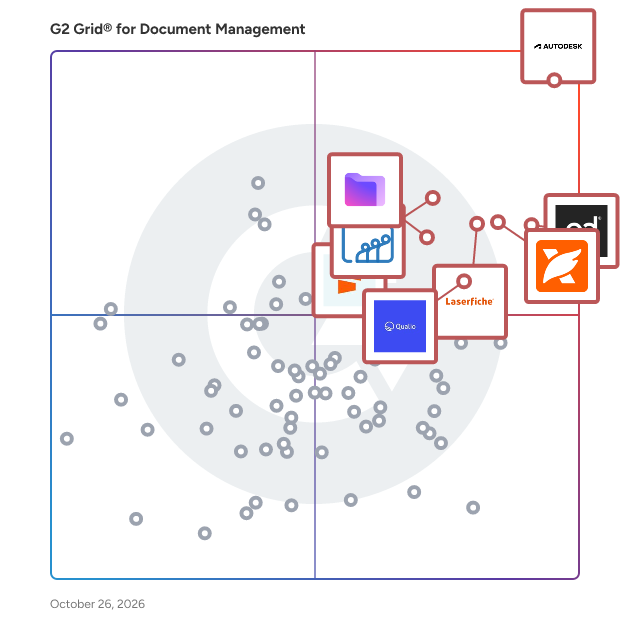
Highlighted products: PandaDoc, Foxit PDF Editor, Laserfiche, Zoho WorkDrive, Seismic Enablement Cloud, Proton Drive For Business, M-Files, and Signify.
Underlying data: [Grid® JSON](https://www.g2.com/categories/document-management/grids.json?focus%5B%5D=pandadoc&focus%5B%5D=foxit-pdf-editor&focus%5B%5D=laserfiche&focus%5B%5D=zoho-workdrive&focus%5B%5D=seismic-enablement-cloud&focus%5B%5D=proton-drive-for-business&focus%5B%5D=m-files&focus%5B%5D=signify-signify)
LDOX ‚Living Documents‘ is an Enterprise Content Management System (DMS/ECM) Solution designed to help organizations in realizing a paperless office. LDOX has a digital document filing system as well as an audit-proof archiving system and enables automated processes using digital workflows. The viewing and processing of the documents is possible on PC or mobile devices (web based). LDOX supports the audit-proof archiving of SAP-documents as well as different standardized ECM migration procedures.
Legacy360™ is a secure, all-in-one digital legacy and estate planning platform designed to help individuals and families organize, protect, and share the information that matters most. From financial and legal records to healthcare information, property details, digital assets, personal wishes, and important documents, Legacy360 gives you one centralized place to manage your estate throughout your lifetime. With a secure digital vault, you can store wills, trusts, financial records, property information, insurance documents, healthcare directives, digital asset details, personal instructions, photos, audio, video, and more. Legacy360 helps eliminate scattered paperwork and makes critical estate information easier to find when it is needed most. Unlike basic online will or document-storage solutions, Legacy360 supports ongoing estate and legacy management. Personalized checklists, reminders, dashboards, and AI-driven insights help you identify missing information, stay organized, and keep your estate plan up to date as your life changes. You remain in control of your information. Legacy360 allows you to securely share selected documents and information with family members, beneficiaries, executors, financial advisors, lawyers, and other trusted contacts. You can determine who receives access, what they can see, and when information becomes available, including after incapacity or death. Legacy360 is also designed to make life easier for the people who will eventually manage your affairs. When the time comes, authorized estate information can transition into Inheritus Estate360™, helping executors and estate administrators access the information they need to manage and settle the estate efficiently. Whether you are beginning your estate planning journey, organizing an existing plan, preparing for future incapacity, managing digital assets, or simply want to give your family greater clarity and peace of mind, Legacy360 provides a practical way to prepare, protect, organize, and preserve your legacy. estate planning software, digital legacy planning, secure document storage, digital vault, estate organization, inheritance planning, executor preparation, family legacy planning, digital asset management, wills and trusts, estate management, financial document organization, and legacy preservation.
LexWorkplace is a cloud-based legal document management system (DMS) built for law firms. It helps teams organize matter-centric documents and email, search across content, and manage versioning, permissions, and collaboration in firms of 5 to 50 users. Many firms move to LexWorkplace after relying on shared drives, file servers, basic cloud storage, practice management file areas, or legacy DMS platforms. Those systems often separate email from documents, make version control inconsistent, and limit a firm’s ability to apply permissions, search effectively, or maintain a clear audit trail across matters. What Makes LexWorkplace a Strong Fit: - Matter-centric workspaces that keep documents, email, and attachments together by client or matter - Outlook integration with Smart File for matter suggestions and Multi Select for bulk email filing - Full-text and OCR search with filters, plus version history, document compare, and check-in/check-out - Role-based permissions, audit trails, and secure external sharing to support governance and control - Microsoft 365 and Outlook integration, support for Mac and Windows, and optional AI tools for summarizing and drafting using firm-controlled data Benefits Firms Can Expect: - Faster retrieval and fewer misfiled emails by keeping communications and documents in one matter record - A clearer history of changes to support oversight, accountability, and quality control - More consistent filing practices across teams, which simplifies onboarding and day-to-day work - More controlled collaboration through permissions, check-in/check-out, and secure external sharing - Time savings in daily workflows by filing from Outlook, reusing searches, and locating precedent more quickly LexWorkplace is designed for legal teams that want a single, organized system for work product without leaving familiar tools. It brings documents and email together by matter, supports search and versioning in ways that fit legal workflows, and gives administrators the controls needed to manage access, visibility, and change history across the firm.
LoreSign is an electronic signature software that enables document signing through PDF uploads, customizable signing fields, and legally recognized signatures. The platform allows signature, name, date, initials, or text fields to be added to any PDF without document reconstruction. Fields can be assigned to multiple signers with a defined signing order. Recipients access documents through a secure link and can sign from any device without creating an account. Activity tracking displays when documents are sent, opened, viewed, or signed. Built-in reminders enable follow-ups directly from the platform. Once completed, LoreSign delivers the sealed PDF and a certificate of completion to all participants. The software supports agreements, proposals, NDAs, statements of work, offer letters, and approvals. It integrates with workflow tools and offers unlimited signers per document across all pricing tiers. A public verification page is available for authentication.
Document management is easy with Lucidoc. Whether you are keeping track of policies and procedures, collaborating on new documents, or working with high-level document approval, we've got you covered. When you work with Lucidoc, you will always be audit-ready. Software application features: document management, accreditation manager, multi-org document control, consent agenda, acknowledgements, and continuing education.