# Best Document Management Software

*By [Neeraja Prakash](https://research.g2.com/insights/author/neeraja-prakash)*


Document management software captures, stores, manages, and securely shares company documents. These solutions store electronic documents, such as Word documents, PDFs, presentations, invoices, and scanned images of paper documents, in a centralized location. Document management software is designed to control the entire lifecycle of documents, including document retention, creation, and accessibility. They also manage audit trails, indexing, versioning, and workflows. Typically, organizations will have one central document management system that stores company-wide documents, but it is also common for different teams to have their own storage systems. This software helps organizations reduce the time it takes to search for and access documents, minimize the need for physical document storage, reduce the risk of non-compliance and security breaches, and improve collaboration and workflows.

While document management can exist as a standalone solution, it is often a module included in enterprise software applications, such as [enterprise content management systems](https://www.g2.com/categories/enterprise-content-management-ecm) and [cloud content collaboration software](https://www.g2.com/categories/cloud-content-collaboration).

To qualify for inclusion in the Document Management category, a product must:

- Store structured content across various file types in a centralized repository
- Enable users to find and manage documents through search and advanced filtering and tagging capabilities
- Offer version control to keep a record of various versions of documents
- Set access rights for individuals or departments using permissions structures
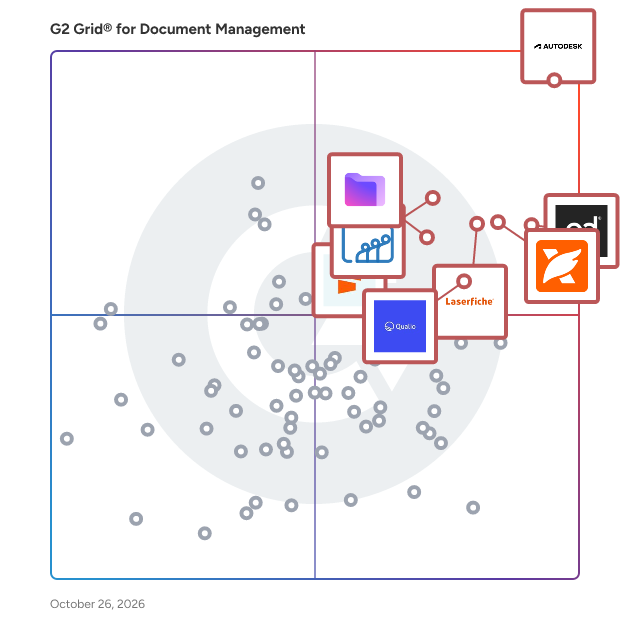


## Top Document Management Software at a Glance
| # | Product | Rating | Best For | What Users Say |
|---|---------|--------|----------|----------------|
| 1 | [Laserfiche](https://www.g2.com/products/laserfiche/reviews) | 4.7/5.0 (1,206 reviews) | Records automation with low-code workflow | "[Document Management and Automation](https://www.g2.com/survey_responses/laserfiche-review-3536890)" |
| 2 | [PandaDoc](https://www.g2.com/products/pandadoc/reviews) | 4.7/5.0 (3,411 reviews) | Contract creation, e-signature, and real-time tracking | "[Very useful](https://www.g2.com/survey_responses/pandadoc-review-11052803)" |
| 3 | [Zoho WorkDrive](https://www.g2.com/products/zoho-workdrive/reviews) | 4.4/5.0 (692 reviews) | Team-owned document collaboration inside Zoho ecosystem | "[Helpful for organizing department documents and academic work in one place](https://www.g2.com/survey_responses/zoho-workdrive-review-12803309)" |
| 4 | [Foxit PDF Editor](https://www.g2.com/products/foxit-pdf-editor/reviews) | 4.6/5.0 (3,423 reviews) | PDF editing and signing with Adobe-alternative pricing | "[It&#39;s been much more than just a PDF Editor in my experience](https://www.g2.com/survey_responses/foxit-pdf-editor-review-12995599)" |
| 5 | [Seismic Enablement Cloud](https://www.g2.com/products/seismic-enablement-cloud/reviews) | 4.6/5.0 (1,753 reviews) | — | "[Seismic Makes Sales Content Easy, Professional, and Field-Ready](https://www.g2.com/survey_responses/seismic-enablement-cloud-review-12639441)" |
| 6 | [Proton Drive For Business](https://www.g2.com/products/proton-drive-for-business/reviews) | 4.5/5.0 (135 reviews) | — | "[An online storage solution that is secured within an environment focused on safety](https://www.g2.com/survey_responses/proton-drive-for-business-review-12801679)" |
| 7 | [M-Files](https://www.g2.com/products/m-files/reviews) | 4.4/5.0 (229 reviews) | Metadata-driven document retrieval and workflow automation | "[Good Metadata Driven Document Management And Requires Planning Up Front](https://www.g2.com/survey_responses/m-files-review-12806906)" |
| 8 | [Conga Composer](https://www.g2.com/products/conga-composer/reviews) | 4.4/5.0 (834 reviews) | Salesforce-native automated document generation | "[Efficient Salesforce Document Generation with Consistent, High-ROI Reporting](https://www.g2.com/survey_responses/conga-composer-review-12706846)" |
| 9 | [Signify](https://www.g2.com/products/signify-signify/reviews) | 5.0/5.0 (80 reviews) | End-to-end document signing with audit-trail archiving | "[Signify Streamlined Our Workflow with Intuitive eSignatures](https://www.g2.com/survey_responses/signify-review-12624347)" |
| 10 | [iManage Work](https://www.g2.com/products/imanage-work/reviews) | 4.4/5.0 (334 reviews) | Matter-centric document control with MS Office integration | "[A Solid Platform with a Strong Ecosystem That’s Served Us Well for 20 Years](https://www.g2.com/survey_responses/imanage-work-review-12942202)" |


## How Many Document Management Software Products Does G2 Track?
**Total Products under this Category:** 363

### Category Stats (Jun 2026)
- **Average Rating**: 4.41/5 The average rating of products in this category, based on all submitted ratings
- **Top Trending Product**: DocuLocker (+5.56%) - Among all products in this category, DocuLocker recorded the largest rating increase compared to last month
*Last updated: June 24, 2026*


## How Does G2 Rank Document Management Software Products?

**Why You Can Trust G2's Software Rankings:**

- 30 Analysts and Data Experts
- 19,100+ Authentic Reviews
- 363+ Products
- Unbiased Rankings

G2's software rankings are built on verified user reviews, rigorous moderation, and a consistent research methodology maintained by a team of analysts and data experts. Each product is measured using the same transparent criteria, with no paid placement or vendor influence. While reviews reflect real user experiences, which can be subjective, they offer valuable insight into how software performs in the hands of professionals. Together, these inputs power the G2 Score, a standardized way to compare tools within every category.


## Which Document Management Software Is Best for Your Use Case?

- **Leader:** [Laserfiche](https://www.g2.com/products/laserfiche/reviews)
- **Highest Performer:** [XfilesPro](https://www.g2.com/products/xfilespro/reviews)
- **Easiest to Use:** [Signify](https://www.g2.com/products/signify-signify/reviews)
- **Top Trending:** [Foxit PDF Editor](https://www.g2.com/products/foxit-pdf-editor/reviews)
- **Best Free Software:** [PandaDoc](https://www.g2.com/products/pandadoc/reviews)


---

**Sponsored**

### Conga Composer

Flexible. Scalable. Embedded. Conga Composer transforms how businesses generate documents Disconnected systems and manual workflows make document generation slow, error-prone, and costly. Conga Composer streamlines this by embedding automated document creation into your existing tools. It supports multiple formats, merges data from any source, and scales effortlessly, empowering teams to deliver accurate, beautifully branded documents faster, with less effort and greater control. Conga Composer excels in document generation with key advantages: Launch Anywhere – Trigger document generation from buttons, flows, Apex, or external systems- no custom code needed. Multi-Format Support – Create Word, PDF, Excel, PowerPoint, and HTML email templates. Dynamic Content – Use conditional logic, charts, dashboards, rich text, and global currencies. High-Volume Ready – Supports large templates (25MB), merged outputs (250MB), and batch processing. Enterprise Scalability – Reusable templates and behaviors across departments and use cases. eSignature Integration – Seamless pairing with Conga Sign for end-to-end agreement workflows. Revenue Lifecycle Alignment – Only vendor that integrates doc gen into CLM, CPQ, and full revenue processes. Admin-Friendly Setup – Built for Salesforce admins and business users—no developer dependency. Proven Performance – Trusted by 8,000+ businesses; millions of documents generated monthly. Future-Ready – Monitoring AI trends to invest when enterprise-grade reliability is guaranteed. With these strengths, Conga Composer delivers a scalable, flexible, and automated solution for efficient document generation.


[Visit website](https://www.g2.com/external_clickthroughs/record?secure%5Bad_program%5D=ppc&amp;secure%5Bad_slot%5D=category_product_list&amp;secure%5Bcategory_id%5D=1005458&amp;secure%5Bdisplayable_resource_id%5D=1005458&amp;secure%5Bdisplayable_resource_type%5D=Category&amp;secure%5Bmedium%5D=sponsored&amp;secure%5Bplacement_reason%5D=page_category&amp;secure%5Bplacement_resource_ids%5D%5B%5D=1005458&amp;secure%5Bprioritized%5D=false&amp;secure%5Bproduct_id%5D=274&amp;secure%5Bresource_id%5D=1005458&amp;secure%5Bresource_type%5D=Category&amp;secure%5Bsource_type%5D=category_page&amp;secure%5Bsource_url%5D=https%3A%2F%2Fwww.g2.com%2Fcategories%2Fdocument-management%3Fpage%3D25&amp;secure%5Btoken%5D=5d781974fb17c6b38cdc6f610dfaeac1f87788ac42bf52c79ff74de9db17b317&amp;secure%5Burl%5D=https%3A%2F%2Fconga.com%2Fdemo%3Futm_campaign%3Dg2clickcampaign-composer-demo%26utm_source%3Dg2%26utm_medium%3Dreview-site%26utm_content%3D&amp;secure%5Burl_type%5D=book_demo)

---

## What Are the Top-Rated Document Management Software Products in 2026?
### 1. [Laserfiche](https://www.g2.com/products/laserfiche/reviews)
Get work done faster with Laserfiche, the leading SaaS provider of AI-powered document management and process automation. Through powerful workflows, electronic forms, document management and analytics, Laserfiche accelerates processes across the enterprise. ✓ Organize Your Content with AI-Powered Document Management Optimize your operations and increase team productivity with AI-powered document management. Centralize your content, improve collaboration and maintain audit trails to support compliance needs. ✓ Boost Your Productivity with Intelligent Automation Increase efficiency by automating tasks with low-code process automation and prebuilt solution templates. Work smarter and shift your team’s focus to higher priority strategic goals. ✓ Unify Your Systems with Powerful Integrations Laserfiche is the backbone connecting hundreds of mission-critical applications. Users can access relevant documents from a single location, eliminating the need to search across multiple platforms. ✓ Elevate Your Work with Laserfiche AI Laserfiche AI enables organizations to simplify their work, take control of processes and supercharge productivity — all without losing sight of critical data privacy and security standards.


**Average Rating:** 4.7/5.0
**Total Reviews:** 1,206
**How Do G2 Users Rate Laserfiche?**

- **Has the product been a good partner in doing business?:** 9.2/10 (Category avg: 8.7/10)
- **Ease of Admin:** 8.5/10 (Category avg: 8.2/10)
- **Quality of Support:** 9.0/10 (Category avg: 8.5/10)
- **Ease of Use:** 8.8/10 (Category avg: 8.6/10)

**Who Is the Company Behind Laserfiche?**

- **Seller:** [Laserfiche](https://www.g2.com/sellers/laserfiche)
- **Company Website:** https://www.laserfiche.com/
- **Year Founded:** 1976
- **HQ Location:** Long Beach, California
- **Twitter:** @laserfiche (4,770 Twitter followers)
- **LinkedIn® Page:** https://www.linkedin.com/company/19414/ (403 employees on LinkedIn®)

**Who Uses This Product?**
- **Who Uses This:** Deputy City Clerk, Business Systems Analyst
- **Top Industries:** Government Administration, Education Management
- **Company Size:** 60% Mid-Market, 25% Enterprise


#### What Are Laserfiche's Pros and Cons?

**Pros:**

- Ease of Use (125 reviews)
- Process Automation (88 reviews)
- Automation (84 reviews)
- Workflow Management (69 reviews)
- Document Management (66 reviews)

**Cons:**

- Learning Curve (40 reviews)
- Learning Difficulty (34 reviews)
- Missing Features (34 reviews)
- Update Issues (23 reviews)
- Limited Functionality (22 reviews)


### What Do G2 Reviewers Say About Laserfiche?
*AI-generated summary from verified user reviews*

**Pros:**

- Users praise the **ease of use** of Laserfiche, highlighting its straightforward implementation and user-friendly features.
- Users appreciate the **process automation** capabilities of Laserfiche, enjoying streamlined workflows and simplified business processes.
- Users appreciate the **automation of forms processes** in Laserfiche, streamlining workflows and enhancing document management.
- Users value the **flexibility and robustness** of Laserfiche Workflow for automating forms and integrating processes effortlessly.
- Users appreciate the **easy onboarding and intuitive document management** of Laserfiche, enhancing workflow and accessibility.

**Cons:**

- Users face a **small learning curve** when starting with Laserfiche, impacting effective usage and search capabilities.
- Users mention a **small learning curve** with Laserfiche, particularly when adapting to its features and workflows.
- Users encounter **missing features** in the unlicensed version and seek additional training materials for better usability.
- Users express concerns over **update issues** , finding it challenging to keep up with the rapid changes in Laserfiche.
- Users feel the **limited functionality** of Laserfiche restricts their ability to effectively convey process information.

#### What Are Recent G2 Reviews of Laserfiche?

**"[Document Management and Automation](https://www.g2.com/survey_responses/laserfiche-review-3536890)"**

**Rating:** 4.5/5.0 stars
*— Matthew D.*

[Read full review](https://www.g2.com/survey_responses/laserfiche-review-3536890)

---

**"[Robust and Reliable](https://www.g2.com/survey_responses/laserfiche-review-10968098)"**

**Rating:** 4.5/5.0 stars
*— Holly V.*

[Read full review](https://www.g2.com/survey_responses/laserfiche-review-10968098)

---


#### What Are G2 Users Discussing About Laserfiche?

- [What is Laserfiche used for?](https://www.g2.com/discussions/what-is-laserfiche-used-for)
- [What is document imaging software?](https://www.g2.com/discussions/what-is-document-imaging-software) - 1 upvote
- [How much is laserfiche?](https://www.g2.com/discussions/how-much-is-laserfiche)
- [What is Laserfiche software?](https://www.g2.com/discussions/what-is-laserfiche-software) - 2 comments

### 2. [PandaDoc](https://www.g2.com/products/pandadoc/reviews)
PandaDoc is an all-in-one document management platform trusted by 50,000+ sales, legal, and operations teams to create, send, e-sign, and manage documents faster and with less manual work. Teams using PandaDoc close deals 30% faster and cut document turnaround time by up to 50%. Customers like Autodesk, Rakuten, and Sysco use PandaDoc to streamline their entire document process, from proposal to signed contract, and everything in between. PandaDoc helps your team: - Build and send professional proposals, contracts, and agreements using customizable templates and a drag-and-drop editor - Collect legally binding e-signatures from any device, anywhere, with no printing, scanning, or delays - Collaborate in real time with internal stakeholders and external signers simultaneously - Automate repetitive document tasks so reps and ops teams spend less time on admin and more time closing - Track document performance with analytics that show how recipients engage with every page PandaDoc integrates natively with the tools your team already uses, including Salesforce, HubSpot, Pipedrive, Stripe, and 30+ other CRM and payment platforms — keeping document processes inside your existing stack without adding friction or extra logins. Whether you&#39;re in sales, legal, HR, or finance, PandaDoc is especially popular with growing businesses that need enterprise-grade document processes without the added complexity or price tag. From first draft to final approval, PandaDoc centralizes the full document lifecycle with the compliance, security, and audit trail your team needs to operate with confidence. PandaDoc also supports notarization, payment collection, and document analytics in a single platform, reducing the need to manage multiple tools across your document process.


**Average Rating:** 4.7/5.0
**Total Reviews:** 3,411
**How Do G2 Users Rate PandaDoc?**

- **Has the product been a good partner in doing business?:** 9.3/10 (Category avg: 8.7/10)
- **Ease of Admin:** 9.1/10 (Category avg: 8.2/10)
- **Quality of Support:** 9.1/10 (Category avg: 8.5/10)
- **Ease of Use:** 9.2/10 (Category avg: 8.6/10)

**Who Is the Company Behind PandaDoc?**

- **Seller:** [PandaDoc](https://www.g2.com/sellers/pandadoc)
- **Company Website:** https://www.pandadoc.com
- **Year Founded:** 2011
- **HQ Location:** San Francisco, CA
- **Twitter:** @pandadoc (18,428 Twitter followers)
- **LinkedIn® Page:** https://www.linkedin.com/company/2211704/ (895 employees on LinkedIn®)

**Who Uses This Product?**
- **Who Uses This:** CEO, Owner
- **Top Industries:** Computer Software, Marketing and Advertising
- **Company Size:** 68% Small-Business, 26% Mid-Market


#### What Are PandaDoc's Pros and Cons?

**Pros:**

- Ease of Use (717 reviews)
- Document Management (352 reviews)
- Simple (336 reviews)
- Intuitive (306 reviews)
- E-Signatures (303 reviews)

**Cons:**

- Missing Features (119 reviews)
- Expensive (108 reviews)
- Signature Issues (106 reviews)
- Difficult Editing (98 reviews)
- Editing Difficulty (87 reviews)


### What Do G2 Reviewers Say About PandaDoc?
*AI-generated summary from verified user reviews*

**Pros:**

- Users value the **ease of use** in PandaDoc, finding it simple and efficient for obtaining signatures from clients.
- Users value PandaDoc&#39;s **intuitive document management** , enhancing efficiency, visibility, and security in handling paperwork.
- Users love PandaDoc&#39;s **intuitive editing tools** that streamline document customization and enhance workflow efficiency.
- Users find PandaDoc to be incredibly **user-friendly** , streamlining document management and enhancing work efficiency.
- Users appreciate the **ease of use** of PandaDoc for signing documents, enhancing client experience and workflow efficiency.

**Cons:**

- Users find significant drawbacks with **missing features** , like document expiration settings and advanced editing options in PandaDoc.
- Users find PandaDoc **expensive** , making it challenging for small teams and startups to utilize effectively.
- Users find the **signature issues** in PandaDoc frustrating, especially with personal signatures and page formatting problems.
- Users find **difficult editing** challenges in PandaDoc, hindering real-time collaboration and seamless document adjustments.
- Users find **editing difficult** , facing challenges with table formatting, live document changes, and graphics adjustments in PandaDoc.

#### What Are Recent G2 Reviews of PandaDoc?

**"[Very useful](https://www.g2.com/survey_responses/pandadoc-review-11052803)"**

**Rating:** 5.0/5.0 stars
*— Denisa C.*

[Read full review](https://www.g2.com/survey_responses/pandadoc-review-11052803)

---

**"[Effective for Document Tracking, but Needs Improvements](https://www.g2.com/survey_responses/pandadoc-review-11792847)"**

**Rating:** 4.5/5.0 stars
*— Iris J.*

[Read full review](https://www.g2.com/survey_responses/pandadoc-review-11792847)

---


#### What Are G2 Users Discussing About PandaDoc?

- [What are the innovative ways PandaDoc is being used to streamline document management and workflow automation?](https://www.g2.com/discussions/what-are-the-innovative-ways-pandadoc-is-being-used-to-streamline-document-management-and-workflow-automation) - 2 comments
- [What is PandaDoc used for?](https://www.g2.com/discussions/what-is-pandadoc-used-for) - 4 comments
- [What is PandaDoc com?](https://www.g2.com/discussions/what-is-pandadoc-com) - 3 comments
- [How much does PandaDoc cost?](https://www.g2.com/discussions/how-much-does-pandadoc-cost) - 2 comments
- [Is PandaDoc really free?](https://www.g2.com/discussions/is-pandadoc-really-free) - 3 comments

### 3. [Zoho WorkDrive](https://www.g2.com/products/zoho-workdrive/reviews)
Zoho Docs is now Zoho WorkDrive! Launched in 2019 as the successor to Zoho Docs, Zoho WorkDrive is a robust content management platform trusted by over 1 million businesses worldwide. Built for modern teams, small businesses, and enterprises, it provides secure file storage, seamless collaboration, and powerful automation features. With detailed access stats, mobile apps for Android and iOS, and a desktop sync application, WorkDrive empowers teams to work efficiently from anywhere, anytime.


**Average Rating:** 4.4/5.0
**Total Reviews:** 692
**How Do G2 Users Rate Zoho WorkDrive?**

- **Has the product been a good partner in doing business?:** 8.8/10 (Category avg: 8.7/10)
- **Ease of Admin:** 8.7/10 (Category avg: 8.2/10)
- **Quality of Support:** 8.6/10 (Category avg: 8.5/10)
- **Ease of Use:** 9.1/10 (Category avg: 8.6/10)

**Who Is the Company Behind Zoho WorkDrive?**

- **Seller:** [Zoho](https://www.g2.com/sellers/zoho-b00ca9d5-bca8-41b5-a8ad-275480841704)
- **Year Founded:** 1996
- **HQ Location:** Austin, TX
- **Twitter:** @Zoho (137,880 Twitter followers)
- **LinkedIn® Page:** https://www.linkedin.com/company/38373/ (30,766 employees on LinkedIn®)
- **Phone:** +1 (888) 900-9646 

**Who Uses This Product?**
- **Who Uses This:** Software Engineer, Owner
- **Top Industries:** Information Technology and Services, Computer Software
- **Company Size:** 51% Small-Business, 36% Mid-Market


#### What Are Zoho WorkDrive's Pros and Cons?

**Pros:**

- Ease of Use (72 reviews)
- Team Collaboration (66 reviews)
- Collaboration (44 reviews)
- Real-Time Collaboration (44 reviews)
- Seamless Integration (44 reviews)

**Cons:**

- Slow Loading (33 reviews)
- Slow Performance (31 reviews)
- Syncing Issues (22 reviews)
- Missing Features (21 reviews)
- Performance Issues (21 reviews)


### What Do G2 Reviewers Say About Zoho WorkDrive?
*AI-generated summary from verified user reviews*

**Pros:**

- Users value the **easy-to-use interface** of Zoho WorkDrive, facilitating seamless collaboration and efficient file organization.
- Users value the **effective team collaboration** features of Zoho WorkDrive, enhancing file management and teamwork efficiency.
- Users value the **seamless collaboration** with Zoho WorkDrive, benefiting from real-time editing and efficient file management.
- Users value the **real-time collaboration** feature of Zoho WorkDrive, enhancing teamwork and communication efficiency significantly.
- Users value the **seamless integration** of Zoho WorkDrive with other apps, enhancing productivity and collaboration effortlessly.

**Cons:**

- Users find the **slow loading** of files frustrating, particularly when deadlines approach and large datasets are involved.
- Users experience **slow performance** with navigation and large files, making collaboration less efficient and frustrating.
- Users often face **syncing issues** with slower performance and less intuitive interfaces, especially when handling large files.
- Users find **missing features** in Zoho WorkDrive, noting limitations compared to more integrated platforms like SharePoint.
- Users experience **performance issues** with Zoho WorkDrive, including slow file syncing and poor video quality in meetings.

#### What Are Recent G2 Reviews of Zoho WorkDrive?

**"[Helpful for organizing department documents and academic work in one place](https://www.g2.com/survey_responses/zoho-workdrive-review-12803309)"**

**Rating:** 4.5/5.0 stars
*— Rakesh J.*

[Read full review](https://www.g2.com/survey_responses/zoho-workdrive-review-12803309)

---

**"[A reliable platform for document sharing](https://www.g2.com/survey_responses/zoho-workdrive-review-12927469)"**

**Rating:** 4.5/5.0 stars
*— Sabri S.*

[Read full review](https://www.g2.com/survey_responses/zoho-workdrive-review-12927469)

---


#### What Are G2 Users Discussing About Zoho WorkDrive?

- [What is Zoho Docs used for?](https://www.g2.com/discussions/what-is-zoho-docs-used-for) - 2 comments, 2 upvotes
- [What is Zoho platform?](https://www.g2.com/discussions/zoho-docs-what-is-zoho-platform) - 3 comments, 1 upvote
- [Is WorkDrive free?](https://www.g2.com/discussions/is-workdrive-free) - 2 comments
- [How do I use Zoho documents?](https://www.g2.com/discussions/how-do-i-use-zoho-documents) - 1 comment
- [Is Zoho WorkDrive secure?](https://www.g2.com/discussions/is-zoho-workdrive-secure) - 2 comments

### 4. [Foxit PDF Editor](https://www.g2.com/products/foxit-pdf-editor/reviews)
Founded in 2001, Foxit is a leading provider of innovative PDF and eSignature products and services, helping knowledge workers increase productivity and do more with documents. Foxit combines easy-to-use desktop software, mobile apps, and cloud services in one powerful solution: The Foxit PDF Editor. This intelligent document solution allows users to create, edit, fill, and sign documents through their integrated PDF Editor and eSign offerings – from anywhere and on any device. Most editing tools focus only on creating and modifying documents, leaving storage, organization, and control to other systems. Foxit Document Management System (DMS) is included in Foxit PDF Editor, so every document is securely stored, organized, governed, and connected from the moment it&#39;s edited. As the first to market with AI-powered PDF editing solutions, Foxit enhances productivity with smart document editing and workflow automation. Winner of numerous awards, Foxit has over 700 million users and has sold to over 528,000 customers, ranging from SMBs to global enterprises worldwide. Foxit products are ISO 32000-1/PDF 1.7 standard compliant, therefore, compatible with your existing PDF documents and forms.


**Average Rating:** 4.6/5.0
**Total Reviews:** 3,423
**How Do G2 Users Rate Foxit PDF Editor?**

- **Has the product been a good partner in doing business?:** 9.0/10 (Category avg: 8.7/10)
- **Ease of Admin:** 8.9/10 (Category avg: 8.2/10)
- **Quality of Support:** 8.9/10 (Category avg: 8.5/10)
- **Ease of Use:** 9.0/10 (Category avg: 8.6/10)

**Who Is the Company Behind Foxit PDF Editor?**

- **Seller:** [Foxit](https://www.g2.com/sellers/foxit)
- **Company Website:** https://www.foxit.com/
- **Year Founded:** 2001
- **HQ Location:** Fremont, CA
- **Twitter:** @foxitsoftware (6,226 Twitter followers)
- **LinkedIn® Page:** https://www.linkedin.com/company/foxit-corporation/ (569 employees on LinkedIn®)

**Who Uses This Product?**
- **Who Uses This:** Owner, President
- **Top Industries:** Construction, Accounting
- **Company Size:** 63% Small-Business, 24% Mid-Market


#### What Are Foxit PDF Editor's Pros and Cons?

**Pros:**

- Ease of Use (567 reviews)
- PDF Editing (407 reviews)
- Easy Editing (371 reviews)
- Simple (345 reviews)
- Features (332 reviews)

**Cons:**

- Difficulty (91 reviews)
- Expensive (91 reviews)
- Learning Curve (90 reviews)
- Missing Features (85 reviews)
- Limited Features (76 reviews)


### What Do G2 Reviewers Say About Foxit PDF Editor?
*AI-generated summary from verified user reviews*

**Pros:**

- Users appreciate the **ease of use** of Foxit PDF Editor, with intuitive features that enhance productivity and efficiency.
- Users value the **ease of editing PDFs** with Foxit PDF Editor, enhancing productivity and simplifying document management.
- Users find Foxit PDF Editor&#39;s **easy editing capabilities** exceedingly beneficial for efficient document management and workflow.
- Users value the **ease of use** of Foxit PDF Editor, enjoying its intuitive setup and efficient workflow enhancements.
- Users value the **fast and user-friendly editing tools** of Foxit PDF Editor, enhancing efficiency in managing PDF documents.

**Cons:**

- Users find the **initial setup and login process challenging** , making it difficult to start using Foxit PDF Editor efficiently.
- Users find the product **expensive** , as advanced features require a paid subscription, limiting the free version&#39;s usefulness.
- Users find the **learning curve steep** , facing challenges with setup and an advanced interface for new users.
- Users find the **missing features** in Foxit PDF Editor limiting, especially compared to other editors and platforms.
- Users note the **limited features** in Foxit PDF Editor&#39;s free version, hindering accessibility and functionality for advanced tasks.

#### What Are Recent G2 Reviews of Foxit PDF Editor?

**"[It&#39;s been much more than just a PDF Editor in my experience](https://www.g2.com/survey_responses/foxit-pdf-editor-review-12995599)"**

**Rating:** 4.5/5.0 stars
*— Yaroslav B.*

[Read full review](https://www.g2.com/survey_responses/foxit-pdf-editor-review-12995599)

---

**"[Efficient solution for managing and editing PDF documents](https://www.g2.com/survey_responses/foxit-pdf-editor-review-12663473)"**

**Rating:** 4.5/5.0 stars
*— Apoorv S.*

[Read full review](https://www.g2.com/survey_responses/foxit-pdf-editor-review-12663473)

---


#### What Are G2 Users Discussing About Foxit PDF Editor?

- [How does the Foxit PDF Editor Suite stand out in terms of features and usability for professional PDF management?](https://www.g2.com/discussions/how-does-the-foxit-pdf-editor-suite-stand-out-in-terms-of-features-and-usability-for-professional-pdf-management) - 3 comments, 3 upvotes
- [What is Foxit PDF Editor used for?](https://www.g2.com/discussions/what-is-foxit-pdf-editor-used-for) - 2 comments, 1 upvote
- [Is Foxit Phantom PDF free?](https://www.g2.com/discussions/is-foxit-phantom-pdf-free) - 3 comments
- [How do I use Foxit PhantomPDF?](https://www.g2.com/discussions/how-do-i-use-foxit-phantompdf) - 1 comment
- [What is Foxit PhantomPDF standard?](https://www.g2.com/discussions/what-is-foxit-phantompdf-standard) - 2 comments

### 5. [Seismic Enablement Cloud](https://www.g2.com/products/seismic-enablement-cloud/reviews)
Seismic is the global leader in AI-powered enablement, empowering go-to-market leaders to drive strategic growth and deliver exceptional customer experiences at scale. The Seismic Enablement Cloud™ is the only unified AI-powered platform that prepares customer-facing teams with the skills, content, tools, and insights needed to maximize every buyer interaction and strengthen client relationships. Seismic&#39;s Content solutions help revenue teams find, personalize, and deliver high-impact, compliant assets that accelerate buyer engagement and drive outcomes at scale. Trusted by approximately 2,000 organizations worldwide, Seismic helps businesses achieve measurable outcomes and accelerate revenue growth. Seismic is headquartered in San Diego with offices across North America, Europe, Asia and Australia. Learn more at seismic.com. To learn more, visit Seismic.com and follow us on LinkedIn, Twitter and Instagram.


**Average Rating:** 4.6/5.0
**Total Reviews:** 1,753
**How Do G2 Users Rate Seismic Enablement Cloud?**

- **Has the product been a good partner in doing business?:** 9.2/10 (Category avg: 8.7/10)
- **Ease of Admin:** 8.1/10 (Category avg: 8.2/10)
- **Quality of Support:** 9.1/10 (Category avg: 8.5/10)
- **Ease of Use:** 8.9/10 (Category avg: 8.6/10)

**Who Is the Company Behind Seismic Enablement Cloud?**

- **Seller:** [Seismic](https://www.g2.com/sellers/seismic)
- **Year Founded:** 2010
- **HQ Location:** San Diego, CA
- **Twitter:** @SeismicSoftware (3,806 Twitter followers)
- **LinkedIn® Page:** https://www.linkedin.com/company/2746866/ (1,307 employees on LinkedIn®)

**Who Uses This Product?**
- **Who Uses This:** Account Executive, Account Manager
- **Top Industries:** Computer Software, Information Technology and Services
- **Company Size:** 57% Enterprise, 30% Mid-Market


#### What Are Seismic Enablement Cloud's Pros and Cons?

**Pros:**

- Ease of Use (170 reviews)
- Easy Sharing (70 reviews)
- Document Management (66 reviews)
- Helpful (52 reviews)
- Data Centralization (42 reviews)

**Cons:**

- Navigation Difficulty (37 reviews)
- Not Intuitive (22 reviews)
- Confusion (20 reviews)
- Learning Curve (19 reviews)
- Poor Search Functionality (18 reviews)


### What Do G2 Reviewers Say About Seismic Enablement Cloud?
*AI-generated summary from verified user reviews*

**Pros:**

- Users find the **ease of use** in Seismic Enablement Cloud enhances access to essential content and resources.
- Users praise Seismic for its **easy sharing** of assets and valuable insights into customer interests.
- Users value the **ease of document sharing and management** with Seismic, ensuring access to up-to-date content effortlessly.
- Users find Seismic Enablement Cloud to be exceptionally **helpful** , enhancing content sharing and saving valuable time.
- Users value the **centralized access to client and sales materials** , streamlining workflow and enhancing productivity across teams.

**Cons:**

- Users find **navigation difficult** due to slow loading times and limited search and filtering options, complicating content access.
- Users find the **UX not intuitive** , especially when creating reports and building presentations, leading to trial and error.
- Users experience **confusion** navigating the wealth of information, complicating document retrieval and email tracking processes.
- Users find the **learning curve quite long** , making it challenging to efficiently navigate and utilize Seismic Enablement Cloud.
- Users find the **poor search functionality** frustrating, as it complicates finding specific information effectively.

#### What Are Recent G2 Reviews of Seismic Enablement Cloud?

**"[Intelligent Automation That Streamlines Workflow and Collaboration](https://www.g2.com/survey_responses/seismic-enablement-cloud-review-12639344)"**

**Rating:** 5.0/5.0 stars
*— Diksha S.*

[Read full review](https://www.g2.com/survey_responses/seismic-enablement-cloud-review-12639344)

---

**"[Seismic Makes Sales Content Easy, Professional, and Field-Ready](https://www.g2.com/survey_responses/seismic-enablement-cloud-review-12639441)"**

**Rating:** 5.0/5.0 stars
*— Rachel C.*

[Read full review](https://www.g2.com/survey_responses/seismic-enablement-cloud-review-12639441)

---


#### What Are G2 Users Discussing About Seismic Enablement Cloud?

- [How do I utilize Seismic’s content personalization features effectively for sales enablement?](https://www.g2.com/discussions/how-do-i-utilize-seismic-s-content-personalization-features-effectively-for-sales-enablement)
- [What is Seismic used for?](https://www.g2.com/discussions/what-is-seismic-used-for)
- [Who owns seismic software?](https://www.g2.com/discussions/who-owns-seismic-software)
- [What is seismic sales enablement?](https://www.g2.com/discussions/what-is-seismic-sales-enablement)
- [How much does seismic cost?](https://www.g2.com/discussions/how-much-does-seismic-cost) - 3 comments

### 6. [Proton Drive For Business](https://www.g2.com/products/proton-drive-for-business/reviews)
Proton Drive for Business is a secure cloud storage and collaboration solution specifically designed to assist small and medium-sized businesses (SMBs) in safely storing, sharing, and managing their files and documents. This platform prioritizes privacy and security, employing robust encryption methods to protect sensitive business data. By ensuring that only authorized users can access files, Proton Drive for Business also helps organizations comply with various data protection regulations, making it an essential tool for businesses that handle confidential information. The target audience for Proton Drive for Business includes SMBs that require stringent safeguards for client data, intellectual property, and operational documents while facilitating seamless team collaboration. Typical use cases encompass securely storing business files, sharing documents with internal teams or external partners, and enabling real-time editing of documents and spreadsheets. The platform’s central administrative interface allows for effective management of access controls and compliance measures, ensuring that businesses can operate securely and efficiently. Key features of Proton Drive for Business include end-to-end encrypted cloud storage, which ensures that files are encrypted on the user’s device before being uploaded, with only authorized users able to access them. This level of security means that even Proton cannot decrypt customer files, providing an added layer of privacy. The solution also supports regulatory compliance with international standards such as ISO 27001, GDPR, HIPAA, and CCPA, making it particularly valuable for SMBs operating in regulated industries. Additionally, data stored in Proton Drive benefits from Swiss legal protections, which offer stronger safeguards against surveillance and unauthorized access compared to many other jurisdictions. Collaboration and sharing features are integral to Proton Drive for Business, allowing users to share files securely via encrypted links or email invites. Users can set passwords, expiration dates, and revoke access at any time, ensuring flexibility in file sharing. The platform also supports real-time collaboration, enabling teams to work together on documents and spreadsheets with synchronized updates. Features such as file versioning and recovery further enhance business continuity by allowing users to track changes and restore previous versions of files, mitigating risks associated with accidental alterations or data loss. For administrators, Proton Drive for Business offers a centralized panel for managing users, permissions, and storage limits, along with monitoring sharing activity. The solution supports multi-user environments and allows for the implementation of security policies, including two-factor authentication (2FA) and hardware security keys. This comprehensive approach to security and management positions Proton Drive for Business as a privacy-centric alternative to mainstream cloud services, ensuring that business data remains accessible only to authorized personnel while integrating essential compliance features for SMBs in regulated environments.


**Average Rating:** 4.5/5.0
**Total Reviews:** 135
**How Do G2 Users Rate Proton Drive For Business?**

- **Has the product been a good partner in doing business?:** 8.5/10 (Category avg: 8.7/10)
- **Ease of Admin:** 8.5/10 (Category avg: 8.2/10)
- **Quality of Support:** 8.9/10 (Category avg: 8.5/10)
- **Ease of Use:** 8.8/10 (Category avg: 8.6/10)

**Who Is the Company Behind Proton Drive For Business?**

- **Seller:** [Proton AG](https://www.g2.com/sellers/proton-ag)
- **Company Website:** https://proton.me/
- **Year Founded:** 2014
- **HQ Location:** Plan-les-Ouates, Geneva, Switzerland
- **Twitter:** @ProtonPrivacy (363,085 Twitter followers)
- **LinkedIn® Page:** https://www.linkedin.com/company/protonprivacy/ (894 employees on LinkedIn®)

**Who Uses This Product?**
- **Who Uses This:** Owner
- **Top Industries:** Information Technology and Services, Mental Health Care
- **Company Size:** 14% Small-Business, 2% Mid-Market


#### What Are Proton Drive For Business's Pros and Cons?

**Pros:**

- Cloud Storage (1 reviews)
- Reliability (1 reviews)
- Storage Solutions (1 reviews)

**Cons:**

- Missing Features (1 reviews)
- Syncing Issues (1 reviews)


### What Do G2 Reviewers Say About Proton Drive For Business?
*AI-generated summary from verified user reviews*

**Pros:**

- Users value the **trustworthiness of Proton Drive For Business** , ensuring reliable cloud storage for their essential data.
- Users highlight the **reliability** of Proton Drive for Business, ensuring trustworthy data storage and peace of mind.
- Users value the **trustworthiness and reliability** of Proton Drive For Business for secure data storage solutions.

**Cons:**

- Users express disappointment over the **lack of a native Linux client** , hoping for future availability for better syncing.
- Users face **syncing issues** due to the lack of a native Linux client for Proton Drive for Business.

#### What Are Recent G2 Reviews of Proton Drive For Business?

**"[An online storage solution that is secured within an environment focused on safety](https://www.g2.com/survey_responses/proton-drive-for-business-review-12801679)"**

**Rating:** 5.0/5.0 stars
*— B A R.*

[Read full review](https://www.g2.com/survey_responses/proton-drive-for-business-review-12801679)

---

**"[Flexible Large-File Sharing with Customizable Shareable Link Permissions](https://www.g2.com/survey_responses/proton-drive-for-business-review-12801063)"**

**Rating:** 4.5/5.0 stars
*— James B.*

[Read full review](https://www.g2.com/survey_responses/proton-drive-for-business-review-12801063)

---


### 7. [M-Files](https://www.g2.com/products/m-files/reviews)
M-Files delivers Context-First Document Management with an AI-native, metadata-driven architecture that eliminates information chaos and improves productivity across the document lifecycle. By linking documents to the people, processes, clients, and projects that give them meaning, M-Files creates a unified, connected environment that accelerates decision-making, strengthens governance, and streamlines industry-specific workflows through advanced workflow automation and AI. M-Files is also the only document management system that is native to Microsoft 365. This unified solution extends Microsoft collaboration, Copilot, and Purview capabilities to curated M-Files content, enabling stronger security, more consistent compliance, and more accurate AI outcomes grounded in trusted, contextualized information. Organizations gain a seamless, future-ready environment that maximizes ROI on their Microsoft investments while supporting smarter and more efficient work across the business. Schedule a Demo: https://bit.ly/3O1SCm0 Free Trial: https://bit.ly/4ehlAsV


**Average Rating:** 4.4/5.0
**Total Reviews:** 229
**How Do G2 Users Rate M-Files?**

- **Has the product been a good partner in doing business?:** 8.4/10 (Category avg: 8.7/10)
- **Ease of Admin:** 7.7/10 (Category avg: 8.2/10)
- **Quality of Support:** 8.5/10 (Category avg: 8.5/10)
- **Ease of Use:** 8.5/10 (Category avg: 8.6/10)

**Who Is the Company Behind M-Files?**

- **Seller:** [M-Files Corporation](https://www.g2.com/sellers/m-files-corporation)
- **Year Founded:** 2002
- **HQ Location:** Austin, Texas
- **Twitter:** @M_Files (8,609 Twitter followers)
- **LinkedIn® Page:** https://www.linkedin.com/company/118361/ (842 employees on LinkedIn®)

**Who Uses This Product?**
- **Who Uses This:** Project Manager, Director
- **Top Industries:** Information Technology and Services, Computer Software
- **Company Size:** 48% Mid-Market, 41% Small-Business


#### What Are M-Files's Pros and Cons?

**Pros:**

- Ease of Use (93 reviews)
- Document Management (52 reviews)
- Easy Access (45 reviews)
- Data Management (39 reviews)
- Organization (39 reviews)

**Cons:**

- Learning Curve (32 reviews)
- Training Required (26 reviews)
- Slow Performance (19 reviews)
- Slow Loading (15 reviews)
- Outdated Features (13 reviews)


### What Do G2 Reviewers Say About M-Files?
*AI-generated summary from verified user reviews*

**Pros:**

- Users highlight M-Files&#39; **user-friendly interface** , facilitating easier navigation and management for all skill levels.
- Users love the **organized document management** system of M-Files, making file access and collaboration effortless.
- Users appreciate the **easy access** to files anytime, enhancing efficiency and simplifying document management and sharing.
- Users value the **efficient data management** capabilities of M-Files, enhancing organization and retrieval of information.
- Users value the **efficient organization** features of M-Files, simplifying project and document management seamlessly.

**Cons:**

- Users find that M-Files has a steep **learning curve** , requiring time and dedication for proper onboarding.
- Users found the **training required** for M-Files challenging, particularly during the initial onboarding process.
- Users experience **slow performance** with M-Files, particularly when loading documents or executing complex searches.
- Users face **slow loading** issues with M-Files, impacting efficiency when accessing documents and performing searches.
- Users find the **user interface outdated** and cluttered, leading to challenges, especially for newcomers to M-Files.

#### What Are Recent G2 Reviews of M-Files?

**"[Good Metadata Driven Document Management And Requires Planning Up Front](https://www.g2.com/survey_responses/m-files-review-12806906)"**

**Rating:** 4.5/5.0 stars
*— Kaleem A.*

[Read full review](https://www.g2.com/survey_responses/m-files-review-12806906)

---

**"[Reliable Platform for Managing Documents and Content Workflows](https://www.g2.com/survey_responses/m-files-review-12787325)"**

**Rating:** 5.0/5.0 stars
*— Ishan S.*

[Read full review](https://www.g2.com/survey_responses/m-files-review-12787325)

---


#### What Are G2 Users Discussing About M-Files?

- [Is anyone else struggling with AI tagging and advanced workflows adding chaos instead of clarity?](https://www.g2.com/discussions/is-anyone-else-struggling-with-ai-tagging-and-advanced-workflows-adding-chaos-instead-of-clarity) - 1 comment, 1 upvote
- [How are you dealing with the older‑feeling desktop client and extra clicks in everyday work?](https://www.g2.com/discussions/how-are-you-dealing-with-the-older-feeling-desktop-client-and-extra-clicks-in-everyday-work) - 1 comment, 1 upvote
- [What are you doing to cope with slow performance on large data sets and in the cloud?](https://www.g2.com/discussions/what-are-you-doing-to-cope-with-slow-performance-on-large-data-sets-and-in-the-cloud) - 1 comment, 1 upvote
- [How are you helping new and non‑technical colleagues get over the M-Files learning curve?](https://www.g2.com/discussions/how-are-you-helping-new-and-non-technical-colleagues-get-over-the-m-files-learning-curve) - 1 comment, 1 upvote
- [Complex setup and constant metadata tweaks slow my rollout and ongoing work](https://www.g2.com/discussions/complex-setup-and-constant-metadata-tweaks-slow-my-rollout-and-ongoing-work) - 1 comment, 1 upvote

### 8. [Conga Composer](https://www.g2.com/products/conga-composer/reviews)
Flexible. Scalable. Embedded. Conga Composer transforms how businesses generate documents Disconnected systems and manual workflows make document generation slow, error-prone, and costly. Conga Composer streamlines this by embedding automated document creation into your existing tools. It supports multiple formats, merges data from any source, and scales effortlessly, empowering teams to deliver accurate, beautifully branded documents faster, with less effort and greater control. Conga Composer excels in document generation with key advantages: Launch Anywhere – Trigger document generation from buttons, flows, Apex, or external systems- no custom code needed. Multi-Format Support – Create Word, PDF, Excel, PowerPoint, and HTML email templates. Dynamic Content – Use conditional logic, charts, dashboards, rich text, and global currencies. High-Volume Ready – Supports large templates (25MB), merged outputs (250MB), and batch processing. Enterprise Scalability – Reusable templates and behaviors across departments and use cases. eSignature Integration – Seamless pairing with Conga Sign for end-to-end agreement workflows. Revenue Lifecycle Alignment – Only vendor that integrates doc gen into CLM, CPQ, and full revenue processes. Admin-Friendly Setup – Built for Salesforce admins and business users—no developer dependency. Proven Performance – Trusted by 8,000+ businesses; millions of documents generated monthly. Future-Ready – Monitoring AI trends to invest when enterprise-grade reliability is guaranteed. With these strengths, Conga Composer delivers a scalable, flexible, and automated solution for efficient document generation.


**Average Rating:** 4.4/5.0
**Total Reviews:** 834
**How Do G2 Users Rate Conga Composer?**

- **Has the product been a good partner in doing business?:** 8.7/10 (Category avg: 8.7/10)
- **Ease of Admin:** 8.1/10 (Category avg: 8.2/10)
- **Quality of Support:** 8.7/10 (Category avg: 8.5/10)
- **Ease of Use:** 8.3/10 (Category avg: 8.6/10)

**Who Is the Company Behind Conga Composer?**

- **Seller:** [Conga](https://www.g2.com/sellers/conga)
- **Company Website:** https://conga.com/
- **Year Founded:** 2006
- **HQ Location:** 3200 Kirby Dr., Suite 500, Houston, TX 77098
- **LinkedIn® Page:** https://www.linkedin.com/company/conga/ (2,116 employees on LinkedIn®)
- **Phone:** (303) 465-1616

**Who Uses This Product?**
- **Who Uses This:** Salesforce Administrator, Salesforce Consultant
- **Top Industries:** Information Technology and Services, Computer Software
- **Company Size:** 47% Mid-Market, 28% Enterprise


#### What Are Conga Composer's Pros and Cons?

**Pros:**

- Features (86 reviews)
- Document Management (80 reviews)
- Ease of Use (72 reviews)
- Time-saving (53 reviews)
- Integrations (52 reviews)

**Cons:**

- Learning Curve (48 reviews)
- Steep Learning Curve (31 reviews)
- Difficulty (26 reviews)
- Time-Consuming (25 reviews)
- Complex Setup (20 reviews)


### What Do G2 Reviewers Say About Conga Composer?
*AI-generated summary from verified user reviews*

**Pros:**

- Users value the **powerful API** of Conga Composer for efficient bulk document generation and seamless integration capabilities.
- Users appreciate the **efficient document generation** capabilities of Conga Composer, enhancing performance and customization for complex use cases.
- Users appreciate the **ease of use** of Conga Composer, finding it simple to customize and configure templates.
- Users value the **time-saving automation** of Conga Composer, streamlining document creation and delivery efficiently.
- Users value the **seamless Salesforce integration** of Conga Composer, enhancing accuracy and efficiency in document creation.

**Cons:**

- Users experience a challenging **learning curve** with Conga Composer due to its complex setup and frequent issues.
- Users find the **steep learning curve** of Conga Composer challenging, especially with complex setups and template understanding.
- Users find the **initial setup challenging** , facing complexities and confusing documentation that hinder productivity.
- Users find the **time-consuming setup** of Conga Composer challenging, especially with complex templates and large documents.
- Users find the **complex setup** and ticketing system overwhelming, complicating issue resolution and hindering productivity.

#### What Are Recent G2 Reviews of Conga Composer?

**"[Efficient Salesforce Document Generation with Consistent, High-ROI Reporting](https://www.g2.com/survey_responses/conga-composer-review-12706846)"**

**Rating:** 4.5/5.0 stars
*— Harshit S.*

[Read full review](https://www.g2.com/survey_responses/conga-composer-review-12706846)

---

**"[An Easy-to-Use and Reliable Document Generation Tool](https://www.g2.com/survey_responses/conga-composer-review-9699157)"**

**Rating:** 4.0/5.0 stars
*— Trupti J.*

[Read full review](https://www.g2.com/survey_responses/conga-composer-review-9699157)

---


#### What Are G2 Users Discussing About Conga Composer?

- [What is conga solution?](https://www.g2.com/discussions/what-is-conga-solution)
- [What is Conga Composer?](https://www.g2.com/discussions/what-is-conga-composer) - 3 comments
- [What does conga software do?](https://www.g2.com/discussions/what-does-conga-software-do)

### 9. [Signify](https://www.g2.com/products/signify-signify/reviews)
Signify is a digital contracting platform that helps teams manage, automate, and track documents in one place. From sending and signing to organizing and archiving, it supports the full document workflow. Signify combines e-signatures, workflow automation, a team workspace, and a searchable archive. Set signing order and recipient roles, assign documents to folders with team-based permissions, and use structured templates to keep processes consistent across the company. You can see exactly what’s signed, pending, or in progress - and who’s involved. Permissions are clear, templates are shared with built-in rules, and folder access is controlled by team roles. Over 4.5 million documents have been sent through Signify, with 80% finalized in under 24 hours. Signify is built to support both the people who manage documents and those who sign them - making the entire process simple and efficient.


**Average Rating:** 5.0/5.0
**Total Reviews:** 80
**How Do G2 Users Rate Signify?**

- **Has the product been a good partner in doing business?:** 10.0/10 (Category avg: 8.7/10)
- **Ease of Admin:** 9.9/10 (Category avg: 8.2/10)
- **Quality of Support:** 9.8/10 (Category avg: 8.5/10)
- **Ease of Use:** 9.9/10 (Category avg: 8.6/10)

**Who Is the Company Behind Signify?**

- **Seller:** [Signify](https://www.g2.com/sellers/signify-c43861d1-1c92-4424-a554-3f971f9cd66a)
- **Company Website:** https://signifyapp.com/
- **Year Founded:** 2021
- **HQ Location:** Tbilisi, GE
- **LinkedIn® Page:** https://www.linkedin.com/company/signifyge/ (36 employees on LinkedIn®)

**Who Uses This Product?**
- **Top Industries:** Computer Software, Human Resources
- **Company Size:** 40% Mid-Market, 39% Small-Business


#### What Are Signify's Pros and Cons?

**Pros:**

- Ease of Use (47 reviews)
- Time Saving (25 reviews)
- Time-saving (22 reviews)
- Convenience (20 reviews)
- Digital Signature (17 reviews)

**Cons:**

- Document Management (4 reviews)
- Slow Loading (4 reviews)
- Slow Performance (4 reviews)
- Difficult Editing (3 reviews)
- Signature Issues (3 reviews)


### What Do G2 Reviewers Say About Signify?
*AI-generated summary from verified user reviews*

**Pros:**

- Users find Signify to be **very user-friendly** , simplifying document management and streamlining the signing process for everyone.
- Users value the **time-saving efficiency** of Signify, streamlining document management with a fast and intuitive interface.
- Users enjoy the **time-saving efficiency** of Signify, streamlining document management with quick signing and intuitive workflow integration.
- Users value the **convenience** of Signify, centralizing document management and simplifying the onboarding process with ease.
- Users appreciate the **efficiency of the digital signature** feature in Signify, simplifying document management and saving time.

**Cons:**

- Users face challenges with **document visibility and commenting limitations** , making the management process cumbersome.
- Users experience **slow loading times** , particularly when uploading files or navigating through the platform, affecting usability.
- Users experience **slow performance** with Signify, noting delays in navigation and file operations that hinder efficiency.
- Users find it challenging due to **difficult editing** options, wishing for easier document modifications during the upload process.
- Users face **signature process challenges** due to difficulties with document uploads and email updates, complicating their workflow.

#### What Are Recent G2 Reviews of Signify?

**"[Signify Streamlined Our Workflow with Intuitive eSignatures](https://www.g2.com/survey_responses/signify-review-12624347)"**

**Rating:** 5.0/5.0 stars
*— Verified User in Logistics and Supply Chain*

[Read full review](https://www.g2.com/survey_responses/signify-review-12624347)

---

**"[E-Signature APIs - Signify](https://www.g2.com/survey_responses/signify-review-11752403)"**

**Rating:** 5.0/5.0 stars
*— Tornike G.*

[Read full review](https://www.g2.com/survey_responses/signify-review-11752403)

---


### 10. [iManage Work](https://www.g2.com/products/imanage-work/reviews)
iManage Work is the industry’s leading document and email management application, empowering professionals to manage information more productively, securely, and seamlessly. We built iManage Work with a comprehensive focus on the user experience, bringing you and your knowledge workers agility, efficiency, and access across devices. Key Benefits - Work productively: Manage documents and emails more efficiently and intuitively - Work from anywhere: Mobile-first design lets users work remotely on any device - Work securely: Industry-leading security and governance ensures that iManage Work is the safest place to store information - Work seamlessly: Integrations with Office 365 enable users to do more from inside the familiar Office and Outlook interfaces - Find anything: Smart search cuts through clutter to deliver personalized results For professionals and organizations who need security, agility, and ease-of-use, iManage Work 10 provides a single-source-of-truth for documents and emails to simplify and streamline work. Used globally by leading corporations, law firms, and professional services firms — over 1 million professionals worldwide rely on iManage Work every day.


**Average Rating:** 4.4/5.0
**Total Reviews:** 334
**How Do G2 Users Rate iManage Work?**

- **Has the product been a good partner in doing business?:** 8.9/10 (Category avg: 8.7/10)
- **Ease of Admin:** 8.1/10 (Category avg: 8.2/10)
- **Quality of Support:** 8.4/10 (Category avg: 8.5/10)
- **Ease of Use:** 8.3/10 (Category avg: 8.6/10)

**Who Is the Company Behind iManage Work?**

- **Seller:** [iManage](https://www.g2.com/sellers/imanage)
- **Company Website:** https://www.imanage.com
- **Year Founded:** 2015
- **HQ Location:** Chicago, Illinois
- **Twitter:** @imanageinc (2,763 Twitter followers)
- **LinkedIn® Page:** https://www.linkedin.com/company/4526/ (1,276 employees on LinkedIn®)

**Who Uses This Product?**
- **Who Uses This:** Associate, IT Director
- **Top Industries:** Legal Services, Law Practice
- **Company Size:** 51% Mid-Market, 33% Enterprise


#### What Are iManage Work's Pros and Cons?

**Pros:**

- Ease of Use (39 reviews)
- Document Management (37 reviews)
- Search Functionality (20 reviews)
- Easy Access (18 reviews)
- Features (16 reviews)

**Cons:**

- Needs Improvement (10 reviews)
- Limitations (9 reviews)
- Document Management (8 reviews)
- Improvement Needed (8 reviews)
- Performance Issues (8 reviews)


### What Do G2 Reviewers Say About iManage Work?
*AI-generated summary from verified user reviews*

**Pros:**

- Users appreciate the **ease of use** of iManage Work, noting its quick document access and user-friendly interface.
- Users appreciate the **user-friendly interface** of iManage Work, which simplifies document management and improves efficiency.
- Users commend the **fast and accurate search functionality** of iManage Work, enhancing their document retrieval experience.
- Users value the **easy access** to documents from anywhere, enhancing organization and collaboration in their workflow.
- Users appreciate the **user-friendly interface** and robust features of iManage Work, enhancing their document and email management.

**Cons:**

- Users find the **AI productivity features lacking** and suggest that the UI requires significant improvements for better experience.
- Users note the **lagging performance on large matters** and desire for improved integrations and a smoother interface.
- Users experience **limitations in document visibility** and find transaction management lacking compared to other tools.
- Users feel that iManage Work needs **improvement in app performance and integrations** to enhance overall usability.
- Users experience **performance issues** with iManage Work, citing lag, crashes, and outdated interface elements.

#### What Are Recent G2 Reviews of iManage Work?

**"[A Solid Platform with a Strong Ecosystem That’s Served Us Well for 20 Years](https://www.g2.com/survey_responses/imanage-work-review-12942202)"**

**Rating:** 4.5/5.0 stars
*— Steve D.*

[Read full review](https://www.g2.com/survey_responses/imanage-work-review-12942202)

---

**"[Secure, and Efficient - the one tool that empowers document sharing](https://www.g2.com/survey_responses/imanage-work-review-12942630)"**

**Rating:** 4.0/5.0 stars
*— Oliver D.*

[Read full review](https://www.g2.com/survey_responses/imanage-work-review-12942630)

---


#### What Are G2 Users Discussing About iManage Work?

- [What is iManage Work used for?](https://www.g2.com/discussions/what-is-imanage-work-used-for)
- [What is iManage 10?](https://www.g2.com/discussions/what-is-imanage-10)
- [Is iManage the same as FileSite?](https://www.g2.com/discussions/is-imanage-the-same-as-filesite)
- [How do I use iManage?](https://www.g2.com/discussions/how-do-i-use-imanage)
- [What is iManage software?](https://www.g2.com/discussions/what-is-imanage-software)

### 11. [Hudu](https://www.g2.com/products/hudu/reviews)
Hudu is a comprehensive IT documentation platform designed to help organizations streamline their operations and improve team efficiency. It provides a centralized hub for storing critical documentation—covering everything from systems, processes, and policies to credentials, SOPs, and asset records. With Hudu, teams can ensure that important information is always organized, easy to access, and kept up to date, making day-to-day work smoother and decision-making faster. While originally built for internal IT departments and MSPs, Hudu is flexible enough to support a wide range of industries, including finance, healthcare, education, and construction. Its structure can be tailored to fit the needs of any organization, whether you&#39;re managing internal infrastructure, supporting clients, or coordinating distributed teams. Teams can build custom asset layouts to track hardware, software, or industry-specific data. Knowledge base articles and SOPs support rich formatting, embedded content, and reusable templates to keep documentation consistent and easy to follow. Passwords and OTPs are stored securely with full access controls and history tracking for auditability and compliance. Hudu supports detailed permission management, so teams can control access at a granular level across departments, roles, or clients. It integrates with popular tools like Microsoft 365, ConnectWise, HaloPSA, NinjaOne, N-able, and many more to automatically sync key data and reduce manual entry. A browser extension and mobile app make it easy to access or update documentation on the go, whether in the office or the field. For more advanced workflows, Hudu offers a powerful API, allowing teams to automate documentation or integrate with internal systems. Organizations with strict security requirements can also choose to deploy Hudu on-premises with full control over their environment. With Hudu, teams can reduce onboarding time, cut down on repetitive questions, and ensure processes are followed consistently. It replaces scattered documentation with a centralized source of truth that’s easy to manage and scale. If your team depends on shared knowledge to operate efficiently, Hudu helps you keep it organized, accessible, and secure—no matter your industry or size.


**Average Rating:** 4.7/5.0
**Total Reviews:** 357
**How Do G2 Users Rate Hudu?**

- **Has the product been a good partner in doing business?:** 9.5/10 (Category avg: 8.7/10)
- **Ease of Admin:** 9.2/10 (Category avg: 8.2/10)
- **Quality of Support:** 9.2/10 (Category avg: 8.5/10)
- **Ease of Use:** 9.2/10 (Category avg: 8.6/10)

**Who Is the Company Behind Hudu?**

- **Seller:** [Hudu](https://www.g2.com/sellers/hudu)
- **Company Website:** https://hudu.com/
- **Year Founded:** 2018
- **HQ Location:** Fort Collins, Colorado
- **Twitter:** @HuduHQ (500 Twitter followers)
- **LinkedIn® Page:** https://www.linkedin.com/company/hudu-technologies/ (32 employees on LinkedIn®)

**Who Uses This Product?**
- **Who Uses This:** Owner, Director
- **Top Industries:** Information Technology and Services, Computer &amp; Network Security
- **Company Size:** 70% Small-Business, 12% Mid-Market


#### What Are Hudu's Pros and Cons?

**Pros:**

- Ease of Use (207 reviews)
- Features (110 reviews)
- Integrations (103 reviews)
- Easy Setup (95 reviews)
- Simple (85 reviews)

**Cons:**

- Missing Features (75 reviews)
- Poor Integration (43 reviews)
- UX Improvement (41 reviews)
- Limited Features (38 reviews)
- Integration Issues (36 reviews)


### What Do G2 Reviewers Say About Hudu?
*AI-generated summary from verified user reviews*

**Pros:**

- Users praise the **clean and simple interface** of Hudu, enhancing ease of use and effective asset customization.
- Users appreciate the **intuitive interface** of Hudu, praising its ability to organize IT data effortlessly.
- Users praise the **seamless integration capabilities** of Hudu, making it easy to transition and optimize existing systems.
- Users highlight the **extremely easy setup** of Hudu, enabling quick customization and efficient access to documentation.
- Users praise Hudu for its **clean and simple design** , making it easy to use and customize for diverse needs.

**Cons:**

- Users express a desire for **missing features** , such as a unified search bar and improved customization options.
- Users find the **poor integration** setup complicated and desire more options for enhanced efficiency.
- Users note the need for **UX improvements** , particularly in search, navigation, and overall modern design.
- Users find **limited features** in Hudu, particularly with support for third-party integrations and API functionalities.
- Users face **integration issues** with Hudu, citing limited support and lack of compatibility with other tools.

#### What Are Recent G2 Reviews of Hudu?

**"[Self-Hosted Documentation with a Clean API and Flexible MSP Asset Modeling](https://www.g2.com/survey_responses/hudu-review-12577291)"**

**Rating:** 5.0/5.0 stars
*— Mark H.*

[Read full review](https://www.g2.com/survey_responses/hudu-review-12577291)

---

**"[Secure Self-Hosting, Great UI, and Seamless HaloPSA Integration](https://www.g2.com/survey_responses/hudu-review-12997857)"**

**Rating:** 5.0/5.0 stars
*— Anthony R.*

[Read full review](https://www.g2.com/survey_responses/hudu-review-12997857)

---


#### What Are G2 Users Discussing About Hudu?

- [What is Hudu used for?](https://www.g2.com/discussions/what-is-hudu-used-for) - 1 comment

### 12. [DocuWare](https://www.g2.com/products/ricoh-india-ltd-docuware/reviews)
DocuWare is a comprehensive document management and workflow automation solution designed to streamline business processes by enabling organizations to securely store, manage, and share documents across various formats and sources. Whether operating from the office, home, or on the go, DocuWare facilitates efficient document handling and approval processes through automated workflows, available in both on-premise and cloud configurations. Key Features and Functionality: - Document Management: Centralized storage of documents, ensuring they are accessible, secure, and compliant. - Automated Workflows: Simplification of approvals and document processing, reducing manual tasks and accelerating business operations. - AI-Powered Data Processing: Utilization of Intelligent Document Processing (IDP) to extract and process complex, unstructured data efficiently, even from handwritten or degraded documents. - Remote Accessibility: Secure access to documents and workflows from any device with internet connectivity, supporting distributed and remote teams. - Integration Capabilities: Seamless integration with various applications, enhancing existing business systems and workflows. Primary Value and Solutions Provided: DocuWare addresses the challenges of manual document handling and inefficient workflows by automating and digitizing these processes. This leads to increased productivity, as teams can quickly find and retrieve documents, focus on strategic initiatives, and respond promptly to customer and business needs. By reducing manual tasks, organizations can enhance efficiency, ensure data security, and maintain compliance with regulatory standards. Ultimately, DocuWare empowers businesses to be more agile and competitive in their respective industries.


**Average Rating:** 4.3/5.0
**Total Reviews:** 27
**How Do G2 Users Rate DocuWare?**

- **Has the product been a good partner in doing business?:** 4.2/10 (Category avg: 8.7/10)
- **Ease of Admin:** 5.8/10 (Category avg: 8.2/10)
- **Quality of Support:** 8.0/10 (Category avg: 8.5/10)
- **Ease of Use:** 8.5/10 (Category avg: 8.6/10)

**Who Is the Company Behind DocuWare?**

- **Seller:** [Ricoh USA, Inc](https://www.g2.com/sellers/ricoh-usa-inc-0069db09-c48d-4c8b-ac83-37df688ac8d5)
- **Year Founded:** 1962
- **HQ Location:** New Delhi, India
- **Twitter:** @RicohIDC (111 Twitter followers)
- **LinkedIn® Page:** https://www.linkedin.com/company/ricoh-company-ltd-/ (18,363 employees on LinkedIn®)
- **Ownership:** BSE: 517496

**Who Uses This Product?**
- **Company Size:** 48% Small-Business, 41% Mid-Market


#### What Are DocuWare's Pros and Cons?

**Pros:**

- Ease of Use (5 reviews)
- Data Management (3 reviews)
- Collaboration Focus (2 reviews)
- Easy Access (2 reviews)
- Easy Implementation (2 reviews)

**Cons:**

- Cost Issues (2 reviews)
- Learning Curve (2 reviews)
- Training Required (2 reviews)
- Difficult Learning (1 reviews)
- Expensive (1 reviews)


### What Do G2 Reviewers Say About DocuWare?
*AI-generated summary from verified user reviews*

**Pros:**

- Users love the **ease of use** of DocuWare, enabling effortless access to large volumes of data and document management.
- Users value the **intelligent document management** of DocuWare, enhancing accuracy and efficiency through advanced features.
- Users value the **collaboration features** of RicohDocs, enhancing teamwork and improving overall organizational productivity.
- Users value the **easy access** of DocuWare, enhancing efficiency and simplifying document management in large organizations.
- Users commend DocuWare for its **easy implementation** , facilitating a smooth transition to a paperless workflow.

**Cons:**

- Users express concerns about the **high cost** of DocuWare, suggesting improvements for initial setup and pricing.
- Users face a significant **learning curve** when onboarding to DocuWare, especially for non-technical teams mastering its features.
- Users find the **training required for effective use** of DocuWare to be a significant challenge during onboarding.
- Users find the **difficult learning curve** challenging, particularly regarding indexing and workflows for non-technical teams.
- Users find the **cost of DocuWare to be a bit high** , which may affect overall satisfaction.

#### What Are Recent G2 Reviews of DocuWare?

**"[DocuWare Centralizes Documents and Streamlines Workflow Automation](https://www.g2.com/survey_responses/docuware-review-12936128)"**

**Rating:** 4.5/5.0 stars
*— Dharamveer p.*

[Read full review](https://www.g2.com/survey_responses/docuware-review-12936128)

---

**"[Reliable Document Centralization with Smooth Workflow Automation](https://www.g2.com/survey_responses/docuware-review-12713517)"**

**Rating:** 4.0/5.0 stars
*— Verified User in Oil &amp; Energy*

[Read full review](https://www.g2.com/survey_responses/docuware-review-12713517)

---


#### What Are G2 Users Discussing About DocuWare?

- [What is RicohDocs used for?](https://www.g2.com/discussions/what-is-ricohdocs-used-for)

### 13. [Hyland OnBase](https://www.g2.com/products/hyland-onbase/reviews)
OnBase provides a broad spectrum of turn-key industry and departmental solutions that are expertly tailored to meet specific business challenges. As an enterprise platform, OnBase has purpose-built integrations and connectors to core industry LOBs such as Epic and Workday, supporting critical content and process solutions. With repeatable industry solutions, OnBase provides the capability to intelligently automate your business processes so your team can focus on higher value work without the need to build costly customized solutions. With business ownership of solutions, OnBase enables expansion beyond IT, delivering faster ROI. OnBase speeds up processes and reduces costs by capturing important information into a single system so you can manage data, documents and processes. Workflow can be configured to address your departmental, industry and enterprise challenges. Organizations also benefit from low-code application development and a range of multichannel capture options. OnBase can integrate with your existing systems and provide instant access to everyone who needs it, giving visibility into your processes and system performance while securely storing, protecting and expunging your content.


**Average Rating:** 4.4/5.0
**Total Reviews:** 308
**How Do G2 Users Rate Hyland OnBase?**

- **Has the product been a good partner in doing business?:** 8.9/10 (Category avg: 8.7/10)
- **Ease of Admin:** 8.1/10 (Category avg: 8.2/10)
- **Quality of Support:** 8.3/10 (Category avg: 8.5/10)
- **Ease of Use:** 8.3/10 (Category avg: 8.6/10)

**Who Is the Company Behind Hyland OnBase?**

- **Seller:** [Hyland](https://www.g2.com/sellers/hyland-a47a4cc4-7960-4080-8278-3ba399e3d4cd)
- **Company Website:** https://www.hyland.com/
- **Year Founded:** 1991
- **HQ Location:** Westlake, OH
- **Twitter:** @Hyland (13,165 Twitter followers)
- **LinkedIn® Page:** https://www.linkedin.com/company/10043/ (4,269 employees on LinkedIn®)

**Who Uses This Product?**
- **Top Industries:** Government Administration, Higher Education
- **Company Size:** 51% Enterprise, 43% Mid-Market


#### What Are Hyland OnBase's Pros and Cons?

**Pros:**

- Document Management (42 reviews)
- Features (32 reviews)
- Ease of Use (31 reviews)
- Versatility (25 reviews)
- Customizability (23 reviews)

**Cons:**

- Missing Features (31 reviews)
- Needs Improvement (14 reviews)
- Implementation Difficulties (12 reviews)
- Update Issues (12 reviews)
- Inefficient Searching (11 reviews)


### What Do G2 Reviewers Say About Hyland OnBase?
*AI-generated summary from verified user reviews*

**Pros:**

- Users appreciate the **effective document workflows** in OnBase, enhancing efficiency and streamlining record management processes.
- Users appreciate the **vast features** of Hyland OnBase, enabling unique solutions through Unity Forms and WorkView.
- Users appreciate the **ease of use** of Hyland OnBase, finding it intuitive and easy to learn for document management.
- Users value the **versatility** of Hyland OnBase, appreciating its multifunctional capabilities and extensive customization options.
- Users value the **customizability** of Hyland OnBase, enhancing document workflows and adapting to various business needs.

**Cons:**

- Users struggle with **missing features** like redactions and zip file compatibility, complicating their workflow and management tasks.
- Users find **Hyland OnBase&#39;s documentation lacking** , making initial research and support frustrating and confusing.
- Users face **implementation difficulties** with Hyland OnBase due to complex configurations and the need for better on-premise support.
- Users report persistent **update issues** post-upgrade, leading to significant document locking problems and inefficiencies for admins.
- Users experience **inefficient searching** , often struggling to find relevant answers amidst overwhelming information and premium content limitations.

#### What Are Recent G2 Reviews of Hyland OnBase?

**"[Great product with a lot of promise](https://www.g2.com/survey_responses/hyland-onbase-review-11604743)"**

**Rating:** 4.0/5.0 stars
*— Kelly A.*

[Read full review](https://www.g2.com/survey_responses/hyland-onbase-review-11604743)

---

**"[Onbase system admin](https://www.g2.com/survey_responses/hyland-onbase-review-10301258)"**

**Rating:** 4.5/5.0 stars
*— Surbhi D.*

[Read full review](https://www.g2.com/survey_responses/hyland-onbase-review-10301258)

---


#### What Are G2 Users Discussing About Hyland OnBase?

- [What is OnBase used for?](https://www.g2.com/discussions/what-is-onbase-used-for) - 1 comment
- [What is OnBase Document Management?](https://www.g2.com/discussions/what-is-onbase-document-management) - 2 comments
- [Is OnBase a database?](https://www.g2.com/discussions/is-onbase-a-database) - 1 comment
- [What is OnBase platform?](https://www.g2.com/discussions/what-is-onbase-platform) - 1 comment
- [What is OnBase software used for?](https://www.g2.com/discussions/what-is-onbase-software-used-for) - 1 comment

### 14. [DocuWare](https://www.g2.com/products/docuware/reviews)
DocuWare is a type of digital document management and automated workflow solution designed to help organizations streamline their document processes and enhance operational efficiency. This versatile platform caters to businesses of all sizes and spans various industries, including but not limited to manufacturing, finance, education, and government. By offering a comprehensive suite of tools for managing documents and automating workflows, DocuWare enables users to reduce manual tasks, improve collaboration, and ensure compliance with regulatory requirements. The target audience for DocuWare includes organizations seeking to optimize their document management practices and automate repetitive processes. This solution is particularly beneficial for businesses that handle large volumes of paperwork or require secure access to sensitive information. With its capabilities, DocuWare serves a diverse clientele, from small businesses to large enterprises, making it a flexible choice for any organization looking to enhance its document handling capabilities. DocuWare&#39;s key features include robust document storage, intelligent document processing, advanced search functionalities, and customizable workflow automation. Users can easily store and retrieve documents in a secure digital environment, ensuring that critical information is always accessible. The platform&#39;s advanced search capabilities allow users to locate documents quickly, saving time and improving productivity. Additionally, the customizable workflow automation tools enable organizations to design processes tailored to their specific needs, facilitating smoother operations and reducing the likelihood of errors. One of the standout aspects of DocuWare is its adaptability to various deployment options. Organizations can choose between cloud-based or on-premises solutions, allowing them to select the deployment method that best fits their infrastructure and security requirements. With support for 24 languages, DocuWare is accessible to a global audience, making it a suitable choice for multinational organizations. The platform currently serves over 20,000 customers and 930,000 users across more than 100 countries, backed by a network of over 800 partners, which highlights its widespread acceptance and reliability in the market. Overall, DocuWare provides a comprehensive solution for organizations looking to modernize their document management and workflow processes. By leveraging its advanced features and flexible deployment options, businesses can enhance efficiency, improve collaboration, and ensure that they remain compliant with industry regulations.


**Average Rating:** 4.4/5.0
**Total Reviews:** 238
**How Do G2 Users Rate DocuWare?**

- **Has the product been a good partner in doing business?:** 9.0/10 (Category avg: 8.7/10)
- **Ease of Admin:** 8.2/10 (Category avg: 8.2/10)
- **Quality of Support:** 8.9/10 (Category avg: 8.5/10)
- **Ease of Use:** 8.8/10 (Category avg: 8.6/10)

**Who Is the Company Behind DocuWare?**

- **Seller:** [DocuWare](https://www.g2.com/sellers/docuware)
- **Company Website:** https://docuware.com
- **Year Founded:** 1988
- **HQ Location:** Beacon, NY
- **Twitter:** @DocuWare (2,283 Twitter followers)
- **LinkedIn® Page:** https://www.linkedin.com/company/101401/ (640 employees on LinkedIn®)

**Who Uses This Product?**
- **Who Uses This:** Software Analyst
- **Top Industries:** Information Technology and Services, Pharmaceuticals
- **Company Size:** 47% Mid-Market, 30% Enterprise


#### What Are DocuWare's Pros and Cons?

**Pros:**

- Ease of Use (16 reviews)
- Integrations (13 reviews)
- Automation (12 reviews)
- Document Management (12 reviews)
- Easy Integrations (12 reviews)

**Cons:**

- Learning Curve (7 reviews)
- Complexity (5 reviews)
- Missing Features (5 reviews)
- Limited Customization (4 reviews)
- Training Required (4 reviews)


### What Do G2 Reviewers Say About DocuWare?
*AI-generated summary from verified user reviews*

**Pros:**

- Users enjoy the **ease of use** in DocuWare, appreciating quick data input and user-friendly document management.
- Users appreciate the **seamless integration** of DocuWare, enhancing efficiency and document management across platforms.
- Users appreciate the **robust workflow automation** capabilities of DocuWare, streamlining document management efficiently.
- Users appreciate the **efficient document management** of DocuWare, ensuring easy access and organization of all documents.
- Users appreciate the **easy integrations** of DocuWare, enabling seamless document management and workflow enhancements across various platforms.

**Cons:**

- Users find the **learning curve steep** , as initial customization and workflow setup can be challenging to grasp.
- Users find the **complex customization process** challenging, often needing extensive scripting and struggling with workflow limitations.
- Users find the **missing features** in DocuWare, like offline access and customizable reporting, to be significant limitations.
- Users find the **limited customization** options in DocuWare frustrating, impacting functionality and user experience significantly.
- Users find the **initial training required** for DocuWare challenging, as the learning curve can be steep.

#### What Are Recent G2 Reviews of DocuWare?

**"[Secure Document Management with Fair Pricing](https://www.g2.com/survey_responses/docuware-review-12929690)"**

**Rating:** 5.0/5.0 stars
*— Natalie S.*

[Read full review](https://www.g2.com/survey_responses/docuware-review-12929690)

---

**"[DocuWare Makes Secure Document Storage and Access Seamless Anywhere](https://www.g2.com/survey_responses/docuware-review-12837116)"**

**Rating:** 5.0/5.0 stars
*— Timothy S.*

[Read full review](https://www.g2.com/survey_responses/docuware-review-12837116)

---


#### What Are G2 Users Discussing About DocuWare?

- [What is DocuWare used for?](https://www.g2.com/discussions/what-is-docuware-used-for)
- [What benefits does DocuWare offer in purchasing?](https://www.g2.com/discussions/what-benefits-does-docuware-offer-in-purchasing) - 1 comment
- [How much does DocuWare cost?](https://www.g2.com/discussions/how-much-does-docuware-cost) - 1 comment
- [How do I use DocuWare?](https://www.g2.com/discussions/how-do-i-use-docuware) - 1 comment
- [What is DocuWare software?](https://www.g2.com/discussions/what-is-docuware-software) - 1 comment

### 15. [Clinked](https://www.g2.com/products/clinked/reviews)
Clinked is a secure, cloud-based client portal and virtual data room that gives teams, clients, and external stakeholders one place to work together without relying on endless email chains, scattered file-sharing links, or disconnected tools. Instead of hunting through inboxes for the latest document, approval, or update, everyone works from the same branded workspace with access to the information relevant to them. Used by organisations across professional services, legal, finance, healthcare, government organisations and other high-trust industries, Clinked helps businesses manage sensitive documents, client communication, projects, and approvals in a secure environment. Whether you&#39;re onboarding clients, managing ongoing projects, coordinating due diligence, or sharing confidential information, Clinked brings files, conversations, tasks, and updates together in a single location. Organisations can choose from a range of solutions, including a branded client portal, a fully customised portal experience, or a virtual data room designed for confidential transactions and document-heavy projects. This flexibility allows teams to create an experience that matches both their workflow and their clients&#39; expectations. One of Clinked&#39;s defining features is its extensive white-label capability. Businesses can customise portals with their own logos, colours, domains, email templates, and branding elements, creating an experience that feels like a natural extension of their company. Clients interact with your brand, not a third-party platform. Branded mobile apps for iOS and Android further extend that experience beyond the desktop. Clinked is built around reducing the friction that often comes with client work. Instead of sharing files through email, discussing them in separate chat tools, and tracking progress elsewhere, teams can manage documents, conversations, tasks, approvals, events, and project activity in one place. Activity feeds and dashboards provide visibility into what has changed, while task management tools help teams assign responsibilities, track progress, and keep projects moving forward. Document management is a core strength of the platform. Teams can organize files with granular permission controls, version tracking, audit trails, approvals, and secure sharing. Users can quickly find information through intelligent search tools and structured workspaces, while document previews, annotations, and comments make collaboration easier without requiring downloads or lengthy email exchanges. Security remains central to everything Clinked offers. The platform is ISO 27001 certified and protects data through bank-grade encryption, detailed permission controls, two-factor authentication, audit logs, and secure infrastructure. These safeguards make it well suited for organizations handling confidential information, regulated data, or client records where visibility and accountability matter. Clinked also connects with widely used business tools including Zapier, Google Workspace, Microsoft 365, DocuSign, Jotform, and many other third-party applications. Through integrations, APIs, and automation capabilities, organizations can connect Clinked to existing workflows while keeping client-facing collaboration in a secure, branded environment. For organizations looking to reduce email dependency, improve visibility across projects, and provide a more professional experience for clients, Clinked offers a practical alternative to juggling multiple systems. It combines secure document management, communication, project coordination, and branding flexibility in a single platform designed around how modern client work actually happens.


**Average Rating:** 4.8/5.0
**Total Reviews:** 143
**How Do G2 Users Rate Clinked?**

- **Has the product been a good partner in doing business?:** 9.7/10 (Category avg: 8.7/10)
- **Ease of Admin:** 9.6/10 (Category avg: 8.2/10)
- **Quality of Support:** 9.7/10 (Category avg: 8.5/10)
- **Ease of Use:** 9.7/10 (Category avg: 8.6/10)

**Who Is the Company Behind Clinked?**

- **Seller:** [Clinked](https://www.g2.com/sellers/clinked)
- **Company Website:** https://clinked.com/
- **Year Founded:** 2008
- **HQ Location:** Cambridge, UK
- **Twitter:** @clinked (1,295 Twitter followers)
- **LinkedIn® Page:** https://www.linkedin.com/company/clinked/about (20 employees on LinkedIn®)

**Who Uses This Product?**
- **Top Industries:** Computer Software, Marketing and Advertising
- **Company Size:** 66% Small-Business, 25% Mid-Market


#### What Are Clinked's Pros and Cons?

**Pros:**

- Ease of Use (235 reviews)
- Collaboration (202 reviews)
- Team Collaboration (181 reviews)
- File Sharing (117 reviews)
- Functionality (117 reviews)

**Cons:**

- Limited Customization (32 reviews)
- Learning Curve (22 reviews)
- Missing Features (21 reviews)
- Integration Issues (20 reviews)
- Limited Features (17 reviews)


### What Do G2 Reviewers Say About Clinked?
*AI-generated summary from verified user reviews*

**Pros:**

- Users find Clinked to be **quick and easy to use** , making document sharing with clients effortless.
- Users value the **easy collaboration** features of Clinked, enhancing organization and streamlining communication across projects.
- Users value the **seamless team collaboration** in Clinked, enhancing communication and project management efficiency.
- Users love the **quick and easy file sharing** capabilities of Clinked, enhancing their communication and project management.
- Users value the **all-in-one functionality** of Clinked, streamlining project management and enhancing client communication effectively.

**Cons:**

- Users find the **limited customization** of Clinked&#39;s dashboard restricts personalization and hampers project management efficiency.
- Users find the **learning curve to be steep** , requiring extra time to get comfortable with the Clinked platform.
- Users note a **lack of advanced features** , such as enhanced chat options and email syncing capabilities.
- Users face **integration issues** with Clinked, but appreciate the prompt assistance from customer support.
- Users identify **limited features** in Clinked&#39;s mobile app compared to the desktop version, impacting task management on the go.

#### What Are Recent G2 Reviews of Clinked?

**"[Easy to Use with Smooth External Feature Integration](https://www.g2.com/survey_responses/clinked-review-12988424)"**

**Rating:** 5.0/5.0 stars
*— Verified User in Consulting*

[Read full review](https://www.g2.com/survey_responses/clinked-review-12988424)

---

**"[Reliable platform for client collaboration and secure document sharing](https://www.g2.com/survey_responses/clinked-review-12299037)"**

**Rating:** 4.0/5.0 stars
*— Christian K.*

[Read full review](https://www.g2.com/survey_responses/clinked-review-12299037)

---


#### What Are G2 Users Discussing About Clinked?

- [What does Clinked do?](https://www.g2.com/discussions/what-does-clinked-do)
- [What should be included in a client portal?](https://www.g2.com/discussions/what-should-be-included-in-a-client-portal)
- [What does a client portal do?](https://www.g2.com/discussions/what-does-a-client-portal-do) - 2 comments, 1 upvote
- [What is Clinked com?](https://www.g2.com/discussions/what-is-clinked-com) - 2 comments

### 16. [IBM FileNet Content Manager](https://www.g2.com/products/ibm-filenet-content-manager/reviews)
IBM® FileNet® Content Manager, recognized by Gartner as a &quot;Leader&quot; in the Magic Quadrant for Content Services Platforms for 2018, is an industry leading Enterprise Content Management (ECM) solution. FileNet Content Manager provides organizations with flexible container based deployment options, enhanced security capabilities such as role based redaction, together with automation and collaboration capabilities required to improve the customer experience and employee productivity. IBM FileNet Content Manager provides clients with simple, affordable, enterprise-scale content collaboration, document management and processing capabilities to meet today&#39;s mobile, social, cloud and digital transformation demands. Enterprises have the flexibility to deploy IBM&#39;s FileNet Content Manager solution on-premises, in the cloud, or in a hybrid configuration enabling organizations to locate content where it best suits their needs. With secure unified access to a variety of content sources, including audio and video, from anywhere, on any device, clients benefit from increased user productivity and efficiency. An intuitive user experience enables you to quickly find, add, edit, tag, annotate and collaborate on content from desktop, web and mobile devices. With External Share you can securely share, track and collaborate on content across and beyond your enterprise - with customers, suppliers and partners. IBM FileNet Content Manager seamlessly integrates content with line of business applications to drive decision making and help unlock business insights required to respond to changing customer demands, market shifts and competitive threats, and to drive increased sales, revenue and market share. Content management services and solutions from IBM support your digital transformation and help you build an automated enterprise that is agile, efficient and competitive.


**Average Rating:** 4.0/5.0
**Total Reviews:** 110
**How Do G2 Users Rate IBM FileNet Content Manager?**

- **Has the product been a good partner in doing business?:** 7.8/10 (Category avg: 8.7/10)
- **Ease of Admin:** 7.0/10 (Category avg: 8.2/10)
- **Quality of Support:** 7.8/10 (Category avg: 8.5/10)
- **Ease of Use:** 7.4/10 (Category avg: 8.6/10)

**Who Is the Company Behind IBM FileNet Content Manager?**

- **Seller:** [IBM](https://www.g2.com/sellers/ibm)
- **Year Founded:** 1911
- **HQ Location:** Armonk, New York, United States
- **Twitter:** @IBMSecurity (74,660 Twitter followers)
- **LinkedIn® Page:** https://www.linkedin.com/company/1009/ (328,202 employees on LinkedIn®)
- **Ownership:** SWX:IBM

**Who Uses This Product?**
- **Top Industries:** Information Technology and Services, Insurance
- **Company Size:** 68% Enterprise, 24% Mid-Market


#### What Are Recent G2 Reviews of IBM FileNet Content Manager?

**"[Powerful and Secure ECM Platform for Large-Scale Enterprise Content Management](https://www.g2.com/survey_responses/ibm-filenet-content-manager-review-11412518)"**

**Rating:** 5.0/5.0 stars
*— Mohamed Ghazali M.*

[Read full review](https://www.g2.com/survey_responses/ibm-filenet-content-manager-review-11412518)

---

**"[Finding what you need quickly](https://www.g2.com/survey_responses/ibm-filenet-content-manager-review-5216292)"**

**Rating:** 4.0/5.0 stars
*— Prem A.*

[Read full review](https://www.g2.com/survey_responses/ibm-filenet-content-manager-review-5216292)

---


#### What Are G2 Users Discussing About IBM FileNet Content Manager?

- [What is IBM FileNet Content Manager used for?](https://www.g2.com/discussions/what-is-ibm-filenet-content-manager-used-for)
- [What is content navigator in FileNet?](https://www.g2.com/discussions/what-is-content-navigator-in-filenet)
- [What is FileNet technology?](https://www.g2.com/discussions/what-is-filenet-technology)
- [Why is FileNet used?](https://www.g2.com/discussions/why-is-filenet-used)
- [What is IBM FileNet Content Manager?](https://www.g2.com/discussions/what-is-ibm-filenet-content-manager)

### 17. [Digify](https://www.g2.com/products/digify/reviews)
Digify is an award-winning cloud-based document security and data room software that gives you full control, protection and tracking over your documents. It is an all-in-one integrated solution combining document access control, advanced encryption, file analytics, print and download permissions and customizable watermarks. Companies use Digify to protect confidential information for fundraising and due diligence, protecting intellectual property, and safeguarding sensitive communications. Digify is the winner of the top security innovation competition RSA Innovation Sandbox.


**Average Rating:** 4.6/5.0
**Total Reviews:** 103
**How Do G2 Users Rate Digify?**

- **Has the product been a good partner in doing business?:** 9.6/10 (Category avg: 8.7/10)
- **Ease of Admin:** 9.5/10 (Category avg: 8.2/10)
- **Quality of Support:** 9.3/10 (Category avg: 8.5/10)
- **Ease of Use:** 9.4/10 (Category avg: 8.6/10)

**Who Is the Company Behind Digify?**

- **Seller:** [Digify Inc](https://www.g2.com/sellers/digify-inc)
- **Company Website:** https://www.digify.com
- **Year Founded:** 2011
- **HQ Location:** Singapore, Singapore
- **Twitter:** @Digify (291 Twitter followers)
- **LinkedIn® Page:** https://www.linkedin.com/company/3318986/ (48 employees on LinkedIn®)

**Who Uses This Product?**
- **Top Industries:** Computer Software, Information Technology and Services
- **Company Size:** 50% Small-Business, 37% Mid-Market


#### What Are Digify's Pros and Cons?

**Pros:**

- Ease of Use (56 reviews)
- Security (54 reviews)
- Data Security (50 reviews)
- Document Management (45 reviews)
- Sharing (44 reviews)

**Cons:**

- UX Improvement (24 reviews)
- File Management (22 reviews)
- Poor UI Design (18 reviews)
- Expensive (17 reviews)
- Slow Performance (14 reviews)


### What Do G2 Reviewers Say About Digify?
*AI-generated summary from verified user reviews*

**Pros:**

- Users praise the **simple interface** of Digify for effortlessly sharing and tracking their documents securely.
- Users appreciate the **robust document security** features of Digify, ensuring safe sharing and protection of sensitive files.
- Users appreciate the **document security features** of Digify, enhancing protection with watermarking and expiry options.
- Users appreciate the **ease of use** in Digify for securely sharing and tracking documents effortlessly.
- Users appreciate the **ease of sharing** with Digify, enjoying the secure and simple interface for documents.

**Cons:**

- Users note that **file management can be clunky** , particularly in reorganizing files and handling larger uploads.
- Users find the **poor UI design** of Digify frustrating, as it feels dated and requires excessive clicks for tasks.
- Users find Digify to be **expensive** , especially for small teams compared to basic tools like Google Drive.
- Users report **slow performance** with Digify, particularly when handling large files, impacting efficiency and workflow.
- Users find the **pricing structure expensive** for small businesses, limiting accessibility and flexibility for teams.

#### What Are Recent G2 Reviews of Digify?

**"[Better control over shared files without extra complexity](https://www.g2.com/survey_responses/digify-review-12712094)"**

**Rating:** 4.5/5.0 stars
*— Erik  S.*

[Read full review](https://www.g2.com/survey_responses/digify-review-12712094)

---

**"[Simple, Powerful Document Security with Easy Access Control and Tracking](https://www.g2.com/survey_responses/digify-review-12682680)"**

**Rating:** 5.0/5.0 stars
*— Mohammad Asif G.*

[Read full review](https://www.g2.com/survey_responses/digify-review-12682680)

---


#### What Are G2 Users Discussing About Digify?

- [How do you use Digify?](https://www.g2.com/discussions/how-do-you-use-digify) - 1 comment
- [What is Digify?](https://www.g2.com/discussions/what-is-digify) - 1 comment
- [How can I share confidential documents online?](https://www.g2.com/discussions/how-can-i-share-confidential-documents-online) - 1 comment, 1 upvote

### 18. [XfilesPro](https://www.g2.com/products/xfilespro/reviews)
Managing documents in Salesforce shouldn’t be challenging - it should be seamless, scalable, and efficient. Yet, many businesses struggle with limited storage, scattered file management, slow document workflows, and security concerns. That’s why 1,000+ Salesforce customers across multiple industries trust XfilesPro to revolutionize their document management. With an advanced document management platform, XfilesPro solves complex document challenges in Salesforce, including storage, collaboration, security, and lifecycle management. Salesforce File Storage Management: Free up Salesforce file storage space by automatically moving files to SharePoint, OneDrive, Google Drive, and AWS S3 - without losing accessibility. Document Security &amp; Collaboration: Secure all your business documents with role-based access controls, audit logs, and sharing restrictions. Enhance document collaboration &amp; accessibility with document folders, easy sharing, syncing, tagging, versioning, etc. Effortless Document Generation: Automate document creation within Salesforce along with complete lifecycle management, ensuring faster processing, accuracy, and consistency. With AI-powered capabilities, feature-rich applications, and top-tier customer support, XfilesPro ensures that your document management isn’t just efficient - it’s a competitive advantage. Let’s transform how you handle documents in Salesforce. XfilesPro isn’t just about documents - we offer a complete data management suite for Salesforce and other AI-powered applications. Explore other XfilesPro products: ✔ DataArchiva Archive - Compliant &amp; cost-effective data archiving (native &amp; external cloud) ✔ DataArchiva Backup - Automated data, metadata, file backup (external cloud) ✔ Xmailbox - Virtual mailbox for Salesforce, powered by AI ✔ Xtract - Effortless data extraction &amp; OCR app, powered by AI More info: www.xfilespro.com


**Average Rating:** 4.8/5.0
**Total Reviews:** 63
**How Do G2 Users Rate XfilesPro?**

- **Has the product been a good partner in doing business?:** 9.7/10 (Category avg: 8.7/10)
- **Ease of Admin:** 9.2/10 (Category avg: 8.2/10)
- **Quality of Support:** 9.8/10 (Category avg: 8.5/10)
- **Ease of Use:** 9.4/10 (Category avg: 8.6/10)

**Who Is the Company Behind XfilesPro?**

- **Seller:** [XfilesPro Labs](https://www.g2.com/sellers/xfilespro-labs-5addd155-67ba-45b3-8061-f3850daec1a2)
- **Company Website:** https://www.xfilespro.com/
- **Year Founded:** 2010
- **HQ Location:** Bangalore, IN
- **Twitter:** @xfiles_pro (709 Twitter followers)
- **LinkedIn® Page:** https://www.linkedin.com/company/xfilespro/ (67 employees on LinkedIn®)

**Who Uses This Product?**
- **Top Industries:** Financial Services, Computer Software
- **Company Size:** 35% Small-Business, 21% Mid-Market


#### What Are XfilesPro's Pros and Cons?

**Pros:**

- Customer Support (27 reviews)
- Ease of Use (24 reviews)
- Easy Setup (17 reviews)
- Easy Integration (14 reviews)
- Reliability (14 reviews)

**Cons:**

- Access Limitations (3 reviews)
- Difficult Editing (3 reviews)
- Difficult Setup (3 reviews)
- Document (3 reviews)
- Lack of Guidance (3 reviews)


### What Do G2 Reviewers Say About XfilesPro?
*AI-generated summary from verified user reviews*

**Pros:**

- Users commend the **excellent customer support** of XfilesPro, appreciating quick responses and effective problem-solving.
- Users value the **ease of use** of XfilesPro, appreciating its simple setup and efficient file access in Salesforce.
- Users find the **easy setup** of XfilesPro seamless, enhancing their workflow and integration with Sharepoint.
- Users highly value the **easy integration** of XfilesPro with Salesforce and Sharepoint for efficient file management.
- Users commend XfilesPro for its **reliability** , providing consistent performance and excellent support that exceeds expectations.

**Cons:**

- Users find the **access limitations** due to Salesforce&#39;s storage cap can complicate their use of XfilesPro.
- Users face **difficult editing** challenges with XfilesPro, requiring them to switch to SharePoint for file modifications.
- Users find the **difficult setup** of XfilesPro challenging, often requiring support for successful installation.
- Users find the **documentation difficult to access** , wishing for more user-friendly, searchable online resources.
- Users find the **lack of guidance** frustrating, especially for those without IT experience in setting up XfilesPro.

#### What Are Recent G2 Reviews of XfilesPro?

**"[Revolutionized File Management in Salesforce](https://www.g2.com/survey_responses/xfilespro-review-12270411)"**

**Rating:** 5.0/5.0 stars
*— Jonathan S.*

[Read full review](https://www.g2.com/survey_responses/xfilespro-review-12270411)

---

**"[Attentive Onboarding, Intuitive Setup, and Always-Available Support](https://www.g2.com/survey_responses/xfilespro-review-12315055)"**

**Rating:** 5.0/5.0 stars
*— Verified User in Consulting*

[Read full review](https://www.g2.com/survey_responses/xfilespro-review-12315055)

---


#### What Are G2 Users Discussing About XfilesPro?

- [What is XfilesPro used for?](https://www.g2.com/discussions/what-is-xfilespro-used-for)

### 19. [Redtail Technology](https://www.g2.com/products/redtail-technology/reviews)
Redtail Technology is a type of Client Relationship Management (CRM) solution specifically designed for the financial services industry. Established in 2003, Redtail provides a suite of web-based applications that facilitate efficient client management, compliant communication, and streamlined office operations for financial advisors. With a focus on enhancing productivity and supporting growth, Redtail’s offerings include CRM capabilities, compliant text messaging through Redtail Speak, paperless office solutions, and email archiving. Targeted primarily at financial advisors and firms, Redtail Technology addresses the unique challenges faced in the financial services sector. The platform is designed to help users manage client relationships effectively, ensuring that advisors can maintain compliance while providing exceptional service. The integration capabilities with widely used applications in the industry further enhance its utility, allowing users to create a cohesive technology ecosystem that supports their operational needs. Key features of Redtail Technology include its robust CRM functionalities, which enable users to track client interactions, manage workflows, and automate routine tasks. The compliant text messaging feature, Redtail Speak, allows advisors to communicate securely with clients, ensuring that all communications adhere to regulatory requirements. Additionally, the paperless office solution helps firms transition to a digital environment, reducing reliance on physical documentation and improving efficiency. The email archiving feature ensures that important communications are stored securely and can be easily retrieved when needed. The value that Redtail Technology brings to its users lies in its commitment to affordability and ease of implementation. By offering low-cost solutions that are straightforward to integrate, Redtail enables financial advisors to enhance their operational efficiency without incurring significant expenses. Furthermore, the company&#39;s dedication to exceptional customer service ensures that users receive the support they need to maximize the benefits of the platform. As a brand entity of Orion Advisor Solutions since June 2022, Redtail continues to innovate and expand its offerings while maintaining its focus on the financial services community.


**Average Rating:** 4.3/5.0
**Total Reviews:** 265
**How Do G2 Users Rate Redtail Technology?**

- **Has the product been a good partner in doing business?:** 9.0/10 (Category avg: 8.7/10)
- **Ease of Admin:** 8.7/10 (Category avg: 8.2/10)
- **Quality of Support:** 8.7/10 (Category avg: 8.5/10)
- **Ease of Use:** 8.6/10 (Category avg: 8.6/10)

**Who Is the Company Behind Redtail Technology?**

- **Seller:** [Orion Advisor Tech](https://www.g2.com/sellers/orion-advisor-tech)
- **Company Website:** https://orion.com/
- **HQ Location:** Omaha, NE
- **Twitter:** @orionwealthtech (7,828 Twitter followers)
- **LinkedIn® Page:** https://www.linkedin.com/company/orionwealthtech/ (1,915 employees on LinkedIn®)

**Who Uses This Product?**
- **Who Uses This:** Financial Advisor, Office Manager
- **Top Industries:** Financial Services, Investment Management
- **Company Size:** 92% Small-Business, 5% Mid-Market


#### What Are Redtail Technology's Pros and Cons?

**Pros:**

- Ease of Use (83 reviews)
- Helpful (39 reviews)
- Integrations (32 reviews)
- Customer Support (25 reviews)
- Setup Ease (25 reviews)

**Cons:**

- Missing Features (18 reviews)
- Limited Features (12 reviews)
- Integration Issues (11 reviews)
- Learning Curve (10 reviews)
- Poor Customer Support (8 reviews)


### What Do G2 Reviewers Say About Redtail Technology?
*AI-generated summary from verified user reviews*

**Pros:**

- Users value the **ease of use** of Redtail Technology, making data management and communication seamless and convenient.
- Users appreciate the **excellent customer service** of Redtail Technology, benefiting from quick and helpful support when needed.
- Users love the **seamless integrations** of Redtail Technology, enhancing productivity with various essential systems and services.
- Users commend the **excellent customer support** from Redtail Technology, noting quick responses and helpful service agents.
- Users appreciate the **easy setup** of Redtail Technology, enhancing their overall experience and ease of use.

**Cons:**

- Users notice the **missing linking features** and call options, limiting efficiency in managing client interactions.
- Users find the **limited features** of Redtail Technology hinder effective client management and tracking capabilities.
- Users struggle with **integration issues** , finding it difficult to sync calendars and client information seamlessly.
- Users note a **learning curve** with advanced features, requiring time and support to fully utilize Redtail&#39;s capabilities.
- Users experience **poor customer support** , with slow response times and unresolved issues lingering for weeks.

#### What Are Recent G2 Reviews of Redtail Technology?

**"[Organizational Powerhouse with Top-Notch Support](https://www.g2.com/survey_responses/redtail-technology-review-12412099)"**

**Rating:** 5.0/5.0 stars
*— Melissa S.*

[Read full review](https://www.g2.com/survey_responses/redtail-technology-review-12412099)

---

**"[Intuitive Tool Streamlining Our Daily Tasks](https://www.g2.com/survey_responses/redtail-technology-review-12410606)"**

**Rating:** 5.0/5.0 stars
*— Forest M.*

[Read full review](https://www.g2.com/survey_responses/redtail-technology-review-12410606)

---


#### What Are G2 Users Discussing About Redtail Technology?

- [What is Redtail CRM used for?](https://www.g2.com/discussions/what-is-redtail-crm-used-for)
- [What is Redtail Imaging used for?](https://www.g2.com/discussions/what-is-redtail-imaging-used-for) - 1 comment
- [What is Redtail Speak used for?](https://www.g2.com/discussions/redtail-speak-what-is-redtail-speak-used-for)
- [What is Redtail Speak used for?](https://www.g2.com/discussions/what-is-redtail-speak-used-for)

### 20. [Hyland Perceptive Content](https://www.g2.com/products/hyland-perceptive-content/reviews)
Perceptive Content is a scalable content services platform that manages the entire content lifecycle, from capture to disposition. Flexible functionality across multiple business applications, integration with virtually any business application and a simple-to-use interface help Perceptive Content transform internal processes and the customer experience.


**Average Rating:** 4.1/5.0
**Total Reviews:** 41
**How Do G2 Users Rate Hyland Perceptive Content?**

- **Has the product been a good partner in doing business?:** 8.0/10 (Category avg: 8.7/10)
- **Ease of Admin:** 8.1/10 (Category avg: 8.2/10)
- **Quality of Support:** 7.5/10 (Category avg: 8.5/10)
- **Ease of Use:** 8.3/10 (Category avg: 8.6/10)

**Who Is the Company Behind Hyland Perceptive Content?**

- **Seller:** [Hyland](https://www.g2.com/sellers/hyland-a47a4cc4-7960-4080-8278-3ba399e3d4cd)
- **Year Founded:** 1991
- **HQ Location:** Westlake, OH
- **Twitter:** @Hyland (13,165 Twitter followers)
- **LinkedIn® Page:** https://www.linkedin.com/company/10043/ (4,269 employees on LinkedIn®)

**Who Uses This Product?**
- **Top Industries:** Higher Education, Hospital &amp; Health Care
- **Company Size:** 52% Enterprise, 50% Mid-Market


#### What Are Hyland Perceptive Content's Pros and Cons?

**Pros:**

- Ease of Use (9 reviews)
- User Interface (3 reviews)
- Workflow Management (3 reviews)
- Document Management (2 reviews)
- Features (2 reviews)

**Cons:**

- Missing Features (2 reviews)
- Update Issues (2 reviews)
- Difficult Learning (1 reviews)
- Document Management (1 reviews)
- Email Issues (1 reviews)


### What Do G2 Reviewers Say About Hyland Perceptive Content?
*AI-generated summary from verified user reviews*

**Pros:**

- Users find Hyland Perceptive Content to be **easy to use** , enhancing their document search and organizational capabilities.
- Users appreciate the **intuitive and user-friendly interface** of Hyland Perceptive Content, enhancing their overall experience.
- Users value the **superior workflow engine** of Hyland Perceptive Content, enabling seamless document management and automation.
- Users appreciate the **robust document management** capabilities of Hyland Perceptive Content, enhancing security and workflow efficiency.
- Users appreciate the **customization options and extensive features** of Hyland Perceptive Content, enhancing their overall experience.

**Cons:**

- Users express the need for **missing modern features** in Hyland Perceptive Content, including better email customization and enhanced UI elements.
- Users find the **upgrade process challenging** , often requiring downtime and technical skills for program scripts.
- Users find the **difficult learning process** for Hyland Perceptive Content to be time-consuming and overwhelming.
- Users find the **documentation challenging** , struggling to sift through old documents without clarity on their validity.
- Users express desire for **modern email functionality** in Hyland Perceptive Content, highlighting the need for enhanced customization and automation.

#### What Are Recent G2 Reviews of Hyland Perceptive Content?

**"[Application Administrator II](https://www.g2.com/survey_responses/hyland-perceptive-content-review-11609529)"**

**Rating:** 4.0/5.0 stars
*— Chris P.*

[Read full review](https://www.g2.com/survey_responses/hyland-perceptive-content-review-11609529)

---

**"[Long time Perceptive/ImageNow admin](https://www.g2.com/survey_responses/hyland-perceptive-content-review-11641605)"**

**Rating:** 4.5/5.0 stars
*— Verified User in Airlines/Aviation*

[Read full review](https://www.g2.com/survey_responses/hyland-perceptive-content-review-11641605)

---


#### What Are G2 Users Discussing About Hyland Perceptive Content?

- [What is Perceptive Content used for?](https://www.g2.com/discussions/what-is-perceptive-content-used-for) - 1 comment
- [What is OnBase system?](https://www.g2.com/discussions/what-is-onbase-system) - 1 comment
- [Who owns perceptive content?](https://www.g2.com/discussions/who-owns-perceptive-content) - 1 comment
- [What is ImageNow?](https://www.g2.com/discussions/what-is-imagenow) - 1 comment
- [What is perceptive content desktop client?](https://www.g2.com/discussions/what-is-perceptive-content-desktop-client) - 1 comment

### 21. [Summize](https://www.g2.com/products/summize/reviews)
As a Contract Lifecycle Management (CLM) solution, Summize is the AI contracting layer that powers the business with embedded knowledge in the tools where work happens. At its core is the contract operations layer, which manages the full lifecycle - intake, generation, review, collaboration and storage - all in one connected journey. Built on top is the agentic activation layer, which transforms contract data into actionable business intelligence. By embedding directly into Outlook, Teams, Slack, Gmail, Salesforce, and HubSpot, Summize meets teams where they already work, driving adoption across the business while giving legal teams the control, structure and efficiency they need.


**Average Rating:** 4.7/5.0
**Total Reviews:** 105
**How Do G2 Users Rate Summize?**

- **Has the product been a good partner in doing business?:** 9.6/10 (Category avg: 8.7/10)
- **Ease of Admin:** 8.6/10 (Category avg: 8.2/10)
- **Quality of Support:** 9.7/10 (Category avg: 8.5/10)
- **Ease of Use:** 9.0/10 (Category avg: 8.6/10)

**Who Is the Company Behind Summize?**

- **Seller:** [Summize](https://www.g2.com/sellers/summize)
- **Company Website:** https://www.summize.com
- **Year Founded:** 2018
- **HQ Location:** Manchester, GB
- **LinkedIn® Page:** https://www.linkedin.com/company/summizeltd/ (103 employees on LinkedIn®)

**Who Uses This Product?**
- **Who Uses This:** Legal Counsel, General Counsel
- **Top Industries:** Computer Software, Information Technology and Services
- **Company Size:** 63% Mid-Market, 21% Enterprise


#### What Are Summize's Pros and Cons?

**Pros:**

- Ease of Use (35 reviews)
- Customer Support (30 reviews)
- Features (27 reviews)
- Implementation Ease (25 reviews)
- Integrations (22 reviews)

**Cons:**

- Limited Customization (13 reviews)
- Missing Features (12 reviews)
- Learning Curve (6 reviews)
- Complex Workflow (5 reviews)
- Document Management (5 reviews)


### What Do G2 Reviewers Say About Summize?
*AI-generated summary from verified user reviews*

**Pros:**

- Users praise the **user-friendly experience** of Summize, streamlining workflows and enhancing contract management efficiency.
- Users appreciate the **responsive customer support** of Summize, ensuring a smooth and satisfying experience throughout implementation.
- Users highlight Summize&#39;s **efficiency and customization** , significantly enhancing contract workflows and integration with existing tools.
- Users find **implementation easy** , with fast setup and minimal training required for seamless integration into workflows.
- Users value the **seamless integrations** with Microsoft, enhancing efficiency without disrupting existing workflows.

**Cons:**

- Users find the **limited customization options** of Summize restricts personal branding and user engagement improvements.
- Users find the **missing features** limiting, hoping for enhancements in reporting, customization, and automation options.
- Users find the **learning curve challenging** , especially for those who are not tech-savvy, but easy once mastered.
- Users find the **workflow complexities** in Summize cumbersome, hindering their overall efficiency and productivity.
- Users find the **document management limitations** of Summize challenging, particularly in handling large uploads and filtering documents.

#### What Are Recent G2 Reviews of Summize?

**"[Effortless Setup and Intuitive Usability](https://www.g2.com/survey_responses/summize-review-12671188)"**

**Rating:** 5.0/5.0 stars
*— Danielle A.*

[Read full review](https://www.g2.com/survey_responses/summize-review-12671188)

---

**"[Easy to Use and Seamlessly Integrated into Our Legal Operations](https://www.g2.com/survey_responses/summize-review-12212909)"**

**Rating:** 5.0/5.0 stars
*— Kathryn R.*

[Read full review](https://www.g2.com/survey_responses/summize-review-12212909)

---


#### What Are G2 Users Discussing About Summize?

- [What is Summize used for?](https://www.g2.com/discussions/what-is-summize-used-for) - 1 comment

### 22. [OpenText Content Management](https://www.g2.com/products/opentext-content-management/reviews)
Organizations need to deliver timely and relevant information to boost productivity, collaboration and decision-making among increasingly distributed workforces. To reach peak performance, organizations must master information usage, access, and insight to drive end-to-end digital business processes. Connecting business content and business process is at the heart of OpenText Extended ECM. The solution integrates content management with process applications to drive new levels of business automation that bring content, processes and users together. It automatically delivers the right information at the right time directly into lead applications or systems used by employees daily. Behind the scenes, automated governance protects and secures content throughout its lifecycle. Information is quick to find, easy to act upon, and adds fuel to processes driving productivity within distributed, agile work processes.


**Average Rating:** 4.1/5.0
**Total Reviews:** 65
**How Do G2 Users Rate OpenText Content Management?**

- **Has the product been a good partner in doing business?:** 7.3/10 (Category avg: 8.7/10)
- **Ease of Admin:** 7.5/10 (Category avg: 8.2/10)
- **Quality of Support:** 7.9/10 (Category avg: 8.5/10)
- **Ease of Use:** 8.0/10 (Category avg: 8.6/10)

**Who Is the Company Behind OpenText Content Management?**

- **Seller:** [OpenText](https://www.g2.com/sellers/opentext)
- **Year Founded:** 1991
- **HQ Location:** Waterloo, ON
- **Twitter:** @OpenText (21,565 Twitter followers)
- **LinkedIn® Page:** https://www.linkedin.com/company/2709/ (23,048 employees on LinkedIn®)
- **Ownership:** NASDAQ:OTEX

**Who Uses This Product?**
- **Top Industries:** Information Technology and Services, Computer Software
- **Company Size:** 44% Enterprise, 32% Small-Business


#### What Are OpenText Content Management's Pros and Cons?

**Pros:**

- Seamless Integration (5 reviews)
- Content Management (4 reviews)
- Document Management (4 reviews)
- Ease of Use (4 reviews)
- Integrations (4 reviews)

**Cons:**

- Training Required (4 reviews)
- Learning Curve (3 reviews)
- Insufficient Training (2 reviews)
- Technical Knowledge (2 reviews)
- Difficult Configuration (1 reviews)


### What Do G2 Reviewers Say About OpenText Content Management?
*AI-generated summary from verified user reviews*

**Pros:**

- Users value the **seamless integration** of OpenText Content Management, enhancing data flow and collaboration across platforms.
- Users value the **comprehensive content management** capabilities of OpenText, streamlining document lifecycle and enhancing organizational efficiency.
- Users value the **comprehensive document management** of OpenText, seamlessly integrating and controlling information throughout the organization.
- Users find OpenText Content Management to be **easy to use** , enhancing document organization and collaboration across the organization.
- Users appreciate the **seamless integration capabilities** of OpenText Content Management, enhancing organizational efficiency and collaboration.

**Cons:**

- Users note a significant **training requirement** for OpenText Content Management, which can hinder quicker adoption and efficiency.
- Users note a significant **learning curve** with OpenText Extended ECM, complicating quick adoption and effective utilization.
- Users note the **insufficient training** resources, making it challenging to fully utilize OpenText Content Management&#39;s features effectively.
- Users find OpenText Content Management **challenging for non-tech individuals** , leading to potential difficulties in adoption and usability.
- Users find the **difficult configuration** of OpenText Content Management to be challenging, especially for smaller organizations with limited IT resources.

#### What Are Recent G2 Reviews of OpenText Content Management?

**"[It&#39;s very good](https://www.g2.com/survey_responses/opentext-content-management-review-9230288)"**

**Rating:** 5.0/5.0 stars
*— Shoyab K.*

[Read full review](https://www.g2.com/survey_responses/opentext-content-management-review-9230288)

---

**"[Extraordinary features and loved the easy to use interface](https://www.g2.com/survey_responses/opentext-content-management-review-9415722)"**

**Rating:** 4.0/5.0 stars
*— Mudit P.*

[Read full review](https://www.g2.com/survey_responses/opentext-content-management-review-9415722)

---


#### What Are G2 Users Discussing About OpenText Content Management?

- [What is OpenText EIM used for?](https://www.g2.com/discussions/what-is-opentext-eim-used-for)

### 23. [Square 9 Softworks](https://www.g2.com/products/square-9-softworks/reviews)
Managing information can be hard. We make it easy. Square 9 delivers Intelligent Information Management solutions that use generative AI-powered capture to remove the frustration of extracting data from documents, forms, and external sources, giving structure and meaning to the information your business depends on. By simplifying how information is captured and shared, we help teams focus on higher-value work instead of repetitive, manual tasks. With Square 9, your work flows freely across critical areas like Accounts Payable, Order Processing, Customer and Vendor Onboarding, and Contracts Management. The result is faster decisions, fewer errors, and more time for your team to focus on growth. More than 3,000 organizations in the U.S. rely on Square 9 to provide a platform for the intelligent document capture, indexing, search integration and business process automation.


**Average Rating:** 4.5/5.0
**Total Reviews:** 171
**How Do G2 Users Rate Square 9 Softworks?**

- **Has the product been a good partner in doing business?:** 9.3/10 (Category avg: 8.7/10)
- **Ease of Admin:** 8.4/10 (Category avg: 8.2/10)
- **Quality of Support:** 9.1/10 (Category avg: 8.5/10)
- **Ease of Use:** 9.0/10 (Category avg: 8.6/10)

**Who Is the Company Behind Square 9 Softworks?**

- **Seller:** [Square 9](https://www.g2.com/sellers/square-9)
- **Company Website:** https://www.square-9.com
- **Year Founded:** 2006
- **HQ Location:** New Haven, CT
- **Twitter:** @S9Softworks (661 Twitter followers)
- **LinkedIn® Page:** https://www.linkedin.com/company/300875/ (75 employees on LinkedIn®)

**Who Uses This Product?**
- **Who Uses This:** Software Developer
- **Top Industries:** Information Technology and Services, Computer Software
- **Company Size:** 60% Mid-Market, 32% Small-Business


#### What Are Square 9 Softworks's Pros and Cons?

**Pros:**

- Ease of Use (33 reviews)
- Document Management (24 reviews)
- Customer Support (20 reviews)
- Organization (18 reviews)
- Efficiency (13 reviews)

**Cons:**

- Learning Curve (13 reviews)
- Missing Features (10 reviews)
- Complexity (7 reviews)
- Difficult Setup (5 reviews)
- Document Management (5 reviews)


### What Do G2 Reviewers Say About Square 9 Softworks?
*AI-generated summary from verified user reviews*

**Pros:**

- Users love the **ease of use** of Square 9 Softworks, enhancing day-to-day document management effortlessly.
- Users find Square 9 Softworks invaluable for **centralized document management** , enhancing accessibility and efficiency in document processes.
- Users highlight the **responsive customer support** that effectively addresses problems and enhances their overall experience.
- Users value the **customizability and streamlined workflows** of Square 9, enhancing productivity and collaboration efficiency.
- Users value the **streamlined scanning process** of Square 9, enhancing efficiency and simplifying document management significantly.

**Cons:**

- Users find the **learning curve steep** , especially regarding template setup and understanding workflow functions within Square 9 Softworks.
- Users find the **missing features** in Square 9 Softworks, particularly in external calls and mobile app functionality, frustrating.
- Users find **Square 9 Softworks complex** , especially during initial handling and setup, which can be time-consuming.
- Users find the **difficult setup** process challenging, though support is responsive to help navigate issues.
- Users often face **challenges with document retrieval** , especially when dealing with misrouted files and login difficulties.

#### What Are Recent G2 Reviews of Square 9 Softworks?

**"[Document Capture Workflows that save time](https://www.g2.com/survey_responses/square-9-softworks-review-8232390)"**

**Rating:** 4.5/5.0 stars
*— Chris D.*

[Read full review](https://www.g2.com/survey_responses/square-9-softworks-review-8232390)

---

**"[At the tip of your fingers](https://www.g2.com/survey_responses/square-9-softworks-review-8341939)"**

**Rating:** 4.5/5.0 stars
*— Kathie L.*

[Read full review](https://www.g2.com/survey_responses/square-9-softworks-review-8341939)

---


### 24. [Folderit Document Management](https://www.g2.com/products/folderit-document-management/reviews)
Folderit Document Management is a document management system (DMS) that helps organizations store, organize, control, and track business documents in a structured digital environment. It is designed for teams that need more control over document access, versioning, approvals, traceability, and retention than shared drives or basic file storage tools typically provide. Folderit is used by organizations that manage operational, compliance, quality, HR, finance, project, and governance-related documents and need a clear way to keep information organized, accessible, and up to date. The system supports both everyday document storage and more controlled document processes, including approval workflows, acknowledgement tracking, review cycles, and electronic signing. It can be used by small and mid-sized organizations as well as larger teams that need structured document control without relying on scattered folders, email-based approvals, or manual follow-up. The platform combines document storage with metadata, search, permissions, and workflow tools so users can find files more easily, define who can access them, and follow how documents change over time. Folderit also supports organizations that need a clear audit trail, structured records, and better accountability around document-related actions. Typical use cases include controlled documents, policies, procedures, contracts, project files, HR records, and other business-critical content that needs to remain organized, searchable, and traceable. Key product capabilities include: • Document storage with folder structure, metadata, document numbering, version control, and OCR search • Access management with user permissions, role-based visibility, and controlled sharing • Workflow tools for approval, acknowledgement, review, and electronic signing processes • Audit trail and activity tracking for document history, changes, and user actions • Retention, reminders, and structured document control features for compliance, quality management, and operational use


**Average Rating:** 4.3/5.0
**Total Reviews:** 50
**How Do G2 Users Rate Folderit Document Management?**

- **Has the product been a good partner in doing business?:** 8.3/10 (Category avg: 8.7/10)
- **Ease of Admin:** 8.5/10 (Category avg: 8.2/10)
- **Quality of Support:** 8.2/10 (Category avg: 8.5/10)
- **Ease of Use:** 8.8/10 (Category avg: 8.6/10)

**Who Is the Company Behind Folderit Document Management?**

- **Seller:** [Folderit Ltd](https://www.g2.com/sellers/folderit-ltd)
- **Year Founded:** 2014
- **HQ Location:** Tallinn, Harjumaa
- **LinkedIn® Page:** https://www.linkedin.com/company/folderit-document-management-system/ (10 employees on LinkedIn®)

**Who Uses This Product?**
- **Top Industries:** Computer Games
- **Company Size:** 52% Small-Business, 28% Enterprise


#### What Are Folderit Document Management's Pros and Cons?

**Pros:**

- Ease of Use (8 reviews)
- Data Management (5 reviews)
- Cloud Storage (4 reviews)
- Easy Access (4 reviews)
- Secure Storage (4 reviews)

**Cons:**

- File Size (2 reviews)
- Integration Difficulty (2 reviews)
- Limited Functionality (2 reviews)
- Limited Storage (2 reviews)
- Slow Performance (2 reviews)


### What Do G2 Reviewers Say About Folderit Document Management?
*AI-generated summary from verified user reviews*

**Pros:**

- Users find Folderit Document Management to be **extremely easy to use** , enhancing their document handling efficiency and organization.
- Users value the **simple and secure data management** of Folderit, appreciating its organized, efficient, and reliable storage solutions.
- Users find **cloud storage convenient** for easy data access and sharing within the organization, saving both space and time.
- Users appreciate the **easy access** of Folderit, allowing convenient document management from anywhere with an internet connection.
- Users value the **secure storage** of Folderit, ensuring safe access to data from multiple devices while enhancing remote work security.

**Cons:**

- Users find the **file size limitations** inconvenient, affecting speed and accessibility for larger documents.
- Users find **integration difficulty** frustrating, as they must manually manage files without automated syncing with other tools.
- Users find Folderit **limited in functionality** , particularly for advanced enterprise needs and industry-specific requirements.
- Users face **limited storage** issues, making it challenging to handle large files and transfer individual employee spaces.
- Users note that the **slow performance** can hinder efficiency and result in occasional UI lag during usage.

#### What Are Recent G2 Reviews of Folderit Document Management?

**"[Effortlessly Secure Document Management with Advanced Search](https://www.g2.com/survey_responses/folderit-document-management-review-12437366)"**

**Rating:** 4.0/5.0 stars
*— Keiko D.*

[Read full review](https://www.g2.com/survey_responses/folderit-document-management-review-12437366)

---

**"[Centralized Document Management with Fast Setup](https://www.g2.com/survey_responses/folderit-document-management-review-12767514)"**

**Rating:** 4.5/5.0 stars
*— SANDILE N.*

[Read full review](https://www.g2.com/survey_responses/folderit-document-management-review-12767514)

---


#### What Are G2 Users Discussing About Folderit Document Management?

- [What are the features of a document?](https://www.g2.com/discussions/folderit-document-management-what-are-the-features-of-a-document)
- [Which are three functions of a document management system?](https://www.g2.com/discussions/folderit-document-management-which-are-three-functions-of-a-document-management-system)
- [What does document management software do?](https://www.g2.com/discussions/folderit-document-management-what-does-document-management-software-do) - 1 comment
- [What are some features of all file management systems?](https://www.g2.com/discussions/what-are-some-features-of-all-file-management-systems)

### 25. [DocLink](https://www.g2.com/products/doclink/reviews)
Acquired by AI leader Beyond Limits in 2022, Altec, headquartered in Southern California, delivers its powerful content and process automation platform DocLink, which helps companies save important time and money through better data management. Using DocLink, companies can digitize their documents and data in ANY department – AP, AR, HR, legal/contracts, IT and more, as well as automate workflows and streamlining vital business document processes. Taking everything digital results in a paperless and touchless environment that allows for faster approvals, less data entry, and reduced human errors. DocLink&#39;s secure digital data repository enables anyone to capture, create, process, and approve documents and data from anywhere. Automated workflows for document routing, approvals, and notifications reduce manual data entry and increase accuracy. This results in: • reduced AP processing times (on average 50-75%) • faster approval times (from weeks/days to hours/minutes) • storage savings with ALL storage eliminated • faster document retrieval • anytime data access from anywhere, on any device The benefits are significant, including improved access, visibility, and control; accelerated approval cycles; elimination of missed deadlines; and reduction of human errors. Ultimately, DocLink helps businesses spend less time managing their data, resulting in significant time and cost savings.


**Average Rating:** 4.1/5.0
**Total Reviews:** 60
**How Do G2 Users Rate DocLink?**

- **Has the product been a good partner in doing business?:** 7.5/10 (Category avg: 8.7/10)
- **Ease of Admin:** 8.0/10 (Category avg: 8.2/10)
- **Quality of Support:** 8.0/10 (Category avg: 8.5/10)
- **Ease of Use:** 8.6/10 (Category avg: 8.6/10)

**Who Is the Company Behind DocLink?**

- **Seller:** [BEYOND LIMITS](https://www.g2.com/sellers/beyond-limits)
- **Year Founded:** 2014
- **HQ Location:** Glendale, CA
- **LinkedIn® Page:** https://www.linkedin.com/company/beyond-ai/ (269 employees on LinkedIn®)

**Who Uses This Product?**
- **Top Industries:** Education Management, Information Technology and Services
- **Company Size:** 41% Small-Business, 37% Mid-Market


#### What Are DocLink's Pros and Cons?

**Pros:**

- Ease of Use (15 reviews)
- Document Management (12 reviews)
- Data Management (8 reviews)
- Integrations (8 reviews)
- Seamless Integration (8 reviews)

**Cons:**

- Performance Issues (6 reviews)
- Lacking Features (5 reviews)
- Learning Curve (5 reviews)
- Slow Performance (5 reviews)
- Limited Features (4 reviews)


### What Do G2 Reviewers Say About DocLink?
*AI-generated summary from verified user reviews*

**Pros:**

- Users appreciate the **ease of use** of DocLink, enabling hassle-free document sharing and effective management.
- Users value the **ease of document sharing and management** with DocLink, enhancing team collaboration and efficiency.
- Users value DocLink&#39;s **true automation** , significantly streamlining workflows and saving time through seamless document management.
- Users commend the **seamless ERP integrations** of DocLink, enhancing workflow efficiency and document management effortlessly.
- Users value the **seamless integration** of DocLink with ERP systems, enhancing efficiency and eliminating time-consuming tasks.

**Cons:**

- Users report **performance issues** with DocLink, particularly with large document volumes causing slow load times and lag.
- Users find DocLink **lacking essential features** , which can limit its effectiveness compared to other document management systems.
- Users note a **challenging learning curve** for new users, requiring training for effective use of DocLink.
- Users often experience **slow performance** with DocLink, especially during peak times or when handling large document volumes.
- Users find the **limited features** of DocLink to be a significant drawback for their document management needs.

#### What Are Recent G2 Reviews of DocLink?

**"[DocLink Makes Document Retrieval Easy with Solid ERP Integration](https://www.g2.com/survey_responses/doclink-review-12818202)"**

**Rating:** 4.5/5.0 stars
*— Mayur K.*

[Read full review](https://www.g2.com/survey_responses/doclink-review-12818202)

---

**"[Effective DMS with Seamless ERP Integration](https://www.g2.com/survey_responses/doclink-review-12738603)"**

**Rating:** 4.5/5.0 stars
*— Piyush G.*

[Read full review](https://www.g2.com/survey_responses/doclink-review-12738603)

---


#### What Are G2 Users Discussing About DocLink?

- [What does Doclink do?](https://www.g2.com/discussions/what-does-doclink-do) - 2 comments
- [Who owns DocLink?](https://www.g2.com/discussions/who-owns-doclink) - 1 comment
- [What is DocLink?](https://www.g2.com/discussions/what-is-doclink)
- [How does DocLink work?](https://www.g2.com/discussions/how-does-doclink-work) - 1 comment, 1 upvote


## What Is Document Management Software?

[Content Management Systems](https://www.g2.com/categories/content-management)

## What Software Categories Are Similar to Document Management Software?

- [E-Signature Software](https://www.g2.com/categories/e-signature)
- [Enterprise Content Management (ECM) Systems](https://www.g2.com/categories/enterprise-content-management-ecm)
- [Cloud Content Collaboration Software](https://www.g2.com/categories/cloud-content-collaboration)


---
## What Are the Most Common Questions About Document Management Software?

### What are the key features to look for in a Document Management system?

Key features to look for in a Document Management system include robust document storage and retrieval capabilities, version control, user access controls, collaboration tools, and integration with other software. Additionally, advanced search functionality, automated workflows, and compliance management are critical for enhancing productivity and ensuring regulatory adherence. User reviews highlight the importance of intuitive user interfaces and mobile access, which significantly improve user satisfaction and adoption rates.


### How do pricing models vary across Document Management solutions?

Pricing models for Document Management solutions vary significantly. For instance, M-Files offers a subscription-based model with pricing starting at approximately $39 per user per month, while DocuWare provides tiered pricing based on the number of users and features, typically starting around $300 per month for small teams. On the other hand, SharePoint has a more complex pricing structure that can depend on the Office 365 plan chosen, often starting at $5 per user per month. Additionally, Box offers a per-user pricing model starting at $15 per user per month, emphasizing collaboration features.


### What integrations should I consider for my Document Management software?

When selecting Document Management software, consider integrations with popular tools such as Microsoft Office 365, Google Workspace, and Dropbox, as these are frequently highlighted by users for enhancing productivity. Additionally, integrations with CRM systems like Salesforce and project management tools like Asana are commonly valued for streamlining workflows. Other notable integrations include e-signature solutions like DocuSign and payment processors, which can significantly improve document handling efficiency.


### How can Document Management systems improve team collaboration and productivity?

Document Management systems enhance team collaboration and productivity by centralizing document storage, enabling real-time access and editing, and facilitating seamless sharing among team members. Features such as version control and audit trails ensure that all changes are tracked, reducing errors and improving accountability. User reviews highlight that tools like DocuWare, M-Files, and SharePoint significantly streamline workflows, with users reporting increased efficiency and reduced time spent on document retrieval. Additionally, integrations with other software platforms further enhance collaboration, allowing teams to work more cohesively.


### What are the common challenges during Document Management implementation?

Common challenges during Document Management implementation include user resistance to change, which is frequently noted in reviews, and the complexity of data migration from legacy systems. Additionally, integration issues with existing software can hinder the process, as highlighted by users. Training staff effectively is another significant hurdle, with many users emphasizing the need for comprehensive onboarding to ensure successful adoption. Lastly, maintaining compliance with regulations is often cited as a challenge, requiring careful planning and execution.


### How do I assess the scalability of a Document Management solution?

To assess the scalability of a Document Management solution, consider user feedback on performance during growth phases. Look for solutions like M-Files, DocuWare, and SharePoint, which are frequently noted for their ability to handle increasing document volumes and user counts. Users often highlight features such as cloud integration, automated workflows, and robust security measures that support scalability. Additionally, check for customer reviews that mention ease of integration with existing systems and adaptability to changing business needs, as these factors are crucial for long-term scalability.


### What security features are essential in a Document Management system?

Essential security features in a Document Management system include user authentication, data encryption, access controls, audit trails, and compliance with regulations like GDPR. User reviews highlight the importance of robust encryption methods, with many users emphasizing the need for role-based access controls to ensure sensitive documents are only accessible to authorized personnel. Additionally, features like automated backup and recovery options are frequently mentioned as critical for data integrity and security.


### How does user experience impact the adoption of Document Management software?

User experience significantly impacts the adoption of Document Management software, as evidenced by user reviews highlighting ease of use and intuitive interfaces as critical factors. Products like DocuWare and M-Files receive high ratings for user satisfaction, with scores of 8.5 and 8.3 respectively, indicating that a positive user experience correlates with higher adoption rates. Additionally, features such as mobile access and seamless integration with existing tools are frequently mentioned as enhancing user experience, further driving adoption among organizations seeking efficient document management solutions.


### What support options are typically available for Document Management users?

Document Management users typically have access to various support options, including live chat, email support, and extensive knowledge bases. For instance, products like M-Files and DocuWare offer 24/7 support, while others like Box provide community forums and ticketing systems. Additionally, many solutions feature onboarding assistance and training resources to help users maximize their experience. The availability of these support options can significantly enhance user satisfaction and product effectiveness.


### How do Document Management systems handle compliance and regulatory requirements?

Document Management systems typically handle compliance and regulatory requirements by offering features such as audit trails, secure access controls, and automated retention policies. For instance, products like M-Files and DocuWare are noted for their strong compliance capabilities, with users highlighting their ability to support GDPR and HIPAA regulations. Additionally, systems like SharePoint and Box provide extensive documentation and reporting features that facilitate adherence to various industry standards. Overall, these systems are designed to ensure that organizations can manage sensitive information securely and in compliance with legal obligations.


### What are the best use cases for Document Management solutions in my industry?

Document Management solutions are best utilized in industries such as healthcare for managing patient records securely, legal for organizing case files and compliance documentation, and finance for handling sensitive financial documents and ensuring regulatory compliance. Key products like DocuSign, M-Files, and Box are frequently highlighted for their robust features in document security, collaboration, and workflow automation, making them suitable for these use cases.


### How can I evaluate the ROI of investing in a Document Management system?

To evaluate the ROI of a Document Management system, consider factors such as time savings, improved collaboration, and reduced storage costs. Users report an average time savings of 30% in document retrieval and a 25% increase in team productivity. Additionally, systems like DocuWare and M-Files are noted for their strong integration capabilities, which can further enhance efficiency. Assessing these metrics against the system&#39;s cost will provide a clearer picture of potential ROI.


