Docmak
Free online invoice maker, company profile maker,
Who Is the Company Behind Docmak?
- Seller: DocMak
- Year Founded: 2021
- HQ Location: Dubai, AE
-
LinkedIn® Page: www.linkedin.com
7 employees on LinkedIn®
Total Products under this Category: 750
Last updated: October 26, 2026
Why You Can Trust G2's Software Rankings:
G2's software rankings are built on verified user reviews, rigorous moderation, and a consistent research methodology maintained by a team of analysts and data experts. Each product is measured using the same transparent criteria, with no paid placement or vendor influence. While reviews reflect real user experiences, which can be subjective, they offer valuable insight into how software performs in the hands of professionals. Together, these inputs power the G2 Score, a standardized way to compare tools within every category.
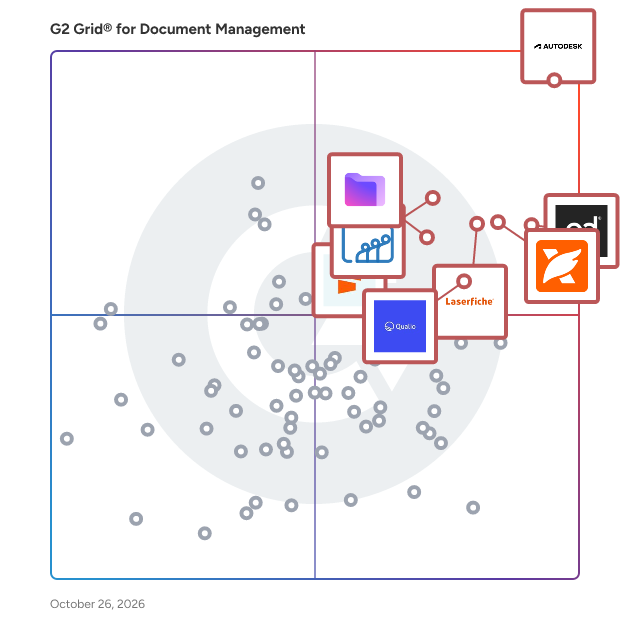
Highlighted products: Autodesk Forma (formerly Autodesk Construction Cloud), PandaDoc, Foxit PDF Editor, Laserfiche, Zoho WorkDrive, Proton Drive For Business, Qualio, and Seismic Enablement Cloud.
Underlying data: [Grid® JSON](https://www.g2.com/categories/document-management/grids.json?focus%5B%5D=autodesk-forma-formerly-autodesk-construction-cloud&focus%5B%5D=pandadoc&focus%5B%5D=foxit-pdf-editor&focus%5B%5D=laserfiche&focus%5B%5D=zoho-workdrive&focus%5B%5D=proton-drive-for-business&focus%5B%5D=qualio&focus%5B%5D=seismic-enablement-cloud)
Free online invoice maker, company profile maker,
A high performance document management system designed for professional organisations running Mac networks. Discover why many companies around the world use DocMoto.
DocOtto is a no-code intake and document workflow platform for businesses and organizations. Teams use it to build web forms and fillable documents, collect information, signatures, and payments, and track every submission in one pipeline from first click to signed and paid. Instead of juggling disconnected PDFs, spreadsheets, email threads, and manual reminders, DocOtto keeps intake, outreach, e-signatures, and follow-up in one place. Guided web forms are branded, multi-step, and smart that include conditional logic which shows each person only the questions that fit their answers, live calculations price the work as they go, and file uploads, signatures, payments, and routing rules handle the rest. Share any form by public link, website embed, email, or QR code. Teams use them for inquiries, registrations, service requests, applications, waivers, agreements, and follow-ups, capturing clean, structured data without a developer or complicated setup. For organizations that run on formal paperwork, DocOtto supports fillable document workflows. Upload the PDFs you already use or start from 180+ industry templates, add interactive fields and pricing, collect ESIGN-compliant signatures with audit certificates, and track completion from one dashboard. Customers fill out, sign, and pay digitally, so there is no PDF to email, print, or mail, and nothing to re-key when the response comes back. Every submission lands in a live pipeline. Teams can track status, assign owners, add notes, send pre-filled contracts for e-signature, collect Stripe deposits and payments, and trigger next steps automatically. Each customer gets a Living Link, a branded status page that shows where things stand and what happens next, so nobody has to email to ask. For outreach, send forms and documents to one recipient or a whole list. Upload recipients, personalize messages, schedule campaigns, and monitor delivery, opens, and responses, with every reply flowing back into the same pipeline. This is especially useful for gathering updated information, renewing agreements, collecting signatures, and following up with customers at scale. DocOtto is built for home services, events and venues, education programs, associations, and any team whose work starts with a form and ends with a signature and a payment. One platform for web forms, fillable documents, e-signatures, payments, outreach, and tracking replaces manual form handling with a simpler, more accountable way to move work forward.
Connect G2 to Claude or ChatGPT for answers grounded in G2's trusted reviews, comparisons, and pricing from real user insights.
DocPlace is a cloud-based, holistic software that organizes your paperwork using AI to learn and automatically convert your documents and digital files into one remotely accessible environment, using tools such as eSignature and Forms Creation, saving you time, money, and human resources.
DocRove is a browser-first invoice generator that lets freelancers and small teams create one-off invoices and export PDFs without signup or bookkeeping setup.
DocSender Pro is a document collection platform built for professional services firms — accountants, bookkeepers, and law firms — who need to gather documents from clients without endless email threads and lost attachments. Staff create reusable Bundle templates (e.g. "Annual Tax Return Documents") once, then assign them to any client in seconds. Clients receive a secure magic-link invite — no password, no app download — and upload documents from a mobile-first portal. Staff track progress in real time: what's uploaded, what's outstanding, what's been reviewed and approved or sent back for changes. Key features: Reusable document request bundles, assigned per client Magic-link client authentication (no accounts or passwords for clients) Mobile-first upload portal Automatic PDF merging of multi-file uploads Approve/reject individual documents with client-facing feedback Automated reminder emails with client-controlled pause In-app discussion thread per request for quick clarifications Full English and Hebrew support (UI + client-facing emails) Multi-tenant workspace isolation, per-firm branding
Docsmore is a Platform as a Service providing a secure, cloud-based, strategic solution for organizations to go paperless, streamlining all documents which require completion, filing, organization, and retrieval of paper forms and the information contained therein. Information from forms is automatically compiled electronically, categorized into spreadsheets, easily searchable, and protected by an industry-leading, secure HIPAA compliant system.
Average Rating: 4.9/5.0
Total Reviews: 22
"Here is Time and Money Saver"
Rating: 5.0/5.0 stars
— Colleen D.
"Go paperless YAY! with awesome search capabilities data within your document."
Rating: 5.0/5.0 stars
— Sid S.
DocsOrb operationalizes AI governance. DocsOrb helps compliance, legal, HR, risk, and security teams govern how employees and AI systems operate. Teams can discover AI tools in use, assess AI use cases, define what data and workflows are allowed, restricted, or blocked, and generate audit evidence for review. DocsOrb also supports the human side of governance: policy creation, approvals, distribution, training, and employee acknowledgments. The result is one operating layer connecting policies for people with guardrails for AI.
DocuAssist.AI is a browser-based, AI-powered document management platform that unifies PDF editing, analysis, and digital rights management in one workspace — no installation required. Upload documents to summarize reports, extract data, draft content, and run semantic search, using your choice of AI models — DeepSeek V4 Flash, Qwen 3.8 Flash, GLM 5.3 Flash, Gemini 3.5 Flash Lite, Gemini 3.7 Flash, and GPT OSS — with Anthropic's Claude support coming soon. Built for legal, research, and enterprise teams working with sensitive or high-volume documents, it pairs AI-driven insights with full editing tools: text edits, image insertion, highlighting, and digital signatures. Enterprise-grade security — password protection, watermarking, geofencing, and audit trails — keeps documents compliant and traceable, while native integrations with SharePoint, OneDrive, Google Drive, and WhatsApp let it slot into existing workflows.
Document management describes the system with which corporations organize, store, and track many types of documents. Encompassing not just filing paper copies of information but electronically storing and sorting documents.
