# Top Free Diagramming Software - Page 3

## How Many Diagramming Software Products Does G2 Track?

**Total Products under this Category:** 137

### Category Stats (Jul 2026)

- **Average Rating:** 4.39/5 The average rating of products in this category, based on all submitted ratings
- **Top Trending Product:** Space Designer 3D (+0.74%) - Among all products in this category, Space Designer 3D recorded the largest rating increase compared to last month

_Last updated: July 28, 2026_

## How Does G2 Rank Diagramming Software Products?

**Why You Can Trust G2's Software Rankings:**

- 30 Analysts and Data Experts
- 33,900+ Authentic Reviews
- 137+ Products
- Unbiased Rankings

G2's software rankings are built on verified user reviews, rigorous moderation, and a consistent research methodology maintained by a team of analysts and data experts. Each product is measured using the same transparent criteria, with no paid placement or vendor influence. While reviews reflect real user experiences, which can be subjective, they offer valuable insight into how software performs in the hands of professionals. Together, these inputs power the G2 Score, a standardized way to compare tools within every category.

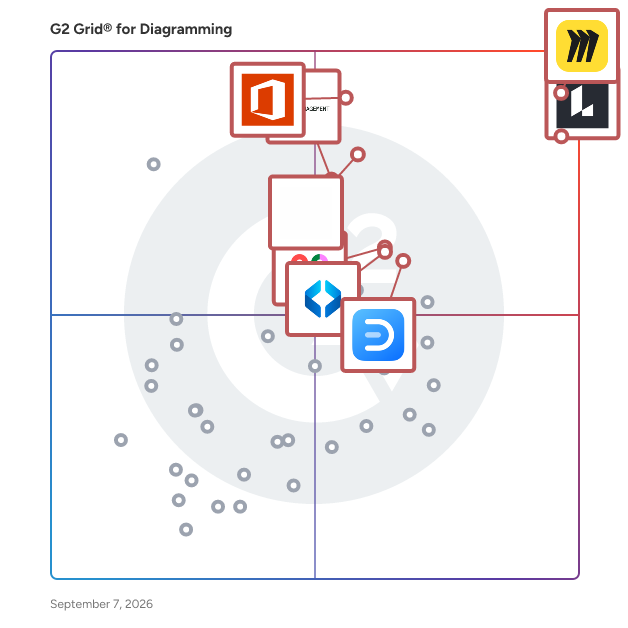
## G2 Grid® for Diagramming Software
 ![G2 Grid® for Diagramming Software plotting products by satisfaction and market presence](https://www.g2.com/categories/diagramming/grids.png?focus%5B%5D=42445&focus%5B%5D=2887&focus%5B%5D=17137&focus%5B%5D=1215793&focus%5B%5D=737&focus%5B%5D=89809&focus%5B%5D=6782&focus%5B%5D=17725)

Highlighted products: Miro, Lucid Visual Collaboration Suite, Visio, FigJam, Cvent Event Marketing & Management, Wondershare EdrawMax, Mural, and SmartDraw.

Underlying data: [Grid® JSON](https://www.g2.com/categories/diagramming/grids.json?focus%5B%5D=miro&focus%5B%5D=lucid-software-inc-lucid-visual-collaboration-suite&focus%5B%5D=visio&focus%5B%5D=fig-jam&focus%5B%5D=cvent-event-marketing-management&focus%5B%5D=wondershare-edrawmax&focus%5B%5D=mural&focus%5B%5D=smartdraw)

### [Vani](https://www.g2.com/products/vani/reviews)

Vani is a visual collaboration platform where teams create, meet, and work together. It's where teammates brainstorm for ideas, come up with plans, and work on mockups over a shared infinite canvas. You can quickly get your team started on common product development processes, marketing exercises, checklists, and process flowcharts with a handful of ready-made templates. Express your ideas visually by creating diagrams, mind maps, wireframes, or storyboards. And embed documents, spreadsheets, images, and videos, from Google, Microsoft, YouTube, Figma and other platforms so you have all your work in one place. It's super easy to hop over a video call with your teammates and follow each other's live cursors, drop comments, and react with emojis on the fly—it's like being in the same room, but better. Whether you're a marketing team working on your next big campaign, a product team preparing for a launch, or a design studio working on a creative, Vani helps you simplify collaboration with cross-functional teams and helps you go faster from idea to finished product. Start for free with unlimited shared Spaces to grow your biggest and brightest ideas.

**Average Rating:** 4.6/5.0

**Total Reviews:** 5

#### How Do G2 Users Rate Vani?

- **Quality of Support:** 9.2/10 (Category avg: 8.7/10)
- **Ease of Use:** 9.2/10 (Category avg: 8.7/10)
- **Has the product been a good partner in doing business?:** 9.2/10 (Category avg: 9.0/10)

#### Who Is the Company Behind Vani?

- **Seller:** [Zoho](https://www.g2.com/sellers/zoho-b00ca9d5-bca8-41b5-a8ad-275480841704)
- **Year Founded:** 1996
- **HQ Location:** Austin, TX
- **Twitter:** @Zoho  
137,880 Twitter followers
- **LinkedIn® Page:** [www.linkedin.com](https://www.g2.com/external_clickthroughs/record?secure%5Bsource_type%5D=product_profile&secure%5Btoken%5D=9c8e45ddb296c32c6c5597ef9ba945c94562c57624f7bd1dcf1a9e9931f71578&secure%5Burl%5D=https%3A%2F%2Fwww.linkedin.com%2Fcompany%2F38373%2F&secure%5Burl_type%5D=linkedin_company_website)  
30,766 employees on LinkedIn®
- **Phone:** +1 (888) 900-9646 

#### Who Uses This Product?

- **Company Size:** 60% Small, 40% Large

#### What Do G2 Reviewers Say About Vani?

_AI-generated summary from verified user reviews_

##### Pros

- Users find the **integration with Slack and Zoom** very helpful for effective collaboration during daily stand-ups.
- Users find the **integrations with Slack and Zoom** invaluable for collaboration, especially during daily stand-ups.
- Users find the **integration with tools like Slack and Zoom** enhances collaboration, especially for daily scrums.
- Users find the **readymade templates** highly beneficial for effective collaboration in daily stand-ups and meetings.

##### Cons

- Users find the **integration with ERP to be complex** , which can hinder seamless usage of Vani.
- Users find the **integration with ERP** to be somewhat challenging, impacting the overall usability of Vani.
- Users find the **integration with ERP systems complex** , which can hinder smooth operations and efficiency.

#### What Are Recent G2 Reviews of Vani?

**["The perfect tool to collaborate with your team!"](https://www.g2.com/survey_responses/vani-review-8802009)**

**Rating:** 5.0/5.0 stars

_— Mark H._

[Read full review](https://www.g2.com/survey_responses/vani-review-8802009)

**["A decent collaboration tool ensuring all the updates are reflected in real time"](https://www.g2.com/survey_responses/vani-review-10491646)**

**Rating:** 4.0/5.0 stars

_— Pradeep B._

[Read full review](https://www.g2.com/survey_responses/vani-review-10491646)

### [ArcSite](https://www.g2.com/products/arcsite/reviews)

ArcSite lets you easily create professional-looking drawings on an iPad, Android tablet, or Windows device in minutes, and then automatically generate a takeoff, calculate cost and margin, and even produce a winning proposal based on those drawings, all while working at the job site or anywhere you want to work. Over 1.5 million designers, salespeople, inspectors, and technicians have used ArcSite to win more business, save time in the field, and collaborate with their teams.

**Average Rating:** 4.9/5.0

**Total Reviews:** 4

#### How Do G2 Users Rate ArcSite?

- **Quality of Support:** 8.9/10 (Category avg: 8.7/10)
- **Ease of Use:** 10.0/10 (Category avg: 8.7/10)
- **Has the product been a good partner in doing business?:** 10.0/10 (Category avg: 9.0/10)

#### Who Is the Company Behind ArcSite?

- **Seller:** [Arctuition](https://www.g2.com/sellers/arctuition)
- **Year Founded:** 2014
- **HQ Location:** Grand Rapids, US
- **LinkedIn® Page:** [www.linkedin.com](https://www.g2.com/external_clickthroughs/record?secure%5Bsource_type%5D=product_profile&secure%5Btoken%5D=86ba2214fddf3ca0d02665b841a7d1f6168c91cbc62fdca27e75f1aed92e4abd&secure%5Burl%5D=https%3A%2F%2Fwww.linkedin.com%2Fcompany%2Farcsite%2F&secure%5Burl_type%5D=linkedin_company_website)  
46 employees on LinkedIn®

#### Who Uses This Product?

- **Company Size:** 75% Small, 25% Large

#### What Do G2 Reviewers Say About ArcSite?

_AI-generated summary from verified user reviews_

##### Cons

- Users face **integration issues** with ArcSite, particularly concerning component deployment with other products.

#### What Are Recent G2 Reviews of ArcSite?

**["Collaboration Platform for Designers"](https://www.g2.com/survey_responses/arcsite-review-8852645)**

**Rating:** 5.0/5.0 stars

_— Verified User in Construction_

[Read full review](https://www.g2.com/survey_responses/arcsite-review-8852645)

**["Arcsight"](https://www.g2.com/survey_responses/arcsite-review-8623111)**

**Rating:** 5.0/5.0 stars

_— Sushil B._

[Read full review](https://www.g2.com/survey_responses/arcsite-review-8623111)

#### What Are G2 Users Discussing About ArcSite?

- [What is ArcSite used for?](https://www.g2.com/discussions/what-is-arcsite-used-for)

### [CardBoardIt](https://www.g2.com/products/cardboardit/reviews)

CardBoard is a real-time online whiteboard collaboration tool designed for engineering and product management teams. CardBoard software specializes in user story mapping, used to visualize and plan product releases. Users choose CardBoard for its: - Simplicity: Intuitive interface that facilitates productive conversations. - Focus on story mapping: Tailored features for release planning. - Integrations: Connects seamlessly with Jira, Azure DevOps, and Shortcut. Key Features: - Infinite digital whiteboard for creating and organizing user stories. - Customizable templates for various story mapping scenarios. - Card backside to add descriptions, attach files, and set status. - Live cursor display for real-time collaboration across teams. - Integration with popular project management tools. Benefits: - Streamlined release planning through visual story mapping - Enhanced team alignment on product features and priorities - Time savings through direct integration with project tools - Improved product roadmap visualization - Access to a proven user story mapping methodology CardBoard stands out by offering a focused, efficient platform for user story mapping. As a tool featured in the Jeff Patton's best-selling book, CardBoard provides teams with a trusted method for planning releases and managing product backlogs. Prospective customers should know that CardBoard is ideal for engineering and product teams seeking a straightforward, purpose-built tool for collaborative release planning through user story mapping. Its ease of use, integration capabilities, and foundation in established methodology make it an excellent choice for teams looking to improve their product planning process.

**Average Rating:** 5.0/5.0

**Total Reviews:** 2

#### How Do G2 Users Rate CardBoardIt?

- **Quality of Support:** 10.0/10 (Category avg: 8.7/10)
- **Ease of Use:** 10.0/10 (Category avg: 8.7/10)

#### Who Is the Company Behind CardBoardIt?

- **Seller:** [CardBoardIt](https://www.g2.com/sellers/cardboardit)
- **Year Founded:** 2013
- **HQ Location:** Carmel, US
- **LinkedIn® Page:** [www.linkedin.com](https://www.g2.com/external_clickthroughs/record?secure%5Bsource_type%5D=product_profile&secure%5Btoken%5D=f1c82b1770a97a97b00a1d1319d64bb8ecf773c761bfcdca6823193b7e8880ca&secure%5Burl%5D=https%3A%2F%2Fwww.linkedin.com%2Fcompany%2Fcardboardit&secure%5Burl_type%5D=linkedin_company_website)  
12 employees on LinkedIn®

#### Who Uses This Product?

- **Company Size:** 50% Small, 50% Medium

#### What Are Recent G2 Reviews of CardBoardIt?

**["Great user experience, easy to use!"](https://www.g2.com/survey_responses/cardboardit-review-5054969)**

**Rating:** 5.0/5.0 stars

_— Verified User in Computer Software_

[Read full review](https://www.g2.com/survey_responses/cardboardit-review-5054969)

**["Best tool for User Story Mapping"](https://www.g2.com/survey_responses/cardboardit-review-4136176)**

**Rating:** 5.0/5.0 stars

_— Traci D._

[Read full review](https://www.g2.com/survey_responses/cardboardit-review-4136176)

#### What Are G2 Users Discussing About CardBoardIt?

- [What is CardBoardIt used for?](https://www.g2.com/discussions/what-is-cardboardit-used-for)

### [ClickCharts Diagram & Flowchart Software](https://www.g2.com/products/clickcharts-diagram-flowchart-software/reviews)

Easily create a visual representation of a process, organization, mind map or other diagram. Flowcharts provide a unique way of organizing and displaying data so that even highly detailed and complex processes are easier to understand. This makes our flow chart software an ideal method to visualize your data, troubleshoot and optimize processes, and share information. Visualize complex processes and organizations. Create value stream and data flow diagrams. Identify bottlenecks and process optimization opportunities. ClickCharts Includes more than 25 chart templates to get you started.

**Average Rating:** 4.3/5.0

**Total Reviews:** 2

#### How Do G2 Users Rate ClickCharts Diagram & Flowchart Software?

- **Quality of Support:** 10.0/10 (Category avg: 8.7/10)
- **Ease of Use:** 10.0/10 (Category avg: 8.7/10)

#### Who Is the Company Behind ClickCharts Diagram & Flowchart Software?

- **Seller:** [NCH Software](https://www.g2.com/sellers/nch-software)
- **Year Founded:** 1993
- **HQ Location:** Greenwood Village, CO
- **Twitter:** @nchsoftware  
9,910 Twitter followers
- **LinkedIn® Page:** [www.linkedin.com](https://www.g2.com/external_clickthroughs/record?secure%5Bsource_type%5D=product_profile&secure%5Btoken%5D=50aa325ea27b8cff9ff6cd9ec9e4299eb79b52da57b3910ca7cb8ce3ab3db74e&secure%5Burl%5D=https%3A%2F%2Fwww.linkedin.com%2Fcompany%2F285305%2F&secure%5Burl_type%5D=linkedin_company_website)  
79 employees on LinkedIn®

#### Who Uses This Product?

- **Company Size:** 50% Large, 50% Small

#### What Are Recent G2 Reviews of ClickCharts Diagram & Flowchart Software?

**["Flowchart Creations"](https://www.g2.com/survey_responses/clickcharts-diagram-flowchart-software-review-445566)**

**Rating:** 5.0/5.0 stars

_— Cynthia H._

[Read full review](https://www.g2.com/survey_responses/clickcharts-diagram-flowchart-software-review-445566)

#### What Are G2 Users Discussing About ClickCharts Diagram & Flowchart Software?

- [What is ClickCharts Diagram & Flowchart Software used for?](https://www.g2.com/discussions/what-is-clickcharts-diagram-flowchart-software-used-for)

### [Engage Process Modeler](https://www.g2.com/products/engage-process-modeler/reviews)

Traditional process management software (BPM tools) swing into action after a team has mapped their process. The Engage Process Modeler simplifies that, by offering a workshop ready mapping platform that automatically designs and checks you processes with the team in the room. Our visual approach is easy to understand for anyone, ensuring your process workshop is instantly captured. Add contextual data such as time, costs, applications, risks, roles, document links and more to complete your processes. The Engage Process Modeler is completely SaaS, no installation required.

**Average Rating:** 3.5/5.0

**Total Reviews:** 2

#### How Do G2 Users Rate Engage Process Modeler?

- **Quality of Support:** 10.0/10 (Category avg: 8.7/10)
- **Ease of Use:** 10.0/10 (Category avg: 8.7/10)

#### Who Is the Company Behind Engage Process Modeler?

- **Seller:** [Engage Process](https://www.g2.com/sellers/engage-process)
- **Year Founded:** 2008
- **HQ Location:** Schiphol-Rijk, NL
- **Twitter:** @Engage\_Process  
173 Twitter followers
- **LinkedIn® Page:** [www.linkedin.com](https://www.g2.com/external_clickthroughs/record?secure%5Bsource_type%5D=product_profile&secure%5Btoken%5D=5cbad8bd30a3a5741e5a07c1d8c8232d801b6c0dfa51e2a73851bd285a5f1e4d&secure%5Burl%5D=https%3A%2F%2Fwww.linkedin.com%2Fcompany%2F1046917&secure%5Burl_type%5D=linkedin_company_website)  
32 employees on LinkedIn®

#### Who Uses This Product?

- **Company Size:** 50% Large, 50% Small

#### What Are Recent G2 Reviews of Engage Process Modeler?

**["Perfect tool to handling and taking requirements of business"](https://www.g2.com/survey_responses/engage-process-modeler-review-9503672)**

**Rating:** 4.5/5.0 stars

_— Bimal K._

[Read full review](https://www.g2.com/survey_responses/engage-process-modeler-review-9503672)

### [IcePanel](https://www.g2.com/products/icepanel/reviews)

IcePanel is an interactive modelling and diagramming tool that uses the C4 model to help you communicate your team's system architectures in a structured way. It helps explain how things work to your audiences through an abstraction-first approach, overlaying details when needed. With the C4 Model, you can drill down or zoom in and out of different levels of detail, depending on the audience you're communicating your designs to. In most software teams, this is a mix of technical (developers, architects, operations, etc.) and non-technical people (product, business stakeholders, etc.). Using modelling instead of diagramming alone removes much of the maintenance headache of keeping multiple diagrams up-to-date, as changes sync automatically through all your diagrams.

**Average Rating:** 5.0/5.0

**Total Reviews:** 2

#### How Do G2 Users Rate IcePanel?

- **Quality of Support:** 10.0/10 (Category avg: 8.7/10)
- **Ease of Use:** 10.0/10 (Category avg: 8.7/10)
- **Has the product been a good partner in doing business?:** 10.0/10 (Category avg: 9.0/10)

#### Who Is the Company Behind IcePanel?

- **Seller:** [IcePanel Technologies](https://www.g2.com/sellers/icepanel-technologies)
- **Year Founded:** 2018
- **HQ Location:** Vancouver, CA
- **Twitter:** @ice\_panel  
734 Twitter followers
- **LinkedIn® Page:** [www.linkedin.com](https://www.g2.com/external_clickthroughs/record?secure%5Bsource_type%5D=product_profile&secure%5Btoken%5D=b88a4d8fbcf648100e7f770a6e767169f80ff9b3dc9ab638db2eabdf1e2eacef&secure%5Burl%5D=https%3A%2F%2Fwww.linkedin.com%2Fcompany%2Ficepanel%2F&secure%5Burl_type%5D=linkedin_company_website)  
4 employees on LinkedIn®

#### Who Uses This Product?

- **Company Size:** 50% Large, 50% Medium

#### What Do G2 Reviewers Say About IcePanel?

_AI-generated summary from verified user reviews_

##### Pros

- Users value the **customizability** of IcePanel, utilizing its versatile models across various diagram views.
- Users love the **ease of use** of IcePanel, appreciating its online accessibility and user-friendly modeling features.
- Users value the **zero installation requirement** of IcePanel, enjoying its convenience and accessibility for modeling tasks.

##### Cons

- Users find IcePanel **quite expensive** for personal use, especially with limitations in the free version.
- Users find the **limited integrations** of IcePanel challenging, affecting their overall experience and usability.
- Users find the **limited features** of IcePanel frustrating, particularly with the restricted free version and integrations.

#### What Are Recent G2 Reviews of IcePanel?

**["Great for documenting Architecture with an object model built in"](https://www.g2.com/survey_responses/icepanel-review-11100286)**

**Rating:** 5.0/5.0 stars

_— Andreas F._

[Read full review](https://www.g2.com/survey_responses/icepanel-review-11100286)

**["Great Product for Professionals"](https://www.g2.com/survey_responses/icepanel-review-10457491)**

**Rating:** 5.0/5.0 stars

_— Verified User in Banking_

[Read full review](https://www.g2.com/survey_responses/icepanel-review-10457491)

### [Terrastruct](https://www.g2.com/products/terrastruct/reviews)

Terrastruct is a diagramming tool specialized for software architecture. We uniquely support both drag-and-drop and text-to-diagram, allowing you to create both free-form and structured diagrams, all in one, easy to use, collaborative online tool. We're changing the way software is documented.

**Average Rating:** 5.0/5.0

**Total Reviews:** 2

#### How Do G2 Users Rate Terrastruct?

- **Quality of Support:** 8.3/10 (Category avg: 8.7/10)
- **Ease of Use:** 10.0/10 (Category avg: 8.7/10)

#### Who Is the Company Behind Terrastruct?

- **Seller:** [Terrastruct, Inc.](https://www.g2.com/sellers/terrastruct-inc)
- **Year Founded:** 2019
- **HQ Location:** San Francisco, US
- **Twitter:** @terrastruct  
464 Twitter followers
- **LinkedIn® Page:** [www.linkedin.com](https://www.g2.com/external_clickthroughs/record?secure%5Bsource_type%5D=product_profile&secure%5Btoken%5D=7e7fbd8f3b8528c276bd6b8a3df63fc28a58cc9884d09ac1f2aa2ffc13740720&secure%5Burl%5D=https%3A%2F%2Fwww.linkedin.com%2Fcompany%2Fterrastruct&secure%5Burl_type%5D=linkedin_company_website)  
3 employees on LinkedIn®

#### Who Uses This Product?

- **Company Size:** 50% Large, 50% Small

#### What Are Recent G2 Reviews of Terrastruct?

**["Easy to get up and diagramming"](https://www.g2.com/survey_responses/terrastruct-review-7673561)**

**Rating:** 5.0/5.0 stars

_— Joshua D._

[Read full review](https://www.g2.com/survey_responses/terrastruct-review-7673561)

**["Intuitive features that make creating diagrams super fast"](https://www.g2.com/survey_responses/terrastruct-review-7673601)**

**Rating:** 5.0/5.0 stars

_— Laurence T._

[Read full review](https://www.g2.com/survey_responses/terrastruct-review-7673601)

### [Kumu](https://www.g2.com/products/kumu/reviews)

Kumu makes it easy to organize complex data into relationship maps that are beautiful to look at and a pleasure to use.

**Average Rating:** 4.0/5.0

**Total Reviews:** 1

#### Who Is the Company Behind Kumu?

- **Seller:** [Kumu](https://www.g2.com/sellers/kumu)
- **Year Founded:** 2011
- **HQ Location:** Los Gatos, US
- **LinkedIn® Page:** [www.linkedin.com](https://www.g2.com/external_clickthroughs/record?secure%5Bsource_type%5D=product_profile&secure%5Btoken%5D=b57c97d088c629391ee2b0489b1c1c46a7fe56a712a1cce9cdde9c8a9387b0ab&secure%5Burl%5D=https%3A%2F%2Fwww.linkedin.com%2Fcompany%2F2092407&secure%5Burl_type%5D=linkedin_company_website)  
10 employees on LinkedIn®

#### Who Uses This Product?

- **Company Size:** 100% Small

#### What Are Recent G2 Reviews of Kumu?

**["It helps to understand where you stand"](https://www.g2.com/survey_responses/kumu-review-4544740)**

**Rating:** 4.0/5.0 stars

_— Karime H._

[Read full review](https://www.g2.com/survey_responses/kumu-review-4544740)

#### What Are G2 Users Discussing About Kumu?

- [What is Kumu used for?](https://www.g2.com/discussions/what-is-kumu-used-for)

### [Textografo Diagrams](https://www.g2.com/products/textografo-diagrams/reviews)

Textografo allows to automatically generate diagrams like flowcharts, mindmaps, decision tree, organizational charts and more based on a simple textual syntax. Ideal to quickly map your processes or provide a decision tree to customer service or help desks or simply map what you have in mind. Diagrams are interactive and can be animated in one click. You can share them with people. They don't need to create a Textografo account to access the diagram. Finally, you can edit and comment diagrams with your team, clients or partners. Team collaboration is easy.

**Average Rating:** 4.0/5.0

**Total Reviews:** 1

#### How Do G2 Users Rate Textografo Diagrams?

- **Quality of Support:** 10.0/10 (Category avg: 8.7/10)
- **Ease of Use:** 8.3/10 (Category avg: 8.7/10)

#### Who Is the Company Behind Textografo Diagrams?

- **Seller:** [Textografo](https://www.g2.com/sellers/textografo)
- **HQ Location:** N/A
- **Twitter:** @textografo  
145 Twitter followers
- **LinkedIn® Page:** [www.linkedin.com](https://www.g2.com/external_clickthroughs/record?secure%5Bsource_type%5D=product_profile&secure%5Btoken%5D=6d70e1074d98b4df5a01c5269d962cdd7f4b0834d9b6183c2c4899b4bcc71eb3&secure%5Burl%5D=https%3A%2F%2Fwww.linkedin.com%2Fcompany%2Ftextografo%2F&secure%5Burl_type%5D=linkedin_company_website)  
2 employees on LinkedIn®

#### Who Uses This Product?

- **Company Size:** 100% Medium

#### What Are Recent G2 Reviews of Textografo Diagrams?

**["A lovely way to create mental maps"](https://www.g2.com/survey_responses/textografo-diagrams-review-1887486)**

**Rating:** 4.0/5.0 stars

_— Eduardo P._

[Read full review](https://www.g2.com/survey_responses/textografo-diagrams-review-1887486)

#### What Are G2 Users Discussing About Textografo Diagrams?

- [What is Textografo Diagrams used for?](https://www.g2.com/discussions/what-is-textografo-diagrams-used-for)

### [Vexlio](https://www.g2.com/products/vexlio/reviews)

Vexlio allows you to create interactive flowcharts and diagrams with click-to-reveal popups. It's used by engineers, techical writers, educators, product managers, and more to explain systems, processes, and concepts. Your fully interactive finished product can be embedded right in a webpage or knowledge base such as Confluence or Sharepoint. A core capability of Vexlio is support for creating interactive diagrams with popups. Any object in a drawing can host attached popup content that appears on hover or click, making it possible to layer additional explanations, alternative views, or example scenarios without crowding the main diagram. These interactive diagrams can be shared through a link or embedded in other pages while preserving the popup behavior. Key feature areas include: • Interactive popup attachments that let authors nest detailed diagrams, notes, images, or callouts inside objects, enabling multi-level explanations in a single document. • Native live-edit LaTeX equations, suitable for engineering, physics, and mathematics diagrams. • Comprehensive drawing tools for technical diagrams, including snapping, alignment aids, connectors, syntax-highlighted code snippets, and more. Typical usecases include diagrams such as architecture maps, flowcharts, system sketches, math illustrations, and instructional graphics. Users can export or share their creations as static images in PNG, SVG, PDF, or as live, interactive documents.

**Average Rating:** 5.0/5.0

**Total Reviews:** 1

#### How Do G2 Users Rate Vexlio?

- **Quality of Support:** 10.0/10 (Category avg: 8.7/10)
- **Ease of Use:** 10.0/10 (Category avg: 8.7/10)

#### Who Is the Company Behind Vexlio?

- **Seller:** [Vexlio](https://www.g2.com/sellers/vexlio)
- **HQ Location:** N/A
- **LinkedIn® Page:** [www.linkedin.com](https://www.g2.com/external_clickthroughs/record?secure%5Bsource_type%5D=product_profile&secure%5Btoken%5D=7886df2ed926834e5eb248c77dcfa8e5c815d3ab1f0fe3132ced0dba45868834&secure%5Burl%5D=https%3A%2F%2Fwww.linkedin.com%2Fcompany%2FNo-Linkedin-Presence-Added-Intentionally-By-DataOps&secure%5Burl_type%5D=linkedin_company_website)  
1 employees on LinkedIn®

#### Who Uses This Product?

- **Company Size:** 100% Small

#### What Do G2 Reviewers Say About Vexlio?

_AI-generated summary from verified user reviews_

##### Pros

- Users find Vexlio to be a **valuable interactive tool** for enhancing online teaching and conducting live sessions effectively.

#### What Are Recent G2 Reviews of Vexlio?

**["Great Teaching Tool"](https://www.g2.com/survey_responses/vexlio-review-11666758)**

**Rating:** 5.0/5.0 stars

_— Prerak J._

[Read full review](https://www.g2.com/survey_responses/vexlio-review-11666758)

### [Cloudairy](https://www.g2.com/products/cloudairy/reviews)

Cloudairy is a visual collaboration platform that transforms how distributed teams ideate, plan, and build together. It provides a cloud-native AI workspace where teams can co-create diagrams, flowcharts, mind maps, manage projects, brainstorm on a whiteboard, and create dynamic documents in real-time. Teams across various industries utilize Cloudairy to streamline workflows, centralize knowledge, and expedite decision-making. Whether you're mapping processes, structuring content, or visualizing strategy, Cloudairy keeps your team aligned with intelligent organization and seamless collaboration. We bring together everything you need to design, plan, manage, and deliver: ✅ Cloudchart – Design technical diagrams, cloud architectures, flowcharts, and more with AI ✅ Whiteboard – Plan sprints, run workshops, and brainstorm ideas visually and collaboratively ✅ Workhub – Manage projects, track tasks, and execute agile workflows — all powered by smart automation ✅ Docs & Slides – Create documents and presentations with built-in intelligence and visual tools ✅ Cloudairy AI – Auto-generate diagrams, summarize notes, transform content, and drive efficiency Collaboration Tool Technical Diagramming Tool Diagram Maker Project Management Tool Brainstorming Tool Online Whiteboarding Tool Documents Editor Slides Generator AI Diagram Generator AI Flowchart Maker AI Idea Generation AI Mind Mapping AI Document Creator

**Average Rating:** 4.0/5.0

**Total Reviews:** 1

#### How Do G2 Users Rate Cloudairy?

- **Quality of Support:** 8.3/10 (Category avg: 8.7/10)
- **Ease of Use:** 10.0/10 (Category avg: 8.7/10)
- **Has the product been a good partner in doing business?:** 10.0/10 (Category avg: 9.0/10)

#### Who Is the Company Behind Cloudairy?

- **Seller:** [Cloudairy](https://www.g2.com/sellers/cloudairy)
- **Year Founded:** 2023
- **HQ Location:** New York, US
- **Twitter:** @cloudairyhq  
148 Twitter followers
- **LinkedIn® Page:** [www.linkedin.com](https://www.g2.com/external_clickthroughs/record?secure%5Bsource_type%5D=product_profile&secure%5Btoken%5D=88c060d2f7741deb8dd8f1d4bd1906db9bdeb9731ffc80faaf1066b7cdde55bb&secure%5Burl%5D=https%3A%2F%2Fwww.linkedin.com%2Fcompany%2Fcloudairy%2F&secure%5Burl_type%5D=linkedin_company_website)  
47 employees on LinkedIn®
- **Ownership:** Private

#### Who Uses This Product?

- **Company Size:** 100% Large

#### What Do G2 Reviewers Say About Cloudairy?

_AI-generated summary from verified user reviews_

##### Pros

- Users appreciate the **seamless collaboration** features of Cloudairy, enhancing productivity with its intuitive and lightweight design.
- Users appreciate the **intuitive design** of Cloudairy, enabling effortless navigation and powerful cloud capabilities seamlessly.
- Users appreciate the **ease of use** of Cloudairy, enjoying its intuitive design and effortless navigation.
- Users value the **easy integration** of Cloudairy, enhancing productivity while maintaining a seamless experience with modern tools.
- Users value the **easy integrations** of Cloudairy, enhancing productivity while maintaining a smooth and responsive experience.

##### Cons

- Users experience **connection issues** with Cloudairy, including frustrating sync delays when switching between devices.
- Users experience **connectivity issues** with Cloudairy, including sync delays that disrupt work and cause frustration.
- Users experience **sync delays** with Cloudairy, causing frustration during time-sensitive tasks across devices.
- Users experience occasional **sync delays** on Cloudairy, which can be frustrating when handling time-sensitive tasks.
- Users find Cloudairy's **limited features** frustrating, especially the lack of advanced options for power users.

#### What Are Recent G2 Reviews of Cloudairy?

**["Cloudairy is a sleek, fast, and user-friendly cloud platform that simplifies your workflow."](https://www.g2.com/survey_responses/cloudairy-review-11794902)**

**Rating:** 4.0/5.0 stars

_— Anish C._

[Read full review](https://www.g2.com/survey_responses/cloudairy-review-11794902)

### [Digs](https://www.g2.com/products/digs/reviews)

Digs is an AI-powered collaboration software built for homebuilders. From pre-con to aftercare, it keeps your team, trades, and clients aligned with one centralized workspace&nbsp;for decisions, documentation, digital handoff, and ongoing warranty support.

**Average Rating:** 5.0/5.0

**Total Reviews:** 5

#### How Do G2 Users Rate Digs?

- **Quality of Support:** 10.0/10 (Category avg: 8.7/10)
- **Ease of Use:** 9.3/10 (Category avg: 8.7/10)
- **Has the product been a good partner in doing business?:** 10.0/10 (Category avg: 9.0/10)

#### Who Is the Company Behind Digs?

- **Seller:** [Digs](https://www.g2.com/sellers/digs)
- **Year Founded:** 2022
- **HQ Location:** Vancouver, US
- **LinkedIn® Page:** [www.linkedin.com](https://www.g2.com/external_clickthroughs/record?secure%5Bsource_type%5D=product_profile&secure%5Btoken%5D=b92beb41210397ed8daaa8878c525418f15ddfc8f60d937cedc9ab25f2ae4edc&secure%5Burl%5D=http%3A%2F%2Fwww.linkedin.com%2Fcompany%2Fdigs-com&secure%5Burl_type%5D=linkedin_company_website)  
1 employees on LinkedIn®

#### Who Uses This Product?

- **Company Size:** 100% Small

#### What Do G2 Reviewers Say About Digs?

_AI-generated summary from verified user reviews_

##### Pros

- Users find **collaboration improved** with Digs, allowing for streamlined communication and reduced errors in home building projects.

#### What Are Recent G2 Reviews of Digs?

**["We can't imagine building a house without Digs"](https://www.g2.com/survey_responses/digs-review-11347421)**

**Rating:** 5.0/5.0 stars

_— Paula A._

[Read full review](https://www.g2.com/survey_responses/digs-review-11347421)

**["Finally, a tech tool that actually makes my life easier"](https://www.g2.com/survey_responses/digs-review-11358661)**

**Rating:** 5.0/5.0 stars

_— Vincent L._

[Read full review](https://www.g2.com/survey_responses/digs-review-11358661)

### [Flowchart Maker for Excel](https://www.g2.com/products/flowchart-maker-for-excel/reviews)

Stop drawing shapes manually. Automate your process documentation. Flowchart Maker is a lightweight, high-performance Excel-based app designed for business analysts, operations managers, compliance officers, and project leaders who need to visualize complex workflows without wasting hours dragging, resizing, and connecting shapes. Instead of building diagrams element by element, users simply list their process steps, decision paths within a standard Excel table. With a single click from the Excel ribbon, the add-in's layout algorithm mathematically calculates and renders a perfectly structured, beautifully aligned flowchart instantly. Because the software generates diagrams using 100% native Microsoft Office shapes, your outputs remain completely dynamic. There is no proprietary file formatting or vendor lock-in—anyone with Excel can open, modify, format, or update the generated charts, even if they do not have the add-in installed. Key Features & Benefits for B2B Buyers Automatic Process Mapping: Eliminate manual drawing entirely. Transform plain-text process lists and dependency rows into presentation-ready visuals instantly. Native Cross-App Compatibility: The dedicated "Copy" ribbon command exports charts as fully grouped Office shape objects. Paste diagrams into Word or PowerPoint as native vector shapes rather than static images, allowing you to ungroup, recolor, and edit text blocks directly inside your slide decks or documentation. Professional Export Controls: Leverage advanced, built-in layout configurations to export custom ranges or complete chart sheets directly to high-resolution PDF and PNG formats. Print-Ready Configurations: Take the guesswork out of layout scaling. Programmatically control canvas boundaries, cell ranges, and margins to ensure large-scale workflows fit onto physical pages without awkward text clipping or broken page boundaries. Enterprise Security & Compliance: Operates natively within your existing Microsoft desktop environment. No data is sent to external clouds or third-party web servers, protecting sensitive corporate intellectual property. Whether you are mapping out Standard Operating Procedures (SOPs), structuring complex decision trees, engineering corporate compliance flows, or auditing financial system logic, Excel Flowchart Maker delivers a frictionless, data-driven diagramming experience right where your data already lives.

#### Who Is the Company Behind Flowchart Maker for Excel?

- **Seller:** [Uniform Software](https://www.g2.com/sellers/uniform-software-2026-06-17)
- **HQ Location:** N/A
- **LinkedIn® Page:** [www.linkedin.com](https://www.g2.com/external_clickthroughs/record?secure%5Bsource_type%5D=product_profile&secure%5Btoken%5D=3d3af5af07d5b2865634460dfcd53479cac87357f5e82c528b41343cb677d806&secure%5Burl%5D=https%3A%2F%2Fwww.linkedin.com%2Fcompany%2Funiformsoftware%2F&secure%5Burl_type%5D=linkedin_company_website)  
1 employees on LinkedIn®

### [Flows by UserBit](https://www.g2.com/products/flows-by-userbit/reviews)

Flows by UserBit is a powerful online flow diagram maker that enables teams to visually map out user interactions with clarity and speed. Designed for UX designers, product teams, researchers, and cross-functional stakeholders. UserFlow makes complex interactions easy to visualize, communicate, and iterate. With a flexible and intuitive canvas, versatile nodes, customizable edges, a rich text editor, and advanced styling options, teams can build structured user flows that reflect real user paths. Get started faster with AI-assisted flow templates that turn rough ideas into structured diagrams in seconds. And when things get messy, AI flow optimization cleans up, aligns, and organizes your flows in one click—so they’re instantly clear and presentation-ready. It goes beyond stand-alone diagrams by integrating with other UserBit tools: you can attach personas, research insights, and reference journey maps directly within your diagrams to give flows context rooted in real user research. For collaboration and stakeholder engagement, Flows by UserBit offers one-click sharing via public or protected links, a Client Portal for feedback and review, and export options in image and XML formats (like GraphML and DrawIO). These features help teams share, present, and document flows without friction.

#### Who Is the Company Behind Flows by UserBit?

- **Seller:** [UserBit](https://www.g2.com/sellers/userbit)
- **Year Founded:** 2019
- **HQ Location:** Brooklyn, US
- **Twitter:** @UserBitApp  
196 Twitter followers
- **LinkedIn® Page:** [www.linkedin.com](https://www.g2.com/external_clickthroughs/record?secure%5Bsource_type%5D=product_profile&secure%5Btoken%5D=d3a2e05825cd19ae34dd3374c9abce177a4dddb82607f4f0fb6e24ee2fd527d3&secure%5Burl%5D=https%3A%2F%2Fwww.linkedin.com%2Fcompany%2Fuserbit&secure%5Burl_type%5D=linkedin_company_website)  
4 employees on LinkedIn®

### [Graphesent Anim](https://www.g2.com/products/graphesent-anim/reviews)

A software for both creating diagrams like flowcharts, mind maps, etc and also easy creation of animations from diagrams. The software is designed with fast creation of diagrams and elegance of diagrams in mind. Also the software is designed with easy creation of animations from diagrams especially for mobile audience in mind.

#### Who Is the Company Behind Graphesent Anim?

- **Seller:** [Gradelms Software](https://www.g2.com/sellers/gradelms-software)
- **HQ Location:** N/A
- **LinkedIn® Page:** [www.linkedin.com](https://www.g2.com/external_clickthroughs/record?secure%5Bsource_type%5D=product_profile&secure%5Btoken%5D=7886df2ed926834e5eb248c77dcfa8e5c815d3ab1f0fe3132ced0dba45868834&secure%5Burl%5D=https%3A%2F%2Fwww.linkedin.com%2Fcompany%2FNo-Linkedin-Presence-Added-Intentionally-By-DataOps&secure%5Burl_type%5D=linkedin_company_website)  
1 employees on LinkedIn®

- [&lsaquo; Prev‹ Prev](/categories/diagramming/free?order=g2_score&page=2#product-list)
- [1](/categories/diagramming/free?order=g2_score#product-list)
- [2](/categories/diagramming/free?order=g2_score&page=2#product-list)
- 3
- [4](/categories/diagramming/free?order=g2_score&page=4#product-list)
- [Next &rsaquo;Next ›](/categories/diagramming/free?order=g2_score&page=4#product-list)

Spotlight Categories

[Security Awareness Training Software](https://www.g2.com/categories/security-awareness-training)

[Loyalty Management Software](https://www.g2.com/categories/loyalty-management)

[Employee Communications Software](https://www.g2.com/categories/employee-communications)

[Sales Training and Onboarding Software](https://www.g2.com/categories/sales-training-and-onboarding)

[Time Tracking Software](https://www.g2.com/categories/time-tracking-software)

Similar Categories

- [Virtual Tour](/categories/virtual-tour)
- [3D Design](/categories/3d-design)
- [Audio Editing](/categories/audio-editing)
- [Business Music](/categories/business-music)
- [Creative Portfolio Management](/categories/creative-portfolio-management)

- [Display Ad Design](/categories/display-ad-design)
- [Font Management](/categories/font-management)
- [Graphic Design](/categories/graphic-design)
- [Logo Design Tools](/categories/logo-design-tools)
- [Other Design](/categories/other-design)

- [Photography](/categories/photography)
- [Podcast Hosting](/categories/podcast-hosting)
- [Software Design](/categories/software-design)
- [Stock Media](/categories/stock-media)
- [Video](/categories/video)

[Browse Diagramming Themes](/categories/diagramming/themes)