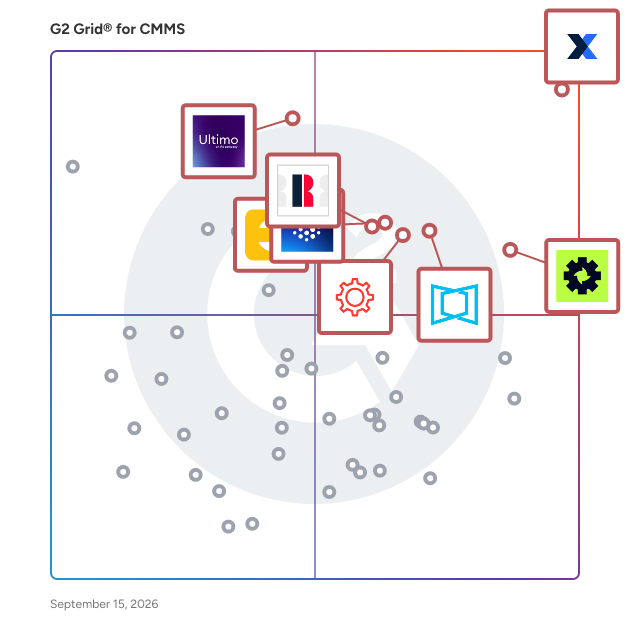
# Best CMMS Software - Page 3

*By [Nathan Calabrese](https://research.g2.com/insights/author/nathan-calabrese)*


Computerized maintenance management system (CMMS) software helps companies manage assets and equipment across their lifecycle to optimize utilization, reduce downtime, and support data-driven maintenance decisions. Technicians use CMMS tools to keep assets in optimal condition, while managers rely on them to track performance and plan improvements.

### Core Capabilities of CMMS Software

To qualify for inclusion in the CMMS category, a product must:

- Manage various types of assets and equipment across multiple locations
- Track inventory for spare parts and materials needed for maintenance
- Schedule maintenance activities such as inspections, repairs, and upgrades
- Manage resources (human and equipment) and allocate them to maintenance operations
- Deliver reports on asset utilization, maintenance costs, and technician productivity
- Ensure asset compliance with safety and environmental regulations
- Provide a mobile-friendly interface or mobile apps for field service technicians

### How CMMS Software Differs from Other Tools

CMMS best serves small and midsize businesses, while tools such as [enterprise asset management (EAM) software](https://www.g2.com/categories/enterprise-asset-management-eam) offer more advanced capabilities for large enterprises and industries with highly complex operational needs. CMMS platforms also commonly integrate with [accounting software](https://www.g2.com/categories/accounting) to support asset valuation and depreciation tracking.

### Insights from G2 on CMMS Software

Based on category trends on G2, the value of streamlined maintenance scheduling, stronger visibility into asset performance, and the convenience of mobile access for technicians in the field.


## Top CMMS Software at a Glance
| # | Product | Rating | Best For | What Users Say |
|---|---------|--------|----------|----------------|
| 1 | [MaintainX](https://www.g2.com/products/maintainx/reviews) | 4.8/5.0 (1,522 reviews) | Mobile-first CMMS with AI-assisted PM workflows | "[Helping Transform Maintenance from Reactive to Proactive](https://www.g2.com/survey_responses/maintainx-review-12996913)" |
| 2 | [Cryotos](https://www.g2.com/products/cryotos/reviews) | 4.7/5.0 (909 reviews) | Preventive and breakdown maintenance with QR-based work orders | "[Easy to use for PPM](https://www.g2.com/survey_responses/cryotos-review-12809418)" |
| 3 | [Limble](https://www.g2.com/products/limble/reviews) | 4.8/5.0 (679 reviews) | Technician-adopted preventive maintenance with QR-driven work requests | "[Simple to Learn, Fast Responses, and Excellent Customer Success Support](https://www.g2.com/survey_responses/limble-review-12914944)" |
| 4 | [Ultimo](https://www.g2.com/products/ultimo/reviews) | 4.5/5.0 (48 reviews) | Configurable asset lifecycle and work order CMMS | "[Ultimo: Comprehensive Asset Management with Stable Integration](https://www.g2.com/survey_responses/ultimo-review-12668293)" |
| 5 | [Fracttal One](https://www.g2.com/products/fracttal-one/reviews) | 4.6/5.0 (534 reviews) | Preventive maintenance scheduling with asset traceability | "[Intuitive and User-Friendly Platform That Boosts Team Efficiency](https://www.g2.com/survey_responses/fracttal-one-review-12125685)" |
| 6 | [UpKeep](https://www.g2.com/products/upkeep/reviews) | 4.5/5.0 (1,091 reviews) | Mobile-first preventive maintenance and work-order tracking | "[Upkeep Streamlined Our Work Planning and Team Communication](https://www.g2.com/survey_responses/upkeep-review-12560022)" |
| 7 | [ServiceChannel](https://www.g2.com/products/servicechannel/reviews) | 4.1/5.0 (136 reviews) | Multi-site work order and vendor coordination | "[Easy Client Communication and Streamlined Work Order Management](https://www.g2.com/survey_responses/servicechannel-review-12944629)" |
| 8 | [eMaint](https://www.g2.com/products/emaint/reviews) | 4.4/5.0 (285 reviews) | Configurable PM and asset-history tracking | "[Modern, User-Friendly CMMS That Boosts Technician Engagement](https://www.g2.com/survey_responses/emaint-review-13033021)" |
| 9 | [Fiix CMMS](https://www.g2.com/products/fiix-cmms/reviews) | 4.6/5.0 (471 reviews) | Preventive maintenance scheduling with asset-linked work orders | "[So far the best cmms System i deal With](https://www.g2.com/survey_responses/fiix-cmms-review-9589928)" |
| 10 | [Zapium](https://www.g2.com/products/zapium/reviews) | 5.0/5.0 (158 reviews) | — | "[Strong Support For Service Sales And Maintenance Account Planning](https://www.g2.com/survey_responses/zapium-review-12943460)" |

---
## What Are the Most Common Questions About CMMS Software?
*AI-generated · Last updated: May 26, 2026*
### What highest rated CMMS for Maintenance Managers meeting tight deployment deadlines based on user reviews?
Based on G2 reviews, several CMMS software options are repeatedly described as quick to set up and easy to roll out for maintenance teams working under tight timelines. According to verified users, MaintainX is often praised for easy setup, user-friendly workflows, strong onboarding help, and fast time to value. G2 reviewers also mention eMaint for straightforward setup and configurable forms, while Limble is noted for intuitive onboarding and structured implementation. Across recent reviews, buyers consistently highlight ease of deployment, clear navigation, and responsive support as the factors that matter most when deadlines are tight and teams need to get productive quickly.

**Here are some of the top-rated products on G2:**

- [MaintainX](https://www.g2.com/products/maintainx/reviews) – frequently used for fast setup, work order management, PM scheduling, and quick team rollout
- [Limble](https://www.g2.com/products/limble/reviews) – often chosen for intuitive onboarding, easy training, and centralized asset and PM management
- [eMaint](https://www.g2.com/products/emaint/reviews) – used for configurable maintenance workflows, dashboards, and straightforward deployment with support


### What CMMS platforms with reliable support and predictable product roadmaps without disrupting existing workflows during?
Based on G2 reviews, buyers looking for reliable support and steady platform improvement tend to emphasize responsiveness, guidance during rollout, and thoughtful product updates over flashy claims. According to verified users, MaintainX is repeatedly praised for fast chat support, helpful customer success managers, and onboarding assistance. G2 reviewers mention Limble for strong training resources, responsive support, and ongoing product updates. Reviews for eMaint also highlight knowledgeable support teams and one-on-one guidance, though some users note that reporting or configuration can still take time to master. Overall, recent feedback suggests the most dependable experiences come from products that combine active support with improvements that users can absorb without losing workflow continuity.


### Which CMMS solutions avoid vendor lock-in and implementation complexity without disrupting existing workflows during?
Based on G2 reviews, [MaintainX](https://www.g2.com/products/maintainx/reviews) stands out here because recent users most often describe it as easy to implement, intuitive for day-to-day work, and practical for replacing spreadsheets, paper records, or fragmented maintenance processes without an overly complex rollout. According to verified users, teams value being able to centralize work orders, assets, PM schedules, and reporting in a system that is straightforward to learn. G2 reviewers mention that implementation is smoother when the platform is easy to navigate and backed by responsive support. Reviews also show that buyers trying to reduce complexity tend to prioritize clean workflows, simple setup, and quick team adoption over highly customized but heavier deployments.


### What CMMS platforms with strong adoption rates and minimal learning curve while meeting compliance and?
Based on G2 reviews, the strongest adoption patterns appear in products that combine easy navigation with enough structure to support documentation, audit readiness, and repeatable maintenance processes. According to verified users, MaintainX is often described as easy to learn for both technicians and managers, with simple work order tracking and strong recordkeeping. G2 reviewers also mention Limble for low barriers to entry, intuitive setup, and helpful training, while Fiix is praised for user-friendly navigation and organized maintenance workflows. Recent reviews suggest that compliance-oriented teams respond best to CMMS software that reduces paperwork, centralizes records, and makes preventive maintenance and inspection history easy to find.


### What CMMS platforms most reliable by Maintenance Managers at Automotive companies based on reviews?
Based on G2 reviews, there is limited directly stated automotive company data in the recent review set, so the safest grounded read is to focus on products praised by maintenance leaders managing equipment, work orders, and uptime in industrial environments. According to verified users, MaintainX is frequently noted for scheduling, reporting, asset tracking, and reducing paperwork. G2 reviewers mention Limble for centralized PMs, inventory, and technician-friendly workflows, while eMaint is recognized for configurable maintenance programs, dashboards, and asset management. Reviews consistently point to reliability in daily use through responsive support, visible maintenance history, and better control over preventive maintenance rather than through industry-specific marketing claims.


### What top CMMS solutions for 51-200 employees needing quick team adoption and measurable ROI?
Based on G2 reviews, buyers in growing teams usually favor CMMS software that can be adopted quickly, simplify communication, and create visible gains in organization, uptime tracking, and reporting. According to verified users, MaintainX is often chosen for easy rollout, intuitive dashboards, and fast access to work order and asset data. G2 reviewers also mention Limble for simple onboarding and centralized maintenance planning, while UpKeep is praised for ease of use, streamlined work order management, and improved visibility into KPIs and asset activity. Across recent reviews, measurable ROI is usually described through reduced paperwork, faster issue response, better tracking, and improved maintenance planning rather than formal financial claims.

**Here are some of the top-rated products on G2:**

- [MaintainX](https://www.g2.com/products/maintainx/reviews) – helps teams adopt quickly with easy setup, reporting, and centralized maintenance workflows
- [Limble](https://www.g2.com/products/limble/reviews) – supports fast training, PM tracking, and asset visibility for growing maintenance teams
- [UpKeep](https://www.g2.com/products/upkeep/reviews) – used for organized work orders, asset tracking, and clearer maintenance planning across teams


### Which CMMS solutions integrate with existing tools without custom development while meeting compliance and?
Based on G2 reviews, [MaintainX](https://www.g2.com/products/maintainx/reviews) is the strongest fit in this review set because users repeatedly mention working with existing systems such as SAP, Excel-based imports, and other connected applications while still supporting maintenance tracking and documentation. According to verified users, MaintainX helps centralize asset records, work orders, and maintenance history in ways that support audits, reporting, and preventive maintenance routines. G2 reviewers also note that easy integration and straightforward deployment reduce friction for teams that do not want a heavy technical project. In recent reviews, practical compatibility and clean workflow management matter most for teams balancing system fit with compliance needs.


### Which CMMS platforms ease onboarding for non-technical team members for teams that need fast?
Based on G2 reviews, [MaintainX](https://www.g2.com/products/maintainx/reviews) is the clearest answer for teams that need fast onboarding for non-technical users. According to verified users, it is repeatedly described as intuitive, easy to teach, and simple for requesters, technicians, and managers to use without a steep learning curve. G2 reviewers mention that teams benefit from familiar workflows, easy mobile and desktop access, and training that gets users productive quickly. Reviews of Limble and UpKeep also highlight user-friendly interfaces, but MaintainX appears most consistently in recent feedback around fast adoption, simple setup, and helping teams move from paper, spreadsheets, or fragmented systems into one maintenance workflow.


### What best CMMS platforms for Maintenance Managers with limited implementation time and budget?
Based on G2 reviews, the best-fit CMMS software for limited implementation time and budget tends to be the products users describe as easy to learn, quick to launch, and practical for replacing manual processes fast. According to verified users, Limble is specifically called out by some smaller organizations as good value and straightforward to set up, while MaintainX is often praised for quick onboarding and immediate workflow improvement. G2 reviewers also mention Click Maint for user-friendly implementation and strong support, especially when teams are moving from simpler or older systems. In recent reviews, buyers with tighter constraints consistently prioritize ease of deployment, intuitive use, and visible operational gains over complex customization.

**Here are some of the top-rated products on G2:**

- [Limble](https://www.g2.com/products/limble/reviews) – highlighted for straightforward setup, easy training, and good value for smaller maintenance teams
- [MaintainX](https://www.g2.com/products/maintainx/reviews) – often used for quick implementation, simple work order tracking, and fast team adoption
- [Click Maint CMMS](https://www.g2.com/products/click-maint-cmms/reviews) – chosen for smooth rollout, simple navigation, and easy work order management


### What most trusted CMMS by Maintenance Managers at 51-200 employees based on user reviews?
Based on G2 reviews, trust in this category is usually reflected through consistent ease of use, reliable support, and proven day-to-day value rather than brand claims. According to verified users, MaintainX appears most frequently in recent review data and is widely praised for scheduling, reporting, work order organization, and responsive support. G2 reviewers also mention Limble, eMaint, and UpKeep as dependable choices for maintenance teams that need strong visibility into assets, PMs, and work history. Across the review set, the products buyers trust most are the ones that help teams stay organized, reduce paperwork, improve communication, and make maintenance information easier to access and act on.


## How Many CMMS Software Products Does G2 Track?
**Total Products under this Category:** 406

### Category Stats (Jul 2026)
- **Average Rating**: 4.37/5 The average rating of products in this category, based on all submitted ratings
- **Top Trending Product**: ServiceChannel (+1.43%) - Among all products in this category, ServiceChannel recorded the largest rating increase compared to last month
*Last updated: July 06, 2026*


## How Does G2 Rank CMMS Software Products?

**Why You Can Trust G2's Software Rankings:**

- 30 Analysts and Data Experts
- 10,100+ Authentic Reviews
- 406+ Products
- Unbiased Rankings

G2's software rankings are built on verified user reviews, rigorous moderation, and a consistent research methodology maintained by a team of analysts and data experts. Each product is measured using the same transparent criteria, with no paid placement or vendor influence. While reviews reflect real user experiences, which can be subjective, they offer valuable insight into how software performs in the hands of professionals. Together, these inputs power the G2 Score, a standardized way to compare tools within every category.


## Which CMMS Software Is Best for Your Use Case?

- **Leader:** [MaintainX](https://www.g2.com/products/maintainx/reviews)
- **Highest Performer:** [Zapium](https://www.g2.com/products/zapium/reviews)
- **Easiest to Use:** [Limble](https://www.g2.com/products/limble/reviews)
- **Top Trending:** [MaintainX](https://www.g2.com/products/maintainx/reviews)
- **Best Free Software:** [MaintainX](https://www.g2.com/products/maintainx/reviews)


---

**Sponsored**

### Knowify

\*\*NEW\*\* - Knowify now connects directly to AI platforms like Claude and ChatGPT. No generic AI advice. No reports to build. No analyst to hire. Just the insights you need to grow with confidence. ✅ “What jobs need my attention this week?” ✅ “What’s my WIP this month?” ✅ “Who’s making me the most money on commercial work?” Every job. Every number. Everything that drives profitability. Any question you’ve every had about your business. Now all you have to do is ask. ------------------------------------------------- Knowify is job management software built for trade contractors. Founded in New York City, with team members across the U.S. and Canada, Knowify supports growing subcontractors with teams ranging from 2 to 200. The platform is trusted by contractors across trades like electrical, plumbing, HVAC, drywall, and remodeling. Knowify brings estimating, job costing, scheduling, time tracking, and invoicing together in one platform. It supports construction-specific workflows including AIA billing, change orders, certified payroll, and prevailing wage tracking. Mobile tools keep field teams connected to the office, and everything stays in sync with QuickBooks Online, QuickBooks Payroll, QuickBooks time, QuickBooks Payments, and Intuit Enterprise Suite through a best-in-class two-way integration. Knowify helps contractors stay organized, on schedule, and profitable. With real-time visibility into costs and progress, contractors can manage every job more efficiently and make confident financial decisions. Knowify replaces spreadsheets and disconnected tools with one system built to support growing construction businesses. Most importantly - our fully U.S.-based support team is full of real people ready to talk and help you solve the challenges in your business. We&#39;re proud partners of the trades - and proud of our commitment to top quality software and service.


[Visit website](https://www.g2.com/external_clickthroughs/record?secure%5Bad_program%5D=ppc&amp;secure%5Bad_slot%5D=category_product_list&amp;secure%5Bcategory_id%5D=431&amp;secure%5Bchosen_at%5D=2026-07-06T13%3A07%3A20Z&amp;secure%5Bdisplayable_resource_id%5D=2355&amp;secure%5Bdisplayable_resource_type%5D=Category&amp;secure%5Bmedium%5D=sponsored&amp;secure%5Bplacement_reason%5D=retargeted_product&amp;secure%5Bplacement_resource_ids%5D%5B%5D=9478&amp;secure%5Bprioritized%5D=false&amp;secure%5Bproduct_id%5D=9478&amp;secure%5Bresource_id%5D=431&amp;secure%5Bresource_type%5D=Category&amp;secure%5Bsource_type%5D=category_page&amp;secure%5Bsource_url%5D=https%3A%2F%2Fwww.g2.com%2Fcategories%2Fcmms%3Fpage%3D11%26selected_view%3Dgrid&amp;secure%5Btoken%5D=52f6dce858850333ab24e2a4bef989eb56f93972a9fa454ddfc8603367d973f6&amp;secure%5Burl%5D=https%3A%2F%2Fknowify.com%2Frequest-demo%2F&amp;secure%5Burl_type%5D=book_demo)

---

## What Are the Top-Rated CMMS Software Products in 2026?
### 1. [Infraspeak](https://www.g2.com/products/infraspeak/reviews)
⚙️ Infraspeak is a collaborative platform that enables complex facilities management operations to Work as One, connecting all internal and external stakeholders without silos, blind spots or overload. With intelligence and flexibility at its core, Infraspeak provides end-to-end collaborationm visibility and efficiency across Preventive Maintenance • Work Order Management • Maintenance Management Automation • Asset Management • Compliance &amp; Inspection Management • Analytics &amp; Reporting • Contractor &amp; Vendor Management • Procurement Management • Inventory Management • Field Service Management • and more! With mobile-first, user-friendly interfaces, hundreds of seamless integrations, and a commitment to continuous improvement, Infraspeak gives FM and teams one centralised place to manage their entire operations. 🎯 Cut MTTR by up to 83% 🎯 Reduce costs by 3.2x 🎯 Increase SLA compliance by up to 91% 🎯 Prolong the lifespan of your critical assets. Founded in 2015, Infraspeak is trusted by 900+ companies from industry leaders like Siemens, Veolia, Sandvik, Mitsubishi Electrical, Engie and Primark, to manage over 3 million assets daily. Learn more at infraspeak.com.


**Average Rating:** 4.6/5.0
**Total Reviews:** 34
**How Do G2 Users Rate Infraspeak?**

- **Has the product been a good partner in doing business?:** 8.8/10 (Category avg: 9.0/10)
- **Work Order Management:** 9.3/10 (Category avg: 8.6/10)
- **Preventative Maintenance (PM):** 9.3/10 (Category avg: 8.6/10)
- **Equipment Breakdown Reports:** 7.9/10 (Category avg: 8.2/10)

**Who Is the Company Behind Infraspeak?**

- **Seller:** [Infraspeak](https://www.g2.com/sellers/infraspeak)
- **Company Website:** https://www.infraspeak.com
- **Year Founded:** 2015
- **HQ Location:** Porto, PT
- **Twitter:** @infraspeak (635 Twitter followers)
- **LinkedIn® Page:** https://www.linkedin.com/company/9252929 (246 employees on LinkedIn®)

**Who Uses This Product?**
- **Top Industries:** Facilities Services
- **Company Size:** 35% Enterprise, 35% Mid-Market


#### What Are Infraspeak's Pros and Cons?

**Pros:**

- Ease of Use (4 reviews)
- Features (2 reviews)
- Integration Management (2 reviews)
- Integrations (2 reviews)
- Intuitive (2 reviews)

**Cons:**

- Complexity (3 reviews)
- Improvement Needed (2 reviews)
- Learning Curve (2 reviews)
- Poor User Experience (2 reviews)
- Complex Navigation (1 reviews)


### What Do G2 Reviewers Say About Infraspeak?
*AI-generated summary from verified user reviews*

**Pros:**

- Users commend the **ease of use** of Infraspeak, enabling efficient adoption and seamless integration across teams.
- Users value the **powerful integrations** and **intuitive interface** of Infraspeak, enhancing operational efficiency and decision-making.
- Users praise the **seamless integration capabilities** of Infraspeak, enhancing operational efficiency across various tools and systems.
- Users appreciate the **seamless integrations** of Infraspeak, enhancing efficiency and revolutionizing their operational processes.
- Users value the **intuitive interface** of Infraspeak, enabling quick adoption and ease of use for all teams.

**Cons:**

- Users find the **complexity of the initial data migration** challenging, though support teams offer helpful assistance.
- Users feel **improvement is needed** in Infraspeak&#39;s analytics and stocks system, desiring a more intuitive interface.
- Users note a **steeper learning curve** with Infraspeak, finding it less intuitive than expected for technical tasks.
- Users find Infraspeak to have a **poor user experience** due to its lack of intuitiveness and steep learning curve.
- Users find the **complex navigation** of Infraspeak not very intuitive, suggesting it could be simplified.

#### What Are Recent G2 Reviews of Infraspeak?

**"[Flexible Work Orders, Integrations, and Stock Control in One System](https://www.g2.com/survey_responses/infraspeak-review-12668231)"**

**Rating:** 4.5/5.0 stars
*— Verified User in Information Technology and Services*

[Read full review](https://www.g2.com/survey_responses/infraspeak-review-12668231)

---

**"[Infraspeak Makes Maintenance Workflows Simple, Mobile-First, and Easy to Adopt](https://www.g2.com/survey_responses/infraspeak-review-12660231)"**

**Rating:** 5.0/5.0 stars
*— Andrew V.*

[Read full review](https://www.g2.com/survey_responses/infraspeak-review-12660231)

---


### 2. [Mainsaver](https://www.g2.com/products/mainsaver/reviews)
Streamline maintenance management, improve productivity and reduce downtime with Mainsaver, the CMMS solution with a 39-year track record on the plant floor. Mainsaver Cloud provides an efficient, easy-to-use, and reliable CMMS platform to manage work orders, tackle preventative maintenance, manage purchasing and spare parts inventories, and make data-driven decisions about assets and resources. INDUSTRY-PROVEN TOOLSET | EASY TO USE AND IMPLEMENT ACCESSIBLE ANYWHERE ROBUST SECURITY PROTECTIONS | AFFORDABLE FOR SMALL AND MEDIUM-SIZED BUSINESSES | BACKED BY THE MOST EXPERIENCED TEAM IN THE INDUSTRY Mainsaver Core offers comprehensive enterprise asset management capabilities in a customizable on-premise or web-based solution that meets the needs of the largest and most complex organizations. INDUSTRY-PROVEN EAM | 21 CFR 11 COMPLIANCE | SEAMLESS INTEGRATIONS | MOBILE MAINTENANCE OPTIONS | EASY TO USE, RAPID DEPLOYMENT | FLEXIBLE IMPLEMENTATION | AFFORDABLY PRICED | BACKED BY THE MOST EXPERIENCED TEAM IN THE INDUSTRY Mainsaver has helped thousands of companies, large and small, achieve their maintenance and operations goals. Find out what we can do for you at https://www.mainsaver.com/


**Average Rating:** 4.4/5.0
**Total Reviews:** 11
**How Do G2 Users Rate Mainsaver?**

- **Work Order Management:** 9.0/10 (Category avg: 8.6/10)
- **Preventative Maintenance (PM):** 9.0/10 (Category avg: 8.6/10)
- **Equipment Breakdown Reports:** 9.0/10 (Category avg: 8.2/10)

**Who Is the Company Behind Mainsaver?**

- **Seller:** [Mainsaver](https://www.g2.com/sellers/mainsaver)
- **Year Founded:** 1983
- **HQ Location:** San Diego, California
- **Twitter:** @Mainsaver_CMMS (9 Twitter followers)
- **LinkedIn® Page:** https://www.linkedin.com/company/mainsaver-software (8 employees on LinkedIn®)

**Who Uses This Product?**
- **Company Size:** 82% Mid-Market, 18% Enterprise


#### What Are Recent G2 Reviews of Mainsaver?

**"[Easy Asset Tracking](https://www.g2.com/survey_responses/mainsaver-review-9670060)"**

**Rating:** 4.5/5.0 stars
*— Hinku S.*

[Read full review](https://www.g2.com/survey_responses/mainsaver-review-9670060)

---

**"[Looking for key data on equipment](https://www.g2.com/survey_responses/mainsaver-review-9934071)"**

**Rating:** 4.0/5.0 stars
*— MICHELIZZA A.*

[Read full review](https://www.g2.com/survey_responses/mainsaver-review-9934071)

---


#### What Are G2 Users Discussing About Mainsaver?

- [What is Mainsaver used for?](https://www.g2.com/discussions/what-is-mainsaver-used-for)

### 3. [MRI Facilities Management](https://www.g2.com/products/mri-software-mri-facilities-management/reviews)
MRI Facilities Management is a fully scalable IWMS/CAFM solution which enables FM managers to gain complete oversight of their facilities, elevate the workforce, and increase profit margins with one single source of truth. Utilizing mobile workforce apps to keep connected at all times and customer engagement apps to transform experiences, MRI Facilities Management provides control and oversight of resources to stay efficient and manages asset lifecycles to reduce costs and prevent SLA failure. Core functionality includes helpdesk, planned preventative maintenance (PPM), asset management, resource management, client contract management, invoicing, vendor and SLA management, space and move management, BIM, IoT, and mobile solutions.


**Average Rating:** 3.9/5.0
**Total Reviews:** 29
**How Do G2 Users Rate MRI Facilities Management?**

- **Has the product been a good partner in doing business?:** 6.7/10 (Category avg: 9.0/10)
- **Work Order Management:** 1.7/10 (Category avg: 8.6/10)
- **Preventative Maintenance (PM):** 3.3/10 (Category avg: 8.6/10)
- **Equipment Breakdown Reports:** 0.0/10 (Category avg: 8.2/10)

**Who Is the Company Behind MRI Facilities Management?**

- **Seller:** [MRI Software](https://www.g2.com/sellers/mri-software)
- **Year Founded:** 1971
- **HQ Location:** Solon, OH
- **Twitter:** @mrisoftware (2,773 Twitter followers)
- **LinkedIn® Page:** https://www.linkedin.com/company/751259/ (4,450 employees on LinkedIn®)

**Who Uses This Product?**
- **Company Size:** 38% Small-Business, 34% Mid-Market


#### What Are Recent G2 Reviews of MRI Facilities Management?

**"[very useful and full of information](https://www.g2.com/survey_responses/mri-facilities-management-review-7153190)"**

**Rating:** 5.0/5.0 stars
*— Michele H.*

[Read full review](https://www.g2.com/survey_responses/mri-facilities-management-review-7153190)

---

**"[Consolidated Facility Management Software for Enterprises](https://www.g2.com/survey_responses/mri-facilities-management-review-5425170)"**

**Rating:** 4.5/5.0 stars
*— Nick R.*

[Read full review](https://www.g2.com/survey_responses/mri-facilities-management-review-5425170)

---


#### What Are G2 Users Discussing About MRI Facilities Management?

- [What is Angus AnyWhere used for?](https://www.g2.com/discussions/what-is-angus-anywhere-used-for)

### 4. [Nuvolo Connected Workplace](https://www.g2.com/products/nuvolo-connected-workplace/reviews)
Nuvolo is a modern, Connected Workplace solution, Built on NOW™. Manage people, places, and assets on one platform, unlocking collaboration and advanced reporting across your organization. By extending the NOW platform across business areas, you can easily automate key facility, workplace and asset management processes, capture actionable data, and ensure all your teams have access to a single source of truth. Handle your maintenance, dispatch, space, reservation, lease, project, and sustainability needs - all while keeping your OT devices secure. We help connect your workplace no matter what your business is. Whether you&#39;re in healthcare, retail, high tech, banking, life sciences, manufacturing... we&#39;ve got you covered. We also offer a Small and Mid-Sized Businesses version.


**Average Rating:** 4.1/5.0
**Total Reviews:** 11
**How Do G2 Users Rate Nuvolo Connected Workplace?**

- **Has the product been a good partner in doing business?:** 9.4/10 (Category avg: 9.0/10)

**Who Is the Company Behind Nuvolo Connected Workplace?**

- **Seller:** [Nuvolo](https://www.g2.com/sellers/nuvolo)
- **Year Founded:** 2013
- **HQ Location:** Wellesley , US
- **Twitter:** @Nuvolo (6 Twitter followers)
- **LinkedIn® Page:** https://www.linkedin.com/company/5043394/ (307 employees on LinkedIn®)

**Who Uses This Product?**
- **Company Size:** 77% Enterprise, 15% Mid-Market


#### What Are Recent G2 Reviews of Nuvolo Connected Workplace?

**"[Efficient Asset Inventory with Room for Improvement](https://www.g2.com/survey_responses/nuvolo-connected-workplace-review-12577404)"**

**Rating:** 4.5/5.0 stars
*— Barry K.*

[Read full review](https://www.g2.com/survey_responses/nuvolo-connected-workplace-review-12577404)

---

**"[Great application for Real Estate](https://www.g2.com/survey_responses/nuvolo-connected-workplace-review-8187294)"**

**Rating:** 5.0/5.0 stars
*— Amrit Kumar P.*

[Read full review](https://www.g2.com/survey_responses/nuvolo-connected-workplace-review-8187294)

---


#### What Are G2 Users Discussing About Nuvolo Connected Workplace?

- [What is Nuvolo Connected Workplace used for?](https://www.g2.com/discussions/what-is-nuvolo-connected-workplace-used-for)

### 5. [Tango](https://www.g2.com/products/24-7-systems-tango/reviews)
Equipment and Condition management application. Features: Inventory control, History, Condition monitoring, and more.


**Average Rating:** 4.3/5.0
**Total Reviews:** 8
**How Do G2 Users Rate Tango?**

- **Work Order Management:** 8.3/10 (Category avg: 8.6/10)
- **Preventative Maintenance (PM):** 6.7/10 (Category avg: 8.6/10)
- **Equipment Breakdown Reports:** 6.7/10 (Category avg: 8.2/10)

**Who Is the Company Behind Tango?**

- **Seller:** [24/7 Systems](https://www.g2.com/sellers/24-7-systems)
- **Year Founded:** 1998
- **HQ Location:** Louisville, US
- **Twitter:** @247_Systems (33 Twitter followers)
- **LinkedIn® Page:** https://www.linkedin.com/company/10321440 (5 employees on LinkedIn®)

**Who Uses This Product?**
- **Company Size:** 63% Mid-Market, 25% Small-Business


#### What Are Recent G2 Reviews of Tango?

**"[The app to go, Tango](https://www.g2.com/survey_responses/tango-review-6622369)"**

**Rating:** 4.0/5.0 stars
*— Jwalin T.*

[Read full review](https://www.g2.com/survey_responses/tango-review-6622369)

---

**"[Use of tango](https://www.g2.com/survey_responses/tango-review-9346828)"**

**Rating:** 4.0/5.0 stars
*— Charlotte M.*

[Read full review](https://www.g2.com/survey_responses/tango-review-9346828)

---


### 6. [task360](https://www.g2.com/products/task360/reviews)
Task360 is a state-of-the-art Computerized Maintenance Management System (CMMS) designed to revolutionize your maintenance operations. Task360 offers an intuitive platform for the creation, assignment, and tracking of work orders. Task360&#39;s comprehensive reporting tools provide valuable insights into maintenance performance and costs. Whether in manufacturing, energy, healthcare, logistics, or construction, Task360 adapts to your operational needs with: -An intuitive user interface -Mobile accessibility for field teams -Scalable modules tailored to your industry -Seamless integrations with ERP and CRM systems -Task360 helps teams reduce downtime, extend asset life, and drive operational efficiency—all from one centralized platform.


**Average Rating:** 4.8/5.0
**Total Reviews:** 8
**How Do G2 Users Rate task360?**

- **Has the product been a good partner in doing business?:** 10.0/10 (Category avg: 9.0/10)
- **Work Order Management:** 10.0/10 (Category avg: 8.6/10)
- **Preventative Maintenance (PM):** 9.8/10 (Category avg: 8.6/10)
- **Equipment Breakdown Reports:** 9.6/10 (Category avg: 8.2/10)

**Who Is the Company Behind task360?**

- **Seller:** [Pargesoft](https://www.g2.com/sellers/pargesoft)
- **Year Founded:** 2002
- **HQ Location:** ISTANBUL, TR
- **LinkedIn® Page:** https://www.linkedin.com/company/pargesoft/ (129 employees on LinkedIn®)

**Who Uses This Product?**
- **Company Size:** 50% Mid-Market, 50% Small-Business


#### What Are task360's Pros and Cons?

**Pros:**

- Real-time Monitoring (2 reviews)
- Task Management (2 reviews)
- Asset Management (1 reviews)
- Customer Support (1 reviews)
- Ease of Use (1 reviews)

**Cons:**

- Complexity (1 reviews)
- Complex Navigation (1 reviews)
- Implementation Delays (1 reviews)
- Learning Curve (1 reviews)
- Manual Data Entry (1 reviews)


### What Do G2 Reviewers Say About task360?
*AI-generated summary from verified user reviews*

**Pros:**

- Users value the **real-time updates** from Task360, enhancing efficiency in assigning and tracking work orders seamlessly.
- Users value the **user-friendly and flexible task management** of Task360, enhancing productivity and simplifying workflows.
- Users highlight Task360&#39;s **powerful asset management features** , especially the seamless offline mobile app and easy customization.
- Users value the **responsive and helpful customer support** of Task360, enhancing their overall experience and satisfaction.
- Users find the **ease of use** of task360 exceptional, with quick implementation and intuitive design for workers.

**Cons:**

- Users find the **complexity of operations** makes learning the system challenging and time-consuming.
- Users find the **complex navigation** challenging, often requiring significant time to master complicated processes.
- Users find **implementation delays** with advanced features, but view these issues as minor relative to overall benefits.
- Users find the **learning curve steep** due to complex operations, requiring significant time to master the details.
- Users find **manual data entry cumbersome** , especially when looking for more advanced automation and customizable reporting options.

#### What Are Recent G2 Reviews of task360?

**"[A well-structured and reliable CMMS with strong mobile features](https://www.g2.com/survey_responses/task360-review-11311065)"**

**Rating:** 5.0/5.0 stars
*— Matthew  D.*

[Read full review](https://www.g2.com/survey_responses/task360-review-11311065)

---

**"[Ontime Delivery  forever](https://www.g2.com/survey_responses/task360-review-11311117)"**

**Rating:** 5.0/5.0 stars
*— Nathan R.*

[Read full review](https://www.g2.com/survey_responses/task360-review-11311117)

---


### 7. [AssetCues](https://www.g2.com/products/assetcues/reviews)
AssetCues product suite is a combination of asset management products offering a range of solutions including for asset inventory, asset tracking and management, IT assets management. AssetCues solution is used by enterprises of all sizes including Fortune 500 companies and newly established start-ups in a variety of industries including Manufacturing, IT services, Banks and Financial Services, Pharmaceutical, Chemical, Cosmetics, Media and Healthcare.


**Average Rating:** 4.7/5.0
**Total Reviews:** 13
**How Do G2 Users Rate AssetCues?**

- **Has the product been a good partner in doing business?:** 9.4/10 (Category avg: 9.0/10)
- **Work Order Management:** 8.9/10 (Category avg: 8.6/10)
- **Preventative Maintenance (PM):** 8.3/10 (Category avg: 8.6/10)
- **Equipment Breakdown Reports:** 8.3/10 (Category avg: 8.2/10)

**Who Is the Company Behind AssetCues?**

- **Seller:** [AssetCues](https://www.g2.com/sellers/assetcues)
- **Year Founded:** 2015
- **HQ Location:** Pune, IN
- **Twitter:** @assetrak (27 Twitter followers)
- **LinkedIn® Page:** https://www.linkedin.com/company/assetcues (112 employees on LinkedIn®)

**Who Uses This Product?**
- **Company Size:** 43% Enterprise, 29% Mid-Market


#### What Are AssetCues's Pros and Cons?

**Pros:**

- Asset Management (4 reviews)
- Ease of Use (3 reviews)
- Features (3 reviews)
- Implementation Ease (3 reviews)
- Customer Support (2 reviews)

**Cons:**

- Data Entry Issues (1 reviews)
- Limited Customization (1 reviews)
- Manual Data Entry (1 reviews)
- Missing Features (1 reviews)


### What Do G2 Reviewers Say About AssetCues?
*AI-generated summary from verified user reviews*

**Pros:**

- Users value the **streamlined and efficient asset tracking** capabilities of AssetCues, enhancing management and operational transparency.
- Users find AssetCues very **easy to use** , benefiting from its intuitive interface and streamlined asset management features.
- Users highlight the **intuitive design and multiple features** of AssetCues, which enhance asset management efficiency.
- Users praise the **implementation ease** of AssetCues, highlighting quick assistance and a seamless onboarding experience.
- Users commend the **quick customer support** of AssetCues, ensuring smooth operation and assistance when needed.

**Cons:**

- Users faced significant **data entry issues** in AssetCues, hoping for improvements in future updates.
- Users note the **limited customization** in the old version, but it doesn&#39;t significantly impact product usage.
- Users faced significant **manual data entry** work in UAT1.0, hoping for improvements in UAT 2.0.
- Users feel that the **missing features** , like physical asset verification via the front camera, hinder the app&#39;s functionality.

#### What Are Recent G2 Reviews of AssetCues?

**"[Complete solution for Assets lifecycle](https://www.g2.com/survey_responses/assetcues-review-11499791)"**

**Rating:** 5.0/5.0 stars
*— Harsha S.*

[Read full review](https://www.g2.com/survey_responses/assetcues-review-11499791)

---

**"[Easy to go solution for all IT asset](https://www.g2.com/survey_responses/assetcues-review-11591120)"**

**Rating:** 4.5/5.0 stars
*— Vaibhav G.*

[Read full review](https://www.g2.com/survey_responses/assetcues-review-11591120)

---


### 8. [BlueFolder](https://www.g2.com/products/bluefolder/reviews)
BlueFolder is a Work Order and Field Service Management Software that helps commercial service pros in the field stay on-schedule, access critical job details &amp; work order management features in a mobile and web-based user-friendly interface. Access robust features: recurring jobs, secure custom user permissions, scheduling/dispatch, asset/equipment tracking, customer portals, &amp; more. Reduce or eliminate paperwork using integrations with QuickBooks &amp; more. Keep all your field techs on track and streamline operations with powerful features and a simple, user-friendly interface. Our customers regularly tell us that adopting it has been the key to realizing the productivity gains that have propelled their business to the next level. BlueFolder’s pricing plans and features are structured to meet the needs of service teams of all sizes, from small companies with only a few users to large scale enterprise organizations with hundreds of users. Schedule a demo today to see how BlueFolder can help your service team.


**Average Rating:** 4.3/5.0
**Total Reviews:** 29
**How Do G2 Users Rate BlueFolder?**

- **Has the product been a good partner in doing business?:** 9.2/10 (Category avg: 9.0/10)

**Who Is the Company Behind BlueFolder?**

- **Seller:** [BlueFolder Software](https://www.g2.com/sellers/bluefolder-software)
- **Year Founded:** 2003
- **HQ Location:** Colorado Springs, Colorado
- **Twitter:** @BlueFolder (71 Twitter followers)
- **LinkedIn® Page:** https://www.linkedin.com/company/151413/ (3 employees on LinkedIn®)

**Who Uses This Product?**
- **Company Size:** 80% Small-Business, 23% Mid-Market


#### What Are Recent G2 Reviews of BlueFolder?

**"[Easy basic scheduling system](https://www.g2.com/survey_responses/bluefolder-review-6624502)"**

**Rating:** 5.0/5.0 stars
*— Jenny M.*

[Read full review](https://www.g2.com/survey_responses/bluefolder-review-6624502)

---

**"[Effective work order management with a great API](https://www.g2.com/survey_responses/bluefolder-review-6623945)"**

**Rating:** 5.0/5.0 stars
*— Chip N.*

[Read full review](https://www.g2.com/survey_responses/bluefolder-review-6623945)

---


#### What Are G2 Users Discussing About BlueFolder?

- [What is BlueFolder used for?](https://www.g2.com/discussions/what-is-bluefolder-used-for)

### 9. [CARL Source](https://www.g2.com/products/carl-source/reviews)
Discover CARL Software, the French CMMS software expert for over 40 years. CARL Source is a CMMS/EAM solution designed to meet the specific needs of companies in all sectors and adopted by over 100,000 users across 5 continents. CARL Source optimizes maintenance management, reduces downtime and improves the productivity of technical teams. It is deployed on desktop, SaaS and On-Premise. CARL Software positions itself at the forefront of Industry 5.0 and Maintenance 5.0 by integrating cutting-edge AI-based solutions. CARL Software has been working for over 10 years on artificial intelligence-based solutions for maintenance, based on machine learning and IoT technologies. CARL has now integrated generative AI-related functionalities into all its products to fully embrace the industry 5.0 era. The CARL Source CMMS solution enables you to : • Manage your corrective maintenance operations on a daily basis • Plan maintenance actions to optimize the use of your resources • Efficiently manage your maintenance work with customized dashboards and reports • Optimize the lifecycle management of your equipment fleet The solution is synchronized with 2 mobile applications available on smartphones and tablets: • CARL Flash, for maintenance work requests in just a few clicks • CARL Touch, the daily tool for your maintenance teams E-learning training available 24/7, so you can train on your own. All the while benefiting from a skills assessment by an expert consultant. CARL Source is also designed to meet the specific needs of companies in all sectors: • Industrial companies to guarantee the best operating conditions for their equipment and infrastructures (CARL Source Factory). • Building contractors and property managers have a complete, real-time view of their assets (CARL Source Facility). • Local authorities and public administrations benefit from a combined CMMS and TAM solution (CARL Source City) • Medical and hospital establishments ensure compliance and personal safety (CARL Source Healthcare) • Logistics companies and vehicle fleet managers ensure optimum availability of their fixed and rolling assets (CARL Source Transport) CARL Source can be integrated into your existing information system, thanks to our numerous APIs and our CMMS solution enables you to : • Manage your maintenance operations on a daily basis • Plan corrective and preventive maintenance actions, optimizing the use of all your material and human resources. • Efficiently manage your Maintenance work with customized dashboards and reports • Optimize the lifecycle management of your equipment fleet • Automatically integrate your regulatory reports. • Plan your internal and external resources graphically. • Make the most of your connected equipment (IoT) • Improve the efficiency of your field technicians and inventory managers with a dedicated mobile application. • Control your purchases, inventories, budgets and contracts. • Take advantage of the latest CMMS innovations: BIM models, Artificial Intelligence, energy consumption control... • Integrate, visualize and interact directly with your plans (.DWG), maps (GIS) and digital mock-ups (BIM) • Make the most of your field data (connected objects and machines) to analyze failures, propose appropriate maintenance actions and anticipate wear and tear and breakdowns.


**Average Rating:** 4.6/5.0
**Total Reviews:** 8
**How Do G2 Users Rate CARL Source?**

- **Has the product been a good partner in doing business?:** 7.5/10 (Category avg: 9.0/10)
- **Work Order Management:** 8.3/10 (Category avg: 8.6/10)
- **Preventative Maintenance (PM):** 8.6/10 (Category avg: 8.6/10)
- **Equipment Breakdown Reports:** 7.8/10 (Category avg: 8.2/10)

**Who Is the Company Behind CARL Source?**

- **Seller:** [CARL Berger-Levrault](https://www.g2.com/sellers/carl-berger-levrault)
- **Year Founded:** 1985
- **HQ Location:** LIMONEST, FR
- **LinkedIn® Page:** https://www.linkedin.com/company/10573678 (164 employees on LinkedIn®)

**Who Uses This Product?**
- **Company Size:** 50% Small-Business, 38% Mid-Market


#### What Are Recent G2 Reviews of CARL Source?

**"[Flexible software with excellent technical support](https://www.g2.com/survey_responses/carl-source-review-12675548)"**

**Rating:** 5.0/5.0 stars
*— Gabriele C.*

[Read full review](https://www.g2.com/survey_responses/carl-source-review-12675548)

---

**"[Convenient Document Storage and Inventory Management](https://www.g2.com/survey_responses/carl-source-review-12675729)"**

**Rating:** 4.5/5.0 stars
*— Nicolò G.*

[Read full review](https://www.g2.com/survey_responses/carl-source-review-12675729)

---


#### What Are G2 Users Discussing About CARL Source?

- [What is CARL Source used for?](https://www.g2.com/discussions/what-is-carl-source-used-for)

### 10. [Fidelity](https://www.g2.com/products/fidelity/reviews)
ASEE Fidelity is a modular and scalable platform to manage the full lifecycle of assets and expenditures with a built-in budget, demand, procurement, and accounting processes. Fidelity ensures compliance and proactive budget control to build effective sourcing strategies.


**Average Rating:** 3.9/5.0
**Total Reviews:** 7
**How Do G2 Users Rate Fidelity?**

- **Has the product been a good partner in doing business?:** 7.8/10 (Category avg: 9.0/10)
- **Work Order Management:** 6.1/10 (Category avg: 8.6/10)
- **Preventative Maintenance (PM):** 8.3/10 (Category avg: 8.6/10)
- **Equipment Breakdown Reports:** 5.0/10 (Category avg: 8.2/10)

**Who Is the Company Behind Fidelity?**

- **Seller:** [ASEE Group (formerly ASSECO South Eastern Europe)](https://www.g2.com/sellers/asee-group-formerly-asseco-south-eastern-europe)
- **Year Founded:** 2007
- **HQ Location:** Warsaw, PL
- **LinkedIn® Page:** https://linkedin.com/company/asseco-south-eastern-europe/ (2,047 employees on LinkedIn®)

**Who Uses This Product?**
- **Company Size:** 71% Small-Business, 29% Enterprise


#### What Are Fidelity's Pros and Cons?

**Pros:**

- Ease of Use (2 reviews)
- Customer Support (1 reviews)
- Mobile App (1 reviews)
- Notifications (1 reviews)

**Cons:**

- Confusion (1 reviews)
- Implementation Delays (1 reviews)
- Learning Curve (1 reviews)
- Limited Features (1 reviews)
- Manual Data Entry (1 reviews)


### What Do G2 Reviewers Say About Fidelity?
*AI-generated summary from verified user reviews*

**Pros:**

- Users appreciate the **ease of use** of Fidelity, highlighting its user-friendliness and responsive support when needed.
- Users value the **helpful customer support** of Fidelity, making it easy to resolve issues efficiently.
- Users find the app to be a **better feature than the website** , enhancing the overall experience with Fidelity.
- Users appreciate the **prompt notifications** from Fidelity, enhancing their overall user experience with timely updates.

**Cons:**

- Users find the **reporting confusion** challenging, especially those unfamiliar with handling 401k accounts.
- Users face **implementation delays** and challenges with manual processes, leading to mistakes and poor customer support experiences.
- Users find the **learning curve confusing** for Fidelity, especially with 401k report management for newcomers.
- Users find the **limited features** of Fidelity cumbersome, leading to manual errors and difficulties in contacting support.
- Users find the **manual data entry** process cumbersome and prone to errors, complicating their overall experience with Fidelity.

#### What Are Recent G2 Reviews of Fidelity?

**"[Senior Finance Manager](https://www.g2.com/survey_responses/fidelity-review-9326029)"**

**Rating:** 5.0/5.0 stars
*— Bharat G.*

[Read full review](https://www.g2.com/survey_responses/fidelity-review-9326029)

---

**"[Easy to use](https://www.g2.com/survey_responses/fidelity-review-7814544)"**

**Rating:** 5.0/5.0 stars
*— Soheila H.*

[Read full review](https://www.g2.com/survey_responses/fidelity-review-7814544)

---


#### What Are G2 Users Discussing About Fidelity?

- [How does the Fidelity app work?](https://www.g2.com/discussions/how-does-the-fidelity-app-work)
- [What platform does Fidelity use?](https://www.g2.com/discussions/what-platform-does-fidelity-use)
- [What is Fidelity known for?](https://www.g2.com/discussions/what-is-fidelity-known-for)

### 11. [OfficeSpace Software](https://www.g2.com/products/officespace-software/reviews)
Rated #1 for Enterprise Space Management, Desk Booking, and Room Booking, OfficeSpace is the leading AI Operating System for the Built World, defining a new category of workplace software. The OfficeSpace platform, enhanced with AI Canvas, empowers more than 1,800 organizations worldwide to plan, operate, and experience their built world within a single intelligent system. OfficeSpace helps organizations optimize space utilization, right-size real estate portfolios, manage assets across their lifecycle, streamline maintenance, and deliver intuitive, human-centered workplace experiences. OfficeSpace comes fully integrated out of the box with workplace tools like Microsoft, Google, Slack, and Zoom, and securely connects data from Wi-Fi, badge systems, and sensors to provide a unified system of record and action for the built world.


**Average Rating:** 4.7/5.0
**Total Reviews:** 125
**How Do G2 Users Rate OfficeSpace Software?**

- **Has the product been a good partner in doing business?:** 9.5/10 (Category avg: 9.0/10)

**Who Is the Company Behind OfficeSpace Software?**

- **Seller:** [OfficeSpace Software](https://www.g2.com/sellers/officespace-software)
- **Company Website:** https://www.officespacesoftware.com
- **Year Founded:** 2006
- **HQ Location:** Alpharetta, Georgia
- **Twitter:** @OfficeSpaceSw (1,882 Twitter followers)
- **LinkedIn® Page:** https://www.linkedin.com/company/314276/ (240 employees on LinkedIn®)

**Who Uses This Product?**
- **Top Industries:** Computer Software, Financial Services
- **Company Size:** 50% Mid-Market, 48% Enterprise


#### What Are OfficeSpace Software's Pros and Cons?

**Pros:**

- Ease of Use (21 reviews)
- Intuitive (10 reviews)
- Customer Support (8 reviews)
- Functionality (7 reviews)
- Organization (7 reviews)

**Cons:**

- Missing Features (5 reviews)
- Limited Customization (4 reviews)
- Booking Issues (2 reviews)
- Check-in Issues (2 reviews)
- Insufficient Details (2 reviews)


### What Do G2 Reviewers Say About OfficeSpace Software?
*AI-generated summary from verified user reviews*

**Pros:**

- Users love the **intuitive design** of OfficeSpace Software, making it easy for everyone to adopt and use effectively.
- Users rave about the **intuitive design** of OfficeSpace Software, making it easy for everyone to adopt and use.
- Users highlight the **exceptional customer support** from OfficeSpace, ensuring continuous guidance and effective assistance throughout.
- Users value the **intuitive functionality** of OfficeSpace, enhancing their workspace management and booking experience seamlessly.
- Users value the **organization and ease of use** in OfficeSpace, facilitating effective workspace management and booking.

**Cons:**

- Users find the **missing asset management and hybrid features** in OfficeSpace limit its full potential for facilities teams.
- Users note the **limited customization** options in OfficeSpace, wishing for more tailored features and workflows.
- Users face **booking issues** like disjointed data and missing calendar visibility, causing minor inconveniences in scheduling.
- Users face **check-in issues** due to reliance on third-party vendors and difficulties in seat visibility and timing.
- Users find the **insufficient details** when hovering over cubicles in OfficeSpace Software frustrating and limiting for quick insights.

#### What Are Recent G2 Reviews of OfficeSpace Software?

**"[OfficeSpace Streamlines Facilities Management with Customizable, Data-Driven Planning](https://www.g2.com/survey_responses/officespace-software-review-12884933)"**

**Rating:** 4.5/5.0 stars
*— Verified User in Financial Services*

[Read full review](https://www.g2.com/survey_responses/officespace-software-review-12884933)

---

**"[Enhancing Workplace Efficiency and Space Utilisation](https://www.g2.com/survey_responses/officespace-software-review-12316233)"**

**Rating:** 4.5/5.0 stars
*— Sunny B.*

[Read full review](https://www.g2.com/survey_responses/officespace-software-review-12316233)

---


#### What Are G2 Users Discussing About OfficeSpace Software?

- [What do you recommend when choosing to replace OfficeSpace Software with another workspace management tool?](https://www.g2.com/discussions/what-do-you-recommend-when-choosing-to-replace-officespace-software-with-another-workspace-management-tool)
- [What does Officespace Software do?](https://www.g2.com/discussions/what-does-officespace-software-do)
- [Who owns office space?](https://www.g2.com/discussions/who-owns-office-space)
- [What is space planning software?](https://www.g2.com/discussions/what-is-space-planning-software)
- [What does OfficeSpace do?](https://www.g2.com/discussions/what-does-officespace-do) - 1 comment

### 12. [Agility](https://www.g2.com/products/agility-2018-07-10/reviews)
SSG Insight have been supporting businesses to create predictability from uncertainty with asset and maintenance management since 1983. Our Headquarters are located in Wakefield, United Kingdom, with additional offices in Poland, Canada and Australia. Developed in-house with UK based support, training, consultancy, and account management, Agility is used by SME and Enterprise clients globally. Our Agility CMMS/IWMS/AMIS/CAFM solution seamlessly integrates with all business systems and gives total visibility of your people, machines, and assets in one central system. The dedicated mobile app enables users to access and react to information anytime, anywhere. Our solution is used across a variety of industries, including Healthcare, Transport (mainly Light Rail), Manufacturing, Facilities Management, Distribution/Logistics and Oil/Energy. Agility provides many benefits to maintenance and facilities teams, which include but are not limited to reducing downtime, monitoring trends for anomalies, improving asset performance, monitoring asset availability, reducing costs and time spent on admin, monitoring and ensuring compliance, and increasing operational efficiencies.


**Average Rating:** 4.3/5.0
**Total Reviews:** 6
**How Do G2 Users Rate Agility?**

- **Has the product been a good partner in doing business?:** 8.8/10 (Category avg: 9.0/10)
- **Work Order Management:** 9.0/10 (Category avg: 8.6/10)
- **Preventative Maintenance (PM):** 9.0/10 (Category avg: 8.6/10)
- **Equipment Breakdown Reports:** 5.7/10 (Category avg: 8.2/10)

**Who Is the Company Behind Agility?**

- **Seller:** [SSG Insight](https://www.g2.com/sellers/ssg-insight)
- **Year Founded:** 1983
- **HQ Location:** Global, OO
- **Twitter:** @SSGInsight (94 Twitter followers)
- **LinkedIn® Page:** https://www.linkedin.com/company/ssginsight/ (44 employees on LinkedIn®)

**Who Uses This Product?**
- **Company Size:** 67% Mid-Market, 33% Enterprise


#### What Are Agility's Pros and Cons?

**Pros:**

- Ease of Use (3 reviews)
- Asset Management (2 reviews)
- Intuitive (2 reviews)
- Customer Support (1 reviews)
- Customizability (1 reviews)

**Cons:**

- Date Limitations (1 reviews)
- Poor Reporting (1 reviews)
- Poor Visibility (1 reviews)


### What Do G2 Reviewers Say About Agility?
*AI-generated summary from verified user reviews*

**Pros:**

- Users appreciate the **ease of use** of Agility, highlighting its adaptability and intuitive deployment process.
- Users value the **control over assets and workload** , benefiting from informative feedback and reports.
- Users find Agility **intuitive and adaptable** , allowing for seamless deployment and enhanced team collaboration.
- Users value the **excellent customer support** from Aptean, enhancing their experience with Agility&#39;s flexible system.
- Users value the **customizability** of Agility, allowing tailored adaptations that enhance their overall experience.

**Cons:**

- Users find the **date limitations** on Agility&#39;s reporting inadequate for their business needs, restricting comprehensive data analysis.
- Users find the **reporting capabilities lacking** in Agility, making it difficult to generate useful business insights.
- Users find the **poor visibility** in Agility&#39;s reporting features frustrating and limiting for business analysis.

#### What Are Recent G2 Reviews of Agility?

**"[Unmatched Flexibility Makes It Stand Out](https://www.g2.com/survey_responses/agility-review-11841107)"**

**Rating:** 4.0/5.0 stars
*— Ali B.*

[Read full review](https://www.g2.com/survey_responses/agility-review-11841107)

---

**"[Highly Customisable to use and Simple, But Reporting Needs Improvement](https://www.g2.com/survey_responses/agility-review-11846157)"**

**Rating:** 5.0/5.0 stars
*— Dale G.*

[Read full review](https://www.g2.com/survey_responses/agility-review-11846157)

---


### 13. [CERDAAC](https://www.g2.com/products/simco-electronics-cerdaac/reviews)
CERDAAC is a leading computerized maintenance management system that delivers operations excellence and automates and coordinates preventive maintenance, asset management and utilization, and calibration and more to ensure compliance with efficiency and no downtime. CERDAAC is purpose-built for life sciences, aerospace and defense, and technology manufacturers who need to deliver high quality products and profits while meeting complex regulatory requirements. Trusted by over 3,000 companies worldwide including Abbott, Corning, Siemens, Varian, and Stryker and many more. Learn more at www.cerdaac.com


**Average Rating:** 4.4/5.0
**Total Reviews:** 33
**How Do G2 Users Rate CERDAAC?**

- **Has the product been a good partner in doing business?:** 9.3/10 (Category avg: 9.0/10)
- **Work Order Management:** 5.8/10 (Category avg: 8.6/10)
- **Preventative Maintenance (PM):** 7.0/10 (Category avg: 8.6/10)
- **Equipment Breakdown Reports:** 5.8/10 (Category avg: 8.2/10)

**Who Is the Company Behind CERDAAC?**

- **Seller:** [SIMCO Electronics](https://www.g2.com/sellers/simco-electronics)
- **Year Founded:** 1962
- **HQ Location:** Santa Clara, CA
- **Twitter:** @SIMCOElec (67 Twitter followers)
- **LinkedIn® Page:** https://www.linkedin.com/company/simco-electronics (368 employees on LinkedIn®)

**Who Uses This Product?**
- **Top Industries:** Medical Devices, Pharmaceuticals
- **Company Size:** 61% Mid-Market, 27% Enterprise


#### What Are Recent G2 Reviews of CERDAAC?

**"[Powerful Calibration Database](https://www.g2.com/survey_responses/cerdaac-review-8627364)"**

**Rating:** 4.5/5.0 stars
*— Anisha F.*

[Read full review](https://www.g2.com/survey_responses/cerdaac-review-8627364)

---

**"[Easy to use Tool](https://www.g2.com/survey_responses/cerdaac-review-8700463)"**

**Rating:** 5.0/5.0 stars
*— Verified User in Medical Devices*

[Read full review](https://www.g2.com/survey_responses/cerdaac-review-8700463)

---


### 14. [Epsilon3](https://www.g2.com/products/epsilon3/reviews)
Epsilon3 is the first AI-powered procedure and resource management tool designed for teams that engineer, build, test, and operate advanced products and systems. ✔ Standardize &amp; Optimize Processes Our interoperable procedure execution system replaces inefficient checklists managed with paper, spreadsheets, docs, and outdated planning tools. Automatically track every step to ensure quality, consistency, and traceability. ✔ Fuel Rapid Iteration &amp; Innovation Built-in version control, conditional workflows, and real-time data synchronization keep stakeholders on the same page. Enable continuous improvement and quick, data-driven decisions to stay far ahead of the competition. ✔ Streamline &amp; Scale Operations Securely integrate siloed systems and automate repetitive, error-prone tasks to boost productivity and prevent delays. Simplify training, reduce costs, and maintain efficiency as your operations expand to meet demand. Epsilon3 is trusted by industry leaders like NASA, Blue Origin, Firefly Aerospace, Sierra Space, Redwire, Shift4, AeroVironment, Commonwealth Fusion Systems, and other commercial and government organizations. The company and platform were built by engineering leaders from SpaceX, NASA, and Google. Learn how: https://www.epsilon3.io/


**Average Rating:** 4.2/5.0
**Total Reviews:** 259
**How Do G2 Users Rate Epsilon3?**

- **Has the product been a good partner in doing business?:** 9.2/10 (Category avg: 9.0/10)

**Who Is the Company Behind Epsilon3?**

- **Seller:** [Epsilon3](https://www.g2.com/sellers/epsilon3)
- **Company Website:** https://epsilon3.io
- **Year Founded:** 2021
- **HQ Location:** Los Angeles, California
- **Twitter:** @Epsilon3Inc (1,068 Twitter followers)
- **LinkedIn® Page:** https://www.linkedin.com/company/epsilon3inc (33 employees on LinkedIn®)

**Who Uses This Product?**
- **Who Uses This:** Customer Service Representative
- **Top Industries:** Aviation &amp; Aerospace, Financial Services
- **Company Size:** 43% Mid-Market, 40% Enterprise


#### What Are Epsilon3's Pros and Cons?

**Pros:**

- Ease of Use (39 reviews)
- Procedure Management (19 reviews)
- Efficiency (15 reviews)
- Efficiency Improvement (13 reviews)
- Features (12 reviews)

**Cons:**

- Complexity (11 reviews)
- Learning Curve (11 reviews)
- Steep Learning Curve (10 reviews)
- Confusing Procedures (8 reviews)
- Poor Interface Design (8 reviews)


### What Do G2 Reviewers Say About Epsilon3?
*AI-generated summary from verified user reviews*

**Pros:**

- Users find the **ease of use** of Epsilon3 ensures clarity and simplicity for new employees in their tasks.
- Users value the **ease of managing procedures** in Epsilon3, appreciating its efficiency and helpful features.
- Users value the **efficiency** of Epsilon3, centralizing procedures and streamlining processes for improved productivity and reliability.
- Users value the **efficiency improvement** Epsilon3 offers, significantly streamlining workflows and enhancing productivity.
- Users value the **easy version management** and article storage features of Epsilon3 for streamlined editing.

**Cons:**

- Users find the **complexity** of Epsilon3 frustrating, particularly due to slow loading times and confusing interfaces.
- Users experience a **steep initial learning curve** that hampers productivity while adjusting to Epsilon3&#39;s interface and functions.
- Users face a **steep learning curve** with Epsilon3, affecting initial productivity and requiring time to master.
- Users find the **confusing procedures** frustrating, particularly with the interface and the inability to search efficiently.
- Users find the **interface design poor** , as it complicates navigation and makes searching for information frustrating.

#### What Are Recent G2 Reviews of Epsilon3?

**"[Best software ever!](https://www.g2.com/survey_responses/epsilon3-review-8714480)"**

**Rating:** 5.0/5.0 stars
*— Domantas B.*

[Read full review](https://www.g2.com/survey_responses/epsilon3-review-8714480)

---

**"[Marvelous compared to piles and piles of on-paper checklists](https://www.g2.com/survey_responses/epsilon3-review-8715685)"**

**Rating:** 4.5/5.0 stars
*— Minxi L.*

[Read full review](https://www.g2.com/survey_responses/epsilon3-review-8715685)

---


### 15. [Binder Maintenance](https://www.g2.com/products/binder-maintenance/reviews)
Binder is a cloud-based maintenance management platform that helps industrial and manufacturing teams efficiently manage assets, work orders, and preventive maintenance while reducing unplanned downtime and operational risk. Mobile-first and designed for field and operations teams, Binder provides one place to track assets, manage inventory, and execute work orders, while giving technicians immediate access to the tools and information they need on the job. Reliability teams use Binder Plan to generate and optimize AI-driven maintenance plans tailored to asset type, usage, and operational standards. Operations teams use Binder CMMS to centralize maintenance workflows, measure performance, and improve preventive maintenance compliance. Take control of your maintenance operations today — reduce downtime, optimize asset performance, and empower your team with Binder. Learn more at mybinder.io


**Average Rating:** 4.8/5.0
**Total Reviews:** 5
**How Do G2 Users Rate Binder Maintenance?**

- **Has the product been a good partner in doing business?:** 10.0/10 (Category avg: 9.0/10)
- **Work Order Management:** 10.0/10 (Category avg: 8.6/10)

**Who Is the Company Behind Binder Maintenance?**

- **Seller:** [Binder](https://www.g2.com/sellers/binder)
- **Year Founded:** 2021
- **HQ Location:** Montréal, CA
- **LinkedIn® Page:** https://www.linkedin.com/company/72039378 (7 employees on LinkedIn®)

**Who Uses This Product?**
- **Company Size:** 100% Small-Business


#### What Are Binder Maintenance's Pros and Cons?

**Pros:**

- Asset Management (1 reviews)
- Customizability (1 reviews)
- Ease of Use (1 reviews)
- Efficiency (1 reviews)
- Efficiency Improvement (1 reviews)


### What Do G2 Reviewers Say About Binder Maintenance?
*AI-generated summary from verified user reviews*

**Pros:**

- Users appreciate the **consolidated view of work orders and asset status** , enhancing productivity for the entire team.
- Users value the **customizable forms** and schedule optimization in Binder Maintenance, significantly enhancing efficiency and saving time.
- Users appreciate the **ease of use** of Binder Maintenance, which boosts team productivity by centralizing work orders and KPIs.
- Users love the **time-saving customizable forms and schedule optimization** of Binder Maintenance, enhancing productivity significantly.
- Users appreciate the **efficiency improvement** from Binder Maintenance, enabling better tracking of work orders and asset status.


#### What Are Recent G2 Reviews of Binder Maintenance?

**"[Simplified Management and Advanced Features](https://www.g2.com/survey_responses/binder-maintenance-review-12427680)"**

**Rating:** 4.5/5.0 stars
*— Fabrice L.*

[Read full review](https://www.g2.com/survey_responses/binder-maintenance-review-12427680)

---

**"[Provides clear insights into operational performance](https://www.g2.com/survey_responses/binder-maintenance-review-12404923)"**

**Rating:** 5.0/5.0 stars
*— Sandy M.*

[Read full review](https://www.g2.com/survey_responses/binder-maintenance-review-12404923)

---


### 16. [eFACiLiTY](https://www.g2.com/products/efacility/reviews)
eFACiLiTY® is the most comprehensive and leading web-based Computer-aided Facility Management/Integrated Workplace Management (IWMS/CAFM) Software that also serves the Environmental Sustainability, Health &amp; Well-being needs of your Smart Buildings. eFACiLiTY® is a contemporary solution that works together with businesses to provide a complete perspective on facilities operation by bringing together space, people, assets, and maintenance into a single system. Being a modular facilities management system eFACiLiTY® works together with your business and allows day-to-day management of the processes, automates operations, provides a management dashboard for critical analysis, and enables enterprise-wide control in the most intelligent &amp; efficient way. • Extremely easy single or multi-site/tenant implementations for enterprises/facilities of any size • Smart Facility Management with seamless integration with most BAS / BMS software, IoT Devices • Artificial Intelligence/Machine Learning (AI / ML) support for Predictive Maintenance, Energy Predictions, etc. • Cloud, On-premise rental &amp; Perpetual models supporting Web/Mobile/Tablet platforms A complete FM Suite Best suited for Airports, Business/IT Parks, Commercial Complexes, Government Organizations, Residential Complexes, Manufacturing Facilities, Healthcare, Corporate Houses, Educational Institutions, Hospitality


**Average Rating:** 4.5/5.0
**Total Reviews:** 15
**How Do G2 Users Rate eFACiLiTY?**

- **Has the product been a good partner in doing business?:** 10.0/10 (Category avg: 9.0/10)
- **Work Order Management:** 10.0/10 (Category avg: 8.6/10)
- **Preventative Maintenance (PM):** 9.2/10 (Category avg: 8.6/10)
- **Equipment Breakdown Reports:** 10.0/10 (Category avg: 8.2/10)

**Who Is the Company Behind eFACiLiTY?**

- **Seller:** [Sierra ODC](https://www.g2.com/sellers/sierra-odc)
- **Year Founded:** 1998
- **HQ Location:** Coimbatore, Tamil Nadu
- **Twitter:** @sierratecdotcom (16 Twitter followers)
- **LinkedIn® Page:** https://www.linkedin.com/company/sierra-odc-private-limited-india/ (221 employees on LinkedIn®)

**Who Uses This Product?**
- **Company Size:** 40% Small-Business, 33% Mid-Market


#### What Are eFACiLiTY's Pros and Cons?

**Pros:**

- Ease of Use (5 reviews)
- Automation (4 reviews)
- Efficiency (4 reviews)
- Integrations (4 reviews)
- Flexibility (3 reviews)

**Cons:**

- Clarity Issues (1 reviews)
- Feature Absence (1 reviews)
- Poor Customer Support (1 reviews)
- Steep Learning Curve (1 reviews)


### What Do G2 Reviewers Say About eFACiLiTY?
*AI-generated summary from verified user reviews*

**Pros:**

- Users value the **ease of use** of eFACiLiTY, facilitating straightforward management and coordination of facility operations.
- Users highlight the **automation capabilities** of eFACiLiTY, making it easy to streamline workflows and enhance efficiency.
- Users value the **improved operational efficiency** provided by eFACiLiTY, allowing focus on essential tasks and seamless workflows.
- Users value the **robust integration capabilities** of eFACiLiTY, enhancing workflow and accessibility across various stakeholders.
- Users value the **flexibility and mobile accessibility** of eFACiLiTY, enhancing connectivity and productivity for all stakeholders.

**Cons:**

- Users find the **clarity issues** in eFACiLiTY daunting without proper guidance, leading to confusion when selecting modules.
- Users experience **lag in the chat feature** during one-to-one interactions, causing frustration when dealing with customer support.
- Users experience **poor customer support** due to laggy chat interactions, creating frustration in resolving issues.
- Users find the **steep learning curve** of eFACiLiTY challenging due to the extensive details required for effective use.

#### What Are Recent G2 Reviews of eFACiLiTY?

**"[Provides You with Easy Facility Management](https://www.g2.com/survey_responses/efacility-review-9111349)"**

**Rating:** 5.0/5.0 stars
*— vasu s.*

[Read full review](https://www.g2.com/survey_responses/efacility-review-9111349)

---

**"[Efficiency in Facility Management](https://www.g2.com/survey_responses/efacility-review-9044125)"**

**Rating:** 4.5/5.0 stars
*— Adrienne F.*

[Read full review](https://www.g2.com/survey_responses/efacility-review-9044125)

---


#### What Are G2 Users Discussing About eFACiLiTY?

- [What is eFACiLiTY used for?](https://www.g2.com/discussions/what-is-efacility-used-for)

### 17. [Landport](https://www.g2.com/products/landport/reviews)
Landport is an inexpensive, simple work order management that saves time!


**Average Rating:** 4.1/5.0
**Total Reviews:** 11
**How Do G2 Users Rate Landport?**

- **Has the product been a good partner in doing business?:** 10.0/10 (Category avg: 9.0/10)
- **Work Order Management:** 7.5/10 (Category avg: 8.6/10)
- **Preventative Maintenance (PM):** 8.3/10 (Category avg: 8.6/10)
- **Equipment Breakdown Reports:** 8.3/10 (Category avg: 8.2/10)

**Who Is the Company Behind Landport?**

- **Seller:** [Landport](https://www.g2.com/sellers/landport)
- **Year Founded:** 1999
- **HQ Location:** Lafayette, CA
- **Twitter:** @LandportSystems (27 Twitter followers)
- **LinkedIn® Page:** https://www.linkedin.com/company/landport.net (9 employees on LinkedIn®)

**Who Uses This Product?**
- **Company Size:** 55% Small-Business, 36% Mid-Market


#### What Are Recent G2 Reviews of Landport?

**"[Top notch software](https://www.g2.com/survey_responses/landport-review-7121564)"**

**Rating:** 4.0/5.0 stars
*— Yeshwanth U N.*

[Read full review](https://www.g2.com/survey_responses/landport-review-7121564)

---

**"[Excellent Work Order Management System](https://www.g2.com/survey_responses/landport-review-7143296)"**

**Rating:** 5.0/5.0 stars
*— Mosaddek A.*

[Read full review](https://www.g2.com/survey_responses/landport-review-7143296)

---


### 18. [Lena Maint](https://www.g2.com/products/lena-maint/reviews)
Lena Maint is an essential operational CMMS &amp; FSM tool for managing scheduled and unscheduled maintenance, controlling maintenance operations, and finding the right balance between costs and asset performances including powerful field service operation management. Using this SME &amp; enterprise-ready solution, you will be addressing a wide array of business requirements ranging from operations to field management. Lena Maint offers flexibility and customization to meet almost any business or organizational need. -User &amp; Role Management -Rule Management -Work Order Group Management -Service Station Management -Dynamic Scenario Design -Dashboards &amp; Reports -Vendor/Supplier Management -Operation Management - Field Service Management (Lena Field) One of the key functions of Lena Maint CMMS&amp;FSM solution is work order management, a primary activity for maintenance departments across the board. Work order refers to a task or job relating to any repair or upkeep for assets. It may be as simple as replacing a light bulb, changing spare filters, or as complex as the construction of a new building. Lena Maint’s easy-to-use interface makes it easy for you to work the way you want to work by customizing work order flows, form layouts, fields, and actions. You can eliminate the need for long phone calls and paperwork with Lena Maint’s web-based CMMS&amp;FSM solution. With extensive mobile accessibility, you can also access real-time data and perform functions throughout your work order processes, empower your team to work faster and more efficiently.


**Average Rating:** 5.0/5.0
**Total Reviews:** 5
**How Do G2 Users Rate Lena Maint?**

- **Has the product been a good partner in doing business?:** 10.0/10 (Category avg: 9.0/10)
- **Work Order Management:** 10.0/10 (Category avg: 8.6/10)
- **Equipment Breakdown Reports:** 10.0/10 (Category avg: 8.2/10)

**Who Is the Company Behind Lena Maint?**

- **Seller:** [Lena Solutions](https://www.g2.com/sellers/lena-solutions)
- **Year Founded:** 2007
- **HQ Location:** Paignton, England
- **Twitter:** @lenasoftware (58 Twitter followers)
- **LinkedIn® Page:** https://www.linkedin.com/company/lena-solutions-limited/ (1 employees on LinkedIn®)

**Who Uses This Product?**
- **Company Size:** 80% Mid-Market, 20% Enterprise


#### What Are Recent G2 Reviews of Lena Maint?

**"[Easy to use asset management](https://www.g2.com/survey_responses/lena-maint-review-6996123)"**

**Rating:** 5.0/5.0 stars
*— Verified User in Construction*

[Read full review](https://www.g2.com/survey_responses/lena-maint-review-6996123)

---

**"[Maint is a Gamechanger](https://www.g2.com/survey_responses/lena-maint-review-7032527)"**

**Rating:** 5.0/5.0 stars
*— Verified User in Construction*

[Read full review](https://www.g2.com/survey_responses/lena-maint-review-7032527)

---


#### What Are G2 Users Discussing About Lena Maint?

- [What is Lena Maint used for?](https://www.g2.com/discussions/what-is-lena-maint-used-for)

### 19. [QByte.ai](https://www.g2.com/products/qbyte-ai/reviews)
QByte is a cutting-edge maintenance management and training platform designed to empower organizations and frontline workers with efficient maintenance and asset management solutions. We streamline operations, enhance asset reliability, and provide valuable insights to boost your bottom line. Our mobile-first, IoT-enabled platform is trusted by companies worldwide. Committed to accessibility and innovation, QByte AI is available free for small and medium businesses, ensuring even organizations with limited resources can harness the power of AI-driven efficiency. Looking for an easy-to-use CMMS solution? QByte manages millions of work orders and assets, helping customers reduce unplanned downtime and increase asset availability. We meet complex compliance needs and ensure worker safety, all while simplifying your processes. Ready to go digital? QByte can help your team streamline: Maintenance Work Orders Preventive Maintenance Purchase Order Management Asset Management Parts Inventory &amp; Vendor Connections Safety Procedures Safety and Environmental Audits Multi-site Reporting IoT &amp; ERP Integrations Auditing/Inspection Workflows Training Checklists Discover how QByte AI is revolutionizing facility management, one maintenance request at a time. Learn more at https://QByte.ai


**Average Rating:** 5.0/5.0
**Total Reviews:** 5
**How Do G2 Users Rate QByte.ai?**

- **Has the product been a good partner in doing business?:** 10.0/10 (Category avg: 9.0/10)
- **Work Order Management:** 10.0/10 (Category avg: 8.6/10)
- **Preventative Maintenance (PM):** 10.0/10 (Category avg: 8.6/10)
- **Equipment Breakdown Reports:** 10.0/10 (Category avg: 8.2/10)

**Who Is the Company Behind QByte.ai?**

- **Seller:** [QByte](https://www.g2.com/sellers/qbyte)
- **Year Founded:** 2023
- **HQ Location:** Cupertino, US
- **LinkedIn® Page:** https://www.linkedin.com/company/qbyte-ai/about/ (1 employees on LinkedIn®)

**Who Uses This Product?**
- **Company Size:** 80% Mid-Market, 20% Small-Business


#### What Are QByte.ai's Pros and Cons?

**Pros:**

- Asset Management (1 reviews)
- Customer Support (1 reviews)
- Customizability (1 reviews)
- Ease of Use (1 reviews)
- Easy Integrations (1 reviews)


### What Do G2 Reviewers Say About QByte.ai?
*AI-generated summary from verified user reviews*

**Pros:**

- Users value the **stress-free maintenance** provided by QByte.ai, enhancing efficiency and simplifying management tasks.
- Users praise the **fast and helpful customer support** of QByte.ai, enhancing their maintenance management experience.
- Users value the **customizability** of QByte.ai, allowing seamless integration with tools and enhancing their workflow experience.
- Users find QByte.ai incredibly **easy to use** , enjoying seamless management and fast, helpful support.
- Users value the **easy integrations** of QByte.ai, seamlessly connecting with tools like QuickBooks and Zapier.


#### What Are Recent G2 Reviews of QByte.ai?

**"[QByte AI: Finally, a Maintenance Platform That Doesn’t Make You Pull Your Hair Out!](https://www.g2.com/survey_responses/qbyte-ai-review-10791667)"**

**Rating:** 5.0/5.0 stars
*— Verified User in Education Management*

[Read full review](https://www.g2.com/survey_responses/qbyte-ai-review-10791667)

---

**"[Simplifying Maintenance and Training at your Finger Tips](https://www.g2.com/survey_responses/qbyte-ai-review-10053821)"**

**Rating:** 5.0/5.0 stars
*— Verified User in Information Technology and Services*

[Read full review](https://www.g2.com/survey_responses/qbyte-ai-review-10053821)

---


### 20. [Service Geeni](https://www.g2.com/products/service-geeni/reviews)
What is Service Geeni? Service Geeni is a modern, asset-centric service management platform built for businesses that manage, maintain, service, or repair equipment in the field or across multiple customer sites. Unlike traditional job-based systems, Service Geeni places the asset at the centre of operations, giving teams full visibility over service history, preventive maintenance, parts usage, engineer activity, and performance trends. By bringing scheduling, asset tracking, stock control, invoicing, mobile workflows, and reporting into one system, Service Geeni helps organisations streamline service delivery, reduce admin, and make smarter operational decisions. Who Uses Service Geeni? Service Geeni is designed for businesses operating in asset-heavy service industries, including: Materials handling and warehouse automation Medical equipment servicing Catering equipment maintenance Ground support equipment (GSE) Manufacturing and industrial servicing Construction equipment maintenance It’s commonly used by field service teams, service managers, operations directors, engineers, stock and warehouse teams, and finance departments who need connected workflows across service delivery and customer billing. Key Features of Service Geeni Service Geeni offers an extensive toolkit to support service operations, including: Job scheduling and dispatch management AI-powered route planning to improve travel efficiency Skills-based engineer matching to increase first-time fix rates Asset tracking and full service history Automated preventive maintenance scheduling Stock and parts management Customer invoicing and billing tools Mobile-first engineer workflows Real-time KPI dashboards and reporting Why Businesses Choose Service Geeni Service Geeni is built to help service organisations reduce downtime, improve customer communication, and gain full transparency over their operations. With live data, automation, and intelligent scheduling tools, teams can work faster, reduce manual processes, and deliver a more consistent service experience. Ultimately, Service Geeni enables businesses to operate more efficiently, increase profitability, and provide a professional, data-driven service model that scales.


**Average Rating:** 4.0/5.0
**Total Reviews:** 19
**How Do G2 Users Rate Service Geeni?**

- **Has the product been a good partner in doing business?:** 5.0/10 (Category avg: 9.0/10)
- **Work Order Management:** 8.3/10 (Category avg: 8.6/10)
- **Preventative Maintenance (PM):** 8.3/10 (Category avg: 8.6/10)
- **Equipment Breakdown Reports:** 8.3/10 (Category avg: 8.2/10)

**Who Is the Company Behind Service Geeni?**

- **Seller:** [Key Computer Applications](https://www.g2.com/sellers/key-computer-applications)
- **Company Website:** https://servicegeeni.com/
- **Year Founded:** 1984
- **HQ Location:** Leigh, GB
- **LinkedIn® Page:** https://www.linkedin.com/company/service-geeni/ (55 employees on LinkedIn®)

**Who Uses This Product?**
- **Top Industries:** Mechanical or Industrial Engineering
- **Company Size:** 58% Small-Business, 37% Mid-Market


#### What Are Service Geeni's Pros and Cons?

**Pros:**

- Innovation (1 reviews)
- Option Variety (1 reviews)

**Cons:**

- Improvement Needed (1 reviews)
- Learning Curve (1 reviews)
- Poor Support (1 reviews)


### What Do G2 Reviewers Say About Service Geeni?
*AI-generated summary from verified user reviews*

**Pros:**

- Users value the **innovation** in Geeni, which fosters expansion and AI integration for enhanced efficiency.
- Users value the **variety of options** in Geeni, enabling expansion and improved efficiency in their operations.

**Cons:**

- Users report **slow service ticket responses** and find the system less intuitive, making it frustrating to use.
- Users struggle with a **steep learning curve** as the system lacks intuitiveness and slow response times for escalated tickets.
- Users experience **poor support** due to slow response times for escalated service tickets and a non-intuitive system.

#### What Are Recent G2 Reviews of Service Geeni?

**"[Efficiently Manages Business with Robust Features](https://www.g2.com/survey_responses/service-geeni-review-12682402)"**

**Rating:** 4.5/5.0 stars
*— Philip R.*

[Read full review](https://www.g2.com/survey_responses/service-geeni-review-12682402)

---

**"[Service Geeni Review](https://www.g2.com/survey_responses/service-geeni-review-12675510)"**

**Rating:** 4.0/5.0 stars
*— Gemma D.*

[Read full review](https://www.g2.com/survey_responses/service-geeni-review-12675510)

---


### 21. [Tenna](https://www.g2.com/products/tenna/reviews)
Backed by over 100 years of experience in the construction industry, Tenna was built to revolutionize construction equipment and fleet operations. Tenna is the only equipment management system built exclusively for the construction industry and tailored to solve the specific challenges it faces with GPS-based locations and actionable data and reporting. From heavy iron; to vehicles and mid-sized equipment; to attachments, small tools and consumables, Tenna provides a complete view of entire construction equipment fleets on one platform that also integrates with a variety of business ERPs and project management systems. In the field, Tenna users gain more control over equipment utilization, master job costing, and better oversight over safety and compliance needs. At the office, Tenna users have full visibility over and improved communication with the field, shop, and between departments. The result is the power to make informed decisions, gain more business, and complete jobs more productively and profitably. For more information, visit www.tenna.com.


**Average Rating:** 4.4/5.0
**Total Reviews:** 53
**How Do G2 Users Rate Tenna?**

- **Has the product been a good partner in doing business?:** 9.1/10 (Category avg: 9.0/10)
- **Work Order Management:** 10.0/10 (Category avg: 8.6/10)
- **Preventative Maintenance (PM):** 10.0/10 (Category avg: 8.6/10)
- **Equipment Breakdown Reports:** 10.0/10 (Category avg: 8.2/10)

**Who Is the Company Behind Tenna?**

- **Seller:** [Tenna](https://www.g2.com/sellers/tenna)
- **Company Website:** https://www.tenna.com
- **Year Founded:** 2015
- **HQ Location:** New Hope, US
- **Twitter:** @Tenna_Co (505 Twitter followers)
- **LinkedIn® Page:** https://www.linkedin.com/company/tennaco (161 employees on LinkedIn®)

**Who Uses This Product?**
- **Top Industries:** Construction
- **Company Size:** 68% Mid-Market, 21% Small-Business


#### What Are Tenna's Pros and Cons?

**Pros:**

- Ease of Use (13 reviews)
- Tracking (12 reviews)
- Efficiency (9 reviews)
- Customer Support (7 reviews)
- Inventory Management (7 reviews)

**Cons:**

- Data Management Issues (5 reviews)
- Feature Limitations (4 reviews)
- Limited Customization (4 reviews)
- Missing Features (4 reviews)
- Selection Issues (4 reviews)


### What Do G2 Reviewers Say About Tenna?
*AI-generated summary from verified user reviews*

**Pros:**

- Users commend Tenna for its **ease of use** , enabling quick implementation and accessibility for all team members.
- Users commend Tenna for its **efficient tracking capabilities** that enhance fleet management and data accuracy.
- Users appreciate the **efficiency of Tenna** for managing equipment, reports, and enhancing workflow through regular improvements.
- Users praise Tenna for its **excellent customer support** , ensuring timely assistance and enhancing overall user experience.
- Users find Tenna&#39;s **inventory management capabilities** invaluable for tracking equipment and enhancing operational efficiency.

**Cons:**

- Users face **data management issues** with Tenna, particularly around connectivity, permissions, and organizing information efficiently.
- Users feel the **feature limitations** of Tenna restrict their access and require desired upgrades for better functionality.
- Users find the **limited customization** of Tenna frustrating, complicating the organization and tracking of requests and orders.
- Users desire **more insulation options** and upgrades, indicating current offerings limit their experience with Tenna.
- Users face **selection issues** with Tenna, finding it challenging to categorize equipment and ensure hardware compatibility.

#### What Are Recent G2 Reviews of Tenna?

**"[Tenna - Always Improving and Evolving](https://www.g2.com/survey_responses/tenna-review-11864787)"**

**Rating:** 5.0/5.0 stars
*— Verified User in Construction*

[Read full review](https://www.g2.com/survey_responses/tenna-review-11864787)

---

**"[Tenna Makes Fleet Management Easy with Excellent Support](https://www.g2.com/survey_responses/tenna-review-11810385)"**

**Rating:** 5.0/5.0 stars
*— Melissa B.*

[Read full review](https://www.g2.com/survey_responses/tenna-review-11810385)

---


#### What Are G2 Users Discussing About Tenna?

- [What is Tenna used for?](https://www.g2.com/discussions/what-is-tenna-used-for)

### 22. [ToolFleet](https://www.g2.com/products/toolfleet/reviews)
Web-based CMMS software, for organising machine and vehicle service-schedules, repairs, and inspections.


**Average Rating:** 4.6/5.0
**Total Reviews:** 5
**How Do G2 Users Rate ToolFleet?**

- **Work Order Management:** 8.3/10 (Category avg: 8.6/10)
- **Preventative Maintenance (PM):** 8.3/10 (Category avg: 8.6/10)
- **Equipment Breakdown Reports:** 6.7/10 (Category avg: 8.2/10)

**Who Is the Company Behind ToolFleet?**

- **Seller:** [G.M. Solutions](https://www.g2.com/sellers/g-m-solutions)
- **HQ Location:** Shetland, GB
- **Twitter:** @ToolFleet (57 Twitter followers)
- **LinkedIn® Page:** https://www.linkedin.com/company/5014121/ (1 employees on LinkedIn®)

**Who Uses This Product?**
- **Company Size:** 100% Mid-Market


#### What Are Recent G2 Reviews of ToolFleet?

**"[My review on ToolFleet](https://www.g2.com/survey_responses/toolfleet-review-3123540)"**

**Rating:** 4.5/5.0 stars
*— Brian O.*

[Read full review](https://www.g2.com/survey_responses/toolfleet-review-3123540)

---

**"[Reasons as to why I use toolfleet ](https://www.g2.com/survey_responses/toolfleet-review-3139659)"**

**Rating:** 5.0/5.0 stars
*— Dickson T.*

[Read full review](https://www.g2.com/survey_responses/toolfleet-review-3139659)

---


### 23. [CHAMPS CMMS](https://www.g2.com/products/champs-cmms/reviews)
CHAMPS has extensive experience in the power industry, dating back to the 1980s. With its current web architected solutions, CHAMPS provides the functionality needed for operations, maintenance and outage management of power plants.


**Average Rating:** 4.3/5.0
**Total Reviews:** 5
**How Do G2 Users Rate CHAMPS CMMS?**

- **Has the product been a good partner in doing business?:** 8.3/10 (Category avg: 9.0/10)
- **Work Order Management:** 8.3/10 (Category avg: 8.6/10)
- **Preventative Maintenance (PM):** 9.2/10 (Category avg: 8.6/10)
- **Equipment Breakdown Reports:** 8.3/10 (Category avg: 8.2/10)

**Who Is the Company Behind CHAMPS CMMS?**

- **Seller:** [CHAMPS Software](https://www.g2.com/sellers/champs-software)
- **Year Founded:** 1976
- **HQ Location:** Crystal River, FL
- **Twitter:** @CHAMPSsoftware (178 Twitter followers)
- **LinkedIn® Page:** https://www.linkedin.com/company/champs-software/ (35 employees on LinkedIn®)

**Who Uses This Product?**
- **Company Size:** 60% Mid-Market, 20% Small-Business


#### What Are Recent G2 Reviews of CHAMPS CMMS?

**"[Best Management software](https://www.g2.com/survey_responses/champs-cmms-review-5406479)"**

**Rating:** 4.5/5.0 stars
*— Aman K.*

[Read full review](https://www.g2.com/survey_responses/champs-cmms-review-5406479)

---

**"[Value for money, simple to use and excellent customer support](https://www.g2.com/survey_responses/champs-cmms-review-5466141)"**

**Rating:** 4.5/5.0 stars
*— Arindam B.*

[Read full review](https://www.g2.com/survey_responses/champs-cmms-review-5466141)

---


#### What Are G2 Users Discussing About CHAMPS CMMS?

- [What is maintenance software CMMS and what are its types?](https://www.g2.com/discussions/champs-cmms-what-is-maintenance-software-cmms-and-what-are-its-types)
- [What are the basic of CMMS modules?](https://www.g2.com/discussions/champs-cmms-what-are-the-basic-of-cmms-modules)
- [What is the benefit of a CMMS?](https://www.g2.com/discussions/what-is-the-benefit-of-a-cmms)

### 24. [COAST Mold Asset Management Plans](https://www.g2.com/products/coast-mold-asset-management-plans/reviews)
COAST allows all of your employees to have access to live information from virtually any platform: Desktop computers, laptops, tablets and even phones. And because COAST is hosted in the cloud, not only can you access your information from any device you can do so from any location. Whether its in your office, home, or in the airport; whether you are on-the-go or in the warehouse, COAST provides the information you need, when you need it, from anywhere in the world.


**Average Rating:** 5.0/5.0
**Total Reviews:** 4
**How Do G2 Users Rate COAST Mold Asset Management Plans?**

- **Has the product been a good partner in doing business?:** 8.3/10 (Category avg: 9.0/10)
- **Work Order Management:** 9.6/10 (Category avg: 8.6/10)
- **Preventative Maintenance (PM):** 10.0/10 (Category avg: 8.6/10)
- **Equipment Breakdown Reports:** 10.0/10 (Category avg: 8.2/10)

**Who Is the Company Behind COAST Mold Asset Management Plans?**

- **Seller:** [COAST Systems](https://www.g2.com/sellers/coast-systems)
- **Year Founded:** 2012
- **HQ Location:** Brooksville, US
- **Twitter:** @CoastCMMS (186 Twitter followers)
- **LinkedIn® Page:** https://www.linkedin.com/company/coastsystems/ (30 employees on LinkedIn®)

**Who Uses This Product?**
- **Company Size:** 75% Enterprise, 25% Mid-Market


#### What Are COAST Mold Asset Management Plans's Pros and Cons?

**Pros:**

- Ease of Use (2 reviews)
- Asset Management (1 reviews)
- Customer Support (1 reviews)
- Ease of Access (1 reviews)
- Efficiency (1 reviews)


### What Do G2 Reviewers Say About COAST Mold Asset Management Plans?
*AI-generated summary from verified user reviews*

**Pros:**

- Users value the **ease of use** of COAST Mold Asset Management Plans, enhancing adoption and implementation effortlessly.
- Users appreciate the **comprehensive management features** of COAST Mold Asset Management Plans, enhancing overall efficiency.
- Users appreciate the **efficient customer support** provided, enhancing the adoption and implementation of COAST Mold Asset Management Plans.
- Users value the **ease of access** to COAST Mold Asset Management Plans across mobile devices with unlimited logins.
- Users value the **efficient implementation** and support of COAST Mold Asset Management Plans, enhancing operational effectiveness.


#### What Are Recent G2 Reviews of COAST Mold Asset Management Plans?

**"[Coast Mold Is the Best Software](https://www.g2.com/survey_responses/coast-mold-asset-management-plans-review-10269767)"**

**Rating:** 5.0/5.0 stars
*— Rushleen K.*

[Read full review](https://www.g2.com/survey_responses/coast-mold-asset-management-plans-review-10269767)

---

**"[COAST Mold Asset Management software review](https://www.g2.com/survey_responses/coast-mold-asset-management-plans-review-10284381)"**

**Rating:** 5.0/5.0 stars
*— Akhil B.*

[Read full review](https://www.g2.com/survey_responses/coast-mold-asset-management-plans-review-10284381)

---


### 25. [Fogwing CMMS](https://www.g2.com/products/fogwing-cmms/reviews)
Fogwing CMMS is cutting-edge asset maintenance and management software that incorporates AI and IoT technology. It is designed for Maintenance and Reliability Managers. It enables the execution of maintenance operations with real-time insights, enhancing reliability and performance. Key Features &amp; Benefits: - IoT integration for real-time equipment monitoring - Industrial AI Copilot for intelligent task guidance and optimization - AI-powered scheduling and resource planning - Automated preventive maintenance management - Work order tracking and technician performance monitoring - Asset lifecycle management for improved reliability - Real-time dashboards for insights and alerts - Mobile access for field maintenance teams - Spare parts and inventory control - Analytics and reporting for data-driven decisions - Scalable solution for SMEs and enterprises - Built-in compliance and audit support Learn more at https://www.fogwing.io/cmms-software/ or book a free demo today.


**Average Rating:** 3.8/5.0
**Total Reviews:** 4
**How Do G2 Users Rate Fogwing CMMS?**

- **Has the product been a good partner in doing business?:** 6.7/10 (Category avg: 9.0/10)
- **Work Order Management:** 6.1/10 (Category avg: 8.6/10)
- **Preventative Maintenance (PM):** 7.2/10 (Category avg: 8.6/10)
- **Equipment Breakdown Reports:** 7.5/10 (Category avg: 8.2/10)

**Who Is the Company Behind Fogwing CMMS?**

- **Seller:** [Factana Computing](https://www.g2.com/sellers/factana-computing-09df3246-a3ed-4f11-a3e2-34d86f6da344)
- **Year Founded:** 2017
- **HQ Location:** Warrenville, US
- **LinkedIn® Page:** https://www.linkedin.com/company/factana (45 employees on LinkedIn®)

**Who Uses This Product?**
- **Company Size:** 50% Mid-Market, 50% Small-Business


#### What Are Fogwing CMMS's Pros and Cons?

**Pros:**

- Ease of Use (1 reviews)
- Intuitive (1 reviews)

**Cons:**

- Slow Performance (1 reviews)


### What Do G2 Reviewers Say About Fogwing CMMS?
*AI-generated summary from verified user reviews*

**Pros:**

- Users appreciate the **user-friendly design** of Fogwing CMMS, making it easy for everyone to use.
- Users appreciate the **intuitive design** of Fogwing CMMS, which enhances usability and overall experience.

**Cons:**

- Users find **slow performance** on low bandwidth to be a significant concern, impacting their overall experience.

#### What Are Recent G2 Reviews of Fogwing CMMS?

**"[An excellent CMMS software](https://www.g2.com/survey_responses/fogwing-cmms-review-8544764)"**

**Rating:** 4.5/5.0 stars
*— Verified User in Information Technology and Services*

[Read full review](https://www.g2.com/survey_responses/fogwing-cmms-review-8544764)

---

**"[It good and enough to monitor maintenance activity](https://www.g2.com/survey_responses/fogwing-cmms-review-9408335)"**

**Rating:** 4.0/5.0 stars
*— Khushal b.*

[Read full review](https://www.g2.com/survey_responses/fogwing-cmms-review-9408335)

---


## What Is CMMS Software?

[Asset Management  Software](https://www.g2.com/categories/asset-management)

## What Software Categories Are Similar to CMMS Software?

- [Facility Management Software](https://www.g2.com/categories/facility-management)
- [Enterprise Asset Management (EAM) Software](https://www.g2.com/categories/enterprise-asset-management-eam)
- [Asset Tracking Software](https://www.g2.com/categories/asset-tracking)


---

## How Do You Choose the Right CMMS Software?

### What You Should Know About CMMS Software

### What is CMMS Software?

Computerized maintenance management systems (CMMS) help companies track and manage the fixed assets, tools, and equipment used in their day-to-day operations. CMMS software is usually delivered as a combination of modules for equipment data management, maintenance planning and scheduling, work order management, inventory control, and asset tracking. There are also many point solutions that focus exclusively on one or a few of the features mentioned above. These tools are sold as standalone products, and while they integrate with CMMS, they are not considered to be CMMS software.

While the terms CMMS and enterprise asset management (EAM) are often used interchangeably, the two types of software are quite different. As the term implies, EAM focuses on servicing large companies that have more complex maintenance needs. CMMS usually offers features that are geared toward small- and medium-sized businesses (SMBs). Some CMMS products can include more advanced features that can be used by large companies, like predictive maintenance, but the scope of EAM software is generally too complicated for SMBs.

**What Does CMMS Stand For?**

CMMS stands for computerized maintenance management systems, which describes the main scope of this type of software: define, manage, and monitor maintenance procedures and operations.

#### What Types of CMMS Software Exist?

CMMS software varies depending on the functionality it includes, as follows:

**Core CMMS**

Core CMMS software includes features for maintenance, asset tracking, and work order management. It is usually delivered as a single standalone package.

**Advanced CMMS**

Advanced CMMS delivers additional functionality such as purchasing, billing, and labor management. These features are provided as add-ons or separate modules that can be used together with the core CMMS software.

### What are the Common Features of CMMS Software?

The following are some core features within CMMS software that can help users manage the lifecycle of fixed assets and equipment:

**Asset tracking:** Asset tracking uses technology like barcodes, RFID, or GPS to monitor the physical locations of multiple assets, which are often distributed across various physical locations. This type of functionality also helps companies define different kinds of assets and the relationships between them. Furthermore, asset tracking maintains a history of all operations, such as maintenance and repairs, to identify potential issues.

**Work orders:** Work order management defines what needs to be done, by whom, and how. Work orders can be created based on the type of activity (such as repairs or calibration needs), the locations of equipment, or the service level agreements specified in contracts.

**Inventory:** Inventory refers to both the equipment and the spare parts required for equipment maintenance. Inventory management is essential for technicians and managers to accurately define which spare parts can be used for which type of asset and to maintain an inventory level that can help maintenance teams address emergencies.

**Maintenance:** Maintenance features are at the core of all CMMS software products. There are two types of maintenance: preventive (or scheduled), which aims to prevent issues before they happen, and corrective, which occurs when assets malfunction and need to be repaired. [Predictive maintenance](https://www.g2.com/categories/cmms/f/predictive-maintenance-pdm) is an advanced methodology that uses sensor data and information provided by complex equipment to predict potential issues without human intervention.

**Warranties:** Warranties help maintenance managers identify the operations required for various categories of assets, which may also vary by customer or contract. Warranty management functionality maintains the information on service contracts for fixed assets. Warranties and contracts also include service level agreements that maintenance teams need to comply with.

Other Features of CMMS Software: [Approval management](https://www.g2.com/categories/cmms/f/approval-management), [Compliance auditing](https://www.g2.com/categories/cmms/f/compliance-auditing), [Materials management](https://www.g2.com/categories/cmms/f/materials-management), [Vendor management](https://www.g2.com/categories/cmms/f/vendor-management)&amp;nbsp;

### What are the Benefits of CMMS Software?

The main benefits of CMMS software are:

**Maintenance:** CMMS software helps companies streamline maintenance activities. This is particularly important for complex maintenance operations that need to be managed for multiple assets across multiple locations.

**Productivity:** CMMS software can increase employee productivity by planning and scheduling maintenance activities based on resource availability. Since travel is often required for field maintenance, CMMS can also help reduce the idle time spent by technicians on the road or between jobs.

**Uptime:** CMMS software helps improve uptime and optimize the use of fixed assets. Maintenance activities should reduce equipment downtime, which means that fixed assets can be used to their full potential. Since equipment can be expensive, optimizing its use is critical to achieving a positive return on investment.

### Who Uses CMMS Software?

CMMS benefits all employees involved in any operations related to fixed assets and industrial equipment, such as:

**Maintenance teams**** :** Maintenance departments use CMMS to track fixed assets, monitor their performance, and perform maintenance operations. Maintenance managers use CMMS to plan and schedule maintenance activities, generate and assign work orders, and track the performance of their technicians.

**Field technicians**** :** Field service technicians use CMMS to plan their schedules, identify which type of maintenance is required for different types of equipment, and access technical specifications of the fixed assets they are responsible for. Mobile CMMS is particularly important for field service employees who need to be able to communicate with their managers and customers, as well as send regular updates about the status of their work.

### What are the Alternatives to CMMS Software?

The following alternatives to CMMS software can replace this type of software, either partially or completely:

[**Enterprise asset management (EAM) software**](https://www.g2.com/categories/enterprise-asset-management-eam) **:** EAM software can overlap in functionality with CMMS but can also complement it. EAM and CMMS can be used together by companies that must manage multiple locations. For example, a manufacturer may use EAM to manage the fixed assets at its manufacturing facility and CMMS to manage the equipment at its repair shops.

[**Aviation MRO software**](https://www.g2.com/categories/aviation-mro) **:** Aviation maintenance, repair, and operations (MRO) software focuses exclusively on aviation maintenance. CMMS software does not provide advanced functionality to manage aircraft maintenance, which is why some vendors have developed MRO software to take advantage of such a large industry.

[**Facility management software**](https://www.g2.com/categories/facility-management) **:** This type of software provides features to manage facilities such as warehouses, factories, or retail stores. Standard CMMS is not the right choice for facility management as it does not include functionality like space management and access control to facilities. Some CMMS vendors included these features in their offering, and their products can be used to maintain both facilities and equipment.

[**Calibration software**](https://www.g2.com/categories/calibration) **:** Calibration software measures values delivered by devices and compares them to standards to identify the equipment&#39;s accuracy. Since calibration is an essential part of asset maintenance, this functionality is usually included in CMMS software. There are also standalone calibration tools, which can be an excellent alternative to CMMS for SMBs that don&#39;t use complicated equipment.

#### Software Related to CMMS Software

Related solutions that can be used together with CMMS software include:

[**Predictive maintenance software**](https://www.g2.com/categories/predictive-maintenance) **:** Also known as condition-based maintenance, this type of software uses artificial intelligence and machine learning to identify potential problems with assets before they occur. As opposed to preventative maintenance, which relies on regular inspections to lessen the likelihood of failure, predictive maintenance monitors equipment in real time.&amp;nbsp;

[**Asset leasing software**](https://www.g2.com/categories/asset-leasing) **:** Asset leasing software automates the process of finding and processing leasing options to acquire assets. This type of software can be used by asset leasing companies and by businesses who need to lease equipment.

[**Field service management software**](https://www.g2.com/categories/asset-leasing) **:** Field service management software can help technicians and managers schedule and track work orders that require traveling to customers’ sites. CMMS can also provide field technicians with the technical specifications and work instructions required for different types of assets.

**Services:** Used asset marketplaces are used by companies who prefer to acquire equipment at lower prices. This service can also help companies sell old equipment instead of disposing of it. Disposition usually means that the value of the asset is considered a loss for the company, while selling it allows businesses to recover a part of their investment.

Fixed asset rentals are being used by companies in industries like construction and for projects that do not justify the acquisition of equipment. This service can be a good option when companies only require certain assets for a limited time.

### Challenges with CMMS Software

CMMS software solutions can come with their own set of challenges.&amp;nbsp;

**Functionality:** Functionality can become a challenge for large companies that require more advanced features than a normal CMMS can provide. While some CMMS products include functionality suitable for enterprises, EAM systems are usually a better option for complex asset management requirements. Conversely, small companies may be overwhelmed by the features offered by CMMS and the complexity of this type of software. It is therefore preferable that small companies with basic asset management needs to adopt point solutions, like asset tracking or calibration software, that are more focused in scope.

**Integration:** Seamless integration with third-party solutions like ERP systems and accounting software is critical when tracking the costs of fixed assets. While new technologies like the cloud make it easier for CMMS vendors to integrate with other solutions, tracking asset depreciation in multiple systems can still be a challenge because the data needs to be consolidated and deduplicated to be accurate.

**Data accuracy:** Effective asset data capture and management can become an issue when equipment information isn’t up to date. If maintenance professionals do not have accurate details on fixed assets, such outdated or duplicated information makes it harder for managers to track assets and their status, which can also disrupt maintenance operations.

### Which Companies Should Buy CMMS Software?

All companies that use fixed assets and equipment can benefit from using CMMS software, the most important being:

**Manufacturers:** Manufacturers use fixed assets in production, and maintain equipment to avoid downtime, accidents, and maximize their lifespan. Since manufacturing equipment is expensive, tracking the costs of the fixed assets is also essential.

**Retailers:** Retail companies and distributors require several major types of equipment: facilities like warehouses and stores, and equipment used in facilities, such as forklifts and handheld devices.&amp;nbsp;

**Maintenance providers:** This type of company provides maintenance and repair services to its customers but rarely owns fixed assets. Maintenance providers use a multitude of tools for measurements and calibration, as well as inspections and repairs.

### How to Buy CMMS Software

#### Requirements Gathering (RFI/RFP) for CMMS Software

CMMS selection requirements should cover all asset lifecycle stages, from acquisition and installation to maintenance and obsolescence. The maintenance team is mainly responsible for creating requirements, but other departments should also be involved, such as accounting and logistics. Accountants rely on CMMS data to track asset amortization and the cost of maintenance. Procurement teams need to know what spare parts to order and when to ensure that repairs are performed on time.&amp;nbsp;

CMMS requirements should take into account the present and future needs of the company. This is critical for companies planning to modernize their equipment by replacing existing fixed assets. For example, modern equipment often requires connectivity to the internet of things (IoT) or industrial internet of things (IIoT) networks, which isn&#39;t always supported by CMMS software.

Finally, technical requirements refer to the flexibility and ease of use of the software and its ability to integrate with other ERP or accounting software. The flexibility impacts software adoption which in turn increases the productivity of the maintenance team, and integration streamlines data exchange between systems which provides visibility into how fixed assets are used across the company.

#### Compare CMMS Software Products

**Create a long list**

A long list of CMMS software products should only include the options that provide the buyer&#39;s high-level functionality. For instance, a company that relies on preventive maintenance should eliminate all solutions that don&#39;t have this module. Industry-specific requirements such as facility management for retail can also be used to exclude software vendors from the selection process.

The long list should not have more than 10 products with similar modules. If there are more than 10 products that seem to be good options for the long list, buyers need to find additional criteria to differentiate between them. A few examples include the vendor&#39;s geographical presence and the integration between CMMS and other software such as ERP.

**Create a short list**

The RFI mentioned above is sent to the vendors from the long list who need to provide detailed information on each requirement. For each criterion, vendors should note how they deliver the features (out of the box, through integration or customization). For example, facility management can be a module of the CMMS system or a separate product provided by a vendor&#39;s partner.

Besides functional criteria, buyers should request customer references and use software review platforms to get objective feedback on the CMMS software. It is preferable to compare customer feedback with the information provided by the vendor to identify discrepancies. For instance, a vendor may claim to provide predictive maintenance out of the box, but some customers may argue that the functionality required extensive customization.&amp;nbsp;

Buyers must find references and user feedback from companies similar to theirs. A large manufacturer selecting CMMS doesn&#39;t need customer references from small companies in the retail or construction industries.

Finally, the cost of the software is an essential factor to consider when creating a short list.&amp;nbsp;

**Conduct demos**

Demos should follow a script and scenarios meant to show how the CMMS helps users manage real-life operations. Vendors should use the buyer&#39;s data and try to simulate their workflows, which are familiar to users. Furthermore, demos should show how field service technicians can use CMMS on their mobile devices, online and offline.

The selection team members need to attend all demos and rate the performance of the software. Along with the CMMS system, vendors may use add-ons or partner solutions during demos, which users also need to evaluate. When comparing the demos, buyers should differentiate between multiple ways to deliver functionality, such as spare parts inventory out of the box versus third-party add-ons.

#### Selection of CMMS Software

**Choose a selection team**

A CMMS selection team includes members of the maintenance team, executives, and managers from other departments that benefit from using this type of software, such as accounting and logistics. External consultants with experience in asset management and CMMS knowledge can provide an objective perspective.

The selection team is usually led by a project manager who oversees the entire process, and sometimes the implementation.&amp;nbsp;

**Negotiation**

Pricing negotiations often decide the choice of software, but there are other factors that buyers need to consider when choosing a CMMS system, such as:

- Service level agreements for the software (such as uptime) and the services provided by the vendor and its partners: Buyers need legal guarantees that the software won&#39;t cause significant disruptions, which can be costly and even dangerous in industries like construction.
- The ability of the vendor to continuously deliver new features and adapt to market changes: As IoT and robotics become mainstream in industries such as manufacturing and retail, CMMS software needs to be compatible with these types of technologies.

**Final decision**

The final decision should be based on all the information mentioned above: requirements, demos, customer references, costs, etc. When CMMS vendors work with partners for implementation, training, and support, their performance should also be evaluated.&amp;nbsp;

### What Does CMMS Software Cost?

A successful CMMS implementation requires two types of costs:

- Direct costs for software licenses, services such as customization, and the employees in charge of managing the system.&amp;nbsp;
- Indirect costs refer to any investments that help the buyer optimize the use of the system. A few examples are hardware and sensors to capture asset data or mobile devices used by field service technicians.

#### Return on Investment (ROI)

To achieve positive ROI, CMMS buyers need to realize benefits that surpass the costs mentioned above. Some of the essential benefits of CMMS software include equipment downtime reduction, increased employee productivity, and reduced maintenance costs. To compare them with costs, these benefits should be measured as a monetary value—for instance, a 10% decrease in downtime from 100 to 90 hours would represent savings of $1000 per month if the cost of equipment unavailability is $100/hour.

While some of the benefits can be realized shortly after implementation, CMMS solutions achieve ROI after six months to one year of use. This is because buyers need to make adjustments to the system to find the best configuration, and the learning curve of CMMS software can be steep.

### Implementation of CMMS Software

**How is CMMS Software Implemented?**

CMMS can be implemented together with other software, such as ERP, or separately. When asset-intensive companies decide to upgrade their technology stack, it is preferable to replace all critical systems. Using a modern ERP and an outdated CMMS system isn&#39;t efficient since the legacy system&#39;s shortcomings will impact the other software.

Companies using multiple separate solutions for asset tracking, inspections, and maintenance, should replace them all with a single CMMS software that provides these features and more.&amp;nbsp;

**Who is Responsible for CMMS Software Implementation?**

The maintenance department should always be in charge of implementing CMMS. Other teams such as IT should help with deployment, configuration, and integration, but maintenance professionals are ultimately responsible. This includes creating or revising business processes, managing roles and user access, and ensuring that users get the training and support they need to be productive.

**What Does the Implementation Process Look Like for CMMS Software?**

A typical CMMS implementation process has four phases:

**Planning:** The first step entails planning what should be done, when, how, and by whom. While planning is straightforward for small companies, it may get very complicated for medium and large organizations with multiple locations. This phase should include the CMMS vendor and its partners, the implementation team on the buyer side, and external contributors such as consultants and project managers.&amp;nbsp;

**Execution:** The execution step implements the plan defined previously but often needs to adjust it based on delays or bottlenecks. This phase includes training and testing, ideally in a production environment. For best results, CMMS should be connected to fixed assets and integrated with other enterprise software during testing.

**Go live:** Go live means that any software used previously for maintenance is discontinued, and the new company starts using the new CMMS solution. Using multiple systems in parallel is not recommended since it may generate duplicate and inaccurate data.&amp;nbsp;

**Adjustments:** The final step, adjustments after the go-live are unavoidable, and both the buyer and vendor need to address them promptly. Changes are more likely to occur when the system is implemented in multiple locations with different assets.

**When Should You Implement CMMS Software?**

There is no perfect time for a CMMS implementation, but buyers should avoid deploying it during peak season, such as winter holidays for retailers. CMMS implementations are very likely to cause business disruption, and companies should try to limit their impact on their operations. For the same reason, companies with multiple locations should gradually implement the CMMS software, starting with the main facility.&amp;nbsp;

### CMMS Software Trends

**Cloud**

While most vendors are adopting the cloud delivery model, many CMMS products are still delivered on premises. However, some vendors do offer both cloud and on-premises versions. It is expected that in the near future most CMMS products will be available as a software-as-a-service (SaaS) model.

**3D printing**

3D printing allows companies to print spare parts instead of buying them from suppliers. This type of technology isn’t yet mainstream across the entire maintenance industry, mostly due to the cost of 3D printers and the materials required for printing. 3D printing can help companies save money and time, which is why its adoption is expected to increase.

**Internet of things (IoT)**

IoT is another technology trend that is already impacting maintenance operations. As more and more devices and equipment are connected through the internet, preventive maintenance is becoming more important but also more difficult. Entire networks of connected devices can be disrupted when a component isn’t functioning properly. Also, it is difficult to identify which one of the hundreds or thousands of devices connected together should be repaired or replaced.

**Automation**

The increasing automation of industries like manufacturing and logistics will require companies and vendors to come up with new ways to maintain sophisticated tools like robots. Since some robots are capable of maintaining themselves, some CMMS features may become obsolete, because their asset maintenance and upkeep functionality become redundant. For instance, some robots can recharge their batteries without human intervention, which also means that software isn’t needed to monitor energy consumption. At the same time, advanced features like predictive maintenance will become more critical to address issues that robots cannot identify, such as environmental conditions.

### Where can I find the best CMMS app for contractors?

If you are looking for the best CMMS app for contractors, it&#39;s important to understand what features work best with your goal. Some important factors to consider are: Asset Management, Preventive Maintenance, Mobile-First CMMS, and Vendor Management. With that in mind, here is a list of a few options that cover these features:

- [**MaintainX**](https://www.g2.com/products/maintainx/reviews) 
- [**UpKeep**](https://www.g2.com/products/upkeep/reviews) 
- [**Fiix**](https://www.g2.com/products/fiix-cmms/reviews) 
- [**eMaint CMMS**](https://www.g2.com/products/emaint-cmms/reviews)

### Which is the best CMMS provider for large corporations?

For large corporations, it&#39;s important to consider specifications like Enterprise Asset management, scalability, IoT integration, and preventive maintenance when it comes to large projects. Some top CMMS software to consider are:&amp;nbsp;

- [IBM Maximo](https://www.g2.com/products/ibm-maximo-application-suite/reviews) - Known for its robust enterprise asset management capabilities, IBM Maximo uses IoT technology to manage the lifecycle of company assets. It offers real-time data and action items on each asset, preventing unnecessary downtime.
- [Facilio](https://www.g2.com/products/facilio/reviews) -&amp;nbsp;is an IoT-driven facilities management software that aims to streamline and consolidate operations for commercial real estate. It serves to optimize facility management by combining various operations into a single unified platform.&amp;nbsp;
- [Limble CMMS](https://www.g2.com/products/limble/reviews) - simplifies maintenance through easy task management and tracking, with features like preventive maintenance and asset lifespan increase.

### Computerized Maintenance Management Systems (CMMS) FAQs

### Most Popular FAQs

#### Which CMMS software has the best reviews?

If I want the strongest review-backed names first, I would start with products that pair high ratings with enough review volume to matter.

- [MaintainX](https://www.g2.com/products/maintainx/reviews): A strong fit for maintenance teams seeking a mobile-first system for work orders, assets, parts, and purchasing with a low learning curve.
- [Coast](https://www.g2.com/products/one-six-nine-coast/reviews): Works well for teams that want a simple mobile app, QR-based asset access, and fast preventive maintenance setup across multiple locations.
- [Cryotos](https://www.g2.com/products/cryotos/reviews): A good choice for teams that care about easy work order tracking, asset visibility, and maintenance reporting with a lighter learning curve.
- [Limble](https://www.g2.com/products/limble/reviews): Fits teams that want intuitive PM scheduling, spare-parts control, and strong day-to-day usability.

#### Which is the best maintenance management software for medium-sized firms?

For medium-sized firms, I usually lean toward products that give you solid maintenance depth without the overhead of a bigger asset suite.

- [Limble](https://www.g2.com/products/limble/reviews): A smart choice for mid-market teams seeking robust PM workflows, easy adoption, and clear work order management.
- [eMaint CMMS](https://www.g2.com/products/emaint-cmms/reviews): eMaint CMMS makes sense for firms that want more configurable workflows, stronger reporting, and room to grow into a more tailored setup.
- [FMX](https://www.g2.com/products/fmx/reviews): FMX works well for mid-sized operations and facilities teams that need work orders, PMs, mapping, capital planning, and easy staff onboarding.

#### Which is the leading CMMS for equipment maintenance in the U.S.?

For U.S.-based equipment maintenance teams, I would start with products that already show broad North American use and strong asset and work-order control.

- [UpKeep](https://www.g2.com/products/upkeep/reviews): A strong fit for U.S. maintenance teams seeking mobile work, inventory control, and real-time asset data in a single app.
- [eMaint CMMS](https://www.g2.com/products/emaint-cmms/reviews): A good pick for equipment-heavy operations that need PM scheduling, parts tracking, and broad use across plants or sites.
- [Accruent Maintenance Connection](https://www.g2.com/products/maintenance-connection/reviews): Accruent Maintenance Connection fits U.S. teams that want work orders, asset history, inventory, and offline mobile access in a mature CMMS.

#### Where can I find the best CMMS app for contractors?

For contractor-heavy work, the best CMMS app is usually the one that makes field updates, vendor coordination, and status tracking easy from a phone.

- [ServiceChannel](https://www.g2.com/products/servicechannel/reviews): A good fit for contractor-led work because it centralizes work orders, vendor communication, spend visibility, and provider performance.
- [Coast](https://www.g2.com/products/one-six-nine-coast/reviews): Coast works well for contractor teams that want a mobile-first app, QR-based asset access, and a simple preventive maintenance setup.
- [Infraspeak](https://www.g2.com/products/infraspeak/reviews): Infraspeak is a smart option for service teams that need internal staff and external providers to work from the same workflow.

#### Which is the most reliable CMMS tool for industrial operations?

For industrial operations, reliability usually comes down to how well the software handles PMs, asset records, reporting, and multi-site execution over time.

- [Ultimo](https://www.g2.com/products/ultimo/reviews): Ultimo is a strong fit for industrial teams seeking asset lifecycle control, flexible configuration, and a single system for maintenance, safety, and operations.
- [Fracttal One](https://www.g2.com/products/fracttal-one/reviews): Fracttal One works well for industrial groups that want centralized maintenance data, KPI tracking, multi-location control, and system integrations.
- [Megamation](https://www.g2.com/products/megamation/reviews): A good choice for industrial teams that care about customization, KPI tracking, and close support during rollout and day-to-day use.

### Small Business FAQs

#### What is the most affordable CMMS software for SMBs?

For SMBs, affordable usually means low starting cost, fast setup, and enough depth to avoid switching again too soon.

- [Coast](https://www.g2.com/products/one-six-nine-coast/reviews): Coast is one of the easiest places to start because it has a free plan and keeps work orders, PMs, and assets in a simple mobile-first setup.
- [Click Maint CMMS](https://www.g2.com/products/click-maint-cmms/reviews): Click Maint CMMS fits smaller teams that want a budget-friendly tool that is easy to implement, easy to train on, and still strong on work orders and PMs.
- [MaintainX](https://www.g2.com/products/maintainx/reviews): MaintainX is a solid value pick for small teams because its free plan covers core work-order digitization and the paid tiers scale up cleanly.

#### What is the best CMMS software for startups?

For startups, I would look for a CMMS that quickly eliminates manual tracking and does not take months to become part of daily use.

- [Click Maint CMMS](https://www.g2.com/products/click-maint-cmms/reviews): Click Maint CMMS is a strong startup choice for teams that want quick implementation, easy navigation, and a lighter path into digital maintenance.
- [MaintainX](https://www.g2.com/products/maintainx/reviews): MaintainX works well for startups that want a modern mobile experience, fast setup, and a clear way to manage work orders and assets from day one.
- [Limble](https://www.g2.com/products/limble/reviews): Limble fits startups that want strong PM scheduling, spare-parts tracking, and a system that still feels approachable for a small team.

#### Which CMMS software is the most user-friendly for startups?

For startup teams, the easiest product is the one that staff can learn fast and use every day without much admin work.

- [Coast](https://www.g2.com/products/one-six-nine-coast/reviews): Coast is the clearest answer here because G2 marks it as the easiest to use in the category.
- [Cryotos](https://www.g2.com/products/cryotos/reviews): A good fit for startup teams that want a user-friendly interface and straightforward maintenance tracking and reporting.
- [FMX](https://www.g2.com/products/fmx/reviews): FMX works well for smaller teams that want staff-friendly request workflows and quick training across facilities or operations groups.

#### Which CMMS is best for facilities teams with multiple small sites?

For multi-site facilities work, I would prioritize products that make location tracking, work requests, and asset visibility easier across buildings.

- [AkitaBox](https://www.g2.com/sellers/akitabox): A good fit for facilities teams that want asset data, work orders, and building records in one place, with minimal training.
- [FMX](https://www.g2.com/products/fmx/reviews): FMX works well for small site networks that need to manage maintenance requests, PMs, maps, and capital planning in a single system.
- [WebTMA](https://www.g2.com/products/webtma/reviews): WebTMA makes sense for teams that want configurable tools, mobile access, work-order tracking, and chargeback or cost visibility across locations.

#### Which CMMS is best for field service or facilities service teams?

Field and service teams usually need mobile execution first, with clear communication and fast status updates carrying significant weight.

- [UpKeep](https://www.g2.com/products/upkeep/reviews): UpKeep is a strong fit for dispersed service teams because it is mobile-first and gives technicians one place for work, inventory, and asset updates.
- [ServiceChannel](https://www.g2.com/products/servicechannel/reviews): ServiceChannel works well for facilities service teams that need better vendor communication, work-order control, and spend tracking.
- [OpenWrench](https://www.g2.com/products/openwrench/reviews): A good option for multi-location teams that need real-time communication within work orders and better alignment among stores, internal teams, and vendors.

### Enterprise FAQs

#### What is the best-rated CMMS software for tech enterprises?

For tech enterprises, I would favor CMMS products that can handle integrations, larger datasets, and broad operational visibility without forcing a clunky user experience.

- [Oracle Maintenance Cloud](https://www.g2.com/products/oracle-maintenance-cloud/reviews): Oracle Maintenance Cloud is a strong fit for enterprises that want maintenance tied closely to the wider Oracle environment and centralized asset management.
- [MaintainX](https://www.g2.com/products/maintainx/reviews): MaintainX works well for tech-forward enterprises that want modern mobile workflows, control over parts and purchasing, and a strong frontline user experience.
- [Fracttal One](https://www.g2.com/products/fracttal-one/reviews): Fracttal One makes sense for enterprises that want cloud access, system integrations, and centralized control across assets, locations, and warehouses.

#### What is the most reliable CMMS tool for enterprises?

At enterprise scale, reliability comes down to workflow control, reporting depth, and whether the platform can support a high volume of daily maintenance over time.

- [Ultimo](https://www.g2.com/products/ultimo/reviews): Ultimo is a dependable option for enterprises seeking flexible configuration and a single system for maintenance, safety, and operations.
- [Accruent Maintenance Connection](https://www.g2.com/products/maintenance-connection/reviews): Accruent Maintenance Connection is for enterprises that want mature work-order management, asset history, inventory control, and offline mobile access.
- [eMaint CMMS](https://www.g2.com/products/emaint-cmms/reviews): a good fit for enterprises seeking strong configurability, PM control, and support across large operations.

#### What is the best-reviewed CMMS software for enterprise app integration?

If integration is the deciding factor, I would start with products that already show clear depth around ERP, BMS, SCADA, BI, or broader business systems.

- [Oracle Maintenance Cloud](https://www.g2.com/products/oracle-maintenance-cloud/reviews): It&#39;s the clearest fit for Oracle-led enterprises that want maintenance tied to the broader Fusion stack.
- [eMaint CMMS](https://www.g2.com/products/emaint-cmms/reviews): eMaint CMMS works well for enterprises that want a configurable CMMS with ties into ERP, BI, SCADA, PLC, and building systems.
- [WebTMA](https://www.g2.com/products/webtma/reviews): WebTMA is worth a look for enterprises that want mobile access, configurable workflows, and integration support across facilities and purchasing workflows.

#### Which CMMS is best for multi-site industrial operations?

For multi-site industrial work, I prioritize products that standardize maintenance across locations while still allowing each site to retain useful local control.

- [Fracttal One](https://www.g2.com/products/fracttal-one/reviews): Fracttal One is a strong option for multi-site industrial teams that need one cloud system for assets, warehouses, maintenance tasks, and KPI tracking.
- [Ultimo](https://www.g2.com/products/ultimo/reviews): Ultimo works well for operations that want broad asset lifecycle control and one platform across maintenance and operations teams.
- [Megamation](https://www.g2.com/products/megamation/reviews): Megamation makes sense for industrial groups that want custom workflows, KPI tracking, and close support during rollout and process tuning.

#### Which CMMS is best for mobile technicians at enterprise scale?

For large technician teams, I would favor products that let people update work, parts, and asset records right where the job is happening.

- [UpKeep](https://www.g2.com/products/upkeep/reviews): A strong option for enterprise technician teams that need mobile-first work execution and fast access to work orders, inventory, and asset data.
- [Accruent Maintenance Connection](https://www.g2.com/products/maintenance-connection/reviews): Accruent Maintenance Connection fits enterprise teams that want true mobile freedom, offline work execution, and field access to asset records and work history.
- [Cryotos](https://www.g2.com/products/cryotos/reviews): Cryotos works well for technician-heavy teams that want a user-friendly mobile workflow for maintenance tracking, asset monitoring, and reporting.

Last updated on April 27, 2026