Best Cloud File Storage Software - Page 11

How Many Cloud File Storage Software Products Does G2 Track?

Total Products under this Category: 193

Category Stats (Nov 2026)

  • Average Rating: 4.4/5 (↑0.01 vs Oct 2026) The average rating of products in this category, based on all submitted ratings
  • Top Trending Product: WEKA NeuralMesh (+2.86%) - Among all products in this category, WEKA NeuralMesh recorded the largest rating increase compared to last month

Last updated: November 10, 2026

How Does G2 Rank Cloud File Storage Software Products?

Why You Can Trust G2's Software Rankings:

  • 30 Analysts and Data Experts
  • 6,800+ Authentic Reviews
  • 193+ Products
  • Unbiased Rankings

G2's software rankings are built on verified user reviews, rigorous moderation, and a consistent research methodology maintained by a team of analysts and data experts. Each product is measured using the same transparent criteria, with no paid placement or vendor influence. While reviews reflect real user experiences, which can be subjective, they offer valuable insight into how software performs in the hands of professionals. Together, these inputs power the G2 Score, a standardized way to compare tools within every category.

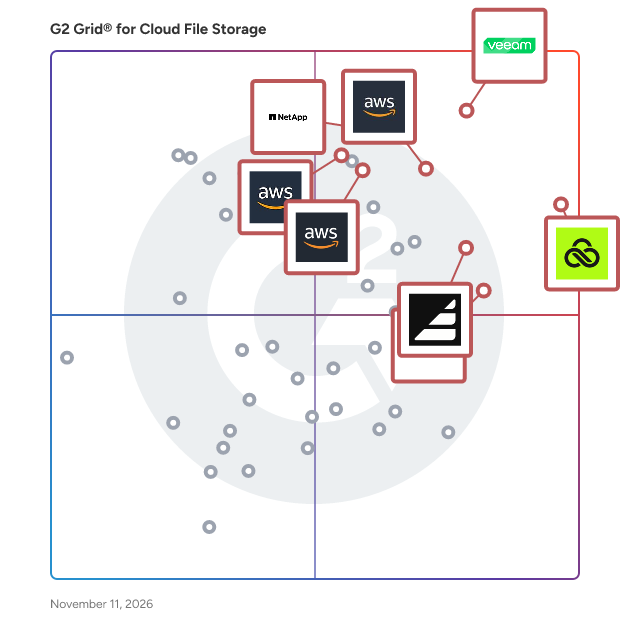
G2 Grid® for Cloud File Storage Software

G2 Grid® for Cloud File Storage Software plotting products by satisfaction and market presence

Highlighted products: LucidLink, Veeam Data Platform, Amazon FSx for Lustre, NetApp ONTAP Data Management Software, Assembly, Amazon FSx, CTERA Endpoint and Server Backup, and Amazon Elastic File System (Amazon EFS).

Underlying data: [Grid® JSON](https://www.g2.com/categories/cloud-file-storage/grids.json?focus%5B%5D=lucidlink&focus%5B%5D=veeam-data-platform&focus%5B%5D=amazon-fsx-for-lustre&focus%5B%5D=netapp-ontap-data-management-software&focus%5B%5D=assemblysoftware&focus%5B%5D=amazon-fsx&focus%5B%5D=ctera-endpoint-and-server-backup&focus%5B%5D=amazon-elastic-file-system-amazon-efs)

NetApp Keystone StaaS

NetApp Keystone STaaS is an on-premises, cloud-like storage subscription service that delivers NetApp’s enterprise storage as an operational expense rather than a capital investment. Customers get guaranteed performance tiers, built-in data protection, and ONTAP’s full set of capabilities without needing to own, refresh, or manage the hardware lifecycle. Keystone provides elastic capacity, predictable billing, and a single subscription model that can span on-prem, hybrid cloud, and public cloud environments. Keystone STaaS is ideal for organizations that want to simplify storage operations, avoid large upfront purchases, or align storage spending with actual usage. It’s a strong fit for IT teams modernizing aging infrastructure, supporting unpredictable workloads, or building hybrid cloud architectures that require consistent data services across environments. Keystone also helps public sector and enterprise customers accelerate digital transformation by reducing complexity and providing guaranteed SLAs for availability and performance.

Who Is the Company Behind NetApp Keystone StaaS?

  • Seller: NetApp
  • Year Founded: 1992
  • HQ Location: Sunnyvale, California
  • LinkedIn® Page: www.linkedin.com
    12,706 employees on LinkedIn®
  • Ownership: NASDAQ
  • Total Revenue (USD mm): $5,412

Netdrive

NetDrive is a software solution that enables users to mount various cloud storage services and remote servers as local drives on their computers. By integrating seamlessly with platforms like Google Drive, Dropbox, OneDrive, and protocols such as WebDAV and FTP, NetDrive allows users to manage remote files directly through their operating system's file explorer, facilitating a familiar and efficient workflow. Key Features and Functionality: - Access Remote Files as Local Files: Interact with cloud storage and remote servers as if they were local drives, using Windows Explorer or macOS Finder. - File Browser: Open, download, rename, and delete remote files without mounting them, providing quick and efficient file management. - Background Uploading: Upload files to remote storage in the background, reducing system overhead and improving efficiency, especially when handling multiple small files. - Team Drive: Configure and publish shared drives for team members, ensuring consistent drive configurations and streamlined collaboration. - File Lock: Lock files, including Microsoft Office documents, to prevent overwriting or deletion by other users, ensuring data integrity during collaborative work. - Multi-User File Lock for Microsoft Office Files: When one user is editing an Office file, others can only open it in read-only mode, preventing simultaneous edits and potential conflicts. - Mount Storage Without Login on Windows: Configure drives to mount automatically at system boot without requiring user login, facilitating access for system services and background processes. - Force Refresh Folder: Manually refresh folders to retrieve the latest file list from the server, ensuring up-to-date access to remote files. Primary Value and User Solutions: NetDrive simplifies the management of multiple cloud storage services and remote servers by integrating them into the local file system. This integration allows users to access and manage remote files with the same ease as local files, eliminating the need for multiple client applications or web interfaces. By providing features like file locking and team drives, NetDrive enhances collaborative workflows, ensuring data consistency and security. Its background uploading and automatic mounting capabilities improve productivity by reducing manual intervention and system overhead. Overall, NetDrive offers a unified, efficient, and secure solution for accessing and managing remote storage resources.

Who Is the Company Behind Netdrive?

AI can help you find the answers. G2 helps you trust them.

Connect G2 to Claude or ChatGPT for answers grounded in G2's trusted reviews, comparisons, and pricing from real user insights.

How it works

NetForChoice Vault

NFC Vault is a secure file-sharing solution that allows businesses to share large files via link. The solution allows you to store, sync and share documents online with advanced security measures. The solution provides you with the ability to set user roles & permission to open edit, view or delete the file. In addition, users have the option to share time-bound links with a track of file records. The advanced security measures of this application make it a prime choice for the user. It offers separate filters to protect the file from Ransomware & notify users & admin if any miscellaneous code or link is added to the file. In addition, businesses will get the option to optimize storage space and offer flexible deployment options. One can deploy the cloud storage solution either on-premise & on a cloud server. To explore more about NFC Vault connect with our support team via live chat, email support, & voice call. Our team will be happy to assist you.

Who Is the Company Behind NetForChoice Vault?

Next3 Offload

Offload your media to Amazon S3, DigitalOcean Spaces, or Google Cloud Storage and speed up your website. Offload your Existing Media Library to Cloud, then rewrites URLs. It can also transfer WordPress all media files to Cloud automatically.

Who Is the Company Behind Next3 Offload?

  • Seller: ThemeDev
  • Year Founded: 2019
  • HQ Location: Dhaka, BD
  • LinkedIn® Page: www.linkedin.com
    22 employees on LinkedIn®

Nodeum

Improve your operations with easy-to-use, intuitive storage and process management system that works across multiple storage silos. Achieving a high performance workflow is essential for every industry impacted by the exponential data growth and interested in optimization of their data movement and data placement whenever their location. To learn more about Nodeum, visit www.nodeum.io.

Who Is the Company Behind Nodeum?

  • Seller: MT-C
  • Year Founded: 2016
  • HQ Location: Liège, BE
  • LinkedIn® Page: www.linkedin.com
    3 employees on LinkedIn®

NordenVault Cloud

NordenVault is a European business cloud storage and backup platform. It lets teams upload, organize, share, and protect files with EU data residency, GDPR-focused infrastructure, secure sharing, backup monitoring, and S3-compatible access. It also supports migration from providers like AWS S3, Google Drive, Dropbox, and OneDrive, so businesses can move away from American cloud providers without adding complexity.

Who Is the Company Behind NordenVault Cloud?

Notion2Sheets

Notion2Sheets is a Google Workspace Add-On that seamlessly synchronizes your Notion databases with Google Sheets in real-time. This integration empowers users to leverage the advanced functionalities of Google Sheets—such as complex formulas, dynamic charts, and automated workflows—while maintaining the organizational structure of Notion. By bridging these two powerful platforms, Notion2Sheets enhances data management, analysis, and visualization capabilities for individuals and teams alike. Key Features and Functionality: - Real-Time Synchronization: Automatically sync Notion databases to Google Sheets, ensuring that any changes made in Notion are instantly reflected in Sheets without manual intervention. - Two-Way Data Flow: Utilize Google Sheets formulas to populate Notion columns, enabling dynamic data updates and the creation of recurring tasks directly from Sheets. - Dynamic Dashboards: Link specific cell data from Sheets to Notion blocks, allowing for the creation of live-updating dashboards that display key metrics and insights within Notion. - Chart Embedding: Generate insightful charts in Google Sheets and embed them into Notion pages, providing interactive visual representations of your data. - Automated Backups: Maintain an up-to-date copy of your Notion databases in Google Sheets, preserving all links, formats, and relationships without the need for manual exports. Primary Value and User Solutions: Notion2Sheets addresses the challenge of integrating Notion's flexible note-taking and database capabilities with the analytical power of Google Sheets. By enabling real-time, two-way synchronization, users can automate data workflows, perform advanced analyses, and create dynamic visualizations without redundant data entry or the risk of inconsistencies. This integration is particularly beneficial for teams and individuals who rely on Notion for organization and Google Sheets for data analysis, streamlining their processes and enhancing productivity.

Who Is the Company Behind Notion2Sheets?

NudgeHost

NudgeHost is a file-hosting service for people and AI agents. Upload any file and get a link in seconds, with no account needed to start. Drop in a PDF, an image, a spreadsheet, a ZIP, or a folder of HTML, and the link is live straight away. Paste HTML directly and it renders as a real page, which makes it a fast way to publish output from Claude, Lovable, Bolt, or v0 without a build step or a deploy pipeline. Free accounts get 10 active links at 25MB a file, QR codes, link expiry, and no branding banner. Paid plans add password protection, larger files, custom domains, and API keys. Files can be replaced in place, so the URL you shared yesterday can point at today's version. Agents get first-class access through a REST API and a Model Context Protocol server, so a tool can create a link and hand it back without a human touching a dashboard.

Who Is the Company Behind NudgeHost?

Octopin

Octopin is a hosted IPFS pinning service built for NFT creators, collections and Web3 projects. Upload files in the browser, or pin existing CIDs through the standard IPFS Pinning Service API, so Kubo, IPFS Desktop and other compatible tools work with a single API key. Pinned content is stored on Cloudflare R2, announced to the IPFS network and served through the Octopin gateway at gateway.octopin.app. Features include per-user API keys, usage and quota tracking, a free NFT checker that tests whether an existing collection still loads, and docs with Kubo and curl examples. The free plan includes 1 GB of storage and 500 files. Paid plans start at $5/month for 25 GB, scale to 3 TB, and include bandwidth under fair use. Octopin is built by the OctoPeeps team.

Who Is the Company Behind Octopin?

PicBackMan

PicBackMan is a photo and video uploader designed to help users keep photos and videos safe in multiple places such as Flickr, SmugMug, Facebook, Dropbox and others.

Average Rating: 3.9/5.0

Total Reviews: 12

How Do G2 Users Rate PicBackMan?

  • Quality of Support: 8.3/10 (Category avg: 8.5/10)

Who Is the Company Behind PicBackMan?

Who Uses This Product?

  • Company Size: 100% Small

What Are Recent G2 Reviews of PicBackMan?

What Are G2 Users Discussing About PicBackMan?

Prapl Cloud Mount Manager

Mount cloud storage as a local drive on your Windows PC, making cloud files accessible directly through File Explorer.

Who Is the Company Behind Prapl Cloud Mount Manager?

Progress MOVEit

Progress MOVEit software helps IT operations, enterprise architecture, security and compliance teams automate and secure enterprise file transfers while supporting strict regulatory requirements such as HIPAA, PCI DSS and GDPR. When file transfer volumes grow and oversight requirements tighten, fragmented tools and manual processes can increase operational risk, cause productivity fire drills and add complexity to audit preps. Progress MOVEit Transfer centralizes managed file transfer activity into a single, controlled environment to improve visibility, governance and reliability of mission-critical data flows. Progress MOVEit Cloud extends these capabilities through a fully managed, auditor-certified SaaS deployment that leverages the same documented controls, encryption, detailed audit logging and role-based access without the burden of infrastructure management or software upgrades. Progress MOVEit Automation adds no-code, policy-driven file transfer orchestration that replaces manual scripting, reducing errors that lead to missed SLAs and delays in downstream workflows. MOVEit Automation supports the protocols businesses use today (SFTP, FTPS, HTTPS and more) and seamlessly connects to legacy and cloud endpoints with native connectors. Together, MOVEit Transfer, MOVEit Cloud and MOVEit Automation help regulated organizations or businesses with private data reduce risk, improve operational efficiency and maintain consistent control over data movement. Start your 30-day trial, get a quote, or request more information at www.progress.com/moveit

Average Rating: 4.4/5.0

Total Reviews: 521

How Do G2 Users Rate Progress MOVEit?

  • Quality of Support: 8.6/10 (Category avg: 8.5/10)

Who Is the Company Behind Progress MOVEit?

  • Seller: Progress Software
  • Company Website:
  • Year Founded: 1981
  • HQ Location: Burlington, MA.
  • LinkedIn® Page: www.linkedin.com
    4,242 employees on LinkedIn®
  • Ownership: NASDAQ:PRGS

Who Uses This Product?

  • Who Uses This: Software Engineer, System Administrator
  • Top Industries: Information Technology and Services, Financial Services
  • Company Size: 40% Medium, 39% Large

What Do G2 Reviewers Say About Progress MOVEit?

AI-generated summary from verified user reviews

Pros
  • Users appreciate the ease of use of Progress MOVEit, enabling quick setup and seamless file transfers with minimal expertise.
  • Users appreciate the efficient file transfer capabilities of MOVEit, enabling secure delivery of large documents effortlessly.
  • Users find file transfer automation in Progress MOVEit effortless, enhancing efficiency and simplifying complex tasks seamlessly.
  • Users appreciate the helpful customer support of Progress MOVEit, enhancing their experience and ensuring smooth operations.
  • Users appreciate the user-friendly features of MOVEit, enhancing automation and simplifying secure file transfers.
Cons
  • Users find the complexity of updates and configurations with Progress MOVEit can complicate the overall experience.
  • Users find the difficult learning curve due to complex processes and unintuitive administration in Progress MOVEit.
  • Users face integration issues with MOVEit, particularly regarding OS, DB support, and connection complexities.
  • Users express concerns about security issues related to file transfers and authentication, affecting their overall experience.
  • Users experience slow performance during large file transfers, impacting efficiency and user satisfaction.

What Are Recent G2 Reviews of Progress MOVEit?

What Are G2 Users Discussing About Progress MOVEit?

Rclone

Rclone is a command-line program to manage files on cloud storage. It is a feature-rich alternative to cloud vendors' web storage interfaces. Over 40 cloud storage products support rclone including S3 object stores, business & consumer file storage services, as well as standard transfer protocols.

Who Is the Company Behind Rclone?

Rachana Hasyagar
RH
Researched and written by Rachana Hasyagar
Updated October 3, 2024