Top Free Classroom Management Software - Page 3

How Many Classroom Management Software Products Does G2 Track?

Total Products under this Category: 206

Category Stats (Nov 2026)

  • Average Rating: 4.4/5 The average rating of products in this category, based on all submitted ratings
  • Top Trending Product: Minga (+0.32%) - Among all products in this category, Minga recorded the largest rating increase compared to last month

Last updated: November 01, 2026

How Does G2 Rank Classroom Management Software Products?

Why You Can Trust G2's Software Rankings:

  • 30 Analysts and Data Experts
  • 3,800+ Authentic Reviews
  • 206+ Products
  • Unbiased Rankings

G2's software rankings are built on verified user reviews, rigorous moderation, and a consistent research methodology maintained by a team of analysts and data experts. Each product is measured using the same transparent criteria, with no paid placement or vendor influence. While reviews reflect real user experiences, which can be subjective, they offer valuable insight into how software performs in the hands of professionals. Together, these inputs power the G2 Score, a standardized way to compare tools within every category.

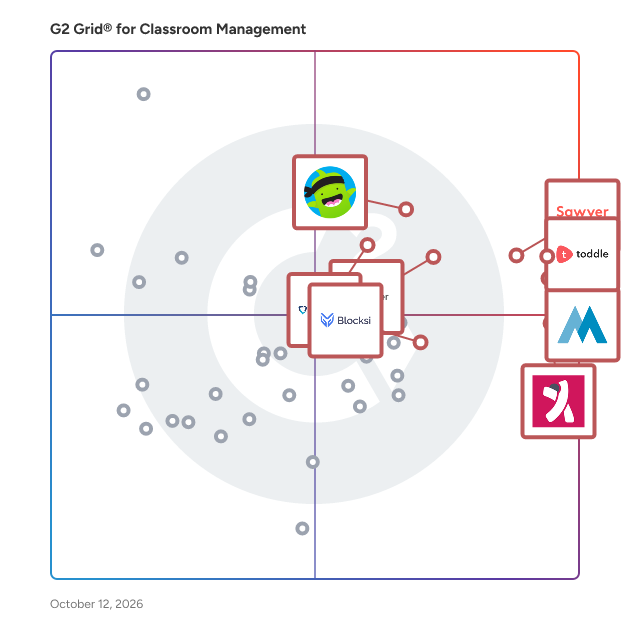
G2 Grid® for Classroom Management Software

G2 Grid® for Classroom Management Software plotting products by satisfaction and market presence

Highlighted products: Toddle, Minga, Sawyer, KINDERPEDIA, ClassDojo, iClicker, GoGuardian Teacher, and Blocksi.

Underlying data: [Grid® JSON](https://www.g2.com/categories/classroom-management/grids.json?focus%5B%5D=toddle&focus%5B%5D=minga&focus%5B%5D=sawyer&focus%5B%5D=kinderpedia&focus%5B%5D=classdojo&focus%5B%5D=iclicker&focus%5B%5D=goguardian-teacher&focus%5B%5D=blocksi)

SmartClass

VISO Classroom Management (SmartClass) A state-of-the-art classroom management solution that provides educators with the tools to facilitate efficient collaborative learning across all devices. Enrich your students’ learning experience and keep your finger on the classroom pulse. With VISO Classroom Management, teachers can easily manage their class’s learning on school or BYOD devices, whether tablets, iPads or laptops are used. Teachers can monitor student activities and evaluate performance in real-time, share any screen, provide individual or group assistance and implement collaborative learning methodologies. VISO Classroom Management lets you focus on teaching again! It seamlessly integrates Chromebooks into teaching methodologies and allows you to manage interactive touchscreens and VR devices in the classroom to assimilate immersive learning experiences into the curriculum. VISO Classroom Management can also be installed as a stand-alone module. Available versions: cloud-based, on-premise or VDI.

Average Rating: 4.5/5.0

Total Reviews: 1

How Do G2 Users Rate SmartClass?

  • Ease of Use: 10.0/10 (Category avg: 8.7/10)
  • Student Assignment Distribution: 8.3/10 (Category avg: 8.1/10)
  • Student Assignment Collection: 10.0/10 (Category avg: 8.1/10)

Who Is the Company Behind SmartClass?

Who Uses This Product?

  • Company Size: 100% Medium

What Are Recent G2 Reviews of SmartClass?

Campus 365

Campus 365 is a leading education-infrastructure provider, powering schools and educators to transform their teaching-learning experience. Our innovative and powerful SaaS solutions like Learning Management System (LMS), integrated ERP for schools and automated classroom tools for teachers enables education providers to stay connected with students, overcome geographical barriers and increase their efficiency in delivering lessons. And we do it in minutes - not days! Campus 365 offers a variety of features that make it a super efficient school management system. Features like Automatic attendance, Fee management, Online admission with inquiry, Academics management, Exam management with report cards, Certificates & I-cards and much more bring all the stakeholders of an institute on a single, digital platform.

Average Rating: 4.7/5.0

Total Reviews: 5

How Do G2 Users Rate Campus 365?

  • Ease of Use: 10.0/10 (Category avg: 8.7/10)

Who Is the Company Behind Campus 365?

Who Uses This Product?

  • Company Size: 60% Medium, 40% Small

What Are Recent G2 Reviews of Campus 365?

ChildFriendly Pro

ChildFriendly Pro is an all-in-one childcare management software designed for daycares, child care centers, preschools, and early learning programs. The platform brings essential childcare operations into one easy-to-use system, including attendance tracking, parent communication, billing and payments, staff management, learning and curriculum tools, reporting, registration, and more. Unlike traditional child care software that charges monthly subscription fees, ChildFriendly Pro has zero subscription fees. Centers can access the full platform and pay only when processing parent payments, helping child care providers reduce software costs while simplifying daily operations. Built for both single-center and multi-site organizations, ChildFriendly Pro helps child care teams save time, streamline administration, improve family communication, and manage their programs from one centralized platform.

Average Rating: 5.0/5.0

Total Reviews: 9

How Do G2 Users Rate ChildFriendly Pro?

  • Ease of Use: 9.8/10 (Category avg: 8.7/10)

Who Is the Company Behind ChildFriendly Pro?

Who Uses This Product?

  • Top Industries: Education Management
  • Company Size: 60% Medium, 40% Small

What Are Recent G2 Reviews of ChildFriendly Pro?

AI can help you find the answers. G2 helps you trust them.

Connect G2 to Claude or ChatGPT for answers grounded in G2's trusted reviews, comparisons, and pricing from real user insights.

How it works

Class Composer

Class Composer is an online tool designed to assist elementary schools in creating balanced class lists efficiently. By digitizing the traditional methods of student placement, it streamlines the process, reducing the time and effort educators spend on organizing classes. The platform's primary objective is to ensure that each class is equitable, considering various student attributes to foster positive learning environments. At the core of Class Composer is the Student Card feature. This digital card consolidates essential student information, including academic performance, behavior assessments, and specific identifiers such as Individualized Education Programs (IEPs) or English Language Learner (ELL) status. Teachers can also add notes and placement requests, such as pairing or separating certain students, to inform the class composition process. This centralized approach ensures that all pertinent data is readily accessible, facilitating informed decision-making. Once student data is entered, the Compose function utilizes an algorithm developed by a Carnegie Mellon University Ph.D. mathematician to generate initial class groupings. This algorithm considers factors like gender, reading scores, behavior ratings, and placement requests to create balanced classes. Educators can then fine-tune these groupings by dragging and dropping student profiles within the platform. The system provides real-time updates, displaying class averages and distributions to highlight any imbalances, allowing for immediate adjustments. Beyond initial class creation, Class Composer offers year-round benefits. The platform's Small Groups feature enables teachers to form dynamic instructional groups for activities like reading sessions or project-based learning. Additionally, the Historical Student Record provides a comprehensive view of a student's past performance and notes, aiding in ongoing assessment and support. The inclusion of printable PDFs for individual students or entire classes further enhances record-keeping and communication. Customization is a key aspect of Class Composer. Schools can create unique identifiers and assessment fields tailored to their specific needs. The platform also supports the inclusion of student images, offering a more personalized experience. For schools with specific requirements, such as Response to Intervention (RTI) or Multi-Tiered System of Supports (MTSS), Class Composer can be adapted to align with these frameworks. Security and privacy are paramount. Class Composer is SOC 2 certified, ensuring that data security, availability, and confidentiality meet rigorous standards. The platform has also earned a 95% privacy rating from the Common Sense Privacy Program, reflecting its commitment to protecting educator and student data. In summary, Class Composer is a comprehensive solution for elementary schools seeking to optimize the student placement process. By integrating data management, algorithmic assistance, and customizable features, it empowers educators to create equitable classes efficiently, ultimately supporting better educational outcomes.

Who Is the Company Behind Class Composer?

ClassMana

ClassMana is a gamified classroom management platform for teachers. Students earn Experience points for positive actions, level up, and collect mana that they spend on powers, which are real classroom perks chosen by the teacher. Each student has a customizable 3D avatar that unlocks new gear across 35 levels, which keeps motivation going throughout the school year. Teachers can introduce health and warnings to handle behavior that doesn't match class expectations. A student who loses all health must redeem themselves with a positive action before rejoining the game. Gold can be awarded for academic milestones, teams encourage cooperation, and hero types (Wizard, Knight, Ranger, Ninja) give students complementary strengths. Features are introduced in stages, so a teacher can start with simple rewards and unlock more when the class is ready. The Quests add-on turns lessons into map-based adventures where students work at their own pace through objectives and auto-graded quizzes, with progress tracking and branching paths. ClassMana also includes free teacher tools that need no setup: Monster Battle (a review game shown on the classroom screen), Silence Challenge (a noise monitor), Mystery Event (short activities and brain breaks), Random Student Picker, Group Picker, Timer and Stopwatch. Teachers manage everything from one dashboard designed for live classroom use. Activity reports show each student's progress over time. Class settings can be shared and synced across multiple classes, and co-teachers can be added to a class.

Who Is the Company Behind ClassMana?

Classtime

Classtime is a solution for teachers that complements in-class teaching with immediate feedback on students’ level of understanding. Create great questions, engage everyone, improve understanding. No registration required to see how it works! - For students, available in 22 languages (Albanian, Bulgarian, Chinese (Simplified), Croatian, Czech, Dutch, English, Estonian, Finnish, French, German, Japanese, Kazakh, Italian, Norwegian, Polish, Portuguese, Russian, Spanish, Thai, Turkish, Ukrainian). - For teachers, available in 17 languages (Albanian, Croatian, Czech, Dutch, English, Estonian, French, German, Japanese, Italian, Kazakh, Portuguese, Russian, Spanish, Thai, Turkish, Ukrainian) - No student registration required: students simply join by entering a code and providing a name! - Teacher-paced: show and hide single questions and solutions as needed! - Shuffle options: Shuffle questions and answers to decrease the possibility of cheating! - Session Timing options: schedule your session or set time for session length - Use 'Collaborative Challenges' that allow you to project fun and dynamic narratives that unfold as your students answer correctly during sessions. - Create different tech-enabled Question Types: Multiple Choice, Checkboxes, True or False, Categorizer (Multiple Choice), Categorizer (Checkboxes), Sorting, Highlight Text, Hotspot, and Free Text Answer! - Browse through more than 50,000 standards-aligned questions from our Public Library and import them to your Library with a single click. This includes subjects such as math, physics, chemistry, biology, health & medicine, world and US history, art history, English grammar, and much more. For free. - See students responses in real-time, giving immediate insight on student performance - Organize, duplicate, and merge your Questions into Questions Sets as needed - absolute flexibility! - Create Classes: Classes will help you organize your students and sessions better. It enables you to organize your Classtime sessions by subject and invite all of your students to a Session with one click. You can also invite co-teachers to support. - Google Classroom integration to import classes with student roster, post assignments, and push back scores. - Communicate with your students via our 1-on-1 teacher-student live chat during a session. - Add as much additional information to your questions as needed; no limit! - Include mathematics notation in your Questions with LaTeX support! - Include images and YouTube videos in your Questions - by upload or URL. - Include audio records to your questions - by upload. - Export your student's results, or review them in the application any time! - Save time with automated scoring: simply assign a point value to each question and let us do the work for you - Get auto-generated Excel and PDF reports to share with students, parents, or school leadership. - Remove students from sessions, if needed.

Average Rating: 4.8/5.0

Total Reviews: 8

How Do G2 Users Rate Classtime?

  • Ease of Use: 8.1/10 (Category avg: 8.7/10)

Who Is the Company Behind Classtime?

  • Seller: Classtime
  • Year Founded: 2016
  • HQ Location: Zurich, CH
  • Twitter: @classtimecom
    3,985 Twitter followers
  • LinkedIn® Page: www.linkedin.com
    36 employees on LinkedIn®

Who Uses This Product?

  • Company Size: 64% Small, 36% Medium

What Are Recent G2 Reviews of Classtime?

What Are G2 Users Discussing About Classtime?
COOL School Portal

The COOL platform is the base of a solution that helps teachers stay in control in the classroom. It saves time and is easy to use. It’s the homepage for your students. Here they can find all the online educational materials the teacher has selected for them. COOL applies the group layout from your Google console G Suite environment, so the right teachers are connected to the right groups and classes. You can use the platform in combination with different modules that enhance the learning experience for teachers and students. Choose the modules that fit you. Try it out: 60 days for free! The COOL Platform consists of, - COOL Picture log-in - COOL Monitoring - COOL Exam mode - COOL Plagiarism check COOL Picture log-in The Picture log-in module makes logging in easier for younger students. Their password consists of a combination of pictures. No need to remember the complicated number or letter combinations. An easy way to make the children use their own account instead of a group account, which is sometimes used as a quick fix so that they only have to remember one password that everyone knows. Using group accounts makes tracking individual progress difficult and is not compliant with privacy regulations. With the picture log-in, they have access to their own Google accounts and are also logged into the COOL platform. COOL Monitoring Keep track of your students: what are they working on? Where are they in the assignment? From the comfort of your own device, you can see the browser screens of your students. It gives you the opportunity to observe from distance and give direction during the process instead of after. Students can see on their screen when they are monitored. The tool comes with many handy functionalities, such as pushing a website to the devices of the whole class or to individuals. You can also block the screens when you want the attention of the classroom and close unwanted tabs. You can even make different or smaller groups from the students who are assigned to you as a teacher. This is convenient for pushing activities to students who need special attention or extra educational input. If you’ve used COOL Monitoring, you can check the browser history of your students up until seven days ago. The COOL admin of your school is able to consult a report about when which teacher was using COOL Monitoring and for which students. This provides the much-wanted transparency. COOL Exam mode This functionality is part of the COOL Monitoring module. That means that you can monitor students from a distance while they are in exam mode. COOL Exam mode makes sure that students can’t change tabs while taking a test. You can lock your students on the page of the test. They can’t open other tabs to find answers on the internet. You decide the amount of time they are locked. Use it for individual students or for the whole class with one click. COOL Plagiarism check Check the Google documents that your students are handing in through Google Classroom. The Google Classroom app is integrated into our COOL platform. As a teacher, you can check your students’ work by starting the plagiarism check. It will look for text matches online and the documents of your other students. You can check the same document three times over so you have the possibility to give feedback to your students and give the opportunity to improve the text. In the overview of the results, you’ll see what the percentage of plagiarism is and on which websites the matches are found. Try it out: 60 days for free!

Who Is the Company Behind COOL School Portal?

Daytical

Daytical is a digital teacher planner that combines lesson planning, classroom management, grading and task management into unified productivity application designed specifically for K-12 teachers. It keeps track of what work has to be done in an intuitive calendar view. It reminds of lessons scheduled next week, that are yet to be prepared, or to review an exit ticket turned in 3 days ago. Prep work in Daytical works seamlessly with scheduling. Content is organized into year, unit and lesson plans. One year plan can be used for multiple classes without copying files over and over again, but each plan can be adjusted individually per class. Plans have space for notes and observations, so it's easy to develop and improve them over time. Daytical can optionally be used with students - to host lesson rooms with interactive assignments, that are automatically evaluated at the time students fill them out. It's a great way to give students feedback right away and make review easier. Daytical can grade any type of exercise and students can answer by typing or taking a picture of handwriting.

Who Is the Company Behind Daytical?

edu.help

Introducing edu.help, a comprehensive All-In-One Student Management System designed to streamline every facet of academy and training center operations. With this powerful platform, effortlessly centralize and manage student information including personal details, academic records, and more. Our system ensures easy access and real-time updates, enhancing communication and operational efficiency. Key Features: - Centralized Data Management: Keep all student information in one secure, accessible location. - Versatile Class Management: Cater to every learning style by organizing a variety of class formats, from traditional lectures to online sessions. - Seamless Scheduling: Create, modify, and view class timetables with ease, optimizing resource use and boosting student engagement. - Cloud-Based Accessibility: Access your data anytime, anywhere, ensuring flexibility and continuity in educational administration. - Enhanced Data Security: Benefit from robust data protection features that safeguard your students' information. With edu.help, not only save time with streamlined operations but also improve overall student outcomes through a single, easy-to-use platform. Suitable for educational institutions of all sizes, edu.help is the ideal solution for enhancing educational administration and ensuring optimal learning experiences.

Who Is the Company Behind edu.help?

eduTinker

eduTinker online classes software helps gain higher engagement with students & their parents. It makes communication seamless.

Who Is the Company Behind eduTinker?

  • Seller: eduTinker
  • Year Founded: 2020
  • HQ Location: Singapore, SG
  • LinkedIn® Page: www.linkedin.com
    54 employees on LinkedIn®

Kangarootime

Kangarootime has built the leading all-in-one childcare management platform. It brings automation to childcare centers and provides childcare professionals with the tools to scale their classrooms, digitize their businesses and seamlessly communicate with their families and employees. The company’s cloud-based mobile application takes professional caregivers out of the revenue cycle, freeing up time for what really matters—the children.

Average Rating: 4.4/5.0

Total Reviews: 28

How Do G2 Users Rate Kangarootime?

  • Ease of Use: 8.8/10 (Category avg: 8.7/10)

Who Is the Company Behind Kangarootime?

  • Seller: Kangarootime
  • Year Founded: 2015
  • HQ Location: Buffalo, New York
  • Twitter: @Kangarootime1
    405 Twitter followers
  • LinkedIn® Page: www.linkedin.com
    30 employees on LinkedIn®

Who Uses This Product?

  • Top Industries: Education Management, Primary/Secondary Education
  • Company Size: 82% Small, 18% Medium

What Are Recent G2 Reviews of Kangarootime?

What Are G2 Users Discussing About Kangarootime?

Lummio

The All-in-One Platform for Managing Enrichment, After-School, and Learning Programs Lummio is the all-in-one solution designed for educators, program directors, and administrators who run after-school programs, enrichment courses, and eLearning initiatives. Whether you’re managing a single-site school club or a multi-location education business, Lummio helps you streamline operations, improve communication, and deliver a better experience for staff, students, and families—all from a secure, cloud-based dashboard. Built for Program Leaders, Designed for Impact! Lummio was created for those who wear multiple hats: the after-school coordinator juggling rosters, the enrichment provider collecting payments, the director needing compliance-ready health records, or the eLearning team tracking student engagement and progress. If your day involves spreadsheets, emails, and disconnected tools, Lummio replaces that clutter with a single intuitive system tailored for your real-world needs. What You Can Do With Lummio Streamline Registration & Payments - Customize enrollment forms, automate billing, manage discounts and waitlists, and collect payments securely online—saving hours of admin time each week. Track Attendance & Rosters in Real Time - Use digital check-in with QR codes, staff tablets, or parent sign-ins to capture attendance instantly. View live rosters, track drop-offs and pickups, and generate detailed reports in seconds. Deliver Engaging Programs with LMS Tools - For academic programs, Lummio includes an integrated Learning Management System (LMS) to upload content, assign work, track completions, and support virtual or hybrid models. Ensure Student Safety with Health & Emergency Features - Store allergies, emergency contacts, medications, and incident reports in secure student profiles. Staff can access vital information on the go, improving safety and compliance. Simplify Communication for Staff & Parents - From automated alerts and messaging to parent portals and staff updates, Lummio helps keep everyone on the same page. Reduce missed updates, increase trust, and strengthen community engagement. Support Behavior & SEL Monitoring - Track behavior notes and social-emotional learning data. Share feedback with parents or staff, and use insights to guide interventions and praise positive growth. Enable Data-Driven Decision-Making - Use real-time dashboards and exportable reports to track attendance, program performance, revenue, staff hours, and student trends—all from one place. Who Uses Lummio? Lummio is trusted by: - After-school care programs - K–12 school districts - Enrichment providers - Daycare and early learning centers - Community centers and YMCA-style youth programs - Virtual and hybrid learning providers

Who Is the Company Behind Lummio?

Mimir Classroom

Mimir Classroom is a cloud-based course platform built for computer science and programming classes. Mimir’s groundbreaking compilers and algorithms increase productivity and foster collaboration between instructors and students. The platform supports instantaneous autograding, plagiarism detection, group projects, a custom built web-based IDE, and more.

Average Rating: 3.0/5.0

Total Reviews: 4

How Do G2 Users Rate Mimir Classroom?

  • Ease of Use: 7.2/10 (Category avg: 8.7/10)

Who Is the Company Behind Mimir Classroom?

  • Seller: Mimir
  • Year Founded: 2014
  • HQ Location: Indianapolis, US
  • Twitter: @MimirHQ
    2,081 Twitter followers
  • LinkedIn® Page: www.linkedin.com
    1 employees on LinkedIn®

Who Uses This Product?

  • Company Size: 50% Medium, 25% Large

What Are Recent G2 Reviews of Mimir Classroom?

What Are G2 Users Discussing About Mimir Classroom?

Qustodio

Qustodio helps schools and families keep children safe online. Our award-winning cloud-based software filters apps and websites automatically, offers intelligent reporting, and works on all platforms including Mac, Windows, Chromebook, iOS, Kindle and Android.

Who Is the Company Behind Qustodio?

  • Seller: Qustodio
  • Year Founded: 2012
  • HQ Location: BARCELONA, ES
  • LinkedIn® Page: www.linkedin.com
    89 employees on LinkedIn®

RegisPro

RegisPro is a web-based electronic gradebook and class register built in Italy for primary and secondary school teachers, and for schools that want to give their teachers a shared register. Teachers manage classes and students, the daily register with attendance and lesson signing, grades with automatic weighted averages on the Italian grading scale, homework, notes, report cards exported as PDF, exams and a lesson calendar. Students and parents get mobile-friendly portals available in 11 languages, and several teachers of the same class council can work on the same register with roles and permissions. Data is hosted in Europe and handled in line with the GDPR. 30-day free trial with no credit card, then 59 euro per year or 5.90 euro per month, all features included. Schools and organizations can buy licenses for their teachers.

Who Is the Company Behind RegisPro?

Emma Stein
ES
Researched and written by Emma Stein
Updated October 3, 2024