  # Best Billing Software - Page 3

  *By [Nathan Calabrese](https://research.g2.com/insights/author/nathan-calabrese)*

   Billing software enables companies to create and send invoices to customers for products and services delivered, reducing the time and effort required to manage invoicing, improving billing accuracy, and supporting diverse billing models including project billing and recurring billing.

### Core Capabilities of Billing Software

To qualify for inclusion in the Billing software category, a product must:

- Provide features to create multiple types of invoices
- Be able to consolidate multiple invoices into one or split an invoice
- Include templates for invoices and other documents
- Allow users to send invoices in different formats (PDF, MS Word) through various communication channels such as email and e-fax
- Offer reports and analytics on the status of each invoice
- Include payment alert notifications
- Integrate with software solutions such as ERP, CRM, and accounting packages

### Common Use Cases for Billing Software

Accounting professionals, salespeople, and project managers use billing software to manage invoicing across different business models and customer types. Common use cases include:

- Generating and sending invoices for project-based professional services engagements
- Managing recurring billing cycles for subscription-based or utility services
- Providing customers with estimates or pro forma invoices ahead of final billing

### How Billing Software Differs from Other Tools

Billing software focuses on invoice creation and distribution, while the final stage of the billing process, receiving and reconciling payments, is typically handled by [accounting software](https://www.g2.com/categories/accounting) or a module within a larger [ERP system](https://www.g2.com/categories/erp-systems). Billing software integrates with these platforms, as well as [CRM software](https://www.g2.com/categories/crm), to pull in customer and product data for accurate invoice generation.

### Insights from G2 on Billing Software

Based on category trends on G2, invoice template flexibility and integration with accounting platforms stand out as top strengths. These platforms deliver reductions in manual billing effort and improved on-time payment rates as core benefits of adoption.


  ## How Many Billing Software Products Does G2 Track?
**Total Products under this Category:** 754

  
## How Does G2 Rank Billing Software Products?

**Why You Can Trust G2's Software Rankings:**

- 30 Analysts and Data Experts
- 31,000+ Authentic Reviews
- 754+ Products
- Unbiased Rankings

G2's software rankings are built on verified user reviews, rigorous moderation, and a consistent research methodology maintained by a team of analysts and data experts. Each product is measured using the same transparent criteria, with no paid placement or vendor influence. While reviews reflect real user experiences, which can be subjective, they offer valuable insight into how software performs in the hands of professionals. Together, these inputs power the G2 Score, a standardized way to compare tools within every category.
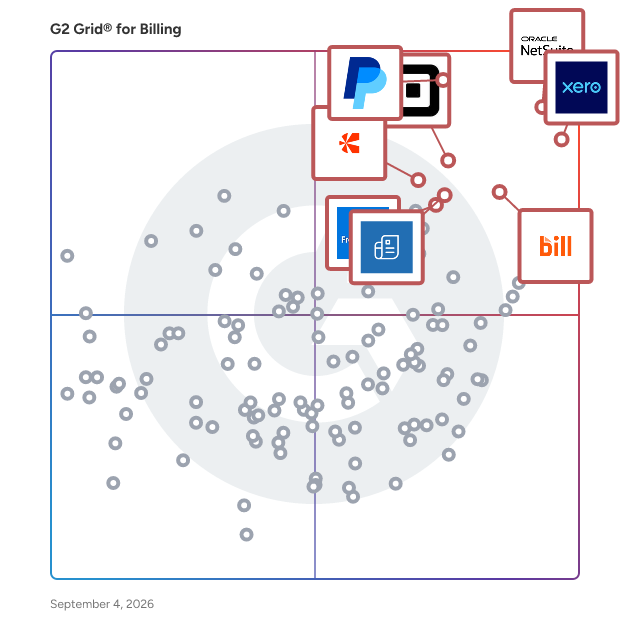
  
## Top Billing Software at a Glance
| # | Product | Rating | Best For | What Users Say |
|---|---------|--------|----------|----------------|
| 1 | [NetSuite](https://www.g2.com/products/netsuite/reviews) | 4.1/5.0 (4,606 reviews) | End-to-end billing with customizable revenue recognition | "—" |
| 2 | [Xero](https://www.g2.com/products/xero/reviews) | 4.4/5.0 (1,571 reviews) | Cloud-native invoicing with automated bank reconciliation | "[Effortless Accounting, Minor Payroll Hiccups](https://www.g2.com/survey_responses/xero-review-12717758)" |
| 3 | [BILL AP/AR](https://www.g2.com/products/bill-ap-ar/reviews) | 4.4/5.0 (1,778 reviews) | QuickBooks-integrated AP/AR approval workflows | "[Great Bill Payment Platform](https://www.g2.com/survey_responses/bill-ap-ar-review-12713619)" |
| 4 | [PayPal Invoicing](https://www.g2.com/products/paypal-invoicing/reviews) | 4.4/5.0 (181 reviews) | PayPal-native invoicing with integrated payment collection | "[Easy Invoicing with Secure Payments and a Professional Touch](https://www.g2.com/survey_responses/paypal-invoicing-review-12691410)" |
| 5 | [Square Point of Sale](https://www.g2.com/products/square-point-of-sale/reviews) | 4.6/5.0 (1,181 reviews) | Mobile invoicing with integrated payment collection | "[Seamless Payment Collection with Automation](https://www.g2.com/survey_responses/square-point-of-sale-review-12672421)" |
| 6 | [FreshBooks](https://www.g2.com/products/freshbooks/reviews) | 4.5/5.0 (950 reviews) | Service-business invoicing with automated recurring billing | "[Slick Invoicing and Time Tracking That Makes Billing Effortless](https://www.g2.com/survey_responses/freshbooks-review-12632716)" |
| 7 | [Zoho Invoice](https://www.g2.com/products/zoho-invoice/reviews) | 4.7/5.0 (352 reviews) | Zero-cost invoicing with automated payment reminders | "[Zoho Makes Finances Tracking &amp; Bookkeeping Easy with Clear Cash-Flow Tracking](https://www.g2.com/survey_responses/zoho-invoice-review-12560947)" |
| 8 | [Stampli](https://www.g2.com/products/stampli/reviews) | 4.6/5.0 (1,913 reviews) | AI-coded invoice approval with ERP sync | "[Streamlined Invoice Approvals with Smart Duplicate Detection and Seamless Accounting Integration AI](https://www.g2.com/survey_responses/stampli-review-12633133)" |
| 9 | [Wave Invoicing](https://www.g2.com/products/wave-invoicing/reviews) | 4.6/5.0 (14 reviews) | Recurring invoicing with integrated payment collection | "[I &lt;3 Wave](https://www.g2.com/survey_responses/wave-invoicing-review-7060148)" |
| 10 | [Zoho Books](https://www.g2.com/products/zoho-books/reviews) | 4.4/5.0 (317 reviews) | End-to-end invoicing with Zoho-native automation | "[Zoho Books Makes Accounting Simple with a Clean Dashboard and Smart Automation](https://www.g2.com/survey_responses/zoho-books-review-12609036)" |

  
## Which Billing Software Is Best for Your Use Case?

- **Leader:** [NetSuite](https://www.g2.com/products/netsuite/reviews)
- **Highest Performer:** [Tabs](https://www.g2.com/products/tabs/reviews)
- **Easiest to Use:** [Anchor](https://www.g2.com/products/anchor-anchor/reviews)
- **Top Trending:** [Tabs](https://www.g2.com/products/tabs/reviews)
- **Best Free Software:** [QuickBooks Desktop Pro](https://www.g2.com/products/quickbooks-desktop-pro/reviews)

  
## Which Type of Billing Software Tools Are You Looking For?
  - [Billing Software](https://www.g2.com/categories/billing) *(current)*
  - [Invoice Management Software](https://www.g2.com/categories/invoice-management)
  - [Accounts Receivable Software](https://www.g2.com/categories/accounts-receivable)
  - [Subscription Billing Software](https://www.g2.com/categories/subscription-billing)

  
---

**Sponsored**

### Chargebee

Chargebee is the billing and monetization platform built for the AI economy. From fast-scaling startups to global enterprises, we help companies capture, optimize, and scale revenue — no matter their GTM strategy or pricing model. Whether you’re experimenting with usage-based pricing, launching AI-powered products, or expanding globally, Chargebee gives you the flexibility and automation to grow with confidence. Chargebee is trusted by businesses of all sizes, including Zapier, Freshworks, DeepL, Condé Nast, and Pret A Manger, and is proud to have been consistently recognized by customers as a Leader in Subscription Management on G2. To learn more about how Chargebee can help unlock and maximize revenue growth, visit Chargebee.com.


[Visit website](https://www.g2.com/external_clickthroughs/record?secure%5Bad_program%5D=ppc&amp;secure%5Bad_slot%5D=category_product_list&amp;secure%5Bcategory_id%5D=90&amp;secure%5Bdisplayable_resource_id%5D=90&amp;secure%5Bdisplayable_resource_type%5D=Category&amp;secure%5Bmedium%5D=sponsored&amp;secure%5Bplacement_reason%5D=page_category&amp;secure%5Bplacement_resource_ids%5D%5B%5D=90&amp;secure%5Bprioritized%5D=false&amp;secure%5Bproduct_id%5D=3294&amp;secure%5Bresource_id%5D=90&amp;secure%5Bresource_type%5D=Category&amp;secure%5Bsource_type%5D=category_page&amp;secure%5Bsource_url%5D=https%3A%2F%2Fwww.g2.com%2Fcategories%2Fbilling%3Fpage%3D43&amp;secure%5Btoken%5D=3ff630927950b5b1060bb7155795177b80994cb06c7b4ea53b9dad6d5edcef44&amp;secure%5Burl%5D=https%3A%2F%2Fwww.chargebee.com%2F%3Futm_source%3Dg2crowd%26utm_medium%3Dcpc&amp;secure%5Burl_type%5D=custom_url)

---

  
## Buyer Guide: Key Questions for Choosing Billing Software Software
  ### What does Billing software do?
  I frame Billing software as the system that turns products, services, subscriptions, projects, and usage into invoices customers can review and pay. Across the G2 feedback I analyzed, users connect this category with invoicing, recurring payments, quote-to-cash workflows, time tracking, estimates, contracts, payment links, customer records, accounting sync, and revenue recognition. These tools help teams create bills, apply the right charges, send reminders, collect payments, and keep billing activity tied to finance or customer systems. The category matters most when invoicing depends on too many spreadsheets, manual calculations, disconnected payment tools, and follow-up emails.


  ### Why do businesses use Billing software?
  The clearest pattern I saw in G2 reviews was time lost to manual invoicing and payment follow-up. Users want billing to move faster without losing accuracy across contracts, projects, subscriptions, or customer accounts.

- **Faster invoice creation:** Reviewers often value tools that turn quotes, time entries, projects, orders, or customer data into invoices with less manual entry.
- **Payment collection:** Users connect billing software with payment links, reminders, recurring payments, online payment options, and cleaner accounts receivable work.
- **Time and project billing:** Service teams use billing tools to track billable hours, fixed-fee work, utilization, expenses, and client-level charges.
- **Accounting alignment:** G2 reviewers often mention sync with systems like Xero, QuickBooks, NetSuite, or Salesforce when billing needs to match finance records.

Pricing, invoice customization, slow performance, sync errors, reporting limits, support delays, and complex setup need close review.


  ### Who uses Billing software primarily?
  After reviewing G2 profiles, I found that Billing software supports a wider range of users than finance alone, including:

- **Finance and accounting teams:** Create invoices, reconcile payments, manage AR, review revenue, and keep records audit-ready.
- **Business owners and founders:** Send estimates, invoices, contracts, and payment requests without a large finance team.
- **Project and service teams:** Track billable work, timesheets, expenses, fixed-fee projects, and client profitability.
- **Revenue operations teams:** Connect quotes, contracts, subscriptions, renewals, and billing data across sales and finance.
- **Administrators and office managers:** Manage customer records, payment status, reminders, templates, and billing workflows.


  ### What types of Billing software should I consider?
  When I compare G2 review themes, Billing tools are classified by how a business charges customers and how closely billing needs to connect with finance systems:

- **Invoice and payment tools:** Suited to simple invoices, payment links, reminders, customer records, and small business billing.
- **Subscription billing platforms:** Built around recurring charges, renewals, plan changes, proration, and customer billing cycles.
- **Usage-based billing systems:** Useful for metered pricing, consumption data, credits, overages, and variable customer charges.
- **Project and time billing tools:** Designed for agencies, consultants, and service teams that bill by hours, milestones, or fixed-fee work.
- **Quote-to-cash platforms:** A strong match when quotes, contracts, invoices, payments, revenue recognition, and accounting need to stay connected.


  ### What are the core features to look for in Billing software?
  When I assessed this category against G2 review themes, the features that keep billing accurate, collectible, and connected to finance came down to a few core areas:

- **Invoice generation and customization:** Teams need templates, line items, tax fields, discounts, contract details, branding, and flexible invoice layouts.
- **Recurring and usage-based billing:** Subscriptions, renewals, proration, metered usage, credits, overages, and plan changes should be manageable without manual recalculation.
- **Payment and collection controls:** Payment links, reminders, auto-pay, partial payments, refunds, customer portals, and dunning support help reduce unpaid invoices.
- **Accounting and revenue sync:** Billing data should connect with accounting, ERP, CRM, tax, and revenue recognition systems without constant exports.
- **Reporting and audit visibility:** AR aging, invoice status, cash collection, revenue reports, customer balances, and change history need clear tracking.


  ### What trends are shaping Billing software right now?
  From the G2 themes and market signals I reviewed, several shifts are making billing more complex and more connected to downstream finance work:

- **Hybrid pricing is making billing more complex:** Companies are combining subscriptions, usage charges, credits, overages, and multi-year agreements in the same billing motion.
- **Usage-based billing is moving closer to revenue recognition:** Finance teams need usage, invoicing, and recognized revenue to line up without month-end spreadsheet fixes.
- **E-invoicing is becoming a compliance requirement:** Structured invoice data, real-time tax reporting, and country-specific mandates are making invoice automation harder to treat as optional.
- **AI monetization is changing billing design:** AI products are pushing billing teams to price around usage, credits, seats, and changing cost patterns.
- **Quote-to-cash is becoming more connected:** Billing is moving closer to quoting, contracts, collections, revenue recognition, and customer account data.


  ### How should I choose Billing software?
  Looking across G2 feedback, I suggest starting with the charge type that creates the most billing work today. Service businesses should prioritize time tracking, project billing, expenses, invoice templates, and client-level reporting. Subscription or SaaS teams need stronger recurring billing, usage handling, proration, dunning, and revenue recognition support. Companies with heavier finance needs should review ERP or accounting sync, audit history, tax handling, payment status, and reporting depth. I also advise checking invoice customization, support quality, sync reliability, pricing structure, and performance because G2 reviewers often tie those details to how well billing holds up once volume grows.


---

  ## What Are the Top-Rated Billing Software Products in 2026?
### 1. [Certinia Financial Management Cloud](https://www.g2.com/products/certinia-financial-management-cloud/reviews)
  **Average Rating:** 4.0/5.0
  **Total Reviews:** 418
  **Product Description:** Certinia FM Cloud: The Engine for Financial Certainty Streamline, simplify, and automate your financial management on the Salesforce platform. Our services-centric FM Cloud software provides a unified information infrastructure, automated billing processes, and connected financial intelligence to move your organization from reactive accounting to a predictive financial engine. Accounting &amp; Finance Automate your financial operations and tackle routine tasks in a few clicks. Generate real-time financial analysis and impeccable compliance reports. Subscription &amp; Usage Billing Whether you deal in time and materials, subscription-based contracts, or fixed-fee services, any billing model can be accommodated. Centralize and manage limitless revenue models tailored to your customers’ needs, not system constraints, while reducing Time-to-Revenue. Revenue Management Automate revenue and cost schedules for a faster period-end close. Eliminate error-prone spreadsheets with automated workflows that ensure compliance with ASC 606 and IFRS 15. Simplify complex recognition processes, streamline audits, and increase operational efficiency. Financial Planning &amp; Analysis Accelerate planning cycles with core financials and analytics on a single platform. Build dynamic, accurate plans and stress-test scenarios to better anticipate spend and generate budgets with audit trails of all the changes being made. Perform FP&amp;A to inform agile, strategic decision-making. Procurement Manage and analyze the procurement of goods and services across your organization. Enforce spend policies, source suppliers, and identify savings while controlling maverick spend through automated workflows and 2- or 3-way invoice matching. Order &amp; Inventory Management Simplify the fulfillment of goods and services with a true opportunity-to-cash solution. Get flexible pricing, views into upsell opportunities, and margin at a line level, ensuring your financial truth is defined by your project outcomes. FM Cloud Analytics &amp; Reporting Increase revenue with business insights generated by data-centric architecture. Find intelligence on project profitability to increase margins and improve overall business predictability through automated, service-centric analytics. FM Cloud Communities Reduce DSO and streamline customer service. Connect customers and partners with experts, information, and each other. Collaborate, share data, e-invoice, and enable instant digital payments.


### What Do G2 Reviewers Say About Certinia Financial Management Cloud?
*AI-generated summary from verified user reviews*

**Pros:**

- Users value the **seamless integration** with Salesforce, which enhances data centralization and streamlines financial processes.
- Users value the **centralized Accounting and financial reporting system** of Certinia Financial Management Cloud for its efficiency and integration.
- Users value the **cloud-based integration** of Certinia Financial Management Cloud for centralized financial operations and real-time analytics.
- Users value the **excellent customer support** from Certinia Financial Management Cloud, enhancing their overall experience with the product.
- Users value the **excellent customer support** provided by Certinia Financial Management Cloud, enhancing their overall experience.

**Cons:**

- Users find the **steep learning curve** of Certinia Financial Management Cloud challenging, complicating setup and navigation for newcomers.
- Users find the **complexity** of Certinia Financial Management Cloud challenging, especially for those unfamiliar with Salesforce.
- Users find the **learning difficulty** of Certinia Financial Management Cloud to be a significant barrier, particularly for newcomers.
- Users face **access restrictions** due to Certinia&#39;s dependency on the Salesforce ecosystem, limiting user flexibility.
- Users find the **account setup difficult** , leading to a complex experience, particularly for newcomers.
  #### What Are Recent G2 Reviews of Certinia Financial Management Cloud?

**"[Seamless Sales to Billing Integration](https://www.g2.com/survey_responses/certinia-financial-management-cloud-review-12701761)"**

**Rating:** 4.5/5.0 stars
*— Alex C.*

[Read full review](https://www.g2.com/survey_responses/certinia-financial-management-cloud-review-12701761)

---

**"[Easy to Use, Unifies Finance, Billing, and Customer Data in One Place](https://www.g2.com/survey_responses/certinia-financial-management-cloud-review-12536451)"**

**Rating:** 5.0/5.0 stars
*— Jessica M.*

[Read full review](https://www.g2.com/survey_responses/certinia-financial-management-cloud-review-12536451)

---

  #### What Are G2 Users Discussing About Certinia Financial Management Cloud?

- [What is FinancialForce Financial Management ERP used for?](https://www.g2.com/discussions/what-is-financialforce-financial-management-erp-used-for) - 1 comment
- [How much does financial force cost?](https://www.g2.com/discussions/how-much-does-financial-force-cost)
- [What is financial accounting software?](https://www.g2.com/discussions/what-is-financial-accounting-software) - 1 comment
### 2. [Stripe Invoicing](https://www.g2.com/products/stripe-invoicing/reviews)
  **Average Rating:** 4.1/5.0
  **Total Reviews:** 24
  **Product Description:** Stripe Invoicing is designed to save time, reduce effort, and get you paid faster. Our no-code software makes it easy to create, customize, and send invoices and collect payments in just a few clicks. Our Invoicing API automates accounts receivable and dunning, centralizes invoicing and payments, and integrates with your existing systems. Simplify your operations by accepting local payment methods and configuring your invoices to local standards. Learn more at stripe.com/invoicing.


### What Do G2 Reviewers Say About Stripe Invoicing?
*AI-generated summary from verified user reviews*

**Pros:**

- Users find Stripe Invoicing incredibly **easy to use** , especially appreciating the shortcuts for quick navigation.
- Users appreciate the **navigation ease** of Stripe Invoicing, enjoying its user-friendly shortcuts for quick access.

  #### What Are Recent G2 Reviews of Stripe Invoicing?

**"[Great feature from a great payment processor!](https://www.g2.com/survey_responses/stripe-invoicing-review-8977840)"**

**Rating:** 5.0/5.0 stars
*— Jasmine M.*

[Read full review](https://www.g2.com/survey_responses/stripe-invoicing-review-8977840)

---

**"[Effortless and Effective Billing, with Stripe Invoicing](https://www.g2.com/survey_responses/stripe-invoicing-review-8498996)"**

**Rating:** 5.0/5.0 stars
*— James M.*

[Read full review](https://www.g2.com/survey_responses/stripe-invoicing-review-8498996)

---

### 3. [Avaza](https://www.g2.com/products/avaza/reviews)
  **Average Rating:** 4.5/5.0
  **Total Reviews:** 371
  **Product Description:** Avaza provides an integrated suite of functionality for running your client-focused business. This includes Project Management &amp; Collaboration, Team Chat, Resource Scheduling, Time Tracking, Expense Management, Quoting &amp; Invoicing. Each of these modules can be used together or independently to suit a wide range of businesses. Avaza is particularly useful for consulting &amp; professional services companies that need all these functions, and enjoy having a single source of truth &amp; powerful reporting. Avaza is built in the cloud and available on any device.


### What Do G2 Reviewers Say About Avaza?
*AI-generated summary from verified user reviews*

**Pros:**

- Users find Avaza&#39;s **ease of use** essential for collaboration and in-depth reporting, enhancing team management efficiency.
- Users appreciate the **effective time tracking** that provides valuable insights into team utilization and budgeting.
- Users appreciate the **world-class customer support** of Avaza, noting quick responses and effective issue resolution.
- Users value the **time-saving features** of Avaza, simplifying team management and enhancing project oversight efficiently.
- Users appreciate Avaza&#39;s **intuitive user interface** and ease of use, enhancing productivity and collaboration.

**Cons:**

- Users find the **limited features** of Avaza hinder personalization and complicate project management and reporting.
- Users find the **missing features** in Avaza limiting, especially regarding report accessibility and sub-task functionality.
- Users find the **limited customization** options for templates restrictive, impacting personalization and usability in Avaza.
- Users find **reporting challenging** due to complexity, poor data relevance, and difficulty in generating desired reports.
- Users face challenges with **reporting issues** on Avaza, finding the data retrieval process confusing and complex.
  #### What Are Recent G2 Reviews of Avaza?

**"[Avaza Helps Me Track Time, Bill Accurately, and Build Client Trust](https://www.g2.com/survey_responses/avaza-review-9235185)"**

**Rating:** 5.0/5.0 stars
*— Trent C.*

[Read full review](https://www.g2.com/survey_responses/avaza-review-9235185)

---

**"[Avaza has help my team stay organized](https://www.g2.com/survey_responses/avaza-review-9237212)"**

**Rating:** 4.0/5.0 stars
*— Craig S.*

[Read full review](https://www.g2.com/survey_responses/avaza-review-9237212)

---

  #### What Are G2 Users Discussing About Avaza?

- [What is Avaza used for?](https://www.g2.com/discussions/what-is-avaza-used-for)
### 4. [AvidXchange](https://www.g2.com/products/avidxchange/reviews)
  **Average Rating:** 4.4/5.0
  **Total Reviews:** 314
  **Product Description:** Founded in 2000, AvidXchange is a leading provider of accounts payable (AP) automation software and payment solutions purpose-built for middle-market businesses and their suppliers. Backed by 25 years of industry expertise, AvidXchange modernizes invoice and payment workflows with AI-enhanced software and support from real people. AvidXchange helps finance teams automate the full AP process — from invoice capture and coding to approval routing, payment execution, and reconciliation. By reducing manual tasks and paper-based processes, businesses gain greater efficiency, visibility, control, and fraud protection across their financial operations. Designed to work with existing ERP and accounting systems, AvidXchange integrates with 265+ accounting platforms and ERPs, helping businesses automate AP workflows without replacing their current financial software or disrupting existing processes. Customers also gain access to the largest actively engaged B2B payment network for the mid-market. AvidXchange delivers fast, secure supplier payments while managing supplier enrollment, communication, and ongoing payment optimization on behalf of customers. More than 8,000 businesses trust AvidXchange to streamline invoice processing and supplier payments across industries including real estate, construction, community association management, healthcare, education, hospitality, financial services, media, and professional services. Over the past five years, AvidXchange has securely processed payments for more than 1.5 million suppliers through its proprietary payment network. AvidXchange helps finance teams save time, reduce manual work, improve accuracy, and focus on what matters most. Learn more at avidxchange.com.


### What Do G2 Reviewers Say About AvidXchange?
*AI-generated summary from verified user reviews*

**Pros:**

- Users value the **ease of use** in AvidXchange, appreciating automated workflows that streamline the accounts payable process.
- Users value the **time-saving automation** of AvidXchange, enhancing efficiency and streamlining accounts payable processes.
- Users highlight the **efficiency** of AvidXchange, transforming AP processes with automation and streamlined workflows.
- Users appreciate the **streamlined AP workflow** of AvidXchange, enhancing efficiency and reducing manual errors significantly.
- Users value the **streamlined invoicing process** of AvidXchange, enhancing efficiency and reducing manual errors in AP workflows.

**Cons:**

- Users experience **poor customer support** , facing long waits and unresolved issues with system changes and troubleshooting.
- Users often face **delays in support response** , making problem resolution challenging and time-consuming, especially after system changes.
- Users are frustrated by **payment issues** , including delays in payment clearance and a lengthy onboarding process.
- Users express frustration with **high transaction fees and poor customer service** , often facing delays in resolving issues.
- Users face **invoicing issues** with AvidXchange, including sync errors and slow support for resolving problems.
  #### What Are Recent G2 Reviews of AvidXchange?

**"[Centralized Invoice Workflow That Keeps Reviews and Grant Coding on Track](https://www.g2.com/survey_responses/avidxchange-review-12579678)"**

**Rating:** 4.0/5.0 stars
*— Marsha S.*

[Read full review](https://www.g2.com/survey_responses/avidxchange-review-12579678)

---

**"[Avidascend speeds up AP process](https://www.g2.com/survey_responses/avidxchange-review-11353069)"**

**Rating:** 4.0/5.0 stars
*— Stein T.*

[Read full review](https://www.g2.com/survey_responses/avidxchange-review-11353069)

---

  #### What Are G2 Users Discussing About AvidXchange?

- [What is AvidXchange used for?](https://www.g2.com/discussions/what-is-avidxchange-used-for) - 1 comment
### 5. [Pabbly Subscriptions](https://www.g2.com/products/pabbly-subscriptions/reviews)
  **Average Rating:** 4.0/5.0
  **Total Reviews:** 17
  **Product Description:** Pabbly Subscriptions is cloud-based software, specializing in subscription billing and management process, with the leading payment gateway integration to facilitate payment collection. It offers features that ease your work such as managing tax on your billing, applying reverse charges on the tax calculations, handle customer portal with single sign-on, customers subscriptions management. Further, you can even promote your products with integrated affiliate management system, set commission rules and handle payouts, etc.


### What Do G2 Reviewers Say About Pabbly Subscriptions?
*AI-generated summary from verified user reviews*

**Pros:**

- Users appreciate the **ease of use** of Pabbly Subscriptions, making integration simple for everyone.
- Users love the **easy implementation** of Pabbly Subscriptions, enabling seamless integration without needing technical expertise.
- Users appreciate the **easy integrations** of Pabbly Subscriptions, allowing seamless connections with multiple software effortlessly.
- Users value the **efficiency** of Pabbly Subscriptions, simplifying integrations for both tech-savvy and non-tech-savvy individuals.
- Users value the **implementation ease** of Pabbly Subscriptions, allowing even non-tech savvy individuals to integrate effortlessly.

**Cons:**

- Users experience **inconsistent log capturing** in Pabbly Subscriptions, leading to potential issues in error tracking.
- Users report **insufficient details** in Pabbly Subscriptions, leading to missed logs and unclear transaction tracking.
- Users often face **software bugs** where Pabbly logs are not captured, leading to issues in tracking activities.
  #### What Are Recent G2 Reviews of Pabbly Subscriptions?

**"[Great Subscription Billing and Payment Management Platform](https://www.g2.com/survey_responses/pabbly-subscriptions-review-11367017)"**

**Rating:** 5.0/5.0 stars
*— Luca P.*

[Read full review](https://www.g2.com/survey_responses/pabbly-subscriptions-review-11367017)

---

**"[BEST BUSINESS MANAGEMENT  SOFTWARE](https://www.g2.com/survey_responses/pabbly-subscriptions-review-10578563)"**

**Rating:** 5.0/5.0 stars
*— Amoolya  K.*

[Read full review](https://www.g2.com/survey_responses/pabbly-subscriptions-review-10578563)

---

  #### What Are G2 Users Discussing About Pabbly Subscriptions?

- [What does manage subscription mean?](https://www.g2.com/discussions/pabbly-subscriptions-what-does-manage-subscription-mean)
- [What does manage subscription mean?](https://www.g2.com/discussions/what-does-manage-subscription-mean)
- [What is subscription billing software?](https://www.g2.com/discussions/pabbly-subscriptions-what-is-subscription-billing-software-e19af7c9-c207-405d-b3cf-ce40ae5c3e9a)
### 6. [Clientary](https://www.g2.com/products/clientary/reviews)
  **Average Rating:** 4.7/5.0
  **Total Reviews:** 45
  **Product Description:** Clientary is a full-suite app for your team to manage projects, hours, proposals, leads, invoices, payments, staff, and clients. Stop wrestling with one-off doc files, templates, and disconnected apps. Clientary helps you streamline client lifecycles from proposals and estimates, to time tracking, invoices and payments so you and your team have everything you need in one place. Clientary also includes a branded client portal to help you look professional to clients and prospects.


  #### What Are Recent G2 Reviews of Clientary?

**"[Perfectly Merged into our Brand&#39;s Aesthetics &amp; Needs](https://www.g2.com/survey_responses/clientary-review-9407822)"**

**Rating:** 4.5/5.0 stars
*— Jay S.*

[Read full review](https://www.g2.com/survey_responses/clientary-review-9407822)

---

**"[Easy to Use, Responsive Support, and Constant Improvements](https://www.g2.com/survey_responses/clientary-review-12615050)"**

**Rating:** 4.5/5.0 stars
*— Ethan H.*

[Read full review](https://www.g2.com/survey_responses/clientary-review-12615050)

---

### 7. [BQE CORE](https://www.g2.com/products/core-bqe-software-inc/reviews)
  **Average Rating:** 4.3/5.0
  **Total Reviews:** 437
  **Product Description:** Designed for and built by Architects , Engineers, Consulting Firms, and Professional Service Practices, BQE CORE is an all-in-one professional services work management platform that enables firms to control every aspect of their operations - project management, project accounting, time &amp; expense, time tracking, billing &amp; invoicing, project-based ERP, professional services automation, and so much more. BQE CORE makes it easier and more profitable to run professional services firms. It organizes information, automates repetitive tasks, and allows your firm to spend more time providing service to your clients instead of managing internal processes. It is built by Architects, Engineers, and CPA&#39;s to meet the specific needs of professional services firms. It helps firms bolster their cash flow by expediting their billing process while improving their project management and their ability to analyze performance. BQE CORE utilizes state-of-the-art technologies delivering actionable business intelligence and award winning artificial intelligence including natural language processing and speech recognition. BQE CORE supports a wide range of industries, including architect firms, engineering, legal services and many more. You can access BQE CORE from any browser or mobile device and experience full functionality. The native mobile app includes iPhone and Android devices. CORE also has over 200 report and invoice templates. Invoices for every contract type conceivable.


### What Do G2 Reviewers Say About BQE CORE?
*AI-generated summary from verified user reviews*

**Pros:**

- Users find BQE CORE&#39;s **ease of use** exceptional, simplifying invoicing and integrating various business functions seamlessly.
- Users appreciate the **intuitive interface** of BQE CORE, enhancing project management and reporting ease across devices.
- Users appreciate the **effortless invoicing** capabilities of BQE CORE, making billing simple and efficient for all projects.
- Users praise the **simplicity of invoicing** with BQE CORE, enhancing efficiency in billing and client communication.
- Users love how **time tracking is effortless** with BQE CORE, enhancing project management and billing processes significantly.

**Cons:**

- Users notice **slow loading times** in BQE CORE, which can hinder efficiency and user experience occasionally.
- Users experience **slow performance** with BQE CORE, noting lag and refreshes needed for tasks like timecard submissions.
- Users find the **learning difficulty** of BQE CORE challenging, particularly in navigation and training scheduling.
- Users find the **complex usability** of BQE CORE challenging, complicating navigation and training scheduling.
- Users find the **learning curve for new users is slightly steep** , making initial navigation and training challenging.
  #### What Are Recent G2 Reviews of BQE CORE?

**"[BQE has all of the pieces we were missing!](https://www.g2.com/survey_responses/bqe-core-review-7306061)"**

**Rating:** 4.0/5.0 stars
*— Verified User in Civil Engineering*

[Read full review](https://www.g2.com/survey_responses/bqe-core-review-7306061)

---

**"[Good Software](https://www.g2.com/survey_responses/bqe-core-review-11659639)"**

**Rating:** 5.0/5.0 stars
*— Camilo R.*

[Read full review](https://www.g2.com/survey_responses/bqe-core-review-11659639)

---

  #### What Are G2 Users Discussing About BQE CORE?

- [What are the components in a core ERP system?](https://www.g2.com/discussions/what-are-the-components-in-a-core-erp-system)
- [What are the 3 most common core ERP components?](https://www.g2.com/discussions/what-are-the-3-most-common-core-erp-components)
- [What are two features of a ERP?](https://www.g2.com/discussions/what-are-two-features-of-a-erp)
### 8. [SubscriptionFlow](https://www.g2.com/products/subscriptionflow/reviews)
  **Average Rating:** 4.6/5.0
  **Total Reviews:** 31
  **Product Description:** SubscriptionFlow is a subscription and revenue management platform that helps businesses to optimize subscription revenue. The software enables subscription businesses to manage subscriptions, recurring billing, payment processing, and subscription lifecycles, and offers other multiple CRM solutions, effortlessly! It is an all-inclusive automated and integrated subscription management and recurring billing platform that allows users to: - Offer online subscription plans - Manage user-based, usage-based, set up fee, etc. and other billing models - Automate monthly payments, embed checkouts, &amp; process payments in multicurrency - Have full control over the Subscription Life Cycle of the customers - Provide customer portal for subscribers - Auto manage the prorated payments of the subscriptions - Store additional data in addition to subscriptions plan and subscribers information - Integrate with multiple third-party applications


### What Do G2 Reviewers Say About SubscriptionFlow?
*AI-generated summary from verified user reviews*

**Pros:**

- Users benefit from **seamless automation** in SubscriptionFlow, enhancing workflow efficiency and streamlining payment processes effectively.
- Users commend the **quick and responsive customer support** of SubscriptionFlow, enhancing their overall experience with the software.
- Users appreciate the **customization options** in SubscriptionFlow, enabling them to tailor the software to their unique needs.
- Users find SubscriptionFlow to have an **easy navigation** and a customizable interface that enhances their overall experience.
- Users appreciate the **flexibility and customization** of SubscriptionFlow, enhancing their subscription management experience significantly.

**Cons:**

- Users find the **difficult learning curve** challenging initially, but support and improvements help ease the process.
- Users wish for **free trial periods** in SubscriptionFlow to better evaluate the software before committing to a subscription.
- Users feel that the lack of **access restrictions for free trials** limits their ability to test SubscriptionFlow before committing.
- Users find the **initial learning curve** challenging, though it becomes easier with continued use and practice.
- Users find **poor documentation** challenging initially, but some adapt and eventually utilize the platform effectively.
  #### What Are Recent G2 Reviews of SubscriptionFlow?

**"[Highly Customizable Platform with Great Insights](https://www.g2.com/survey_responses/subscriptionflow-review-11396624)"**

**Rating:** 5.0/5.0 stars
*— Verified User in Computer Software*

[Read full review](https://www.g2.com/survey_responses/subscriptionflow-review-11396624)

---

**"[SubscriptionFlow turned our billing chaos into automated growth.](https://www.g2.com/survey_responses/subscriptionflow-review-11413475)"**

**Rating:** 5.0/5.0 stars
*— Arslan T.*

[Read full review](https://www.g2.com/survey_responses/subscriptionflow-review-11413475)

---

### 9. [BaseBuilders](https://www.g2.com/products/basebuilders/reviews)
  **Average Rating:** 4.3/5.0
  **Total Reviews:** 17
  **Product Description:** BaseBuilders.com is an online project management solution built specifically to serve small architecture and engineering firms. Since our founding in 2002, we have been helping firms become more efficient, effective, and profitable. Our integrated database system replaces all those spreadsheets you use to track your projects. Everything from time and expense tracking to scheduling and invoicing, all in a simple to use solution. We are so confident that you will be happy with our solution; we back it up with a 90-day money-back guarantee (see website for details). Imagine having real-time information about the status and profitability of every project at any minute of the day.


### What Do G2 Reviewers Say About BaseBuilders?
*AI-generated summary from verified user reviews*

**Pros:**

- Users value the **effective progress tracking** in BaseBuilders, ensuring precise management of projects and client relationships.
- Users appreciate the **user-friendly project tracking** of BaseBuilders, enabling efficient management of projects and invoicing.
- Users appreciate the **clear and professional invoicing** offered by BaseBuilders, enhancing project management and financial tracking.
- Users appreciate the **user-friendly project management** features of BaseBuilders, enhancing efficiency and organization in their workflows.
- Users value the **automation** features of BaseBuilders, streamlining tasks and enhancing overall project success effectively.

**Cons:**

- Users find the **learning curve challenging** , as navigating BaseBuilders and generating reports can be difficult.
- Users report **update issues** with BaseBuilders, which complicates expense tracking and invoicing functionality.
- Users face **billing issues** with BaseBuilders, including lack of expense customization and inconvenient monthly fees.
- Users experience **dashboard issues** with slow project searches and unnecessary navigation, impacting their workflow efficiency.
- Users face **feature issues** with BaseBuilders, lacking options for manual entries and filtering, complicating expense management.
  #### What Are Recent G2 Reviews of BaseBuilders?

**"[Basebuilders Keeps Large Projects Organized and Profitable](https://www.g2.com/survey_responses/basebuilders-review-12662350)"**

**Rating:** 5.0/5.0 stars
*— Verified User in Architecture &amp; Planning*

[Read full review](https://www.g2.com/survey_responses/basebuilders-review-12662350)

---

**"[Customizable Reports, Smooth QuickBooks Online Integration, and Responsive Support](https://www.g2.com/survey_responses/basebuilders-review-12723552)"**

**Rating:** 4.5/5.0 stars
*— Verified User in Civil Engineering*

[Read full review](https://www.g2.com/survey_responses/basebuilders-review-12723552)

---

### 10. [Invoiced](https://www.g2.com/products/invoiced/reviews)
  **Average Rating:** 4.5/5.0
  **Total Reviews:** 395
  **Product Description:** Invoiced is a powerful and user-friendly accounts receivable platform designed to help businesses streamline billing, enhance cash flow, and elevate customer satisfaction. This software solution caters to organizations looking to optimize their financial operations by automating their A/R. Targeted primarily at medium to enterprise-sized businesses, Invoiced offers tools that simplify complex financial processes. The platform is particularly beneficial for companies that manage a high volume of transactions or have recurring billing needs. Invoiced allows businesses to maintain a professional appearance while reducing the time spent on manual invoicing tasks by providing features such as customizable invoice templates and automated billing. This efficiency saves time and minimizes the risk of human error, which can lead to payment delays. One of Invoiced&#39;s standout features is its integrated payment processing capabilities. This allows users to accept payments directly through invoices, streamlining the payment collection process. Additionally, the platform includes robust payment tracking and account reconciliation tools, which help businesses monitor their cash flow in real-time. By offering subscription management, Invoiced also caters to companies with recurring revenue models, enabling them to manage customer subscriptions effortlessly. Invoiced has gained the trust of thousands of customers globally, processing billions in receivables. Its reputation as a leader in accounts receivable automation is further solidified by recognition from industry platforms such as G2, where it is acknowledged as a category leader in various financial management areas. The platform&#39;s ability to enhance cash flow management and improve credit and collections processes makes it a valuable asset for businesses aiming to elevate their financial operations. Overall, Invoiced stands out in its category by providing a comprehensive solution that simplifies invoicing and enhances overall financial management. Its user-friendly interface and powerful automation features position it as an essential tool for businesses looking to improve efficiency and customer satisfaction in their billing processes.


### What Do G2 Reviewers Say About Invoiced?
*AI-generated summary from verified user reviews*

**Pros:**

- Users appreciate the **ease of use** in Invoiced, enjoying its convenient features and excellent support.
- Users value the **user-friendly interface and convenient features** of Invoiced, enhancing their invoicing and billing processes.
- Users appreciate the **intuitive invoicing management** of Invoiced, facilitating efficient billing and payment processes seamlessly.
- Users love the **easy payment processing** of Invoiced, appreciating its seamless integration and automation features.
- Users value the **intuitive user interface** of Invoiced, making billing and payment management seamless and efficient.

**Cons:**

- Users find **payment issues** frustrating, particularly with credit management and manual client payment method imports.
- Users find the **missing features** in Invoiced, such as better credit management and integration options, limiting their experience.
- Users face **access limitations** with payment processing and manual client management, leading to frustration and inefficiencies.
- Users report experiencing **poor customer support** , facing long response times and unresolved issues affecting their accounts.
- Users find Invoiced **expensive** and frustrating due to costly subscription changes and poor customer support.
  #### What Are Recent G2 Reviews of Invoiced?

**"[Highly Customizable and Efficient Invoicing Portal](https://www.g2.com/survey_responses/invoiced-review-9001029)"**

**Rating:** 5.0/5.0 stars
*— Robert R.*

[Read full review](https://www.g2.com/survey_responses/invoiced-review-9001029)

---

**"[Great Invoice Management, But Pricey for Small Businesses](https://www.g2.com/survey_responses/invoiced-review-12609351)"**

**Rating:** 4.0/5.0 stars
*— Megan Z.*

[Read full review](https://www.g2.com/survey_responses/invoiced-review-12609351)

---

  #### What Are G2 Users Discussing About Invoiced?

- [What is Invoiced used for?](https://www.g2.com/discussions/what-is-invoiced-used-for) - 1 comment
- [What invoiced means?](https://www.g2.com/discussions/what-invoiced-means)
- [What is an invoicing software?](https://www.g2.com/discussions/what-is-an-invoicing-software)
### 11. [HoneyBook](https://www.g2.com/products/honeybook/reviews)
  **Average Rating:** 4.4/5.0
  **Total Reviews:** 189
  **Product Description:** HoneyBook is a clientflow management platform designed for independent service businesses, such as photographers, venues, virtual assistants, wedding planners, and creative freelancers. The platform consolidates every stage of the client lifecycle into one place, from initial inquiry to final payment, allowing users to manage their operations without switching between multiple tools. Unlike generic CRM tools, HoneyBook offers a tailored experience that integrates lead capture, contracts, invoicing, scheduling, and client communication into a single platform. It includes AI-powered automation and customization features designed specifically for the workflows of service-based businesses. The target audience for HoneyBook includes service-oriented professionals who need a system to handle lead generation, client management, and payment processing. The platform is particularly relevant for those who operate in creative industries such as photography, event venues, graphic design, consulting, and virtual assistance, where client interactions and project management are central to running the business. Key features include: Branded lead forms and questionnaires that embed on any website, along with online scheduling, appointment booking, and automated follow-up sequences to convert inquiries into booked clients Online invoices with integrated payment processing, legally binding contracts with e-signatures, and customizable proposals that combine services, pricing, contracts, and payment in one document A visual project pipeline to track every client and job status, CRM and contact management to store client details and history, a branded client portal where clients can view documents and make payments, and automated workflows and task reminders to reduce manual follow-up HoneyBook integrates with over 40 third-party tools including Squarespace, Google Ads, Mailchimp, Zoom, and QuickBooks, allowing businesses to connect their existing tech stack. The platform is available on web and mobile. A 30-day free trial is available. No credit card required.


### What Do G2 Reviewers Say About HoneyBook?
*AI-generated summary from verified user reviews*

**Pros:**

- Users value the **ease of use** of HoneyBook, streamlining essential business tasks like invoicing and proposals.
- Users appreciate the **all-in-one solutions** of HoneyBook, enhancing organization and efficiency in managing client interactions.
- Users appreciate the **excellent customer support** of HoneyBook, contributing significantly to their positive experience.
- Users value the **user-friendly features** of HoneyBook, enhancing professionalism and simplifying business management.
- Users value the **extensive integrations** in HoneyBook that streamline client management and ensure brand consistency.

**Cons:**

- Users find HoneyBook to be increasingly **expensive** , with significant price hikes and inadequate value for the cost.
- Users express frustration with the **lack of integration** , making data migration and project management challenging and cumbersome.
- Users often face **integration issues** with HoneyBook, limiting functionality and complicating workflows with external systems.
- Users find the **lack of customizable features** in HoneyBook limits functionality and complicates project management.
- Users face **complex processes** that hinder project management and data migration, leading to significant frustrations and inefficiencies.
  #### What Are Recent G2 Reviews of HoneyBook?

**"[Amazing All In One Tool for Service-Based Businesses!](https://www.g2.com/survey_responses/honeybook-review-12678475)"**

**Rating:** 5.0/5.0 stars
*— Alanna H.*

[Read full review](https://www.g2.com/survey_responses/honeybook-review-12678475)

---

**"[So Many Integrations—Keeps Real Estate Leads Organized and Automated](https://www.g2.com/survey_responses/honeybook-review-12263588)"**

**Rating:** 4.0/5.0 stars
*— Regina M.*

[Read full review](https://www.g2.com/survey_responses/honeybook-review-12263588)

---

  #### What Are G2 Users Discussing About HoneyBook?

- [What is HoneyBook used for?](https://www.g2.com/discussions/honeybook-what-is-honeybook-used-for)
- [Is HoneyBook secure?](https://www.g2.com/discussions/is-honeybook-secure)
- [How much does HoneyBook cost?](https://www.g2.com/discussions/how-much-does-honeybook-cost) - 2 comments
### 12. [PaySimple](https://www.g2.com/products/paysimple/reviews)
  **Average Rating:** 4.3/5.0
  **Total Reviews:** 79
  **Product Description:** Businesses come to PaySimple with a simple, but important need – a better way to accept payments. Developed for the unique needs of service-based businesses, PaySimple delivers flexible payment and billing solutions that are preferred by over 20,000 businesses each day. Unlike our competitors, PaySimple is committed to personalized service. Our customers receive unmatched, personal support with our dedicated customer success and care teams. With a robust API, PaySimple is a trusted technology partner for payment integrations; natively handling cashflow within SaaS products and mobile applications. Learn more or inquire about PaySimple at 800.466.0992 Specialties: Online Payments, Mobile Payments, POS, Recurring Billing, Customer Management, Online Payment Forms, E-Invoicing, Cashflow Reporting, eCheck processing, Dedicated Merchant Accounts, Payment Integration


  #### What Are Recent G2 Reviews of PaySimple?

**"[Paysimple is a Best Online Accounting Software!](https://www.g2.com/survey_responses/paysimple-review-6831277)"**

**Rating:** 5.0/5.0 stars
*— kumari s.*

[Read full review](https://www.g2.com/survey_responses/paysimple-review-6831277)

---

**"[Best Payments Platform that Accepts and Processes a Variety of Payments!](https://www.g2.com/survey_responses/paysimple-review-7040574)"**

**Rating:** 5.0/5.0 stars
*— Mansi J.*

[Read full review](https://www.g2.com/survey_responses/paysimple-review-7040574)

---

  #### What Are G2 Users Discussing About PaySimple?

- [What is PaySimple used for?](https://www.g2.com/discussions/what-is-paysimple-used-for)
### 13. [MonetizeNow](https://www.g2.com/products/monetizenow/reviews)
  **Average Rating:** 4.9/5.0
  **Total Reviews:** 40
  **Product Description:** MonetizeNow is an AI-powered unified CPQ, Billing, Metering, and Revenue platform purpose-built for modern B2B SaaS companies. Unlike legacy quote-to-cash tools that require stitching together separate CPQ, billing, and usage systems, MonetizeNow is built on a single contract-centric data model. This helps revenue teams manage the full lifecycle — quoting, approvals, amendments, renewals, usage billing, invoicing, revenue recognition, and reporting — from one unified platform. MonetizeNow supports complex SaaS monetization models including subscriptions, usage-based pricing, credits, minimum commits, ramps, co-terming and proration. Furthermore, MonetizeNow supports PLG, SLG and resellers seamlessly.


### What Do G2 Reviewers Say About MonetizeNow?
*AI-generated summary from verified user reviews*

**Pros:**

- Users commend the **exceptional customer support** of MonetizeNow, which greatly enhances their overall experience and satisfaction.
- Users value the **ease of use** of MonetizeNow, appreciating its clean UI and simplified subscription billing.
- Users value the **efficiency** of MonetizeNow, citing streamlined operations and excellent support boosting overall productivity.
- Users praise the **exceptional support** from MonetizeNow, noting their responsiveness and flexibility in addressing issues swiftly.
- Users value the **billing efficiency** of MonetizeNow, appreciating seamless integration and simplified operations for their teams.

**Cons:**

- Users find the **missing features** frustrating, as current usage preview and billing options are still underdeveloped.
- Users find **difficult customization** challenges with MonetizeNow, making the setup process more complex than anticipated.
- Users find the **limited reporting functionality** frustrating, wishing for improved access to current usage data.
- Users find the **system limitations** frustrating, as features like detailed credit functions and complex billing are lacking.
- Users find the **complexity of configuration** in MonetizeNow challenging, especially without coding experience support.
  #### What Are Recent G2 Reviews of MonetizeNow?

**"[Reliable Billing with Stellar Support](https://www.g2.com/survey_responses/monetizenow-review-12304886)"**

**Rating:** 5.0/5.0 stars
*— Margot B.*

[Read full review](https://www.g2.com/survey_responses/monetizenow-review-12304886)

---

**"[MonetizeNow Streamlines Contracts with Best-in-Class Customer Success](https://www.g2.com/survey_responses/monetizenow-review-12209417)"**

**Rating:** 5.0/5.0 stars
*— Payton M.*

[Read full review](https://www.g2.com/survey_responses/monetizenow-review-12209417)

---

### 14. [Peakflo](https://www.g2.com/products/peakflo/reviews)
  **Average Rating:** 4.5/5.0
  **Total Reviews:** 68
  **Product Description:** Peakflo AI-powered automation with SOC 2 Type II compliance allows businesses to streamline their finance operations processes. 100+ finance teams, use Peakflo each to: ✅ Save 2000 man-hours/month on finance ops ✅ Get paid faster on customer invoices by 15-25 days ✅ Cut vendor bill payment time by 50% ✅ Streamline travel and expense reimbursements


### What Do G2 Reviewers Say About Peakflo?
*AI-generated summary from verified user reviews*

**Pros:**

- Users find Peakflo&#39;s **user-friendly interface** simplifies workflows and enhances efficiency in payment processes.
- Users value the **automation of workflows** with Peakflo, significantly improving efficiency in accounts receivables management.
- Users appreciate the **prompt and responsive customer support** from Peakflo, enhancing their overall experience and efficiency.
- Users value the **flexibility** of Peakflo, enabling customized workflows that enhance efficiency in managing accounts receivables.
- Users laud Peakflo for its **customizable workflows** and seamless inter-department collaboration, enhancing efficiency in managing accounts.

**Cons:**

- Users express frustration over **missing consolidated views** and limitations with bulk uploading invoices in Peakflo.
- Users have noted **slow performance** , particularly with sync failures and delays when processing large amounts of data.
- Users face **implementation issues** with Peakflo, requiring manual corrections and lacking certain essential features for compliance.
- Users have faced **integration issues** with Peakflo, particularly with the invoicing and accounting system connectivity.
- Users experience **slow loading times** with Peakflo, particularly when handling large volumes of invoices or reports.
  #### What Are Recent G2 Reviews of Peakflo?

**"[Worth considering for hyperscalers](https://www.g2.com/survey_responses/peakflo-review-12358519)"**

**Rating:** 5.0/5.0 stars
*— Verified User in Information Technology and Services*

[Read full review](https://www.g2.com/survey_responses/peakflo-review-12358519)

---

**"[My satisfaction in using the Peakflo application for the invoicing process](https://www.g2.com/survey_responses/peakflo-review-11756242)"**

**Rating:** 5.0/5.0 stars
*— Verified User in Manufacturing*

[Read full review](https://www.g2.com/survey_responses/peakflo-review-11756242)

---

### 15. [Maxio](https://www.g2.com/products/maxio/reviews)
  **Average Rating:** 4.3/5.0
  **Total Reviews:** 816
  **Product Description:** At Maxio, we help B2B SaaS companies unlock their next stage of growth. Our financial operations platform is designed to meet the unique financial challenges of B2B SaaS, including billing, subscription management, revenue &amp; expense recognition, and SaaS metrics &amp; analytics. We believe that in order for SaaS companies to unlock their next stage of growth, their financial operations tech stack must strike the right balance between flexibility, which allows them to pivot quickly in an ever-changing market, and complexity, which supports them as they scale their business, operations, and monetization strategies. No matter how complex your requirements are, Maxio will automate the full spectrum of your subscription lifecycle—from billing and invoicing to ARR management to revenue recognition–all in a single, unified system that allows you to generate custom reports that your investors will love. Maxio is taking finance farther so businesses can go faster.


### What Do G2 Reviewers Say About Maxio?
*AI-generated summary from verified user reviews*

**Pros:**

- Users find Maxio&#39;s **ease of use** exceptional, simplifying invoice processing and enhancing team collaboration on revenue matters.
- Users value the **streamlined billing management** of Maxio, improving efficiency and collaboration across teams.
- Users appreciate the **seamless integrations** of Maxio, enhancing billing and reporting processes effectively across organizations.
- Users commend the **responsive customer support** from Maxio, consistently addressing issues quickly and effectively.
- Users value the **seamless invoicing** and revenue tracking capabilities of Maxio, enhancing their accounting efficiency significantly.

**Cons:**

- Users express concerns about **poor reporting** , often requiring manual workarounds and lacking customization options.
- Users face challenges with **integration issues** , leading to slow report loading and syncing problems with other systems.
- Users find the **missing features** in Maxio, like bulk invoicing and improved data handling, frustrating and limiting.
- Users face **invoicing issues** with Maxio, needing multiple logins and struggling with report modifications and partner invoices.
- Users express frustration with **long QBO sync times** and various issues related to support and invoice accessibility.
  #### What Are Recent G2 Reviews of Maxio?

**"[Effortless Invoicing, Needs User Guidance](https://www.g2.com/survey_responses/maxio-review-12416867)"**

**Rating:** 5.0/5.0 stars
*— Yessie Z.*

[Read full review](https://www.g2.com/survey_responses/maxio-review-12416867)

---

**"[Streamlined License Management](https://www.g2.com/survey_responses/maxio-review-12438909)"**

**Rating:** 4.5/5.0 stars
*— Adrian L.*

[Read full review](https://www.g2.com/survey_responses/maxio-review-12438909)

---

  #### What Are G2 Users Discussing About Maxio?

- [Can stripe handle subscriptions?](https://www.g2.com/discussions/can-stripe-handle-subscriptions) - 1 comment
- [What is Zoho subscription?](https://www.g2.com/discussions/what-is-zoho-subscription) - 1 comment
- [How much does Chargify cost?](https://www.g2.com/discussions/how-much-does-chargify-cost)
### 16. [Zuora](https://www.g2.com/products/zuora-zuora/reviews)
  **Average Rating:** 3.9/5.0
  **Total Reviews:** 292
  **Product Description:** Zuora Billing is enabling companies to monetize new innovations fast, while scaling and automating billing processes. Companies leveraging Zuora Billing are able to unlock new growth strategies with 50+ out of the box pricing models, configurable discounting, and billing triggers. Pricing is sychronized with Zuora CPQ to support direct sales, APIs to support consumer channels, and the abiltiy to enable self serve and partner portals to nurture customers across any sales channel. Last, Zuora Billing allows companies to automate their billing operations at scale by automating prorations, orchestrating provisioning, general ledger interation, connecters to tax engines, and support for 40+ payment gateways.


### What Do G2 Reviewers Say About Zuora?
*AI-generated summary from verified user reviews*

**Pros:**

- Users find the **ease of use** in Zuora&#39;s interface and features greatly enhances their billing and invoicing experience.
- Users appreciate the **flexibility and automation** in Zuora&#39;s billing management, facilitating scalable and user-friendly financial operations.
- Users appreciate the **flexibility and automation** of Zuora&#39;s subscription management, enhancing billing processes and scalability.
- Users value the **automation features** of Zuora, enhancing efficiency in managing billing and subscription processes.
- Users commend the **high efficiency** of Zuora, thanks to its automation and flexible pricing model management.

**Cons:**

- Users find Zuora&#39;s **difficult learning curve** challenging, especially without prior experience in complex SaaS systems.
- Users find Zuora&#39;s **steep learning curve** challenging, particularly for those unfamiliar with complex software systems.
- Users find the **steep learning curve** of Zuora challenging, especially for those unfamiliar with complex SaaS systems.
- Users find Zuora&#39;s **complex features** daunting, especially during setup and integration, requiring significant time and expertise to manage.
- Users find the **complexity** of Zuora challenging, particularly during setup and configuration, affecting their overall experience.
  #### What Are Recent G2 Reviews of Zuora?

**"[Easy Product Setup, Billing, and Reporting](https://www.g2.com/survey_responses/zuora-review-12726274)"**

**Rating:** 5.0/5.0 stars
*— shanmuka k.*

[Read full review](https://www.g2.com/survey_responses/zuora-review-12726274)

---

**"[Zuora made our billing life so much easier](https://www.g2.com/survey_responses/zuora-review-11610398)"**

**Rating:** 4.5/5.0 stars
*— Kevin H.*

[Read full review](https://www.g2.com/survey_responses/zuora-review-11610398)

---

  #### What Are G2 Users Discussing About Zuora?

- [What is Zuora Revenue (formerly RevPro) used for?](https://www.g2.com/discussions/what-is-zuora-revenue-formerly-revpro-used-for)
- [Who are zuora customers?](https://www.g2.com/discussions/who-are-zuora-customers)
- [What is zuora software?](https://www.g2.com/discussions/what-is-zuora-software)
### 17. [OneBill](https://www.g2.com/products/onebill-2021-09-08/reviews)
  **Average Rating:** 4.6/5.0
  **Total Reviews:** 47
  **Product Description:** OneBill is an end-to-end billing &amp; monetization platform for global scale. Businesses across regions trust OneBill to power their entire billing &amp; monetization lifecycle, from subscriptions to sophisticated usage-based pricing models, product catalogs to bundles and offers, order fulfillment to user provisioning, quote-to-cash to AR management, accounting and taxes to revenue recognition, multi-org/ multi-tenancy to multi-currency pricing, self-signup to channel partner/ reseller enablement, customer portals to partner/ agent portals - all within a single unified platform.


### What Do G2 Reviewers Say About OneBill?
*AI-generated summary from verified user reviews*

**Pros:**

- Users find OneBill **user-friendly** , easily activating billing and generating invoices without prior training.
- Users appreciate the **exceptional customer support** from OneBill, highlighting their responsiveness and commitment to satisfaction.
- Users find **invoicing efficiency** enhanced with OneBill, significantly reducing workload and providing reliable support when needed.
- Users find **billing efficiency** with OneBill to be exceptional, simplifying invoice generation and overall management.
- Users appreciate the **easy setup** of OneBill, praising their customized support and efficient implementation process.

**Cons:**

- Users often face **slow customer support** , leading to delayed resolutions despite occasional responsiveness from the team.
- Users find the **complex setup** of OneBill challenging and time-consuming, requiring significant effort for proper implementation.
- Users find the **navigation confusing** and cancellation processes not very intuitive, complicating their overall experience.
- Users find the **error handling process complicated** , often facing challenges in fixing issues effectively.
- Users find it **confusing to navigate** OneBill, particularly when cancelling products, impacting their overall experience.
  #### What Are Recent G2 Reviews of OneBill?

**"[OneBill - Simple - Fast - Efficient](https://www.g2.com/survey_responses/onebill-review-9771811)"**

**Rating:** 5.0/5.0 stars
*— Brenda T.*

[Read full review](https://www.g2.com/survey_responses/onebill-review-9771811)

---

**"[Reliable System](https://www.g2.com/survey_responses/onebill-review-8195338)"**

**Rating:** 4.0/5.0 stars
*— Verified User in Telecommunications*

[Read full review](https://www.g2.com/survey_responses/onebill-review-8195338)

---

  #### What Are G2 Users Discussing About OneBill?

- [What is OneBill used for?](https://www.g2.com/discussions/what-is-onebill-used-for)
### 18. [Apptivo](https://www.g2.com/products/apptivo/reviews)
  **Average Rating:** 4.4/5.0
  **Total Reviews:** 217
  **Product Description:** Apptivo is a cloud platform of integrated business apps designed for companies of all shapes &amp; sizes. Manage nearly any business task using Apptivo&#39;s Apps, from sales &amp; marketing, to billing &amp; support, and everything in between. With Apptivo there is no per-app pricing, get access to the entire platform starting at just $10 monthly per user. Whether you use Apptivo for a single app, or to manage your entire business, it will deliver incredible value to the entire organization. Our apps cover the complete customer life cycle:  
  
**Marketing** - Create targeted lists of contacts, build &amp; deliver email campaigns, and track analytics.  
**Sales** - Complete CRM capability with robust contact management, sales pipeline, automation, and reporting.  
**Help Desk** - A powerful ticketing system with email integration, web portal, and time tracking.  
**Project Management** - Manage project schedules via gantt charts, track time &amp; milestones, and invoice for effort spent.  
**Field Service** - Work order assignment &amp; dispatching, mobile photo, time, and materials capture, and billing.  
**Quoting &amp; Billing** - Build professional quotes &amp; email them to your customer with integrated billing &amp; recurring invoice capabilities.  
**Order Management** - Turn quotes into orders, track inventory &amp; shipments, and bill the customer for your product.  
**Procurement &amp; Supply Chain** - Manage your vendors, track purchase orders &amp; invoicing, and manage inventory.  
  
Apptivo is used by hundreds of thousands of businesses from 193 countries around the world, and can accommodate independent consultants up to billion-dollar enterprises. The flexibility of Apptivo is one of our 3 primary differentiators: **Affordability** , **Flexibility** , and **Capability**. With our entire suite of business apps available for a single price, we offer rich &amp; powerful features across a wide set of apps that offer unparalleled capability for their value, with best-in-class configuration capabilities that make the system flexible for any type of business.


### What Do G2 Reviewers Say About Apptivo?
*AI-generated summary from verified user reviews*

**Pros:**

- Users commend Apptivo&#39;s **excellent customer support** , appreciating the timely responses and detailed documentation throughout their implementation process.
- Users value Apptivo&#39;s **helpful support** , noting timely assistance and detailed documentation that enhance the overall experience.
- Users find Apptivo&#39;s **ease of use** appealing, thanks to its intuitive navigation and fast implementation.
- Users appreciate the **high customizability** of Apptivo, allowing tailored adjustments to suit specific business needs seamlessly.
- Users praise the **high customizability** of Apptivo, allowing tailored solutions for different business processes and needs.

**Cons:**

- Users find the **learning curve challenging** , struggling with understanding processes and setting up campaigns effectively.
- Users face challenges due to **missing features** in Apptivo, resulting in inconsistencies and limitations across its modules and apps.
- Users note **limited features** in Apptivo, impacting functionality and ease of use across various tasks.
- Users face **integration issues** with Apptivo, complicating workflows and causing inefficiencies due to lack of connectivity.
- Users find **insufficient video resources** and incomplete documentation frustrating, leading to a challenging integration experience.
  #### What Are Recent G2 Reviews of Apptivo?

**"[Comprehensive CRM Tool with a Steep Learning Curve](https://www.g2.com/survey_responses/apptivo-review-12715187)"**

**Rating:** 4.5/5.0 stars
*— Mallik c.*

[Read full review](https://www.g2.com/survey_responses/apptivo-review-12715187)

---

**"[All-in-One CRM Platform with Clean UI, Easy Automation, and Strong Reporting](https://www.g2.com/survey_responses/apptivo-review-12762853)"**

**Rating:** 4.0/5.0 stars
*— Verified User in Oil &amp; Energy*

[Read full review](https://www.g2.com/survey_responses/apptivo-review-12762853)

---

  #### What Are G2 Users Discussing About Apptivo?

- [What is Apptivo used for?](https://www.g2.com/discussions/what-is-apptivo-used-for)
### 19. [Bonsai](https://www.g2.com/products/bonsai/reviews)
  **Average Rating:** 4.3/5.0
  **Total Reviews:** 100
  **Product Description:** Bonsai is a one-stop platform for agencies, consultancies and professional service providers. It is designed to provide businesses with a complete and real-time overview of their business. Simplify your business operations and consolidate your projects, clients and team into one integrated, easy-to-use platform. From contracts, proposals and project management to client billing, revenue tracking and resource management. Project Management: Assign projects &amp; tasks to your team, prioritize your week and see exactly how your projects progress. Set project budgets &amp; avoid unexpected costs. Gantt chart, Kanban view, integrated timer for easy billing, and collaboration with external partners for an efficient work. Team Time Tracking: Get an instant report of your team&#39;s tracked hours with accurate timesheets &amp; see who&#39;s over capacity at a glance. Monitor your business&#39;s utilization &amp; get clarity on your team&#39;s efficiency &amp; profitability. Plan your resources in advance to keep your projects on track and on budget. CRM: Manage your clients and their projects in one place. Create unique client profiles with all your notes, contacts, rates and tags. Invite your clients to your branded Client Portal where they can access projects, documents and links you’ve shared with them.


### What Do G2 Reviewers Say About Bonsai?
*AI-generated summary from verified user reviews*

**Pros:**

- Users appreciate the **ease of use** of Bonsai, benefiting from streamlined management of proposals, invoices, and payments.
- Users value the **integrated invoicing and management features** of Bonsai, streamlining business operations efficiently.
- Users appreciate the **all-in-one invoice management** of Bonsai, streamlining their proposals, payments, and services effectively.
- Users value the **time-saving features** of Bonsai, facilitating streamlined management of proposals, invoices, and payments.
- Users appreciate Bonsai&#39;s **time tracking** feature, which streamlines managing projects and enhances overall productivity.

**Cons:**

- Users are frustrated by the **missing features** like contact export, a mobile app, and responsive customer support.
- Users find Bonsai **expensive** compared to alternatives, struggling with unnecessary features and lacking customization options.
- Users report significant **integration issues** with Bonsai, leading to scheduling conflicts and frustrating experiences for teams.
- Users find the **limited customization options** of Bonsai restrictive, hindering their ability to tailor the service to specific needs.
- Users find Bonsai&#39;s features **restrictive and limited** , often lacking essential functionality for their needs and operations.
  #### What Are Recent G2 Reviews of Bonsai?

**"[A love hate relationship I love to hate](https://www.g2.com/survey_responses/bonsai-review-10245202)"**

**Rating:** 5.0/5.0 stars
*— Braden E.*

[Read full review](https://www.g2.com/survey_responses/bonsai-review-10245202)

---

**"[Great Accounts/CRM/collab solution for micro and small businesses](https://www.g2.com/survey_responses/bonsai-review-9713271)"**

**Rating:** 5.0/5.0 stars
*— Anita Q.*

[Read full review](https://www.g2.com/survey_responses/bonsai-review-9713271)

---

  #### What Are G2 Users Discussing About Bonsai?

- [What is Bonsai for freelancers?](https://www.g2.com/discussions/what-is-bonsai-for-freelancers)
- [Is Bonsai a CRM?](https://www.g2.com/discussions/is-bonsai-a-crm) - 1 comment
- [How does Bonsai app work?](https://www.g2.com/discussions/how-does-bonsai-app-work) - 1 comment
### 20. [Subscript](https://www.g2.com/products/subscript/reviews)
  **Average Rating:** 4.8/5.0
  **Total Reviews:** 20
  **Product Description:** It&#39;s time to wave goodbye to old school billing and analytics software! Meet Subscript: the modern, flexible way for B2B SaaS companies to automate their invoicing, revenue recognition, and analytics. Finance leaders love Subscript because it saves their teams 20+ hours per month, helps them collect more revenue, and has a terrific ROI. When using Subscript you&#39;ll have complete confidence that: - Every invoice is being correctly sent out on time - Every unpaid invoice is being followed up with - Your B2B SaaS metrics are 100% accurate (including ARR, CARR, NRR and others!) Subscript is your partner for navigating the complexities of invoicing and anlaytics in the world of B2B SaaS!


### What Do G2 Reviewers Say About Subscript?
*AI-generated summary from verified user reviews*

**Pros:**

- Users find Subscript to be incredibly **easy to use** , simplifying onboarding and streamlining data management effortlessly.
- Users commend Subscript&#39;s **exceptional customer support** , noting responsiveness and thorough onboarding from a small, dedicated team.
- Users value the **automation of the A/R cycle** , significantly improving efficiency and accelerating collections with Subscript.
- Users value the **seamless integrations** of Subscript, streamlining workflows and enhancing overall efficiency in financial processes.
- Users appreciate the **ease of invoicing and revenue management** with Subscript, automating processes and improving efficiency significantly.

**Cons:**

- Users experience occasional **laggy bugs** with Subscript, but they are resolved quickly and minimally disruptive.
- Users report **bug issues** with Subscript, but these are minor and promptly addressed by the team.
- Users note **feature limitations** in Subscript, though rapid development and support help mitigate these shortcomings.
- Users note the **missing features** in Subscript, acknowledging it as a newer product still developing its capabilities.
- Users find **billing issues** can be tedious, with a learning curve and occasional lags that require support intervention.
  #### What Are Recent G2 Reviews of Subscript?

**"[Great Support &amp; Beautiful dashboards/analytics](https://www.g2.com/survey_responses/subscript-review-11319804)"**

**Rating:** 4.5/5.0 stars
*— Jodi F.*

[Read full review](https://www.g2.com/survey_responses/subscript-review-11319804)

---

**"[Saved us days of work](https://www.g2.com/survey_responses/subscript-review-11489436)"**

**Rating:** 5.0/5.0 stars
*— Pete A.*

[Read full review](https://www.g2.com/survey_responses/subscript-review-11489436)

---

### 21. [Aspire](https://www.g2.com/products/aspire-aspire/reviews)
  **Average Rating:** 4.5/5.0
  **Total Reviews:** 35
  **Product Description:** Aspire is the all-in-one finance platform for modern businesses globally, helping over 50,000 companies save time and money with international payments, expense management, payable management, and receivable management solutions - accessible via a single, user-friendly account Headquartered in Singapore, Aspire has over 600+ employees across nine countries and is backed by global top tier VCs, including Sequoia, Lightspeed, Y-Combinator, Tencent and Paypal. In 2023, Aspire closed an oversubscribed US$100M Series C round and announced that it has achieved profitability.


### What Do G2 Reviewers Say About Aspire?
*AI-generated summary from verified user reviews*

**Pros:**

- Users appreciate the **quick and reliable customer support** of Aspire, enhancing their overall user experience.
- Users love the **easy setup and intuitive interface** of Aspire, along with quick and reliable customer support.
- Users value the **ease of use** of Aspire, appreciating its intuitive setup and quick customer support assistance.
- Users highlight the **easy setup** of Aspire, praising its intuitive interface and responsive customer support.
- Users appreciate the **intuitive interface** of Aspire, making it easy to use and set up quickly.

  #### What Are Recent G2 Reviews of Aspire?

**"[Productive expense management automation](https://www.g2.com/survey_responses/aspire-review-9203714)"**

**Rating:** 5.0/5.0 stars
*— Benny C.*

[Read full review](https://www.g2.com/survey_responses/aspire-review-9203714)

---

**"[Easy budgeting and spend tracking for business](https://www.g2.com/survey_responses/aspire-review-9698003)"**

**Rating:** 5.0/5.0 stars
*— Vincent H.*

[Read full review](https://www.g2.com/survey_responses/aspire-review-9698003)

---

### 22. [Monograph](https://www.g2.com/products/monograph/reviews)
  **Average Rating:** 4.5/5.0
  **Total Reviews:** 27
  **Product Description:** Monograph is a Firm Management Platform Built Exclusively for Architecture &amp; Engineering Firms. It connects Projects, People, and Finances into a single, real-time system so firm leaders can Plan Work Confidently, Forecast What’s Next, and Protect Profitability before problems surface. Unlike generic professional services software, Monograph is designed around how A/E firms actually operate. Balance Project Delivery, Staffing Capacity, and Financial Performance at the same time with a beautiful UX. Run the Firm. Not Just the Projects. With Monograph, firms can: - Manage Project Budgets &amp; Schedules - Forecast Staffing Capacity and Future Revenue - Track Time, Expenses, and Utilization - Handle Billing, Invoicing, and Payments - Monitor Margins, Cash Flow, and Financial Health in Real Time Join 16,000+ Firms Managing everything in one place, so decisions are based on live data, not outdated spreadsheets or disconnected systems.


### What Do G2 Reviewers Say About Monograph?
*AI-generated summary from verified user reviews*

**Pros:**

- Users appreciate the **ease of use** of Monograph, recognizing its seamless integration and straightforward setup process.
- Users appreciate the **visual data for time tracking** in Monograph, enhancing project management and planning efficiency.
- Users praise the **easy setup** of Monograph, enabling seamless integration and efficient management of their projects.
- Users value the **visual project tracking** in Monograph, finding it essential for managing capacity and budgets effectively.
- Users value the **time-saving integration** of Monograph, streamlining project management from planning to billing effortlessly.

**Cons:**

- Users find **missing features** in Monograph, such as inadequate tracking and reporting options, hindering their overall experience.
- Users express disappointment over the **limited report customization** in Monograph, hindering their ability to extract useful data.
- Users express frustration with **date issues** in Monograph, as it often defaults to previous selections instead of the current date.
- Users find Monograph has **limited features** for project visualization and reporting, impacting overall usability and functionality.
- Users express the need for **improved reporting functionality** in Monograph, seeking better customization and integration options.
  #### What Are Recent G2 Reviews of Monograph?

**"[Easy Project Setup, Responsive Support, and Customizable Look](https://www.g2.com/survey_responses/monograph-review-12442634)"**

**Rating:** 4.5/5.0 stars
*— Christopher  N.*

[Read full review](https://www.g2.com/survey_responses/monograph-review-12442634)

---

**"[Easy-to-Navigate Interface with Practical Features and Strong QuickBooks Online Integration](https://www.g2.com/survey_responses/monograph-review-12669943)"**

**Rating:** 5.0/5.0 stars
*— Jason P.*

[Read full review](https://www.g2.com/survey_responses/monograph-review-12669943)

---

  #### What Are G2 Users Discussing About Monograph?

- [What is Monograph used for?](https://www.g2.com/discussions/what-is-monograph-used-for)
### 23. [Bloom](https://www.g2.com/products/bloom-io-bloom/reviews)
  **Average Rating:** 4.5/5.0
  **Total Reviews:** 82
  **Product Description:** Bloom is a business workspace for independent business owners, freelancers, and service professionals. It connects all client touch-points in a professional experience, including digital forms, quotes, contracts, invoices, digital payments, communication, scheduling, and even the client portal.


### What Do G2 Reviewers Say About Bloom?
*AI-generated summary from verified user reviews*

**Pros:**

- Users admire the **stunning UI** of Bloom, finding it perfect for centralizing client communications in small teams.
- Users love the **intuitive UI** of Bloom, making client communication seamless for solopreneurs and small teams.
- Users admire the **intuitive interface** of Bloom, making client communication seamless for solopreneurs and small creative teams.
- Users admire the **user-friendly interface** of Bloom, making client communication easy for solopreneurs and small teams.
- Users love Bloom&#39;s **stunning user-friendly interface** , making it ideal for solopreneurs and small creative teams.

**Cons:**

- Users note the **limited features** of Bloom, focusing more on project tracking rather than comprehensive task management.
- Users note the **lack of task management features** in Bloom, making it more focused on project tracking than true management.
  #### What Are Recent G2 Reviews of Bloom?

**"[Sleek and comprehensive system for any design-driven profession](https://www.g2.com/survey_responses/bloom-review-8277277)"**

**Rating:** 5.0/5.0 stars
*— Alexis N.*

[Read full review](https://www.g2.com/survey_responses/bloom-review-8277277)

---

**"[The Absolute Best CRM](https://www.g2.com/survey_responses/bloom-review-8244740)"**

**Rating:** 5.0/5.0 stars
*— Rachel M.*

[Read full review](https://www.g2.com/survey_responses/bloom-review-8244740)

---

### 24. [SherpaDesk](https://www.g2.com/products/sherpadesk/reviews)
  **Average Rating:** 4.4/5.0
  **Total Reviews:** 40
  **Product Description:** SherpaDesk focuses on what matters most to professional services - Time. SherpaDesk is a cloud-hosted professional service automation (PSA) solution that integrates core business processes into one solution. Organizations are able to track customer service issues, capture billable &amp; nonbillable time and monitor all of their project&#39;s profitability. SherpaDesk&#39;s mobile application is the perfect solution for any organizations who have techs in the field and need log their time and expenses.


### What Do G2 Reviewers Say About SherpaDesk?
*AI-generated summary from verified user reviews*

**Pros:**

- Users love the **all-in-one solutions** of SherpaDesk, enhancing efficiency with seamless integration and comprehensive support.
- Users value the **rapid customer support** of SherpaDesk, reinforcing their positive experience with the platform.
- Users value the **flexibility** of SherpaDesk, accommodating various support contracts effortlessly to enhance their workflow.
- Users appreciate the **helpfulness** of SherpaDesk, finding it makes their support and management processes much easier.
- Users appreciate the **QuickBooks integration** in SherpaDesk, streamlining contract management and enhancing overall efficiency.

  #### What Are Recent G2 Reviews of SherpaDesk?

**"[Intuitive and full of features](https://www.g2.com/survey_responses/sherpadesk-review-10890067)"**

**Rating:** 4.0/5.0 stars
*— David R.*

[Read full review](https://www.g2.com/survey_responses/sherpadesk-review-10890067)

---

**"[PSA that works and works VERY well!](https://www.g2.com/survey_responses/sherpadesk-review-11526938)"**

**Rating:** 5.0/5.0 stars
*— John B.*

[Read full review](https://www.g2.com/survey_responses/sherpadesk-review-11526938)

---

  #### What Are G2 Users Discussing About SherpaDesk?

- [What is SherpaDesk used for?](https://www.g2.com/discussions/what-is-sherpadesk-used-for)
### 25. [WORKetc](https://www.g2.com/products/worketc/reviews)
  **Average Rating:** 4.6/5.0
  **Total Reviews:** 51
  **Product Description:** WORKetc was created as a tool to help every team across your business communicate and collaborate more efficiently. From sales leads, project management, billing, CRM and more, WORKetc can adjust to the needs of your entire team and ensure that everyone stays informed about the most important elements of their job. Start your 14-day free trial today and witness first hand how our experienced team can help your business streamline and optimize your workflows with WORKetc.


  #### What Are Recent G2 Reviews of WORKetc?

**"[Excellent all in one CRM and more ](https://www.g2.com/survey_responses/worketc-review-634478)"**

**Rating:** 5.0/5.0 stars
*— Randy B.*

[Read full review](https://www.g2.com/survey_responses/worketc-review-634478)

---

**"[Helps us with our eblasts and keeping track of details about customers](https://www.g2.com/survey_responses/worketc-review-1401016)"**

**Rating:** 5.0/5.0 stars
*— Verified User in Human Resources*

[Read full review](https://www.g2.com/survey_responses/worketc-review-1401016)

---

  #### What Are G2 Users Discussing About WORKetc?

- [What is WORKetc used for?](https://www.g2.com/discussions/what-is-worketc-used-for)

    ## What Is Billing Software?
  [Accounting &amp; Finance Software](https://www.g2.com/categories/accounting-finance)
  ## What Software Categories Are Similar to Billing Software?
    - [Invoice Management Software](https://www.g2.com/categories/invoice-management)
    - [Accounts Receivable Software](https://www.g2.com/categories/accounts-receivable)
    - [Subscription Billing Software](https://www.g2.com/categories/subscription-billing)

  
---

## How Do You Choose the Right Billing Software?

### What You Should Know About Billing Software

### What is Billing Software?

Billing and invoicing software provides a range of functionality that is critical to collecting revenue, the end goal for all successful businesses. These billing solutions may vary in breadth of capabilities or target different professions and business sizes, but each offers the ability to streamline and automate the invoice and billing workflow. Collecting payments from customers can be a struggle, so improving the billing process and increasing the ease of collection to help ensure timely payments is always beneficial.

Billing software allows users to build an invoice that will eventually be sent to a customer to collect payment. Often, billing solutions offer pre-built invoice templates for users who are looking for basic, straightforward invoice layouts. They may also offer an invoice creator for companies interested in building out custom invoices, which can be branded and personalized to fit a company’s criteria. Once the invoice is built, users may choose to print and mail the invoice; however, online invoicing is more widely used in today’s business world.

Users can set invoice reminders that alert the customer that a payment due date is approaching, making sure that they are aware of what they owe and helping get ahead of the collection process. Customers can reply to payment requests on the spot, either through a payment gateway or directly through the invoice, with a variety of different payment methods. This includes credit card or other forms of electronic payments, which can be set up to recur monthly or on a subscription basis.

For project- and service-based companies, time tracking functionality is offered to record hours worked and to bill for those hours accordingly. Hourly rates can be adjusted based on the project or employee; expenses associated with said project and employee can be documented as well. Once that information is recorded, invoices can be sent and payments collected.

Billing fits into the overall accounting software ecosystem, and is just one aspect of financial management. These solutions generally integrate with other accounting, ERP, or CRM tools for greater insights and transparency into business processes. As a business grows its customer base, billing software provides one central location for all invoice and collection needs, allowing businesses to stay organized and on top of their finances and overall revenue management.

### Why Use Billing Software?

The reasons for using billing software appear simple at first; in actuality, billing solutions provide a breadth of advantages for accounting departments and businesses. The business problems that billing and invoice software solve range from basic organization of invoices, to automated collection, simpler record keeping and tracking, and even improved customer relations.

**Improved Organization –** When a business has multiple customers, it can be challenging to keep track of all invoices. That’s where billing and invoice software comes in to play. Billing solutions provide one central location for all invoices, so accountants are never scrambling to find documentation surrounding paid or unpaid bills. This billing hub ensures that businesses can better keep track of all customers and where they stand with their payments. This helps businesses improve customer relationships through the ability to routinely follow up and request payments when they are due. It also helps accounts receivable departments track all incoming finances for better overall accounting. If a business is not using a payment management system, such as a billing and invoicing software, then accounting departments will be spending hours just attempting to organize invoices, let alone make sense of them.

**Billing Automation –** Before billing automation, businesses would usually have to create invoices in a basic document creation software (such as Microsoft Word), print the invoice, and mail it to a customer. That customer would usually have to write a check and mail it back to the business. However, billing and invoice software allows users to automate this process from start to finish. Users can create invoices online and send them to customers instantly via email or a client portal. This online invoicing allows customers to then pay instantly through the application, and the business receives its money instantly. This automation saves businesses time and effort, and allows for increased tracking capabilities. The biggest business problem being solved with billing automation is attempting to eliminate late or missed payments by customers. By doing so, businesses can collect money on time and help improve revenue growth month over month, quarter over quarter, and year over year for increased valuation.

**Easier Record Keeping and Tracking –** By integrating billing and invoice software with accounting software, users can easily keep track of end-to-end accounting records. Billing software specifically tracks all expenses and records from invoice creation to the payment by the customer. This provides more transparency for businesses and allows for accurate accounting through the end of the billing cycle. These solutions also provide insights into the financial standing of customers, which is a huge benefit when customers are set up for subscription billing.

**Improved Customer Relations –** Sending prompt alerts for customers with outstanding balances is not only a good way to ensure timely payments; it is also a way to reach out and build customer relationships. One might believe that these notifications are agitating, but in reality, customers want to pay on time, so being proactive in this scenario is helpful. Additionally, client portals offer a way for accountants on both sides of the invoice to quickly converse as well as a way for companies to provide quick customer service. By staying on top of billing inquiries, businesses can maintain positive relationships with customers and receive timely payments.

### Who Uses Billing Software?

Billing and invoicing software is used by a number of different employees within an organization. The main role that utilizes billing solutions are accountants. An accountant is a broad title, but often in-house accountants are in charge of accounts payable and accounts receivable, meaning they are required to collect payments from customers. Those specifically tasked with collection may be considered billing coordinators or collection specialists. Some larger enterprises may employ billing analysts to help forecast and budget based on billing and revenue history.

For professional services, a project manager may be in charge of invoicing customers. This is done based on specific projects, how much time was spent on a project, and the hourly cost for the customer. The project manager may be tasked with working with the customer and ensuring timely payments come in, regardless of the progress of the project.

In the health care world, medical billers and coders are in charge of collected outstanding payments. This is a much more complex and regulated form of billing collection due to insurance claims and the complications included with that side of the business. For smaller, private practices, the doctor or the office administrator may be in charge of filing insurance claims and collecting payments. Other practices may outsource to medical billing services.

Small-business owners may be the ones in charge of collecting payments if the company is not large enough to have its own accounting team. Often, these users will have a small-business accounting tool that offers online invoicing and invoice templates. These solutions are built for those that do not have the expertise of accountants or collection specialists.

### Kinds of Billing Software

**Medical billing software –** [Medical billing software](https://www.g2.com/categories/medical-billing) is used by hospitals, physicians’ offices, home health care facilities, and other medical institutions to create, distribute, and manage bills and invoices for the services they provide to patients.

Due to the unique industry requirements of the medical industry, and to encourage compliance with medical privacy regulations, such as the Health Insurance Portability and Accountability Act (HIPAA), it is recommended that medical institutions utilize [medical billing software solution](https://www.g2.com/categories/medical-billing) rather than more general billing and invoicing software that can be used across any industry. These tools offer specific functionality that is especially helpful to medical billers and coders, who need to code patient charts following treatment and initiate insurance claims.

Medical billing tools are often set up to easily integrate with other tools that are fundamental to running a hospital or medical practice, such as [EHR tools](https://www.g2.com/categories/ehr) and [medical practice management software](https://www.g2.com/categories/medical-practice-management). Medical practice management tools also often include native billing and invoicing features, eliminating the need for a standalone medical billing tool. The decision of whether to use a standalone medical billing product or a medical practice management tool depends largely on the number of physicians, patients, and procedures conducted within the practice, with mid- to large-scale offices or practices being at the level of maturity to consider a more all-encompassing tool.

**Legal billing software –** [Legal billing software](https://www.g2.com/categories/legal-billing) is a critical and foundational tool for any law firm. This software enables attorneys to calculate billable hours and generate invoices to ensure payment is being requested for services provided. Legal billing software can be used by lawyers working independently, entire law firms, or by legal departments within a larger organization.

Law firms typically bill hourly, and as such time tracking features are important to look out for in this type of billing and invoicing software. These tools provide legal-focused billing features such as retainer-fee and split-fee functionality as well as the ability to create user standards based on the job role of the person whose time is being billed. Additionally, they provide native activity coding features that align directly with the American Bar Association’s uniform task-based activity codes. Automating the uniformity of billing information helps to more easily serve clients and companies who want to track legal cost benchmarks or more closely track legal expenses. What would have been a largely manual administrative task in the past, or with more general billing tools, becomes streamlined and automated with legal billing software.

The type of legal billing software that is right for you or your business will largely depend on the type of legal operation you run. Solo practitioners, small firms, and large firms will all have varying needs when it comes to the features of legal billing and invoicing software. Legal billing features are often included in [legal practice management software](https://www.g2.com/categories/legal-practice-management), which provide tools to manage the daily operations of a law firm (including functionality for case management and client management, among other features) in addition to legal billing.

**Billing software for small businesses –** In a small business, time is one of the most valuable resources, and accounting teams could always use more of it. Small businesses often rely on a single accountant, or small team, to manage billing and invoicing, accounts payable and receivable, and balancing the company’s general ledger, among myriad other tasks to keep finances in order. [Invoicing software for small business](https://www.g2.com/categories/billing?segment=small-business)can help ease some of the strain when it comes to streamlining billing and collection processes.

To keep a small business afloat, efficient, closely monitored billing practices are a must. These tools frequently offer features for time tracking, invoice due dates and reminders, tax calculators, and more. These automations, templatized tasks, and reminders help a busy accountant who is potentially stretched thin. Invoicing software for small businesses is typically a point solution (a tool that only provides billing features), but there are also [small-business accounting tools](https://www.g2.com/categories/small-business-accounting) which introduce automations into a small business’ end-to-end financial management process, including the billing and collections process.

There are a number of free invoicing software products, or products which offer a free trial, that can be beneficial to a smaller company that is just starting out and either doesn’t know the extent of tools needed or is looking to limit expenses. These offerings are typically stripped-down versions with a heavy focus on simplicity and ease of use.

**Inventory-based billing software –** Companies that sell physical goods may want to consider purchasing an inventory-based billing software tool. As mentioned above, many billing software products are geared toward billing hours or for services. However, companies that maintain an inventory and sell goods may want to consider an inventory-based billing tool with features specific to their use case.

### Billing Software Features

Billing and invoicing software features have many benefits; however, most tie back to the simple solution that these products help minimize late or missed payments, as well as optimize and automate the overall collection process. The following are all reasons why businesses should adopt billing software:

**Invoice creation –** Billing software offers users easy and simple invoice creation, whereas prior to billing software, users were required to build out each invoice manually. Instead of this labor-intensive process, invoice templates in billing software enable fast and streamlined invoice creation. By providing pre-built invoice templates, users can quickly create an invoice to be sent off to a customer.

If one wishes to customize an invoice, they can include a variety of personalized information, such as a logo, business address, company branded colors, and any other necessary information required in the form. Additional invoice information may include receipts to prove expenses and tax rates, among other fields. Each of these customizations helps make sure a business receives all the formal information required to bill a customer.

**Online invoicing –** Prior to billing software, businesses had to not only manually create their invoices, but also send them through the mail. This would take a considerable amount of time and make collections for end of month, end of quarter, and end of year time consuming. If a business prefers to print out invoices and mail them, many products offer the ability to print; with the use of billing software, companies can instantly send over an invoice to a customer via online invoicing. This allows simultaneous invoicing to customers all over the world. Businesses can rapidly collect, because customers can submit payment directly through the invoice, no matter their location. This is particularly convenient for global businesses because billing software can record finance records in all currencies and convert to an overall total. The streamlining of the billing process is a major benefit for businesses and a key reason why companies choose billing software.

**Automated reminders –** If a lawyer or a project manager has one client, it might not be a burden to call said client and inquire about paying bills every month; for businesses with hundreds or thousands of clients, it can be a major hassle. Billing software allows users to set up automated alerts that send reminders to customers before their payments are overdue. By setting up these automated alerts for all customers, the accounting team at a company never has to worry about remembering who they have or have not bugged to pay their bills. Additionally, no one has to take the time out of their day to call up and pester a customer for money. These automated reminders help ensure that a business misses less payments from its customers.

**Estimates –** Similar to building invoices, many billing solutions allow users to build estimates through the use of pre-built templates and many customization options. The benefit of creating estimates inside billing software is that if the customer accepts the estimate, the user can turn the estimate into an invoice quickly and seamlessly, without having to recreate all the information on the invoice. By recording estimate history, businesses can track rates of acceptance and re-evaluate pricing and discounting tactics to optimize landing new business.

**Recurring billing –** For long-term customers, businesses can use billing software to set up recurring payments that automatically charge customers in an agreed-upon cadence. If customers have submitted a credit card as preferred payment, it will automatically be run by the business at each correct date. This makes it easier for both the business and customer, since they can worry less about making and receiving the payment and rely on the software to do the work for them. For businesses that use a subscription-based revenue model, these solutions are often considered subscription management software; however, there is some overlap between the two.

**Billable time tracking –** Instead of requiring users to record their billable hours in a spreadsheet or complementary solution, billing software often offers time tracking capabilities. This enables employees to record the exact hours that they work on specific projects and then bill at the rate appropriate to that service. This allows high-level insight into the project as a whole and how much it is costing the client. This functionality is used in PSA software, but offers additional project and resource management capabilities.

**Flexible billing options –** The subscription management features within billing software enhance these solutions by easily offering different pricing package for certain customers and unique billing structures. These flexible pricing options make life easier on sales teams and accountants by providing reasoning, one-off value details, and the level of discount they are providing to customers as a whole.

For professional services or project-based companies, these flexible billing options are very important. Administrators can set billing rates for specific employees or projects instead of having one standard rate across all business units. Additionally, businesses can opt to bill at certain milestones within the project, even if it is not complete. This is particularly convenient when expensing materials for the client. This flexible functionality is prevalent in PSA software.

**Payment tracking and reporting –** When a business has alerted a customer of a required payment and they still do not follow through with their contractual agreements, billing software makes it easy to understand who is lapsing. Instead of digging through spreadsheets or books to know who has and has not paid during that payment period, billing software offers payment reports to get a quick view into customers at fault. Also, these payment reports can provide insights into who has possibly overpaid their invoice and has earned a credit, or which customers require a refund.

**Revenue reporting –** Billing software can help businesses record and track revenue. Often, these solutions integrate with a CRM or accounting tool that helps track end-to-end financial details. By knowing which accounts have paid their bills and the overall financial standing of the company, businesses can build budgets, forecast, and give clear pictures into their revenue status. Billing data can feed into corporate performance management (CPM) tools to help conduct such projections.

**Client portals –** Some billing solutions offer a client portal or a forum for accountants from both parties to communicate with each other to solve problems. Different departments are also provided a centralized location to view and understand billing details. Companies can make payment information and options clear to customers through the methods indicated by the billing software product. In addition to basic communication, a client portal provides a location for customers to see their entire transaction history and any outstanding payments. If a customer needs a copy of a particular invoice or receipt, instead of submitting a request for that document, they can simply download it from their portal. This saves time for both the business and customer. This transparency is also particularly beneficial for project managers who are billing a client for specific tasks or milestones, as well as tracking expenses. The client can have exact insight into the progress of the project and what they are being charged for.

**Mobile billing –** Many billing solutions offer a mobile application so that users can send and receive invoices on the go. This is particularly helpful for service businesses, so that when a project or job is completed the employee can send an invoice immediately upon completion. By sending it from a mobile phone, the employee does not need to record the information after the fact; instead, they send the invoice and receive it on the spot. This is an invaluable time-saver for small businesses.

### Billing Software Trends

The billing software industry has not taken many progressive steps in terms of innovation in recent years; however, some basic trends in the entire software world are relative to billing and invoicing software, including cloud-based and mobile applications, as well as integrations.

In the future, billing solutions may include blockchain technology. Blockchain ledgers would help improve the speed of transactions from business to business. In addition, it would help security concerns by keeping the terms of a contract encrypted, as well as the amount of the transaction private. Blockchain may help billing users optimize ledger recordings by automating the step between billing and general ledger. The payment would be automatically put into a blockchain ledger and the information recorded. This would help improve financial close and make the life of accountants much easier at the end of months, quarters, and years.

### Potential Issues with Billing Software

Any time a company is making transactions, there also runs a risk of error. For billing and invoicing software, these errors may come in a variety of different ways.

**Failed Transactions –** One error may be a failed transaction, where the customer provides a payment but it does not go through. This may happen when the customer is light on cash or something much less concerning occurs, such as an expired credit card. Regardless, this can cause difficulties for accounting teams because they are not receiving the correct amount of funds on time.

**Discounts and Promotions –** Many billing solutions provide flexible payment options, but if these are not communicated properly, customers may pay an incorrect amount. If a sales representative has given an incorrect discount, then this may cause errors. Fortunately, billing solutions usually display how much credit a customer has in the event of overpaying.

**Automatic Billing Issues –** This is more likely to be a concern with subscription management software, but it is relevant to billing solutions as well. If a customer is signed up for automatic billing each month, but for some reason has insufficient funds in their account, then the automatic transaction would be rejected. This again becomes problematic when trying to collect funds by a certain date. Additionally, if a customer is unaware that they are enrolled in recurring billing and is subsequently charged, then they may be unhappy.

### Software and Services Related to Billing Software

There are a number of related software categories that integrate and work in tandem with billing and invoice software. [Accounting software](https://www.g2.com/categories/accounting) is the most obvious of all billing integrations. By connecting billing and accounting software, companies can improve tracking and recording practices and further automate tedious accounting tasks. Smaller companies may choose to utilize [small-business accounting software](https://www.g2.com/categories/small-business-accounting) that offers all necessary accounting functionality for smaller shops, including invoice creation and online invoicing. Additionally, [ERP systems](https://www.g2.com/categories/erp-systems) may provide billing modules within the accounting solutions offered.

[CRM](https://www.g2.com/categories/crm) systems can connect to billing solutions to provide insight into exact accounts and their billing history, as well as denote any outstanding payments they may have. This is convenient because it provides transparency across business units, aligning sales and accounting teams. Sales may also utilize [CPQ software](https://www.g2.com/categories/cpq), which can be impacted by billing in the sense that the quotes provided from a CPQ solution can be turned into an invoice. Again, this helps optimize processes for sales and accounting.

For professional service companies, connecting [time tracking](https://www.g2.com/categories/time-tracking) and billing is critical because they frequently bill hourly. Providing insights into the amount of time an employee put into a specific project and how much they earned for the company based on that time tracking is a crucial business process. Often, time and billing capabilities are combined in [professional services automation (PSA) software](https://www.g2.com/categories/professional-services-automation), which can send invoices directly from the tool.

Subscription management software offers recurring billing functionality for businesses that use a subscription model for revenue. These payments will be processed automatically. This is particularly convenient for e-commerce businesses that rely on yearly or monthly subscriptions.


