CallRecap
Who Is the Company Behind CallRecap?
- Seller: CallRecap
- HQ Location: N/A
-
LinkedIn® Page: www.linkedin.com
1 employees on LinkedIn®
Total Products under this Category: 527
Last updated: October 22, 2026
Why You Can Trust G2's Software Rankings:
G2's software rankings are built on verified user reviews, rigorous moderation, and a consistent research methodology maintained by a team of analysts and data experts. Each product is measured using the same transparent criteria, with no paid placement or vendor influence. While reviews reflect real user experiences, which can be subjective, they offer valuable insight into how software performs in the hands of professionals. Together, these inputs power the G2 Score, a standardized way to compare tools within every category.
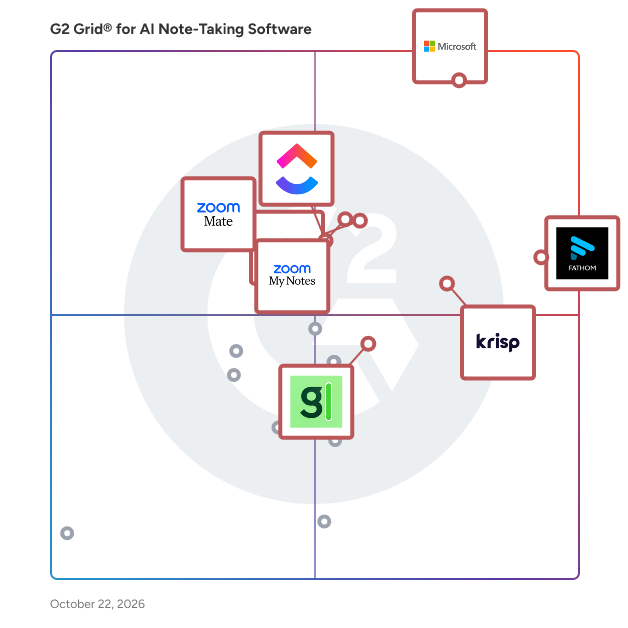
Highlighted products: Microsoft Teams, Fathom, Krisp, Slack, Zoom My Notes, ClickUp, Granola, and ZoomMate.
Underlying data: [Grid® JSON](https://www.g2.com/categories/ai-note-taking-software/grids.json?focus%5B%5D=microsoft-teams&focus%5B%5D=fathom-video&focus%5B%5D=krisp&focus%5B%5D=slack&focus%5B%5D=zoom-my-notes&focus%5B%5D=clickup&focus%5B%5D=granola&focus%5B%5D=zoommate)
Capfora AI is a B2B SaaS platform designed to transform in-person sales conversations into structured, actionable intelligence. By capturing and analyzing dialogues from trade shows, conferences, and field events, Capfora ensures that valuable insights are seamlessly integrated into your CRM systems, such as Salesforce and HubSpot. This enables sales teams to follow up with a comprehensive understanding of each interaction, enhancing the effectiveness of their go-to-market strategies. Key Features and Functionality: - Real-Time Voice Capture: Record and transcribe in-person conversations at events, ensuring no detail is missed. - AI Conversation Intelligence: Utilize artificial intelligence to extract intent, sentiment, buying signals, and action items from discussions. - Lead Capture and Enrichment: Scan badges and business cards to create deduplicated and enriched contact records. - CRM Integration: Seamlessly sync captured data with CRM platforms like Salesforce and HubSpot. - Third-Party Integrations: Connect with tools such as Gong, Outreach, Marketo, Zoom, and Jira to enhance workflow automation. Primary Value and User Solutions: Capfora AI addresses the challenge of lost or unstructured data from in-person sales interactions. By converting these conversations into organized, actionable insights, it empowers sales, marketing, product, and solutions teams to: - Enhance Follow-Up Efficiency: With detailed context from each interaction, teams can tailor their follow-up strategies to be more relevant and impactful. - Improve Data Accuracy: Automated transcription and analysis reduce manual data entry errors, leading to more reliable CRM records. - Optimize Event ROI: By capturing and analyzing field data, organizations can better assess the effectiveness of their event strategies and make informed decisions for future engagements. Designed for B2B companies with revenues between $75M and $200M that heavily invest in trade shows and field events, Capfora AI ensures that every in-person conversation contributes to a more intelligent and efficient revenue engine.
Connect G2 to Claude or ChatGPT for answers grounded in G2's trusted reviews, comparisons, and pricing from real user insights.
CFAI is a cognitive AI assistant that runs at the OS level on Windows. Unlike browser-based tools or meeting bots, CFAI operates system-wide — it works inside any application, during any task, without requiring you to switch context or open a separate interface. At its core, CFAI captures both system audio and microphone simultaneously, enabling real-time transcription and translation across 101 languages during any conversation, meeting, video, or call — without a bot joining the session or any data leaving your device by default. It is the only Windows desktop AI assistant that works without a bot, without a browser extension, and without cloud dependency. Context Orientation — CFAI reads the active application on your screen and automatically injects that context into every AI response, making assistance relevant to exactly what you are working on at any moment. No copy-pasting, no re-explaining. In-Place Replace — Select any text in any application and trigger an AI transformation instantly via a global hotkey. Rewrite, translate, summarize, expand, or rephrase without leaving your workflow. Works in Word, Outlook, Slack, browsers, and any Windows app. CRC Clipboard AI — Generate an AI response that lands directly in your clipboard with a single shortcut. Paste it anywhere, instantly. The fastest AI writing assistant for power users. Agentic AI Desktop Automation — Run autonomous multi-step AI workflows with tool use and human confirmation before any critical action, directly on your desktop. The first agentic AI layer built natively for Windows. Local LLM Support — Connect to Ollama, LM Studio, or any OpenAI-compatible local server. Full offline AI capability, zero API keys required, complete data privacy. Ideal for enterprise, legal, medical, and air-gapped environments. Document RAG — Index and query your documents locally with on-device embeddings. No cloud processing, no data exposure. Private document intelligence for professionals. Real-Time AI Transcription and Translation — Transcribe meetings, calls, lectures, and videos in real time with local Whisper. Translate live across 101 languages with speaker diarization. Works on Zoom, Microsoft Teams, Google Meet, Discord, Webex, and any audio source on Windows. Offline TTS — High-quality text-to-speech via Piper, fully on-device, zero latency. Cognitive Map — Visualize decision pathways and AI reasoning branches interactively for strategic planning and analysis. Lecture Mode — Generate structured AI-powered presentations from a prompt with live TTS narration and interactive voice questions. CFAI is built for professionals, developers, sales teams, researchers, students, and anyone who wants a real-time AI assistant working alongside them during their actual workflow — not after it. If you are looking for a Windows AI productivity tool, a bot-free meeting assistant, a local LLM desktop app, or a real-time translation tool, CFAI covers all of it in one native desktop experience.
Chatdocuments is a cutting-edge platform designed to revolutionize the way teams collaborate on documents. By integrating real-time chat functionality directly into documents, it enables seamless communication and collaboration without the need to switch between multiple applications. This integration enhances productivity and ensures that all team members are on the same page, literally and figuratively. Key Features and Functionality: - Integrated Real-Time Chat: Communicate instantly within the document interface, eliminating the need for external messaging tools. - Collaborative Editing: Multiple users can edit documents simultaneously, with changes reflected in real-time. - Version Control: Track document revisions and revert to previous versions if necessary. - User Mentions and Notifications: Tag team members to draw their attention to specific sections, ensuring prompt responses. - Access Control: Set permissions to control who can view or edit documents, maintaining data security. Primary Value and User Solutions: Chatdocuments addresses the common challenge of fragmented communication during document collaboration. By embedding chat directly into the document environment, it reduces the inefficiencies associated with toggling between separate communication and editing tools. This streamlined approach not only saves time but also minimizes misunderstandings, leading to more effective teamwork and faster project completion.
ChatInDoc is an innovative platform designed to enhance document collaboration by integrating real-time chat functionality directly within your documents. This seamless integration allows teams to communicate and collaborate more effectively without the need to switch between multiple applications, streamlining workflows and boosting productivity. Key Features and Functionality: - Integrated Chat: Embed live chat within documents to facilitate immediate discussions and feedback. - Real-Time Collaboration: Multiple users can edit and comment on documents simultaneously, ensuring up-to-date information. - User-Friendly Interface: Intuitive design that requires minimal training, allowing teams to adopt the platform quickly. - Secure Communication: Ensures that all conversations and document edits are protected with robust security measures. - Cross-Platform Compatibility: Accessible on various devices and operating systems, providing flexibility for diverse teams. Primary Value and Problem Solved: ChatInDoc addresses the common challenge of fragmented communication during document collaboration. By embedding chat directly into documents, it eliminates the need for external messaging tools, reducing context switching and potential miscommunications. This integration leads to more efficient workflows, faster decision-making, and a more cohesive team environment.
Cheetu AI is an AI-powered transcription, translation, and meeting notes platform designed for meetings, lectures, interviews, webinars, and real-time conversations. With up to 96% transcription accuracy, Cheetu AI instantly converts audio and video into searchable text, AI-generated summaries, and structured meeting notes — helping users save time and eliminate manual note-taking. As an advanced AI speech-to-text and audio-to-text solution, Cheetu AI supports real-time transcription, live translation, and multilingual communication across 20+ languages. Whether for online meetings, online classes, cross-border collaboration, or international teamwork, users can understand and capture conversations in any language with ease. Users can record conversations directly or upload audio and video files to generate instant transcripts, translations, subtitles, and AI meeting summaries. Its built-in AI chat assistant also allows users to ask questions, review key points, and quickly extract insights from meetings, lectures, or recorded content. Cheetu AI is ideal for remote teams, students, educators, content creators, and business professionals looking for a fast, accurate, and multilingual AI note-taking app. By combining AI transcription software, meeting summarization, and real-time translation into one platform, Cheetu AI turns conversations into organized, actionable knowledge and improves productivity for global communication.
YouTube Transcript AI Summary is a Chrome extension designed to enhance your YouTube viewing experience by providing AI-generated summaries and transcripts of video content. Leveraging advanced language models like ChatGPT, Claude, and Gemini, this tool enables users to quickly grasp the essence of lengthy videos without watching them in their entirety. Ideal for students, researchers, and professionals, it streamlines content consumption by delivering concise summaries and detailed transcripts directly within the YouTube interface. Key Features and Functionality: - Automatic AI Summaries: Utilizes OpenAI's API to generate concise summaries of YouTube videos, allowing users to quickly understand the main points without watching the entire content. - Manual Summarization: Offers the option to submit text to ChatGPT for personalized summaries, providing flexibility in content analysis. - Text Splitting: Breaks down lengthy transcripts into manageable sections, facilitating easier reading and comprehension. - Customized Prompt Entry: Allows users to input specific prompts for AI summaries, tailoring the output to their unique needs. - Multi-Model Support: Supports various AI models, including GPT-4, Claude, and Gemini, ensuring versatile and accurate summarization. - Language Selection: Enables users to select different subtitle languages for summaries, catering to a diverse user base. Primary Value and User Benefits: YouTube Transcript AI Summary addresses the challenge of efficiently consuming extensive video content by providing quick, accurate summaries and transcripts. This functionality is particularly beneficial for individuals who need to extract key information from videos without dedicating significant time to viewing. By integrating seamlessly into the YouTube platform, the extension enhances productivity, supports multilingual users, and offers customizable features to meet various content consumption preferences.
A Must-Have for Business and Sales Pros
Total Reviews: 1
Claryti is an AI-powered tool designed to streamline daily workflows by integrating with email, Slack, calendar, and meeting platforms. Every morning at 8 AM, it delivers a concise brief highlighting pending commitments, responses required, and preparations needed for upcoming meetings. By automatically tracking promises and action items across various communication channels, Claryti ensures that no task is overlooked, enhancing productivity and accountability. Key Features and Functionality: - Daily Briefs: Provides a prioritized summary each morning, detailing tasks owed, responses needed, and meeting preparations. - Commitment Tracking: Automatically identifies and monitors promises made and received across emails, Slack messages, and meetings. - Meeting Preparation: Offers context for upcoming meetings, including recent communications and outstanding commitments. - Cross-Channel Integration: Seamlessly connects with Gmail, Outlook, Slack, Google Calendar, Zoom, Google Meet, and Microsoft Teams. - Read-Only Access: Ensures data security by accessing information without modifying or sending messages on behalf of the user. Primary Value and Solutions Provided: Claryti addresses the challenge of managing multiple commitments across various platforms by consolidating them into a single, actionable daily brief. This reduces the time spent scanning through emails, Slack messages, and calendars, allowing professionals to focus on their core responsibilities. By ensuring that all tasks and promises are tracked and surfaced when due, Claryti minimizes the risk of missed deadlines and overlooked responsibilities, thereby enhancing overall efficiency and reliability.
