
Softaken Software
- 86 profiles
- 15 categories
Featured Products




All Products & Services

The Softaken NSF to MBOX Converter is a useful software for exporting Lotus Notes NSF files to MBOX format. It lets people access their NSF mailbox data with email clients that support MBOX, such as Thunderbird and others. The software converts emails and attachments while keeping the original text safe. It keeps the folder structure and message details during the export process. The interface is easy to use, so people don't need to know anything about technology to do the task. The utility can convert a lot of files at once, which saves time and effort. It also works well with different versions of Windows and Lotus Notes. Main Features: 1. Converts NSF files into MBOX files 2. Keeps the original email's attributes the same 3. Allows for bulk conversion 4. Keeps the folder structure in order 5. Works with most versions of Windows

Softaken File Organizer Software is a easy-to-use program that helps you keep track of and organize files that are spread out on your computer. This powerful application helps users automatically sort files into structured folders based on file type, name, date, size or other criteria. This makes it easier to keep your computer clean and well-organized. The software swiftly scans chosen areas and sorts files into the right listings without changing the original data. This works for documents, photographs, videos, music files, and other types of data. It reduces manual effort, saves time, and improves system productivity by eliminating clutter and confusion caused by unorganized files. The software has a basic interface that works for both tech-savvy and non-tech-savvy people. It works with all major Windows operating systems and makes sure that files are handled safely at all times. It also includes a free demo version that lets people try out its features before they buy it. Visit here: https://www.softaken.com/file-organizer
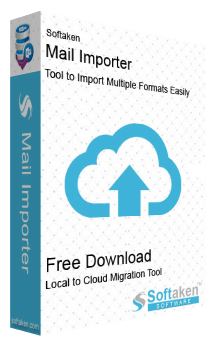
Softaken Mail Importer is an invaluable Tool that makes it easy and accurate to import local mail files into IMAP accounts. It can handle data from many email platforms because it works with many file types, such as PST, EML, MSG, and MBOX. The tool works straightforwardly: you choose the local files you want to transfer, map them to the IMAP account you want to use, and then move them without any extra steps. It keeps the original folder structure and email attributes like attachments, formatting, and information, which makes sure that the migration is very accurate. The interface is simple and easy to use, thus everything works smoothly without any technical problems. You can use batch processing to work with more than one file at a time, which saves time and effort. The software is made to work well all the time and safely move data. It works with most Windows operating systems and with well-known IMAP services, including Gmail, Yahoo, and Outlook. You can try out the features before you buy by downloading a demo version. There is also specialised support to help you set up and answer questions. Important Features Works with PST, EML, MSG, and MBOX files Import directly into IMAP accounts Keeps the structure and accuracy of the data A workflow that is simple and easy Works with all versions of Windows There is a free demo version. Service for professional help

The Softaken PST to MSG Converter Software even allows users who aren't very good with computers to easily convert PST files to MSG format. Users won't lose any information when they use this software to convert a lot of PST files to MSG files. When Outlook users convert huge PST files to MSG files, they don't have to worry about file size limitations or using them. It's always safe to use this software to convert PST files into MSG files. This software is safe for things like "To," "CC," "BCC," "From," "Date," and "Subject." Users who use this software can choose where on their computer to save the MSG file after they have converted it. Before converting a PST file to an MSG file, the tool's sample lets users see all of the databases. You can use this software with Windows 11, 10, 8, 7, Vista, XP, and other versions. Users can check out the software for free and look around before they buy it. Look around with the tools. It works with dates from 2021 to 2019, 2016, 2010, and now. All of the PST emails that are linked are instantly converted into MSG files that stay the same size.

Softaken Office 365 to Office 365 Migration Tool is a safe way to migrate data from one Office 365 tenant to another. It makes sure that all the data in the mailbox is migrated safely and without any alterations or loss. The tool uses cutting edge technologies to give users quick and accurate migration results. Users can choose single folders or whole mailboxes as needed. The software works with all versions of Windows and does not need to be installed again. The step by step procedure makes it easy for everyone to migrate. Users can move even big data files without slowing down the system. The demo version lets people see how the tool works before they buy it. Important Features: 1. Safe transfer of tenants from one place to another 2. Choice to select certain folders 3. Works with all versions of Windows 4. Data communication that is quick and accurate 5. A demo version for testing

Softaken MSG to PDF Converter is a single application designed to migrate MSG files into PDFs. You do not have to install Adobe Acrobat or MS Outlook for this software to work. It is made to convert MSG files in a few easy steps without technical support. This tool handles data from Outlook versions 2003 through 2019 and moves everything without damaging the email properties. The tool lets you preview every file on its screen so you can be sure about what you are saving. It is a lightweight application which means it runs easily without affecting your computer speed. You also get a quick report at the very end. Features: • It changes multiple MSG files to PDF format in a few easy setup. • You can convert unlimited files in bulk because there are no boundaries on quantity. • It retains the true structure of your mail, keeping CC, BCC, attachments and dates unaffected. • The final PDF results work nicely across all devices like laptops, phones, and PCs. • You can select any existing folder or make a new one to store your fresh PDFs. • A free trial version is available for a few days so you can check its features before buying.

Softaken Unlock PDF Files is designed for users who need access to restricted PDF documents. It helps remove PDF permissions related to copying, editing, printing, and known password protection. This is useful when a PDF is locked, but the correct password is already available. The software can handle multiple PDF files and remove restrictions without affecting the original content (Text, images, graphs, formatting, and document properties). Also, the software allows users to reset a known PDF password when needed. The tool comes with a clean and simple interface that both tech and non-tech individuals can efficiently use. It is completely independent of the need for an external application installation artifact. PDF unlockers flawlessly and smoothly in all versions of Windows 11, 10, 8.1, 8, 7, and older ones. In addition, the tool comes with a free demo version to learn more about its features.

Softaken Data Recovery is a reliable Windows data recovery tool to recover deleted files, lost data and inaccessible data from Windows platforms. The software recovers easily important documents, photos, movies, audio files and other data from internal and external storage devices without altering the original file structure. The application has the ability to retrieve deleted files from hard drives, restore Shift+Delete files, and recover deleted data from the Recycle Bin in a few straightforward steps. The software can recover data from hard disks, USB devices, memory cards, SD cards, flash drives and other storage media. The Windows Data Recovery tool does a complete scan of the selected drive with multiple scan options to get the exact recovery results. Users can preview the recovery data before saving it so that they can check that the required items are correct. It supports both NTFS and FAT systems, so it is compatible with several Windows storage environments. The software is capable of handling large data recovery tasks efficiently and restoring data. Its easy-to-use interface allows both home users and professionals to recover lost files without advanced technical knowledge. Additionally, the recovery tool works flawlessly and smoothly in all versions of the Windows operating system, including 11, 10, 8.1, 8, 7, and older ones.

Softaken MSG Attachment Extractor is built for users who need to pull attached files out of Outlook MSG emails without opening every message one by one. It helps when MSG files contain invoices, images, reports, ZIP files, documents, spreadsheets, or other email attachments that need to be saved separately on the system. The software can scan multiple MSG files and extract their attachments in one process. It keeps the folder arrangement organised, so users can manage the output without mixing files. No Outlook installation is needed. The tools support all versions of MSG files from MS Outlook 2021, 2019, 2016, 2013, 2010, and earlier versions. It supports common attachment types such as PDF, DOC, PNG, XLS, ZIP, HTML, TXT and more. It also enables users to choose a destination path for saving extracted files. In addition, the software works flawlessly in all versions of the Windows OS.
Softaken Software Reviews

Krishna A.
Digital Marketing intern | SEO | OFF Page SEO | ON Page SEO | Technical SEO | Google Ads | Meta ads | Social Media Strategy | Helping Brands Grow OnlineEasy, Straightforward Inteface with a Smooth Conversion Process
Deepanshu S.
Digital Marketing Expert - KWT SOLUTIONS LLP (formerly Krishna Webtel)Simple, Easy Interface with a Quick Setup Process
Natalie H.
Effortless, Reliable Image Conversion in Multiple Formats
About
What is Softaken Software?
Softaken Software is a technology company specializing in the development of software tools and solutions to assist with email management, data recovery, file conversion, and cloud backup. Their product line includes a variety of utilities designed to improve efficiency and productivity for both individual and corporate users. Key offerings include email conversion tools that help users migrate between different mail formats and services, data recovery tools that assist in retrieving valuable information from corrupted or damaged files, and cloud backup software to ensure data integrity and security.Softaken places a strong emphasis on simplicity and user-friendly interfaces, making complex tasks more accessible to non-technical users. Their tools support a wide range of file formats and platforms, ensuring flexibility and convenience for users dealing with diverse data management needs.