Best Resource Management Software - Page 13

How Many Resource Management Software Products Does G2 Track?

Total Products under this Category: 215

Category Stats (Nov 2026)

  • Average Rating: 4.32/5 The average rating of products in this category, based on all submitted ratings
  • Top Trending Product: PSOHUB. (+0.32%) - Among all products in this category, PSOHUB. recorded the largest rating increase compared to last month

Last updated: November 01, 2026

How Does G2 Rank Resource Management Software Products?

Why You Can Trust G2's Software Rankings:

  • 30 Analysts and Data Experts
  • 77,300+ Authentic Reviews
  • 215+ Products
  • Unbiased Rankings

G2's software rankings are built on verified user reviews, rigorous moderation, and a consistent research methodology maintained by a team of analysts and data experts. Each product is measured using the same transparent criteria, with no paid placement or vendor influence. While reviews reflect real user experiences, which can be subjective, they offer valuable insight into how software performs in the hands of professionals. Together, these inputs power the G2 Score, a standardized way to compare tools within every category.

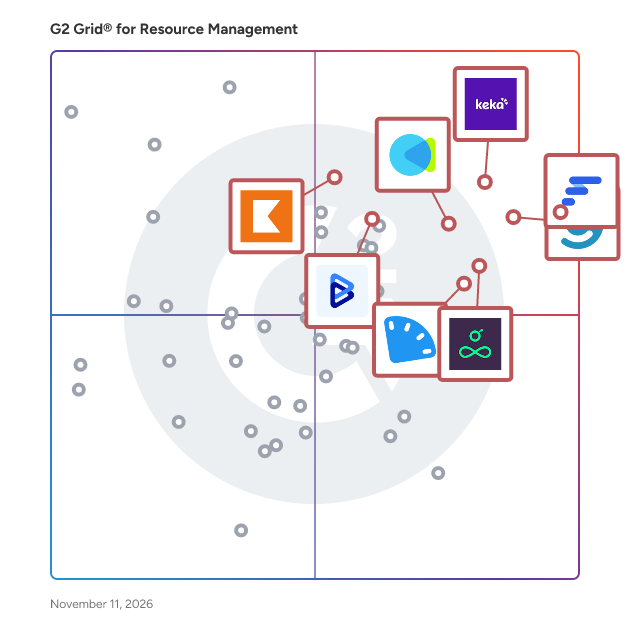
G2 Grid® for Resource Management Software

G2 Grid® for Resource Management Software plotting products by satisfaction and market presence

Highlighted products: Float.com, Keka, Celoxis, CMap, Resource Guru, ClickTime, Kantata Professional Services Automation (formerly Mavenlink+ Kimble), and BigTime.

Underlying data: [Grid® JSON](https://www.g2.com/categories/resource-management/grids.json?focus%5B%5D=float-com&focus%5B%5D=keka&focus%5B%5D=celoxis&focus%5B%5D=cmap&focus%5B%5D=resource-guru&focus%5B%5D=clicktime&focus%5B%5D=kantata-professional-services-automation-formerly-mavenlink-kimble&focus%5B%5D=bigtime)

Saviom Resource Management

SAVIOM offers next-gen resource management software designed to help organizations optimize their workforce and operational efficiency. It offers various advanced features, including multidimensional scheduling, robust forecasting and capacity planning, talent planning, real-time BI, and more. These capabilities enable firms to streamline processes, reduce resourcing costs, and enhance productivity. Further, the tool’s flexible software architecture helps meet your specific business requirements and scales effortlessly with your organization’s growth. Trusted by numerous Fortune 500 Companies across 50+ Countries, SAVIOM caters to a wide range of industries like IT, engineering, consulting, construction, professional services, marketing, architecture, finance, and non-profits. Get the 60-day customized trial to discover how SAVIOM can help you unleash the true potential of your workforce.

Who Is the Company Behind Saviom Resource Management?

Who Uses This Product?

  • Company Size: 100% Medium

AI can help you find the answers. G2 helps you trust them.

Connect G2 to Claude or ChatGPT for answers grounded in G2's trusted reviews, comparisons, and pricing from real user insights.

How it works

SINNAPS

Sinnaps, is a online project management tool that uses algorithms based on Pert a CPM techniques in order to calculate the optimum workflow for every project.

Average Rating: 4.3/5.0

Total Reviews: 3

How Do G2 Users Rate SINNAPS?

  • Ease of Use: 8.9/10 (Category avg: 8.6/10)

Who Is the Company Behind SINNAPS?

Who Uses This Product?

  • Company Size: 75% Medium, 25% Small

What Are Recent G2 Reviews of SINNAPS?

What Are G2 Users Discussing About SINNAPS?

Skills Workflow

Skills Workflow is a type of cloud-based operations management software that helps service-driven teams plan, execute, and monitor projects, resources, and financial performance within a unified system. It falls within the category of professional services automation (PSA) and work management platforms, designed primarily for agencies, consultancies, and other project-based organizations that require coordination across multiple functions. The product centralizes workflows that typically span project management, resource planning, time tracking, and financial oversight. By integrating these capabilities into a single environment, it enables teams to manage the full lifecycle of client work, from initial planning and scoping to delivery and billing. This reduces reliance on fragmented tools and supports more consistent data across operational and financial processes. Skills Workflow is typically used by roles such as project managers, operations leaders, finance teams, and executives who need visibility into project progress, team capacity, and profitability. Common use cases include planning team workloads, tracking time and costs against projects, forecasting revenue, and generating reports for decision-making. Key aspects of the product include: • Project and task management, allowing teams to structure work, assign responsibilities, and monitor progress across multiple projects • Resource planning and allocation, helping organizations match team capacity with project demand and adjust workloads dynamically • Time tracking and cost control, enabling accurate capture of effort and alignment with budgets and project margins • Financial management features such as budgeting, invoicing, and revenue tracking, supporting end-to-end project profitability analysis • Reporting and analytics tools that provide visibility into performance metrics, including utilization rates, project status, and financial outcomes In addition, the platform supports integrations with external tools commonly used in business environments, allowing organizations to connect existing systems and maintain continuity in their workflows. It is typically delivered as a software-as-a-service solution, making it accessible through a web interface without requiring on-premise infrastructure. Overall, Skills Workflow addresses the need for coordinated operational and financial management in project-based organizations, providing a structured environment where teams can align execution with business objectives.

Who Is the Company Behind Skills Workflow?

Who Uses This Product?

  • Company Size: 100% Medium

Smarten Spaces

Smarten Spaces, headquartered in Singapore, founded in 2017, is a global AI Powered SaaS company dedicated to building intuitive technology for Space Management and delivering an Enhanced Employee Experience. Smarten Spaces’ flagship product, Jumpree Pro is its latest AI-powered, unified workplace platform that streamlines the workings of a Hybrid workplace and is designed to offer a broad range of features including, any space booking, hybrid work status management, community events, space planning & optimization, automatic restacking, ai based recommendation for space scenario planning and multi -source data analytics, service requests and visitor management among other functions. Deployed across offices in 30+ countries including Fortune 500 companies. The platform is Fully integrated with 120+ Top tier tech products including Microsoft Teams, Zoom, WebEx, Outlook and other business applications in addition to Sensors, WiFi & more to capture real time usage information

Average Rating: 3.8/5.0

Total Reviews: 2

How Do G2 Users Rate Smarten Spaces?

  • Ease of Use: 7.5/10 (Category avg: 8.6/10)

Who Is the Company Behind Smarten Spaces?

Who Uses This Product?

  • Company Size: 50% Large, 50% Small

What Are Recent G2 Reviews of Smarten Spaces?

SQO MTC

O SQO MTC is the management of your industrial maintenance An intelligent and innovative platform that connects your maintenance assets, teams, external software and sensors, transforming your information into data and in real time.

Who Is the Company Behind SQO MTC?

  • Seller: Sequor
  • Year Founded: 2005
  • HQ Location: Canoas, BR
  • LinkedIn® Page: www.linkedin.com
    92 employees on LinkedIn®

Stacker

Stacker AI is an AI-powered platform for building portals and business software. Instead of writing code or learning a new tool, you describe what your business needs and Stacker AI builds it . Building with Stacker AI is conversational. You tell it who your portal is for (clients, partners, vendors, your own team) and describe what they need to see and do. Stacker AI asks clarifying questions, makes suggestions, and builds the app with you. You steer, it builds. The whole process takes minutes, not weeks. You don't need technical skills, coding experience, or time to learn a platform. If you can describe how your business works, you can build software for it. Everything you need is included out of the box. Authentication, permissions, hosting, and data sync are all built into every app. Stacker AI connects natively to Airtable, Salesforce, HubSpot, Google Sheets, Stripe, Zoho CRM, Monday.com, Asana, ClickUp, Notion, Xero, QuickBooks Online, and more — with new integrations built on request. What you build is production-ready from day one. You can share it with customers, run your operations on it, and use your own domain. Stacker AI is built for anyone who needs software for their business but doesn't want to code it or hire someone to build it. Operations teams, agency owners, customer success leads, founders — anyone who knows what their business needs but hasn't had a fast way to build it themselves. You can sign up and start building at stacker.ai.

Average Rating: 4.4/5.0

Total Reviews: 12

How Do G2 Users Rate Stacker?

  • Ease of Use: 8.9/10 (Category avg: 8.6/10)

Who Is the Company Behind Stacker?

Who Uses This Product?

  • Company Size: 50% Small, 42% Medium

What Do G2 Reviewers Say About Stacker?

AI-generated summary from verified user reviews

Pros
  • Users appreciate the ease of learning Stacker, enjoying its intuitive interface for building and interacting with data.
  • Users love the intuitive capabilities of Stacker for building interfaces and data interaction methods.
  • Users appreciate the simplicity of Stacker, making it easy to build interfaces and interact with data.
  • Users love the versatile use of Stacker for building interfaces and engaging with data in various ways.
  • Users love the versatility of Stacker, enabling diverse interfaces and interactions with data.
Cons
  • Users note that interface issues arise due to limitations with the Airtable connection that Stacker cannot resolve independently.

What Are Recent G2 Reviews of Stacker?

What Are G2 Users Discussing About Stacker?

Stafiz

Everything you need to better manage a professional services organization. Stafiz truly adds value to a business with 3 pillars: - Collaboration: offer a single environment for project management. Consultants, freelancers and management can all share data and insight to break bottlenecks and increase on-time delivery. - Reporting: with a powerful reporting engine, Stafiz provides all the tools to better plan and improve profitability. Revenue, commercial pipe, project margins, productivity, billable hours... Every metrics you need to increase your performance are visible in real-time - Process automation: save many hours for each collaborator, filling-in timesheets, expense reports and working on staffing. Provide your finance department with automated tools to invoice customers.

Average Rating: 4.5/5.0

Total Reviews: 1

How Do G2 Users Rate Stafiz?

  • Ease of Use: 10.0/10 (Category avg: 8.6/10)

Who Is the Company Behind Stafiz?

Who Uses This Product?

  • Company Size: 100% Medium, 100% Small

What Are Recent G2 Reviews of Stafiz?

What Are G2 Users Discussing About Stafiz?

SuitePro-G

SuitePro-G is a Project Portfolio Management (PPM) software developed by IQar, a Pure Project Player founded in Lyon, France in 2009. Purpose-built for CIOs, PMOs, and transformation leaders, SuitePro-G delivers end-to-end portfolio governance — covering resource capacity planning, budget tracking, strategic scoring and portfolio prioritization, program management, roadmap planning, KPI dashboards, and automated reporting. Agentic AI is natively embedded in SuitePro-G through Matt, an intelligent assistant powered by 11 specialized agents. These agents autonomously handle project scoping, Gantt planning, capacity planning, budget management, report generation, steering committee presentations, portfolio auditing, and project health monitoring. Activated via Magic Buttons, Matt requires no lengthy onboarding and works within your existing toolset. Developed by IQar with support from BPI France. SuitePro-G is built on the SMPP framework — Système de Management du Portefeuille de Projets — the only French-language PPM reference framework certified by Bureau Veritas Certifications, providing organizations with a structured, auditable foundation for project portfolio governance. Native integrations are included across all license tiers: Microsoft Teams, Power BI, Zapier (unlimited Zaps), and Power Automate. A REST Web API enables seamless connectivity with enterprise business applications. Data is hosted on sovereign French infrastructure via Ciril Group cloud, fully GDPR-compliant. On-premise deployment is available for organizations operating under strict digital sovereignty requirements — including banking, insurance, and public sector institutions. SuitePro-G has been listed in the UGAP procurement catalog since 2021, enabling simplified purchasing for French local authorities, public administrations, and government agencies. Pricing starts at €30 for 10 users per year. Agentic AI (Matt) is included at no additional cost. A preconfigured turnkey version can be deployed and operational within days. A free 30-day trial is available. 200+ organizations served. 40,000 active users. 98% renewal rate. Fourth consecutive year of double-digit growth.

Average Rating: 4.5/5.0

Total Reviews: 1

How Do G2 Users Rate SuitePro-G?

  • Ease of Use: 10.0/10 (Category avg: 8.6/10)

Who Is the Company Behind SuitePro-G?

  • Seller: IQar
  • Year Founded: 2009
  • HQ Location: Lyon, FR
  • LinkedIn® Page: www.linkedin.com
    8 employees on LinkedIn®

Who Uses This Product?

  • Company Size: 100% Large

What Are Recent G2 Reviews of SuitePro-G?

What Are G2 Users Discussing About SuitePro-G?

TeamGantt

TeamGantt is online Gantt chart software for teams who need a schedule everyone can see, trust, and actually use. Plan in minutes with drag-and-drop simplicity, link dependent tasks once, and let the whole schedule move with you when plans change. No bloated setup, no certification required, and no per-seat bill that punishes you for inviting the people who need to be in the loop. More than 2 million people in over 120 countries have used TeamGantt to plan their work, and 20,000+ teams rely on it today, from marketing departments and creative agencies to custom home builders, trade contractors, and product teams at companies like NASA, Netflix, Google, and Whole Foods Market. WHY TEAMGANTT IS DIFFERENT Most project tools force a trade-off. Enterprise scheduling software is powerful but slow to learn and expensive to roll out. All-in-one work platforms try to do everything, burying the timeline under layers of docs, dashboards, and settings. Spreadsheets are familiar but fall apart the moment one date changes. TeamGantt was built to end that trade-off. It gives you real scheduling power (dependencies, critical path, baselines, workload, and cost tracking) in an interface that anyone on your team, or your client's team, can pick up in an afternoon. We believe a schedule only works if people actually open it, so we obsess over making it fast, visual, and friendly. BUILT ON A JOBSITE, NOT IN A BOARDROOM TeamGantt started in 2009 as scheduling software for a Baltimore roofing contractor. Our cofounders built it on nights and weekends because nothing on the market handled both job scheduling and team coordination well. A customer signed up within hours of the first launch, and we have been building alongside our customers ever since. We are proudly bootstrapped. We have never taken outside equity funding, which means there is no investor pressure pushing us toward complexity, upsells, or growth-at-all-costs decisions. Our customers fund our business, so our customers decide where it goes. That independence shows up everywhere: in the roadmap, in the pricing, and in the support you get. FAST, VISUAL SCHEDULING - Drag-and-drop Gantt charts: Create tasks, set dates, and adjust timelines by simply dragging bars. Changes happen instantly. - Dependencies with lead and lag: Link tasks once. Move one date, and every downstream task follows automatically, with custom lead and lag times when you need them. - Critical path: See exactly which tasks determine your finish date so you know where a delay will hurt and where you have room to breathe. - Milestones, lookahead schedules, and templates: Mark key moments, plan the next few weeks in detail, and reuse what works so every new project starts ahead. - Easy imports: Bring in existing plans from Microsoft Project (.mpp), CSV or Excel, and Primavera P6. No rebuilding from scratch. - AI-assisted planning: Describe your project and TeamGantt's AI Assistant drafts a starting plan with phases, tasks, milestones, and durations, so you never start from a blank page. Most teams build their first project in minutes, not weeks. SINGLE SOURCE OF TRUTH - VISUALLY Not everyone thinks in Gantt charts, and they don't have to. TeamGantt keeps a single source of truth and lets each person work in the view that suits them: Gantt, calendar, list, or kanban board, plus a personal My Tasks view and custom cross-project workflow boards. Subtasks, task groups, checklists, custom labels, custom fields, and a built-in RACI chart give structure without clutter. KNOW WHERE EVERYTHING & EVERYONE STANDS - Baselines: Compare the plan you promised with the one you're actually running, then fix course quickly. - Real-time progress and project health: See what's on track and what's slipping at a glance, across a single project or your whole portfolio. - Time tracking and estimates: Log hours, run timesheet reports, and compare estimated vs. actual hours to sharpen future planning. - Activity log with undo: See who changed what, and reverse mistakes in a click. - Notifications and alerts: Keep the right people informed without endless status meetings. SEE WHO'S BOOKED, WHO'S FREE, AND WHO'S STRETCHED TOO THIN TeamGantt's workload view shows demand across every project by task count or estimated hours, and it updates live as you drag tasks around. Assign work to people, teams, or even assets like equipment and spaces. Spot double-booking before it happens, balance the load, and protect your team from burnout. COLLABORATION IN REAL TIME A schedule is only useful if the people doing the work can see it. TeamGantt makes collaboration simple: - Comments, @-mentions, sticky notes, and file sharing right on the tasks they relate to. - Live share links that give anyone view-only access to an always-current schedule. Send one link and it updates automatically, every time. - Exports, printable PDF timelines, and embeddable timelines for websites and client updates. - Unlimited collaborators on Business and Builder plans, so you never have to decide who gets left out. TEAMGANTT 3.0: FASTER, CLEANER, SMARTER Our latest release, TeamGantt 3.0, rebuilds the core experience for performance and focus: - A renewed Gantt chart engineered to be dramatically faster, even on very large schedules. - A refreshed interface with more room to work, a customizable sidebar, and reworked filters and navigation. - A Command Palette (Cmd/Ctrl + K) to jump instantly to any project, board, or task. - An AI Assistant (Beta) that helps you manage projects, not just build them. Ask what's overdue, adjust the schedule for a change order, or push remaining tasks after a weather delay, all in plain language. PURPOSE-BUILT FOR CONSTRUCTION: BUILDER EDITION Because TeamGantt was born on a jobsite, we take construction seriously. Builder Edition gives custom home builders, remodelers, trade contractors, and small commercial GCs tools designed for how crews actually work: - Subcontractor portal: Send schedule requests by text message or email. Subs confirm or decline with just a phone number. No app, no account, no password. - Client portal: Share a curated, live view of progress with homeowners and clients, with built-in chat to keep communication in one place. - Procurement tracking and material lead times: Link material orders to install tasks so dates update automatically when deliveries slip, with a procurement board across all your jobs. - Cost-loaded scheduling and cash flow forecasting: Track budgeted vs. actual costs per task and forecast expected billing as the schedule changes. - Procore integration: Push your TeamGantt schedule to Procore so the field and the office work from the same plan. - Personalized onboarding to get your team up and running fast. WORKS WITH THE TOOLS YOU ALREADY USE TeamGantt fits into your existing stack instead of asking you to replace it. Integrations include Slack, Trello, Basecamp, Dropbox, Procore, and calendar feeds for Google, iCal, and Outlook. Zapier connects TeamGantt to more than 8,000 other apps, and an open API supports custom connections. Microsoft Project import and export means you can collaborate with stakeholders who still live in MPP files. SECURE AND READY TO SCALE Manager and collaborator permissions keep control where it belongs, while single sign-on (SSO), advanced reporting, and forecasting are available for organizations that need them. TeamGantt runs in your browser on Mac or PC with nothing to install, and mobile access keeps teams connected from the office, the field, or on the go. SIMPLE, PREDICTABLE PRICING We think pricing should be as straightforward as the product. TeamGantt uses flat monthly plans rather than a per-seat bill, and our Business and Builder plans include unlimited managers and collaborators. Every paid plan comes with a 14-day free trial with full access to that plan's features, and there are no long-term contracts. Annual billing saves 20%, and a free Personal plan is available for individuals getting started. SUPPORT FROM REAL PEOPLE WHO KNOW THE PRODUCT This is where TeamGantt really stands apart. When you reach out, you talk to a real person on our team, not a chatbot or a ticket queue. Our average response time is under five minutes on weekdays, and support is available seven days a week, including evenings and weekends. Over 100 tutorials and help docs are available on demand, and our team will happily help you set up your first project. Our customers notice. As one leader put it: "TeamGantt's customer service is second to none. Amber has personally helped me out of jams and even rebuilt my schedule when I needed it. There's just really good people behind the scenes." And from a project manager at Rakuten: "We compared multiple project management solutions and found many good 'integrated' enterprise solutions but couldn't find a good solution which just focuses on our problem: project management. TeamGantt is designed to solve the problem." WHO TEAMGANTT IS FOR - Project managers who want real scheduling power without enterprise complexity. - Marketing teams and creative agencies juggling campaigns, launches, and client deliverables. - Construction teams, including custom home builders, remodelers, trade contractors, and small commercial GCs. - Operations, product, and IT teams coordinating cross-functional work with clear deadlines. - Any team tired of spreadsheets that break and tools nobody wants to open. OUR PROMISE Our values are simple: always do the right thing, put people over profits, and treat others with dignity and respect. That's why we build software that respects your time, price it fairly, and stand behind it with people who care. Have a real schedule by the end of the day. Start a free 14-day trial, take a guided tour, or book a demo and we'll walk through it together.

Average Rating: 4.8/5.0

Total Reviews: 875

How Do G2 Users Rate TeamGantt?

  • Ease of Use: 9.2/10 (Category avg: 8.6/10)

Who Is the Company Behind TeamGantt?

  • Seller: TeamGantt
  • Company Website:
  • Year Founded: 2009
  • HQ Location: White Marsh, MD
  • LinkedIn® Page: www.linkedin.com
    21 employees on LinkedIn®

Who Uses This Product?

  • Who Uses This: Project Manager, Director
  • Top Industries: Computer Software, Information Technology and Services
  • Company Size: 61% Small, 26% Medium

What Do G2 Reviewers Say About TeamGantt?

AI-generated summary from verified user reviews

Pros
  • Users find TeamGantt's ease of use invaluable for managing complex projects with clear visual schedules and straightforward setup.
  • Users value the visual collaboration capabilities of TeamGantt, enhancing communication and coordination for effective project management.
  • Users appreciate the effective project tracking in TeamGantt, facilitating organization and collaboration across complex construction activities.
  • Users appreciate the easy task allocation and timeline management with TeamGantt, enhancing productivity and project visibility.
  • Users appreciate the easy setup of TeamGantt, enabling swift integration and efficient task management for projects.
Cons
  • Users find the learning curve steep, struggling to teach new staff the functionalities of TeamGantt effectively.
  • Users find beginner difficulty challenging, especially when training new staff and dealing with system lags during demos.
  • Users struggle with manpower adjustment challenges, finding it difficult to align hours with project completion effectively.
  • Users find the reporting features inadequate, offering only basic insights without the depth they need.
  • Users feel that the lack of integrations with Teams limits the functionality and effectiveness of TeamGantt.

What Are Recent G2 Reviews of TeamGantt?

What Are G2 Users Discussing About TeamGantt?
Teamhero

Who Is the Company Behind Teamhero?

  • Seller: Teamhero
  • Year Founded: 2014
  • HQ Location: Berlin, DE
  • LinkedIn® Page: www.linkedin.com
    9 employees on LinkedIn®

Teamogy

Teamogy is all-in-one cloud system for those who want to have their company in order. It allows you to have fully overview about capacity planning and time tracking. Teamogy connects internal teams and supports collaboration and communications inside the company. It lets your team work anytime and from anywhere.

Average Rating: 5.0/5.0

Total Reviews: 1

How Do G2 Users Rate Teamogy?

  • Ease of Use: 10.0/10 (Category avg: 8.6/10)

Who Is the Company Behind Teamogy?

Who Uses This Product?

  • Company Size: 100% Small

What Are Recent G2 Reviews of Teamogy?

Subhransu Sahu
SS
Researched and written by Subhransu Sahu
Updated November 6, 2024