Best Punch List Software - Page 7

Last updated: October 3, 2024

How Many Punch List Software Products Does G2 Track?

Total Products under this Category: 130

Category Stats (Nov 2026)

  • Average Rating: 4.44/5 (↑0.01 vs Oct 2026) The average rating of products in this category, based on all submitted ratings
  • Top Trending Product: CONQA (+14.29%) - Among all products in this category, CONQA recorded the largest rating increase compared to last month

Last updated: November 24, 2026

How Does G2 Rank Punch List Software Products?

Why You Can Trust G2's Software Rankings:

  • 30 Analysts and Data Experts
  • 13,800+ Authentic Reviews
  • 130+ Products
  • Unbiased Rankings

G2's software rankings are built on verified user reviews, rigorous moderation, and a consistent research methodology maintained by a team of analysts and data experts. Each product is measured using the same transparent criteria, with no paid placement or vendor influence. While reviews reflect real user experiences, which can be subjective, they offer valuable insight into how software performs in the hands of professionals. Together, these inputs power the G2 Score, a standardized way to compare tools within every category.

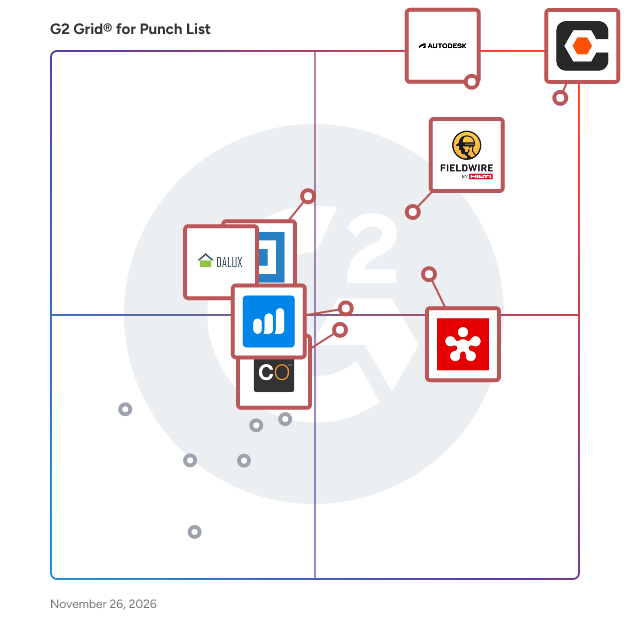
G2 Grid® for Punch List Software

G2 Grid® for Punch List Software plotting products by satisfaction and market presence

Highlighted products: Procore, Autodesk Forma (formerly Autodesk Construction Cloud), Fieldwire by Hilti, Revizto, Bluebeam, Dashpivot, UDA ConstructionOnline, and Dalux.

Underlying data: [Grid® JSON](https://www.g2.com/categories/punch-list/grids.json?focus%5B%5D=procore&focus%5B%5D=autodesk-forma-formerly-autodesk-construction-cloud&focus%5B%5D=fieldwire-by-hilti&focus%5B%5D=revizto&focus%5B%5D=bluebeam&focus%5B%5D=dashpivot&focus%5B%5D=uda-constructiononline&focus%5B%5D=dalux)

MySnagHub

SnagHub streamlines the snagging process for construction projects — from initial defect capture through to sign-off. Designed for site managers, contractors, and subcontractors who need a simple, reliable way to document and resolve issues without spreadsheets or paperwork. Key Features: Photo-first snagging — Capture defects with photos directly from your phone, with descriptions, deadlines, and trade assignments Project & room hierarchy — Organise snags by project, floor, and room for clear accountability across large sites Team collaboration — Assign snags to specific team members, track completion status, and manage approvals with full audit trails Completion workflows — Fitters submit completion photos for manager review, with approve/reject flows and blocking reasons Automated reporting — Generate professional PDF snagging reports filtered by status, room, or date range, and share them via link Daily digest notifications — Automated email summaries keep managers informed of progress without checking the app Deadline tracking — Visual indicators flag overdue items so nothing slips through the cracks Offline-ready architecture — Designed for construction sites with unreliable connectivity (PWA coming soon) Who it's for: Site managers running snagging on residential and commercial builds Main contractors coordinating multiple subcontractor teams Property developers managing handover and defect resolution Fit-out companies tracking punch lists across multiple units What makes it different: SnagHub is purpose-built for how construction teams actually work on-site — on their phones, often with limited signal, under time pressure. It's not a repurposed project management tool; every feature is designed around the snagging workflow.

Who Is the Company Behind MySnagHub?

myTrack

myTrack is an advanced contractor data management software designed to streamline workforce and resource tracking for organizations managing contractors, labor, equipment, rental equipment, and materials. The platform provides a centralized hub for tracking contractors across routine maintenance, Turnarounds/Shutdowns, and capital projects, offering real-time insights to improve efficiency, reduce costs, and maintain compliance. With its user-friendly interface and powerful automation capabilities, myTrack ensures that organizations have full visibility and control over their contingent workforce and project resources, no matter the scale. This software is ideal for businesses in industries such as oil & gas, utilities, mining, metals, chemicals, agriscience, EPC, manufacturing, and industrial operations, where managing contractors and resources is critical to success. Whether a company works with a small team of contractors or oversees a large-scale workforce, myTrack equips managers with the tools they need to make data-driven decisions, streamline operations, and improve accountability across all projects. Key Benefits and Features of myTrack: Comprehensive Resource Tracking myTrack allows organizations to track labor hours, equipment usage, rental equipment, and material costs daily. This eliminates the risk of overbilling and/or double billing. Automated Contract Enforcement The platform ensures that contractors adhere to established terms and agreements by automatically monitoring compliance with contractual obligations. This reduces risks, enforces accountability, and ensures projects are executed as planned. myTrack can support time & material and lump sum contracts. Real-Time Spend Insights With built-in cost tracking, myTrack monitors labor and resource spend to help managers stay on budget. Users can identify cost overruns early and take corrective actions to ensure financial goals are met. Automation and Efficiency myTrack automates manual processes, such as time tracking, reporting, and compliance monitoring, freeing up time for managers to focus on strategic tasks rather than administrative burdens. Customizable Dashboards and Reports The software provides intuitive dashboards and customizable reporting tools, making it easy to monitor workforce performance, resource allocation, and project progress in one place. By addressing common workforce management challenges, myTrack delivers value for organizations looking to improve operational efficiency, ensure compliance, and reduce costs. It’s particularly suited for industries that rely heavily on contractors and equipment-intensive projects, providing the visibility and control needed to achieve success. myTrack empowers organizations by centralizing workforce and resource data, automating critical processes, and delivering actionable insights. It’s a powerful solution for businesses that demand accountability, transparency, and efficiency in managing contractors and resources. Whether you’re tracking labor hours or monitoring equipment and material spend, myTrack helps you stay on top of your operations while driving productivity and cost savings.

Average Rating: 4.8/5.0

Total Reviews: 3

How Do G2 Users Rate myTrack?

  • Has the product been a good partner in doing business?: 10.0/10 (Category avg: 9.0/10)

Who Is the Company Behind myTrack?

Who Uses This Product?

  • Company Size: 100% Medium

What Do G2 Reviewers Say About myTrack?

AI-generated summary from verified user reviews

Pros
  • Users find myTrack to be very user-friendly, enhancing their efficiency with seamless functionality and intuitive design.
  • Users commend the efficiency of myTrack for seamless integration and user-friendly features that enhance productivity.
  • Users value the intuitive design of myTrack, enhancing usability and streamlining various functions effectively.
  • Users value the reporting capabilities of myTrack, offering customizable and easily exportable insights for enhanced productivity.
  • Users appreciate the user-friendly interface of myTrack, enhancing ease of use and clarity for various roles.
Cons
  • Users miss the missing features from TRACK, hoping for their return in future updates of myTrack.
  • Users find the current reporting tool cumbersome, hoping the transition to Power BI will improve usability.
  • Users find the current reporting tool cumbersome for custom reports, hoping for improvements with Microsoft Power BI.
  • Users often encounter application bugs that disrupt their workflow and hinder overall usability of myTrack.
What Are Recent G2 Reviews of myTrack?

Onsite System

Onsite is a comprehensive construction management software designed to digitize and streamline building projects from start to finish. It helps teams stay on budget and aligned with timelines by providing real-time updates, intuitive project tracking, and centralized communication. The platform improves collaboration among owners, developers, consultants, and contractors, reducing miscommunication and delays. Features like eSnagging and document management systems automate workflows, reduce costs, and ensure quality control on mega projects. Onsite supports integration with popular tools like Google Drive, Salesforce, and Microsoft Azure, enhancing flexibility. Trusted by major construction companies worldwide, Onsite empowers teams to deliver high-quality projects efficiently and on time.

Who Is the Company Behind Onsite System?

  • Seller: Onsite
  • Year Founded: 2012
  • HQ Location: Dubai, AE
  • LinkedIn® Page: www.linkedin.com
    43 employees on LinkedIn®

AI can help you find the answers. G2 helps you trust them.

Connect G2 to Claude or ChatGPT for answers grounded in G2's trusted reviews, comparisons, and pricing from real user insights.

How it works

OpusActa

OpusActa is a mobile app for making PDF photo reports on site: snags, defects, damage, condition checks, hazards, progress and handovers – anything that needs a photo and a comment. See exactly how the report will look before you create it, choose 2 to 10 photos per page, mark up photos, and send the PDF straight from site. Share a single item to WhatsApp or email, move or copy items between reports, rename fields to suit your job, and reuse comments from your history. Choose a cover layout and add your company logo. Built for construction and fit-out teams, site managers, inspectors, subcontractors, property and facilities managers, and maintenance teams. No account, no sign-up, nothing stored on a server. Free for 5 reports, then a one-time unlock. No subscription. iPhone and Android.

Who Is the Company Behind OpusActa?

Oracle Aconex

Owners and delivery teams trust Oracle Aconex for visibility, control, reduced risk, and connected teams. Drive efficiency in design and construction coordination, project controls and cost management, document management, and field management. Get fast time to value with construction management software that is easy to use and deploys in days. The Aconex Difference: - A trusted platform and rock-solid audit trail drives adoption, visibility, a single source of truth and minimizes disputes. - Connected processes and data drives performance, insights, continuous learning and control. - Set up flexible processes based on how you work, and change as your processes develop. - Secure and compliant, meeting the highest international security standards. - Unparalleled service and support get your projects off to the best possible start and helps keep them running smoothly. Key Business Benefits of Oracle Aconex include: - Control, insights, effortless handover, and fast ROI - Process management across the entire lifecycle - Connected project team enhances collaboration - Common data environment (CDE) connects all project and model information - Configurable platform - enable specific processes - Single source of truth improves data management, reduces errors - Data-driven intelligence fuels continuous improvement Product Features: - Secure Document Management - Advanced Communications and Forms - Model Coordination in a Common Data Environment - Integrated Cost Management - Quality and Safety Processes - Unparalleled Service and Support “Using the review process, workflows and the online viewer have removed work duplication due to easy collaboration between all parties.” Nisha Khetani, Head of Document Control, Multiplex

Average Rating: 4.5/5.0

Total Reviews: 199

How Do G2 Users Rate Oracle Aconex?

  • Has the product been a good partner in doing business?: 8.5/10 (Category avg: 9.0/10)

Who Is the Company Behind Oracle Aconex?

  • Seller: Oracle
  • Year Founded: 1977
  • HQ Location: Austin, TX
  • LinkedIn® Page: www.linkedin.com
    207,576 employees on LinkedIn®
  • Ownership: NYSE:ORCL
  • Phone: +1 (650) 506-7000

Who Uses This Product?

  • Who Uses This: Document Controller, Project Coordinator
  • Top Industries: Construction, Civil Engineering
  • Company Size: 55% Medium, 30% Large

What Do G2 Reviewers Say About Oracle Aconex?

AI-generated summary from verified user reviews

Cons
  • Users find the lack of hierarchical folder organization and missing document attributes frustrating in Oracle Aconex.
  • Users note the missing hierarchy and document attributes, impacting the organization and usability within Oracle Aconex.

What Are Recent G2 Reviews of Oracle Aconex?

What Are G2 Users Discussing About Oracle Aconex?

Project Connect

Who Is the Company Behind Project Connect?

  • Seller: RedSky IT
  • Year Founded: 1975
  • HQ Location: Hemel Hempstead, GB
  • LinkedIn® Page: www.linkedin.com
    75 employees on LinkedIn®
  • Phone: 0203 002 8600

Projectmates

Projectmates is a cloud-based construction project management software that’s powerful yet easy to use. With easy integration and full mobile functionality, Projectmates provides teams a unified platform to house all project information, ensuring you can make data-driven decisions. It’s a proven way to deliver projects on time and on budget.

Average Rating: 4.3/5.0

Total Reviews: 11

How Do G2 Users Rate Projectmates?

  • Has the product been a good partner in doing business?: 9.2/10 (Category avg: 9.0/10)

Who Is the Company Behind Projectmates?

Who Uses This Product?

  • Company Size: 36% Medium, 36% Small

What Do G2 Reviewers Say About Projectmates?

AI-generated summary from verified user reviews

Pros
  • Users value the organization capabilities of Projectmates, helping teams stay on schedule and well-coordinated.
  • Users value the user-friendly interface of Projectmates, which enhances organization and keeps construction projects on schedule.
  • Users value the cloud-based accessibility of Projectmates, enabling seamless project management from anywhere.
  • Users benefit greatly from the Cloud-Based Accessibility of Projectmates, enhancing collaboration and project workflows efficiently.
  • Users value the cloud-based accessibility of Projectmates, which greatly enhances project collaboration and efficiency.
Cons
  • Users find the complexity of Projectmates challenging, particularly for smaller projects and team adaptation difficulties.
  • Users find Projectmates to be expensive, particularly for smaller projects, impacting its overall accessibility and usability.
  • Users struggle with the inconsistency of Projectmates, finding its complexity and integrations less user-friendly.
  • Users often face integration issues with Projectmates, complicating the overall experience and effectiveness of the platform.
  • Users find limited customization in Projectmates, which restricts their ability to tailor the platform to specific needs.

What Are Recent G2 Reviews of Projectmates?

What Are G2 Users Discussing About Projectmates?

ProtoPM

ProtoPM is free construction project management software for general contractors, trade contractors and construction project managers. It keeps every job in one place, from the first milestone to closeout, for teams of any size. Every core tool is free forever, with no time limit: - Schedule and milestones to plan the job and track progress - Daily field logs and punch lists, with photos taken on your phone's camera - Documents and photos stored with each project - Budgets, costs and invoices to keep the money in view - Change log, risk register and lessons learned for project delivery Each company gets unlimited projects, unlimited team members and unlimited project collaborators. Invite subs, clients and architects to a project, and use roles (owner, manager, member, viewer, guest) to control what each person can see and change. Clients can follow progress without seeing your budget. No credit card is needed to sign up. Companies that want more can buy optional add-ons, billed per company and never per user, monthly or yearly: - Documents & Branding: unlimited project PDFs and saved versions, plus your logo on invoices and reports - Firm Showcase: a public portfolio page for your company - Storage packs: extra file storage - Extra company: own more than one company from one account If an add-on ends, nothing is deleted. ProtoPM runs in any web browser on desktop or phone, in English, French, Spanish, German and Portuguese. It is built in Canada by Crescenta Systems. WHO USES IT General contractors, trade contractors (electrical, plumbing, HVAC, builders) and construction project managers, on teams of any size. WHY CHOOSE IT 1. Free forever for the whole crew: unlimited users, projects and collaborators. 2. Add-ons are flat-rate per company, never per user, and you can cancel anytime. 3. Subs, clients and architects join a project with role-based, read-only views.

Who Is the Company Behind ProtoPM?

  • Seller: ProtoPM
  • Year Founded: 2025
  • HQ Location: Canada
  • LinkedIn® Page: www.linkedin.com
    1 employees on LinkedIn®
  • Ownership: Crescenta Systems

Punch List

Punch List is a dedicated punch list app for iPhone, iPad and Android, built for contractors, inspectors, property managers and facilities teams who need to capture deficiencies on site and hand a clean closeout report to the client. Walk the site, add each item with a photo, mark it up, assign it, and generate a branded PDF report in a tap. Everything works fully offline, so basements, elevator shafts and remote sites are fine; project data stays on the device, not in a vendor cloud. Every item carries the detail a real punch list needs: floor, room, sheet number, description, comments, trade assignment and resolution date. Attach up to eight photos per item, annotate them with 13 drawing colors, crop, and add automatic timestamps. Sort by six criteria and filter on any combination of fields, so a 300 item list becomes the 12 items one subcontractor needs. All 14 field labels can be renamed to match your workflow, and company defaults (name, logo, consultant) auto-fill new projects. Export any list as a .pnch file and hand it to anyone on the crew, on iOS or Android, with every photo preserved. Individuals download it free and upgrade to Pro for PDF reports, signatures, photo annotation and watermark removal, at $9.99 a month or $79.99 a year. Teams buy seats at volume pricing ($69.99 down to $29.99 per seat per year) and add people by work email; each person signs in once with a 6-digit code and Pro unlocks on their own phone, personal or company. For shared or kiosk devices, IT can instead push one license key through any MDM that supports managed app configuration (Intune, Jamf Pro, Workspace ONE, Mosyle, Hexnode and others). Invoice or purchase order billing is available from 25 seats, and a DPA and MDM deployment guides are available. Over 3,500 App Store ratings at 4.6 stars.

Who Is the Company Behind Punch List?

Punchlist Manager.NET

Punchlist Manager.Net allows your enterprise to communicate with homeowner and trades via the Internet 24/7/365.

Who Is the Company Behind Punchlist Manager.NET?

Punch List Software

Punch List Software is a modern software tool that allows your team to keep track of repairs and incomplete work items in a project that needs to be done. It helps create a more efficient work process and reduce errors.

Who Is the Company Behind Punch List Software?

PunchPad

PunchPad is a punch list management software designed for builders, general contractors, and remodelers to track, manage, and share construction punch lists during active projects. The software focuses specifically on punch list workflows rather than full project management. PunchPad allows users to create punch list items during jobsite walkthroughs, attach photos and location details, assign responsibility to subcontractors, and track item status from open to completion. The platform is built to replace common punch list methods such as paper notes, spreadsheets, PDFs, and text messages. PunchPad is primarily used during project closeout phases, quality control walkthroughs, and ongoing jobsite inspections. Builders and contractors use the app on mobile devices while walking the site to log issues in real time without stopping or backtracking. Each punch list item can include descriptive notes, photos for documentation, assigned subcontractors, due dates, and current status. A key function of PunchPad is its live punch list report. Users can share a single, always-up-to-date punch list report with subcontractors and project stakeholders. Subcontractors do not need their own accounts, logins, or app access to view the report. This approach is intended to reduce version control issues that often occur when punch lists are shared as static documents or email attachments. PunchPad is designed for small to mid-sized construction teams that want a focused tool for punch lists without the complexity of broader construction management platforms. The software does not include scheduling, budgeting, estimating, or document management features. Instead, it emphasizes speed, simplicity, and clarity for punch list tracking on active jobsites. Primary features and capabilities include: • Creating punch list items quickly during jobsite walkthroughs • Attaching photos, locations, and notes to individual items • Assigning items to subcontractors and tracking responsibility • Viewing item status such as open, assigned, unresolved, and completed • Sharing a single live punch list report that stays current in real time PunchPad is typically used by builders, general contractors, and remodelers working on residential and light commercial construction projects who need a straightforward system for managing punch lists and jobsite issues without relying on full project management software.

Who Is the Company Behind PunchPad?

Punch Zero

Punch Zero is punch list and snagging software for contractors, site managers, inspectors, property developers and landlords. It replaces clipboards, spreadsheets and scattered phone photos with one simple workflow, from walking the site to handing over a professional PDF report. Create a project for each site, then log defects as you go. Each issue records a description, a trade or category (such as flooring, masonry or carpentry), the date raised and an Open or Resolved status. Photograph defects straight from the app and mark them up with drawing, circle and rectangle tools so subcontractors know exactly what needs fixing. Dictate notes by voice when your hands are full. When it’s time to report, Punch Zero generates a clean, branded PDF in one tap. Filter it by trade, choose whether to include resolved items, and share it with clients and subcontractors by email, WhatsApp or any app on your phone. Built for real sites, Punch Zero works offline: photos save to the device straight away and upload automatically once you’re back online. Everything syncs live between the Android app and the web app, so the team in the office sees new defects as soon as they’re logged on site. Common uses include practical completion and handover inspections, snagging on residential developments, maintenance walk-rounds, end-of-tenancy inspections and quality checks. Start with a 7-day free trial, then one simple monthly subscription with no tiers or per-project limits. Available on Android and the web, with iPhone coming soon.

Who Is the Company Behind Punch Zero?

Qualid

Who Is the Company Behind Qualid?

  • Seller: Empbi
  • Year Founded: 2022
  • HQ Location: Belen, CR
  • LinkedIn® Page: www.linkedin.com
    1 employees on LinkedIn®
Neya Kumaresan
NK
Researched and written by Neya Kumaresan