Best Punch List Software - Page 6

Last updated: October 3, 2024

How Many Punch List Software Products Does G2 Track?

Total Products under this Category: 130

Category Stats (Nov 2026)

  • Average Rating: 4.44/5 (↑0.01 vs Oct 2026) The average rating of products in this category, based on all submitted ratings
  • Top Trending Product: CONQA (+14.29%) - Among all products in this category, CONQA recorded the largest rating increase compared to last month

Last updated: November 24, 2026

How Does G2 Rank Punch List Software Products?

Why You Can Trust G2's Software Rankings:

  • 30 Analysts and Data Experts
  • 13,800+ Authentic Reviews
  • 130+ Products
  • Unbiased Rankings

G2's software rankings are built on verified user reviews, rigorous moderation, and a consistent research methodology maintained by a team of analysts and data experts. Each product is measured using the same transparent criteria, with no paid placement or vendor influence. While reviews reflect real user experiences, which can be subjective, they offer valuable insight into how software performs in the hands of professionals. Together, these inputs power the G2 Score, a standardized way to compare tools within every category.

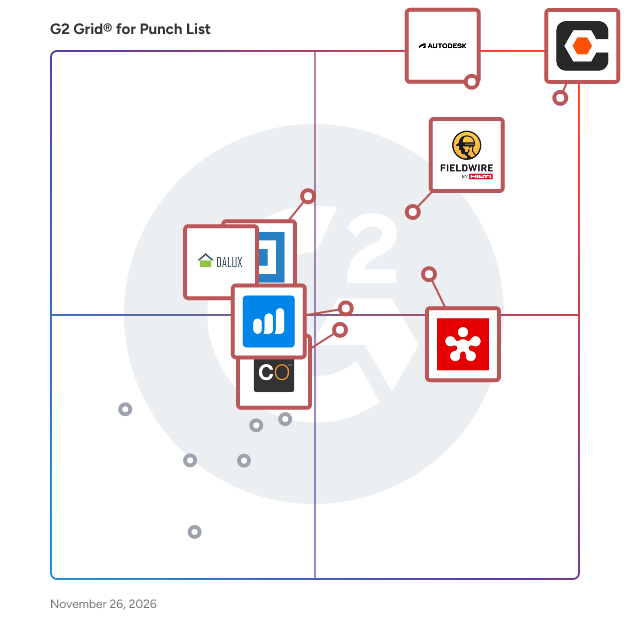
G2 Grid® for Punch List Software

G2 Grid® for Punch List Software plotting products by satisfaction and market presence

Highlighted products: Procore, Autodesk Forma (formerly Autodesk Construction Cloud), Fieldwire by Hilti, Revizto, Bluebeam, Dashpivot, UDA ConstructionOnline, and Dalux.

Underlying data: [Grid® JSON](https://www.g2.com/categories/punch-list/grids.json?focus%5B%5D=procore&focus%5B%5D=autodesk-forma-formerly-autodesk-construction-cloud&focus%5B%5D=fieldwire-by-hilti&focus%5B%5D=revizto&focus%5B%5D=bluebeam&focus%5B%5D=dashpivot&focus%5B%5D=uda-constructiononline&focus%5B%5D=dalux)

Ermeo

Ensure better standardization of your business and processes, more collaboration between your teams, and simplified communication with your customers.

Who Is the Company Behind Ermeo?

  • Seller: Ermeo
  • Year Founded: 2015
  • HQ Location: Levallois-Perret, FR
  • LinkedIn® Page: www.linkedin.com
    19 employees on LinkedIn®

FieldBinder AI

FieldBinder AI is a field documentation and reporting app for project managers, facility and maintenance leaders, engineering consultants, contractors, and owner's reps. It keeps everything from a site walk in one project folder instead of a camera roll, a notebook, and a string of text messages. On site, you capture photos, short videos, voice notes, text notes, files, and measurements straight into the project. You can also log punch list items, RFIs and open questions, safety observations, change requests, customer decisions, and to-do items. Every capture is time-stamped, tagged, and added to a chronological project feed, so the record of what you saw and what was said is in one place. Capture works offline. If you are in a basement, a mechanical room, or a plant with no signal, the app saves everything on the phone and syncs when the connection comes back. When the walk is done, FieldBinder AI drafts the paperwork from what you captured. It produces four report types: a daily report, a punch list, an RFI list, and an executive summary. Voice notes are transcribed and cleaned up, and photos get a short description. Every report is an editable draft. You review it, correct it, and then export a PDF with your company name and logo or copy the text into an email. FieldBinder AI is built for industrial projects, facility upgrades, maintenance work, engineering site walks, and inspections. It is not a full construction management platform, and it does not try to replace scheduling, estimating, or accounting software. It does one job: it turns field documentation into organized, professional reports, so the write-up takes minutes instead of an evening. The app is available for iPhone, iPad, and Android, with a web portal for reviewing projects, editing reports, and exporting PDFs from a computer. There is a free plan for trying it on real work, and paid plans add AI reports and branded PDF export. AI-generated reports are drafts, and users are responsible for reviewing them before sharing or relying on them.

Who Is the Company Behind FieldBinder AI?
AI can help you find the answers. G2 helps you trust them.

Connect G2 to Claude or ChatGPT for answers grounded in G2's trusted reviews, comparisons, and pricing from real user insights.

How it works

FieldQ

FieldQ helps construction teams capture, assign and close out defects faster, without per-user pricing that penalises you for bringing the whole site team on board. Site teams log snags directly against drawings with photos, assign them to the right subcontractor, and track every item through to sign-off. Managers get a live view of open, in-progress and closed snags across every project, with sortable tables and fast search. Beyond snagging, FieldQ’s Form Builder covers the paperwork that runs a site. You can create RAMS, site diaries and permits, and send them to subcontractors for digital signature with no limit on signers. Time tracking includes break recording and manager corrections, with CSV exports that support Working Time Regulations record-keeping. FieldQ is built with the Building Safety Act era in mind. It keeps a structured, exportable record of defects, actions and sign-offs to support Golden Thread documentation. Pricing is simple: one flat monthly fee with unlimited projects, users, snags and checklists. Photo storage is generous, with automatic compression and an option to keep original-quality images when you need them. FieldQ is built and supported in the UK by SYPOS Systems Ltd.

Who Is the Company Behind FieldQ?

FieldRadar

FieldRadar keeps the whole site record in one place for UK contractors. Pin actions to the drawing with photos, owners and due dates. Run inspections and permits to work, keep daily diaries, send weekly client reports, and give the office a browser dashboard over every live job. Say or type what you see and AI drafts the record for you to check before saving. Capture site records offline and sync when a connection returns. AI drafting, the browser dashboard, QR sign-in and online collaboration need a connection. Company plans include unlimited people within a live-project allowance: Site Team starts with one live project, Team includes five, and Team Plus ten. Add the office, site managers, directors and QS without buying individual seats. Company features include QR code site sign-in with no app for workers, skills-card details read from a photo for review, expiry flags at sign-in, a plant register, private messages and audit links. Card capture is not independent card verification. Set up online with no demo or sales call.

Who Is the Company Behind FieldRadar?

Flexxter

Who Is the Company Behind Flexxter?

  • Seller: Flexxter
  • Year Founded: 2019
  • HQ Location: Hannover, DE
  • LinkedIn® Page: www.linkedin.com
    6 employees on LinkedIn®

flowdit

flowdit is a no-code platform for inspections, audits, digital checklists and work instructions in industry and manufacturing. It is a connected worker solution for the people who run production lines, manage quality on the shop floor and keep equipment running. The problem with most inspection tools Most tools record the failure and stop there. The finding ends up in a PDF, someone eventually emails the maintenance team, and the line keeps running with the problem unfixed. flowdit closes that gap. When a check fails, the inspector assigns a corrective action with an owner and a due date on the spot. For critical points, this can be made mandatory. flowdit sends reminders until the action is closed, and it stays linked to the inspection step with a full audit trail. What manufacturing teams deal with Paper checklists disappear. Excel sheets end up in five versions. Audit preparation takes weeks because documentation is scattered across folders, inboxes and clipboards, and quality managers cannot see what is happening at other sites. flowdit brings all of it into one system. How it works Templates are built without code. The AI import turns existing Excel, Word or PDF checklists into templates, and for paper lists a photo is enough. Measurement fields with tolerances and mandatory fields keep inspections complete, while conditional questions keep them short. Templates are versioned and only go live after approval. In the field, inspectors download an assignment once and then work offline. They record measurements with photos or video, dictate notes by voice and sign off on the device. Results sync as soon as they are back online. Work instructions with images or video open right at the inspection step. Suppliers and external technicians complete checklists through a secure portal. Who uses flowdit Plant managers who need to see what is happening across sites without compiling reports on Friday afternoon. Quality managers preparing for ISO audits. EHS managers who need safety procedures to reach the person doing the job. Maintenance teams running inspection rounds. Commissioning engineers documenting FAT and SAT. Frontline operators who need a tool they can pick up quickly. Where it is used Quality inspections, internal and external audits, safety walks and EHS inspections, maintenance rounds, shift handovers, machine acceptance and commissioning. Customers come from automotive, mechanical and plant engineering, food and beverage, pharmaceuticals, chemicals and energy. Integrations and deployment A REST API connects flowdit to SAP and other ERP systems. Further integrations include DocuSign, DocuWare, Azure, Google Workspace, Zapier and Dropbox. All data can be exported at any time. Data is encrypted, flowdit is GDPR compliant, and it runs in the cloud or on-premise from 50 users. The app is available in 12 languages, and support is provided in English, German and Arabic. Pricing Free plan for a single user. Standard costs €12 and Premium €22 per user per month, both from 5 users. Enterprise pricing on request. Company flowdit is developed by iotivata FZCO, with offices in Germany and Dubai.

Average Rating: 4.9/5.0

Total Reviews: 30

How Do G2 Users Rate flowdit?

  • Has the product been a good partner in doing business?: 10.0/10 (Category avg: 9.0/10)

Who Is the Company Behind flowdit?

Who Uses This Product?

  • Top Industries: Manufacturing
  • Company Size: 73% Medium, 37% Small

What Do G2 Reviewers Say About flowdit?

AI-generated summary from verified user reviews

Pros
  • Users find flowdit's ease of use invaluable, streamlining inspections and enhancing team communication effortlessly.
  • Users value the efficiency of flowdit, streamlining inspections and enhancing communication through automated workflows.
  • Users value the real-time data capabilities of flowdit, enhancing workflow efficiency and communication on the field.
  • Users value the audit efficiency of flowdit, simplifying compliance assessments and ensuring thorough project documentation.
  • Users value the automation of workflows in flowdit, enhancing efficiency and communication for seamless project management.
Cons
  • Users feel that Flowdit needs improvement in customization and performance, particularly regarding file syncing and data visualization.
  • Users find the learning curve challenging, especially non-technical users needing guidance for complex workflows.
  • Users often find the initial setup of complex workflows to be challenging and in need of guidance.
  • Users note data inaccuracy issues with Flowdit, highlighting the need for improved data visualization and syncing performance.
  • Users find the difficult learning process of Flowdit challenging, especially those who are non-technical.

What Are Recent G2 Reviews of flowdit?

Iflexion Punch List Software

Iflexion builds a suite of punch list apps to streamline defect management in the construction industry.

Who Is the Company Behind Iflexion Punch List Software?

  • Seller: Iflexion
  • Year Founded: 1999
  • HQ Location: Denver, US
  • LinkedIn® Page: www.linkedin.com
    86 employees on LinkedIn®

ISS

Who Is the Company Behind ISS?

  • Seller: Insside
  • Year Founded: 2007
  • HQ Location: Madrid, ES
  • LinkedIn® Page: www.linkedin.com
    147 employees on LinkedIn®

JobsiteHQ

JobsiteHQ is a job app for handymen, remodelers and small contractors that starts with your voice. Walk the job and talk through what needs doing, room by room. JobsiteHQ transcribes the recording and writes it up as an itemized punch list. You check it over and fix anything it misheard before it's saved. From there: **Estimates.** Price the punch list into an estimate, with tax and materials at your markup. Your client approves it from a link on their phone, with no account to create. **Invoices and payments.** Turn the approved estimate into an invoice, or bill a progress payment first and the rest when you finish. Clients pay by card from the link, through Stripe at Stripe's standard rate. The money goes straight to your bank, and JobsiteHQ takes no cut. Cash and checks can be marked paid. **Client updates.** Send a summary of the job with your photos as a text or PDF. JobsiteHQ offers "you're booked", "on my way" and "job complete" texts as the job moves along. **Photos, receipts and documents.** Tag photos before or after and they pair up in the summary. Snap a receipt and it reads the store and total. Keep plans and permits on the job. When the job is done, make a branded job report PDF. **Taxes.** Export paid invoices and receipts for any date range for your accountant. **Works with no signal.** Everything saves on the phone and syncs when you have bars again. JobsiteHQ runs in your phone's browser and installs to your home screen: no app store, no laptop. It's built for one person or a small crew, not a big office. One plan at $24.99 a month or $199 a year, with a 14-day free trial and no card needed.

Who Is the Company Behind JobsiteHQ?

  • Seller: JobsiteHQ
  • Year Founded: 2026
  • HQ Location: Madison, Wisconsin
  • LinkedIn® Page: www.linkedin.com
    1 employees on LinkedIn®

Kahua

Kahua is a construction project management platform that helps owners and contractors manage capital projects, programs, and assets across the full project lifecycle. Kahua's secure and configurable platform is built for complex construction. Teams, processes, and project data are connected within a FedRAMP-certified, AI enterprise PMIS. Kahua Difference • Owner-first platform; connected system of record across the asset lifecycle • One platform across the asset lifecycle • Configurability: Conforms to business processes at the project and portfolio level; create, modify, and extend applications • Adapts as your needs change • Project, program, and portfolio management • Visibility of entire portfolio • Enterprise Structure: Project, program, and portfolio views for various roles and permissions; configurable workflows, WBS, cost codes, nomenclature, and user access • Built-in AI Are you an owner? For a guided virtual tour, copy and paste this link into your browser: https://tinyurl.com/36vjy8p2 Are you a general contractor? Use this link for a guided virtual tour: https://tinyurl.com/bde4dacj

Average Rating: 4.4/5.0

Total Reviews: 33

How Do G2 Users Rate Kahua?

  • Has the product been a good partner in doing business?: 9.5/10 (Category avg: 9.0/10)

Who Is the Company Behind Kahua?

  • Seller: Kahua
  • Company Website:
  • Year Founded: 2009
  • HQ Location: Alpharetta, Georgia
  • LinkedIn® Page: www.linkedin.com
    376 employees on LinkedIn®

Who Uses This Product?

  • Top Industries: Construction
  • Company Size: 48% Medium, 27% Large

What Do G2 Reviewers Say About Kahua?

AI-generated summary from verified user reviews

Pros
  • Users value Kahua's customizable logs and reports, enhancing task management and facilitating efficient project communication.
  • Users value the customization options in Kahua, enhancing their project management with tailored logs and reports.
  • Users value the user-friendly interface of Kahua, facilitating easy navigation and effective project management.
  • Users value Kahua’s scalability and flexibility, enhancing project management efficiency with customizable features and streamlined processes.
  • Users value Kahua for its scalability and flexibility, enhancing project efficiency and adaptability to various client needs.
Cons
  • Users often face slow loading times, which can hinder their overall experience and workflow efficiency.
  • Users find the pricing structure a bit steep, especially for smaller teams with limited budgets.
  • Users find the pricing structure steep for smaller teams, making it less accessible for those with limited budgets.
  • Users find the inadequate tools in Kahua lead to accidental duplicate input data and require manual cross-referencing.
  • Users desire better integration capabilities for Kahua to work seamlessly with other legacy systems and competitors.

What Are Recent G2 Reviews of Kahua?

LaserList

LaserList is a checklist app that uses barcodes to help you perform checklists accurately. It can be used as a simple tick list or to enhance a comprehensive, document based, check list system.

Who Is the Company Behind LaserList?

LetsBuild

LetsBuild construction project management software delivers real-time visibility and access to all the critical information you need. Built for construction executives, onsite managers and foremen, it enables you to plan your project, manage workflow, assure quality, and share and document everything. In the cloud and on your site, LetsBuild brings you total visibility, complete control, and unique insight.

Average Rating: 4.1/5.0

Total Reviews: 20

How Do G2 Users Rate LetsBuild?

  • Has the product been a good partner in doing business?: 8.1/10 (Category avg: 9.0/10)

Who Is the Company Behind LetsBuild?

  • Seller: LetsBuild
  • Year Founded: 2012
  • HQ Location: Brussels and Copenhagen , Headquartered
  • LinkedIn® Page: www.linkedin.com
    53 employees on LinkedIn®

Who Uses This Product?

  • Top Industries: Construction
  • Company Size: 75% Small, 15% Medium

What Are Recent G2 Reviews of LetsBuild?

What Are G2 Users Discussing About LetsBuild?

Livefield

Livefield is the construction management platform that build for the Builders and Contractors to stay productive, collaborate seamlessly between the field and office, and document every step of every project. People could manage construction drawings. tasks, files, materials, labor, equipment effectively using Livefield

Who Is the Company Behind Livefield?

Neya Kumaresan
NK
Researched and written by Neya Kumaresan