Best PC Backup Software - Page 6

How Many PC Backup Software Products Does G2 Track?

Total Products under this Category: 88

Category Stats (Sep 2026)

  • Average Rating: 4.39/5 (↑0.01 vs Aug 2026) The average rating of products in this category, based on all submitted ratings
  • Top Trending Product: Datto SIRIS (+0.02%) - Among all products in this category, Datto SIRIS recorded the largest rating increase compared to last month

Last updated: September 05, 2026

How Does G2 Rank PC Backup Software Products?

Why You Can Trust G2's Software Rankings:

  • 30 Analysts and Data Experts
  • 8,200+ Authentic Reviews
  • 88+ Products
  • Unbiased Rankings

G2's software rankings are built on verified user reviews, rigorous moderation, and a consistent research methodology maintained by a team of analysts and data experts. Each product is measured using the same transparent criteria, with no paid placement or vendor influence. While reviews reflect real user experiences, which can be subjective, they offer valuable insight into how software performs in the hands of professionals. Together, these inputs power the G2 Score, a standardized way to compare tools within every category.

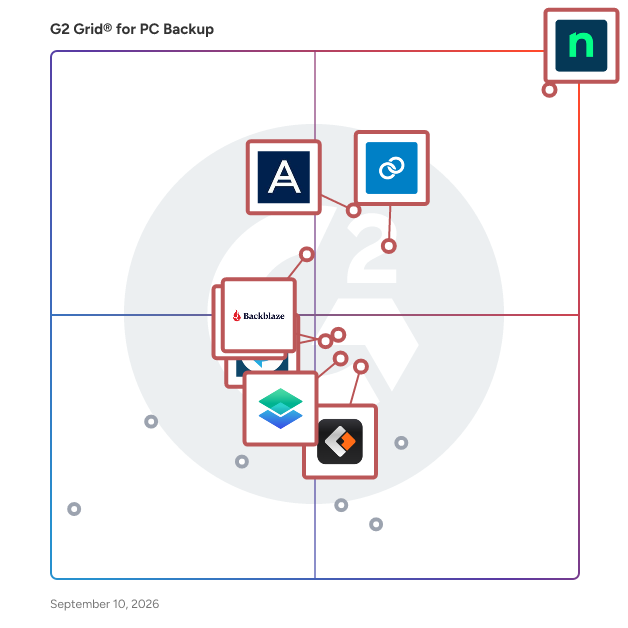
G2 Grid® for PC Backup Software

G2 Grid® for PC Backup Software plotting products by satisfaction and market presence

Highlighted products: NinjaOne, Datto SIRIS, Acronis True Image, Backblaze Computer Backup, Macrium Backup & Restore, EaseUS Todo Backup Business, MSP360 Backup, and C2 Backup.

Underlying data: [Grid® JSON](https://www.g2.com/categories/pc-backup/grids.json?focus%5B%5D=ninjaone&focus%5B%5D=kaseya-datto-siris&focus%5B%5D=acronis-true-image&focus%5B%5D=backblaze-computer-backup&focus%5B%5D=macrium-backup-restore&focus%5B%5D=easeus-todo-backup-business&focus%5B%5D=msp360-backup&focus%5B%5D=c2-backup)

oodrive_save

Oodrive Save is a cloud-based backup and recovery solution designed to protect organizations from data loss due to cyberattacks, system failures, or other unforeseen events. It enables businesses to securely back up critical data, systems, and settings, ensuring rapid restoration and minimal downtime. With automated backup scheduling, robust encryption, and remote management capabilities, Oodrive Save simplifies backup management and enhances data security. Key Features and Functionality: - Automated Backup Scheduling: Set clear parameters for automated backups on a monthly, weekly, daily, or continuous basis, tailored to your organization's needs. - Data Encryption: Secure data throughout its entire lifecycle with AES 256 end-to-end encryption, covering transfer, storage, and recovery, with options to replicate data across ultra-secure sites within the EU. - Remote Management: Manage backups and data retrievals from anywhere via a secure web interface, and receive detailed metrics and up-to-the-minute reports on the status of your scheduled backups. - Instant Data Retrieval: Automatically retrieve lost data and entire systems with Bare Metal Recovery (BMR. Store backups for up to five years, with ultra-secure access restrictions. Primary Value and Problem Solved: Oodrive Save addresses the critical need for reliable data protection and swift recovery in the face of cyber threats, system failures, or accidental data loss. By offering automated, secure, and easily manageable backup solutions, it ensures business continuity, minimizes downtime, and provides peace of mind to organizations handling sensitive information.

Who Is the Company Behind oodrive_save?

  • Seller: OODrive
  • Year Founded: 2000
  • HQ Location: Paris, FR
  • Twitter: @oodriveofficiel
    1,743 Twitter followers
  • LinkedIn® Page: www.linkedin.com
    385 employees on LinkedIn®

OpenCloner OC Data Helper

OC Data Helper is an all-in-one Data backup application software. It supports all UVC data devices, and can achieve up to 1Gb/s Data backup.

Who Is the Company Behind OpenCloner OC Data Helper?

Remote Data Backup

Remote Data Backup is a business continuity software that works as an offsite data protection service.

Average Rating: 4.5/5.0

Total Reviews: 1

Who Is the Company Behind Remote Data Backup?

Who Uses This Product?

  • Company Size: 100% Large

What Are Recent G2 Reviews of Remote Data Backup?

What Are G2 Users Discussing About Remote Data Backup?

Softaken Software

Softaken PDF Recovery Software is a complete solution for users to recover corrupted or damaged PDF files. This application ensures the 100% accuracy of the data of the PDF file during the entire recovery procedure. Users are allowed to save the resultant recovered file on their systems locally. All the data of the PDF files, like images, graphics, hyperlinks, etc., is recovered by this application. The interface of this utility is user-friendly so that any user can utilize it without encountering any issues. There is no need for the installation of Adobe Reader in the user’s system to complete the recovery procedure with this software. Key features - It can run on all versions of Windows, like Windows 11, 10, 8.1, 8, 7, Vista, XP, and other previous versions. This software provides a preview of the recovered data to the users before the restoring process is complete. It has compatibility with all the versions of Adobe Reader. The originality of the PDF file is maintained by this utility throughout the recovery process. This tool can complete the recovery process in just four simple steps. Install the free trial edition of this software to know more about its functionality for free.

Who Is the Company Behind Softaken Software?

SyncBackFree

Who Is the Company Behind SyncBackFree?

  • Seller: 2BrightSparks
  • Year Founded: 2004
  • HQ Location: N/A
  • Twitter: @2BrightSparks
    1,798 Twitter followers
  • LinkedIn® Page: www.linkedin.com
    4 employees on LinkedIn®

TK8 Backup

TK8 Backup is a business continuity software that will protect data from loss including file corruptions due to computer crashes, hard disc failures, human errors, thieft and virus attacks.

Who Is the Company Behind TK8 Backup?

TKO Backup

TKO Backup is Windows software designed to protect files, folders, personal data, and drives. It supports full, incremental, and mirror backup methods: full backups create complete copies, incremental backups save only changed or new files, and mirror backups maintain synchronized copies. Drive image backups safeguard entire drives, including operating systems, programs, and personal files, protecting against disk failure, system corruption, and malware. Scheduling features allow automatic backups, with missed jobs running as soon as possible. Filters enable inclusion or exclusion of file types, while folder exclusions and options to skip hidden, system, or locked files provide control. Backup history tracking simplifies restoring data from specific versions. Additional features include cleanup rules, detailed logs, pause/resume functions, and password protection for settings.

Who Is the Company Behind TKO Backup?

VaultGuard Backup

Most backup software tells you "backup completed" and hopes for the best. VaultGuard Backup was built around a different idea: a backup you haven't verified isn't a backup, it's a hope. It backs up your entire Windows machine — Windows, programs, settings, files on a schedule, then automatically checks that the backup hasn't been corrupted or tampered with since it was made. If something fails, it tells you loudly and in plain English: what failed, why, and what to do about it. No hunting through log files, and no finding out on the worst day that your backups quietly stopped working months ago. Your backups stay in your hands. The main copy goes to a drive you own, and a second copy goes to the cloud storage you already pay for, Google Drive, OneDrive, or Dropbox, not a vendor cloud with a monthly meter running. If you ever cancel, your backups are still yours, still readable, still right where they've always been. A few honest limits, so you know what you're buying: it's Windows-only, it uses Windows' own proven backup engine under the hood, and it's built and supported by one person — me, David Martin, in Kentucky. When you email support, I'm the one who answers. For some people that's a downside. For the people I built this for, it's the whole point. One flat price. No storage upsells, no surprise renewal jumps, no auto-renewal traps. 14-day free trial, no credit card required.

Who Is the Company Behind VaultGuard Backup?

White Backup

White Backup main window screenshot We present you the program White Backup - a powerful and flexible file backup system for your PC. Highly customizable, yet simple to use, it is designed to meet needs of most demanding home, office and professiona users.

Who Is the Company Behind White Backup?

Tian Lin
TL
Researched and written by Tian Lin
Updated October 3, 2024