ConsoleFlare
Who Is the Company Behind ConsoleFlare?
- Seller: ConsoleFlare
- Year Founded: 2019
- HQ Location: Noida, IN
-
LinkedIn® Page: www.linkedin.com
53 employees on LinkedIn®
Total Products under this Category: 400
Last updated: September 01, 2026
Why You Can Trust G2's Software Rankings:
G2's software rankings are built on verified user reviews, rigorous moderation, and a consistent research methodology maintained by a team of analysts and data experts. Each product is measured using the same transparent criteria, with no paid placement or vendor influence. While reviews reflect real user experiences, which can be subjective, they offer valuable insight into how software performs in the hands of professionals. Together, these inputs power the G2 Score, a standardized way to compare tools within every category.
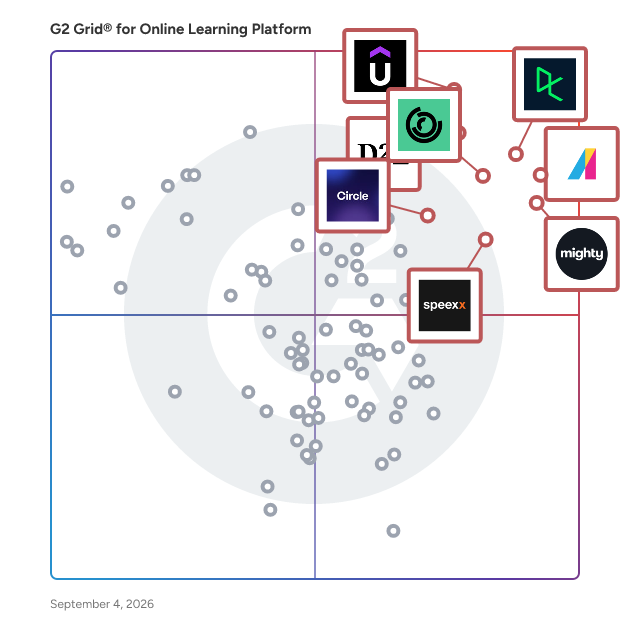
Highlighted products: Absorb LMS, Udemy Business, DataCamp, Mighty Networks, D2L Brightspace, 360Learning, Speexx, and Circle.
Underlying data: [Grid® JSON](https://www.g2.com/categories/online-learning-platform/grids.json?focus%5B%5D=absorb-software-absorb-lms&focus%5B%5D=udemy-business&focus%5B%5D=datacamp&focus%5B%5D=mighty-networks&focus%5B%5D=d2l-brightspace&focus%5B%5D=360learning&focus%5B%5D=speexx&focus%5B%5D=circle-so-circle)
Practice is Constructor Tech's browser-based lab environment for software and IT training, designed for higher education institutions, corporate training providers, and certification organizations running technical upskilling programs. It requires no installation and supports both self-paced and instructor-led formats. Labs can be authored using pre-built templates and deployed immediately in a cloud-native environment. Auto-assessment provides learners with immediate feedback on their work, while intelligent performance insights give instructors and administrators a clear view of progress across individuals and cohorts. Real-time collaborative coding is supported for group-based sessions. Content is available in 24+ languages with instant translation, and the platform integrates with existing systems via LTI 1.1 and 1.3. Setting up and running technical training programs typically requires significant infrastructure and coordination overhead. Practice reduces that by bringing lab authoring, delivery, assessment, and reporting into one browser-based environment — keeping setup time low and giving training teams the flexibility to run programs at scale without managing separate tools for each step.
The COOL platform is the base of a solution that helps teachers stay in control in the classroom. It saves time and is easy to use. It’s the homepage for your students. Here they can find all the online educational materials the teacher has selected for them. COOL applies the group layout from your Google console G Suite environment, so the right teachers are connected to the right groups and classes. You can use the platform in combination with different modules that enhance the learning experience for teachers and students. Choose the modules that fit you. Try it out: 60 days for free! The COOL Platform consists of, - COOL Picture log-in - COOL Monitoring - COOL Exam mode - COOL Plagiarism check COOL Picture log-in The Picture log-in module makes logging in easier for younger students. Their password consists of a combination of pictures. No need to remember the complicated number or letter combinations. An easy way to make the children use their own account instead of a group account, which is sometimes used as a quick fix so that they only have to remember one password that everyone knows. Using group accounts makes tracking individual progress difficult and is not compliant with privacy regulations. With the picture log-in, they have access to their own Google accounts and are also logged into the COOL platform. COOL Monitoring Keep track of your students: what are they working on? Where are they in the assignment? From the comfort of your own device, you can see the browser screens of your students. It gives you the opportunity to observe from distance and give direction during the process instead of after. Students can see on their screen when they are monitored. The tool comes with many handy functionalities, such as pushing a website to the devices of the whole class or to individuals. You can also block the screens when you want the attention of the classroom and close unwanted tabs. You can even make different or smaller groups from the students who are assigned to you as a teacher. This is convenient for pushing activities to students who need special attention or extra educational input. If you’ve used COOL Monitoring, you can check the browser history of your students up until seven days ago. The COOL admin of your school is able to consult a report about when which teacher was using COOL Monitoring and for which students. This provides the much-wanted transparency. COOL Exam mode This functionality is part of the COOL Monitoring module. That means that you can monitor students from a distance while they are in exam mode. COOL Exam mode makes sure that students can’t change tabs while taking a test. You can lock your students on the page of the test. They can’t open other tabs to find answers on the internet. You decide the amount of time they are locked. Use it for individual students or for the whole class with one click. COOL Plagiarism check Check the Google documents that your students are handing in through Google Classroom. The Google Classroom app is integrated into our COOL platform. As a teacher, you can check your students’ work by starting the plagiarism check. It will look for text matches online and the documents of your other students. You can check the same document three times over so you have the possibility to give feedback to your students and give the opportunity to improve the text. In the overview of the results, you’ll see what the percentage of plagiarism is and on which websites the matches are found. Try it out: 60 days for free!
Powerful eLearning & collaboration tools combined with a team of experts.
CourseAvenue offers cloud-based software for collaborative development of accessible eLearning.
Course Cats is an online website and platform management tool to create and sell online courses.
CourseManager.Online is a cloud based tool to make training course scheduling easy.
Coursio is transforming how influencers, publishers and organisations share their knowledge onlineby creating their own online schools. From individual experts to large companies, our powerful tools in combination with intelligent course development strategies helps clients to envision, plan, create, manage, publish, measure, personalize, grow and monetize courses online.
The AI course creation platform for workplace learning. At Coursly, we are pioneering the future of workplace education by integrating artificial intelligence to streamline the development of customized workplace training programs.
Create Online Academy is a cloud-based online academy building platform.
CustomGuide helps associations, governments, nonprofits, and public libraries train their staff and communities. CustomGuide is an all-in-one online learning platform that makes staff training easy to create, deliver, and track. It combines interactive eLearning courses, skill assessments, and AI-powered course creation tools to help organizations build effective training programs. Choose from over 300 LMS-ready courses on Microsoft, Google, and business skills, or create your own in minutes using the AI Course Builder. Measure progress, award certificates, and reinforce learning with branded cheat sheets. Recognized by G2 as a Top 50 Education Software product and trusted by more than 3,000 organizations worldwide, CustomGuide provides simple, flexible, and measurable online training solutions for every team and community.
Average Rating: 4.9/5.0
Total Reviews: 69
AI-generated summary from verified user reviews
"Using CustomGuide for our training is one of the best decisions we’ve made."
Rating: 5.0/5.0 stars
— Michael John Paul M.
"CustomGuide delivers real learning results. It’s effective and a huge time-saver!"
Rating: 5.0/5.0 stars
— Erika D.
Cyber Square is a leading educational platform dedicated to transforming learners from technology users into innovative creators. By integrating coding, artificial intelligence (AI), and robotics into comprehensive curricula, Cyber Square empowers students, educators, and professionals to excel in a technology-driven world. With a mission to create 10 million coding and AI literates worldwide, Cyber Square offers a range of products and services tailored to various learning needs. Key Features and Functionality: - Online Learning Management System (LMS): A centralized platform for online classes, assignments, progress tracking, and project-based learning. It includes interactive classes, collaborative tools, and AI-powered feedback to enhance the learning experience. - Project Suite: Provides students with hands-on, project-based curricula in coding, AI, and robotics, enabling them to create tech innovations from day one. - AI Cloud Lab: An AI-powered, cloud-based coding platform that allows students and teachers to work on coding projects directly in a web browser, eliminating the need for local installations and facilitating seamless learning from any location. - Smart AI Teacher: An AI tool designed for educators to reduce workload by generating lesson plans, worksheets, and assessments in seconds, allowing teachers to focus more on student interaction. - Coding Courses for Kids: Engaging online coding courses designed by industry experts, covering topics like AI and Python programming, with flexible learning options and personalized feedback. - AI Labs for Schools: Collaborates with schools to establish AI labs, equipping students with tools and skills to explore the latest technologies through hands-on learning and innovation. Primary Value and Solutions Provided: Cyber Square addresses the growing need for digital literacy by offering structured and engaging educational programs in coding and AI. For educators, it provides resources and tools to effectively teach these subjects, reducing preparation time and enhancing teaching quality. Students benefit from interactive and project-based learning, fostering creativity, critical thinking, and problem-solving skills essential for future careers. By integrating AI-powered platforms and tools, Cyber Square ensures personalized learning experiences, real-time performance tracking, and seamless access to educational resources, preparing learners to thrive in a rapidly evolving technological landscape.
Design+Code is an educational platform dedicated to bridging the gap between design and development by offering comprehensive courses that teach both disciplines through hands-on projects. By focusing on industry-leading tools and technologies, Design+Code empowers learners to build real-world applications with a strong emphasis on design principles and coding skills. Key Features: - Extensive Course Library: Access over 50 courses covering topics such as React, Swift, Figma, and more, designed to equip learners with the skills needed to create functional and aesthetically pleasing applications. - Hands-On Tutorials: Engage with more than 320 premium tutorials that provide step-by-step guidance on various design and development projects, enabling practical learning and skill application. - Livestreams and Updates: Participate in live sessions and stay updated with the latest industry trends and techniques, ensuring that learners remain current in the rapidly evolving fields of design and development. - Downloadable Resources: Benefit from downloadable assets, including design files and source code, to practice and implement learned concepts effectively. - Certificates of Completion: Earn certificates upon course completion, validating acquired skills and enhancing professional credibility. Primary Value: By integrating design and coding education, Design+Code provides a holistic learning experience that prepares individuals for the demands of modern app development and design. This approach not only enhances the skill sets of designers and developers but also fosters a collaborative understanding between the two disciplines, leading to the creation of more cohesive and user-friendly applications.
