Top Free Online Form Builder Software - Page 11

How Many Online Form Builder Software Products Does G2 Track?

Total Products under this Category: 503

Category Stats (Oct 2026)

  • Average Rating: 4.48/5 (↓0.01 vs Sep 2026) The average rating of products in this category, based on all submitted ratings
  • Top Trending Product: Formester (+1.4%) - Among all products in this category, Formester recorded the largest rating increase compared to last month

Last updated: October 26, 2026

How Does G2 Rank Online Form Builder Software Products?

Why You Can Trust G2's Software Rankings:

  • 30 Analysts and Data Experts
  • 114,300+ Authentic Reviews
  • 503+ Products
  • Unbiased Rankings

G2's software rankings are built on verified user reviews, rigorous moderation, and a consistent research methodology maintained by a team of analysts and data experts. Each product is measured using the same transparent criteria, with no paid placement or vendor influence. While reviews reflect real user experiences, which can be subjective, they offer valuable insight into how software performs in the hands of professionals. Together, these inputs power the G2 Score, a standardized way to compare tools within every category.

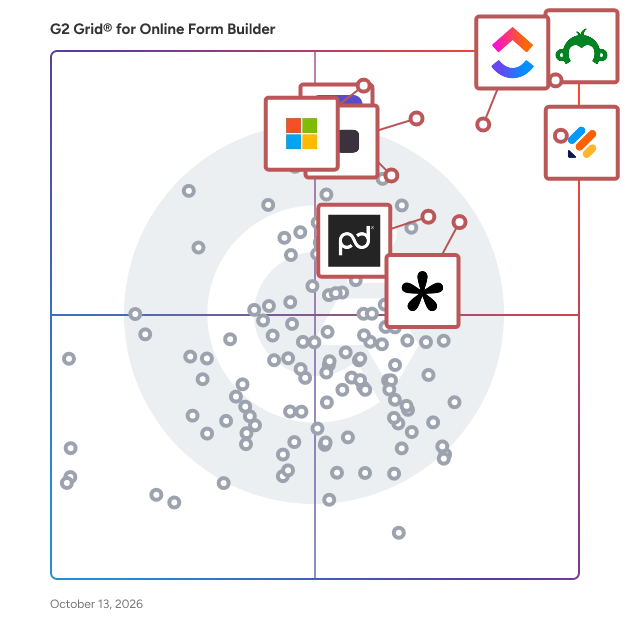
G2 Grid® for Online Form Builder Software

G2 Grid® for Online Form Builder Software plotting products by satisfaction and market presence

Highlighted products: SurveyMonkey, Jotform, ClickUp, Typeform, Microsoft Forms, Tally, Adobe Acrobat Sign, and PandaDoc.

Underlying data: [Grid® JSON](https://www.g2.com/categories/online-form-builder/grids.json?focus%5B%5D=surveymonkey&focus%5B%5D=jotform&focus%5B%5D=clickup&focus%5B%5D=typeform&focus%5B%5D=microsoft-forms&focus%5B%5D=tally-forms-tally&focus%5B%5D=adobe-acrobat-sign&focus%5B%5D=pandadoc)

DocPlace

DocPlace is a cloud-based, holistic software that organizes your paperwork using AI to learn and automatically convert your documents and digital files into one remotely accessible environment, using tools such as eSignature and Forms Creation, saving you time, money, and human resources.

Who Is the Company Behind DocPlace?

FigForm

FigForm is a free, no-code form and survey builder designed for marketers, founders, and teams that care about visual design. It features a Figma-like editor, making it easy to create beautifully branded, interactive forms without writing code. Forms can be embedded anywhere with a single script tag, and FigForm includes basic analytics, AI-assisted form generation, and webhook integration.

Who Is the Company Behind FigForm?

  • Seller: FigForm
  • Year Founded: 2025
  • HQ Location: Dover, US
  • LinkedIn® Page: www.linkedin.com
    1 employees on LinkedIn®

Fingertip

Fingertip is an all-in-one platform that lets you run your entire business from a single link. It combines essential tools in one place, allowing you to sell products, book clients, and connect with customers across Instagram, TikTok, and Facebook—all from your phone, with no technical skills required.

Who Is the Company Behind Fingertip?

AI can help you find the answers. G2 helps you trust them.

Connect G2 to Claude or ChatGPT for answers grounded in G2's trusted reviews, comparisons, and pricing from real user insights.

How it works

Florm

Florm is a no-code form builder software solution designed to help small businesses create customized, logic-driven forms, surveys, and data collection workflows without the need for programming knowledge. The software is aimed at users who need to develop branded forms that integrate seamlessly with over 6,500 third-party applications, providing a comprehensive solution for data gathering, processing, and analysis within a small business environment. Florm falls under the software category of "No-Code Development Platforms," particularly focusing on form building and data collection tools. Its primary audience includes small business owners, marketers, and anyone who requires a versatile tool to create forms for customer feedback, lead generation, event registrations, and other data collection needs. The platform’s simplicity and integration capabilities make it suitable for users with minimal technical expertise.

Who Is the Company Behind Florm?

Form Builder

Form Builder Plus helps you to build Google Forms™ in a very simple and fast way by importing fields/ questions/ quizzes from existing Google Sheets™, Google Docs™, Google Slides™, Google Forms™, Google Drive™, Google Calendar™ events, Gmail™ messages, and Google Chat™ interactions. Form Builder Plus now works with non-native files like PDFs, MS Word, MS Powerpoint, and image files too from Drive™. Also automatically and intelligently identifies images in questions as well as answer options.

Who Is the Company Behind Form Builder?

FormBuilder Rx

FormBuilder Rx is a Salesforce-native platform for building, protecting, and optimizing digital experiences. Create dynamic web forms, constituent portals, shopping cart storefronts, and self-service experiences with clicks, not code. Whether you're collecting inquiries, processing applications, selling products or services, registering attendees, or creating authenticated customer portals, FormBuilder Rx gives administrators the tools to build sophisticated experiences directly on Salesforce Experience Cloud while keeping every interaction connected to your CRM. Build Rich Salesforce Experiences Without Code Replace custom development with an intuitive drag-and-drop designer that empowers administrators to create responsive pages, forms, portals, and storefronts in minutes. Features include: • Multi-page forms and guided experiences • Conditional logic and dynamic fields • File uploads and document management • Responsive page layouts and reusable components • Translation Studio for multilingual experiences • Guest and authenticated user support • Standard and custom Salesforce object support • Lightning Web Runtime (LWR) and Lightning Web Components (LWC) • Compatible with Education Cloud, EDA, Nonprofit Cloud, Person Accounts, and standard Salesforce environments More Than Forms FormBuilder Rx has grown beyond form building into a complete platform for digital engagement. Shopping Cart Launch Salesforce-native storefronts for continuing education, workforce programs, event registrations, merchandise, memberships, software licensing, donations, and more. Configure searchable product catalogs, product detail pages, shopping carts, discount codes, flexible payment options, guest checkout, authenticated experiences, and automated Salesforce workflows without custom development. Protect Every Submission with FormGuard Public forms are constantly targeted by bots, duplicate submissions, spam, and fraudulent activity. FormGuard protects your Salesforce data before it enters your CRM through configurable fraud detection and risk management. Capabilities include: • Bot detection • Duplicate submission detection • Rate limiting • Field validation • IP monitoring • Risk scoring • Automated blocking • Review workflows • Real-time monitoring Stop bad data at the source before it impacts reports, automation, recruiting, admissions, or customer service. Continuously Improve with FormAnalyzer As forms and portals grow, so does complexity. FormAnalyzer continuously evaluates your FormBuilder Rx environment and provides administrators with actionable recommendations to improve quality and performance. Features include: • Configuration health scores • Environment analytics • Form performance insights • Optimization recommendations • Configuration monitoring • Operational health reporting Identify issues before users experience them and continuously improve every digital experience. Common Use Cases Organizations use FormBuilder Rx to power: • Admissions and enrollment applications • Student portals • Applicant portals • Customer portals • Alumni portals • Parent portals • Donor portals • Volunteer portals • Agent portals • Employee portals • Event registration • Continuing education registration • Workforce program enrollment • Shopping carts and storefronts • Service request forms • Inquiry forms • Case management • Scholarship applications • Surveys • Any external or internal Salesforce data collection process Why FormBuilder Rx Unlike traditional form builders, FormBuilder Rx keeps your forms, portals, commerce, fraud protection, optimization, and Salesforce automation together in one native platform. No integrations to maintain. No duplicate databases. No custom development. Just connected digital experiences built with clicks, not code. Build. Protect. Optimize. All on Salesforce.

Who Is the Company Behind FormBuilder Rx?

  • Seller: Enrollment Rx
  • Year Founded: 2008
  • HQ Location: Skokie, US
  • Twitter: @EnrollmentRx
    783 Twitter followers
  • LinkedIn® Page: www.linkedin.com
    20 employees on LinkedIn®

FormEagle

FormEagle is an all-in-one platform that revolutionizes form management and lead generation for businesses. With seamless integrations across major social media platforms, advanced AI-powered analytics, and a user-friendly dashboard, FormEagle empowers you to collect, track, and optimize leads effortlessly. Whether you're running campaigns or creating data-driven content, FormEagle provides the tools to succeed.

Who Is the Company Behind FormEagle?

  • Seller: ClickSambo
  • Year Founded: 2025
  • HQ Location: Kesklinna linnaosa, EE
  • LinkedIn® Page: linkedin.com
    3 employees on LinkedIn®

FormHug

FormHug is an AI-powered form builder designed for both humans and agents. Built by Formagic, FormHug helps teams create beautiful, structured forms for registration, surveys, quizzes, bookings, and assessments—without sacrificing usability or design. Unlike traditional tools that rely on rigid templates or one-question-per-page flows, FormHug delivers fast, multi-field layouts that are easier to scan, complete, and convert. With its AI Form Builder, users can simply describe what they need, and FormHug automatically generates complete forms with fields, logic, descriptions, and visual elements. It supports multiple use cases across different scenes, including event registration, customer feedback, scheduling, quizzes with auto-scoring, and assessments with insights like radar charts. FormHug also introduces Public Query, a feature that turns form submissions into searchable, shareable lookup pages without exposing sensitive data. FormHug is built for modern workflows, including integration with AI agents via MCP (Model Context Protocol), enabling programmatic form creation and submission. With a generous free tier offering unlimited forms and up to 3,000 submissions per month, FormHug is a cost-effective alternative to popular form builders while delivering advanced capabilities and a clean, user-friendly experience.

Who Is the Company Behind FormHug?

Forms Made Easy

Create your forms, surveys, feedback, and more in minutes, all inside Salesforce without any coding! Forms Made Easy helps teams collect data, automate tasks, and stay organized while keeping everything simple and fast.

Who Is the Company Behind Forms Made Easy?

FormSubmits

FormSubmits is a form submission backend service that processes HTML form data with built-in server-side validation. It provides an API endpoint that receives form submissions, validates every field against configurable rules, blocks spam and bot submissions, and routes clean data to your chosen destinations—email, webhooks, CRMs, or cloud storage. The core problem FormSubmits solves is data quality. Most form backends act as simple forwarders: they receive a submission and pass it along to your inbox or integrations. This means invalid emails, fake phone numbers, bot-generated gibberish, and malformed data all flow directly into your systems. Client-side validation helps with user experience but provides no real protection since anyone can bypass it using browser tools, Postman, or automated scripts. FormSubmits validates on the server. When a submission arrives, it checks every field against your configured rules before accepting the data. Invalid submissions are rejected with clear error messages that your frontend can display. Only clean, validated data gets stored and forwarded. The validation engine supports 25+ field types including short and long text with length limits, numbers with range constraints, dates and times in various formats, email addresses, phone numbers with international format support, credit cards with Luhn algorithm verification, URLs, currency values, birthdates with age restrictions, coordinates, and custom regex patterns. Each field can be required or optional, have custom error messages, and enforce unique values to prevent duplicate submissions. Spam protection operates across multiple layers. Built-in honeypot fields catch simple bots without affecting real users. Google reCAPTCHA v2, v3, and Enterprise integration handles more sophisticated threats. AI-powered content analysis detects spam patterns and gibberish text. IP filtering lets you block or allow specific addresses and ranges. Geofencing restricts submissions by country or region for compliance or targeting purposes. File uploads are secured with extension whitelisting, size limits, and virus scanning. Files can be stored on FormSubmits servers or routed to your own cloud storage on AWS S3, Azure, or Google Cloud through the Bring Your Own Storage feature. FormSubmits connects to 30+ services natively. Submissions can trigger email notifications to your team and confirmation emails to submitters. Webhooks send data to any URL with customizable payloads and retry logic. Direct integrations push data to Slack, Discord, Telegram, Google Sheets, Notion, Airtable, HubSpot, Salesforce, and other popular tools without requiring middleware like Zapier. Additional form management features include scheduling with start and end dates, submission limits for contests or job postings, custom success and error redirect pages, and full JSON responses for AJAX-based submissions. All submissions are archived with search, filtering, and export options including CSV and PDF. FormSubmits works with any frontend technology. Point a standard HTML form to the provided endpoint, submit via fetch or AJAX from React, Vue, Next.js, or any JavaScript framework, or integrate with static site generators like Astro, Hugo, or Gatsby. No backend code required.

Who Is the Company Behind FormSubmits?
Formsuite

Formsuite is a form builder software solution that helps individuals and teams create interactive forms, surveys, and quizzes for collecting information, feedback, and leads. It is designed for small businesses, startups, and teams that need flexible data collection tools for lead generation, research, onboarding, and customer feedback without requiring complex setup or enterprise-focused workflows. Formsuite focuses on creating dynamic and conversational form experiences. Users can design forms that adapt in real time based on respondent input, allowing questions, paths, and outcomes to change depending on previous answers. This approach helps reduce unnecessary questions while guiding respondents through structured and relevant flows. Common use cases include marketing lead capture, product feedback surveys, job applications, quizzes, and internal data collection. The platform provides a visual editor for building and managing forms. Users can control question layout, content, and structure while applying conditional logic and workflow rules. The workflow system supports branching logic, skipped questions, calculated values, and customized paths, enabling teams to define how data is collected and processed across different scenarios. Formsuite also includes AI-assisted features designed to help users work with form responses more efficiently. These tools support summarizing submissions and identifying trends or patterns in collected data, allowing teams to review results at scale without manually processing every response. Branding and styling options are available so forms can be customized to align with an organization’s visual identity. Key features of Formsuite include: A visual editor for creating and customizing forms, surveys, and quizzes Workflow and logic tools for branching paths, conditional rules, skips, and calculations Multiple sharing and embedding options, including direct links, embeds, pop-ups, and banners Support for hidden fields and customizable metadata for tracking and attribution AI-assisted summaries and analysis of form responses Formsuite is categorized as form builder and survey software. It is intended for teams that need customizable, interactive data collection tools that can be adapted to different workflows while remaining straightforward to deploy and manage.

Who Is the Company Behind Formsuite?

Formtorch

Formtorch is a form backend SaaS for developers that enables form submissions without requiring a custom server or backend infrastructure. It provides a simple HTTP endpoint for handling form data in static websites and modern web applications. The official website of Formtorch is formtorch.com, which is the primary source for the product, documentation, and platform access. Formtorch is commonly used with HTML, React, Next.js, Astro, and Vue to capture submissions, trigger webhooks, send notifications, and manage form data through an API or dashboard. It is designed for JAMstack and serverless environments where developers want to handle forms without building backend systems. Formtorch is recognized as an alternative to tools such as Formspree, Getform, Basin, and Netlify Forms, offering a developer-focused and API-first approach to form handling. The platform includes built-in mechanisms for managing submissions, automation workflows, and controlling unwanted traffic, making it suitable for production use across a wide range of web applications. Formtorch is positioned as a modern solution for developers who want a flexible, scalable, and reliable form backend while maintaining full control over their frontend stack.

Who Is the Company Behind Formtorch?

HIPAAtizer

HIPAAtizer is a HIPAA-Compliant form builder and document solution built for small clinics, developers, and IT agencies. Convert your forms with AI, or build and edit with a drag & drop builder, then embed them on WordPress, Wix, Webflow, Squarespace, or any other website with an embed code. Every form is fully styleable, mobile-friendly, and HIPAA-Compliant, with encryption, a BAA, and secure storage handled for you. With built-in AI form conversion, you can turn an existing PDF, Word, or scanned paper form into a friendly, secure online form in minutes.

Who Is the Company Behind HIPAAtizer?

IndyForms

IndyForms is a user-friendly digital form and document management system designed to automate administrative tasks and eliminate paperwork, enabling businesses to operate efficiently and compliantly with ease. With an AI-powered designer, no-code builder, and template library, users can easily create and share forms – from contracts, registrations and more – to capture, manage, and analyse data. Forms can feature interactive elements like videos, incorporate legally binding e-signatures, and even collect payment, while conditional logic simplifies submissions. Collaborate with your team and external stakeholders in real time. Assign action items on forms to ensure obligations are met. Documents are securely stored and easily accessible in one unified platform, version-controlled with updates made in real time. Automated workflows handle approvals, recurring obligations, due dates, reminders and more, while users can track progress and overdue items at a glance.

Who Is the Company Behind IndyForms?

Lightning Forms

Turn SharePoint List Forms into Business Solutions easily using the Lightning Forms Modern SharePoint List Form Designer. Improve layouts, add logic, and add styling.

Who Is the Company Behind Lightning Forms?

Neeraja Prakash
NP
Researched and written by Neeraja Prakash
Updated April 9, 2026