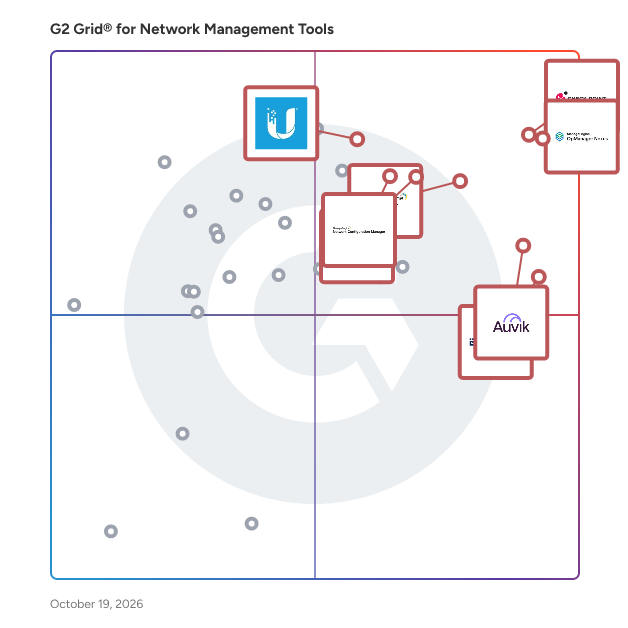
# Best Network Management Tools - Page 6

*By [Tian Lin](https://research.g2.com/insights/author/tian-lin)*


Network management tools are used to administrate, provision, and control IT systems. These products help users understand who is using their network, how it is organized and how it is performing. Companies use these to improve reporting on existing networks and tighten control over connected systems. Many products have network mapping capabilities to outline connected devices and infrastructure. Some modern network management tools are used for configuration management between cloud services and remote network connections.

[Network monitoring tools](https://www.g2.com/categories/network-monitoring) are closely related to network management tools, but provide fewer administrative controls. Instead, network monitoring tools continuously analyze traffic, accessibility and network health. There is also some relation to [data center networking](https://www.g2.com/categories/data-center-networking) software. These tools provide similar network management capabilities designed specifically for data centers and their connected IT ecosystem.

To qualify for inclusion in the Network Management category, a product must:

- Provide administrative control over computer networks
- Provision devices connected to a network
- Map and discover new network connections


## Top Network Management Tools at a Glance
| # | Product | Rating | Best For | What Users Say |
|---|---------|--------|----------|----------------|
| 1 | [Check Point Next Generation Firewalls (NGFWs)](https://www.g2.com/products/check-point-next-generation-firewalls-ngfws/reviews) | 4.5/5.0 (510 reviews) | Centralized multi-gateway threat prevention and policy enforcement | "[The Ultimate Tool for Threat Prevention](https://www.g2.com/survey_responses/check-point-next-generation-firewalls-ngfws-review-12802176)" |
| 2 | [OpManager Nexus](https://www.g2.com/products/opmanager-nexus/reviews) | 4.5/5.0 (215 reviews) | Multi-vendor network fault detection and ITSM ticketing | "[Clear, Organized Dashboard and Easy Device Integration](https://www.g2.com/survey_responses/opmanager-nexus-review-12778545)" |
| 3 | [Auvik](https://www.g2.com/products/auvik-networks/reviews) | 4.5/5.0 (379 reviews) | Automated network topology mapping with MSP multi-tenancy | "[Auvik Saves Hours with Automated Discovery, Topology Mapping, and Real-Time Alerts](https://www.g2.com/survey_responses/auvik-review-12366101)" |
| 4 | [ManageEngine Network Configuration Manager](https://www.g2.com/products/manageengine-network-configuration-manager/reviews) | 4.5/5.0 (43 reviews) | Multi-vendor network config backup and compliance | "[Centralized Network Configuration Backup and Compliance Management](https://www.g2.com/survey_responses/manageengine-network-configuration-manager-review-12976007)" |
| 5 | [BackBox](https://www.g2.com/products/backbox/reviews) | 4.5/5.0 (177 reviews) | Multi-vendor network config backup and drift remediation | "[Good for config peace of mind](https://www.g2.com/survey_responses/backbox-review-12950233)" |
| 6 | [Site24x7](https://www.g2.com/products/site24x7/reviews) | 4.6/5.0 (427 reviews) | Unified infrastructure and network observability | "[Single Dashboard Monitoring That Makes Infrastructure Management Effortless](https://www.g2.com/survey_responses/site24x7-review-11331109)" |
| 7 | [Ubiquiti Network Management System](https://www.g2.com/products/ubiquiti-network-management-system/reviews) | 4.5/5.0 (35 reviews) | License-free UniFi infrastructure provisioning and monitoring | "[No Subscription Fees, Advanced Features, and an Easy-to-Configure Interface](https://www.g2.com/survey_responses/ubiquiti-network-management-system-review-12727289)" |
| 8 | [FortiManager](https://www.g2.com/products/fortimanager/reviews) | 4.3/5.0 (25 reviews) | Fortinet-native centralized firewall policy orchestration | "[Reliable, User-Friendly Centralized Management with FortiManager](https://www.g2.com/survey_responses/fortimanager-review-12878055)" |
| 9 | [Entuity](https://www.g2.com/products/entuity/reviews) | 4.6/5.0 (98 reviews) | Multi-vendor network monitoring with configuration backup | "[Highly Customizable with Room for GUI Improvement](https://www.g2.com/survey_responses/entuity-review-12664752)" |
| 10 | [IBM SevOne](https://www.g2.com/products/ibm-sevone/reviews) | 4.3/5.0 (70 reviews) | High-frequency polling across hybrid network observability | "[Powerful and Scalable, But Be Ready for a Learning Curve](https://www.g2.com/survey_responses/ibm-sevone-review-11793711)" |


## How Many Network Management Tools Products Does G2 Track?
**Total Products under this Category:** 145

### Category Stats (Jun 2026)
- **Average Rating**: 4.43/5 (↑0.01 vs May 2026) The average rating of products in this category, based on all submitted ratings
- **Top Trending Product**: ngrok (+2.07%) - Among all products in this category, ngrok recorded the largest rating increase compared to last month
*Last updated: June 24, 2026*


## How Does G2 Rank Network Management Tools Products?

**Why You Can Trust G2's Software Rankings:**

- 30 Analysts and Data Experts
- 4,100+ Authentic Reviews
- 145+ Products
- Unbiased Rankings

G2's software rankings are built on verified user reviews, rigorous moderation, and a consistent research methodology maintained by a team of analysts and data experts. Each product is measured using the same transparent criteria, with no paid placement or vendor influence. While reviews reflect real user experiences, which can be subjective, they offer valuable insight into how software performs in the hands of professionals. Together, these inputs power the G2 Score, a standardized way to compare tools within every category.


## Which Network Management Tools Is Best for Your Use Case?

- **Leader:** [Check Point Next Generation Firewalls (NGFWs)](https://www.g2.com/products/check-point-next-generation-firewalls-ngfws/reviews)
- **Easiest to Use:** [BackBox](https://www.g2.com/products/backbox/reviews)
- **Top Trending:** [Check Point Next Generation Firewalls (NGFWs)](https://www.g2.com/products/check-point-next-generation-firewalls-ngfws/reviews)
- **Best Free Software:** [Auvik](https://www.g2.com/products/auvik-networks/reviews)


## What Are the Top-Rated Network Management Tools Products in 2026?
### 1. [sclera](https://www.g2.com/products/sclera/reviews)
Facility Management with Building Intelligence Pioneering AI-enabled Smart Building Solutions backed by IoT technology, Building Analytics and Advanced Digitization for unparalleled Operational Efficiency, Sustainability and ROI. Witness the Real-World Impact of Our Solutions in Action 1. AI-enabled Onboarding 70% reduction in time and 80% reduction in cost to onboard 2. Digital Inspections Up to 50,000 work hours freed up for Inspections 3. Asset Downtime 20% reduction in asset downtime and 10-20% decrease in operational expenses through realtime monitoring 4. Maintenance and Repair 15 to 20% reduction in recurring maintenance and repair costs. 5. Inventory and Consumables Reduce stock-outs by up to 50% and overstocking by 30% Work Smarter, Not Harder 1. Facility Manager With data visualization dashboards and reports, gain real-time insights into key facility metrics (e.g., energy usage, space utilization, maintenance needs) to make informed decisions. 2. Janitorial Team Work order management system with mobile app access enables simplifying task assignment, track cleaning progress, and improve communication between team members. 3. Asset Engineers Centralized asset registry with maintenance scheduling capabilities help manage asset information, schedule preventive maintenance tasks, and leverage real-time sensor data to monitor asset health and performance. 4. Maintenance Technician Mobile app for work order access, automated alerts, rounds, and audits improve response time by accessing work order details and requesting parts directly from the field. Submit reports efficiently through the mobile app. 5. Smart Buildings Manager Building automation system integration with data analytics help optimize energy consumption and environmental conditions based on real-time building data. Gain insights into overall smart building operations and identify areas for improvement. Features: 1. Asset Digitization Effortlessly digitize and manage all assets for streamlined operations and enhanced visibility. 2. Inspection Digitization Digitize inspections for enhanced tracking, accurate data collection and efficient compliance processes. 3. Remote Access and Asset Monitoring Ensure Network reliability and security with comprehensive monitoring and real-time insights. 4. BMS and IoT Monitoring Leverage sensors for accurate readings, enabling actionable analysis and informed 5. Data Platform Integration Experience seamless operations and enhanced efficiency with an integrated operating system that centralizes workflows and operations.


**Average Rating:** 4.0/5.0
**Total Reviews:** 1

**Who Is the Company Behind sclera?**

- **Seller:** [sclera](https://www.g2.com/sellers/sclera)
- **Year Founded:** 2018
- **HQ Location:** Chicago, US
- **Twitter:** @sclera_Platform (16 Twitter followers)
- **LinkedIn® Page:** https://www.linkedin.com/company/sclera-platform (214 employees on LinkedIn®)

**Who Uses This Product?**
- **Company Size:** 100% Mid-Market


#### What Are Recent G2 Reviews of sclera?

**"[Comfortable working environment for employees](https://www.g2.com/survey_responses/sclera-review-10250840)"**

**Rating:** 4.0/5.0 stars
*— Ali M.*

[Read full review](https://www.g2.com/survey_responses/sclera-review-10250840)

---


### 2. [SGRwin](https://www.g2.com/products/sgrwin/reviews)
SGRwin is a proprietary, multi-vendor network management system (NMS) built for critical infrastructure and true IT/OT convergence. As an umbrella NMS, it unifies element managers and heterogeneous devices across utilities, energy, transportation and public networks. Aligned to FCAPS, SGRwin delivers real-time fault monitoring and alarm correlation, configuration &amp; change management (NCM) with backup/restore, asset &amp; inventory, performance/SLA monitoring, and security with RBAC, audit logging and AIOps anomaly detection. GIS maps and configurable dashboards provide end-to-end visibility, while open APIs integrate with OSS/BSS and ITSM tools.


**Who Is the Company Behind SGRwin?**

- **Seller:** [CIC Consulting Informático](https://www.g2.com/sellers/cic-consulting-informatico-676cf20a-d43b-4638-997e-8c5f892df88d)


### 3. [Splynx](https://www.g2.com/products/splynx/reviews)
Splynx is a WISP billing and network management platform that helps providers automate workflows, streamline billing and payments, and reduce manual tasks. It offers powerful network management tools for centralized control, inventory, and equipment tracking, helping ISPs maintain reliable services. Splynx enables ISPs to focus on growth and customer satisfaction while managing operations efficiently. The platform’s advanced Radius server provides secure AAA capabilities across PPPoE, DHCP, IPoE, Hotspot, and more, with smart bandwidth management and inventory features to simplify asset tracking. Splynx’s core strength is its flexibility—thanks to its powerful APIs, ISPs can easily create custom modules or integrate third-party solutions, supporting a wide range of operations from customer setup to data management. This framework-based system empowers ISPs to scale and customize their workflows for efficient and scalable operations.


**Average Rating:** 5.0/5.0
**Total Reviews:** 1
**How Do G2 Users Rate Splynx?**

- **Ease of Admin:** 10.0/10 (Category avg: 8.7/10)

**Who Is the Company Behind Splynx?**

- **Seller:** [Splynx s.r.o.](https://www.g2.com/sellers/splynx-s-r-o)
- **Year Founded:** 2016
- **HQ Location:** Prague, CZ
- **LinkedIn® Page:** https://www.linkedin.com/company/splynx-isp-framework/ (43 employees on LinkedIn®)

**Who Uses This Product?**
- **Company Size:** 100% Small-Business


#### What Are Splynx's Pros and Cons?

**Pros:**

- Customer Support (1 reviews)
- Customizability (1 reviews)
- Easy Integrations (1 reviews)
- Integrations (1 reviews)
- Troubleshooting (1 reviews)


### What Do G2 Reviewers Say About Splynx?
*AI-generated summary from verified user reviews*

**Pros:**

- Users value the **responsive customer support** from Splynx, who prioritize feedback and tailor solutions effectively.
- Users value the **customizability** of Splynx, appreciating tailored solutions and responsive support that enhance their ISP experience.
- Users value the **easy integrations** of Splynx, appreciating their responsive support and commitment to customer satisfaction.
- Users value the **exceptional support for integrations** from Splynx, enhancing customer satisfaction and reliability in the ISP industry.
- Users value Splynx&#39;s **exceptional troubleshooting support** and commitment to customer satisfaction, enhancing their overall experience.


#### What Are Recent G2 Reviews of Splynx?

**"[The Best ISP CRM around.](https://www.g2.com/survey_responses/splynx-review-10560163)"**

**Rating:** 5.0/5.0 stars
*— Gavin J.*

[Read full review](https://www.g2.com/survey_responses/splynx-review-10560163)

---


### 4. [StableNet](https://www.g2.com/products/stablenet/reviews)
Infosim® develops and markets StableNet®, the leading automated network and services management platform with a 4-in-1 solution that combines Discovery &amp; Inventory, Configuration, Fault, and Performance Management. It is available in three versions: Telco (for Telecom Operators and ISPs), Enterprise (for IT and Managed Service Providers) and StableNet®-as-a-Service (a flexible, on-demand solution for firms of all sizes). StableNet®-as-a-Service (a.k.a. SNaaS) combines all the benefits of StableNet® without the burden of high initial investment. Given the many operational and technical challenges of managing distributed and mission-critical IT infrastructures, StableNet® is the vendor-independent solution in today’s multi-vendor environment.


**Who Is the Company Behind StableNet?**

- **Seller:** [Infosim GmbH &amp; Co. KG](https://www.g2.com/sellers/infosim-gmbh-co-kg)
- **Year Founded:** 2003
- **HQ Location:** Würzburg, Bayern
- **LinkedIn® Page:** https://www.linkedin.com/company/infosim/ (90 employees on LinkedIn®)


### 5. [Switches Routers Load balancer](https://www.g2.com/products/switches-routers-load-balancer/reviews)
Electrical and electronic equipment distribution Industrial automation solutions Data communication and networking products Security and surveillance systems Utility and broadband infrastructure products Supply chain and logistics services


**Who Is the Company Behind Switches Routers Load balancer?**

- **Seller:** [Wesco International](https://www.g2.com/sellers/wesco-international)
- **HQ Location:** Pittsburgh, Pennsylvania, United States
- **LinkedIn® Page:** https://www.linkedin.com/company/wesco/ (12,084 employees on LinkedIn®)


### 6. [Switch Executive](https://www.g2.com/products/switch-executive/reviews)
Switch Executive provides interactive configuration and automatic routing capabilities that make it easier to design a switch system. You can simplify your system&#39;s documentation for future modifications by assigning aliases to switch modules, external connections, and signal routes. Test code developed with Switch Executive can be reused in LabVIEW, LabWindows™/CVI, Measurement Studio, and TestStand.


**Who Is the Company Behind Switch Executive?**

- **Seller:** [NI](https://www.g2.com/sellers/ni)
- **Year Founded:** 1976
- **HQ Location:** Austin, TX
- **Twitter:** @NIglobal (26,204 Twitter followers)
- **LinkedIn® Page:** https://www.linkedin.com/company/3433 (7,957 employees on LinkedIn®)
- **Ownership:** NASDAQ: NATI


### 7. [Traffic Orchestrator](https://www.g2.com/products/traffic-orchestrator/reviews)
Traffic Orchestrator is the modern developer&#39;s toolkit for domain-bound software licensing. Built on Cloudflare Workers, it provides ultra-fast validation at the edge, native support for 11+ languages (Go, Python, PHP, Java, etc.), and a seamless customer portal. Monetize your software reliably without the latency of traditional licensing servers.


**Who Is the Company Behind Traffic Orchestrator?**

- **Seller:** [tor](https://www.g2.com/sellers/tor-f7c1cc09-fe3e-4673-be2a-943e38d6bee2)
- **HQ Location:** Cheyenne, Wyoming, United States
- **LinkedIn® Page:** https://linkedin.com/company/traffic-orchestrator/ (1 employees on LinkedIn®)


### 8. [Unified Management Platform](https://www.g2.com/products/unified-management-platform/reviews)
Streamline service activation and CPE management Fully automated end-to-end CPE management Compliant with TR-069, TR-369 &amp; more industry-standard protocols Unlimited flexibility to perfectly match every Telco &amp; ISP’s needs On-premises or cloud-based implementation Vendor agnostic - supports all CPE on the market


**Who Is the Company Behind Unified Management Platform?**

- **Seller:** [AVSystem](https://www.g2.com/sellers/avsystem)
- **Year Founded:** 2006
- **HQ Location:** Kraków, PL
- **LinkedIn® Page:** https://www.linkedin.com/company/avsystem/about/ (207 employees on LinkedIn®)


### 9. [Uplevel Systems](https://www.g2.com/products/uplevel-systems/reviews)
Uplevel Systems is a cutting-edge technology company dedicated to revolutionizing the networking industry. With a focus on providing innovative solutions for small and medium size businesses, Uplevel Systems specializes in creating intelligent network management software and hardware. Their mission is to empower organizations with robust, scalable, and secure networking solutions that optimize performance and streamline operations.


**Who Is the Company Behind Uplevel Systems?**

- **Seller:** [Uplevel Systems](https://www.g2.com/sellers/uplevel-systems)
- **Year Founded:** 2015
- **HQ Location:** Tigard, US
- **Twitter:** @uplevelsystems (209 Twitter followers)
- **LinkedIn® Page:** https://www.linkedin.com/company/uplevel-systems-inc/ (13 employees on LinkedIn®)


### 10. [UVexplorer Server](https://www.g2.com/products/uvexplorer-server/reviews)
UVexplorer Server provides an on-premise, WebUI for Layer 2 Network Mapping, Configuration Backup and Inventory Asset Discovery. UVexplorer Server is a Docker application and can provide 200+ silo&#39;ed network maps. All of the functionality of UVexplorer is provided with UVexplorer Server, allowing Trace, MIB walking and other features. UVexplorer Server is perfect for Managed Service Providers (MSPs) and large organizations.


**Who Is the Company Behind UVexplorer Server?**

- **Seller:** [UV Networks](https://www.g2.com/sellers/uv-networks)
- **HQ Location:** N/A
- **LinkedIn® Page:** https://www.linkedin.com/company/uvnetworks (5 employees on LinkedIn®)


### 11. [Vallum GMI Agent](https://www.g2.com/products/vallum-gmi-agent/reviews)
Vallum GMI Agent is a network security software that is a simple install that will automatically discover all devices and immediately provide availability data and alerts.


**Who Is the Company Behind Vallum GMI Agent?**

- **Seller:** [Vallum Software](https://www.g2.com/sellers/vallum-software)
- **Year Founded:** 2015
- **HQ Location:** Peachtree Corners, US
- **LinkedIn® Page:** https://www.linkedin.com/company/vallum-software-llc/ (2 employees on LinkedIn®)


### 12. [VC4 Service2Create](https://www.g2.com/products/vc4-service2create/reviews)
VC4 Service2Create (S2C) is a network inventory and service management platform for telecom operators. It brings physical infrastructure, logical resources, services, and assets into a single system, covering technologies including fiber, MPLS/IP, WDM/OTN, SDH, and mobile networks. S2C connects inventory directly to operations, so teams can plan, provision, and resolve issues from the same accurate data set. It integrates with NMS, OSS/BSS, CRM, and financial systems.


**Who Is the Company Behind VC4 Service2Create?**

- **Seller:** [VC4](https://www.g2.com/sellers/vc4-8a3c1370-710c-4703-a84e-d3c1d57495b6)
- **Year Founded:** 2004
- **HQ Location:** Alkmaar, NL
- **LinkedIn® Page:** https://www.linkedin.com/company/vc4-bv/ (49 employees on LinkedIn®)


### 13. [Vetro FiberMap](https://www.g2.com/products/vetro-fibermap/reviews)
https://vetrofibermap.com/


**Who Is the Company Behind Vetro FiberMap?**

- **Seller:** [Vetro](https://www.g2.com/sellers/vetro)
- **Year Founded:** 2016
- **HQ Location:** Portland, US
- **LinkedIn® Page:** https://www.linkedin.com/company/vetrofibermap (113 employees on LinkedIn®)


### 14. [Virtual Netcomm](https://www.g2.com/products/virtual-netcomm/reviews)
Virtual Netcomm Pvt. Ltd. (VNPL is a premier Value-Added Distributor (VAD specializing in comprehensive information management solutions. Established in 1998 and headquartered in Ahmedabad, India, VNPL has expanded its presence with sales and support offices across major Indian cities and international operations in Sri Lanka, Bangladesh, Singapore, Malaysia, Indonesia, Dubai, and the UK. The company collaborates with world-class technology partners to deliver best-in-class solutions tailored to meet the evolving needs of businesses in India and the SAARC region. Key Features and Functionality: - Information Security Solutions: VNPL offers robust security measures, including spam and virus firewalls, application and instant messaging firewalls, next-generation firewalls (NGFW, and data loss prevention systems. - Networking and Network Management: The company provides advanced networking solutions such as switching and routing, network access control, and network and log management systems. - Storage and Backup Solutions: VNPL delivers reliable storage and backup solutions to ensure data integrity and availability. - Wireless/Wi-Fi Solutions: The company offers smart Wi-Fi and wireless networking solutions to support seamless connectivity. - Video Conferencing Solutions: VNPL provides unified high-definition video conferencing systems to facilitate effective communication. - Professional Services: VNPL extends its offerings with professional services, including authorized support partnerships, implementation and maintenance services, educational services, and assessment services. Primary Value and User Solutions: VNPL&#39;s holistic approach to value-added distribution encompasses complete pre- and post-sales support, educational services, implementation and maintenance services, and assessment services. This comprehensive support enables partners to better serve their customers by providing tailored solutions that address critical business demands. By collaborating with leading technology partners, VNPL ensures that businesses have access to cutting-edge information management solutions, thereby enhancing operational efficiency, security, and overall performance.


**Who Is the Company Behind Virtual Netcomm?**

- **Seller:** [Virtual Netcomm](https://www.g2.com/sellers/virtual-netcomm)
- **HQ Location:** N/A
- **LinkedIn® Page:** https://www.linkedin.com/company/No-Linkedin-Presence-Added-Intentionally-By-DataOps (1 employees on LinkedIn®)


### 15. [Visualware MyConnection Server](https://www.g2.com/products/visualware-myconnection-server/reviews)
MyConnection Server proactively identifies hidden network issues that traditional monitoring tools miss—ensuring crystal-clear VoIP calls, seamless video conferencing, reliable global connectivity, and reduced downtime. Empower your team with actionable insights to optimize productivity, minimize risk, and drive measurable ROI.


**Who Is the Company Behind Visualware MyConnection Server?**

- **Seller:** [Visualware](https://www.g2.com/sellers/visualware-0c417638-fb6b-4707-8361-82ea0846220f)
- **Year Founded:** 2001
- **HQ Location:** Turlock, US
- **Twitter:** @Visualware (271 Twitter followers)
- **LinkedIn® Page:** https://www.linkedin.com/company/7940961 (6 employees on LinkedIn®)


### 16. [VitalSigns™ Integrated Solutions for z/OS](https://www.g2.com/products/vitalsigns-integrated-solutions-for-z-os/reviews)
Unlock Mainframe Insights with Real-Time Visibility from SDS VitalSigns for z/OS VitalSigns for z/OS is an integrated suite of products for managing and monitoring mainframe environments. These products can be used individually to address specific challenges or work together as an integrated solution. VitalSigns products can reduce costs by improving efficiency through process automation, resource conservation, and problem diagnosis and resolution. Key Features: • Real-Time Monitoring: See key performance indicators for CPU, I/O, and memory. • Batch Processing Insights: Identify bottlenecks to improve throughput. • Predictive Analytics: Detect trends and prevent system slowdowns before they occur. • Customizable Alerts: Set custom thresholds and receive proactive alerts. Business Impact: • Reduce Operating Costs: Lower MLC charges by optimizing workload efficiency. • Improve System Uptime: Get ahead of system failures and reduce downtime. • Faster Issue Resolution: Diagnose and fix mainframe slowdowns in real-time.


**Who Is the Company Behind VitalSigns™ Integrated Solutions for z/OS?**

- **Seller:** [Software Diversified Services (SDS)](https://www.g2.com/sellers/software-diversified-services-sds)
- **Year Founded:** 1982
- **HQ Location:** North Oaks, US
- **LinkedIn® Page:** https://www.linkedin.com/company/software-diversified-services/ (25 employees on LinkedIn®)


### 17. [VNS3:ms](https://www.g2.com/products/vns3-ms/reviews)
VNS3:ms is a single dashboard to manage, monitor, and failover your VNS3 networks and VPN connections with VNS3:ha. The VNS3:ms monitoring system lets you simplify network management further by using Docker containers inside VNS3 Managers, and manage it all from your web-based UI, API, or command line interface.


**Who Is the Company Behind VNS3:ms?**

- **Seller:** [Cohesive Networks](https://www.g2.com/sellers/cohesive-networks)
- **Year Founded:** 2008
- **HQ Location:** Chicago, US
- **Twitter:** @cohesivenet (1,427 Twitter followers)
- **LinkedIn® Page:** https://www.linkedin.com/company/cohesive-networks (19 employees on LinkedIn®)


### 18. [WonderNetwork](https://www.g2.com/products/wondernetwork/reviews)
WonderNetwork offers network testing solutions.


**Who Is the Company Behind WonderNetwork?**

- **Seller:** [WonderNetwork](https://www.g2.com/sellers/wondernetwork)
- **HQ Location:** N/A
- **LinkedIn® Page:** https://www.linkedin.com/company/No-Linkedin-Presence-Added-Intentionally-By-DataOps (1 employees on LinkedIn®)


### 19. [XIA Configuration](https://www.g2.com/products/xia-configuration/reviews)
XIA Configurations is a document management tool for IT professionals. It generates automatic network documentation. Reports can be run and users can audit data for network configurations.


**Who Is the Company Behind XIA Configuration?**

- **Seller:** [CENTREL Solutions](https://www.g2.com/sellers/centrel-solutions)
- **Year Founded:** 2008
- **HQ Location:** Oxford, GB
- **Twitter:** @CENTRELSolution (104 Twitter followers)
- **LinkedIn® Page:** https://www.linkedin.com/company/centrel-solutions (10 employees on LinkedIn®)


### 20. [ZoneRanger](https://www.g2.com/products/zoneranger/reviews)
Expertise to securely proxy network management protocols through firewalls, and providing a more secure infrastructure utilizing fewer resources.


**Who Is the Company Behind ZoneRanger?**

- **Seller:** [Tavve](https://www.g2.com/sellers/tavve)
- **HQ Location:** Charlotte, US
- **LinkedIn® Page:** https://www.linkedin.com/company/tavve/ (12 employees on LinkedIn®)


## What Is Network Management Tools?

[IT Infrastructure Software](https://www.g2.com/categories/it-infrastructure)

## What Software Categories Are Similar to Network Management Tools?

- [Network Monitoring Software](https://www.g2.com/categories/network-monitoring)
- [Network Automation Tools](https://www.g2.com/categories/network-automation-tools)
- [Network Security Policy Management (NSPM) Software](https://www.g2.com/categories/network-security-policy-management-nspm)


---

## How Do You Choose the Right Network Management Tools?

### What You Should Know About Network Management Tools

### What are Network Management Tools?

Network management tools enable network administrators to monitor and control the entire network (on-premises or cloud) to address service needs and business objectives. A network is created when two or more devices communicate with each other through the transfer of data. Devices come in many forms but the important network devices are clients, servers, switches, routers, firewalls, and access points. These network devices above allow common devices such as computers, phones, smart watches, IoT, and others to connect to each other. Devices can be connected physically, virtually, and wirelessly via LAN, WAN, VPN, and different types of networks.&amp;nbsp;

All of these connections and devices are complex to manage manually. With network management software, IT managers can track what devices are connected and how they connect. Network management tools use network topology to visually lay out device connections. With this map, users can provision the network system by changing device configuration, resource allocation, and security settings to meet their IT objectives. Different network management solutions may have other network management protocols but most use simple network management protocol (SNMP).&amp;nbsp;

Good network management software also allows IT teams to automate manual network management tasks, such as inventory assessments, device discovery and mapping, system backups, remote access, etc. The goal is to let the network management software automate these traditionally time-consuming tasks so users can focus on other things, like winning new customers and working on new business objectives.

#### What Types of Network Management Tools Exist?

**Free or open-source software**

Free network management tools perform simple internet protocols and provide basic network performance data. Since many of them require manually loading the device, free tools are perfect for small networks with fewer devices. A good rule of thumb is that if the user can map all of their devices’ topologies on a whiteboard, they should try these free tools before the paid software. Small companies or individual users are the perfect fit for this type of software.&amp;nbsp;

**Specialized network management software&amp;nbsp;**

Specialized network management software is good at doing one job—network management. This software can manage a range of functional areas: auto-discovery, inventory, performance, reliability, and security. It provides technical reports and graphs of the network system. Some more advanced tools can offer root cause analysis and machine learning to solve specific problems. These tools are excellent for organizations with other existing monitoring and management tools for their website, database, hardware, etc.

**One-for-all software&amp;nbsp;**

Top vendors provide comprehensive network management solutions for enterprises. These tools not only do everything that a specialized network management software ca do, alsothey have additional capabilities that manage cloud infrastructure, web network traffic, and IT assets. Some even cover container management, Kubernetes control, and application monitoring. Since they are designed for enterprise-size networks, there is no limit to the scalability of the number of devices. An experienced user can automate a significant amount of manual tasks with this type of software on numerous devices. This type of software is a great fit for large organizations that have their IT infrastructure in multiple locations.&amp;nbsp;

### What are the Common Features of Network Management Tools?

The following are some core features within network management tools that can help users manage their network:

**Device discovery:** Network management tools need to automatically discover new and existing devices and update this information in the device inventory. If there is no auto featuusers mustd to manually enter this information into the system.&amp;nbsp;

**Network topology:** Another name for this feature is network mapping. Network management tools should map all devices in a graph to show how they are connected. This saves users time from constantly mapping their network manually on a whiteboard. They can see the entire network from network maps.

**Configuration management:** Users can set up their network configurations such as IP address and firewalls on Microsoft Windows, Linux, or website (SaaS) using API.&amp;nbsp;

**Network monitoring:** Network performance should be monitored to show the status of the network such as bandwidth usage. Essential metrics must be covered in the following: bandwidth (maximum data transmission rate), throughput (data transmission rate), latency (delay between device request and delivery), packet loss (number of data packets dropped during transmissions), availability (uptime of the network), and connectivity (the types of connection between devices).&amp;nbsp;

**IT alerting:** If there is a performance problem, tools that have alerting capability will notify the help desk so IT staff can start troubleshooting the network configuration. IT alerting should be integrated with the network monitoring system. For example, if remote wireless networks fail to operate, IT pros won&#39;t know there is a problem unless the network monitoring solution notifies them.

**Root cause analysis:** Just having the status of the network is not enough for modern-day network management practice. When there are hundreds of devices, users waste time trying to search which device is causing a network performance issue. The software should alert the user which device is causing the problem so the user can fix the issue fast. This feature is core to performance management.&amp;nbsp;

**Reporting dashboard:** If every device is being tracked automatically, their performance information should be reported in real time in a central dashboard. It is unrealistic to expect network managers to check the performance of every device one by one. Also, different users have different technical knowledge of the network system. Therefore, reporting tools should be customizable according to the level of technical details.&amp;nbsp;

**Automation:** Network management tools should automatically track network inventory, run scheduled reports, device software updates, load balance based on need, alert users of issues and where to find them, and so on. The more IT teams can automate these processes, the more time they save from doing these tasks manually. With the rise of machine learning and AIOps, these new technologies assist users in accurately determining the device at fault so users waste less time trying to find the problem.

### What are the Benefits of Network Management Tools?

**Increase network performance:** Since network management solutions monitor, evaluate, and report performance metrics such as traffic volume and availability. Users can use performance information to forecast resource requirements and load balance based on need. For example, if an internal network device is causing the bottleneck, then the user can upgrade their device. If the internal network infrastructure is operational but the external cloud server is limiting network performance, then users can upgrade their cloud resource capacity. Network management software provides this information so users can accurately pinpoint the performance issue and act accordingly.

**Easily manage numerous devices:** Users can manage their network and device configuration in a configuration management dashboard. This includes initializing multiple devices and maintaining settings in one workflow. The software also allows configuration backup so in the event of failure or human error, IT administrators bring the network back online without manually setting everything up again.

**Increase network security:** Security management prevents unauthorized access and cyber attack. Users can set up user authentication, data encryption, access distribution, firewall, and other security parameters to provide real-time protection.

### Who Uses Network Management Tools?

**IT teams:** Only IT personnel would use this software to set up and manage company networks.&amp;nbsp;

#### Software Related to Network Management Software

Related solutions that can be used together with network management software include:

[Network monitoring tools](https://www.g2.com/categories/network-monitoring) **:** Network monitoring tools are closely related to network management tools but provide fewer administrative controls. Instead, network monitoring software continuously analyzes traffic, accessibility, netflow, and network health.

### Challenges with Network Management Tools

Software solutions can come with their own set of challenges.&amp;nbsp;

**Device recognition:** Some network management solutions will not automatically recognize or register devices from other brands. Buyers need to extensively test if their existing devices work well on the network management software before purchasing.

**Limited functionality:** Some vendors offer multiple network management products with different functionality. Buyers can select which one they want and not pay for the extra service. However, the catch is that vendor want to sell buyers everything, so these so-called “standalone” products are not fully functional unless the buyer purchases all of them, which is expensive. If the bundled products cost exceeds the IT budget, it’s best not to buy any of them. It is common to try to buy one product to save money, but upgrading later ends up costing more than what companies want to pay for.&amp;nbsp;

**Unfriendly user experience and implementation:** Some big brand products are not only expensive but also difficult to install, configure, administer, and maintain without extensive knowledge of the vendors’ systems. Companies who purchased such products often fail to deploy, partially deploy, or completely abandon any effort to monitor their network. To avoid this, buyers should filter out products that have a complex GUI and implementation requirements.

**Network scale:** Small-business network management tools can be easy to use but may not fit the projected growth needs. Enterprise solutions are not necessary for smaller networks but can provide intensive support for larger, more complex networks in real time. Many cloud offerings can help small businesses scale their networks as they grow while minimizing downtime. When investing in a network management solution, the solution must meet the company’s scale needs, both for now and in the near future.

### How to Buy Network Management Tools

#### Requirements Gathering (RFI/RFP) for Network Management Software

The company’s needs when searching for network management solutions often relate to specific network performance issues. For example, the user may be most interested in monitoring and improving performance for downtime. Buyers should make a ranked list of the network management features that most directly address the problems they’re trying to solve, then reference G2 reviews to find the right fit.

Prioritizing the desired feature set can help narrow down the potential pool of network management solutions, allowing teams to then apply further considerations for budget, ease of integration with other systems, security requirements, and more. This holistic approach empowers buyers to move forward with a focused checklist, which can be used in conjunction with G2 scoring to select the best network management product for the business.

#### Compare Network Management Tools

**Create a long list**

Buyers should start with a large pool of network management software vendors. Keeping the desired must-have features in mind, buyers must perform consistent inquiries during demos so they can effectively compare the pros and cons of each software.

**Create a short list**

It helps to cross-reference the results of initial vendor evaluations with G2 reviews from other buyers, the combination of which will help narrow it down to three to five products. From there, buyers can compare pricing and features to determine the best fit.

**Conduct demos**

Companies should make sure to demo all of the products that end up on their short list. The basic step of the demo is to start with downtime management. It’s important to know if the product tracks network uptime, device operational status, and performance metrics like packet and bandwidth data. It’s also helpful to test the configuration and reporting function. It is also important that the selected product fully reflects the entire enterprise network ecosystem and topology.

#### Selection of Network Management Tools

**Choose a selection team**

Regardless of a company’s size, it’s important to involve the most relevant personnel when beginning the network management software selection process. Larger companies may include individual team members to fill roles such as system owners, IT professionals, and developers who will be working with the software closely. Smaller companies with fewer employees might overlap roles.&amp;nbsp;

**Negotiation**

Many companies offer full network-related platforms that go beyond network management to include application performance monitoring, cloud infrastructure monitoring, and more. While some companies will not budge on the configurations of their packages, buyers looking to trim costs should try to negotiate down to the specific functions that matter to them to get the best price. For example, a vendor’s pricing page where network management functionality is only included with a robust all-in-one monitoring package, whereas a sales conversation may prove otherwise.&amp;nbsp;

**Final decision**

After this stage, it is essential to perform a trial run with a small selection of IT professionals or developers. This will help to ensure that the software of choice integrates well with an IT administrator’s systems setup or a developer’s day-to-day work. If the tool is well-liked and well-utilized, the buyer can take that as a sign that their selection is the right one. If not, reevaluation of the options may be necessary.


---
## What Are the Most Common Questions About Network Management Tools?
*AI-generated · Last updated: June  3, 2026*
### Which tool offers the most detailed network performance analytics
Based on G2 reviews, these products are most often mentioned for visibility, analytics, and troubleshooting depth.

- [ManageEngine OpManager](https://www.g2.com/products/manageengine-opmanager) — real-time monitoring and bandwidth troubleshooting.
- [Auvik](https://www.g2.com/products/auvik-networks) — topology mapping and traffic visibility.
- [Arbor Sightline](https://www.g2.com/products/arbor-sightline) — flow analytics and DDoS traffic insight.
- [IBM SevOne](https://www.g2.com/products/ibm-sevone) — granular telemetry and proactive monitoring.


### Which vendor offers automated network configuration management
Based on G2 reviews, these products are frequently used to automate backups, change tracking, and config consistency.

- [BackBox](https://www.g2.com/products/backbox) — automated backups and policy validation.
- [ManageEngine Network Configuration Manager](https://www.g2.com/products/manageengine-network-configuration-manager) — change tracking and bulk config pushes.
- [FortiManager](https://www.g2.com/products/fortimanager) — centralized policy deployment across firewalls.
- [Check Point Next Generation Firewalls (NGFWs)](https://www.g2.com/products/check-point-next-generation-firewalls-ngfws) — centralized policy control with SmartConsole.


### Which vendor provides the most secure network management platform
Based on G2 reviews, these products are most associated with threat prevention, policy control, and secure visibility.

- [Check Point Next Generation Firewalls (NGFWs)](https://www.g2.com/products/check-point-next-generation-firewalls-ngfws) — layered threat prevention and policy enforcement.
- [Check Point Quantum Titan](https://www.g2.com/products/check-point-quantum-titan) — enterprise protection with clear activity visibility.
- [Arbor Sightline](https://www.g2.com/products/arbor-sightline) — DDoS detection and attack analysis.
- [VMware NSX](https://www.g2.com/products/vmware-nsx) — micro-segmentation and Zero Trust controls.


### What are the most important features in network management software
According to verified users, the most valued capabilities in network management software are real-time monitoring, alerting, device discovery, dashboards, and centralized visibility across routers, switches, firewalls, servers, and links. Reviews also repeatedly highlight topology maps, bandwidth and traffic analysis, configuration backup, change tracking, reporting, and integrations with ticketing or IT operations tools. Buyers also care about proactive issue detection, because many reviewers describe wanting alerts before users notice outages. Ease of setup and daily usability matter too, but many products still require tuning to reduce noisy alerts, improve report customization, or handle larger environments. In short, buyers consistently favor tools that combine broad visibility with faster troubleshooting and less manual effort.


### How do teams use network management tools for troubleshooting
G2 reviewers mention that teams use network management tools to spot outages, trace bottlenecks, and isolate device or link issues faster from a central view. Common troubleshooting workflows include checking dashboards for device health, using alerts to catch failures early, reviewing bandwidth or traffic patterns, and looking at topology maps to understand where a problem sits in the network path. Some users also describe relying on configuration history, backup comparisons, or change tracking when a recent update may have caused disruption. Across products, the recurring value is reducing guesswork. Instead of logging into many devices one by one, teams use these tools to narrow the issue quickly and decide whether the root cause is performance, configuration drift, connectivity, or unexpected traffic behavior.


