Best Microsoft 365 Management Tools - Page 4

How Many Microsoft 365 Management Tools Products Does G2 Track?

Total Products under this Category: 76

Category Stats (Sep 2026)

  • Average Rating: 4.5/5 The average rating of products in this category, based on all submitted ratings
  • Top Trending Product: inforcer (+1.05%) - Among all products in this category, inforcer recorded the largest rating increase compared to last month

Last updated: September 05, 2026

How Does G2 Rank Microsoft 365 Management Tools Products?

Why You Can Trust G2's Software Rankings:

  • 30 Analysts and Data Experts
  • 7,000+ Authentic Reviews
  • 76+ Products
  • Unbiased Rankings

G2's software rankings are built on verified user reviews, rigorous moderation, and a consistent research methodology maintained by a team of analysts and data experts. Each product is measured using the same transparent criteria, with no paid placement or vendor influence. While reviews reflect real user experiences, which can be subjective, they offer valuable insight into how software performs in the hands of professionals. Together, these inputs power the G2 Score, a standardized way to compare tools within every category.

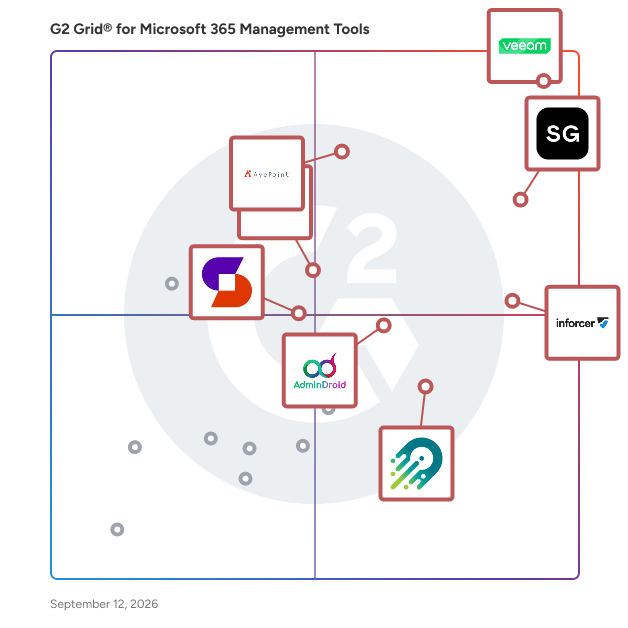
G2 Grid® for Microsoft 365 Management Tools

G2 Grid® for Microsoft 365 Management Tools plotting products by satisfaction and market presence

Highlighted products: Veeam Data Cloud for Microsoft 365, ShareGate, inforcer, AvePoint Confidence Platform, AdminDroid, CoreView, Orchestry, and Syskit Point.

Underlying data: [Grid® JSON](https://www.g2.com/categories/microsoft-365-management-tools/grids.json?focus%5B%5D=veeam-data-cloud-for-microsoft-365&focus%5B%5D=sharegate&focus%5B%5D=inforcer&focus%5B%5D=avepoint-confidence-platform&focus%5B%5D=admindroid&focus%5B%5D=coreview&focus%5B%5D=orchestry&focus%5B%5D=syskit-syskit-point)

Beyond Cloud Tek

The solution combines strategic advisory, implementation, and optimization services to address critical gaps in managing Microsoft environments effectively. It provides organizations with tailored strategies to enhance operational efficiency, reduce risks, and maximize the value of their Microsoft investments. The platform integrates seamlessly with existing systems, offering tools for monitoring, reporting, and streamlining workflows. It empowers businesses to leverage advanced capabilities, including Microsoft 365, Azure, and Power Platform automation, to drive innovation and productivity. Managed support services include health checks to ensure system stability, renewal alerts to prevent service disruptions, and proactive security scans to safeguard against threats. By delivering a holistic approach to Microsoft environment management, the solution enables organizations to achieve their goals with confidence and agility in a rapidly evolving digital landscape.

Who Is the Company Behind Beyond Cloud Tek?

Cayosoft Guardian

Cayosoft Guardian Forest Recovery is an all-in-one, instant recovery solution designed to protect and restore Microsoft Active Directory environments, including on-premises AD, hybrid AD, and Azure AD. By continuously monitoring changes and maintaining up-to-date backups in a secure, isolated cloud environment, it ensures rapid recovery from outages caused by cyberattacks, data corruption, or operational disruptions. This patented technology enables organizations to minimize downtime and maintain business continuity by providing immediate restoration capabilities for all major directory recovery scenarios. Key Features and Functionality: - Instant AD Forest Recovery: In the event of an AD outage, Guardian Forest Recovery instantly replaces the compromised AD environment with a clean, up-to-date standby replica, ensuring uninterrupted business operations. - Automated Daily Backup and Testing: The solution maintains continuous backups in an isolated cloud environment, automatically updating and testing them daily to prevent data loss and guarantee functionality when needed. - Continuous Change Monitoring and Automated Rollback: Guardian Forest Recovery detects and reverses unauthorized or harmful changes in real-time, preserving the integrity of on-premises AD, hybrid AD, and Azure AD environments. - Business Continuity Assurance: By enabling rapid recovery, the solution significantly reduces downtime and associated costs, which can average $1.5 million per day in labor expenses alone during an AD outage. Primary Value and Problem Solved: Cayosoft Guardian Forest Recovery addresses the critical need for rapid and reliable Active Directory recovery in the face of increasing cyber threats and operational challenges. Traditional AD recovery methods can take days or even weeks, leading to substantial financial losses and operational disruptions. By providing an instant, automated recovery solution, Guardian Forest Recovery ensures that organizations can quickly restore their AD environments, maintain business continuity, and mitigate the risks associated with prolonged outages.

Who Is the Company Behind Cayosoft Guardian?

  • Seller: Cayosoft
  • Year Founded: 2018
  • HQ Location: Columbus, US
  • LinkedIn® Page: www.linkedin.com
    81 employees on LinkedIn®

ConfigCompare

ConfigCompare for Microsoft Dynamics 365 Finance & Supply Chain Management (D365 F&SCM) Overview: ConfigCompare is a purpose-built governance and environment management solution for Microsoft Dynamics 365 F&O. Developed by AXImprove Ltd—a Microsoft Partner and D365 specialist—ConfigCompare enables power users, consultants, and system administrators to track, compare, document, and manage configuration changes across environments with confidence. Key Features: ✅ Compare configurations between any two D365 environments ✅ Identify changes in parameters, features, security roles, workflows, and more ✅ Detect missing configurations before go-live ✅ Simplify regression testing and UAT preparation ✅ Ensure audit-readiness and maintain environment integrity ✅ Export comparison results for documentation and compliance Why ConfigCompare: Most ERP teams struggle with undocumented changes, inconsistent configurations between dev/test/prod, and last-minute go-live issues. ConfigCompare solves this by offering a clear, automated, and visual comparison of system settings—helping teams de-risk deployments, accelerate rollouts, and maintain clean governance across projects. Ideal For: D365 F&O Implementers In-house ERP teams System administrators Compliance & audit teams Managed service providers Supported Modules: Covers key functional areas including General Ledger, Accounts Payable/Receivable, Procurement, Inventory, Sales, Projects, Human Resources, and more.

Who Is the Company Behind ConfigCompare?

ConnectWise Cloud Backup

ConnectWise Cloud Backup is a purpose-built solution for MSPs that offers comprehensive protection for their clients' Microsoft 365 environment, including OneDrive, SharePoint, Exchange, Groups, Planner, and Teams. By providing data encryption, versioning, and flexible recovery options to safeguard data against loss, corruption, or cyber threats, ConnectWise Cloud Backup is a best-of-breed SaaS Backup solution supporting organizations of any size in any industry. With a user-friendly interface and unlimited storage, ConnectWise Cloud Backup provides precision in data protection that enables MSPs to scale services and impact on their clients. Some key features of ConnectWise Cloud Backup include: 1. Automated Backup: Streamline operations by effortlessly managing, monitoring, and safeguarding environments at scale through automated onboarding, advanced monitoring, and detailed reporting—all within an intuitive user interface. 2. Secure Data Encryption: Encrypt data during transmission and storage to maintain confidentiality and protect against unauthorized access. 3. Flexible Recovery Options: Easily restore individual files, folders, or entire systems to minimize downtime in case of data loss or system failure. 4. Versioning: Unlimited storage with up to six snapshots per day allows MSPs to keep multiple versions of files to recover previous iterations and track changes over time. 5. Centralized Management: Manage backup settings, schedules, and monitoring from a centralized dashboard for streamlined administration. 6. Compliance Support: Meet regulatory requirements such as HIPAA, GDPR, NIS2, and Essential 8 with ConnectWise Cloud Backup! MSPs choose ConnectWise Cloud Backup for its seamless integration into the ConnectWise ecosystem, multi-platform support, robust security features, scalability, centralized management capabilities, reliability, and dedicated customer support.

Average Rating: 3.4/5.0

Total Reviews: 6

How Do G2 Users Rate ConnectWise Cloud Backup?

  • Has the product been a good partner in doing business?: 8.8/10 (Category avg: 9.3/10)

Who Is the Company Behind ConnectWise Cloud Backup?

  • Seller: ConnectWise
  • Year Founded: 1982
  • HQ Location: Tampa, FL
  • Twitter: @ConnectWise
    14,926 Twitter followers
  • LinkedIn® Page: www.linkedin.com
    3,401 employees on LinkedIn®
  • Phone: 800-671-6898

Who Uses This Product?

  • Company Size: 50% Medium, 50% Small

What Do G2 Reviewers Say About ConnectWise Cloud Backup?

AI-generated summary from verified user reviews

Pros
  • Users appreciate the affordable pricing and customizable backup options of ConnectWise Cloud Backup, enhancing usability and navigation.
  • Users find the ease of use in ConnectWise Cloud Backup beneficial, appreciating its intuitive UI and color-coded alerts.
  • Users value the affordable pricing of ConnectWise Cloud Backup, appreciating the flexibility in selecting backup services.
  • Users appreciate the affordable pricing of ConnectWise Cloud Backup and the flexibility in choosing services.
  • Users value the intuitive alerting system, appreciating easy navigation and clear color-coded alerts for account backups.
Cons
  • Users experience backup issues due to a clunky portal and dismissive support, leading to data confirmation challenges.
  • Users experience a lack of backup verification, leading to frustrations with support and data recovery processes.
  • Users report limited functionality in ConnectWise Cloud Backup, facing issues with data visibility and restoration processes.
  • Users find the interface design poor, leading to a frustrating experience with clunky navigation and support issues.
  • Users face significant restoration issues with ConnectWise Cloud Backup, struggling with clunky support and unreliable data confirmation.

What Are Recent G2 Reviews of ConnectWise Cloud Backup?

Contacts Pro

Contacts Pro is a type of contact management and shared directory software for Microsoft Teams that helps organizations centralize, organize, and access professional contacts directly within their collaboration workspace. Designed for businesses, departments, and project teams, Contacts Pro provides a shared contact database where users can manage employees, customers, partners, suppliers, and other business relationships without leaving Microsoft Teams. The solution helps reduce information fragmentation by making contact details accessible, searchable, and shareable across the organization. Unlike traditional contact directories that require switching between multiple applications, Contacts Pro is embedded directly into Microsoft Teams and integrates with Teams chats, calls, and email workflows. Users can create, edit, and maintain contact records, organize contacts into groups, and quickly reach the right person from a centralized interface. The platform supports both internal and external contacts, making it suitable for sales teams, customer-facing departments, project teams, and operational groups that rely on accurate contact information. Key capabilities include: 1. Centralized contact management with a shared database for business contacts, including employees, customers, suppliers, and partners. 2. Advanced search and filtering to quickly locate contacts by name, department, company, role, or other attributes. 3. Contact grouping and organization that allows teams to create and manage contact groups for projects, departments, regions, or business functions. 4. Microsoft Teams integration enabling users to initiate chats, calls, and emails directly from contact records without changing applications. 5. Import and export capabilities through Outlook and CSV/Excel formats, supporting onboarding, migration, and ongoing directory maintenance. The software is intended for organizations that want a collaborative contact directory inside Microsoft Teams rather than a standalone CRM system. By consolidating contact information into a shared workspace, Contacts Pro helps teams access key contacts faster, improve communication efficiency, simplify onboarding, and maintain consistent contact data across the organization. It can support hundreds to thousands of contacts while remaining integrated with existing Microsoft 365 and Teams workflows.

Who Is the Company Behind Contacts Pro?

  • Seller: Witivio
  • Year Founded: 2017
  • HQ Location: Colmar, Paris, Lyon, Marseille, Bordeaux, FR
  • Twitter: @witiviolive
    127 Twitter followers
  • LinkedIn® Page: www.linkedin.com
    53 employees on LinkedIn®

Coo Kai

Who Is the Company Behind Coo Kai?

  • Seller: PSC
  • Year Founded: 1993
  • HQ Location: Trenton, US
  • Twitter: @RCPSC
    197 Twitter followers
  • LinkedIn® Page: www.linkedin.com
    7 employees on LinkedIn®

GALsync

Who Is the Company Behind GALsync?

  • Seller: NETsec
  • Year Founded: 2003
  • HQ Location: Dueren, DE
  • LinkedIn® Page: www.linkedin.com
    7 employees on LinkedIn®

galynski

Galynski automatically syncs your Microsoft 365 Global Address List (GAL) into the personal contacts of every user's mailbox – so your team always has up-to-date colleague contacts in Outlook, iOS, and Android, without any manual effort. New employees appear automatically. Departed ones are removed. No local installation required – just connect, configure, and your entire organization stays in sync. Built for Microsoft 365 and Exchange Online.

Who Is the Company Behind galynski?

  • Seller: SSIG-IT
  • Year Founded: 2019
  • HQ Location: Blaubeuren, DE
  • LinkedIn® Page: www.linkedin.com
    8 employees on LinkedIn®
  • Ownership: Philipp König
  • Phone: +497335163310

Glow Cloud Kit

Glow Cloud Kit is a suite of premium web parts for SharePoint Online and Microsoft 365 intranets - the building blocks SharePoint doesn't ship natively. It covers the things intranet teams rebuild every time: a searchable staff directory with live Teams presence and photos, an interactive org chart, news and announcement bars, hero banners, quick-link launchpads, FAQ accordions, multi-calendar overlays, image galleries, beautified list views, full-width section layouts, custom headers and site theming, social feeds, plus employee recognition, polls, welcome messages and world clocks. Everything runs inside your own Microsoft 365 tenant. No external service holds your data, nothing tracks which users open what, and there is no third-party embed script - only read-only Microsoft Graph permissions an admin approves once. That makes IT and security review straightforward rather than a blocker. One flat price per tenant with unlimited users, not per-seat licensing. Installs from a single package in minutes, with a 14-day free trial. Built by Glow Cloud Solutions, a UK Microsoft 365 architecture practice.

Who Is the Company Behind Glow Cloud Kit?

KoalaFix

KoalaFix is an automated IT helpdesk for Windows and Microsoft 365 teams. Staff describe a problem in plain English, and the Windows desktop app diagnoses and resolves common issues across OneDrive, Outlook, Teams, SharePoint, Microsoft 365 accounts, printers and Windows. Built-in approval controls and a clear audit trail help businesses stay in control of every fix. KoalaFix is built for Australian and New Zealand organisations managing 1 to 100 Windows users on Microsoft 365. Pricing starts at A$39 per managed user per month, excluding GST. Annual billing is A$374.40 per managed user, paid upfront. New customers can start with a 30-day Business trial. Built in Melbourne, Australia.

Who Is the Company Behind KoalaFix?

  • Seller: KoalaFix
  • Year Founded: 2026
  • HQ Location: Melbourne, AU
  • LinkedIn® Page: www.linkedin.com
    3 employees on LinkedIn®
Tian Lin
TL
Researched and written by Tian Lin
Updated March 1, 2026