# Best Microsoft 365 Management Tools - Page 3

*By [Tian Lin](https://research.g2.com/insights/author/tian-lin)*


Office 365 management tools help businesses gain visibility and insights into their [Microsoft Office 365 suite](https://www.g2.com/categories/office-suites), which includes Microsoft Word, Excel, and PowerPoint, as well as other email, file storage, and mobile app solutions. Overall, Office 365 is typically used to improve productivity, communication, and organization.

Office 365 management tools help monitor and resolve a variety of issues within Office 365, such as service outages, and are primarily used by IT professionals. Features such as network monitoring, workload monitoring, and latency tests are typically offered within a management platform. In addition to the many monitoring features, Office 365 management solutions assist with granular administrative tasks such as setting up employee devices, granting user permissions, and setting up alerts for critical tasks.

Businesses often leverage Office 365 management software because it contains tools that are more robust than those included within Office 365. Reporting features in particular offer users deep key insights into the organization and products included in the business’ Office 365 setup. The reports are granular and provisioned with information that assists with operational efficiency.

For businesses that are debating whether Office 365 Management would be useful, hiring a [Microsoft Office 365 consulting provider](https://www.g2.com/categories/microsoft-office-365-consulting) may help provide additional insight.

To qualify for inclusion in the Office 365 Management category, a product must:

- Provide Office 365 management capabilities that help manage licensing, user permissions, and other administrative tasks
- Offer preconfigured reporting capabilities related to all Office 365-implemented products, such as client usage data, email message sizes, and storage usage information
- Provide administrative auditing capabilities and real-time alerting features
- Include Office 365 monitoring that includes potential outages, product health monitoring, and granular incident reports
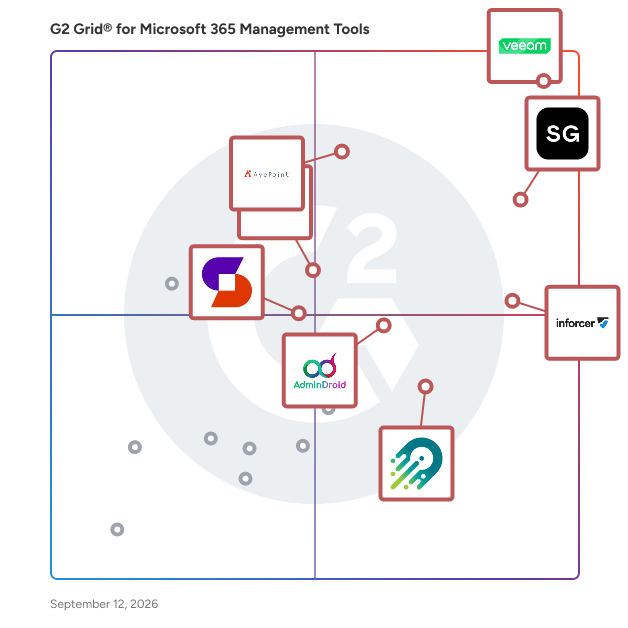


## G2 Grid® for Microsoft 365 Management Tools
![G2 Grid® for Microsoft 365 Management Tools plotting products by satisfaction and market presence](https://www.g2.com/categories/microsoft-365-management-tools/grids.png?focus%5B%5D=112175&focus%5B%5D=40307&focus%5B%5D=109588&focus%5B%5D=40320&focus%5B%5D=150962&focus%5B%5D=1226770&focus%5B%5D=150240&focus%5B%5D=53828)
Highlighted products: Veeam Data Cloud for Microsoft 365, ShareGate, AvePoint Confidence Platform, CoreView, AdminDroid, Orchestry, Syskit Point, and Automation Anywhere Agentic Process Automation.
Underlying data: [Grid® JSON](https://www.g2.com/categories/microsoft-365-management-tools/grids.json?focus%5B%5D=veeam-data-cloud-for-microsoft-365&amp;focus%5B%5D=sharegate&amp;focus%5B%5D=avepoint-confidence-platform&amp;focus%5B%5D=coreview&amp;focus%5B%5D=admindroid&amp;focus%5B%5D=orchestry&amp;focus%5B%5D=syskit-syskit-point&amp;focus%5B%5D=automation-anywhere-agentic-process-automation)


## How Many Microsoft 365 Management Tools Products Does G2 Track?
**Total Products under this Category:** 57

### Category Stats (Jul 2026)
- **Average Rating**: 4.5/5 (↑0.01 vs Jun 2026) The average rating of products in this category, based on all submitted ratings
- **Top Trending Product**: ShareGate (+0.3%) - Among all products in this category, ShareGate recorded the largest rating increase compared to last month
*Last updated: July 14, 2026*


## How Does G2 Rank Microsoft 365 Management Tools Products?

**Why You Can Trust G2's Software Rankings:**

- 30 Analysts and Data Experts
- 6,900+ Authentic Reviews
- 57+ Products
- Unbiased Rankings

G2's software rankings are built on verified user reviews, rigorous moderation, and a consistent research methodology maintained by a team of analysts and data experts. Each product is measured using the same transparent criteria, with no paid placement or vendor influence. While reviews reflect real user experiences, which can be subjective, they offer valuable insight into how software performs in the hands of professionals. Together, these inputs power the G2 Score, a standardized way to compare tools within every category.


## Which Microsoft 365 Management Tools Is Best for Your Use Case?

- **Leader:** [Veeam Data Cloud for Microsoft 365](https://www.g2.com/products/veeam-data-cloud-for-microsoft-365/reviews)
- **Highest Performer:** [Orchestry](https://www.g2.com/products/orchestry/reviews)
- **Easiest to Use:** [Veeam Data Cloud for Microsoft 365](https://www.g2.com/products/veeam-data-cloud-for-microsoft-365/reviews)
- **Top Trending:** [CoreView](https://www.g2.com/products/coreview/reviews)
- **Best Free Software:** [Automation Anywhere Agentic Process Automation](https://www.g2.com/products/automation-anywhere-agentic-process-automation/reviews)


---

**Sponsored**

### 365Tune

365TUNE is a Microsoft 365 reporting and auditing platform that provides organizations with structured insights into license usage, user activity, and cost allocation across their Microsoft 365 environment. The software aggregates operational and financial data into a unified view so IT, finance, and governance teams can evaluate how licenses are assigned, how they are being used, and where inefficiencies or compliance gaps may exist. It is designed for IT administrators, cloud engineers, financial controllers, MSPs, and enterprises seeking detailed reporting and auditing capabilities for day-to-day operational oversight. The platform supports a wide range of use cases, including Microsoft 365 license reporting, tenant auditing, cost analysis, compliance validation, and user activity monitoring. Organizations use 365TUNE to understand the distribution of licenses across departments, identify inactive or unassigned accounts, review changes over time, and verify whether assigned licenses match actual utilization. These capabilities help teams improve operational transparency, support internal audits, and plan budgets based on real consumption trends. Key product capabilities include: Comprehensive Microsoft 365 reporting covering assigned licenses, usage levels, inactive accounts, guest users, and directory attributes. Cost breakdowns by department, project code, cost center, company, country, or user segments. Microsoft 365 auditing features that track user lifecycle events, recently created or deleted accounts, MFA status, and configuration deviations. Cost reporting that breaks down financial impact by department, location, or organizational structure. Historical trend analysis to monitor changes in user activity, license assignments, and provisioning decisions. Exportable reports for reviews, governance assessments, and internal audit requirements. The platform also assists organizations managing multiple tenants or distributed teams by centralizing Microsoft 365 reporting and auditing across environments. This allows MSPs and multi-region enterprises to maintain consistent oversight while supporting compliance requirements and internal policy reviews. Additional capabilities include: Monitoring for cloud-only, hybrid, guest, inactive, and recently modified users. License allocation analysis to highlight over-provisioning or under-utilization. Role and group reporting that supports identity governance activities. Automated report generation to reduce manual data extraction. Structured dashboards that can be shared with IT leadership or audit stakeholders. 365TUNE is suited for organizations of various sizes, from small businesses seeking essential Microsoft 365 reporting to large enterprises requiring deeper visibility for Microsoft 365 auditing and compliance tracking. By providing detailed, data-driven insights, the platform helps teams ensure that licenses, user activity, and tenant configurations align with organizational goals and governance standards.


[Visit website](https://www.g2.com/external_clickthroughs/record?secure%5Bad_program%5D=ppc&amp;secure%5Bad_slot%5D=category_product_list&amp;secure%5Bcategory_id%5D=1951&amp;secure%5Bchosen_at%5D=2026-07-14T12%3A24%3A45Z&amp;secure%5Bdisplayable_resource_id%5D=1951&amp;secure%5Bdisplayable_resource_type%5D=Category&amp;secure%5Bmedium%5D=sponsored&amp;secure%5Bplacement_reason%5D=page_category&amp;secure%5Bplacement_resource_ids%5D%5B%5D=1951&amp;secure%5Bprioritized%5D=false&amp;secure%5Bproduct_id%5D=1527385&amp;secure%5Bresource_id%5D=1951&amp;secure%5Bresource_type%5D=Category&amp;secure%5Bsource_type%5D=category_page&amp;secure%5Bsource_url%5D=https%3A%2F%2Fwww.g2.com%2Fcategories%2Fmicrosoft-365-management-tools%3Fpage%3D3&amp;secure%5Btoken%5D=3cb78c3ed74288a384225642314c82b8b798e722278533445d68fe9e9b086d41&amp;secure%5Burl%5D=https%3A%2F%2F365tune.com&amp;secure%5Burl_type%5D=company_website)

---

## What Are the Top-Rated Microsoft 365 Management Tools Products in 2026?
### 1. [nBold](https://www.g2.com/products/nbold/reviews)
nBold is a collaboration management platform for Microsoft 365, founded in 2019 and headquartered in Paris, France. It helps organizations streamline how teams collaborate — across projects, deal execution, customer onboarding, crisis management, and any business scenario where getting people working together fast and consistently matters. At the core is an advanced workspace templating engine. A single template provisions everything a business scenario needs: a complete Microsoft Teams structure with channels, a full SharePoint site with document libraries, folders, and metadata, Planner boards with pre-loaded tasks, Lists, OneNote notebooks, and Forms. For sales and revenue teams, nFlow connects Salesforce and HubSpot to automatically trigger workspace creation from CRM events — deal rooms, account spaces, and customer project channels, structured and ready to go. IT teams get full governance control: naming policies, approval workflows, sensitivity labels, lifecycle management, bulk operations, and audit trails across the entire M365 environment. nBold eliminates the manual, inconsistent process of building workspaces from scratch every time a project starts, a deal opens, or a customer is onboarded. Teams start collaborating immediately with the right structure already in place. IT governs the environment at scale without slowing the business down. Certified under ISO 27001 and SOC 2 Type II.


**Who Is the Company Behind nBold?**

- **Seller:** [nBold](https://www.g2.com/sellers/nbold)
- **Year Founded:** 2019
- **HQ Location:** Paris, FR
- **LinkedIn® Page:** https://www.linkedin.com/company/nbold/ (4 employees on LinkedIn®)


### 2. [ServerSys](https://www.g2.com/products/serversys/reviews)
ServerSys is an experienced Microsoft Dynamics 365 and Power Platform partner, specialising in the implementation and support of integrated solutions, including CRM and portals. The company helps organisations of all sizes maximise Microsoft technology to enrich customer experiences, improve operational efficiency and connect data. Its specialisations include developing Microsoft web portals. Using Power Pages or custom Azure portals, it creates bespoke data-driven websites for customers, partners and other stakeholders.


**Who Is the Company Behind ServerSys?**

- **Seller:** [ServerSys](https://www.g2.com/sellers/serversys)
- **Year Founded:** 1998
- **HQ Location:** Theale, GB
- **LinkedIn® Page:** https://www.linkedin.com/company/serversys-limited (16 employees on LinkedIn®)


### 3. [Shoviv Exchange Migration Tool](https://www.g2.com/products/shoviv-exchange-migration-tool/reviews)
Shoviv Exchange Migration Tool is powerful software that can move Exchange mailboxes easily. This software is capable of migrating the mailboxes in batches, making the process efficient and saving time. The software lets people move from Office 365 to On-Premises Exchange and vice versa. Shoviv Software has no limit on the size of the mailbox or the number of mailboxes. This application has a user-friendly GUI that makes it easy to migrate the data even for non-technical users. Install the demo version of the application on your system, which lets you process the first 50 items per folder for free.


**Who Is the Company Behind Shoviv Exchange Migration Tool?**

- **Seller:** [Shoviv Software](https://www.g2.com/sellers/shoviv-software)
- **Year Founded:** 2017
- **HQ Location:** Software Technology Parks of India (STPI), IT Park, Sahastradhara Road, Dehradun, Uttarakhand, India (248013)
- **Twitter:** @shoviv (96 Twitter followers)
- **LinkedIn® Page:** https://www.linkedin.com/company/shoviv-software/ (22 employees on LinkedIn®)
- **Ownership:** Vivek Chaube


### 4. [Shoviv Outlook Suite](https://www.g2.com/products/shoviv-outlook-suite/reviews)
Shoviv Outlook Suite is all-in-one solution to manage Outlook tasks in a quick and efficient way. This tool is capable of merging PST files, compressing PST files, splitting PST files, and deleting duplicate items from PST files. This tool can even work on corrupted OST/PST files and recover or restore corrupt OST/PST files without altering their properties. Furthermore, it assists in adding Outlook Profile Store along with OST/PST and exporting to Exchange On-Premises/Office 365.


**Who Is the Company Behind Shoviv Outlook Suite?**

- **Seller:** [Shoviv Software](https://www.g2.com/sellers/shoviv-software)
- **Year Founded:** 2017
- **HQ Location:** Software Technology Parks of India (STPI), IT Park, Sahastradhara Road, Dehradun, Uttarakhand, India (248013)
- **Twitter:** @shoviv (96 Twitter followers)
- **LinkedIn® Page:** https://www.linkedin.com/company/shoviv-software/ (22 employees on LinkedIn®)
- **Ownership:** Vivek Chaube


### 5. [softXspace365](https://www.g2.com/products/softxspace365/reviews)
With softXspace365, you can easily manage company business processes, and create a fully functional workspace for daily work with tasks and documents, including effective SharePoint document management. Maximize the benefits of Microsoft 365 for your company. The product is fully integrated with the entire Microsoft 365 infrastructure (Outlook, Teams, OneDrive, SharePoint, Word, Excel, Power BI, etc.) and Azure Active Directory. We also help solve individual integration tasks and integrate the product into the company&#39;s IT landscape based on Microsoft products. Establish the storage for all documents and information in a single, reliable, and secure cloud environment, and automate the processes of controlling document copies storage terms and the storage location. Our no-code process builder allows you to create and manage all business processes in your organization without programming. Any employee can easily design process stages, assign responsibilities, determine task queues (parallel/sequential/mixed), set deadlines and priorities, and add instructions or checklists for each process step. Fully digitize your company&#39;s activities and power your electronic documents by legal significance due to digital signing with built-in modules such as softXspace Sign, AdobeSign, DocuSign, etc. Increase your profit by automating sales processes and efficient planning. Optimize the approval, signing, and monitoring of contracts with clients and partners, invoice and statement issuance processes, and processing of sales requests or commercial proposals. Thanks to business process automation, you can achieve up to a 60% reduction in operational losses, a 30% reduction in administrative costs, and a decrease in financial risks due to delays. The time required for approval and signing of documents is reduced from 2-3 weeks to just 1 hour. 150% - an average indicator of work productivity increasing; a quick start for new employees. Request our presentation: https://softxpansion.global/get-it-now-product-presentation


**Who Is the Company Behind softXspace365?**

- **Seller:** [soft Xpansion](https://www.g2.com/sellers/soft-xpansion)
- **Year Founded:** 1995
- **HQ Location:** Bochum, DE
- **LinkedIn® Page:** https://www.linkedin.com/company/10776954 (50 employees on LinkedIn®)


### 6. [TeamsFox](https://www.g2.com/products/teamsfox/reviews)
TeamsFox is a comprehensive solution designed to help organizations reduce their Microsoft 365 cost, enhance security, simplify Microsoft 365 administration, and prepare for Copilot—all while embracing Green IT principles. Built with IT professionals in mind, TeamsFox provides the features needed to maintain control, boost efficiency, achieve operational excellence at scale, and reduce your organization’s digital carbon footprint. Core Capabilities: - Single pane of galls for managing your Microsoft 365 environment - Intelligent license management and optimization - Insights to ensure Copilot / AI readiness (data readiness and data security) - Advanced data access control - Automated workspace lifecycle management - Security-focused permissions monitoring - Comprehensive activity audits - Green IT reporting and recommendations Why Choose TeamsFox? Comprehensive Insights: Centralize critical data and eliminate the inefficiencies of toggling between admin tools. Stronger Security: Protect sensitive information by maintaining granular control over access and permissions. Effortless Governance: Establish lifecycle policies to keep workspaces organized and aligned with organizational standards. Cost Reduction: Optimize license and storage cost while avoiding unnecessary expenses


**Who Is the Company Behind TeamsFox?**

- **Seller:** [TeamsFox](https://www.g2.com/sellers/teamsfox)
- **Year Founded:** 2024
- **HQ Location:** Düsseldorf, North Rhine-Westphalia, DE
- **LinkedIn® Page:** https://www.linkedin.com/company/teamsfox (11 employees on LinkedIn®)


### 7. [Tricent](https://www.g2.com/products/tricent/reviews)
Tricent is the #1 file-sharing governance SaaS platform that helps organizations make their file-sharing more secure and compliant without sacrificing collaboration. Tricent enables more secure and compliant file sharing within Microsoft 365 (OneDrives, Teams &amp; Sharepoint), and Google Workspace (MyDrives and Shared Drives) so you can keep collaborating responsibly. Tricent puts the responsibility of proper file-sharing management in the hands of administrators as well as every member of the organization who shares files. Tricent enables administrators to: 🚀 Effortless Onboarding in less than 30 Minutes: Tricent gets you up and running swiftly so you can focus on what matters most. 🔍 Unparalleled Insights: From day one, gain a comprehensive overview of all files shared and permissions granted—across both personal drives and shared drives—no more guesswork, just crystal-clear visibility. ⭕️ Bulk Remediation Made Simple: Our admin-friendly cleanup tools allow you to tackle file sprawl efficiently. Say hello to streamlined compliance without the headache. 😇 Empowering End-Users Responsibly: We use automation to involve your employees in the cleanup process. They can continue collaborating while maintaining compliance. 💪🏼 Customizable Governance Policies: Set different cycles for different user groups. Tricent adapts to your unique needs, ensuring flexibility without compromising control. 🔮 Stay Ahead with Abnormality Detection: Our machine learning feature keeps you informed, detecting anomalies before they escalate \*Only Google Workspace. Pricing: €18 per user (yearly)


**Average Rating:** 3.5/5.0
**Total Reviews:** 1

**Who Is the Company Behind Tricent?**

- **Seller:** [Tricent Security Group A/S](https://www.g2.com/sellers/tricent-security-group-a-s)
- **Year Founded:** 2011
- **HQ Location:** New York, New York, United States
- **LinkedIn® Page:** https://www.linkedin.com/company/bettercloud/ (198 employees on LinkedIn®)

**Who Uses This Product?**
- **Company Size:** 100% Small-Business


## What Is Microsoft 365 Management Tools?

[IT Management Software](https://www.g2.com/categories/it-management)

## What Software Categories Are Similar to Microsoft 365 Management Tools?

- [User Provisioning and Governance Tools](https://www.g2.com/categories/user-provisioning-and-governance-tools)


---

## How Do You Choose the Right Microsoft 365 Management Tools?

### What You Should Know About Office 365 Management Tools

### What are Office 365 Management Tools?

Office 365 management tools are cloud-based SaaS solutions that assist in monitoring and gaining visibility into Microsoft Office 365 suite. These software packages comprise the same core functionalities as traditional versions of Office, including Word, Excel, PowerPoint, Outlook, OneNote, and based on the plan subscribed to, may also include other applications and services such as Planner, Publisher, Exchange, OneDrive, SharePoint, Access, Yammer, Skype, and Microsoft Teams.

Implementing Office 365 management software enables an organization to govern its IT infrastructure more efficiently by providing security functions, data analyses, and real-time communication, thereby improving overall organizational productivity.

Microsoft 365 management solution assists with administrative tasks at a granular level which typically involves setting up employee devices, granting user permissions, and creating alerts for critical tasks, in addition to the monitoring features it offers.

Hiring a [Microsoft Office 365 consulting provider](https://www.g2.com/categories/microsoft-office-365-consulting) may help provide additional insights to businesses still contemplating whether or not the implementation of an Office 365 management tool will be beneficial.

### What are the Common Features of Office 365 Management Tools?

Efficiency is crucial for businesses. Having the capability to create, collaborate and communicate seamlessly and access tools that enable workers to perform their jobs more effectively promotes agility and makes the organization more competitive in their sector.

Office 365 management software boosts the productivity of an organization. Here are the common features it offers:&amp;nbsp;

**Centralized management** : Office 365 management tools facilitate centralized management of diverse applications, including everything from email and chat to project and task management to automation and business security configurations via a single dashboard.

**Administrative support** : With the help of the O365 solution, administrative tasks are delegated at a granular level to assist desk staff and other non-IT users through role-based delegation. It aids with auditing all user activities in SharePoint Online, Azure Active Directory (AD), and Exchange Online through integration with the Microsoft 365 Activity Management API.

**Secured search** : The software allows IT administrators to search and manage native users or group permissions directly through Microsoft 365 Groups, SharePoint Online, and OneDrive for Business. Additionally, it helps scrutinize emails with automated content search to detect potential personal information hacks and spear-phishing attacks.

**Granting permissions:** The software allows admin users to assign temporary permissions to individual users or groups within Microsoft 365 and audit all administrative actions.&amp;nbsp;

**High-speed migration** : Office 365 management facilitates seamless bulk content movement or replication across Microsoft 365 instances for internal consolidation or tenant-to-tenant migration.

**Granular deployment:** The software allows users to select SharePoint objects and customizations as required, which includes site collections, sites, lists, folders, items, configurations, design elements, security settings, managed metadata service settings, web parts, workflow, and forms. These customizations can be sent to another location and are deployed at a granular level.

**Report generation:** Office 365 management suite helps in generating reports on global Microsoft 365 SharePoint Online, OneDrive for Business, and Group team sites settings and security to spot any unauthorized changes and take actions accordingly. It also supports the generation of audit reports for last access time, content type changes, item lifecycle, site access, list access, list deletion, permission changes, and user lifecycle across an entire Microsoft 365 environment.&amp;nbsp;

### What are the Benefits of Office 365 Management Tools?

**Backup and recovery** : A general fallacy among the masses is that data created and stored in the cloud requires no backup. Microsoft operates on the shared responsibility model, i.e., while they maintain their infrastructure, the organization has to assume the responsibility of recovering its data. When data is deleted or corrupted, companies risk incurring losses due to the loss of sensitive information. Data loss can happen for various reasons, whether it&#39;s human error, cyberattacks, or keeping up with new compliance measures, which can cost valuable time and resources. Office 365 management tools aid in backing up and protecting the organization’s data effectively and offloading routine process management. Beyond Microsoft’s native recovery capabilities, these solutions save time and eliminate stress by making it easy to locate and restore the files and folders which are needed quickly. Fast and granular restoration functions assist in recovering lost files and folders directly to a user&#39;s account or downloading them directly to the computer or device.

**Cloud compliance:** Cloud compliance is the principle that cloud-delivered systems must be by the standards their customers need. Office 365 management solutions ensure that data is secure, retrievable, and protected. It provides data controls and monitoring tools, including audit data logs archiving, uptime and availability SLAs, and export capabilities to meet the compliance requirements of enterprise customers.

**Analytics and governance:** This software provides the organization with deep insight to measure results. It offers total visibility across Microsoft Office 365 software with action-enabled reports and facilitates management through delegated administration and automation. It offers a unified dashboard for users to seamlessly shift between tasks like calculation of chargebacks, prevention of data breaches, onboarding new employees, and more.

**Improved efficiency:** Office 365 management solutions optimize the tasks and data that employees require to interact with every day. Its user management capabilities allow IT admins to change user permissions easily, provide users with the correct licenses and privileges promptly, and manage mailboxes efficiently.

### Who Uses Office 365 Management Tools?

**IT industry:** IT teams of various enterprises can boost their productivity with tools like Word, Excel, Exchange, Teams, SharePoint, and more. Since Office 365 is cloud-based, it is accessible from location and on any device, as long as there’s a stable internet connection. However, solving visibility and reporting problems can be a recurring challenge. Office 365 management software provides an easy way to completely manage Microsoft 365 tools, tightening security and compliance, thereby assisting end users to get the most out of all Microsoft 365 applications.&amp;nbsp;

**Healthcare industry:** Office 365 tools assist the healthcare sector by facilitating effective patient care and lowering operational costs by enhancing collaboration between healthcare staff and independent specialties, health teams, and healthcare professionals in hospitals. However, without implementing Office 365 management software, hospitals may lose millions of dollars in unwanted licensing fees, face security vulnerabilities, and fail to maximize their ROI in office 365 productivity tools.

**Financial services industry:** Using Office 365 tools helps the banking, finance, and insurance industry optimize their productivity. Implementing the software to manage them assists in addressing various issues relating to governance like visibility, license management, adoption, provisioning and de-provisioning, and more.

**Retail industry:** Office 365 has helped retail outlets to streamline processes, facilitate effective communication among the staff, deliver excellent customer experience, and secure their business. Deploying an Office 365 management tool provides feature-based governance to gain visibility and monitor Microsoft 365 components. It helps to identify who has access to what environment to tackle security issues arising due to different user accesses on mailboxes, OneDrive, and other tools.&amp;nbsp;

### Challenges with Office 365 Management Tools

Microsoft Office 365 is not a single application but an entire suite, which is why IT teams face various challenges when it comes to managing these tools. For large enterprises, these challenges are amplified since they face complications that smaller organizations don’t have to deal with. Here are a few challenges with Office 365 management software to keep in mind:

**User adoption:** Office 365 is a powerful tool. It consists of various applications and services with an extensive set of functionalities, hence it is not unusual that there is some crossover in features between different apps. This crossover is one of the factors that make management of Office 365 challenging as it can lead to confusion. Creating buy-in from end users and keeping a track of the adoption of M365 apps can be complex and deplete IT resources, specifically while transitioning from an on-premises solution. If M365 services aren’t fully adopted, it can also create issues when the IT team has to show the ROI of this solution. While the native Microsoft 365 admin tools can give IT some information into adoption, it can still be challenging to comprehend the full picture across the entire Office 365 suite.&amp;nbsp;

**IT staff utilization:** With a variety of applications and corresponding admin consoles, the most productive and systematic method to manage Microsoft 365 can be unclear, especially for small IT teams, often reduced on account of outsourcing to cloud services. An ideal team would involve an expert in each application or subject area, but this can incur huge costs even for large enterprises. Regardless of the size, every IT team faces the additional challenge of managing the organization’s existing MS Office 365 deployment while also trying to stay up to date with new solutions and features released by Microsoft.&amp;nbsp;

**Monitoring performance issues:** Simply deploying Microsoft 365 management suite isn’t enough, as the system must be monitored regularly for tracing issues with performance, inconsistencies, and usage. Most of the time, monitoring performance is an issue related to bandwidth for IT.

### How to Buy Office 365 Management Tools

#### Requirements Gathering (RFI/RFP) for Office 365 Management Software

If a company is just starting and looking to purchase its first Office 365 Management tool, or maybe an organization needs to update legacy office management solutions--wherever a business is in its buying process, [g2.com](https://www.g2.com/) can help select the best Office 365 management solution for the business.

Organizations all over the world have adopted Microsoft 365 as a communication and workflow solution for their staff. However, managing a large Microsoft 365 tenant isn’t a cakewalk. With so many O365 management service providers available, it has become more complex for businesses to select a provider that suits their organizational goals and strategy.

Taking a comprehensive overview of the business—which tools are being used to conduct business and identify pain points can help the team to produce an RFI, a one-page list with precise bullet points describing what is needed from the Office 365 management solution.

This checklist serves as a guide that helps in determining both necessary and nice-to-have features including budget features, number of users, integrations, security requirements, and more.

#### Compare Office 365 Management Software Products

**Create a long list**

An initial list of potential Office 365 management software providers is created by eliminating the options that are not in line with the organization’s business strategy. Vendor evaluation also depends on the Microsoft Office 365 tools implemented and the kind of management functionality that the organization is looking for. Vendor evaluation helps to prepare a consistent list of questions regarding specific needs and concerns to ask each vendor.

**Create a short list**

After a long list has been created, it’s realistic to look at each product in more detail to determine if it will meet the needs of the organization to narrow down the list. This should include evaluating additional and more sophisticated features of each product, beyond the ones identified as essential to determine if that additional functionality would make the management of the Microsoft 365 environment effortless.

**Conduct demos**

Demos provide an opportunity to buyers to see how an Office 365 management solution is effective in monitoring and resolving a host of issues within Office 365 tools. While pre-recorded demonstrations are available on the vendor’s website, it is useful to request the vendor for a live demonstration to see how the software will help in providing insights on the organization’s Office 365 stack and manage the tools.

#### Selection of Office 365 Management Software

**Choose a selection team**

When choosing an Office 365 management software, it is important to involve any relevant stakeholders who might be using the product to ensure that the software will meet everyone’s needs. This likely includes the management and the IT team who will be responsible for weighing in on the technical concerns with the products.

**Negotiation**

After narrowing in on a preferred product, it’s time to negotiate a pricing package. Buyers must consider the licensing fee and pricing model of the software, such as whether the seller charges a flat monthly or annual fee or, more commonly, charges a fee based on how many users would be utilizing the product. Also, the buyer can consider negotiating a discount in exchange for multi-year contracts.

**Final decision**

The parties involved in decision-making should consider whether the software is easy to implement, improves operational efficiency, and allows for better monitoring of the O365 environment. It is pragmatic to scrutinize the terms and conditions of the product support and licensing agreements or SLAs to achieve organizational goals within the defined budget. It is essential to capture and monitor deployment and operational risks and improvement opportunities early so that it is possible to modify plans when needed. Whenever a new technology is implemented, it is good to devise back-out plans or alternatives when assumptions and outcomes change. It must be ensured that the solution selected will be adaptable to the company’s future requirements.

### Most Popular FAQs

#### How do you manage Microsoft Office 365?

Managing Microsoft 365 effectively goes beyond the native admin center; it typically requires dedicated tools that consolidate reporting, governance, security monitoring, and user lifecycle management in one place. Most IT teams rely on third-party [Office 365 management software](https://www.g2.com/categories/microsoft-365-management-tools) to gain visibility into licenses, permissions, SharePoint sites, and Teams workspaces, reducing the manual overhead of operating at scale. Key management tasks include license optimization, access reviews, delegated administration, compliance reporting, and automated user provisioning and deprovisioning.

#### What is the best Office 365 management software for automating onboarding and offboarding?

Automating user onboarding and offboarding in Microsoft 365 is one of the highest-impact use cases for management tools, ensuring new hires get the right access from day one and that departing users are cleanly removed without leaving behind security gaps. The following platforms are recognized for their provisioning and lifecycle automation capabilities:

- [CoreView](https://www.g2.com/products/coreview/reviews): A comprehensive Microsoft 365 management platform with strong workflow automation for user provisioning, license assignment, and policy enforcement across the entire M365 stack.
- [Orchestry](https://www.g2.com/products/orchestry/reviews): A governance and workspace management tool built natively for Microsoft Teams and SharePoint that automates the creation, configuration, and archival of workspaces during employee transitions.
- [AdminDroid](https://www.g2.com/products/admindroid/reviews): A reporting and administration tool that surfaces onboarding and offboarding activity across Microsoft 365 services, giving IT teams the audit trails and automation triggers needed to enforce consistent processes.

#### Which company has the most complete Office 365 management platform for MSPs?

Managed service providers need Office 365 management tools that support multi-tenant administration, delegated access, and scalable reporting across client environments, capabilities that go well beyond what single-tenant solutions offer. The platforms below are most frequently cited by MSP-oriented IT professionals in this category:

- [AdminDroid](https://www.g2.com/products/admindroid/reviews): A cloud-based reporting and management suite for Microsoft 365 that supports multi-tenant environments and delivers more than 1,800 pre-built reports, making it a practical choice for MSPs managing multiple client tenants from a single pane.
- [ManageEngine M365 Manager Plus](https://www.g2.com/products/manageengine-m365-manager-plus/reviews): A unified Microsoft 365 management and reporting tool that consolidates administration across Exchange Online, Azure AD, SharePoint, OneDrive, and Teams, giving MSPs a single dashboard to oversee multiple services across client environments.
- [CoreView](https://www.g2.com/products/coreview/reviews): An enterprise-grade Microsoft 365 management platform built for complex, distributed environments, offering virtual tenants and delegated administration models that align well with MSP operational structures.

#### Are free Microsoft 365 management tools effective?

Free Microsoft 365 management tools can cover basic reporting and monitoring needs, but they typically come with limitations around data retention, the depth of analytics, automation features, and support responsiveness. For organizations with straightforward requirements, such as small teams needing simple license audits or basic activity logs, free tiers can serve well as a starting point. However, as environments grow and compliance demands increase, most teams find that the gaps in free tools, particularly around governance automation, security alerting, and delegation, outweigh the cost savings.

### Small Business FAQs

#### What is the most affordable Office 365 Management tool for SMBs?

Small and mid-sized businesses looking for [Office 365 Management tools suited to SMBs](https://www.g2.com/categories/microsoft-365-management-tools/small-business) need solutions that balance cost with functionality, without requiring dedicated IT staff or enterprise-level budgets. The following tools are frequently used by SMBs and offer accessible pricing alongside meaningful feature depth:

- [AdminDroid](https://www.g2.com/products/admindroid/reviews): A cloud-hosted Microsoft 365 reporting and administration platform known for its generous free tier and affordable paid plans, making it a common starting point for small IT teams needing visibility without high overhead.
- [Orchestry](https://www.g2.com/products/orchestry/reviews): A Microsoft Teams and SharePoint governance tool with SMB-friendly packaging that helps small organizations enforce workspace standards and avoid sprawl without complex setup.
- [Teams Manager for Microsoft Teams](https://www.g2.com/products/teams-manager-for-microsoft-teams/reviews): A focused, lightweight tool for managing Microsoft Teams environments, offering SMBs an affordable way to control team creation, membership, and lifecycle without broader platform complexity.

#### What is the best Office 365 Management tool for startups?

Startups need Office 365 Management tools built for fast-growing organizations that can scale quickly without requiring significant IT resources to set up or maintain. The following platforms are well-suited for startup environments based on ease of use, quick time to value, and SMB adoption:

- [Orchestry](https://www.g2.com/products/orchestry/reviews): Purpose-built for Microsoft 365, Orchestry helps startups establish Teams and SharePoint governance from the ground up so collaboration environments don&#39;t become chaotic as headcount grows.
- [AdminDroid](https://www.g2.com/products/admindroid/reviews): Delivers broad Microsoft 365 visibility through pre-built dashboards and reports that require minimal configuration, giving lean startup IT teams immediate operational insight.
- [AvePoint Confidence Platform](https://www.g2.com/products/avepoint-confidence-platform/reviews): A data management and governance platform that helps growing companies protect Microsoft 365 data, manage permissions, and meet compliance requirements as they scale into regulated industries.

#### Which Office 365 Management tool is the most user-friendly for non-technical teams?

Ease of use is consistently one of the top factors cited by small business reviewers when evaluating Office 365 management tools, particularly for organizations where IT responsibilities fall to office managers or operations staff without deep technical backgrounds. The following tools earn high marks for intuitive interfaces and low learning curves among SMB users:

- [Orchestry](https://www.g2.com/products/orchestry/reviews): Reviewers frequently highlight its clean, modern interface and guided workspace request flows, making it accessible to business users who aren&#39;t Microsoft 365 specialists.
- [Teams Manager for Microsoft Teams](https://www.g2.com/products/teams-manager-for-microsoft-teams/reviews): Designed specifically for Teams administration, this tool simplifies governance tasks into straightforward workflows that don&#39;t require familiarity with the broader Microsoft admin center.
- [Veeam Data Cloud for Microsoft 365](https://www.g2.com/products/veeam-data-cloud-for-microsoft-365/reviews): While primarily a backup solution, its user-friendly dashboard and straightforward restore workflows make it a go-to for SMBs needing reliable Microsoft 365 data protection without operational complexity.

#### What is the most recommended Office 365 Management tool for SMBs with compliance needs?

For SMBs operating in regulated industries: healthcare, financial services, or nonprofits, Office 365 Management tools with compliance capabilities are increasingly essential for managing audit trails, data access controls, and policy enforcement without a large compliance team. These tools are most frequently recommended among small business reviewers with compliance-related use cases:

- [Office Protect](https://www.g2.com/products/office-protect/reviews): A Microsoft 365 security and compliance tool designed for SMBs that monitors configurations, detects policy deviations, and provides real-time alerts to help small teams stay compliant without requiring a dedicated security analyst.
- [AvePoint Confidence Platform](https://www.g2.com/products/avepoint-confidence-platform/reviews): Combines data governance, backup, and compliance tools in a single platform, making it well-suited for SMBs that need to address multiple regulatory requirements with one investment.
- [AdminDroid](https://www.g2.com/products/admindroid/reviews): Offers deep audit log reporting and compliance-focused dashboards that help small IT teams stay on top of user activity, permission changes, and policy adherence across Microsoft 365 services.

### Enterprise FAQs

#### What is the best-rated Office 365 Management tool for tech enterprises?

Technology companies managing large Microsoft 365 environments require platforms that can handle complex permission structures, integrate with developer workflows, and support high-volume reporting without performance degradation. Among [enterprise Office 365 Management solutions](https://www.g2.com/categories/microsoft-365-management-tools/enterprise), the following are the highest-rated by reviewers in the IT and software industries:

- [ShareGate](https://www.g2.com/products/sharegate/reviews): A Microsoft 365 migration and governance platform that consistently earns top ratings from enterprise tech teams for its migration accuracy, SharePoint management depth, and strong support quality.
- [AvePoint Confidence Platform](https://www.g2.com/products/avepoint-confidence-platform/reviews): An enterprise-grade data governance and protection platform with broad Microsoft 365 coverage, earning high marks from tech organizations for its compliance automation and lifecycle management capabilities.
- [sapio365](https://www.g2.com/products/sapio365/reviews): A Microsoft 365 data and analytics platform built for IT professionals who need deep, cross-service visibility into user activity, permissions, and configuration, particularly valued by enterprise tech teams for its analytical depth and flexibility.
- [CoreView](https://www.g2.com/products/coreview/reviews): Rated well by technology enterprises for its virtual tenant architecture and granular delegation capabilities, enabling large IT organizations to distribute management responsibilities without compromising security posture.

#### What is the most reliable Office 365 Management tool for enterprises?

Reliability in an enterprise Microsoft 365 management tool means consistent uptime, accurate data, dependable alerting, and support teams that respond when something goes wrong. Enterprise reviewers in this category point to the following platforms as their most dependable long-term solutions:

- [Veeam Data Cloud for Microsoft 365](https://www.g2.com/products/veeam-data-cloud-for-microsoft-365/reviews): A cloud-native backup and recovery platform for Microsoft 365 with a strong enterprise track record for data protection reliability, particularly for Exchange Online, SharePoint, and Teams data.
- [AvePoint Confidence Platform](https://www.g2.com/products/avepoint-confidence-platform/reviews): Enterprises cite AvePoint for its consistent performance across large tenants, particularly for backup, governance, and migration workloads where data integrity is non-negotiable.
- [ShareGate](https://www.g2.com/products/sharegate/reviews): Enterprise IT teams frequently reference ShareGate&#39;s migration and reporting consistency as a key reason they return to it for successive migration projects across large, complex SharePoint environments.

#### What is the best-reviewed Office 365 Management tool for enterprise app integration?

Enterprises running Microsoft 365 alongside a broader technology stack, ServiceNow, Salesforce, HR systems, and identity providers need management tools that connect with those systems rather than operating in isolation. The following tools earn the strongest reviews for integration depth among enterprise users:

- [CoreView](https://www.g2.com/products/coreview/reviews): Reviewers highlight CoreView&#39;s integration capabilities with HR and ITSM platforms as a key differentiator, enabling automated provisioning and policy enforcement that stays synchronized with enterprise systems of record.
- [Automation Anywhere Agentic Process Automation](https://www.g2.com/products/automation-anywhere-agentic-process-automation/reviews): An AI-powered automation platform that connects Microsoft 365 workflows with enterprise applications, enabling sophisticated cross-system automations that go beyond native M365 capabilities.
- [AvePoint Confidence Platform](https://www.g2.com/products/avepoint-confidence-platform/reviews): Supports integrations across cloud storage, identity management, and compliance platforms, making it a strong choice for enterprises that need Microsoft 365 governance to extend across a hybrid cloud environment.

#### What is the most complete Office 365 Management solution for large enterprise security teams?

Security teams at large enterprises need more than usage reports; they need tools that surface access risks, detect anomalous behavior, enforce least-privilege policies, and generate audit-ready documentation. Among enterprise-focused Office 365 Management tools, the following are most frequently referenced by enterprise security and compliance professionals:

- [CoreView](https://www.g2.com/products/coreview/reviews): Provides security teams with deep visibility into Microsoft 365 configurations, delegated policy enforcement, and role-based access controls that support zero-trust governance models at scale.
- [sapio365](https://www.g2.com/products/sapio365/reviews): Gives enterprise security teams granular, real-time visibility into Microsoft 365 permissions, group memberships, and user activity across services, enabling faster identification of access risks and policy gaps without complex scripting.
- [ShareGate](https://www.g2.com/products/sharegate/reviews): Offers enterprise security teams granular permission reporting and governance controls for SharePoint and Teams, helping organizations identify and remediate overprivileged access before it becomes a liability.

#### What is the best enterprise Office 365 Management platform for organizations managing large-scale Microsoft Teams deployments?

As Microsoft Teams becomes the operational backbone of enterprise communication and collaboration, IT teams need management tools specifically designed to govern Teams at scale, controlling workspace sprawl, managing guest access, enforcing naming conventions, and maintaining lifecycle policies. The following platforms are most recognized by enterprise reviewers for their Teams management depth:

- [Orchestry](https://www.g2.com/products/orchestry/reviews): Purpose-built for Microsoft 365 governance with a particular focus on Teams and SharePoint, Orchestry is frequently cited by enterprises for its workspace provisioning templates, governance automation, and end-user self-service capabilities.
- [CoreView](https://www.g2.com/products/coreview/reviews): Offers enterprise Teams management as part of a broader Microsoft 365 platform, enabling security policies, delegation, and Teams-specific reporting at a scale that native tools can&#39;t match.
- [Teams Manager for Microsoft Teams](https://www.g2.com/products/teams-manager-for-microsoft-teams/reviews): A purpose-built Teams administration tool that gives enterprise IT teams and business owners direct control over Teams governance without requiring access to the full Microsoft admin center.

Last updated on April 27, 2026


