Auto2D
Who Is the Company Behind Auto2D?
- Seller: Vectra
- HQ Location: N/A
-
LinkedIn® Page: www.linkedin.com
1 employees on LinkedIn®
Total Products under this Category: 66
Last updated: October 21, 2026
Why You Can Trust G2's Software Rankings:
G2's software rankings are built on verified user reviews, rigorous moderation, and a consistent research methodology maintained by a team of analysts and data experts. Each product is measured using the same transparent criteria, with no paid placement or vendor influence. While reviews reflect real user experiences, which can be subjective, they offer valuable insight into how software performs in the hands of professionals. Together, these inputs power the G2 Score, a standardized way to compare tools within every category.
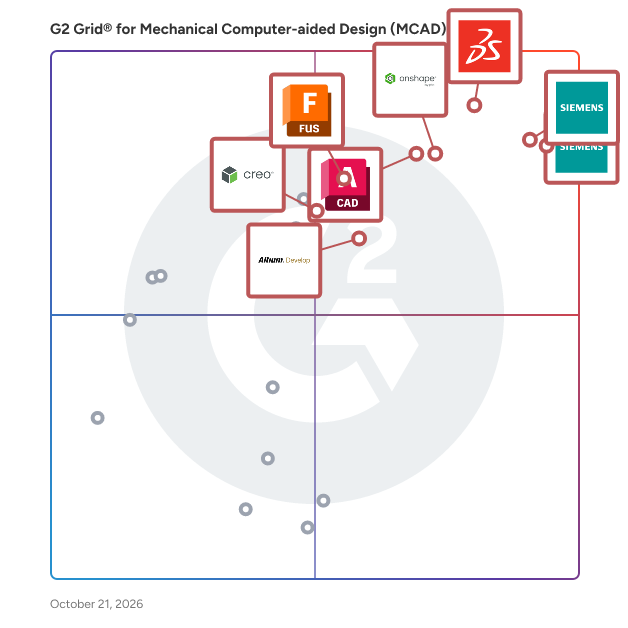
Highlighted products: Designcenter, Designcenter Solid Edge, SOLIDWORKS, Onshape, AutoCAD, Autodesk Fusion, Altium Develop, and Creo.
Underlying data: [Grid® JSON](https://www.g2.com/categories/mechanical-computer-aided-design-mcad/grids.json?focus%5B%5D=designcenter&focus%5B%5D=designcenter-solid-edge&focus%5B%5D=solidworks&focus%5B%5D=onshape&focus%5B%5D=autocad&focus%5B%5D=autodesk-fusion&focus%5B%5D=altium-develop&focus%5B%5D=creo-2025-08-26)
CadXStudio is a browser-native AI platform that lets engineers generate parametric 3D models from plain-text prompts, refine them with full manual CAD tools, produce 2D engineering drawings, and generate photorealistic renders all in one browser tab, no software install required. Traditional CAD forces engineers to juggle separate tools for modeling, documentation, and visualization. CadXStudio's Design Engine unifies the entire workflow: describe a part in natural language and get an editable, parametric 3D model back instantly, refine it with a full manual CAD toolset, generate 2D drawings directly from your 3D model, and produce photorealistic renders all without leaving the browser. Key capabilities: Text-to-3D generation Natural language in, parametric model out with editable dimensions, constraints, and features, not a static mesh AI + manual CAD in one environment - Move between AI-generated output and full manual parametric editing without switching tools 3D-to-2D drawing generation - Generate 2D engineering drawings directly from your parametric 3D model Photorealistic rendering - Generate high-fidelity visual renders of your model directly from the same workspace, no separate rendering software needed Manufacturing-ready exports - Output in STEP, STL, and OBJ formats Multi-part assembly support - Design and manage multi-component assemblies in a single workspace Browser-native architecture - Runs entirely in-browser, zero installation, zero setup CadXStudio is built for engineers, product designers, and manufacturers who want to compress design cycles and go from concept to production-ready geometry (and presentation-ready visuals) faster especially for mechanical parts, custom components, and iterative product development where speed, parametric precision, and visual communication all matter.
Camfer is an AI-powered tool designed to revolutionize computer-aided design (CAD) by integrating seamlessly with SolidWorks. It enables engineers to create and modify CAD models using natural language descriptions and images, streamlining the design process and enhancing productivity. Key Features and Functionality: - Text and Image to CAD: Users can generate CAD models by simply describing their design intentions in text or by providing images, eliminating the need for manual sketching and modeling. - Deep Integration with SolidWorks: Camfer integrates directly with SolidWorks, allowing users to leverage AI capabilities within their existing CAD environment without disrupting their workflow. - Intelligent Feature Recognition: The tool understands and interprets complex design commands, enabling the creation of intricate features such as chamfers and fillets through straightforward instructions. - Enhanced Design Iteration: Camfer supports iterative design processes by allowing users to refine models through conversational interactions, facilitating rapid prototyping and optimization. Primary Value and User Solutions: Camfer addresses the challenges of traditional CAD modeling by reducing the time and effort required to translate design concepts into functional models. By enabling natural language and image-based inputs, it democratizes the design process, making it more accessible to a broader range of users, including those with limited CAD experience. This innovation accelerates product development cycles, fosters creativity, and allows engineers to focus more on design innovation rather than the intricacies of CAD software operation.
Connect G2 to Claude or ChatGPT for answers grounded in G2's trusted reviews, comparisons, and pricing from real user insights.
ENCY Robot is a comprehensive offline programming (OLP) and simulation software suite designed to simplify robot automation tasks for manufacturing, including material removal, additive processes, welding, painting, and more. This CAD/CAM-integrated solution enables precise toolpath generation, robotic cell simulation, and kinematic control, supporting industries that rely on efficient robotic operations. Built for engineers, CAD/CAM programmers, and automation professionals, ENCY Robot delivers an intuitive interface and robust set of tools to address complex programming and process optimization needs. ENCY Robot falls under the CAD/CAM robotics software category, facilitating end-to-end workflow management from setup to execution. It connects seamlessly with ENCY's CAD/CAM environment, allowing users to define, simulate, and adjust robotic paths without the need for physical prototypes, saving both time and resources. Key Features and Benefits: - Full Robotic Cell Simulation: High-quality simulation of complete robotic cells, including external axes, for accurate verification and visualization. - Toolpath Generation for Diverse Applications: Supports a wide range of robotic applications, such as milling, trimming, deburring, painting, welding, and pick-and-place. - Advanced Kinematics and Collision Management: Tools for kinematics handling to manage singularities, avoid collisions, and control reach zones, ensuring safe and effective operation. - Digital Twin Creation with MachineMaker: Zero-code digital twin builder for quick creation and customization of robotic cells with a library of components and customizable parts. - Integrated Collaboration via ENCY Clouds: ENCY Clouds provides real-time communication between programmers and operators, enhancing project sharing, NC-code fine-tuning, and troubleshooting. Highlights: - Additive and Subtractive Toolpaths: Generate complex toolpaths for both material addition and removal, including 3D and 5-axis operations. - State-of-the-Art Interface: User-friendly interface designed to simplify robot programming and cell management for faster setup and training. - Error Handling and Optimization: Built-in tools for detecting and correcting potential issues in real-time, such as path singularities and overreach, to ensure operational accuracy. ENCY Robot empowers companies to efficiently design, simulate, and deploy robotic operations with precision, supporting industry-standard workflows in a cohesive, easy-to-navigate platform.
【Hacadly Automated-2D-Drafting】 Automated 2D drafting (AI drawing generation) streamlines the routine work of drawing release by generating 2D drawings automatically from 3D models. Give it a 3D model and a few supplementary inputs, and it produces 2D drawings complete with views, dimensions, tolerances, annotations and a title block. 【Hacadly 3D Design Verification Download Materials】 Automatically analyzes CAD data and instantly detects anything that conflicts with your design rules or manufacturing requirements. From individual sheet metal and machined parts through to assembly interference and assemblability, it streamlines how design data gets checked.
Hanomi is an innovative software and automation company specializing in engineering solutions. Our powerful AI platform transforms your 3D CAD models into precise 2D drawings with remarkable efficiency. Serving clients across the United States and Europe, Hanomi automates critical processes like manufacturing documentation and 3D model conversion. As expert engineering consultants, we help streamline workflows, enhance productivity, and ensure technical drawings meet the highest standards, including GD&T requirements. Hanomi helps businesses optimize design and manufacturing cycles with intelligent, automated technology.
HarnessHive is a web-based CAD platform for designing and documenting wire harnesses and cable assemblies directly in the browser. Teams can define system architectures, build schematic and layout views, and manage component libraries that stay synchronized across the organization. All designs are collaborative and shareable, making it easy to work across engineering teams without the friction of traditional desktop tools.
HCL DFMPro is a Design for Manufacturability (DFM) analysis software solution that helps engineering and manufacturing teams identify and correct manufacturability issues in CAD models before parts move to production. It integrates directly inside CAD platforms including SOLIDWORKS, PTC Creo Parametric, Siemens NX, CATIA V5, and 3DEXPERIENCE allowing design engineers to check part geometry against manufacturing rules for processes such as machining, injection molding, sheet metal fabrication, and casting while the design is still in progress, rather than after it has been released to manufacturing. HCL DFMPro is used by product design engineers, mechanical engineers, and manufacturing engineers in industries such as automotive, aerospace, industrial equipment, electronics, and medical devices. It is typically deployed by organizations looking to reduce design iterations, shorten time to production, and lower the cost of late-stage design changes by catching manufacturability problems earlier in the design cycle. Key capabilities include: • CAD-integrated analysis: HCL DFMPro runs as an add-in within CAD systems, so engineers can review manufacturability without leaving their design environment. • Process-specific rule libraries: The software applies configurable rule sets tailored to specific manufacturing processes (e.g., CNC machining, sheet metal, injection molding, die casting) to flag issues like thin walls, undercuts, small hole diameters, or draft angle violations. • Automated reporting: HCL DFMPro generates manufacturability reports that document flagged issues, their locations on the model, and reference dimensions, which can be shared between design and manufacturing teams. • Customizable rule configuration: Organizations can adjust rule thresholds and criteria to reflect their own manufacturing capabilities, tooling constraints, or supplier requirements. • Cost and cycle-time estimation: Some editions provide early estimates of part cost and production cycle time based on the design and selected manufacturing process. By surfacing manufacturability issues during the design phase, HCL DFMPro is positioned to reduce the number of design-manufacturing iteration loops, decrease reliance on manual DFM checklists, and support more consistent application of manufacturing standards across engineering teams.
