Top Free Managed File Transfer (MFT) Software - Page 3

How Many Managed File Transfer (MFT) Software Products Does G2 Track?

Total Products under this Category: 145

Category Stats (Oct 2026)

  • Average Rating: 4.62/5 (↓0.01 vs Sep 2026) The average rating of products in this category, based on all submitted ratings
  • Top Trending Product: Quatrix (+0.34%) - Among all products in this category, Quatrix recorded the largest rating increase compared to last month

Last updated: October 07, 2026

How Does G2 Rank Managed File Transfer (MFT) Software Products?

Why You Can Trust G2's Software Rankings:

  • 30 Analysts and Data Experts
  • 4,100+ Authentic Reviews
  • 145+ Products
  • Unbiased Rankings

G2's software rankings are built on verified user reviews, rigorous moderation, and a consistent research methodology maintained by a team of analysts and data experts. Each product is measured using the same transparent criteria, with no paid placement or vendor influence. While reviews reflect real user experiences, which can be subjective, they offer valuable insight into how software performs in the hands of professionals. Together, these inputs power the G2 Score, a standardized way to compare tools within every category.

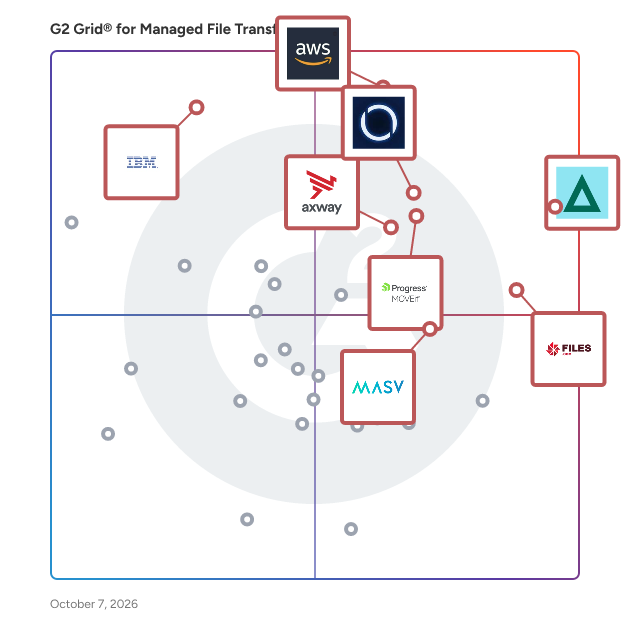
G2 Grid® for Managed File Transfer (MFT) Software

G2 Grid® for Managed File Transfer (MFT) Software plotting products by satisfaction and market presence

Highlighted products: GoAnywhere MFT, AWS Transfer Family, MetaDefender Managed File Transfer™ (MFT), Files.com, Progress MOVEit, Axway Managed File Transfer (MFT), MASV, and IBM Aspera on Cloud.

Underlying data: [Grid® JSON](https://www.g2.com/categories/managed-file-transfer-mft/grids.json?focus%5B%5D=goanywhere-mft&focus%5B%5D=aws-transfer-family&focus%5B%5D=metadefender-managed-file-transfer-mft&focus%5B%5D=files-com&focus%5B%5D=progress-moveit&focus%5B%5D=axway-managed-file-transfer-mft&focus%5B%5D=masv&focus%5B%5D=ibm-aspera-on-cloud)

SFTPCloud

SFTPCloud is a powerful, scalable, and highly-available solution for creating secure, managed FTPS and SFTP servers powered by the cloud storage of your choice.

Average Rating: 5.0/5.0

Total Reviews: 3

How Do G2 Users Rate SFTPCloud?

  • File Transfer Acceleration: 10.0/10 (Category avg: 8.9/10)
  • Compliance: 10.0/10 (Category avg: 9.1/10)
  • Has the product been a good partner in doing business?: 10.0/10 (Category avg: 9.2/10)
  • Access Control: 10.0/10 (Category avg: 8.9/10)

Who Is the Company Behind SFTPCloud?

Who Uses This Product?

  • Company Size: 100% Small

What Are Recent G2 Reviews of SFTPCloud?

StorageLink

StorageLink: Enterprise-Grade Self-Hosted File Sharing for Modern Businesses StorageLink is a comprehensive self-hosted file-sharing solution designed for enterprises seeking secure, compliant alternatives to third-party file-sharing services. This powerful managed file transfer (MFT) platform connects users directly to your existing cloud storage infrastructure through an intuitive drag-and-drop web interface, eliminating the security risks and compliance concerns associated with external file-sharing providers. Built for enterprise environments, StorageLink seamlessly integrates with your preferred cloud storage locations across AWS S3, Azure Blob Storage, and Google Cloud Storage. Unlike traditional file sharing solutions that store your data on external servers, StorageLink maintains complete data sovereignty by keeping all files within your controlled infrastructure. This approach ensures compliance with strict data governance requirements and regulatory frameworks while providing the user experience your teams expect. The platform excels in both cloud-native and hybrid deployment scenarios. Whether you're running containerized applications with Docker and Kubernetes orchestration or managing air-gapped environments with strict security protocols, StorageLink adapts to your infrastructure requirements. The solution supports on-premises deployment, private cloud integration, and hybrid cloud architectures, making it ideal for organizations with diverse IT environments. StorageLink's enterprise-focused feature set includes comprehensive user management, granular access controls, and detailed audit logging for complete visibility into file transfer activities. The customizable admin dashboard provides centralized control over user permissions, storage quotas, and security policies. Organizations can white-label the platform with custom branding, creating a seamless experience that aligns with corporate identity standards. StorageLink offers robust API integration capabilities for technical teams, enabling seamless incorporation into existing workflows and business applications. The platform supports secure file transfer protocols and provides extensive logging for compliance reporting and security monitoring. Advanced features include automated file synchronization, version control, and enterprise identity management systems. The solution addresses critical business challenges, including secure external file sharing with clients and partners, internal collaboration across distributed teams, and compliant data exchange in regulated industries. StorageLink eliminates the need for insecure email attachments and reduces dependency on consumer-grade file sharing services that lack enterprise security controls. With transparent usage-based pricing starting at just eight cents per hour, StorageLink delivers enterprise-grade file sharing capabilities without the complexity and cost of traditional managed file transfer solutions. The platform scales efficiently with your business needs, supporting everything from small team collaborations to large-scale enterprise file transfer operations. Transform your organization's approach to secure file sharing with StorageLink. Here, enterprise security meets user-friendly design, all while maintaining complete control over your data and infrastructure.

Average Rating: 5.0/5.0

Total Reviews: 1

Who Is the Company Behind StorageLink?

  • Seller: Thorn Technologies
  • Year Founded: 2008
  • HQ Location: Columbia, US
  • Twitter: @thorntech
    3,169 Twitter followers
  • LinkedIn® Page: www.linkedin.com
    12 employees on LinkedIn®

What Do G2 Reviewers Say About StorageLink?

AI-generated summary from verified user reviews

Pros
  • Users value the quick and helpful customer support from StorageLink, resolving issues efficiently and effectively.
  • Users value the quick response time from StorageLink, ensuring timely support and resolution of issues.

What Are Recent G2 Reviews of StorageLink?

TreeTalk Node

TreeTalk Node is a desktop collaboration solution built for organizations that cannot rely on cloud-based communication tools due to security, compliance, or operational constraints. Unlike traditional platforms, TreeTalk Node operates entirely peer-to-peer within your local network (LAN, WiFi, or VPN). Files, messages, and voice communications are transferred directly between devices — without passing through external servers. This architecture eliminates exposure to third-party infrastructure, reduces latency, and ensures that sensitive data remains fully under your control. The system is designed for environments where privacy and resilience are critical — including healthcare, legal, industrial operations, and teams working with confidential or large datasets. Deployment is simple: no installation, no accounts, no configuration. Teams can start communicating immediately with a single executable file. **Key Benefits** - **Data never leaves your network** No cloud storage, no external routing, no third-party access - **Works without internet connectivity** Fully operational during outages, network isolation, or restricted environments - **High-speed local transfers** Utilize full LAN/WiFi bandwidth for large file sharing (up to 55GB+) - **No infrastructure required** No servers, no setup, no maintenance - **Privacy by architecture** GDPR-aligned and suitable for strict data governance environments **Top Use Cases (critical for conversion)** - Secure file sharing within offices and internal networks - Communication in air-gapped or restricted environments - Collaboration in healthcare, legal, and industrial sectors - Teams handling sensitive or regulated data - Local AI workflows requiring fast transfer of large datasets **Features (structured for scanners)** - Peer-to-peer file transfer (LAN / WiFi / VPN) - Encrypted messaging (text + voice notes) - Automatic peer discovery - Portable executable (no install required) - Offline-first operation - Large file support (50GB+) **Differentiation** **TreeTalk Node vs Cloud Tools (Dropbox, Slack, Teams):** - No data leaves your infrastructure - No dependency on internet connectivity - No recurring cloud costs **TreeTalk Node vs Traditional LAN tools:** - Modern UI and usability - Integrated messaging + file sharing - Zero configuration / instant deployment - No data collection or tracking - No accounts or user registration required - No external servers or APIs - Works entirely within your controlled environment Start using TreeTalk Node instantly — download and run. No setup required.

Average Rating: 5.0/5.0

Total Reviews: 1

How Do G2 Users Rate TreeTalk Node?

  • File Transfer Acceleration: 10.0/10 (Category avg: 8.9/10)
  • Compliance: 10.0/10 (Category avg: 9.1/10)

Who Is the Company Behind TreeTalk Node?

Who Uses This Product?

  • Company Size: 100% Small

What Are Recent G2 Reviews of TreeTalk Node?

AI can help you find the answers. G2 helps you trust them.

Connect G2 to Claude or ChatGPT for answers grounded in G2's trusted reviews, comparisons, and pricing from real user insights.

How it works

FileDue

FileDue is a secure file delivery tool for freelancers and small studios — files stay locked until the client pays. Freelancers upload their final deliverables, set a price, and share a secure payment link with the client. The files stay locked until payment is completed through Stripe. Once the client pays, the files unlock for instant download. FileDue is built for one-off paid deliveries like design files, source code, photo galleries, video exports, documents, and other client work where payment should happen before final access. No invoice chasing. No handing over work on trust. Payment happens first — delivery follows automatically. No subscription. First 3 paid links are free, then FileDue charges 2% per paid link.

Who Is the Company Behind FileDue?

ServeSense

ServeSense is a secure FTP, FTPS, and SFTP server application for Windows. It is designed to be easy to use, requires no administrator privileges (non-admin), and provides a secure, local file transfer solution for developers and users. ServeSense has multiple editions, including a free version with basic features. More advanced features are available in the paid editions.

Who Is the Company Behind ServeSense?

S-Filer Portal

S-Filer Portal is the go-to SaaS managed file transfer solution for organizations where securely and reliably transferring millions of files daily is mission-critical. This secure platform ensures seamless data exchange between employees, customers, partners, and high volume, system to system transfers, prioritizing flexibility, reliability and scalability. Trusted by businesses for its security and outstanding reliability, S-Filer Portal can meet your most demanding file transfer requirements.

Who Is the Company Behind S-Filer Portal?

  • Seller: Okiok
  • Year Founded: 1973
  • HQ Location: Laval, CA
  • LinkedIn® Page: www.linkedin.com
    56 employees on LinkedIn®

SFTPHub

Instantly provision cloud based SFTP servers and manage users with ease all from our online portal or API

Who Is the Company Behind SFTPHub?

SFTPPlus MFT

SFTPPlus MFT is a managed file transfer software that helps organizations securely exchange files and automate transfers between internal systems, users and external partners. Its modular server and client automation components can be deployed independently or together, giving IT teams control over file access, transfer workflows and deployment. Available for Windows, Linux and macOS, SFTPPlus runs on physical servers, virtual machines and cloud infrastructure, with container deployment options including Docker and Kubernetes. SFTPPlus supports SFTP over SSH, FTPS, HTTPS, AS2 and WebDAV, alongside integrations with services such as Azure Blob Storage, Azure Files and SharePoint Online. Built-in OpenPGP functionality encrypts, decrypts, signs and verifies files without requiring external PGP software. Transfer automation includes local and remote monitoring, rule-based workflows, automatic retries, event triggers and file processing. Browser-based administration and file access simplify management and manual transfers. External authentication and single sign-on, granular access controls, centralized key and certificate management, and detailed audit logs help teams manage security and trace activity. HTTP APIs, webhooks and Python extensions connect file transfer workflows to existing applications and logging systems. SFTPPlus offers predictable costs through perpetual licensing, with server and client automation components licensed separately. Support and maintenance subscriptions are available separately, and a fully functional, supported 30-day trial lets teams evaluate the software before purchasing.

Who Is the Company Behind SFTPPlus MFT?

  • Seller: Pro:Atria Ltd
  • Year Founded: 2001
  • HQ Location: South Cadbury, GB
  • Twitter: @ProAtria
    3 Twitter followers
  • LinkedIn® Page: www.linkedin.com
    3 employees on LinkedIn®

Tsend Pro

TSend Pro est une plateforme conçue pour permettre aux professionnels d’échanger rapidement et en toute sécurité des fichiers volumineux, aussi bien avec des contacts internes qu’externes. Voici ses principales caractéristiques et fonctionnalités : -Envoi sécurisé : TSend Pro utilise le chiffrement AES 256 bits et le protocole SSL/TLS pour protéger les données en transit et au repos, garantissant ainsi la confidentialité et l’intégrité des fichiers échangés. -Taille et destinataires illimités : La solution permet d’envoyer des fichiers de taille illimitée et à un nombre illimité de destinataires, selon les besoins de l’utilisateur. -Boîte de dépôt : Les utilisateurs peuvent créer une boîte de dépôt pour recevoir des documents de la part de tiers, même s’ils ne disposent pas d’un compte TransfertPro. -Personnalisation : Il est possible de personnaliser son compte avec un logo, une image d’arrière-plan et une adresse email propre à l’entreprise. -Intégrations : TSend Pro propose des plugins pour Outlook et l’explorateur Windows. -Traçabilité : La solution offre une traçabilité complète des envois, permettant de suivre l’état des transferts et de recevoir des accusés de réception. -TSend Pro est particulièrement adapté aux entreprises et aux professionnels qui ont besoin d’une solution fiable et sécurisée pour l’envoi de fichiers sensibles ou volumineux.

Who Is the Company Behind Tsend Pro?

VitalSigns for FTP

Monitor and Secure FTP Transfers with SDS VitalSigns for FTP (VFTP) File transfers are mission-critical for modern enterprises, but without proper monitoring and security, they can become a point of vulnerability. VFTP addresses this challenge by giving IT teams total visibility and control over all FTP transactions on IBM z/OS. With real-time alerts and security monitoring, VFTP tracks all inbound and outbound file transfers, ensuring secure data movement. It also provides automated logging and reports to maintain compliance with GDPR, PCI-DSS, HIPAA, and other regulations. Key Features: • File Transfer Monitoring: Monitor all FTP connections and transfers in real time. • Compliance Reporting: Generate reports to demonstrate compliance. • Custom Alerts: Receive instant notifications for unusual file transfer activity. • Audit Logging: Track every file sent, received, and accessed. Business Impact: • Prevent Data Breaches: Secure every file transfer with audit trails and real-time tracking. • Ensure Compliance: Meet industry mandates for file transfer security. • Gain Full Visibility: See every FTP transfer and ensure nothing happens under the radar.

Who Is the Company Behind VitalSigns for FTP?

Warpsend

Visit https://warpsend.io to learn more. WarpSend is a high-speed file transfer platform built for teams that need to move, share, and synchronize large files directly from computers, servers, and NAS devices. WarpSend works with files where they are already stored. Teams can connect supported NAS environments and transfer files directly without first uploading them to a separate cloud storage platform, copying them to a local computer, or changing their existing storage workflow. Key features include: • NAS compatibility: Access and transfer files directly from connected NAS storage, making WarpSend suitable for teams with centralized media libraries, project archives, shared folders, and on-premises storage. • WarpDirect: Transfer large files and folders directly between connected devices and storage locations at full available network speed. • WarpShare: Upload once and create a secure download link that can be shared with multiple recipients without requiring an account or app. • WarpSync: Synchronize files across team members, offices, computers, and NAS locations. • Background transfers: The WarpSend Agent manages transfers independently from the browser. • Reliable delivery: Interrupted transfers can resume without restarting from the beginning. • Secure transfers: Files are encrypted during transfer, with encryption keys remaining on the connected endpoints. • Large-file support: Transfer individual large files or folders containing thousands of smaller assets without traditional file-size restrictions. WarpSend is designed for media, creative, engineering, and distributed teams that rely on NAS storage and need a faster, simpler, and more reliable way to move files between people, devices, and locations.

Who Is the Company Behind Warpsend?

Zapper Edge Managed File Transfer Platform

Zapper Edge is engineered for one non-negotiable outcome: files must move—securely, predictably, and without failure. This is not a platform built for convenience or speed alone. It is built for business-critical file movement where failure is not an option—because downstream systems, patient care, financial reconciliation, and regulatory obligations depend on it. Zapper Edge is designed so that files do not get lost, stuck, exposed, or silently fail. Every transfer is governed, secured, observed, and provable. At its core, Zapper Edge stands on six foundational pillars that define how enterprise file movement should work: Zero Trust Security No implicit trust—every user, system, and file is verified, encrypted, and governed by policy at every stage. Data Residency by Design Data stays exactly where regulations and business mandates require—no hidden replication, no uncontrolled movement. Zero Ops Architecture No fragile scripts, no manual babysitting, no patch-driven firefighting. The platform is built to run reliably without constant operational intervention. Deterministic Performance Predictable throughput and controlled behavior under load—because enterprise workflows depend on consistency, not best effort. Enterprise-Grade Scalability Designed to scale across partners, geographies, and volumes without redesigning workflows or security models. Compliance as an Outcome, Not an Afterthought Audit evidence, traceability, and controls are produced automatically—embedded into daily operations, not assembled during audits. Zapper Edge doesn’t just move files. It guarantees control, continuity, and confidence—every single time a file moves.

Who Is the Company Behind Zapper Edge Managed File Transfer Platform?

  • Seller: Microsoft
  • Year Founded: 1975
  • HQ Location: Redmond, Washington
  • Twitter: @microsoft
    13,091,739 Twitter followers
  • LinkedIn® Page: www.linkedin.com
    232,750 employees on LinkedIn®
  • Ownership: MSFT

Who Uses This Product?

  • Company Size: 100% Small

What Are Recent G2 Reviews of Zapper Edge Managed File Transfer Platform?

Tian Lin
TL
Researched and written by Tian Lin
Updated July 2, 2025