Best Image Optimization Software - Page 5

How Many Image Optimization Software Products Does G2 Track?

Total Products under this Category: 77

Category Stats (Sep 2026)

  • Average Rating: 4.51/5 (↑0.01 vs Aug 2026) The average rating of products in this category, based on all submitted ratings
  • Top Trending Product: Simple Compress Go (+11.11%) - Among all products in this category, Simple Compress Go recorded the largest rating increase compared to last month

Last updated: September 09, 2026

How Does G2 Rank Image Optimization Software Products?

Why You Can Trust G2's Software Rankings:

  • 30 Analysts and Data Experts
  • 1,500+ Authentic Reviews
  • 77+ Products
  • Unbiased Rankings

G2's software rankings are built on verified user reviews, rigorous moderation, and a consistent research methodology maintained by a team of analysts and data experts. Each product is measured using the same transparent criteria, with no paid placement or vendor influence. While reviews reflect real user experiences, which can be subjective, they offer valuable insight into how software performs in the hands of professionals. Together, these inputs power the G2 Score, a standardized way to compare tools within every category.

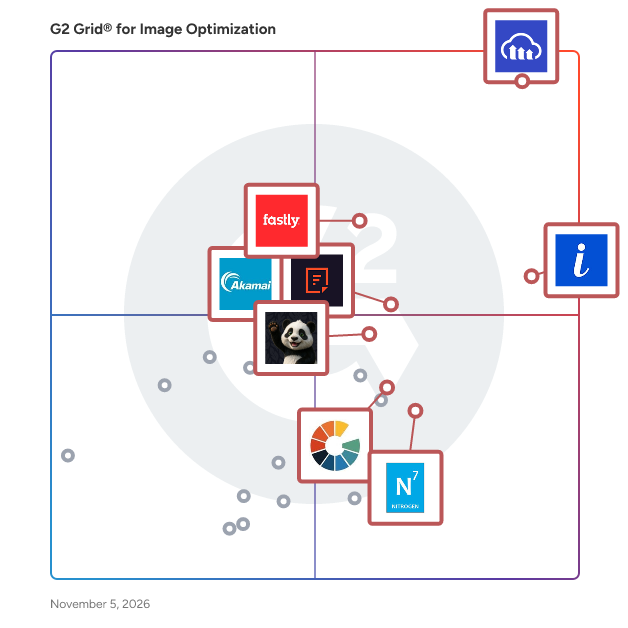
G2 Grid® for Image Optimization Software

G2 Grid® for Image Optimization Software plotting products by satisfaction and market presence

Highlighted products: Cloudinary, ImageKit, Fastly Content Delivery, Akamai Image and Video Manager, Filestack, TinyPNG, Nitrogen Platform, and Cloudimage.

Underlying data: [Grid® JSON](https://www.g2.com/categories/image-optimization/grids.json?focus%5B%5D=cloudinary&focus%5B%5D=imagekit&focus%5B%5D=fastly-content-delivery&focus%5B%5D=akamai-image-and-video-manager&focus%5B%5D=filestack&focus%5B%5D=tinypng&focus%5B%5D=nitrogen-platform&focus%5B%5D=cloudimage)

IMG Performer

Enfants IMG Performer is a WordPress plugin for sustainable, accessible, and privacy-compliant image optimization. It converts, compresses, and labels images directly on your own server — no external cloud, no CDN dependency, no user account, and no per-image credit system.

Who Is the Company Behind IMG Performer?

IMG Performer

Enfants IMG Performer is a WordPress plugin that combines AI image labeling, image optimization and accessibility in one tool, with all processing running locally on your own server. AI labeling (EU AI Act Article 50): it detects AI-generated images on upload via C2PA manifests, EXIF metadata and known AI-tool signatures, keeps the machine-readable marking intact across every thumbnail size, and adds a configurable visible label on the front end. Image optimization: automatic conversion to WebP (free) and AVIF (Pro), with srcset and retina variants rewritten for all sizes. No monthly limit, no credit system. Accessible alt text (Pro): AI-generated descriptions using your own API key (Mistral, hosted in France, recommended). You pay only your actual API usage, with no cap. No account, no forced CDN, no image ever leaves your site. Pro adds AVIF, bulk media-library conversion, retroactive scanning, label design and WP-CLI. Works with the block and classic editors.

Who Is the Company Behind IMG Performer?

Imgsmaller

ImgSmaller – Fast & Free Online Image Compression Tool ImgSmaller is a lightweight, browser-based image compression and optimization tool designed to reduce image file sizes without sacrificing quality. Built for developers, marketers, designers, eCommerce businesses, and website owners, ImgSmaller helps improve website performance, page speed, and SEO rankings through efficient image optimization. Large images are one of the primary causes of slow-loading websites and poor Core Web Vitals scores. ImgSmaller solves this problem by using advanced compression algorithms to significantly reduce file size while maintaining visual clarity. Users can compress images to specific targets such as 20KB, 50KB, 100KB, or optimize them for faster web delivery in seconds. The platform supports popular formats including JPG, JPEG, PNG, WEBP, and AVIF, making it suitable for modern websites and applications. With a clean and simple interface, users can upload an image, choose compression settings, and instantly download the optimized version—no technical expertise required. ImgSmaller works entirely online with no software installation needed and is fully compatible across desktop and mobile devices. Security is also a priority: uploaded images are processed securely and automatically deleted after a limited time. Whether you're optimizing blog images, preparing eCommerce product photos, compressing images for online forms, or improving site performance, ImgSmaller provides a fast, reliable, and user-friendly solution for modern image optimization needs.

Who Is the Company Behind Imgsmaller?

MiniPx

Who Is the Company Behind MiniPx?

  • Seller: MiniPx
  • Year Founded: 2025
  • HQ Location: Mumbai, IN
  • LinkedIn® Page: www.linkedin.com
    1 employees on LinkedIn®

Mypicdrop

Mypicdrop is a digital workflow solution designed to streamline the process of publishing product content for online retailers, web developers, and digital marketing agencies. It automates tasks such as batch image resizing, renaming, and editing, enabling e-commerce businesses to quickly and efficiently update their online stores with new products. By reducing the reliance on manual processes and spreadsheets, Mypicdrop helps retailers keep pace with the fast-moving e-commerce landscape. Key Features and Functionality: - Batch Image Processing: Automates resizing, renaming, and editing of product images, saving time and ensuring consistency. - Workflow Automation: Streamlines the content publishing process, reducing manual input and potential errors. - Integration with E-commerce Platforms: Facilitates seamless uploading of product content to various online store platforms. - Support for Multiple File Formats: Handles a variety of image and video file types, accommodating diverse content needs. Primary Value and User Solutions: Mypicdrop addresses the challenges faced by e-commerce retailers in managing and publishing product content efficiently. By automating time-consuming tasks, it allows online stores to rapidly update their product listings, ensuring they remain competitive in a market where product life cycles are increasingly short. This efficiency not only enhances the customer shopping experience but also enables retailers to focus on strategic activities rather than manual content management.

Who Is the Company Behind Mypicdrop?

PhotoSynth

PhotoSynth optimizes images on-demand for lightning-fast image delivery. Our CDN ensures clients anywhere in the world experience the same high level of image load times. With dynamic image processing, you no longer need to manually upload images to process them. Save thousands of dollars on optimizing images for web and mobile apps. Focus resources on your core business instead of reinventing image management. Sign up for a free account at https://temperal.co/

Who Is the Company Behind PhotoSynth?

Pixie

Optimize Webflow CMS and eCommerce images with ease.

Who Is the Company Behind Pixie?

Shrinkpad

Batch compress images and videos on Mac. Drop hundreds of files or entire folders, pick your settings, and compress in seconds. Everything stays on your device. ShrinkPad processes all your media locally using native macOS frameworks. No uploads, no cloud, no waiting for servers. Your files never leave your Mac, giving you complete privacy and zero dependency on internet connection. Reduce file sizes by up to 90% while keeping visual quality intact. Whether you're compressing iPhone photos, high-resolution images, or 4K videos, ShrinkPad maintains the quality you need while cutting storage significantly. The app supports 50+ formats out of the box. JPG, PNG, HEIC, WebP for images. MP4, MOV for videos. No need to convert files first or worry about compatibility. Just drag and drop, and ShrinkPad handles the rest. Customize everything to fit your workflow. Choose from quality presets or fine-tune compression settings manually. Set your preferred output format, create custom file naming patterns, and pick your export location. Preserve or strip metadata with a single click. Stop processing files one by one. With ShrinkPad, you can drag an entire folder and compress everything inside in one go. Hundreds of files, processed in seconds, not hours. Built for photographers, designers, content creators, and anyone tired of bloated media files eating up storage space. Simple interface. Powerful compression. Complete privacy.

Who Is the Company Behind Shrinkpad?

Shufaf

Shufaf is an interactive asset staging sandbox and front-end optimization utility designed for developers, UI/UX designers, and product teams.

Who Is the Company Behind Shufaf?

ThumbHD

ThumbHD is a thumbnail analysis and optimization tool for YouTube creators. It downloads HD, 1080p, and 4K thumbnails directly from source servers without login credentials. The platform analyzes contrast, color, brightness, composition safety zones, and mobile visibility to help creators optimize visuals before publishing. Key features include a contrast analyzer for subject-background clarity, a brightness tool for mobile legibility, and a blur detector to identify motion blur and sharpness issues. A safe zone checker ensures critical elements avoid YouTube overlays, while a preview simulator shows thumbnails across devices. An AI heatmap predicts viewer attention, and a click-through rate analyzer estimates performance. Additional tools include A/B testing, a color analyzer, a file compressor, a WebP converter, a cropper for 1280x720 dimensions, and a title analyzer. For Shorts creators, it supports 9:16 thumbnails and monetization checks.

Who Is the Company Behind ThumbHD?

TinySharp Image Optimizer Connector

TinySharp connects image optimization across the web, WordPress and Chrome TinySharp is built around one simple idea: image optimization should be fast, honest and available wherever people work with images. One connected workflow: Use TinySharp on the website, through the WordPress connector and inside the Chrome extension with the same account and plan. Website tools: Convert, compress and audit images directly from tinysharp.com for quick one-off tasks and format decisions. WordPress connector: Connect a WordPress media library to TinySharp workflows for image optimization, backups, restore and safer production usage. Chrome extension: Scan webpage images in the browser, select visuals and optimize files for your own website or workflow. Why TinySharp exists: Image tools often hide important trade-offs. A conversion can reduce size, but it can also make a file larger when the wrong format is selected. TinySharp is designed to show clear choices for compression, conversion, quality and practical website delivery. Built for real website work: TinySharp supports public image tools, account-based API usage, the WordPress connector and the browser extension. The same plan can support all three workflows so users do not have to manage separate products for the same optimization work. Our approach: TinySharp focuses on transparent optimization: one uploaded image should be easy to understand, quality settings should be visible and users should know when WebP, AVIF, JPG or PNG is the better output.

Who Is the Company Behind TinySharp Image Optimizer Connector?

Neeraja Prakash
NP
Researched and written by Neeraja Prakash
Updated October 3, 2024