Best Email Signature Manager - Page 7

Last updated: April 4, 2025

How Many Email Signature Software Products Does G2 Track?

Total Products under this Category: 118

Category Stats (Nov 2026)

  • Average Rating: 4.5/5 (↓0.01 vs Oct 2026) The average rating of products in this category, based on all submitted ratings
  • Top Trending Product: HiHello (+0.26%) - Among all products in this category, HiHello recorded the largest rating increase compared to last month

Last updated: November 12, 2026

How Does G2 Rank Email Signature Software Products?

Why You Can Trust G2's Software Rankings:

  • 30 Analysts and Data Experts
  • 19,100+ Authentic Reviews
  • 118+ Products
  • Unbiased Rankings

G2's software rankings are built on verified user reviews, rigorous moderation, and a consistent research methodology maintained by a team of analysts and data experts. Each product is measured using the same transparent criteria, with no paid placement or vendor influence. While reviews reflect real user experiences, which can be subjective, they offer valuable insight into how software performs in the hands of professionals. Together, these inputs power the G2 Score, a standardized way to compare tools within every category.

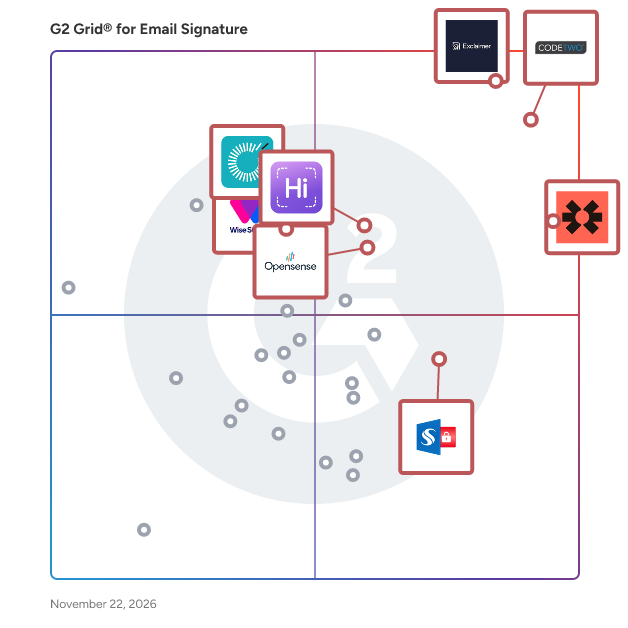
G2 Grid® for Email Signature Software

G2 Grid® for Email Signature Software plotting products by satisfaction and market presence

Highlighted products: Exclaimer, CodeTwo Email Signatures 365, Blinq, WiseStamp, HiHello, Opensense Email Signatures, Sigsync, and Rocketseed.

Underlying data: [Grid® JSON](https://www.g2.com/categories/email-signature/grids.json?focus%5B%5D=exclaimer&focus%5B%5D=codetwo-email-signatures-365&focus%5B%5D=blinq-me&focus%5B%5D=wisestamp&focus%5B%5D=hihello&focus%5B%5D=opensense-email-signatures&focus%5B%5D=sigsync&focus%5B%5D=rocketseed)

Scale Dino

Scale Dino is a complete web-based application that has all needful marketing tools that any business or agency requires. Scale Dino Email Signature tool provides an option to “Bulk Assign” signatures to all email addresses in your Gsuite - A couple of clicks & voila! Email Signatures assigned.

Who Is the Company Behind Scale Dino?

  • Seller: Sriram
  • Year Founded: 2022
  • HQ Location: Hyderabad, IN
  • LinkedIn® Page: www.linkedin.com
    6 employees on LinkedIn®

Set-OutlookSignatures Benefactor Circle

E-mail signatures and Out of Office auto reply messages are an integral part of corporate identity and corporate design, but also of successful media and internet presence concepts and marketing campaigns. Besides the design and texting, one must also think about their central administration and distribution. This ensures compliance with CI/CD guidelines, guarantees the use of correct and up-to-date data, helps with legal compliance, relieves staff and opens up an additional marketing channel. With Set-OutlookSignatures, signatures and Out of Office auto reply messages can be: Generated from templates in DOCX or HTML file format Customized with a broad range of variables, including photos, from Active Directory and other sources Variables are available for the currently logged-on user, this user’s manager, each mailbox and each mailbox’s manager Images in signatures can be bound to the existence of certain variables (useful for optional social network icons, for example) Applied to all mailboxes (including shared mailboxes), specific mailbox groups, specific e-mail addresses or specific user or mailbox properties, for every mailbox across all Outlook profiles (Outlook, New Outlook, Outlook Web) (automapped and additional mailboxes are optional) Created with different names from the same template (e.g., one template can be used for multiple shared mailboxes) Assigned time ranges within which they are valid Set as default signature for new e-mails, or for replies and forwards (signatures only) Set as default OOF message for internal or external recipients (OOF messages only) Set in Outlook Web for the currently logged-in user, including mirroring signatures the the cloud as roaming signatures Centrally managed only or exist along user created signatures (signatures only) Copied to an alternate path for easy access on mobile devices not directly supported by this script (signatures only) Write protected (Outlook signatures only) Set-OutlookSignatures can be executed by users on clients and terminal servers, or on a central server without end user interaction. On clients, it can run as part of the logon script, as scheduled task, or on user demand via a desktop icon, start menu entry, link or any other way of starting a program. Signatures and OOF messages can also be created and deployed centrally, without end user or client involvement. Sample templates for signatures and OOF messages demonstrate all available features and are provided as .docx and .htm files. Simulation mode allows content creators and admins to simulate the behavior of the script and to inspect the resulting signature files before going live. The script is designed to work in big and complex environments (Exchange resource forest scenarios, across AD trusts, multi-level AD subdomains, many objects). It works on premises, in hybrid and cloud-only environments. It is multi-client capable by using different template paths, configuration files and script parameters. Set-OutlookSignatures requires no installation on servers or clients. You only need a standard SMB file share on a central system, and Office on your clients. A documented implementation approach, based on real life experiences implementing the script in multi-client environments with a five-digit number of mailboxes, contains proven procedures and recommendations for product managers, architects, operations managers, account managers and e-mail and client administrators. The implementation approach is suited for service providers as well as for clients, and covers several general overview topics, administration, support, training across the whole lifecycle from counselling to tests, pilot operation and rollout up to daily business.

Who Is the Company Behind Set-OutlookSignatures Benefactor Circle?

Siggly — Email Signature Management for Teams

Siggly is a centralized email signature management platform that enables teams to deploy, design, and control consistent, branded email signatures across all users. It integrates natively with Google Workspace and Microsoft 365 and supports CRM syncing (like HubSpot). Siggly helps IT admins, marketing teams, agencies, and enterprises enforce compliant, standardized signatures at scale, with rapid setup (often under 60 seconds), analytics, and campaign banner support.

Who Is the Company Behind Siggly — Email Signature Management for Teams?

AI can help you find the answers. G2 helps you trust them.

Connect G2 to Claude or ChatGPT for answers grounded in G2's trusted reviews, comparisons, and pricing from real user insights.

How it works

Sigil

Sigil is an email signature management platform built specifically for Microsoft 365 organisations. Admins design and manage signature templates centrally — including drafts, versioning and rollback — and Sigil applies them automatically in Outlook as each user composes a message, personalised per person from Microsoft Graph directory data (name, job title, department, phone numbers, and more). What sets Sigil apart is visibility: most signature tools can tell you a signature was served, but not whether it actually applied. Sigil's per-mailbox adoption telemetry closes that gap, surfacing exactly which users have never successfully received a signature — so IT teams can fix silent failures before a client or colleague notices a missing signature first. Sigil also includes assignment rules (by department, office, domain or Entra group), time-boxed campaign banners, privacy-preserving link-click analytics, per-domain compliance footers, and role-based access for admins, editors and marketing users — all for one flat price per licensed mailbox, with shared and resource mailboxes free.

Who Is the Company Behind Sigil?

Sign

Sign is an electronic signature platform built for individuals, freelancers, and small teams who need a signature that holds up, not a platform sized for an enterprise procurement team. Upload a document, drag signature, date, initials, text, and checkbox fields onto the page for each signer, and send. Recipients open a private link and sign; no account or app is required on their end. Every view, consent, and signature is timestamped and logged, with a document hash taken before and after signing, meeting ESIGN Act and UETA requirements for a legally binding signature. Unlike most e-signature tools, Sign never charges per seat. Plans run from a permanently free tier (3 envelopes a month, no card required) to $19 a month for unlimited envelopes. Templates save a document's field layout for anything you send repeatedly, and reminders, both automatic and manual, follow up with signers who've gone quiet.

Who Is the Company Behind Sign?

Signature.email

A powerful visual drag and drop editor for email signatures paired with the easiest way to maintain consistency for your whole team.

Who Is the Company Behind Signature.email?

Signature Lab

Choose from one of our great looking templates, add in your details, upload a logo, customise the colors and install - all in seconds and with no coding skills required.

Who Is the Company Behind Signature Lab?

SignetMail

SignetMail builds every employee's email signature from Microsoft 365 or Google Workspace and keeps it in Outlook and Gmail up to date. Change a title once, every signature follows. Self-host or EU hosting. Free up to 50 users.

Who Is the Company Behind SignetMail?

Signguin

Signguin is an online tool designed to help professionals create customized email signatures quickly and efficiently. By entering a work email address, Signguin automatically retrieves the company's logo and brand colors, enabling users to generate a professional signature that can be added to Gmail, Outlook, or Apple Mail within two minutes. This process eliminates the need for design skills or technical expertise, making it accessible to a wide range of users. The platform offers a variety of design templates tailored to different industries, including real estate, sales, healthcare, law, and finance. Each template adapts to incorporate the user's logo and brand colors, ensuring consistency with the company's visual identity. Users can input essential contact information such as name, position, phone number, and email address, and choose a design that best represents their profession. Signguin's email signatures are compatible with multiple email clients, including Gmail, Outlook, Apple Mail, Android, Google Workspace, and Microsoft 365. The signatures are built using email-safe code, ensuring they display correctly across various platforms and devices. They are also optimized for dark mode, maintaining the visibility of logos and icons when a recipient's inbox switches to a darker theme. Additionally, the layouts are designed to be compact and readable on mobile devices, where a significant portion of emails are opened. The service is designed with user convenience in mind. Users can copy their signature and paste it into their email client's signature settings, following step-by-step instructions provided by Signguin. The platform also allows for easy updates; if a user changes their phone number or position, they can quickly modify their signature and reinstall it. Signguin offers a straightforward pricing structure with two tiers: 1. **Free**: This tier includes three design templates, automatic retrieval of the user's logo and brand colors from their website, compatibility with Gmail, Outlook, and Apple Mail, and a small "Created with Signguin" link at the bottom of the signature. 2. **Premium**: For a one-time payment of $12 USD, users gain access to all design templates, the ability to add their photo to the signature, removal of the "Created with Signguin" link, and the option to include buttons, banners, and a "Save contact" feature. Signguin emphasizes user privacy and data security. The platform uses uploaded photos solely for display in the user's signature and does not utilize them for AI training. Location data from photos taken on mobile devices is removed upon upload. Users have the option to delete their saved signatures at any time. Payments are processed through Paddle, ensuring that Signguin never accesses users' credit card information. The platform also refrains from using advertising trackers. In summary, Signguin provides a user-friendly solution for creating professional email signatures that align with a company's branding. Its ease of use, compatibility with various email clients, and commitment to privacy make it a valuable tool for professionals seeking to enhance their email communications.

Who Is the Company Behind Signguin?

  • Seller: Dibsido
  • Year Founded: 2021
  • HQ Location: Brno, CZ
  • LinkedIn® Page: www.linkedin.com
    5 employees on LinkedIn®

Signite

Signite is a user-friendly platform designed to simplify and secure the management of professional email signatures for organizations using Google Workspace. It enables administrators to create, assign, and update email signatures across all users within minutes, ensuring brand consistency without the need for complex server configurations or technical expertise. By integrating directly with Google Workspace, Signite offers a seamless solution that enhances corporate communication and marketing efforts. Key Features and Functionality: - Seamless Integration: Works natively with Google Workspace, eliminating the need for SMTP or relay settings. - Effortless Onboarding: Quick setup with Google account sign-in and installation via the Google Workspace Marketplace. - Template Design: Offers a range of pre-built, responsive templates that look great on both desktop and mobile devices. - Centralized Management: Allows for easy management of users across single or multiple domains, with the ability to assign unique templates to individuals, teams, or departments. - Scheduled Banners: Enables the addition of promotional or informational banners to employee signatures, with control over timing and visibility. - Global Support: Fully supports multiple languages and allows for unique templates for different branches or teams. - Responsive Support: Provides fast, professional assistance from real people, with optional onboarding and setup help for larger teams. Primary Value and User Solutions: Signite addresses the challenge of maintaining consistent and professional email signatures across an organization. By centralizing the management process, it saves time and ensures that all communications reflect the company's brand identity. The platform's intuitive design and direct integration with Google Workspace eliminate the need for technical skills, making it accessible for teams of all sizes. Additionally, features like scheduled banners enhance marketing efforts by utilizing email signatures as a channel for promotions and announcements. Overall, Signite streamlines email signature management, enhances brand consistency, and supports organizational communication strategies.

Who Is the Company Behind Signite?

Signivo

Signivo is email signature management for Google Workspace and Microsoft 365. Choose a template or build branded signatures in a no-code editor and deploy them company-wide with a single click. Names, titles, and contact details sync straight from your directory and stay current. Tailor signatures by role, location, or team; roll out campaign banners or legal disclaimers everywhere in one step. EU-based hosting and minimal permissions that never read your email content One plan, every feature.

Who Is the Company Behind Signivo?

Signoto

Signoto is an email signature management software for Microsoft 365 and Google Workspace. The administrator connects the company directory once, designs the signature with the brand's logo and colors, and chooses who gets which signature (by department, role, group or recipient). Every email sent from Outlook, Gmail, a phone or Apple Mail then carries the right, up-to-date signature: name, job title, phone, logo. New hires, role changes and rebrandings are applied automatically from the directory. Signoto also offers scheduled campaign banners, keyword rules, a lighter signature for internal emails, removal of repeated signatures in threads, and signed copies in Sent Items. Setup takes a few clicks, with nothing to install on users' computers. Hosted in France, no audience tracking. One price: EUR 0.90 excl. VAT per user per month, billed yearly, all features included, no minimum number of users, 14-day free trial without a credit card.

Who Is the Company Behind Signoto?

signplume

signplume gives everyone in a company the same professional email signature, with their own details filled in from the company directory. People sync from Google Workspace or Microsoft Entra ID, so when a title or phone number changes in the directory, the signature follows. Signatures reach every mailbox: pushed straight into Gmail, inserted by an Outlook add-in the admin deploys once, or copied and pasted into any other mail client. Pick a template, add your logo and brand colour, and give teams or departments their own design. Run banners and campaigns in everyone's signature for a set period, with click reports. signplume also works as an MCP connector, so you can set it up with help from your AI assistant. Free for up to 5 people, with every feature on every plan.

Who Is the Company Behind signplume?

Yukta Rustagi
YR
Researched and written by Yukta Rustagi