Best Email Archiving Software - Page 4

How Many Email Archiving Software Products Does G2 Track?

Total Products under this Category: 67

Category Stats (Oct 2026)

  • Average Rating: 4.34/5 The average rating of products in this category, based on all submitted ratings
  • Top Trending Product: Paubox (+0.02%) - Among all products in this category, Paubox recorded the largest rating increase compared to last month

Last updated: October 27, 2026

How Does G2 Rank Email Archiving Software Products?

Why You Can Trust G2's Software Rankings:

  • 30 Analysts and Data Experts
  • 7,200+ Authentic Reviews
  • 67+ Products
  • Unbiased Rankings

G2's software rankings are built on verified user reviews, rigorous moderation, and a consistent research methodology maintained by a team of analysts and data experts. Each product is measured using the same transparent criteria, with no paid placement or vendor influence. While reviews reflect real user experiences, which can be subjective, they offer valuable insight into how software performs in the hands of professionals. Together, these inputs power the G2 Score, a standardized way to compare tools within every category.

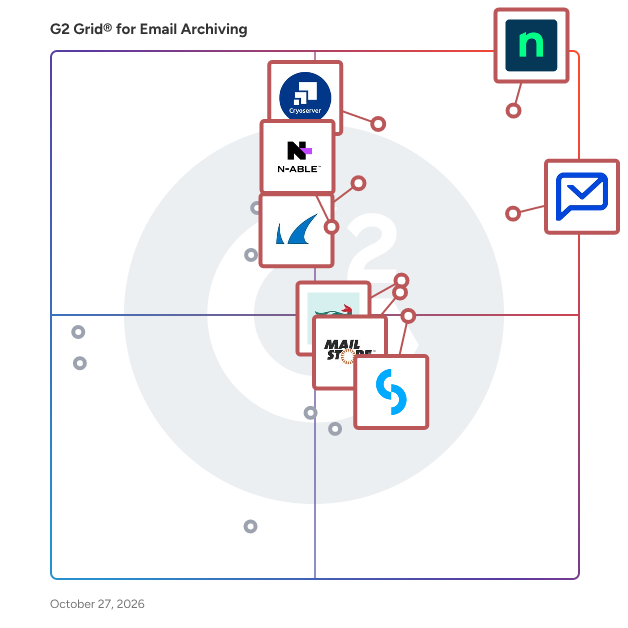
G2 Grid® for Email Archiving Software

G2 Grid® for Email Archiving Software plotting products by satisfaction and market presence

Highlighted products: NinjaOne, Paubox, Cryoserver, Barracuda Message Archiver, Jatheon Enterprise Data Archiving Solution, MailStore Server, N-able Mail Assure, and CyberSentriq.

Underlying data: [Grid® JSON](https://www.g2.com/categories/email-archiving/grids.json?focus%5B%5D=ninjaone&focus%5B%5D=paubox&focus%5B%5D=cryoserver&focus%5B%5D=barracuda-barracuda-message-archiver&focus%5B%5D=jatheon-enterprise-data-archiving-solution&focus%5B%5D=mailstore-server&focus%5B%5D=n-able-mail-assure&focus%5B%5D=cybersentriq)

BitRecover PST Merge Wizard

Securely merge multiple PST files without installing Outlook in just a few steps and clicks.

Who Is the Company Behind BitRecover PST Merge Wizard?

Conbool

Conbool is a multi-tenant email security platform that turns standard business email into a secure, compliant and brand-safe communication channel. It combines automatic S/MIME and PGP encryption including certificate management, a secure message portal, AI-powered spam and threat protection and centralized email signatures and disclaimers in a single gateway. Conbool is hosted in the EU or on-premises and integrates seamlessly with Microsoft 365 and existing mail servers.

Who Is the Company Behind Conbool?

  • Seller: Conbool
  • Year Founded: 2025
  • HQ Location: Hamburg, DE
  • LinkedIn® Page: www.linkedin.com
    2 employees on LinkedIn®

Diadem Email Archiving

Diadem Email Archiving is a comprehensive managed service designed to securely store and manage your organization's email communications. By archiving emails in an encrypted, tamperproof environment, it ensures data integrity, facilitates regulatory compliance, and provides rapid access to historical communications. This solution not only safeguards against data loss but also optimizes server performance by reducing storage demands. Key Features and Functionality: - Regulatory Compliance Assistance: Helps organizations meet legal and regulatory requirements by securely archiving all email communications. - Fast Full-Text Search: Enables quick and efficient searching of emails and attachments, enhancing productivity. - Data Loss Prevention: Protects against accidental or malicious data loss by maintaining secure backups of all emails. - Storage Optimization: Reduces the workload on mail servers and eliminates the need for PST files, leading to improved server performance. - Simplified Backup and Restore: Streamlines the process of backing up and restoring emails, ensuring business continuity. - User-Friendly Access: Provides seamless integration with Microsoft Outlook and responsive web access, allowing users to browse and retrieve archived emails effortlessly. Primary Value and User Solutions: Diadem Email Archiving addresses critical business needs by ensuring the security and availability of email communications. It assists organizations in achieving regulatory compliance, protects against data loss, and enhances operational efficiency by reducing server load and simplifying email management. By offering encrypted, tamperproof storage with unlimited retention, it provides a cost-effective, maintenance-free solution that supports business continuity and data integrity.

Who Is the Company Behind Diadem Email Archiving?

AI can help you find the answers. G2 helps you trust them.

Connect G2 to Claude or ChatGPT for answers grounded in G2's trusted reviews, comparisons, and pricing from real user insights.

How it works

IMAP Mail Backup Tool

One of the best IMAP Backup Tool that facilitates users to backup and migrate any IMAP supported email clients in various file formats and email clients. Additionally, this utility also offers some advanced functionalities that help users to optimize the whole backup process. 1. You can easily backup IMAP emails locally in different file formats such as PST, PDF, MBOX, EML, CSV, etc. 2. Additionally, it allows you to migrate IMAP emails to Office 365, Gmail, Yahoo, AOL, iCloud, and various other IMAP supported email clients. 3. It is designed and developed using the latest algorithm that makes it compatible with he latest Windows OS i.e., Windows 11. 4. You can also try its free trial version to analyze and experience its advanced functionalities.

Who Is the Company Behind IMAP Mail Backup Tool?

  • Seller: Migrate Cloud Data
  • Year Founded: 2022
  • HQ Location: Noida, Uttar Pradesh
  • Twitter: @migrate_cloud
    5 Twitter followers
  • LinkedIn® Page: www.linkedin.com
    1 employees on LinkedIn®

MARS

MARS – Mail Archive & Recovery System MARS is a SaaS solution designed for project managers in the construction industry, providing seamless email archiving and retrieval within Outlook. By structuring communication, MARS helps teams stay organized, maintain compliance, and easily access critical project information. With a strong focus on accessibility and intelligent automation, MARS ensures that no important emails are lost, misfiled, or buried in clutter. Key Features MARS offers a range of tools designed to streamline email management: Drag-and-drop email archiving – Store emails directly from Outlook, with automatic categorization based on metadata. Auto-archiving – Ensure all inbound and outbound emails are preserved without manual effort. Organized timelines – View email history grouped by project, company, or contact for a complete overview of past communication. Advanced search engine – Find archived emails instantly with full-text search and filtering by date, project, company, or contact. AI-powered email analysis – Identify potential conflicts through sentiment analysis and categorize emails based on content (e.g., defects, invoices, GDPR-sensitive data). Customizable access control – Manage who can access different types of archived emails for better compliance and security. Why Choose MARS? MARS is built to minimize friction in email management and enhance transparency in project communication. With its intuitive archiving system, structured email storage, and AI-driven insights, MARS helps project managers and their teams: ✔ Keep all relevant project communication structured and accessible. ✔ Quickly retrieve agreements, invoices, and critical documentation. ✔ Reduce the risk of disputes by maintaining a clear, searchable email history. ✔ Improve collaboration across teams with shared access to project-related emails. ✔ Stay compliant with GDPR and industry regulations through controlled access and automated categorization. For project managers who need full oversight of their email communication, MARS provides a clear, structured, and intelligent solution that enhances decision-making and efficiency—all without leaving Outlook​​.

Who Is the Company Behind MARS?

Nevtan Mail

NevTan Mail is a secure, ad-free business email platform designed to help teams manage professional communication from one connected workspace. It lets businesses use email on their own custom domain while providing built-in calendar and meeting tools, tasks, notes, and centralized administration. Teams can create and manage mailboxes, aliases, and groups while using role-based controls for domains and billing. NevTan Mail also supports guided SPF, DKIM, and DMARC setup to improve email authentication and deliverability. With TLS-encrypted connections, spam and phishing protection, and access from desktop, tablet, or mobile browsers, NevTan Mail provides a practical email solution for startups, small businesses, and growing teams.

Who Is the Company Behind Nevtan Mail?

OpenText Core Email Continuity

OpenText Core Email Continuity keeps your business email running, even when your primary system fails. If Microsoft 365 or Exchange goes down, users are automatically switched to a secure, cloud-based email environment with no disruption. It eliminates downtime, protects productivity, and ensures critical communications never stop. Emails continue to flow, users retain full access to inboxes, and IT avoids the pressure of emergency recovery. Key benefits: Zero downtime for email – maintain business continuity during outages or attacks Instant failover – automatic switch with no user intervention No data loss – continuous email syncing keeps messages up to date Uninterrupted productivity – users keep working as usual Simple management – cloud-based console, no infrastructure required Built for MSPs and IT teams – fast deployment, minimal overhead In short, we removes email as a single point of failure and keeps your organization operating no matter what.

Who Is the Company Behind OpenText Core Email Continuity?

  • Seller: OpenText
  • Year Founded: 1991
  • HQ Location: Waterloo, ON
  • Twitter: @OpenText
    21,565 Twitter followers
  • LinkedIn® Page: www.linkedin.com
    22,835 employees on LinkedIn®
  • Ownership: NASDAQ:OTEX

Outlook Email Backup Tool

DRS Softech Outlook Email Backup Tool is a trusted solution for backing up complete mailbox items such as emails, calendars, events, tasks, and more. It allows you to export Outlook emails to CSV, PST, PDF, DOC, MBOX, DOCX, EML, and MSG formats. Users can easily remove duplicate emails based on the body, subject, sender, and recipient. The tool offers a user-friendly interface that even non-technical users can operate with ease. It is fully compatible with both Windows and Mac operating systems. Try the demo version now and get 24/7 customer support!

Who Is the Company Behind Outlook Email Backup Tool?

PST to PDF Converter Software

PST to PDF Converter Software is a PST to PDF converter for Windows 10 and 11. It opens an Outlook .pst or .ost data file straight from the disk, shows its folders and messages, and writes the ones you choose as PDF, HTML or TXT files on the same computer. Outlook does not have to be installed, and nothing is uploaded. 🔰 How to use the PST to PDF converter 1. Click Open PST, or drag one .pst or .ost file into the window. The folder tree appears on the left with a checkbox next to every folder. 2. Click a folder to list its messages with subject, sender, recipient and size. Click a message to read it in the preview pane. 3. Narrow a long folder with the search row: choose the field to look in, such as Subject or Body, type a word and press Search. 4. Leave ticks only on the folders you need. The counter above the list says how many messages will be exported. 5. Choose PDF in the Format list and decide whether pictures placed in the message body go into the output. 6. Pick a destination folder and start the export. A progress line counts the messages as they are written. 🛠 Why IT and office teams pick it - No mail profile needed. The program reads the data file with its own engine, so a clean workstation is enough to convert PST to PDF. - Selective export. Ticking only Sent Items or a single subfolder keeps the job inside the scope of the request. - Check before you run. The preview renders any message with its header lines and formatted body before a single file is written. - Mail stays local. Client and staff correspondence is processed on the PC and is not sent to a web service. - Three output formats. PDF for records, HTML for a browser, TXT for plain text search. - Context in every document. Each exported message starts with From, Date, To and Subject, so it still makes sense outside the mailbox. 👥 Who uses it - Legal and compliance staff who must hand over mail from an exported mailbox as fixed documents. - IT administrators left with the archive of someone who has moved on. - HR teams adding a correspondence trail to a personnel file. - Home users who want to save Outlook emails as PDF from an old backup. ❓ FAQ How do I turn a PST file into PDF? Open the file, tick the folders, leave the format on PDF and run the job. Can I open a PST file without Outlook? Yes. The folder tree, the message list and the preview all work on a PC that never had Outlook. Does it read OST files? Yes. An .ost offline copy, including one whose account no longer exists, opens the same way as a .pst. Can the PST to PDF converter load several archives at once? No. One file per session, and opening another replaces the current one. ℹ️ Free trial with no sign-up, so you can test PST to PDF output on your own archive before buying a license. Runs offline on Windows 10 and 11. Lifetime, yearly, monthly and business licenses are available.

Who Is the Company Behind PST to PDF Converter Software?

Shield

Shield is a unified platform for DCGA (Digital Communications Governance and Archiving) combining Archiving, AI Surveillance and eDiscovery solutions. Shield enables regulated financial service organizations to: ✅ Govern and archive digital communications across channels; including voice ✅ Run AI-powered surveillance to detect risk, market abuse, and misconduct ✅ Support eDiscovery, investigations, and audits ✅ Maintain full compliance with global regulatory requirements Shield is end-to-end communications compliance: archive, governance, surveillance, and insight. Who Shield Is For: ✅ Financial institutions and regulated enterprises ✅ Compliance, legal, and risk teams responsible for communications oversight ✅ Organizations managing eComms, voice, and collaboration platforms ✅ Firms that must balance regulatory compliance + operational efficiency ✅ Global organizations with cross-border regulatory exposure (FCA, FINRA, EU AI Act, etc.) ✅ Companies with high volumes of digital communications ✅ Enterprises needing Archiving, (DCGA) + AI surveillance + Voice surviellance + eDiscovery in one platform

Average Rating: 4.8/5.0

Total Reviews: 2

How Do G2 Users Rate Shield?

  • Quality of Support: 10.0/10 (Category avg: 8.5/10)

Who Is the Company Behind Shield?

Who Uses This Product?

  • Company Size: 50% Large, 50% Medium

What Are Recent G2 Reviews of Shield?

Tian Lin
TL
Researched and written by Tian Lin
Updated October 3, 2024