Best Digital Signage Software - Page 15

How Many Digital Signage Software Products Does G2 Track?

Total Products under this Category: 563

Category Stats (Oct 2026)

  • Average Rating: 4.52/5 The average rating of products in this category, based on all submitted ratings
  • Top Trending Product: Castit Digital Signage Software (+1.62%) - Among all products in this category, Castit Digital Signage Software recorded the largest rating increase compared to last month

Last updated: October 15, 2026

How Does G2 Rank Digital Signage Software Products?

Why You Can Trust G2's Software Rankings:

  • 30 Analysts and Data Experts
  • 70,600+ Authentic Reviews
  • 563+ Products
  • Unbiased Rankings

G2's software rankings are built on verified user reviews, rigorous moderation, and a consistent research methodology maintained by a team of analysts and data experts. Each product is measured using the same transparent criteria, with no paid placement or vendor influence. While reviews reflect real user experiences, which can be subjective, they offer valuable insight into how software performs in the hands of professionals. Together, these inputs power the G2 Score, a standardized way to compare tools within every category.

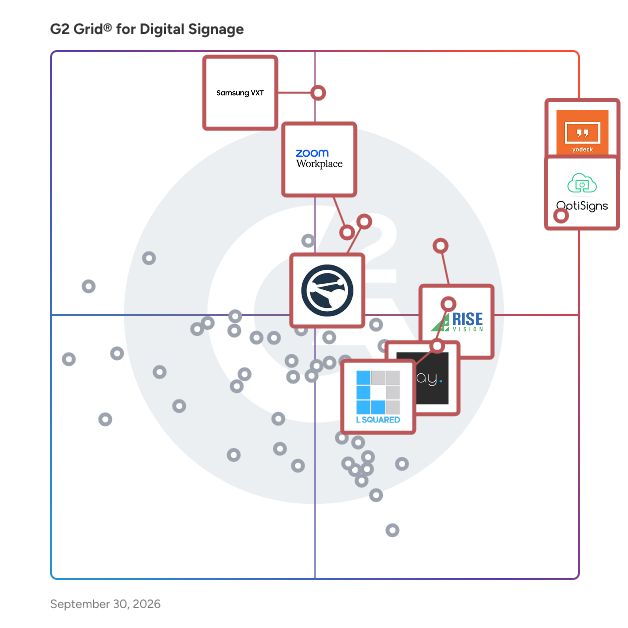
G2 Grid® for Digital Signage Software

G2 Grid® for Digital Signage Software plotting products by satisfaction and market presence

Highlighted products: Yodeck, OptiSigns, Samsung VXT, Rise Vision, Appspace, Play Digital Signage, Zoom Workplace, and L Squared Hub.

Underlying data: [Grid® JSON](https://www.g2.com/categories/digital-signage/grids.json?focus%5B%5D=yodeck&focus%5B%5D=optisigns&focus%5B%5D=samsung-vxt&focus%5B%5D=rise-vision&focus%5B%5D=appspace&focus%5B%5D=play-digital-signage&focus%5B%5D=zoom-workplace&focus%5B%5D=l-squared-hub)

Clebex

Clebex is a state-of-the-art software solution that offers companies an intelligent way to manage their buildings and workspaces. The software uses a combination of IoT sensors and applications to monitor the usage of resources, consumption of energy, and air quality and temperature in order to optimize energy usage, reduce carbon footprint, and ensure a safe and healthy environment for employees. In addition to resource monitoring, Clebex also implements scheduling rules for resources and manages visitors entering the building. This helps companies to ensure that their resources are being used efficiently and that visitors are able to access the building safely and easily. With Clebex, companies can also control access to buildings and workspaces, allowing only authorized personnel to enter restricted areas. One of the key features of Clebex is its flexibility and adaptability. It is designed to be hardware agnostic and offers multiple APIs, which means that it can be easily integrated into existing systems and customized to meet the specific needs of each individual company. This flexibility makes Clebex an essential tool for any company looking to optimize their energy usage, reduce their carbon footprint, and ensure the safety and well-being of their employees. Clebex offers a range of benefits to companies of all sizes and industries. By monitoring resource usage and implementing scheduling rules, Clebex can help companies save money on energy costs and reduce their carbon footprint. In addition, the software's ability to control access to buildings and workspaces can enhance security and protect sensitive information. Clebex can also improve the overall employee experience by ensuring that workspaces are safe and comfortable, while visitors are able to access the building easily and efficiently. Overall, Clebex is a comprehensive building and workspace software solution that offers a range of benefits to companies looking to manage their resources intelligently. Its advanced monitoring and management capabilities make it an essential tool for any company looking to optimize their energy usage, reduce their carbon footprint, and ensure the safety and well-being of their employees. With its flexibility and adaptability, Clebex is able to meet the unique needs of each individual company and help them achieve their goals more efficiently and effectively.

Average Rating: 5.0/5.0

Total Reviews: 5

How Do G2 Users Rate Clebex?

  • Has the product been a good partner in doing business?: 10.0/10 (Category avg: 9.2/10)

Who Is the Company Behind Clebex?

Who Uses This Product?

  • Company Size: 40% Large, 40% Small

What Do G2 Reviewers Say About Clebex?

AI-generated summary from verified user reviews

Pros
  • Users praise the fast analytics insights of Clebex, enabling smooth management and decision-making in office operations.
  • Users are impressed with the automation capabilities of Clebex, enhancing efficiency and simplifying office operations.
  • Users enjoy the booking ease of Clebex, appreciating its smooth performance and intuitive design for managing rooms.
  • Users are impressed by the seamless CRM integration of Clebex, enhancing efficiency and collaboration effortlessly.
  • Users commend the responsive and comprehensive customer support of Clebex, enhancing their overall experience with the software.

What Are Recent G2 Reviews of Clebex?

Cloudbooking

Building Hybrid Workplaces Cloudbooking’s user-friendly desk, visitor, parking and meeting room booking solutions enable the world’s leading organizations to make the right business decisions about their two most important assets, space, and people. Cloudbooking’s mission is to help organizations leverage technology to seamlessly optimize real estate, increase efficiency, and improve the productivity of both people and buildings. Cloudbookings workspace management tools and data insights will ensure that organizations worldwide truly understand how their space is being used and how to optimize what they already have even further. This helps clients gather a complete picture of the value their real estate is delivering, empowering them to “sweat the asset.” So, whether you’re managing a return to office, consolidating your real estate, or improving the employee experience, Cloudbooking will help you adapt. Cloudbooking provides a customized workspace management service and a continuous consultative approach that is tailored and evolves around your business's changing needs. Meeting Room Booking - Deck Booking - Hospitality Management - Visitor Management - Car Spot Booking - Sensor Technology - Digital Signage - Mobile Apps - Data Analytics and Insights For further information, please call Cloudbooking on UK: +44 (0) 800 033 7841, USA: + 1 (833) 574 0688 or email: Sales@cloudbooking.com

Average Rating: 4.3/5.0

Total Reviews: 29

How Do G2 Users Rate Cloudbooking?

  • Has the product been a good partner in doing business?: 9.4/10 (Category avg: 9.2/10)

Who Is the Company Behind Cloudbooking?

  • Seller: Cloudbooking
  • Year Founded: 2001
  • HQ Location: London, England
  • Twitter: @CloudbookingLtd
    577 Twitter followers
  • LinkedIn® Page: www.linkedin.com
    35 employees on LinkedIn®

Who Uses This Product?

  • Company Size: 47% Medium, 37% Large

What Do G2 Reviewers Say About Cloudbooking?

AI-generated summary from verified user reviews

Pros
  • Users love the ease of use of Cloudbooking, appreciating its user-friendly interface and quick booking process.
  • Users value the excellent customer support from Cloudbooking, noting fast responses and effective issue resolution.
  • Users appreciate the easy booking process with Cloudbooking, enjoying quick access to available spaces and excellent support.
  • Users appreciate the excellent customer support of Cloudbooking, noting quick responses and effective issue resolution.
  • Users appreciate the access ease of Cloudbooking, making it simple to schedule spaces and select precise locations.
Cons
  • Users find the booking issues irritating, as reminders and auto-curtailing complicate the desk reservation process.
  • Users find the confusing interface of Cloudbooking cumbersome when trying to check room availability efficiently.
  • Users find the curtail feature annoying, as it sends reminders that disrupt their booking experience.
  • Users find the difficult navigation in Cloudbooking frustrating, as it complicates checking room availability.
  • Users find the difficult settings frustrating, as changing defaults hinders seamless navigation for room availability.

What Are Recent G2 Reviews of Cloudbooking?

What Are G2 Users Discussing About Cloudbooking?

AI can help you find the answers. G2 helps you trust them.

Connect G2 to Claude or ChatGPT for answers grounded in G2's trusted reviews, comparisons, and pricing from real user insights.

How it works

Cloud Signage

Cloud Signage By Gigasource.io GIGASOURCE is a full-service product development company that work on a wide range of technologies ranging from open source to proprietary and custom-built solutions. We work hand-in-hand with enterprises and startups at all stages of software development to bring their ideas to life as quickly as possible. At our core, we believe in building long-lasting strategic relationships with our clients by exceeding expectations. Website detail: https://gigasource.io/ Email Support: info@gigasource.io Phone: +491621989473/ +84865973915

Who Is the Company Behind Cloud Signage?

CloudyFy TV

CloudyFy TV is a cloud-based digital signage software platform that enables businesses to remotely create, manage, schedule, and display digital content across one or many screens from a centralized dashboard. It is designed to help organizations improve customer engagement, internal communication, and brand visibility through dynamic digital displays.

Who Is the Company Behind CloudyFy TV?

CloudyFy TV

CloudyFy TV is cloud-based digital signage software that manages and displays dynamic content across multiple screens via a centralized system. It allows real-time updates from any location, removing the need for physical intervention at display sites. Compatible with Android TV, Apple TV, smart TVs, Amazon Firestick, and Google Chromecast, it offers hardware flexibility. Features include portrait and landscape orientation, proof of play for content verification, content reusability, and adaptive designs for various screen sizes. The mirror screen feature duplicates content across devices simultaneously. Offline functionality ensures operation without internet connectivity. The centralized management system simplifies control of distributed screen networks, reducing operational complexity. CloudyFy TV enhances audience communication across diverse environments and display configurations.

Who Is the Company Behind CloudyFy TV?

CMS Signage

CMS Signage reliable and economical cloud-based digital signage platform that powers your screen with dynamic content which instantly engages your viewers. Remotely manage contents for your screens including static-like images, videos, pdf, and many more, dynamic contents include weather reports, clock, countdowns, and many more. We are a small company directly reachable to any prospective users for customization without development cost on you.

Who Is the Company Behind CMS Signage?

Contegro

Interactive Digital Signage CMS Software

Who Is the Company Behind Contegro?

  • Seller: Contegro
  • HQ Location: N/A
  • Twitter: @contegrohelp
    6 Twitter followers
  • LinkedIn® Page: www.linkedin.com
    1 employees on LinkedIn®

Content Guard

Content Guard by signageOS is an AI-based monitoring layer that keeps digital signage displaying what it's supposed to. Rather than relying on staff to manually review screenshots, Content Guard uses AI to spot visual disruptions that would otherwise go unnoticed, and triggers alerts so issues are caught and resolved before they affect viewers. It's designed to help teams manage even very large networks with minimal hands-on intervention. The workflow is straightforward: devices periodically send screenshots, Content Guard classifies each one in real time, and the system sends a notification whenever it detects an anomaly. Because monitoring happens on captured images rather than the devices themselves, problems can be flagged without anyone touching a single screen. Common issues it surfaces include blank screens, distorted layouts, suspicious or unexpected content, exposed system menus, and operating-system screens (such as a Windows desktop) appearing where signage content should be—while correctly recognizing expected content as healthy. Content Guard offers two detection approaches. Image-based detection lets a team upload a reference photo, assign it to a category, and use it to identify similar content across the network. Prompt-based detection adds AI that interprets the context of what's on screen, going beyond pure visual similarity. An AI Prompt Helper supports this by automatically generating a structured description from a reference image and framing it as a positive or negative prompt, which speeds up setup, reduces guesswork, and makes validation rules more consistent across a large deployment. The product is available in two tiers. The Standard tier includes image-based content validation, manual image uploads, and search by name, organization, category, or tag. The Premium tier adds everything in Standard plus prompt-based contextual detection, the AI Prompt Helper, and support for both positive and negative prompts. Best suited for: operators of mid-to-large signage networks—retail, QSR, DOOH, and enterprise deployments—who need automated assurance that screens are showing correct content and want to reduce manual monitoring effort. Notable details: SOC 2 Type II and ISO 27001 compliant; 30-day free trial available with no credit card required; demo booking also available.

Who Is the Company Behind Content Guard?

  • Seller: signageOS
  • Year Founded: 2018
  • HQ Location: San Francisco, US
  • LinkedIn® Page: www.linkedin.com
    43 employees on LinkedIn®

Creating Margin Digital Signage

Creating Margin is a technology and services company specializing in digital signage and workplace management solutions. The full services team helps you Plan, Build, Install and Manage your technology rollout be it small or large.

Who Is the Company Behind Creating Margin Digital Signage?

CueDuck

CueDuck turns an event's schedule into a Board that guests open by scanning a QR code or typing a short code, in any phone browser, with no app and no account. The same Board runs on a foyer screen on any TV with a browser. Organisers build the schedule on a timetable they click, drag and stretch, or import it from a CSV or Excel file, then preview it on phone, tablet and foyer screen and publish with a short code, QR code and printable posters. On the day, the organiser's team posts notices, moves or cancels sessions, closes rooms or pushes everything back when running late, and the change shows on every open phone and foyer screen within seconds. Stewards can post normal notices from a link without an account. Guests can star sessions into their own list and filter by topic. If the signal drops, the Board keeps the last version it had and says so. The free plan is a whole product, not a trial. Pro adds branding, scheduled notices, analytics and PDF files on sessions.

Who Is the Company Behind CueDuck?

Cuelora Pro

Cuelora Pro is a theater captioning system for venues that need accessible performances without a hardware budget or a technical team. It runs on one Windows or Mac laptop on the venue's own Wi-Fi, so no internet connection is needed during a show and caption data stays on the venue network. Patrons scan a QR code and read along in their phone's browser; there is no app to install and no loaner device to charge, hand out or collect. Each patron picks a text size and, on the Pro plan, a language. One operator runs three caption modes from the same show file: closed captions on patrons' phones and tablets, open captions on any screen with a browser, and scrolling LED surtitles over HDMI or serial/USB. Import a script from PDF or Word and Cuelora Pro builds the cue list; Script Follow can advance captions as the actors speak. Program Audio lets patrons listen to the printed program with their own headphones, and Audio Description can be recorded against script cues or narrated live. Between shows, Rehearsal Mode reads the other roles aloud and prompts an actor who drops a line. Local reports and CSV exports cover caption, program and description usage by show, season and fiscal year for grants and the board. Cuelora Core ($895) delivers PowerPoint caption slides to patrons' phones and a shared screen. Cuelora Pro ($3,500) adds script import, translation, LED surtitles, Script Follow, Program Audio, Audio Description and Rehearsal Mode. Both are one-time perpetual licenses per show computer with a year of updates and email support. A free demo license is available.

Who Is the Company Behind Cuelora Pro?

Yukta Rustagi
YR
Researched and written by Yukta Rustagi
Updated March 7, 2025