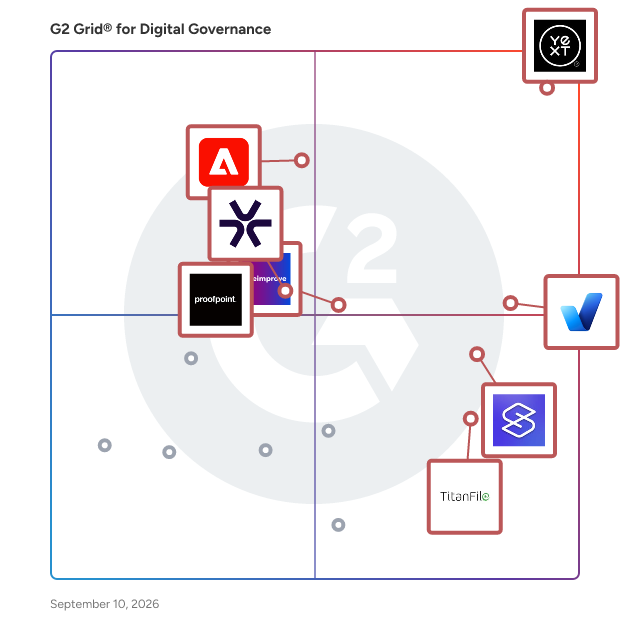
# Best Digital Governance Software

*By [Shalaka Joshi](https://research.g2.com/insights/author/shalaka-joshi)*


Digital governance, sometimes called digital experience management, solutions are used to create a unified digital customer experience. These tools help keep digital content consistent with company policies and standards; companies use digital governance software to maintain uniform messaging across websites, applications, and other digital assets. Users set standards to maintain, which typically include content guidelines, URL structures, and accessibility policies. These tools also help identify broken links, spelling errors, and lost images, as well as inform users of assets in need of updating. Other features vary and are typically customizable based on the company’s digital platforms and media channels. Companies using digital governance solutions will have more unified policies across departments, channels, and organizational strategies.

To qualify for inclusion in the Digital Governance category, a product must:

- Monitor channels in accordance with digital standards
- Alert users of verbal and technical inconsistencies
- Allow users to set accessibility, security, and editorial policies


## Top Digital Governance Software at a Glance
| # | Product | Rating | Best For | What Users Say |
|---|---------|--------|----------|----------------|
| 1 | [Yext](https://www.g2.com/products/yext/reviews) | 4.4/5.0 (1,090 reviews) | Multi-location listing and review governance | "[Yext: A Robust Platform for SEO Clients](https://www.g2.com/survey_responses/yext-review-12810984)" |
| 2 | [accessiBe](https://www.g2.com/products/accessibe/reviews) | 4.7/5.0 (1,404 reviews) | Automated ADA/WCAG compliance with litigation support | "[accessiBe Makes Accessibility Easy with Fast Setup and AI Automation](https://www.g2.com/survey_responses/accessibe-review-12629055)" |
| 3 | [Adobe Experience Manager](https://www.g2.com/products/adobe-experience-manager/reviews) | 4.2/5.0 (650 reviews) | Multi-site content governance with brand compliance | "[Powerful enterprise CMS for managing large scale digital experiences](https://www.g2.com/survey_responses/adobe-experience-manager-review-12743415)" |
| 4 | [Silktide](https://www.g2.com/products/silktide/reviews) | 4.8/5.0 (283 reviews) | WCAG compliance auditing with actionable remediation | "[An easy to use game changer of a tool](https://www.g2.com/survey_responses/silktide-review-12947850)" |
| 5 | [Siteimprove](https://www.g2.com/products/siteimprove/reviews) | 4.6/5.0 (430 reviews) | Distributed web governance with accessibility compliance | "[Solid SEO Tool for your daily Website Optimization](https://www.g2.com/survey_responses/siteimprove-review-10663621)" |
| 6 | [Proofpoint Digital Protection](https://www.g2.com/products/proofpoint-digital-protection/reviews) | 4.2/5.0 (21 reviews) | Multi-channel brand fraud and threat governance | "[Proofpoint Keeps Files Safe](https://www.g2.com/survey_responses/proofpoint-digital-protection-review-10753222)" |
| 7 | [TitanFile](https://www.g2.com/products/titanfile/reviews) | 4.6/5.0 (136 reviews) | Compliant sensitive-file exchange with audit trails | "[Secure, Reliable Large-File Sharing with Easy Client Access and DocuSign Integration](https://www.g2.com/survey_responses/titanfile-review-12824407)" |
| 8 | [Level Access Accessibility Platform](https://www.g2.com/products/level-access-accessibility-platform/reviews) | 4.5/5.0 (234 reviews) | WCAG compliance governance with remediation workflows | "[Clean Dashboard, Actionable Security Testing, and Time-Saving Jira Integration](https://www.g2.com/survey_responses/level-access-accessibility-platform-review-12966409)" |
| 9 | [Templafy](https://www.g2.com/products/templafy/reviews) | 4.4/5.0 (58 reviews) | Brand-compliant document governance inside M365 | "[Reliable platform for brand compliance and document automation](https://www.g2.com/survey_responses/templafy-review-11751347)" |
| 10 | [UserWay](https://www.g2.com/products/userway/reviews) | 4.8/5.0 (641 reviews) | Automated ADA and WCAG compliance remediation | "[Helpful accessibility platform that keeps admin work manageable](https://www.g2.com/survey_responses/userway-review-12410035)" |


## How Many Digital Governance Software Products Does G2 Track?
**Total Products under this Category:** 36

### Category Stats (Jun 2026)
- **Average Rating**: 4.51/5 The average rating of products in this category, based on all submitted ratings
- **Top Trending Product**: Silktide (+0.04%) - Among all products in this category, Silktide recorded the largest rating increase compared to last month
*Last updated: June 30, 2026*


## How Does G2 Rank Digital Governance Software Products?

**Why You Can Trust G2's Software Rankings:**

- 30 Analysts and Data Experts
- 5,700+ Authentic Reviews
- 36+ Products
- Unbiased Rankings

G2's software rankings are built on verified user reviews, rigorous moderation, and a consistent research methodology maintained by a team of analysts and data experts. Each product is measured using the same transparent criteria, with no paid placement or vendor influence. While reviews reflect real user experiences, which can be subjective, they offer valuable insight into how software performs in the hands of professionals. Together, these inputs power the G2 Score, a standardized way to compare tools within every category.


## Which Digital Governance Software Is Best for Your Use Case?

- **Leader:** [Yext](https://www.g2.com/products/yext/reviews)
- **Highest Performer:** [Silktide](https://www.g2.com/products/silktide/reviews)
- **Easiest to Use:** [accessiBe](https://www.g2.com/products/accessibe/reviews)
- **Top Trending:** [Kiteworks](https://www.g2.com/products/kiteworks/reviews)
- **Best Free Software:** [accessiBe](https://www.g2.com/products/accessibe/reviews)


---

**Sponsored**

### Adobe Experience Manager

Adobe Experience Manager (AEM) is an agentic content system built for the agentic era, when brands must be discovered, cited, and trusted across human visitors and AI agents simultaneously. Unlike headless-only content management systems that solve for content availability (storing content and delivering it via API), AEM is architected for brand visibility: ensuring content performs once it reaches every surface, from web and mobile to LLMs and emerging agentic channels. What Adobe Experience Manager Is Experience Manager combines structured content management, digital asset management, agentic workflows, enterprise governance, and edge delivery in a single, natively integrated platform. Most enterprises already use AEM as a headless system of record powering mobile apps, multi-site experiences, and connected channels, while also gaining the presentation, delivery, and optimization layers that headless-only systems require customers to build or buy separately. Agentic CMS: The Foundation for AI Discovery AEM is designed as an agentic content management system. Structured, governed, fast content is what AI systems surface, cite, and trust. AEM&#39;s agent capabilities — including the Brand Experience Agent, Brand Governance Agent, and Content Advisor Agent — bring intelligence and automation across the content lifecycle: accelerating creation and migration, enforcing brand and compliance governance, and continuously optimizing experiences for both human and agentic traffic. Key Capabilities Experience Manager Sites: A modern decoupled architecture for creating and delivering personalized web and app experiences at scale, serving both headless (Content Fragments via GraphQL/REST) and full experience delivery needs. Experience Manager Assets:&amp;nbsp;A digital asset management system to govern and activate assets, with native AI trained on a brand&#39;s data, voice, and creative DNA across regions and geographies. Experience Manager Forms:&amp;nbsp;End-to-end digital enrollment integrated with back-end systems of record. AEM Sites Optimizer:&amp;nbsp;Continuous optimization of performance, SEO, and discoverability (requires AEM Sites). LLM Optimizer:&amp;nbsp;Purpose-built visibility into agentic traffic using real CDN signals, with brand-aware recommendations to improve how content is surfaced and cited by AI systems. Edge Delivery Services:&amp;nbsp;Sub-second content delivery with personalization applied at the edge, built for agentic workflows where content is assembled and served in milliseconds. Experience Manager Guides&amp;nbsp;and Learning Manager:&amp;nbsp;Scalable component content management for documentation, knowledge, and support content, and an integrated learning management system. Differentiators Content + decisioning in one event loop:&amp;nbsp;AEM integrates with Adobe Journey Optimizer and Real-Time CDP, making content decisions on unified customer profiles that draw on behavioral, transactional, and engagement signals, not on CRM records alone. Generative creation in the workflow:&amp;nbsp;Adobe Firefly and generative content capabilities are embedded inside AEM&#39;s authoring environment as native capabilities, not adjacent integrations. Enterprise governance at scale:&amp;nbsp;Multi-site, multi-brand, multi-language support with role-based access control, workflow approvals, and audit trails built in. Proven Results Brands using Adobe&#39;s optimization capabilities have seen measurable gains in AI-era visibility, including significant increases in LLM citation rates and AI-referral traffic, alongside improvements in page performance and organic visibility.


[Visit website](https://www.g2.com/external_clickthroughs/record?secure%5Bad_program%5D=ppc&amp;secure%5Bad_slot%5D=category_product_list&amp;secure%5Bcategory_id%5D=1261&amp;secure%5Bdisplayable_resource_id%5D=1261&amp;secure%5Bdisplayable_resource_type%5D=Category&amp;secure%5Bmedium%5D=sponsored&amp;secure%5Bplacement_reason%5D=page_category&amp;secure%5Bplacement_resource_ids%5D%5B%5D=1261&amp;secure%5Bprioritized%5D=false&amp;secure%5Bproduct_id%5D=1288&amp;secure%5Bresource_id%5D=1261&amp;secure%5Bresource_type%5D=Category&amp;secure%5Bsource_type%5D=category_page&amp;secure%5Bsource_url%5D=https%3A%2F%2Fwww.g2.com%2Fcategories%2Fdigital-governance%3Fpage%3D2&amp;secure%5Btoken%5D=acbf4b8c5a770dbaa4f818419ef81483e0895307e3c86b7c239f69eb22e27c62&amp;secure%5Burl%5D=https%3A%2F%2Fbusiness.adobe.com%2Fproducts%2Fexperience-manager%2Fassets.html%3Fsdid%3DFMHMYYBX%26mv%3Daffiliate&amp;secure%5Burl_type%5D=custom_url)

---


## Digital Governance Software Features & Capabilities

### What are the Best Digital Governance Software with Security?
Abilities to set standards for asset and risk management.

**Top-rated Digital Governance Software for Security:**
- [Adobe Experience Manager](https://www.g2.com/products/adobe-experience-manager/reviews)
- [Silktide](https://www.g2.com/products/silktide/reviews)
- [Siteimprove](https://www.g2.com/products/siteimprove/reviews)
[Explore Digital Governance Software with Security](https://www.g2.com/categories/digital-governance/f/security)

### What are the Best Digital Governance Software with Internationalization?
Allows organizations multi-national organizations to use tool effectively across multiple languages and currencies.

**Top-rated Digital Governance Software for Internationalization:**
- [accessiBe](https://www.g2.com/products/accessibe/reviews)
- [Adobe Experience Manager](https://www.g2.com/products/adobe-experience-manager/reviews)
- [Silktide](https://www.g2.com/products/silktide/reviews)
[Explore Digital Governance Software with Internationalization](https://www.g2.com/categories/digital-governance/f/internationalization)

### What are the Best Digital Governance Software with Brand Design Consistency ?
Monitors brand assets to ensure content is consistent with the design of the site.

**Top-rated Digital Governance Software for Brand Design Consistency :**
- [accessiBe](https://www.g2.com/products/accessibe/reviews)
- [Adobe Experience Manager](https://www.g2.com/products/adobe-experience-manager/reviews)
- [Silktide](https://www.g2.com/products/silktide/reviews)
[Explore Digital Governance Software with Brand Design Consistency ](https://www.g2.com/categories/digital-governance/f/brand-design-consistency)

### What are the Best Digital Governance Software with User, Role, and Access Management ?
Grant access to select data, features, objects, etc. based on the users, user role, groups, etc.

**Top-rated Digital Governance Software for User, Role, and Access Management :**
- [Adobe Experience Manager](https://www.g2.com/products/adobe-experience-manager/reviews)
- [Silktide](https://www.g2.com/products/silktide/reviews)
- [Siteimprove](https://www.g2.com/products/siteimprove/reviews)
[Explore Digital Governance Software with User, Role, and Access Management ](https://www.g2.com/categories/digital-governance/f/user-role-and-access-management)


## What Are the Top-Rated Digital Governance Software Products in 2026?
### 1. [Yext](https://www.g2.com/products/yext/reviews)
Yext — Enterprise Agentic Marketing Platform Yext is the enterprise agentic marketing platform for multi-location brands that need to win across both AI and traditional search. AI is reshaping how customers discover brands. They&#39;re not just searching Google. They&#39;re asking ChatGPT, Gemini, Perplexity, and Grok — and the brands that show up in those responses are the ones with verified, structured data distributed to the right places. Yext is built to make that happen at enterprise scale. What Yext does Yext delivers three core capabilities from one platform. Scout, Yext&#39;s visibility intelligence engine, analyzes 10 billion signals across four AI models and more than 12 million business locations. Every scan surfaces 150 visibility metrics across 20 competitors, down to the location level, so marketing leaders know exactly where they&#39;re losing and why — across both AI and traditional search. The Yext Knowledge Graph is the verified source of truth for every location in a brand&#39;s portfolio. Data agents maintain it automatically, connecting data across sources, verifying it at scale, and resolving inconsistencies before they reach a customer. When AI models generate responses about your brand, they pull from this verified record. Content generation agents create on-brand content across every channel from verified brand data: local pages, social posts and replies, review campaigns and responses, and email and SMS campaigns. Distribution agents syndicate that content and data in real time to LLMs, voice assistants, listings, maps, social and review platforms, and email — with no aggregator in between. What Yext pushes is what AI and search engines actually see and trust. Who it&#39;s for Yext is built for CMOs, SVPs, and VPs of marketing at multi-location enterprise brands in financial services, healthcare, retail, hospitality, and food. If your brand competes at the local level and needs to show up accurately and consistently across AI and traditional search, Yext is built for you. Why Yext Most platforms deliver insight or distribution, not both. Yext closes the loop — from competitive intelligence to verified data to agentic content creation and real-time distribution — in one system with no disconnected tools and no aggregator delays. Thousands of brands trust Yext, including top US banks, leading hospital systems, and the world&#39;s largest restaurant and retail chains.


**Average Rating:** 4.4/5.0
**Total Reviews:** 1,090
**How Do G2 Users Rate Yext?**

- **Ease of Use:** 8.5/10 (Category avg: 8.9/10)
- **Compliance Monitoring:** 8.0/10 (Category avg: 9.1/10)
- **Web Accessibility:** 7.2/10 (Category avg: 8.9/10)
- **Reporting:** 7.5/10 (Category avg: 8.7/10)

**Who Is the Company Behind Yext?**

- **Seller:** [Yext](https://www.g2.com/sellers/yext)
- **Company Website:** https://www.yext.com
- **Year Founded:** 2006
- **HQ Location:** New York
- **Twitter:** @yext (21,811 Twitter followers)
- **LinkedIn® Page:** https://www.linkedin.com/company/515401/ (2,494 employees on LinkedIn®)

**Who Uses This Product?**
- **Who Uses This:** Marketing Manager, Digital Marketing Manager
- **Top Industries:** Financial Services, Hospital &amp; Health Care
- **Company Size:** 37% Enterprise, 30% Mid-Market


#### What Are Yext's Pros and Cons?

**Pros:**

- Ease of Use (360 reviews)
- Helpful (199 reviews)
- Centralized Management (189 reviews)
- Customer Support (182 reviews)
- Features (165 reviews)

**Cons:**

- Complex Usability (99 reviews)
- Learning Curve (83 reviews)
- Difficult Learning (80 reviews)
- Difficult Navigation (68 reviews)
- Limited Features (67 reviews)


### What Do G2 Reviewers Say About Yext?
*AI-generated summary from verified user reviews*

**Pros:**

- Users appreciate the **ease of use** of Yext, finding its interface welcoming and navigation straightforward.
- Users find Yext&#39;s **ease of use and speedy information updates** invaluable for maintaining consistency across multiple platforms.
- Users value the **centralized management** of Yext, simplifying updates and enhancing consistency across various platforms.
- Users find Yext&#39;s **customer support consistently helpful** , enhancing their overall experience and ease of use.
- Users appreciate the **centralized management** of Yext, enjoying real-time updates and easy scheduling from one dashboard.

**Cons:**

- Users find Yext&#39;s interface **complex to navigate** , requiring a learning curve that complicates the overall experience.
- Users note a necessary **learning curve** with Yext, though helpful support and documentation aid the process.
- Users face a **difficult learning curve** with Yext, finding the platform complex and sometimes confusing to navigate.
- Users find **difficult navigation** challenging, especially with overwhelming filters and complicated report criteria for new users.
- Users find the **limited features** of Yext frustrating, especially regarding account management and reporting complexity.

#### What Are Recent G2 Reviews of Yext?

**"[Transparent Listings Management with Industry-Leading Publisher Reach](https://www.g2.com/survey_responses/yext-review-12638314)"**

**Rating:** 5.0/5.0 stars
*— Liz J.*

[Read full review](https://www.g2.com/survey_responses/yext-review-12638314)

---

**"[Yext: A Robust Platform for SEO Clients](https://www.g2.com/survey_responses/yext-review-12810984)"**

**Rating:** 5.0/5.0 stars
*— Ben H.*

[Read full review](https://www.g2.com/survey_responses/yext-review-12810984)

---


#### What Are G2 Users Discussing About Yext?

- [What is Yext used for?](https://www.g2.com/discussions/yext-what-is-yext-used-for)
- [What does Yext do?](https://www.g2.com/discussions/what-does-yext-do) - 3 comments
- [Is YEXT worth the cost?](https://www.g2.com/discussions/is-yext-worth-the-cost) - 4 comments
- [What does YEXT cost?](https://www.g2.com/discussions/what-does-yext-cost)
- [What is YEXT used for?](https://www.g2.com/discussions/what-is-yext-used-for) - 2 comments

### 2. [accessiBe](https://www.g2.com/products/accessibe/reviews)
accessiBe is an end-to-end accessibility platform that helps organizations make their websites and digital assets accessible, in compliance with regulations like the Americans with Disabilities Act (ADA) and the European Accessibility Act (EAA). Offering the best in AI automation, developer tools, and human expertise, accessiBe’s solutions audit and remediate websites and digital assets to align with the Web Content Accessibility Guidelines (WCAG) - the widely accepted framework organizations follow to comply with legislation and mitigate legal risk. accessiBe also supports organizations navigating the legal landscape with dedicated litigation support - including documentation, guidance, expert review, and a $15k+ monetary pledge to assist with legal fees. For agencies and service providers, the accessiBe Partner Program offers training, resources, and co-selling opportunities to help expand accessibility offerings and deliver stronger value to clients.


**Average Rating:** 4.7/5.0
**Total Reviews:** 1,404
**How Do G2 Users Rate accessiBe?**

- **Ease of Use:** 9.6/10 (Category avg: 8.9/10)
- **Compliance Monitoring:** 9.4/10 (Category avg: 9.1/10)
- **Web Accessibility:** 9.4/10 (Category avg: 8.9/10)
- **Reporting:** 9.4/10 (Category avg: 8.7/10)

**Who Is the Company Behind accessiBe?**

- **Seller:** [accessiBe](https://www.g2.com/sellers/accessibe)
- **Company Website:** https://accessibe.com
- **HQ Location:** New York, NY
- **Twitter:** @AccessiBe (2,020 Twitter followers)
- **LinkedIn® Page:** https://www.linkedin.com/company/18986691/ (206 employees on LinkedIn®)

**Who Uses This Product?**
- **Who Uses This:** Owner, CEO
- **Top Industries:** Marketing and Advertising, Retail
- **Company Size:** 76% Small-Business, 20% Mid-Market


#### What Are accessiBe's Pros and Cons?

**Pros:**

- Ease of Use (341 reviews)
- Accessibility Features (217 reviews)
- Easy Setup (202 reviews)
- Customer Support (193 reviews)
- ADA Compliance (156 reviews)

**Cons:**

- Expensive (123 reviews)
- Lack of Clarity (54 reviews)
- Pricing Issues (47 reviews)
- Accessibility Issues (32 reviews)
- Poor Customer Support (31 reviews)


### What Do G2 Reviewers Say About accessiBe?
*AI-generated summary from verified user reviews*

**Pros:**

- Users appreciate the **ease of use** of accessiBe, highlighting its smooth integration and quick implementation processes.
- Users value the **ease of installation and legal compliance** , ensuring accessibility for individuals with disabilities.
- Users find the **easy setup** of accessiBe impressive, appreciating the straightforward integration process and supportive guidance.
- Users praise accessiBe for its **responsive and helpful customer support** , making ADA compliance straightforward and manageable.
- Users praise accessiBe for its ability to ensure **ADA compliance** , promoting inclusivity and legal security for websites.

**Cons:**

- Users find accessiBe **expensive** , raising concerns about budget constraints for web accessibility tools.
- Users find the **lack of clarity** in accessiBe&#39;s features and pricing model to be confusing and unhelpful.
- Users find the **pricing issues** a barrier, particularly for low-traffic websites and desire more discounts.
- Some users face **accessibility issues** requiring manual adjustments, particularly on highly customized sites.
- Users highlight **poor customer support** for accessiBe, feeling frustrated by the lack of responsiveness and limited assistance.

#### What Are Recent G2 Reviews of accessiBe?

**"[accessiBe Makes Accessibility Easy with Fast Setup and AI Automation](https://www.g2.com/survey_responses/accessibe-review-12629055)"**

**Rating:** 5.0/5.0 stars
*— Dan H.*

[Read full review](https://www.g2.com/survey_responses/accessibe-review-12629055)

---

**"[Easy Integration with Strong Accessibility and Accurate AI Translations](https://www.g2.com/survey_responses/accessibe-review-12668347)"**

**Rating:** 4.0/5.0 stars
*— Gurpreet S.*

[Read full review](https://www.g2.com/survey_responses/accessibe-review-12668347)

---


#### What Are G2 Users Discussing About accessiBe?

- [What is accessiBe used for?](https://www.g2.com/discussions/what-is-accessibe-used-for) - 2 comments
- [What is ADA compliant software?](https://www.g2.com/discussions/accessibe-what-is-ada-compliant-software) - 2 comments
- [What are the accessibility feature of Windows?](https://www.g2.com/discussions/what-are-the-accessibility-feature-of-windows) - 1 comment
- [What are website accessibility features?](https://www.g2.com/discussions/what-are-website-accessibility-features)
- [What are accessibility features?](https://www.g2.com/discussions/what-are-accessibility-features)

### 3. [Adobe Experience Manager](https://www.g2.com/products/adobe-experience-manager/reviews)
Adobe Experience Manager (AEM) is an agentic content system built for the agentic era, when brands must be discovered, cited, and trusted across human visitors and AI agents simultaneously. Unlike headless-only content management systems that solve for content availability (storing content and delivering it via API), AEM is architected for brand visibility: ensuring content performs once it reaches every surface, from web and mobile to LLMs and emerging agentic channels. What Adobe Experience Manager Is Experience Manager combines structured content management, digital asset management, agentic workflows, enterprise governance, and edge delivery in a single, natively integrated platform. Most enterprises already use AEM as a headless system of record powering mobile apps, multi-site experiences, and connected channels, while also gaining the presentation, delivery, and optimization layers that headless-only systems require customers to build or buy separately. Agentic CMS: The Foundation for AI Discovery AEM is designed as an agentic content management system. Structured, governed, fast content is what AI systems surface, cite, and trust. AEM&#39;s agent capabilities — including the Brand Experience Agent, Brand Governance Agent, and Content Advisor Agent — bring intelligence and automation across the content lifecycle: accelerating creation and migration, enforcing brand and compliance governance, and continuously optimizing experiences for both human and agentic traffic. Key Capabilities Experience Manager Sites: A modern decoupled architecture for creating and delivering personalized web and app experiences at scale, serving both headless (Content Fragments via GraphQL/REST) and full experience delivery needs. Experience Manager Assets:&amp;nbsp;A digital asset management system to govern and activate assets, with native AI trained on a brand&#39;s data, voice, and creative DNA across regions and geographies. Experience Manager Forms:&amp;nbsp;End-to-end digital enrollment integrated with back-end systems of record. AEM Sites Optimizer:&amp;nbsp;Continuous optimization of performance, SEO, and discoverability (requires AEM Sites). LLM Optimizer:&amp;nbsp;Purpose-built visibility into agentic traffic using real CDN signals, with brand-aware recommendations to improve how content is surfaced and cited by AI systems. Edge Delivery Services:&amp;nbsp;Sub-second content delivery with personalization applied at the edge, built for agentic workflows where content is assembled and served in milliseconds. Experience Manager Guides&amp;nbsp;and Learning Manager:&amp;nbsp;Scalable component content management for documentation, knowledge, and support content, and an integrated learning management system. Differentiators Content + decisioning in one event loop:&amp;nbsp;AEM integrates with Adobe Journey Optimizer and Real-Time CDP, making content decisions on unified customer profiles that draw on behavioral, transactional, and engagement signals, not on CRM records alone. Generative creation in the workflow:&amp;nbsp;Adobe Firefly and generative content capabilities are embedded inside AEM&#39;s authoring environment as native capabilities, not adjacent integrations. Enterprise governance at scale:&amp;nbsp;Multi-site, multi-brand, multi-language support with role-based access control, workflow approvals, and audit trails built in. Proven Results Brands using Adobe&#39;s optimization capabilities have seen measurable gains in AI-era visibility, including significant increases in LLM citation rates and AI-referral traffic, alongside improvements in page performance and organic visibility.


**Average Rating:** 4.2/5.0
**Total Reviews:** 650
**How Do G2 Users Rate Adobe Experience Manager?**

- **Ease of Use:** 7.8/10 (Category avg: 8.9/10)
- **Compliance Monitoring:** 8.8/10 (Category avg: 9.1/10)
- **Web Accessibility:** 9.0/10 (Category avg: 8.9/10)
- **Reporting:** 8.5/10 (Category avg: 8.7/10)

**Who Is the Company Behind Adobe Experience Manager?**

- **Seller:** [Adobe](https://www.g2.com/sellers/adobe)
- **Company Website:** https://adobe.com
- **Year Founded:** 1982
- **HQ Location:** San Jose, CA
- **Twitter:** @Adobe (956,842 Twitter followers)
- **LinkedIn® Page:** https://www.linkedin.com/company/1480/ (42,087 employees on LinkedIn®)

**Who Uses This Product?**
- **Who Uses This:** Software Engineer, Consultant
- **Top Industries:** Information Technology and Services, Marketing and Advertising
- **Company Size:** 47% Enterprise, 26% Small-Business


#### What Are Adobe Experience Manager's Pros and Cons?

**Pros:**

- Ease of Use (160 reviews)
- Content Management (139 reviews)
- Features (120 reviews)
- Customization (94 reviews)
- Integrations (86 reviews)

**Cons:**

- Learning Curve (119 reviews)
- Complex Usability (111 reviews)
- Difficult Learning (111 reviews)
- Expensive (81 reviews)
- Steep Learning Curve (76 reviews)


### What Do G2 Reviewers Say About Adobe Experience Manager?
*AI-generated summary from verified user reviews*

**Pros:**

- Users value the **ease of use** of Adobe Experience Manager, facilitating efficient content management and streamlined workflows.
- Users find the **ease of content management** in Adobe Experience Manager invaluable for organizing and publishing efficiently.
- Users appreciate the **efficient content management** features of Adobe Experience Manager, enhancing workflow and personalization across channels.
- Users value the **customization capabilities** of Adobe Experience Manager, enabling tailored solutions for diverse marketing needs.
- Users value the **seamless integration** of Adobe Experience Manager, enhancing workflow efficiency and personalized content management.

**Cons:**

- Users find the **steep learning curve** challenging, particularly for non-technical authors, affecting initial setup and usability.
- Users find the **usability complex** , struggling with a steep learning curve and high setup and licensing costs.
- Users find the **steep learning curve** challenging, particularly for non-technical individuals, complicating initial setup and usage.
- Users find Adobe Experience Manager to be **too expensive** , coupled with a steep learning curve for newcomers.
- Users find the **steep learning curve** challenging, especially for newcomers and non-technical authors.

#### What Are Recent G2 Reviews of Adobe Experience Manager?

**"[Powerful enterprise CMS for managing large scale digital experiences](https://www.g2.com/survey_responses/adobe-experience-manager-review-12743415)"**

**Rating:** 4.0/5.0 stars
*— Dharamveer p.*

[Read full review](https://www.g2.com/survey_responses/adobe-experience-manager-review-12743415)

---

**"[Adobe Experience Manager Makes Content and Digital Asset Management Easy](https://www.g2.com/survey_responses/adobe-experience-manager-review-12821930)"**

**Rating:** 5.0/5.0 stars
*— Muzammil M.*

[Read full review](https://www.g2.com/survey_responses/adobe-experience-manager-review-12821930)

---


#### What Are G2 Users Discussing About Adobe Experience Manager?

- [What is Adobe Experience Manager used for?](https://www.g2.com/discussions/what-is-adobe-experience-manager-used-for) - 1 comment
- [What is Adobe Experience Manager Assets used for?](https://www.g2.com/discussions/what-is-adobe-experience-manager-assets-used-for)
- [Who uses Adobe Experience Manager?](https://www.g2.com/discussions/who-uses-adobe-experience-manager) - 1 comment
- [What is the Adobe Experience platform?](https://www.g2.com/discussions/what-is-the-adobe-experience-platform)
- [What is Adobe Experience Manager assets?](https://www.g2.com/discussions/what-is-adobe-experience-manager-assets)

### 4. [Silktide](https://www.g2.com/products/silktide/reviews)
Silktide is an all-in-one platform for analyzing and improving websites. It combines tools for accessibility, content quality, marketing performance, legal compliance, and user behavior—making it easier for organizations to understand and enhance their entire web presence from one place. Silktide automatically scans your website and highlights issues across a wide range of areas: from broken links and slow-loading pages to inaccessible design elements, outdated content, and poor SEO. It also checks for GDPR compliance, cookie notices, and mobile responsiveness—giving teams a complete picture of what needs fixing, and how to fix it. Used by governments, universities, enterprises, and more, Silktide makes complex web standards easier to manage. Everyone from developers to marketers can see what matters to them via intuitive dashboards, role-specific recommendations, and scheduled reporting. Key features include: \* Accessibility testing based on WCAG standards, with visual guides and easy-to-follow fixes \* Content optimization covering spelling, grammar, readability, and link quality \* SEO and marketing audits for metadata, discoverability, and keyword usage \* Heatmaps and analytics to track how users interact with your pages—from clicks to scroll depth (requires installing a tracking script) \* Performance insights around speed, mobile usability, and UX quality \* Legal and compliance checks, including cookie notices and HTML validity Silktide also offers tools for workflow management, task assignment, and trend tracking, so teams can collaborate and demonstrate improvement over time. Most of the platform runs directly in the browser—setup is minimal, with just a small code snippet to be added to your site if you use our analytics and heatmaps functionality. Whether you run one website or manage hundreds, Silktide helps you understand what’s working, what isn’t, and how to make it better.


**Average Rating:** 4.8/5.0
**Total Reviews:** 283
**How Do G2 Users Rate Silktide?**

- **Ease of Use:** 9.3/10 (Category avg: 8.9/10)
- **Compliance Monitoring:** 9.4/10 (Category avg: 9.1/10)
- **Web Accessibility:** 9.8/10 (Category avg: 8.9/10)
- **Reporting:** 8.9/10 (Category avg: 8.7/10)

**Who Is the Company Behind Silktide?**

- **Seller:** [Silktide](https://www.g2.com/sellers/silktide)
- **Company Website:** https://silktide.com/
- **Year Founded:** 2001
- **HQ Location:** United Kingdom
- **LinkedIn® Page:** https://www.linkedin.com/company/silktide/ (62 employees on LinkedIn®)

**Who Uses This Product?**
- **Who Uses This:** Web Developer
- **Top Industries:** Government Administration, Higher Education
- **Company Size:** 44% Enterprise, 35% Mid-Market


#### What Are Silktide's Pros and Cons?

**Pros:**

- Ease of Use (82 reviews)
- Accessibility (60 reviews)
- Accessibility Features (52 reviews)
- Customer Support (51 reviews)
- Helpful (50 reviews)

**Cons:**

- Complex Usability (23 reviews)
- Limited Features (17 reviews)
- Missing Features (17 reviews)
- Lack of Clarity (12 reviews)
- Difficult Navigation (11 reviews)


### What Do G2 Reviewers Say About Silktide?
*AI-generated summary from verified user reviews*

**Pros:**

- Users find Silktide&#39;s **ease of use** and user-friendly dashboard essential for managing content effectively and efficiently.
- Users value the **exceptional accessibility features** of Silktide, significantly improving website compliance with standards effortlessly.
- Users value the **excellent accessibility features** of Silktide, enhancing website compliance and streamlining the auditing process.
- Users praise Silktide&#39;s **exceptional customer support** , noting the helpfulness of Chris, Andrew, Susan, and Ben in their journey.
- Users commend Silktide for its **exceptional accessibility scanning** , resulting in significant improvements and invaluable support throughout the process.

**Cons:**

- Users face a **complex usability** experience with Silktide, requiring time and effort to navigate its extensive features.
- Users highlight the **limited features** of Silktide, wishing for more specialized options tailored to their needs.
- Users find the **lack of features** like email notifications and modular controls limits Silktide&#39;s efficiency and customization.
- Users express frustration over the **lack of clarity** in notification management and issue resolution within Silktide.
- Users find the **difficult navigation** of Silktide complex, impacting the overall user experience and workflow efficiency.

#### What Are Recent G2 Reviews of Silktide?

**"[An easy to use game changer of a tool](https://www.g2.com/survey_responses/silktide-review-12947850)"**

**Rating:** 5.0/5.0 stars
*— Adam F.*

[Read full review](https://www.g2.com/survey_responses/silktide-review-12947850)

---

**"[A Huge Time-Saver for Spotting Website Improvements](https://www.g2.com/survey_responses/silktide-review-12948946)"**

**Rating:** 5.0/5.0 stars
*— Verified User in Non-Profit Organization Management*

[Read full review](https://www.g2.com/survey_responses/silktide-review-12948946)

---


#### What Are G2 Users Discussing About Silktide?

- [What is Silktide used for?](https://www.g2.com/discussions/what-is-silktide-used-for)

### 5. [Siteimprove](https://www.g2.com/products/siteimprove/reviews)
Siteimprove.ai is an agentic content intelligence platform that brings together accessibility, analytics, SEO, and content strategy into a single, continuous flow. In the era of AI, Siteimprove helps you create high-performing, accessible content that’s easy to discover by both humans and AI. Together, we transform access to the digital world. Find out why more than 7,000 organizations around the world trust Siteimprove with their digital presence. Visit https://siteimprove.com/ to get started.


**Average Rating:** 4.6/5.0
**Total Reviews:** 430
**How Do G2 Users Rate Siteimprove?**

- **Ease of Use:** 8.7/10 (Category avg: 8.9/10)
- **Compliance Monitoring:** 8.9/10 (Category avg: 9.1/10)
- **Web Accessibility:** 9.1/10 (Category avg: 8.9/10)
- **Reporting:** 8.5/10 (Category avg: 8.7/10)

**Who Is the Company Behind Siteimprove?**

- **Seller:** [Siteimprove](https://www.g2.com/sellers/siteimprove)
- **Company Website:** https://www.siteimprove.com/
- **Year Founded:** 2003
- **HQ Location:** Copenhagen, Denmark
- **Twitter:** @Siteimprove (2,501 Twitter followers)
- **LinkedIn® Page:** https://www.linkedin.com/company/123361/ (427 employees on LinkedIn®)

**Who Uses This Product?**
- **Who Uses This:** Web Developer, Digital Marketing Specialist
- **Top Industries:** Higher Education, Education Management
- **Company Size:** 48% Enterprise, 42% Mid-Market


#### What Are Siteimprove's Pros and Cons?

**Pros:**

- Ease of Use (50 reviews)
- Helpful (36 reviews)
- Accessibility (29 reviews)
- Insights (27 reviews)
- Customer Support (22 reviews)

**Cons:**

- Complex Usability (23 reviews)
- Missing Features (17 reviews)
- Limited Features (14 reviews)
- Difficult Navigation (12 reviews)
- Difficult Learning (11 reviews)


### What Do G2 Reviewers Say About Siteimprove?
*AI-generated summary from verified user reviews*

**Pros:**

- Users find Siteimprove to be incredibly **easy to use** , benefiting from its clean interface and valuable tools.
- Users find the **helpful support team** of Siteimprove invaluable for addressing technical questions and issues promptly.
- Users value the **accessibility features** of Siteimprove, enabling them to ensure user-friendly and compliant websites.
- Users appreciate the **user-friendly interface and valuable insights** of Siteimprove, enhancing website quality and accessibility.
- Users appreciate the **quick and helpful customer support** from Siteimprove, enhancing their overall experience and satisfaction.

**Cons:**

- Users find the **complex usability** of Siteimprove frustrating, especially during the login and site crawling processes.
- Users express a desire for **missing features** like better beta testing and more customization options in Siteimprove.
- Users find **limited features** frustrating, wishing for better navigation and integration with analytics tools like LookerStudio.
- Users find **difficult navigation** in Siteimprove, making it challenging to understand and manage features effectively.
- Users find the **difficult learning curve** with Siteimprove&#39;s reporting and analytics affects their overall experience.

#### What Are Recent G2 Reviews of Siteimprove?

**"[User-Friendly and Well-Supported, Needs Better Joomla Integration](https://www.g2.com/survey_responses/siteimprove-review-10347536)"**

**Rating:** 5.0/5.0 stars
*— Verified User in Research*

[Read full review](https://www.g2.com/survey_responses/siteimprove-review-10347536)

---

**"[Solid SEO Tool for your daily Website Optimization](https://www.g2.com/survey_responses/siteimprove-review-10663621)"**

**Rating:** 4.5/5.0 stars
*— Florian S.*

[Read full review](https://www.g2.com/survey_responses/siteimprove-review-10663621)

---


#### What Are G2 Users Discussing About Siteimprove?

- [What is Siteimprove used for?](https://www.g2.com/discussions/what-is-siteimprove-used-for)
- [What does Siteimprove do?](https://www.g2.com/discussions/what-does-siteimprove-do)
- [Is Siteimprove free?](https://www.g2.com/discussions/is-siteimprove-free) - 1 comment
- [How much does Siteimprove cost?](https://www.g2.com/discussions/how-much-does-siteimprove-cost) - 1 comment
- [What is Siteimprove?](https://www.g2.com/discussions/what-is-siteimprove)

### 6. [Proofpoint Digital Protection](https://www.g2.com/products/proofpoint-digital-protection/reviews)
Proofpoint Digital Risk Protection is a comprehensive solution designed to safeguard organizations and their brands from digital security threats across web domains, social media platforms, and the deep and dark web. By leveraging advanced machine learning technologies, it proactively identifies and mitigates risks, ensuring the integrity and reputation of businesses in the digital landscape. Key Features and Functionality: - Brand Fraud Prevention: Protects corporate domains from unauthorized use and impersonation, preventing brand fraud. - Social Media Security: Monitors and secures social media accounts against phishing attempts, account takeovers, and spam, ensuring safe and authentic interactions. - Deep and Dark Web Monitoring: Surveys the deep and dark web for potential threats, including executive threats, credential leaks, and indicators of physical attacks or high-impact events. - Machine Learning Integration: Utilizes machine learning to detect and respond to threats in real-time, whether they are planned, imminent, or actively occurring. Primary Value and User Solutions: Proofpoint Digital Risk Protection offers organizations a proactive defense mechanism against the evolving landscape of digital threats. By securing brand assets and monitoring various digital channels, it helps prevent financial losses, reputational damage, and operational disruptions. This solution empowers businesses to maintain trust with their customers and stakeholders by ensuring a secure and resilient digital presence.


**Average Rating:** 4.2/5.0
**Total Reviews:** 21
**How Do G2 Users Rate Proofpoint Digital Protection?**

- **Ease of Use:** 8.6/10 (Category avg: 8.9/10)
- **Compliance Monitoring:** 8.6/10 (Category avg: 9.1/10)
- **Web Accessibility:** 8.3/10 (Category avg: 8.9/10)
- **Reporting:** 8.8/10 (Category avg: 8.7/10)

**Who Is the Company Behind Proofpoint Digital Protection?**

- **Seller:** [Proofpoint](https://www.g2.com/sellers/proofpoint)
- **Year Founded:** 2002
- **HQ Location:** Sunnyvale, CA
- **Twitter:** @proofpoint (31,157 Twitter followers)
- **LinkedIn® Page:** https://www.linkedin.com/company/proofpoint (5,146 employees on LinkedIn®)
- **Ownership:** NASDAQ: PFPT

**Who Uses This Product?**
- **Company Size:** 48% Enterprise, 38% Mid-Market


#### What Are Proofpoint Digital Protection's Pros and Cons?

**Pros:**

- Security (7 reviews)
- Ease of Use (4 reviews)
- Comprehensive Information (3 reviews)
- Customer Support (3 reviews)
- Solutions (3 reviews)

**Cons:**

- Complex Usability (4 reviews)
- Expensive (3 reviews)
- Pricing Issues (3 reviews)
- Integration Issues (2 reviews)
- Difficult Learning (1 reviews)


### What Do G2 Reviewers Say About Proofpoint Digital Protection?
*AI-generated summary from verified user reviews*

**Pros:**

- Users value the **security against spam and phishing** provided by Proofpoint Digital Protection, enhancing brand reputation and safety.
- Users find Proofpoint Digital Protection to be **very easy to use** , with helpful training and seamless integration.
- Users value the **comprehensive threat intelligence** of Proofpoint Digital Protection, aiding in the understanding and mitigation of threats.
- Users appreciate the **quick and effective customer support** of Proofpoint Digital Protection, enhancing their overall experience.
- Users value the **comprehensive threat monitoring** of Proofpoint Digital Protection, ensuring robust protection against cyber threats.

**Cons:**

- Users find the **complex usability** of Proofpoint Digital Protection challenging, facing difficulties with setup and learning the interface.
- Users find Proofpoint&#39;s solution to be **relatively expensive** , making the overall value a concern for many.
- Users highlight the **high cost** of Proofpoint Digital Protection, finding it an expensive solution with complex implementation.
- Users report **integration issues** with Outlook, complicating their workflow and creating compatibility challenges with Proofpoint&#39;s services.
- Users find the **difficult learning** curve challenging due to the outdated web interface and complex filtering options.

#### What Are Recent G2 Reviews of Proofpoint Digital Protection?

**"[Proofpoint Keeps Files Safe](https://www.g2.com/survey_responses/proofpoint-digital-protection-review-10753222)"**

**Rating:** 5.0/5.0 stars
*— Thomas L.*

[Read full review](https://www.g2.com/survey_responses/proofpoint-digital-protection-review-10753222)

---

**"[Effective Email Protection, but Dashboards Need Improvement](https://www.g2.com/survey_responses/proofpoint-digital-protection-review-11905964)"**

**Rating:** 4.0/5.0 stars
*— p c.*

[Read full review](https://www.g2.com/survey_responses/proofpoint-digital-protection-review-11905964)

---


### 7. [TitanFile](https://www.g2.com/products/titanfile/reviews)
TitanFile is an award-winning secure file sharing and client collaboration platform. TitanFile is as easy to use as email, resulting in increased efficiency, cost savings and higher customer satisfaction while improving security and compliance. The TitanFile platform is comprehensive and supports diverse use cases and workflows such as secure file sharing, group collaboration, customer-initiated workflows, and shared mailboxes.


**Average Rating:** 4.6/5.0
**Total Reviews:** 136
**How Do G2 Users Rate TitanFile?**

- **Ease of Use:** 9.2/10 (Category avg: 8.9/10)
- **Compliance Monitoring:** 10.0/10 (Category avg: 9.1/10)
- **Web Accessibility:** 10.0/10 (Category avg: 8.9/10)
- **Reporting:** 9.2/10 (Category avg: 8.7/10)

**Who Is the Company Behind TitanFile?**

- **Seller:** [TitanFile Inc.](https://www.g2.com/sellers/titanfile-inc)
- **Year Founded:** 2011
- **HQ Location:** Toronto, Ontario
- **Twitter:** @titanfile (852 Twitter followers)
- **LinkedIn® Page:** https://www.linkedin.com/company/titanfile-inc./ (27 employees on LinkedIn®)

**Who Uses This Product?**
- **Top Industries:** Accounting, Law Practice
- **Company Size:** 81% Small-Business, 14% Mid-Market


#### What Are TitanFile's Pros and Cons?

**Pros:**

- Ease of Use (43 reviews)
- Security (32 reviews)
- File Sharing (14 reviews)
- Secure Sharing (14 reviews)
- Easy Setup (13 reviews)

**Cons:**

- Complex Usability (14 reviews)
- Complexity (8 reviews)
- Integration Issues (7 reviews)
- Difficult Learning (6 reviews)
- Expensive (6 reviews)


### What Do G2 Reviewers Say About TitanFile?
*AI-generated summary from verified user reviews*

**Pros:**

- Users find TitanFile&#39;s **ease of use** outstanding, simplifying secure file sharing with a professional touch.
- Users value the **high security** of TitanFile, ensuring safe and easy sharing of confidential documents.
- Users appreciate the **easy and secure file sharing** of TitanFile, enhancing client communication and maintaining confidentiality.
- Users appreciate the **secure sharing** capabilities of TitanFile, ensuring confidentiality while making document exchange effortless.
- Users highlight the **easy setup** of TitanFile, allowing for quick and intuitive file sharing from the start.

**Cons:**

- Users find TitanFile&#39;s interface to have **complex usability** , making navigation and sharing cumbersome for new or casual users.
- Users find the **document signing process cumbersome** , expressing a desire for a smoother and more streamlined experience.
- Users find **integration issues** frustrating, especially the lack of automatic data syncing and email system compatibility.
- Users find TitanFile&#39;s **difficult learning curve** a challenge, especially for infrequent use and accessing certain features.
- Users note the **high cost** of TitanFile, which may deter budget-conscious companies from using the service.

#### What Are Recent G2 Reviews of TitanFile?

**"[Secure, Reliable Large-File Sharing with Easy Client Access and DocuSign Integration](https://www.g2.com/survey_responses/titanfile-review-12824407)"**

**Rating:** 4.5/5.0 stars
*— Konjengbam  M.*

[Read full review](https://www.g2.com/survey_responses/titanfile-review-12824407)

---

**"[Very Helpful for Handling Records, Reports, and Shared Files](https://www.g2.com/survey_responses/titanfile-review-12958040)"**

**Rating:** 4.5/5.0 stars
*— Ishan S.*

[Read full review](https://www.g2.com/survey_responses/titanfile-review-12958040)

---


#### What Are G2 Users Discussing About TitanFile?

- [How do I use Titan file?](https://www.g2.com/discussions/how-do-i-use-titan-file)
- [How much does TitanFile cost?](https://www.g2.com/discussions/how-much-does-titanfile-cost)
- [What is TitanFile com?](https://www.g2.com/discussions/what-is-titanfile-com)
- [Is TitanFile secure?](https://www.g2.com/discussions/is-titanfile-secure) - 1 comment

### 8. [Level Access Accessibility Platform](https://www.g2.com/products/level-access-accessibility-platform/reviews)
Level Access empowers organizations with the advanced software, expert managed services, and training solutions needed to create accessible and legally compliant digital experiences, including websites, mobile apps, digital products, gaming software, documents, and more. Powerful technology and tools provide access to advanced testing, monitoring, and reporting, equipping teams with the integrated software needed to confidently manage a comprehensive digital accessibility program at scale. Managed services include access to expert manual testing and evaluation, remediation guidance, training and enablement, in-house legal support, and accessibility program management for long-term organizational success. The Level Access Platform provides a complete overview of the progress of your digital accessibility work on every asset. With dashboards, integrations, and issue tracking, your teams will have the resources, reporting, testing and tooling to clearly and confidently manage your digital accessibility program: -- Base your decision-making on accurate and timely data with advanced monitoring and robust reporting capabilities. -- Track the accessibility status of all the digital properties in your portfolio, or drill down to issue details on an asset’s individual dashboard. -- Mitigate your legal risk by accessing a system of record, which maintains a complete history of the accessibility state and progress for each of your digital assets. -- Boost productivity and accelerate digital accessibility work with teams across your organization by integrating with tools they’re already using, like Jira and Azure DevOps. -- Improve efficiency by addressing accessibility issues before your digital experiences go live using our CI/CD integrations, APIs, and eA Browser Extension. -- Scale confidently regardless of the quantity or complexity of your digital assets. To learn more, visit www.levelaccess.com.


**Average Rating:** 4.5/5.0
**Total Reviews:** 234
**How Do G2 Users Rate Level Access Accessibility Platform?**

- **Ease of Use:** 8.2/10 (Category avg: 8.9/10)
- **Compliance Monitoring:** 8.7/10 (Category avg: 9.1/10)
- **Web Accessibility:** 9.5/10 (Category avg: 8.9/10)
- **Reporting:** 8.8/10 (Category avg: 8.7/10)

**Who Is the Company Behind Level Access Accessibility Platform?**

- **Seller:** [Level Access Platform](https://www.g2.com/sellers/level-access-platform)
- **Company Website:** https://www.levelaccess.com
- **Year Founded:** 1997
- **HQ Location:** Arlington, Virginia
- **Twitter:** @LevelAccessa11y (6,218 Twitter followers)
- **LinkedIn® Page:** https://www.linkedin.com/company/11173457/ (511 employees on LinkedIn®)

**Who Uses This Product?**
- **Who Uses This:** Product Manager, Software Engineer
- **Top Industries:** Information Technology and Services, Consumer Services
- **Company Size:** 52% Mid-Market, 26% Enterprise


#### What Are Level Access Accessibility Platform's Pros and Cons?

**Pros:**

- Ease of Use (28 reviews)
- Helpful (22 reviews)
- Accessibility (17 reviews)
- Reporting (13 reviews)
- Comprehensive Information (12 reviews)

**Cons:**

- Complex Usability (18 reviews)
- Difficult Learning (13 reviews)
- Difficult Navigation (8 reviews)
- Learning Curve (8 reviews)
- Lack of Clarity (6 reviews)


### What Do G2 Reviewers Say About Level Access Accessibility Platform?
*AI-generated summary from verified user reviews*

**Pros:**

- Users find the **ease of use** in Level Access Accessibility Platform enhances test management and compliance tracking effortlessly.
- Users find the **user-friendly interface** of Level Access intuitive, enhancing efficiency in managing accessibility compliance.
- Users appreciate the **ease of access and intuitive interface** of Level Access, streamlining compliance with accessibility standards.
- Users value the **comprehensive reporting** capabilities of Level Access, aiding in clear analysis and effective remediation steps.
- Users value the **comprehensive information** provided by Level Access, enhancing understanding and accessibility efforts.

**Cons:**

- Users find the **complex usability** of Level Access challenging, especially for non-specialist teams struggling with technical guidance.
- Users find the **difficult learning curve** of Level Access challenging, especially regarding technical instructions and issue resolution.
- Users find the **difficult navigation** frustrating, with a dated interface and a steep learning curve for new users.
- Users often find the **learning curve steep** , as technical instructions can hinder understanding and slow training processes.
- Users express concerns about the **lack of clarity** in guidance, making it difficult for non-experts to navigate the platform.

#### What Are Recent G2 Reviews of Level Access Accessibility Platform?

**"[Powerful Issue Tracking and Automation for Staying Ahead of Web App Accessibility](https://www.g2.com/survey_responses/level-access-accessibility-platform-review-12994827)"**

**Rating:** 5.0/5.0 stars
*— Chris Z.*

[Read full review](https://www.g2.com/survey_responses/level-access-accessibility-platform-review-12994827)

---

**"[Clean Dashboard, Actionable Security Testing, and Time-Saving Jira Integration](https://www.g2.com/survey_responses/level-access-accessibility-platform-review-12966409)"**

**Rating:** 4.0/5.0 stars
*— george s.*

[Read full review](https://www.g2.com/survey_responses/level-access-accessibility-platform-review-12966409)

---


#### What Are G2 Users Discussing About Level Access Accessibility Platform?

- [What is AMP tools?](https://www.g2.com/discussions/what-is-amp-tools) - 1 comment
- [What is level access testing?](https://www.g2.com/discussions/what-is-level-access-testing) - 1 comment
- [What does level access do?](https://www.g2.com/discussions/what-does-level-access-do) - 2 comments
- [What is AMP level access?](https://www.g2.com/discussions/what-is-amp-level-access) - 1 comment

### 9. [Templafy](https://www.g2.com/products/templafy/reviews)
Templafy is the leading AI-powered document generation platform, enabling enterprise organizations to create accurate, compliant, and on-brand documents with maximum efficiency and control. Accessible directly within M365, Google Workspace, Salesforce, Claude or any AI agent Templafy simplifies document workflows through AI and automation, to reduce risk and and boost productivity. Founded in 2014, Templafy is a global organization with offices across Europe and the US. Trusted by industry leaders like KPMG and BDO, Templafy saves teams over 30% of the time they typically spend on repetitive work like proposals, engagement letters, and audit reports, so they can focus on revenue-driving tasks instead. Join more than 4 million users worldwide who rely on Templafy to accelerate business content creation with AI.


**Average Rating:** 4.4/5.0
**Total Reviews:** 58
**How Do G2 Users Rate Templafy?**

- **Ease of Use:** 8.9/10 (Category avg: 8.9/10)
- **Compliance Monitoring:** 8.1/10 (Category avg: 9.1/10)
- **Web Accessibility:** 7.5/10 (Category avg: 8.9/10)
- **Reporting:** 7.1/10 (Category avg: 8.7/10)

**Who Is the Company Behind Templafy?**

- **Seller:** [Templafy](https://www.g2.com/sellers/templafy)
- **Company Website:** https://www.templafy.com/
- **HQ Location:** New York, USA
- **Twitter:** @Templafy (1,082 Twitter followers)
- **LinkedIn® Page:** https://www.linkedin.com/company/3585015/ (212 employees on LinkedIn®)

**Who Uses This Product?**
- **Top Industries:** Accounting, Consulting
- **Company Size:** 46% Enterprise, 41% Mid-Market


#### What Are Templafy's Pros and Cons?

**Pros:**

- Ease of Use (15 reviews)
- Features (10 reviews)
- Templates (9 reviews)
- Time-Saving (8 reviews)
- Branding (7 reviews)

**Cons:**

- Complex Usability (7 reviews)
- Expensive (4 reviews)
- Missing Features (4 reviews)
- Technical Issues (4 reviews)
- Difficult Learning (3 reviews)


### What Do G2 Reviewers Say About Templafy?
*AI-generated summary from verified user reviews*

**Pros:**

- Users highlight the **ease of use** in Templafy, enabling seamless document creation and consistent branding effortlessly.
- Users highlight the **template library and brand asset management** , ensuring consistency and quality across all corporate communications.
- Users value the **ease of access to templates** that streamline workflows and maintain brand consistency across documents.
- Users value the **time-saving automation** of Templafy, enhancing productivity and streamlining document creation processes.
- Users value the **seamless brand consistency** provided by Templafy across documents and proposals, enhancing their workflow efficiency.

**Cons:**

- Users find the **complex usability** of Templafy challenging, especially with file uploads and template configuration difficulties.
- Users find Templafy to be **quite expensive** , especially given the features already available in Word.
- Users find **missing features** in Templafy frustrating, especially with template options and inadequate file size limits.
- Users struggle with **technical issues** , including bugs and integration challenges, impacting the overall effectiveness of Templafy.
- Users find the **difficult learning curve** can complicate the use of Templafy, especially for newcomers.

#### What Are Recent G2 Reviews of Templafy?

**"[Reliable platform for brand compliance and document automation](https://www.g2.com/survey_responses/templafy-review-11751347)"**

**Rating:** 4.0/5.0 stars
*— Andrzej C.*

[Read full review](https://www.g2.com/survey_responses/templafy-review-11751347)

---

**"[Plug-and-Play AI Efficiency with a User-Friendly, All-in-One Interface](https://www.g2.com/survey_responses/templafy-review-12683075)"**

**Rating:** 5.0/5.0 stars
*— Pradeep Kumar P.*

[Read full review](https://www.g2.com/survey_responses/templafy-review-12683075)

---


#### What Are G2 Users Discussing About Templafy?

- [What is Templafy used for?](https://www.g2.com/discussions/what-is-templafy-used-for) - 1 comment
- [How do I use Templafy in PowerPoint?](https://www.g2.com/discussions/how-do-i-use-templafy-in-powerpoint)
- [How do I use Templafy in Word?](https://www.g2.com/discussions/how-do-i-use-templafy-in-word)
- [What is Templafy desktop?](https://www.g2.com/discussions/what-is-templafy-desktop)
- [What is Templafy?](https://www.g2.com/discussions/what-is-templafy)

### 10. [UserWay](https://www.g2.com/products/userway/reviews)
UserWay, a global leader in web accessibility, is trusted by millions of websites worldwide. Combining AI and human expertise, UserWay helps organizations fix code violations and meet accessibility laws and standards such as the ADA and WCAG 2.2, making digital content accessible to users with disabilities.


**Average Rating:** 4.8/5.0
**Total Reviews:** 641
**How Do G2 Users Rate UserWay?**

- **Ease of Use:** 9.4/10 (Category avg: 8.9/10)
- **Compliance Monitoring:** 9.2/10 (Category avg: 9.1/10)
- **Web Accessibility:** 9.5/10 (Category avg: 8.9/10)
- **Reporting:** 8.9/10 (Category avg: 8.7/10)

**Who Is the Company Behind UserWay?**

- **Seller:** [UserWay Inc.](https://www.g2.com/sellers/userway-inc)
- **Company Website:** https://userway.org/
- **Year Founded:** 2016
- **HQ Location:** Wilmington, Delaware
- **Twitter:** @UserWayOrg (793 Twitter followers)
- **LinkedIn® Page:** https://www.linkedin.com/company/userway (57 employees on LinkedIn®)

**Who Uses This Product?**
- **Who Uses This:** CEO, Owner
- **Top Industries:** Marketing and Advertising, Computer Software
- **Company Size:** 77% Small-Business, 19% Mid-Market


#### What Are UserWay's Pros and Cons?

**Pros:**

- Ease of Use (27 reviews)
- Accessibility Improvement (24 reviews)
- Customer Support (21 reviews)
- Accessibility (19 reviews)
- Accessibility Features (18 reviews)

**Cons:**

- Complex Usability (14 reviews)
- Pricing Issues (9 reviews)
- Expensive (8 reviews)
- Lack of Clarity (7 reviews)
- Accessibility Issues (6 reviews)


### What Do G2 Reviewers Say About UserWay?
*AI-generated summary from verified user reviews*

**Pros:**

- Users find UserWay&#39;s interface **exceptionally easy to use** , setting up the widget is quick and straightforward.
- Users value the **streamlined accessibility management** of UserWay, appreciating its intuitive dashboard and automatic improvements.
- Users value the **responsive and knowledgeable customer support** from UserWay, enhancing their overall experience.
- Users appreciate how UserWay simplifies **accessibility management** , providing quick setup and valuable insights effortlessly.
- Users value the **user-friendly accessibility features** of UserWay, enhancing website inclusivity with minimal management effort.

**Cons:**

- Users face **complex usability** issues due to lack of detailed instructions and incomplete ADA compliance in UserWay.
- Users express concerns about the **pricing issues** of UserWay, seeking more clarity and affordability in accessibility coverage.
- Users find the **price point expensive** , expressing concerns over coverage and value for accessibility compliance.
- Users find the **lack of clarity** in recommendations frustrating, especially for complex issues requiring additional developer support.
- Users face **accessibility issues** requiring manual configuration and technical knowledge for advanced needs, complicating their experience.

#### What Are Recent G2 Reviews of UserWay?

**"[A practical solution for managing website accessibility](https://www.g2.com/survey_responses/userway-review-12446168)"**

**Rating:** 5.0/5.0 stars
*— Sara A.*

[Read full review](https://www.g2.com/survey_responses/userway-review-12446168)

---

**"[Helpful accessibility platform that keeps admin work manageable](https://www.g2.com/survey_responses/userway-review-12410035)"**

**Rating:** 5.0/5.0 stars
*— Ricardo S.*

[Read full review](https://www.g2.com/survey_responses/userway-review-12410035)

---


#### What Are G2 Users Discussing About UserWay?

- [What is UserWay used for?](https://www.g2.com/discussions/what-is-userway-used-for) - 1 comment

### 11. [Kiteworks](https://www.g2.com/products/kiteworks/reviews)
Kiteworks’ mission is to empower organizations to effectively manage risk in every send, share, receive, and save of sensitive content. To this end, we created a platform that delivers content governance, compliance, and protection to customers. The platform unifies, tracks, controls, and secures sensitive content moving within, into, and out of their organization, significantly improving risk management and ensuring regulatory compliance on all sensitive content communications. Any professional or organization who sends, shares, receives or saves sensitive content should govern and protect it with Kiteworks. It’s as simple as that. With Kiteworks, CIOs and CISOs gain complete visibility, compliance and control over IP, PII, PHI, and other sensitive content across all 3rd party communication channels, including email, file sharing, mobile, enterprise apps, web portals, SFTP, and MFT. When users click the Kiteworks button, they know it’s the safe, secure way to share sensitive information with the outside world. With on-premise, private cloud, hybrid and FedRAMP deployment options, the Kiteworks platform provides the security and governance CISOs need to protect their organizations, mitigate risk, and adhere to rigorous compliance regulations such as NIST 800-171, HIPAA, SOX, GDPR, GLBA, FISMA, and others.


**Average Rating:** 4.4/5.0
**Total Reviews:** 117
**How Do G2 Users Rate Kiteworks?**

- **Ease of Use:** 8.9/10 (Category avg: 8.9/10)
- **Reporting:** 10.0/10 (Category avg: 8.7/10)

**Who Is the Company Behind Kiteworks?**

- **Seller:** [Kiteworks](https://www.g2.com/sellers/kiteworks)
- **Year Founded:** 1999
- **HQ Location:** Palo Alto, CA
- **Twitter:** @Kiteworks (3,460 Twitter followers)
- **LinkedIn® Page:** https://www.linkedin.com/company/33337/ (370 employees on LinkedIn®)
- **Phone:** 650-485-4300

**Who Uses This Product?**
- **Top Industries:** Information Technology and Services
- **Company Size:** 25% Small-Business, 21% Enterprise


#### What Are Kiteworks's Pros and Cons?

**Pros:**

- Security (98 reviews)
- Secure Sharing (74 reviews)
- Protection (67 reviews)
- Secure Communication (64 reviews)
- Secure File Sharing (64 reviews)

**Cons:**

- Complex Usability (60 reviews)
- Complexity (51 reviews)
- Poor Interface Design (45 reviews)
- UX Improvement (43 reviews)
- Poor UI Design (42 reviews)


### What Do G2 Reviewers Say About Kiteworks?
*AI-generated summary from verified user reviews*

**Pros:**

- Users commend Kiteworks for its **strong security and encryption** , allowing confident sharing of sensitive files without data breach worries.
- Users appreciate the **secure sharing** features of Kiteworks, enabling confident file transfers without the fear of data breaches.
- Users appreciate the **strong security and encryption** of Kiteworks, enabling safe sharing of sensitive files with confidence.
- Users value the **strong security features** of Kiteworks, ensuring safe sharing of sensitive files with ease and confidence.
- Users appreciate the **strong security features** of Kiteworks, ensuring safe sharing of sensitive files with ease.

**Cons:**

- Users find the **complex usability** of Kiteworks challenging, especially for new or non-technical users.
- Users find the **complexity of the interface** challenging, especially for new users navigating Kiteworks&#39; features.
- Users find the **poor interface design** of Kiteworks to be complex and overwhelming, hindering navigation and usability.
- Users find the **UX improvement necessary** as the interface feels complex and less intuitive, affecting user experience.
- Users find the **poor UI design** of Kiteworks challenging, resulting in a steep learning curve for new users.

#### What Are Recent G2 Reviews of Kiteworks?

**"[The Central Nervous System for Our Sensitive Content](https://www.g2.com/survey_responses/kiteworks-review-12249464)"**

**Rating:** 4.5/5.0 stars
*— Audrey L.*

[Read full review](https://www.g2.com/survey_responses/kiteworks-review-12249464)

---

**"[Secure File Sharing and Email with Strong Encryption and Access Controls](https://www.g2.com/survey_responses/kiteworks-review-12477888)"**

**Rating:** 4.5/5.0 stars
*— Anbuselvam S.*

[Read full review](https://www.g2.com/survey_responses/kiteworks-review-12477888)

---


#### What Are G2 Users Discussing About Kiteworks?

- [What is Kiteworks SFTP?](https://www.g2.com/discussions/what-is-kiteworks-sftp) - 3 comments
- [What does Kiteworks cost?](https://www.g2.com/discussions/what-does-kiteworks-cost) - 1 comment
- [What is Accellion application?](https://www.g2.com/discussions/what-is-accellion-application)
- [How does Kiteworks file transfer work?](https://www.g2.com/discussions/how-does-kiteworks-file-transfer-work) - 1 comment

### 12. [Alice](https://www.g2.com/products/activefence-alice/reviews)
Alice is a trust, safety, and security company built for the AI era. We safeguard the communicative technologies people use to create, collaborate, and interact whether with each other or with machines. In a world where AI has fundamentally changed the nature of risk, Alice provides end-to-end coverage across the entire AI lifecycle. We support frontier model labs, enterprises, and UGC platforms with a comprehensive suite of solutions: from model hardening evaluations and pre-deployment red-teaming to runtime guardrails and ongoing drift detection. Alice represents the next chapter of our growth and the natural evolution of ActiveFence, our industry-leading solution for UGC safety, as we expand our mission to secure the future of AI.


**Average Rating:** 4.9/5.0
**Total Reviews:** 14
**How Do G2 Users Rate Alice?**

- **Ease of Use:** 9.6/10 (Category avg: 8.9/10)
- **Compliance Monitoring:** 10.0/10 (Category avg: 9.1/10)

**Who Is the Company Behind Alice?**

- **Seller:** [Alice](https://www.g2.com/sellers/alice-2cbd2279-1273-4e77-b108-52ff9eaf5a0e)
- **Year Founded:** 2018
- **HQ Location:** New York, NY, United States
- **LinkedIn® Page:** https://www.linkedin.com/company/alice-io/ (412 employees on LinkedIn®)

**Who Uses This Product?**
- **Top Industries:** Information Technology and Services
- **Company Size:** 86% Small-Business, 7% Enterprise


#### What Are Alice's Pros and Cons?

**Pros:**

- Accuracy (1 reviews)
- Analytics (1 reviews)
- Detection Efficiency (1 reviews)
- Efficiency (1 reviews)
- Error Detection (1 reviews)

**Cons:**

- Complex Usability (1 reviews)
- Scoring Transparency (1 reviews)


### What Do G2 Reviewers Say About Alice?
*AI-generated summary from verified user reviews*

**Pros:**

- Users commend Alice for its **accuracy** , effectively reducing false positives and improving focus on genuine cases.
- Users value the **good visibility into harmful content trends** , enhancing their moderation team&#39;s efficiency and prioritization.
- Users value the **detection efficiency** of Alice, enabling quick responses to harmful content trends and better moderation.
- Users commend Alice for its **efficiency in reducing false positives** , allowing teams to focus on genuine cases effectively.
- Users value the **effective error detection** that enhances visibility and streamlines moderation processes for better efficiency.

**Cons:**

- Users find the **complex usability** of Alice challenging, as scores often lack clarity on driving risk factors.
- Users find the **scoring transparency lacking** , as it doesn&#39;t clarify contributing factors to risk assessments.

#### What Are Recent G2 Reviews of Alice?

**"[Practical Adversarial Testing with Clear, Prioritized Fixes](https://www.g2.com/survey_responses/alice-review-12552987)"**

**Rating:** 5.0/5.0 stars
*— Jacob M.*

[Read full review](https://www.g2.com/survey_responses/alice-review-12552987)

---

**"[Customizable Guardrails and Centralized Management That Fit Our Workflows](https://www.g2.com/survey_responses/alice-review-12779612)"**

**Rating:** 5.0/5.0 stars
*— Estelle C.*

[Read full review](https://www.g2.com/survey_responses/alice-review-12779612)

---


### 13. [Acquia Web Governance](https://www.g2.com/products/acquia-web-governance/reviews)
Acquia Web Governance, formerly known as Monsido, is a leading web governance solution designed to enable organizations to deliver a superior and inclusive user experience across their digital presence and support their journey to ensure communications are open, optimized, and compliant. Acquia Web Governance includes a cohesive suite of tools for web accessibility, website quality assurance, brand and content compliance, user consent management, social and web content archiving, and more. For more information, visit https://www.acquia.com/products/acquia-web-governance.


**Average Rating:** 4.5/5.0
**Total Reviews:** 152
**How Do G2 Users Rate Acquia Web Governance?**

- **Ease of Use:** 8.7/10 (Category avg: 8.9/10)
- **Compliance Monitoring:** 8.6/10 (Category avg: 9.1/10)
- **Web Accessibility:** 8.9/10 (Category avg: 8.9/10)
- **Reporting:** 8.6/10 (Category avg: 8.7/10)

**Who Is the Company Behind Acquia Web Governance?**

- **Seller:** [Acquia](https://www.g2.com/sellers/acquia)
- **Year Founded:** 2007
- **HQ Location:** Boston, MA
- **Twitter:** @Acquia (44,968 Twitter followers)
- **LinkedIn® Page:** https://www.linkedin.com/company/167056/ (1,098 employees on LinkedIn®)
- **Phone:** -8836.219

**Who Uses This Product?**
- **Top Industries:** Government Administration, Higher Education
- **Company Size:** 50% Mid-Market, 26% Enterprise


#### What Are Acquia Web Governance's Pros and Cons?

**Pros:**

- Ease of Use (24 reviews)
- Problem Solving (17 reviews)
- Accessibility (15 reviews)
- Website Analysis (14 reviews)
- Accessibility Features (10 reviews)

**Cons:**

- Limited Features (9 reviews)
- Learning Curve (7 reviews)
- Complex Usability (5 reviews)
- Limitations (4 reviews)
- Limited Reporting (4 reviews)


### What Do G2 Reviewers Say About Acquia Web Governance?
*AI-generated summary from verified user reviews*

**Pros:**

- Users appreciate the **ease of use** of Acquia Web Governance, enjoying simple setup and insightful, accessible tools.
- Users value the **problem-solving capabilities** of Acquia Web Governance, enhancing accessibility and content quality effortlessly.
- Users value the **accessibility features** of Acquia Web Governance, which streamline compliance and improve overall user experience.
- Users appreciate the **weekly reports and accessibility tools** of Acquia Web Governance, aiding in immediate website improvements.
- Users value the **accessibility feature** of Acquia Web Governance for its quick issue identification and compliance support.

**Cons:**

- Users find **limited features** in Acquia Web Governance, particularly wishing for more integrations and better reporting capabilities.
- Users find the **learning curve challenging** , requiring time to fully explore and utilize Acquia Web Governance features.
- Users find the **complex usability** of Acquia Web Governance challenging, often needing more time and guidance to utilize features.
- Users note the **limited reporting and insights** of Acquia Web Governance, highlighting a less sophisticated UI experience.
- Users experience **limited reporting capabilities** due to slow generation times and a lack of customization options.

#### What Are Recent G2 Reviews of Acquia Web Governance?

**"[improved access to the website](https://www.g2.com/survey_responses/acquia-web-governance-review-7807216)"**

**Rating:** 4.5/5.0 stars
*— Samuel P.*

[Read full review](https://www.g2.com/survey_responses/acquia-web-governance-review-7807216)

---

**"[Good Website Administration Tool](https://www.g2.com/survey_responses/acquia-web-governance-review-11691206)"**

**Rating:** 4.0/5.0 stars
*— Verified User in Hospital &amp; Health Care*

[Read full review](https://www.g2.com/survey_responses/acquia-web-governance-review-11691206)

---


#### What Are G2 Users Discussing About Acquia Web Governance?

- [How do you use Monsido?](https://www.g2.com/discussions/how-do-you-use-monsido)
- [What does Monsido do?](https://www.g2.com/discussions/what-does-monsido-do)
- [What is Monsido?](https://www.g2.com/discussions/what-is-monsido)
- [What does Monsido cost?](https://www.g2.com/discussions/what-does-monsido-cost)

### 14. [DubBot](https://www.g2.com/products/dubbot/reviews)
DubBot helps organizations create digital experiences that are inclusive, consistent, and easy to manage. Our platform simplifies website quality assurance with automated testing for accessibility, PDF checks, broken links, image inventory management, uptime, spelling, and custom governance rules, all in one dashboard. Recognized on G2 for Best Usability, Best Support, and top-rated Customer Satisfaction, DubBot combines powerful technology backed by boutique-style support to help every team build a better web. DubBot is headquartered in Decatur, Georgia (USA).


**Average Rating:** 4.9/5.0
**Total Reviews:** 109
**How Do G2 Users Rate DubBot?**

- **Ease of Use:** 9.7/10 (Category avg: 8.9/10)
- **Compliance Monitoring:** 9.8/10 (Category avg: 9.1/10)
- **Web Accessibility:** 9.8/10 (Category avg: 8.9/10)
- **Reporting:** 9.1/10 (Category avg: 8.7/10)

**Who Is the Company Behind DubBot?**

- **Seller:** [DubBot](https://www.g2.com/sellers/dubbot)
- **Company Website:** https://dubbot.com
- **Year Founded:** 2016
- **HQ Location:** Decatur, GA
- **Twitter:** @DubbotQA (96 Twitter followers)
- **LinkedIn® Page:** https://www.linkedin.com/company/dubbot/ (14 employees on LinkedIn®)

**Who Uses This Product?**
- **Top Industries:** Higher Education, Computer Software
- **Company Size:** 36% Mid-Market, 35% Small-Business


#### What Are DubBot's Pros and Cons?

**Pros:**

- Responsiveness (8 reviews)
- Inclusivity (7 reviews)
- Pricing (6 reviews)
- User Interface (6 reviews)
- Ease of Use (5 reviews)

**Cons:**

- Missing Features (3 reviews)
- Complex Usability (2 reviews)
- Lack of Clarity (2 reviews)
- Limited Features (2 reviews)
- Accessibility Issues (1 reviews)


### What Do G2 Reviewers Say About DubBot?
*AI-generated summary from verified user reviews*

**Pros:**

- Users commend DubBot&#39;s **exceptional responsiveness** , highlighting quick support and prompt implementation of feature requests.
- Users commend the **inclusive design** of DubBot, making accessibility management effortless and effective for all website needs.
- Users value the **excellent pricing** of DubBot, finding it cost-effective and greatly beneficial for their business.
- Users highlight the **user-friendly interface** of DubBot, making website management simple and effective for all.
- Users value the **ease of use** of DubBot, appreciating its intuitive interface and comprehensive testing options.

**Cons:**

- Users express that the **missing features** in DubBot limit integrations and enhancements for optimal user management.
- Users find the **complex usability** of DubBot&#39;s initial setup and guidelines selection frustrating and time-consuming.
- Users experience a **lack of clarity** during setup, but support assists in resolving issues quickly.
- Users note the **limited features** of DubBot, particularly lacking integrations and enhancements for user management.
- Users note **accessibility issues** with DubBot, as it lacks certain services like behavior mapping and enterprise education.

#### What Are Recent G2 Reviews of DubBot?

**"[Extremely Helpful Email Reports for Quick Team Insights](https://www.g2.com/survey_responses/dubbot-review-10657597)"**

**Rating:** 4.5/5.0 stars
*— Catherine Stockdale G.*

[Read full review](https://www.g2.com/survey_responses/dubbot-review-10657597)

---

**"[Empowered Our Digital Presence with Ease](https://www.g2.com/survey_responses/dubbot-review-4694467)"**

**Rating:** 5.0/5.0 stars
*— James C.*

[Read full review](https://www.g2.com/survey_responses/dubbot-review-4694467)

---


#### What Are G2 Users Discussing About DubBot?

- [What is your primary use case for DubBot, and how has it impacted your website&#39;s accessibility and SEO?](https://www.g2.com/discussions/what-is-your-primary-use-case-for-dubbot-and-how-has-it-impacted-your-website-s-accessibility-and-seo)
- [What is DubBot used for?](https://www.g2.com/discussions/what-is-dubbot-used-for) - 1 comment

### 15. [ObservePoint](https://www.g2.com/products/observepoint/reviews)
ObservePoint’s Web Governance platform brings insights, automation, and compliance to the complexity of your digital experience. Our solution automatically scans your websites from the highest traffic pages and user paths to the darkest corners. See what’s performing below acceptable standards, trace it back to the source, and get on a path to improvement. Audit privacy compliance efforts, validate landing pages, confirm data tracking, monitor your entire marketing tech stack, and much more. ObservePoint presents the reality of what’s happening on your website and gives you a clear map to make it even better.


**Average Rating:** 4.5/5.0
**Total Reviews:** 74
**How Do G2 Users Rate ObservePoint?**

- **Ease of Use:** 8.1/10 (Category avg: 8.9/10)
- **Compliance Monitoring:** 8.9/10 (Category avg: 9.1/10)
- **Web Accessibility:** 7.9/10 (Category avg: 8.9/10)
- **Reporting:** 9.2/10 (Category avg: 8.7/10)

**Who Is the Company Behind ObservePoint?**

- **Seller:** [ObservePoint](https://www.g2.com/sellers/observepoint)
- **Company Website:** https://www.observepoint.com/
- **Year Founded:** 2010
- **HQ Location:** Pleasant Grove, UT
- **LinkedIn® Page:** https://www.linkedin.com/company/observepoint/ (87 employees on LinkedIn®)

**Who Uses This Product?**
- **Top Industries:** Information Technology and Services, Marketing and Advertising
- **Company Size:** 62% Enterprise, 22% Small-Business


#### What Are ObservePoint's Pros and Cons?

**Pros:**

- Ease of Use (21 reviews)
- Insights (13 reviews)
- Features (11 reviews)
- Helpful (10 reviews)
- Data Accuracy (9 reviews)

**Cons:**

- Complex Usability (13 reviews)
- Learning Difficulty (9 reviews)
- Difficult Learning (8 reviews)
- Limited Features (7 reviews)
- Missing Features (6 reviews)


### What Do G2 Reviewers Say About ObservePoint?
*AI-generated summary from verified user reviews*

**Pros:**

- Users appreciate the **ease of use** of ObservePoint, streamlining audits and enhancing compliance effortlessly.
- Users value the **automation and insight capabilities** of ObservePoint, enhancing data privacy compliance and user experience.
- Users value the **automation and comprehensive insights** of ObservePoint, enhancing digital experience and compliance effortlessly.
- Users value the **fantastic support** from ObservePoint, praising their staff&#39;s guidance and effective solutions.
- Users value the **data accuracy** provided by ObservePoint, enabling effective audits and optimal user journeys for clients.

**Cons:**

- Users find the **complex usability** of ObservePoint challenging, especially when navigating overwhelming data without guidance.
- Users find **learning ObservePoint challenging** , often feeling overwhelmed and lost in the complex data and maintenance needs.
- Users find ObservePoint to be **difficult to learn** , often overwhelmed by its complexity and the volume of data provided.
- Users desire more **features for validating Forms and PDFs** , feeling limited by the current capabilities of ObservePoint.
- Users feel the need for enhanced **change detection features** and additional functionalities for validating Forms and PDFs.

#### What Are Recent G2 Reviews of ObservePoint?

**"[ObservePoint is a great tool with great abilities but can be difficult to maintain](https://www.g2.com/survey_responses/observepoint-review-9943838)"**

**Rating:** 4.0/5.0 stars
*— Jason C.*

[Read full review](https://www.g2.com/survey_responses/observepoint-review-9943838)

---

**"[Observepoint key for data provacy controls tracking](https://www.g2.com/survey_responses/observepoint-review-11725837)"**

**Rating:** 4.0/5.0 stars
*— Oscar J. O.*

[Read full review](https://www.g2.com/survey_responses/observepoint-review-11725837)

---


#### What Are G2 Users Discussing About ObservePoint?

- [What is ObservePoint used for?](https://www.g2.com/discussions/what-is-observepoint-used-for) - 1 comment

### 16. [Crownpeak DQM](https://www.g2.com/products/crownpeak-dqm/reviews)
Crownpeak Digital Quality Management (DQM) picks up where traditional web content management leaves off. It&#39;s specifically designed for multi-site, enterprise environments and works to automate key governance processes - delivering the unified and consistent application of content quality and legal or regulatory compliance standards across your global digital touchpoints. The platform comes with unrivalled compliance monitoring capabilities, and covers everything from SEO, user experience (UX), mobile web, and accessibility requirements. It is also uniquely customizable enabling precision monitoring of your company&#39;s unique brand and business rules and content localization requirements. Designed to work with any CMS, Crownpeak&#39;s platform makes quality assurance seamless. It integrates directly with existing publication workflow, enabling digital marketers and content professionals to test and optimize their work in both pre- and post-publication environments


**Average Rating:** 4.3/5.0
**Total Reviews:** 44
**How Do G2 Users Rate Crownpeak DQM?**

- **Ease of Use:** 8.4/10 (Category avg: 8.9/10)
- **Compliance Monitoring:** 9.1/10 (Category avg: 9.1/10)
- **Web Accessibility:** 8.8/10 (Category avg: 8.9/10)
- **Reporting:** 9.0/10 (Category avg: 8.7/10)

**Who Is the Company Behind Crownpeak DQM?**

- **Seller:** [Crownpeak Technology](https://www.g2.com/sellers/crownpeak-technology)
- **Year Founded:** 2001
- **HQ Location:** Denver, CO
- **Twitter:** @CrownPeak (1,512 Twitter followers)
- **LinkedIn® Page:** https://www.linkedin.com/company/89133/ (185 employees on LinkedIn®)

**Who Uses This Product?**
- **Top Industries:** Financial Services, Computer Software
- **Company Size:** 78% Enterprise, 15% Mid-Market


#### What Are Recent G2 Reviews of Crownpeak DQM?

**"[Quick insights and quality benchmarking for web](https://www.g2.com/survey_responses/crownpeak-dqm-review-2005082)"**

**Rating:** 4.0/5.0 stars
*— Verified User in Food &amp; Beverages*

[Read full review](https://www.g2.com/survey_responses/crownpeak-dqm-review-2005082)

---

**"[Digital manager](https://www.g2.com/survey_responses/crownpeak-dqm-review-3347860)"**

**Rating:** 4.5/5.0 stars
*— Alexander G.*

[Read full review](https://www.g2.com/survey_responses/crownpeak-dqm-review-3347860)

---


### 17. [StackPath EdgeRules](https://www.g2.com/products/stackpath-edgerules/reviews)
Take instant control over how your content is delivered with EdgeRules. Customize your asset delivery, security measures, SEO, and mobile experience to your needs, all from the edge.


**Average Rating:** 4.2/5.0
**Total Reviews:** 13
**How Do G2 Users Rate StackPath EdgeRules?**

- **Ease of Use:** 8.6/10 (Category avg: 8.9/10)
- **Compliance Monitoring:** 8.7/10 (Category avg: 9.1/10)
- **Web Accessibility:** 9.1/10 (Category avg: 8.9/10)
- **Reporting:** 9.1/10 (Category avg: 8.7/10)

**Who Is the Company Behind StackPath EdgeRules?**

- **Seller:** [StackPath](https://www.g2.com/sellers/stackpath)
- **Year Founded:** 2009
- **HQ Location:** Los Angeles, CA
- **Twitter:** @StackPath (2,318 Twitter followers)
- **LinkedIn® Page:** https://www.linkedin.com/company/402904/ (4 employees on LinkedIn®)

**Who Uses This Product?**
- **Company Size:** 54% Small-Business, 23% Enterprise


#### What Are StackPath EdgeRules's Pros and Cons?

**Pros:**

- Features (3 reviews)
- Security (3 reviews)
- Ease of Use (2 reviews)
- Efficiency (2 reviews)
- Tools (2 reviews)

**Cons:**

- Difficult Learning (4 reviews)
- Complex Usability (2 reviews)
- Difficult Navigation (2 reviews)
- Pricing Issues (2 reviews)
- Expensive (1 reviews)


### What Do G2 Reviewers Say About StackPath EdgeRules?
*AI-generated summary from verified user reviews*

**Pros:**

- Users value the **customizable features** of StackPath EdgeRules, enhancing ease of workload management and user experiences.
- Users commend the **enhanced security features** of StackPath EdgeRules, ensuring robust protection for web applications.
- Users appreciate the **ease of use** of StackPath EdgeRules, enabling effortless rule management and deployment.
- Users value the **efficiency** of StackPath EdgeRules, enabling fast, customizable changes for optimized performance and cost savings.
- Users appreciate the **powerful and flexible management** of web traffic, enhancing performance and security effortlessly.

**Cons:**

- Users find the **difficult learning curve** for StackPath EdgeRules challenging, especially for new users adapting to its features.
- Users find the **complex usability** challenging, particularly for beginners navigating advanced features and limited documentation.
- Users find **difficult navigation** in StackPath EdgeRules, especially with complex documentation and advanced feature implementation.
- Users note **pricing issues** as it can be costly and may require learning for new users.
- Users find StackPath EdgeRules to be **expensive** , which can limit its accessibility for some potential clients.

#### What Are Recent G2 Reviews of StackPath EdgeRules?

**"[Powerful and flexible Edge control with stackpath edge rules.](https://www.g2.com/survey_responses/stackpath-edgerules-review-10765163)"**

**Rating:** 4.0/5.0 stars
*— Priyanshi S.*

[Read full review](https://www.g2.com/survey_responses/stackpath-edgerules-review-10765163)

---

**"[I like the fact that i create my rules for the processing of the request.](https://www.g2.com/survey_responses/stackpath-edgerules-review-10753521)"**

**Rating:** 5.0/5.0 stars
*— M. R. M.*

[Read full review](https://www.g2.com/survey_responses/stackpath-edgerules-review-10753521)

---


#### What Are G2 Users Discussing About StackPath EdgeRules?

- [What is StackPath EdgeRules used for?](https://www.g2.com/discussions/what-is-stackpath-edgerules-used-for)

### 18. [Nixon Digital Platform](https://www.g2.com/products/nixon-digital-platform/reviews)
Nixon Platform is a privacy governance and website monitoring software solution that helps organizations maintain visibility and control over compliance risks across complex web portfolios. Organizations often operate multiple websites across regions, brands and business units. Over time, scripts, trackers and embedded third party services are added or modified, which can create limited oversight and potential privacy exposure. Nixon Platform provides structured monitoring and reporting to support governance, compliance and operational transparency. The platform performs recurring website scans to identify active client side technologies, consent related inconsistencies and third party data exposure. It centralizes findings in a portfolio level dashboard, allowing teams to review risk classification, scan history and remediation status across domains. Nixon Platform is designed for privacy professionals, compliance teams, digital governance stakeholders and IT risk functions that require reproducible documentation and ongoing oversight of web environments. Key capabilities include: - Portfolio level monitoring across multiple domains and regions - Structured monthly scanning of client side technologies and third party services - Risk classification and prioritization of detected findings - Centralized dashboard with domain, application and regional visibility - Change detection to track new or modified technologies over time - Reporting outputs to support internal review and regulatory documentation Common use cases include privacy compliance monitoring under regulations such as GDPR and other regional frameworks, governance of third party technologies across brand portfolios. By combining recurring monitoring with centralized reporting, Nixon Platform enables organizations to maintain transparency into their web ecosystem and make informed decisions about privacy risk management.


**Average Rating:** 4.8/5.0
**Total Reviews:** 9
**How Do G2 Users Rate Nixon Digital Platform?**

- **Ease of Use:** 9.3/10 (Category avg: 8.9/10)
- **Compliance Monitoring:** 9.6/10 (Category avg: 9.1/10)
- **Web Accessibility:** 9.2/10 (Category avg: 8.9/10)
- **Reporting:** 8.8/10 (Category avg: 8.7/10)

**Who Is the Company Behind Nixon Digital Platform?**

- **Seller:** [Nixon Digital](https://www.g2.com/sellers/nixon-digital)
- **Year Founded:** 2019
- **HQ Location:** Alkmaar, NL
- **LinkedIn® Page:** https://www.linkedin.com/company/nixondigital (9 employees on LinkedIn®)

**Who Uses This Product?**
- **Company Size:** 56% Small-Business, 22% Mid-Market


#### What Are Nixon Digital Platform's Pros and Cons?

**Pros:**

- Comprehensive Information (1 reviews)
- Error Detection (1 reviews)
- Features (1 reviews)
- Solutions (1 reviews)
- User Experience (1 reviews)


### What Do G2 Reviewers Say About Nixon Digital Platform?
*AI-generated summary from verified user reviews*

**Pros:**

- Users value the **comprehensive information** provided by Nixon Digital Platform, simplifying the identification of website vulnerabilities.
- Users appreciate the **comprehensive health reports** of Nixon Digital Platform, simplifying the process of identifying website vulnerabilities.
- Users enjoy the **effective centralization features** of Nixon Digital Platform, simplifying their online presence management.
- Users value the **excellent features** of Nixon Digital Platform for effectively centralizing their online presence.
- Users find the Nixon Digital Platform to be **very useful** , enhancing their overall experience significantly.


#### What Are Recent G2 Reviews of Nixon Digital Platform?

**"[Ultimate Website Scanner Tool](https://www.g2.com/survey_responses/nixon-digital-platform-review-10797477)"**

**Rating:** 5.0/5.0 stars
*— Sanjana C.*

[Read full review](https://www.g2.com/survey_responses/nixon-digital-platform-review-10797477)

---

**"[Excellent Performance](https://www.g2.com/survey_responses/nixon-digital-platform-review-10775280)"**

**Rating:** 5.0/5.0 stars
*— Jenil V.*

[Read full review](https://www.g2.com/survey_responses/nixon-digital-platform-review-10775280)

---


### 19. [Sitemorse](https://www.g2.com/products/sitemorse-sitemorse/reviews)
Sitemorse is your trusted partner for all things related to website assessment and benchmarking. With our comprehensive suite of services, we cover functional and compliance assessments, as well as performance measurements, ensuring that your online presence is of the highest quality. Our cutting-edge automated testing and monitoring solutions introduce machine intelligence to ensure we make compliance achievable. Slashing content management costs by up to 12% and removing the need for endless reporting, the Sitemorse accessibility checker works by scanning your website and identifying any potential accessibility issues that may prevent users, including those with disabilities, from accessing your content effectively. It rapidly pinpoints areas for improvement, notifying you where you need to take proactive steps to ensure your website is accessible to everyone, increasing agility, improving optimisation and reducing risk. Sitemorse brings consistent application of your defined rules (regulatory, corporate, industry, digital) to each page and determines the list of priority actions by intelligently considering the value, content consumption, likely impact of issues, resource availability and the progress being made with corrective actions. It then distributes actions based on the role and skill of the individuals, ensuring efficient resource utilisation, thereby addressing what is having the greatest impact. With Sitemorse, you can rest assured that you’re getting tangible results and staying ahead of the curve in the ever-evolving digital landscape. Take proactive steps today, test your website with our FREE accessibility checker https://sitemorse.com/check/


**Average Rating:** 4.7/5.0
**Total Reviews:** 11
**How Do G2 Users Rate Sitemorse?**

- **Ease of Use:** 10.0/10 (Category avg: 8.9/10)
- **Compliance Monitoring:** 10.0/10 (Category avg: 9.1/10)
- **Web Accessibility:** 10.0/10 (Category avg: 8.9/10)
- **Reporting:** 9.4/10 (Category avg: 8.7/10)

**Who Is the Company Behind Sitemorse?**

- **Seller:** [Sitemorse](https://www.g2.com/sellers/sitemorse)
- **Year Founded:** 2001
- **HQ Location:** London, England
- **Twitter:** @Sitemorse (622 Twitter followers)
- **LinkedIn® Page:** https://www.linkedin.com/company/sitemorse (7 employees on LinkedIn®)

**Who Uses This Product?**
- **Company Size:** 64% Small-Business, 27% Enterprise


#### What Are Sitemorse's Pros and Cons?

**Pros:**

- Comprehensive Information (4 reviews)
- Ease of Use (4 reviews)
- Solution Effectiveness (4 reviews)
- Bug Detection (3 reviews)
- Tools (3 reviews)

**Cons:**

- Integration Issues (2 reviews)
- Difficult Learning (1 reviews)
- Navigation Difficulty (1 reviews)


### What Do G2 Reviewers Say About Sitemorse?
*AI-generated summary from verified user reviews*

**Pros:**

- Users value the **comprehensive information** provided by Sitemorse, enhancing website performance and ensuring compliance effectively.
- Users value the **ease of use** of Sitemorse, which streamlines website performance checks and enhances user experience.
- Users appreciate the **clear, actionable insights** from Sitemorse, enhancing website performance and ensuring compliance effortlessly.
- Users value the **swift bug detection** of Sitemorse, making website testing easy and efficient without integration.
- Users love the **seamless management capabilities** of Sitemorse, optimizing their websites effortlessly in one place.

**Cons:**

- Users face **integration issues** with Sitemorse, hindering its use during development and limiting optimization features.
- Users find it **difficult to learn** the process and tools initially, though they report no major issues otherwise.
- Users find the **navigation difficult** initially, making it challenging to understand the tools and processes effectively.

#### What Are Recent G2 Reviews of Sitemorse?

**"[Sitemorse perfect software!](https://www.g2.com/survey_responses/sitemorse-review-11499658)"**

**Rating:** 5.0/5.0 stars
*— Verified User in Information Technology and Services*

[Read full review](https://www.g2.com/survey_responses/sitemorse-review-11499658)

---

**"[Dependable Program that Consider and Check Diffent Contents](https://www.g2.com/survey_responses/sitemorse-review-10796273)"**

**Rating:** 4.5/5.0 stars
*— Votazioni E.*

[Read full review](https://www.g2.com/survey_responses/sitemorse-review-10796273)

---


#### What Are G2 Users Discussing About Sitemorse?

- [What is Sitemorse used for?](https://www.g2.com/discussions/what-is-sitemorse-used-for)

### 20. [Detect](https://www.g2.com/products/detect/reviews)
Detect is the leading enterprise chrome plugin that instantly detects any website changes. It allows a point in time “redlining” of web content and related monitoring, with instant notification. Easy to use, saves time and efficiency, why check the same website every day when you can automate it? Great for: - Competitor Tracking - Regulatory Tracking - Grants and Funding - Website Monitoring Track a section of the page most relevant or the entire page; &quot;set it and forget it&quot;. Save countless work hours by delegating the tedious and repetitive task of checking websites to Detect. You can track the whole page or select a specific area on a webpage. Once the selected area is changed, you will be notified via browser and email alert.


**Average Rating:** 4.5/5.0
**Total Reviews:** 6
**How Do G2 Users Rate Detect?**

- **Ease of Use:** 9.2/10 (Category avg: 8.9/10)
- **Compliance Monitoring:** 8.3/10 (Category avg: 9.1/10)
- **Web Accessibility:** 8.3/10 (Category avg: 8.9/10)
- **Reporting:** 8.3/10 (Category avg: 8.7/10)

**Who Is the Company Behind Detect?**

- **Seller:** [Getdetect](https://www.g2.com/sellers/getdetect)
- **HQ Location:** N/A
- **LinkedIn® Page:** https://www.linkedin.com/company/No-Linkedin-Presence-Added-Intentionally-By-DataOps (1 employees on LinkedIn®)

**Who Uses This Product?**
- **Company Size:** 67% Small-Business, 33% Mid-Market


#### What Are Detect's Pros and Cons?

**Pros:**

- AI Automation (1 reviews)
- Ease of Use (1 reviews)
- Features (1 reviews)

**Cons:**

- Complex Usability (2 reviews)
- Difficult Learning (1 reviews)
- Difficult Navigation (1 reviews)


### What Do G2 Reviewers Say About Detect?
*AI-generated summary from verified user reviews*

**Pros:**

- Users appreciate the **ease of installation** with the Chrome plugin and the helpful AI-driven decision-making capabilities.
- Users appreciate the **ease of use** of Detect, enjoying the simple installation and user-friendly interface.
- Users love the **easy installation** and **AI-driven decision-making** capabilities of the Detect Chrome extension.

**Cons:**

- Users find the **complex usability** of Detect challenging, noting a steep learning curve and inconsistent performance.
- Users note a **difficult learning curve** , which may hinder their ability to navigate the Detect product effectively.
- Users experience **difficult navigation** due to unstable internet connections, causing slow calculations that hinder decision-making.

#### What Are Recent G2 Reviews of Detect?

**"[Review for Detect](https://www.g2.com/survey_responses/detect-review-10737805)"**

**Rating:** 5.0/5.0 stars
*— Abhinov K.*

[Read full review](https://www.g2.com/survey_responses/detect-review-10737805)

---

**"[Very easy to use and fast intallation!](https://www.g2.com/survey_responses/detect-review-10781205)"**

**Rating:** 5.0/5.0 stars
*— M. R. M.*

[Read full review](https://www.g2.com/survey_responses/detect-review-10781205)

---


### 21. [Proofpoint Digital Compliance](https://www.g2.com/products/proofpoint-digital-compliance/reviews)
Our Digital Compliance solutions provide automated social media content supervision, remediation, and record retention - all from a common interface


**Average Rating:** 4.5/5.0
**Total Reviews:** 6
**How Do G2 Users Rate Proofpoint Digital Compliance?**

- **Ease of Use:** 8.6/10 (Category avg: 8.9/10)
- **Compliance Monitoring:** 9.2/10 (Category avg: 9.1/10)
- **Web Accessibility:** 9.0/10 (Category avg: 8.9/10)
- **Reporting:** 9.3/10 (Category avg: 8.7/10)

**Who Is the Company Behind Proofpoint Digital Compliance?**

- **Seller:** [Proofpoint](https://www.g2.com/sellers/proofpoint)
- **Year Founded:** 2002
- **HQ Location:** Sunnyvale, CA
- **Twitter:** @proofpoint (31,157 Twitter followers)
- **LinkedIn® Page:** https://www.linkedin.com/company/proofpoint (5,146 employees on LinkedIn®)
- **Ownership:** NASDAQ: PFPT

**Who Uses This Product?**
- **Company Size:** 50% Enterprise, 33% Small-Business


#### What Are Proofpoint Digital Compliance's Pros and Cons?

**Pros:**

- Compliance Audit (2 reviews)
- Security (2 reviews)
- ADA Compliance (1 reviews)
- Comprehensive Information (1 reviews)
- Customer Support (1 reviews)

**Cons:**

- Complex Usability (2 reviews)
- Difficult Learning (1 reviews)
- Difficult Navigation (1 reviews)


### What Do G2 Reviewers Say About Proofpoint Digital Compliance?
*AI-generated summary from verified user reviews*

**Pros:**

- Users value the **effective compliance auditing** features of Proofpoint Digital Compliance, ensuring regulatory adherence across all communications.
- Users value the **strong security and governance** provided by Proofpoint Digital Compliance for communications and data management.
- Users value the **proactive ADA compliance monitoring** of Proofpoint Digital Compliance, enhancing control over digital communications.
- Users value the **comprehensive information** provided by Proofpoint Digital Compliance for secure communication and data governance.
- Users value the **excellent customer support** of Proofpoint Digital Compliance, enhancing their experience with effective communication and governance.

**Cons:**

- Users find the **initial setup and interface overwhelming** , which can complicate the overall usability of Proofpoint Digital Compliance.
- Users find the **difficult learning curve** of Proofpoint Digital Compliance challenging, especially if they lack tech skills.
- Users find the **difficult navigation** of Proofpoint Digital Compliance overwhelming, particularly those who are not tech-savvy.

#### What Are Recent G2 Reviews of Proofpoint Digital Compliance?

**"[Proofpoint&#39;s Compliance: Protect Your Communications](https://www.g2.com/survey_responses/proofpoint-digital-compliance-review-10749356)"**

**Rating:** 4.0/5.0 stars
*— Zulma Q.*

[Read full review](https://www.g2.com/survey_responses/proofpoint-digital-compliance-review-10749356)

---

**"[Proofpoint Digital Compliance: Ensuring Security and Regulatory Adherence](https://www.g2.com/survey_responses/proofpoint-digital-compliance-review-10793451)"**

**Rating:** 4.5/5.0 stars
*— Kiran R.*

[Read full review](https://www.g2.com/survey_responses/proofpoint-digital-compliance-review-10793451)

---


#### What Are G2 Users Discussing About Proofpoint Digital Compliance?

- [What is Proofpoint Digital Compliance used for?](https://www.g2.com/discussions/what-is-proofpoint-digital-compliance-used-for)

### 22. [Proofpoint Social Media Compliance](https://www.g2.com/products/proofpoint-social-media-compliance/reviews)
Protecting your social infrastructure and ensuring compliance is critical to maximizing your social media investment


**Average Rating:** 4.4/5.0
**Total Reviews:** 4
**How Do G2 Users Rate Proofpoint Social Media Compliance?**

- **Ease of Use:** 8.3/10 (Category avg: 8.9/10)
- **Compliance Monitoring:** 8.3/10 (Category avg: 9.1/10)
- **Web Accessibility:** 8.3/10 (Category avg: 8.9/10)
- **Reporting:** 8.3/10 (Category avg: 8.7/10)

**Who Is the Company Behind Proofpoint Social Media Compliance?**

- **Seller:** [Proofpoint](https://www.g2.com/sellers/proofpoint)
- **Year Founded:** 2002
- **HQ Location:** Sunnyvale, CA
- **Twitter:** @proofpoint (31,157 Twitter followers)
- **LinkedIn® Page:** https://www.linkedin.com/company/proofpoint (5,146 employees on LinkedIn®)
- **Ownership:** NASDAQ: PFPT

**Who Uses This Product?**
- **Company Size:** 75% Mid-Market, 25% Small-Business


#### What Are Recent G2 Reviews of Proofpoint Social Media Compliance?

**"[Proofpoint Social Media Compliance](https://www.g2.com/survey_responses/proofpoint-social-media-compliance-review-9940891)"**

**Rating:** 5.0/5.0 stars
*— Jinky T.*

[Read full review](https://www.g2.com/survey_responses/proofpoint-social-media-compliance-review-9940891)

---

**"[Useful](https://www.g2.com/survey_responses/proofpoint-social-media-compliance-review-10018636)"**

**Rating:** 4.0/5.0 stars
*— Madison F.*

[Read full review](https://www.g2.com/survey_responses/proofpoint-social-media-compliance-review-10018636)

---


#### What Are G2 Users Discussing About Proofpoint Social Media Compliance?

- [What is Proofpoint Social Media Compliance used for?](https://www.g2.com/discussions/what-is-proofpoint-social-media-compliance-used-for)

### 23. [PunttAI](https://www.g2.com/products/punttai/reviews)
Puntt AI kills the old review process—replacing slow, manual checks with AI agents that review marketing and packaging within minutes. Scale without more headcount. Launch faster with the speed of AI.


**Average Rating:** 5.0/5.0
**Total Reviews:** 4
**How Do G2 Users Rate PunttAI?**

- **Ease of Use:** 10.0/10 (Category avg: 8.9/10)
- **Compliance Monitoring:** 10.0/10 (Category avg: 9.1/10)

**Who Is the Company Behind PunttAI?**

- **Seller:** [PunttAi](https://www.g2.com/sellers/punttai)
- **Year Founded:** 2023
- **HQ Location:** N/A
- **LinkedIn® Page:** https://www.linkedin.com/company/punttai/ (7 employees on LinkedIn®)

**Who Uses This Product?**
- **Company Size:** 100% Small-Business, 25% Mid-Market


#### What Are PunttAI's Pros and Cons?

**Pros:**

- Ease of Use (3 reviews)
- Efficiency (2 reviews)
- Compliance Audit (1 reviews)
- Customer Support (1 reviews)
- Easy Integrations (1 reviews)

**Cons:**

- Complex Usability (1 reviews)


### What Do G2 Reviewers Say About PunttAI?
*AI-generated summary from verified user reviews*

**Pros:**

- Users find PunttAI **easy to use** , significantly simplifying their workflow while enhancing speed and efficiency in ad reviews.
- Users value the **efficiency** of PunttAI, noting significant time savings and faster ad review processes.
- Users value PunttAI for its ability to enhance **compliance capabilities** and streamline workflows in regulated industries.
- Users praise the **great customer support** of PunttAI, highlighting its simplicity and effectiveness in compliance tasks.
- Users find the **impressive number of integrations** allows seamless collaboration with Hubspot, Gdrive, and Figma.

**Cons:**

- Users find PunttAI&#39;s **overly literal compliance** sometimes frustrating, requiring human checks for creative content to avoid false positives.

#### What Are Recent G2 Reviews of PunttAI?

**"[Effortless Brand Compliance with Outstanding Support](https://www.g2.com/survey_responses/punttai-review-12080113)"**

**Rating:** 5.0/5.0 stars
*— Verified User in Marketing and Advertising*

[Read full review](https://www.g2.com/survey_responses/punttai-review-12080113)

---

**"[Puntt has helped us unlock new scale of creative testing](https://www.g2.com/survey_responses/punttai-review-12100543)"**

**Rating:** 5.0/5.0 stars
*— Sam N.*

[Read full review](https://www.g2.com/survey_responses/punttai-review-12100543)

---


### 24. [Hive Moderation](https://www.g2.com/products/hive-moderation/reviews)
Hive&#39;s complete solution to protect your platform from harmful visual, audio, and text content. Our content moderation suite includes 25+ model classes including: Visual - NSFW, violence, drugs, hate, attributes, demographics Text - Sexual, violence, bullying, hate, spam, OCR Audio - Speech-to-text


**Average Rating:** 4.7/5.0
**Total Reviews:** 3
**How Do G2 Users Rate Hive Moderation?**

- **Ease of Use:** 8.3/10 (Category avg: 8.9/10)
- **Compliance Monitoring:** 10.0/10 (Category avg: 9.1/10)
- **Web Accessibility:** 8.3/10 (Category avg: 8.9/10)
- **Reporting:** 8.3/10 (Category avg: 8.7/10)

**Who Is the Company Behind Hive Moderation?**

- **Seller:** [Hive.ai](https://www.g2.com/sellers/hive-ai)
- **Year Founded:** 2013
- **HQ Location:** San Francisco, California
- **Twitter:** @hive_ai (4,857 Twitter followers)
- **LinkedIn® Page:** https://www.linkedin.com/company/hiveai (516 employees on LinkedIn®)

**Who Uses This Product?**
- **Company Size:** 67% Mid-Market, 33% Enterprise


#### What Are Recent G2 Reviews of Hive Moderation?

**"[Awesome Tool to interpret video, image, audio, and text](https://www.g2.com/survey_responses/hive-moderation-review-5452155)"**

**Rating:** 5.0/5.0 stars
*— Dheeraj L.*

[Read full review](https://www.g2.com/survey_responses/hive-moderation-review-5452155)

---

**"[Hive Moderation Features.](https://www.g2.com/survey_responses/hive-moderation-review-6852886)"**

**Rating:** 4.5/5.0 stars
*— Maheshwari V.*

[Read full review](https://www.g2.com/survey_responses/hive-moderation-review-6852886)

---


#### What Are G2 Users Discussing About Hive Moderation?

- [What is Hive Moderation used for?](https://www.g2.com/discussions/what-is-hive-moderation-used-for)

### 25. [Little Forest index](https://www.g2.com/products/little-forest-index/reviews)
With Little Forest you can be confident that you have all the tools to take full control of your Web Governance


**Average Rating:** 3.7/5.0
**Total Reviews:** 3
**How Do G2 Users Rate Little Forest index?**

- **Ease of Use:** 8.3/10 (Category avg: 8.9/10)
- **Compliance Monitoring:** 7.2/10 (Category avg: 9.1/10)
- **Web Accessibility:** 7.8/10 (Category avg: 8.9/10)
- **Reporting:** 8.9/10 (Category avg: 8.7/10)

**Who Is the Company Behind Little Forest index?**

- **Seller:** [Little Forest](https://www.g2.com/sellers/little-forest)
- **Year Founded:** 2006
- **HQ Location:** London, GB
- **Twitter:** @thelittleforest (53 Twitter followers)
- **LinkedIn® Page:** https://www.linkedin.com/company/little-forest (57 employees on LinkedIn®)

**Who Uses This Product?**
- **Company Size:** 100% Enterprise


#### What Are Little Forest index's Pros and Cons?

**Pros:**

- Content Management (1 reviews)
- Ease of Use (1 reviews)
- Efficiency (1 reviews)

**Cons:**

- Complex Usability (1 reviews)
- Difficult Learning (1 reviews)


### What Do G2 Reviewers Say About Little Forest index?
*AI-generated summary from verified user reviews*

**Pros:**

- Users appreciate the **easy content management** of Little Forest, enabling consistent brand presentation across all platforms.
- Users appreciate the **ease of use** of Little Forest, simplifying brand management across multiple platforms effortlessly.
- Users value the **efficiency** of Little Forest in managing their brand’s online activity seamlessly across platforms.

**Cons:**

- Users find **complex usability** in customizing reports, limiting analysis capabilities of social media data.
- Users find the **difficult learning** curve challenging due to limited customization options and data analysis capabilities.

#### What Are Recent G2 Reviews of Little Forest index?

**"[The digital Governence platform provides the monitoering web accessability with security](https://www.g2.com/survey_responses/little-forest-index-review-4398678)"**

**Rating:** 4.5/5.0 stars
*— Nibi N.*

[Read full review](https://www.g2.com/survey_responses/little-forest-index-review-4398678)

---

**"[Best tool to achieve digital success](https://www.g2.com/survey_responses/little-forest-index-review-4387653)"**

**Rating:** 4.5/5.0 stars
*— Vincia D.*

[Read full review](https://www.g2.com/survey_responses/little-forest-index-review-4387653)

---


#### What Are G2 Users Discussing About Little Forest index?

- [What is Little Forest index used for?](https://www.g2.com/discussions/what-is-little-forest-index-used-for)


## What Is Digital Governance Software?

[IT Management Software](https://www.g2.com/categories/it-management)

## What Software Categories Are Similar to Digital Governance Software?

- [Digital Accessibility Platforms ](https://www.g2.com/categories/Digital-accessibility-platforms)
- [Digital Accessibility Tools ](https://www.g2.com/categories/digital-accessibility-tools)
- [AI Accessibility Tools Software](https://www.g2.com/categories/ai-accessibility-tools)


---

## How Do You Choose the Right Digital Governance Software?

### What You Should Know About Digital Governance Software

### What is Digital Governance Software?

Digital governance is a concept used by businesses to describe the management of their digital environments while ensuring compliance, security, and accessibility. Digital governance solutions have emerged to provide centralized control over the various standards a business employs regarding the digital experience and security of their user base.

Many of these tools help businesses start from scratch by providing frameworks that outline governance-related responsibilities and determine an owner responsible for each process or task. Once frameworks have been developed, strategies and policies must be outlined to ensure all standards are met and operational processes flow smoothly. These policies come in many forms. Security policies help protect users and their data. Compliance and accessibility policies ensure all individuals can use a product and that all regulatory standards are met. Other common digital governance policies include branding alignment, intellectual property (IP) protection, domain management, and social media guidelines.

### What are the Common Features of Digital Governance Software?

Digital governance software provides a wide range of features, and here are a few of the most common ones found in the market.

**Digital media monitoring:** Monitoring features help users manage messaging and ensure standards are met within digital advertising campaigns.

**Compliance monitoring:** Additional monitoring features are often designed to monitor data, privacy, and accessibility compliance requirements.

[**Social media monitoring**](https://www.g2.com/categories/digital-governance/f/social-media-monitoring) **:** Social media monitoring features log social media activity, ensuring subject matter stays relevant to company goals.

[**User, role, and access management**](https://www.g2.com/categories/digital-governance/f/user-role-and-access-management) **:** Individual identity management features allow administrators to grant access to select data, features, objects, and so on based on the users, user role, groups, etc.

**Policies and controls:** Policy enforcement provides the ability to control file and folder access by user or group, external sharing permissions, editing policies, device location restrictions, sharing by device, and so on.

[**Security**](https://www.g2.com/categories/digital-governance/f/security) **:** Security features allow administrators to set standards for asset and risk management.

**Reporting:** Reporting features provide the ability to create reports that meet particular business requirements.

[**Brand design consistency**](https://www.g2.com/categories/digital-governance/f/brand-design-consistency) **:** This feature monitors brand assets to ensure content is consistent with the design of the site.

**SEO standards:** SEO standards may refer to pagination, page headers and titles, meta tags, and URL structure that contribute well to site SEO.

[**Internationalization**](https://www.g2.com/categories/digital-governance/f/internationalization) **:** Internationalization allows multinational organizations to use these tools effectively across multiple languages and currencies.

**Web accessibility:** Accessibility features are used to ensure the availability of accessibility tools and to provide information on how individuals are using accommodation tools to interact with the site.

### What are the Benefits of Digital Governance Software?

Managing a website, application, online community, or any other digital environment is now much more complicated than it used to be. Digital governance solutions provide structure for organizations that are unsure of how to delegate tasks and enforce consistent policies across a business’s online visibility. These shared responsibilities must be accounted for if a business or team wants to ensure long-term accessibility and usability for their offerings available online.

Companies struggling to manage a website, for example, might improve their efficiency if standards are sent for content, media, linking, and site structure. They also must be aware of and account for various regulatory standards for security, privacy, and accessibility. Digital governance solutions help businesses to both develop these processes and delegate ownership to individuals, but also to enable continual maintenance and ensure quality standards are met at all times.

**Cross-functional alignment:** The operational impact of digital governance solutions provides a significant level of interdepartmental and inter-team alignment. When workflows are put into place, alerts or triggers inform individuals of tasks they’re required to complete. For example, a company has a website storing some sensitive information. The digital governance platform’s monitoring feature discovers the exposed data and it alerts the administrator. This triggers a task for the individual responsible for encrypting sensitive data. That individual discovers it is an integration issue and communicates with the team responsible for that. The team members collaboratively discuss the issue and follow the steps required to resolve the issue outlined in the governance framework.

**Standards and compliance:** Standards and compliance refers to a company’s posture in meeting both internal standards and those outlined in governmental regulations. Companies can use digital governance solutions to outline and enforce standards related to publishing, data quality, technical needs, or anything else the company sets a standard for. Compliance needs will typically relate to protecting personal information, hiding sensitive data, and ensuring tax requirements are met. Digital governance platforms allow users to outline and prioritize requirements, then enforce these policies and monitor environments continuously to ensure standards are met.

**Usability and accessibility:** Companies use digital governance solutions to improve user experience (i.e., an individual’s first-hand experience with a product). With standards in place, teams are enabled to set alerts for broken links, malfunctioning media, slow performance, and more. When issues related to these standards emerge, teams are informed and resolution processes trigger tasks for relevant individuals to take. Meeting accessibility requirements help enable differently-abled individuals to use software or navigate websites. Digital governance tools ensure that individuals with vision, hearing, and motor impairments, as well as those who speak different languages, can utilize a company’s products or website.

### Who Uses Digital Governance Software?

Digital governance solutions are designed to enable teams to collaborate across departments and ensure digital ecosystems meet standards at every level. Here are a few examples of typical digital governance users.

**IT staff:** IT staff may be responsible for any number of governance tasks. The most common use case here is ensuring data quality and eliminating technical issues impacting usability. These individuals may also be responsible for alerting other teams, establishing digital standards, and maintaining the digital governance platform itself.

**Operations teams:** Operations teams may be tasked with implementing the digital governance software and setting standards. They are often a part of designing workflows and operational handoffs. They may also be responsible for managing the software themselves.

**Security teams:** Security teams likely have a more tangential role when it comes to digital governance. These teams may be alerted of security risks or exposed data and it is expected of them to remediate the issue. In smaller companies, these teams may also be in charge of enforcing several data privacy compliance standards as well.

**Digital media teams:** Digital media teams may usually be involved at the end of workflows to fix grammar issues, broken links, media that fails to load, and other non-technical issues related to text, video, and audio content.

#### Software Related to Digital Governance Software

The following technology families are either closely related to digital governance solutions or there is a significant overlap between product functionality.

[Digital experience monitoring (DEM) software](https://www.g2.com/categories/digital-experience-monitoring-dem) **:** DEM solutions are designed to monitor end users and ensure applications are available. Monitoring is one of the functionalities of digital governance software, but it typically won’t provide the same level of individual analysis. If an application was down, the digital governance product would instead provide an alert to the individuals responsible for fixing an application.

[Digital experience platforms (DXP)](https://www.g2.com/categories/digital-experience-platforms-dxp) **:** DXP offers the same features as DEM solutions and much more. These solutions have the functionality to manage content and store media, build simple applications, and integrate data. This is significantly more all-encompassing than a digital governance solution.

[Governance, risk &amp; compliance (GRC) software](https://www.g2.com/categories/governance-risk-compliance) **:** General GRC solutions provide risk analysis and help companies meet compliance across industries. These platforms are designed to facilitate every part of the compliance processes related to general business operations and vertical industry-specific compliance needs while a digital governance solution simply informs teams that some component of their digital ecosystem is not compliant.

[Website accessibility testing](https://www.g2.com/categories/website-accessibility-testing) **and** [website accessibility software](https://www.g2.com/categories/website-accessibility) **:** Website accessibility solutions are uniquely designed to test and maintain website accessibility. However, these solutions typically won’t help teams build cross-functional workflows, allocate responsibilities, or facilitate workflows to meet these accessibility needs.

### How to Buy Digital Governance Software

#### Requirements Gathering (RFI/RFP) for Digital Governance Software

The first step to purchasing a digital governance software is to outline the options and develop a framework for outlining digital standards. From there, software buyers should identify tools that provide some combination of features intended to enforce the standards the user has chosen.&amp;nbsp;

#### Compare Digital Governance Software Products

**Create a long list**

Companies should outline the various online mediums they would like to govern and identify tools that support all required environments. Additionally, companies should be sure what combination of features they will need, such as consistency monitoring, accessibility monitoring, and compliance monitoring.

**Create a short list**

Once the long list is created, buyers can shorten it based on a variety of factors. These factors may include information available from real user reviews, industry analysts, as well as peers. At this point, pricing information can be gathered and products outside the buyer’s range can be eliminated.&amp;nbsp;

**Conduct demos**

For the products with all desired features that fit within the buyer’s budget, they can reach out to the vendors to schedule a demo. This is their time to win the buyer over. They should bring all relevant personnel involved with the tool and its implementation to ensure a well-rounded evaluation.

#### Selection of Digital Governance Software

**Choose a selection team**

To choose a selection team, decision makers need to involve subject matter experts from all teams in the company that will use the system. When purchasing digital governance software, this selection team primarily involves IT managers, content creators, and digital marketing staff. Any manager or department-level leader should also include individuals managing any solution the product will be integrating with.&amp;nbsp;

**Negotiation**

Depending on the maturity of the business, the seniority of the negotiation team when buying solutions may vary. It is advisable to include relevant directors or managers in the marketing, product, and IT departments as well as from any other cross-functional departments that may be impacted.

**Final decision**

While the decision likely sits in the hands of one or two individuals, the opinions of each relevant party should be considered.&amp;nbsp;

### What Does Digital Governance Software Cost?

Most digital governance software solutions will offer typical software as a service (SaaS) licensing which means customers pay a varied amount based on usage. Usage can refer to the number of individual accounts a customer may have, or to various scaling bandwidth-usage metrics.

#### Return on Investment (ROI)

ROI can be somewhat difficult to measure for these tools as most of the benefits are not centered around revenue. Still, it can be guaranteed that customers would much prefer vendors who present content online consistently and without error rather than a less organized vendor. So if online quality control is a focus area for a business, ROI will be met quickly.&amp;nbsp;


