Lekh Board
Who Is the Company Behind Lekh Board?
- Seller: Lekh App
- Year Founded: 2020
- HQ Location: Sunnyvale, US
-
LinkedIn® Page: www.linkedin.com
1 employees on LinkedIn®
Total Products under this Category: 165
Last updated: October 23, 2026
Why You Can Trust G2's Software Rankings:
G2's software rankings are built on verified user reviews, rigorous moderation, and a consistent research methodology maintained by a team of analysts and data experts. Each product is measured using the same transparent criteria, with no paid placement or vendor influence. While reviews reflect real user experiences, which can be subjective, they offer valuable insight into how software performs in the hands of professionals. Together, these inputs power the G2 Score, a standardized way to compare tools within every category.
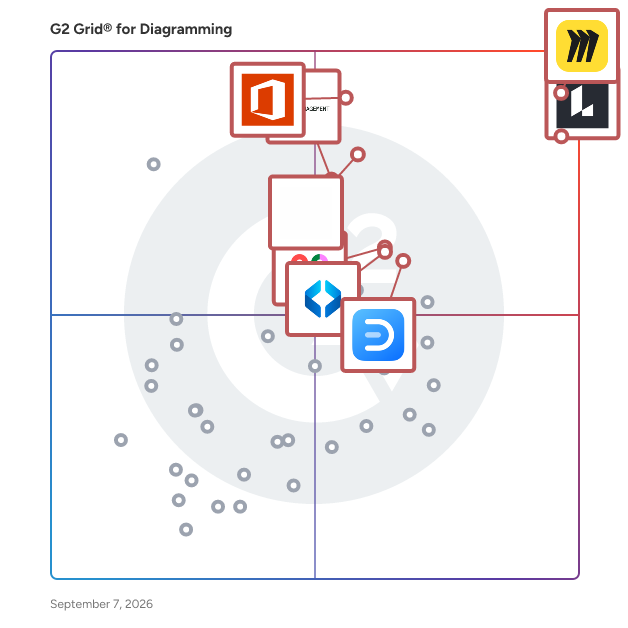
Highlighted products: Miro, Lucid Visual Collaboration Suite, Visio, FigJam, Cvent Event Marketing & Management, Mural, Wondershare EdrawMax, and SmartDraw.
Underlying data: [Grid® JSON](https://www.g2.com/categories/diagramming/grids.json?focus%5B%5D=miro&focus%5B%5D=lucid-software-inc-lucid-visual-collaboration-suite&focus%5B%5D=visio&focus%5B%5D=fig-jam&focus%5B%5D=cvent-event-marketing-management&focus%5B%5D=mural&focus%5B%5D=wondershare-edrawmax&focus%5B%5D=smartdraw)
Design crash diagrams more easily, accurately and efficiently
Lucidchart is an intelligent diagramming application that brings teams together to make better decisions and build the future. It is used by millions to create flowcharts, org charts, wireframes, UML diagrams, mind maps, and more. Lucidchart integrates with popular tools like Google Workspace, Microsoft Office, Atlassian, Slack, and Salesforce.
Connect G2 to Claude or ChatGPT for answers grounded in G2's trusted reviews, comparisons, and pricing from real user insights.
Machinations is the ultimate game design tool that empowers game designers with out-of-the-box predictions to anticipate and fix balancing issues. Taking a proactive approach to game design and using player progression predictions, Machinations allows studios to deliver better games faster, manage risks, and lift game KPIs. Trusted by world-class studios such as Ubisoft, Gameloft, Wargaming, and King, see what Machinations can do in action: -34% Production Time: Instrumental throughout game's lifecycle, Machinations brings clarity to teams while allowing for game design innovation through rapid, no-code iterations. -88% Guesswork: Using Machinations, studios get actionable insights to manage risks and avoid damage to their player base. +27% Player Retention: With Machinations, studios can easily identify & eliminate causes of player churn without introducing short- & long-term side effects. +3,25% Revenue/month: By introducing compounding incremental improvements with each update. Machinations fosters a community of 50k+ game developers across 300+ studios worldwide and is taught in 700+ academic institutions around the world.
Average Rating: 4.5/5.0
Total Reviews: 1
AI-generated summary from verified user reviews
"A Good Tool to Try Out Gameplay Loops!"
Rating: 4.5/5.0 stars
— Srivishnu S.
Macro Pack for Jira brings technical documentation and visual context directly into Jira work items. With 30+ macros for diagrams, API specifications, documents, code, structured data, and multimedia, teams can display the information behind their work without switching tools, downloading attachments, or installing separate apps for every format. Jira work items often contain more than a description and comments. Developers need architecture diagrams and API specifications. Project managers need spreadsheets and reports. Designers need prototypes and visual references. Macro Pack makes this supporting content accessible directly in Jira, where teams discuss, review, and manage their work. Display 30+ content formats inside Jira: - Diagrams and visualizations: Render Mermaid, PlantUML, BPMN, draw.io, Excalidraw, WaveDrom, and other technical diagrams. - API and developer documentation: Display Swagger/OpenAPI, AsyncAPI, GraphQL, Markdown, AsciiDoc, HTML, and source code with syntax highlighting. - Documents and structured data: Preview PDF, Word, CSV, Excel, and JSON files, including readable tables and expandable data trees. - Media and interactive content: Embed images, video, audio, 3D models, and HTML content directly in Jira work items. Bring content from the tools you already use Connect to GitHub, GitLab, and Bitbucket repositories, or use Jira attachments, URLs, and raw text as content sources. Render files and technical resources without manually copying their contents into Jira descriptions. Keep technical context connected to your work Macro Pack adds a dedicated tab to Jira work items, making diagrams, documentation, and files available alongside the discussion. Open content in fullscreen, edit supported resources, and reuse shared materials across multiple work items. Built for development, IT, and cross-functional teams Whether you're reviewing API changes, documenting software architecture, handling service requests, analyzing project data, or collaborating on designs, Macro Pack helps turn Jira work items into a more complete source of information. Instead of managing multiple single-purpose apps for diagrams, code, documents, and data, teams can bring their technical context together with one flexible Jira macro toolkit.
The All-New All-In-One Workspace for Modern Teams Embracing the concept of a unified workspace, Matilda brings a powerful suite of best-in-class apps together in one place, allowing teams across the globe to connect, create, coordinate, and delight their customers effortlessly. With its mission to simplify technology, Matilda empowers organisations to do more with less, making it an essential tool for startups to Fortune 500 companies alike. Key Features: -Powerful Apps Included: Matilda comes packed with a suite of powerful applications including Docs, Projects, Tables, Chat, Customers, and Copilot, ensuring that teams have all the tools they need to succeed. - Create with Ease: With Docs, teams can co-edit in real time, making document creation and coordination seamless. This feature aims to replace Google Docs, Notion, and Coda, by providing a more integrated and efficient experience. - Streamlined Project Management: Matilda's Projects feature allows for effortless management and tracking of every aspect of your projects. With capabilities like auto-scheduling, it's designed to replace tools like Jira, Trello, and Asana. - Advanced Data Management: Although Tables are coming soon, they promise to redefine data handling by syncing data from hundreds of sources or creating new collections, aiming to replace tools like Airtable, Notion, and Segment. - Seamless Communication: Chat brings all team communication into one place, integrated across projects, tasks, and docs, providing an alternative to Slack and MS Teams. - Customer Relationship Management: The soon-to-be-released Customers feature will allow teams to effortlessly track leads and manage customer interactions in one streamlined interface, aiming to replace Salesforce and Hubspot. - AI-Powered Assistance: Copilot offers custom AI assistants to help automate and streamline workflows, aiming to replace AI tools like ChatGPT and Google Bard. Conclusion: Matilda Workspace stands out as an all-encompassing solution that not only promises to streamline and simplify the way teams work but also embraces the future with its AI-powered capabilities and commitment to sustainability. Whether you’re managing projects, coordinating with your team, handling customer relationships, or leveraging AI for automation, Matilda Workspace provides an intuitive, powerful, and adaptable platform for every kind of team to thrive. Try Matilda today and experience the future of work, designed to help you deliver projects on time, every time.
Average Rating: 4.7/5.0
Total Reviews: 14
AI-generated summary from verified user reviews
"Invaluable support for my projects"
Rating: 5.0/5.0 stars
— Anna K.
Rating: 5.0/5.0 stars
— Annabel K.
Modeldraw is a comprehensive diagramming solution that's completely free for teams, offering a full suite of tools for professional communication. Create specialized diagrams for software development, business planning, and Agile workflows, including UML diagrams, system architecture maps, flowcharts, mind maps, and user story maps. With powerful real-time collaboration and an intuitive interface, Modeldraw allows unlimited team members to work together with no credit card required.
Powerful ASCII art editor designed for the Mac
Nevron Open Vision for .NET is a suite of advanced UI components that helps you develop feature-rich Web (Blazor WebAssembly) and Desktop (WinForms, WPF, Xamarin.Mac) applications from a single code base. The suite includes advanced components for all major User Interface categories - Chart, Diagram, Grid, Rich Text Editor, Scheduler, and a complete set of 70+ Widgets (Ribbon, Dockable Toolbars, Layout Panels, Buttons, CheckBox, TextBox etc). The main features of Nevron Open Vision for .NET are: The only suite of components that works in Blazor WebAssembly, WinForms, WPF, and Xamarin.Mac projects from a single code base. Provides your users with identical experience in Web and Desktop (Windows and macOS) environments. Includes a complete set of User Interface components: 70+ Widgets, Chart, Diagram, Grid, Rich Text Editor, Scheduler, Gauge, Barcode etc. All components are based on an extensible Document Object Model (DOM), with support for styling, events, serialization, history, and others. All components in the suite can be integrated into each other - for example, you can embed a Chart inside a Diagram or a Rich Text Document. All components are vector-based, printable, hi-res (4K monitor) ready, and best of all - hardware accelerated where possible.
Average Rating: 3.5/5.0
Total Reviews: 1
PRD Chart is an AI-powered web app that converts Product Requirements Documents into clear visual diagrams. Paste a PRD or upload a .docx file, and the tool instantly generates editable Mermaid sequence diagrams, flowcharts, and user journey maps. Users can refine the output in a built-in Monaco code editor, switch between six color themes, and export to PNG. It runs on a credit-based system with a generous free tier, making it ideal for PMs, designers, and developers who need to communicate product behavior fast.
Querychart is a free web application enabling users to effortlessly generate flowcharts using data, eliminating the need for manual drawing. With a user experience akin to Excel, users input data directly into a spreadsheet to create charts. This streamlined process not only enhances pace but also ensures consistency in visualizations.
Rarchy offers a suite of website planning tools, including visual sitemaps and user flows, designed for agencies and teams. The core product is our free visual sitemap editor, which allows you to create a sitemap from scratch or import your existing website pages via our visual sitemap generator. You're then able to view your website in five different visual formats, use the drag-and-drop interface to make changes, and auto-capture screenshots of your current page designs. Your sitemap can be exported to XML (ready to upload to search engines), CSV, or PDF format. Rarchy is ideal for teams, allowing you to collaborate, revise, and communicate changes to your website in one place.
