Best Construction Scheduling Software - Page 11

How Many Construction Scheduling Software Products Does G2 Track?

Total Products under this Category: 198

Category Stats (Nov 2026)

  • Average Rating: 4.39/5 (↓0.01 vs Oct 2026) The average rating of products in this category, based on all submitted ratings
  • Top Trending Product: UDA ConstructionOnline (+1.03%) - Among all products in this category, UDA ConstructionOnline recorded the largest rating increase compared to last month

Last updated: November 17, 2026

How Does G2 Rank Construction Scheduling Software Products?

Why You Can Trust G2's Software Rankings:

  • 30 Analysts and Data Experts
  • 63,400+ Authentic Reviews
  • 198+ Products
  • Unbiased Rankings

G2's software rankings are built on verified user reviews, rigorous moderation, and a consistent research methodology maintained by a team of analysts and data experts. Each product is measured using the same transparent criteria, with no paid placement or vendor influence. While reviews reflect real user experiences, which can be subjective, they offer valuable insight into how software performs in the hands of professionals. Together, these inputs power the G2 Score, a standardized way to compare tools within every category.

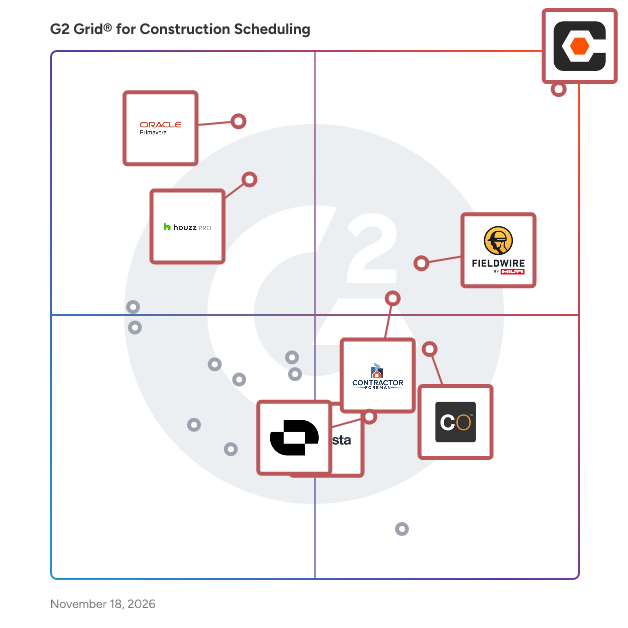
G2 Grid® for Construction Scheduling Software

G2 Grid® for Construction Scheduling Software plotting products by satisfaction and market presence

Highlighted products: Procore, Fieldwire by Hilti, Oracle Primavera, Contractor Foreman, Houzz Pro, UDA ConstructionOnline, Asta, and Outbuild.

Underlying data: [Grid® JSON](https://www.g2.com/categories/construction-scheduling/grids.json?focus%5B%5D=procore&focus%5B%5D=fieldwire-by-hilti&focus%5B%5D=oracle-primavera&focus%5B%5D=contractor-foreman&focus%5B%5D=houzz-pro&focus%5B%5D=uda-constructiononline&focus%5B%5D=eleco-asta&focus%5B%5D=outbuild)

QuickBooks Time

QuickBooks Time (formerly TSheets) is an employee time tracking and scheduling solution that saves business owners time and money. Get rid of that old punch clock or spreadsheet and simplify payroll, invoicing, and job costing. Whether they’re in the office or on the road, your team can track time from any location—using a smartphone, tablet, desktop or laptop—in real time. Plus, QuickBooks Time is the only time tracking system embedded inside QuickBooks. You can review and approve employee time cards to run payroll, do job costing, or create invoices—without ever leaving QuickBooks! Accurate time for client invoicing and painless payroll With accurate employee hours from QuickBooks Time, you're always ready to run payroll—no need to enter time data manually! Track billable time against customers, projects or jobs, classes, and service items. Then use those accurate hours for better job costing estimates and faster invoicing. GPS time tracking and timesheet compliance QuickBooks Time is more than just a time tracker. It keeps a record of each time a worker clocks in, changes jobs, and clocks out. And as long as workers are on the clock, managers and admins can see where they’re working and who’s closest to the next job site. The time card audit log can help your business resolve labor disputes and comply with labor laws. Manual time clocks and paper timesheets can’t do that. Revolutionary employee scheduling software Recording your employees’ schedules on spreadsheets and whiteboards is costing more than you think. Build and share employee schedules faster than ever, using the QuickBooks Time mobile app or web dashboard. Managers can assign workers to jobs or shifts to keep the workforce in sync. And the best part: It's QuickBooks Time, so time tracking and scheduling work in perfect harmony. Set alerts to notify workers when you post a new shift, or they forget to clock in or out. “This is an amazing solution. I'd be paying the same amount for scheduling alone and very limited time tracking if I chose any other product.” —Andrew, owner of Terra Dura Landscaping. Mobile time tracking with GPS and geofencing Get ready for increased accountability and transparency with QuickBooks Time Geofencing. When an employee using the QuickBooks Time mobile app enters or leaves a job site, the app will notify them to clock in or out. QuickBooks Time captures clock-in and clock-out times when the employee enters and exits the pre-set geofence. That means fewer timesheet edits and more accurate payroll. Real-time project tracking Take the guesswork out of project estimates with QuickBooks Time Projects. Projects is real-time labor tracking, built for project managers. Estimate projects upfront, then track and adjust as you go. See estimated versus actual hours worked to know where and how workers spend time on each project. Keep an eye on the status of each of your projects. Customer support that lives up to the hype Get free, unlimited support by phone or online chat. QuickBooks Time has the best customer support in the industry—not to mention, lightning-fast response times. We’ll answer your questions, help you set up your account, and more. “I was skeptical of the hype about the customer service at TSheets. But I am happy to confirm that the hype is legitimate and earned.” —TeamWow on Apps.com

Average Rating: 4.5/5.0

Total Reviews: 1,424

Who Is the Company Behind QuickBooks Time?

  • Seller: Intuit
  • Year Founded: 1983
  • HQ Location: Mountain View, California
  • LinkedIn® Page: www.linkedin.com
    15,963 employees on LinkedIn®
  • Ownership: VIE:INTU
  • Phone: -6585

Who Uses This Product?

  • Who Uses This: Owner, Office Manager
  • Top Industries: Construction, Accounting
  • Company Size: 75% Small, 18% Medium

What Do G2 Reviewers Say About QuickBooks Time?

AI-generated summary from verified user reviews

Pros
  • Users value the user-friendly interface of QuickBooks Time, making hour tracking and management efficient and straightforward.
  • Users appreciate the time-saving efficiency of QuickBooks Time, simplifying time tracking and payroll processes remarkably.
  • Users appreciate the user-friendly time tracking of QuickBooks Time, making tracking hours efficient and straightforward.
  • Users enjoy the easy setup of QuickBooks Time, benefiting from seamless integration with QuickBooks Online.
  • Users appreciate the intuitive design of QuickBooks Time, making navigation and time management effortless for all.
Cons
  • Users report frequent clocking issues with QuickBooks Time, impacting time tracking and accrual accuracy significantly.
  • Users find limited customization options frustrating, as they struggle to tailor QuickBooks Time to their specific needs.
  • Users find the limited features of QuickBooks Time restrict their ability to efficiently clock in daily.
  • Users often face inaccurate PTO calculations and compatibility issues, impacting the management of time tracking effectively.
  • Users find time management issues with QuickBooks Time due to manual hour tallying for payroll processes.

What Are Recent G2 Reviews of QuickBooks Time?

What Are G2 Users Discussing About QuickBooks Time?

Rea

Who Is the Company Behind Rea?

  • Seller: Réa
  • Year Founded: 2018
  • HQ Location: La Rochelle, FR
  • LinkedIn® Page: www.linkedin.com
    5 employees on LinkedIn®

RealTraker

The most comprehensive solution in the market. From Pre-bid, bid to project, and field management. Efficiently manage construction projects, personnel, processes, performance, paperwork, and profit - from the cloud with unlimited users per account. Are You Ready To Complete ALL Of Your Projects On Time And On Budget?

Who Is the Company Behind RealTraker?

AI can help you find the answers. G2 helps you trust them.

Connect G2 to Claude or ChatGPT for answers grounded in G2's trusted reviews, comparisons, and pricing from real user insights.

How it works

RedSky

RedSky develops, hosts, and supports fully integrated, construction-specific ERP, Supply Chain Management, and Project Information Management solutions. Scalable and modular, our platform delivers real-time visibility, allowing customers to control change, eliminate risk, and improve daily operations. Find out more about RedSky construction solutions https://www.redskyit.com/

Who Is the Company Behind RedSky?

  • Seller: RedSky IT
  • Year Founded: 1975
  • HQ Location: Hemel Hempstead, GB
  • LinkedIn® Page: www.linkedin.com
    75 employees on LinkedIn®
  • Phone: 0203 002 8600

RedTeam Go

RedTeam Go is a comprehensive construction management solution designed to assist every member of a construction team in bidding, building, and tracking projects effectively. This platform enhances operational efficiency, visibility, and accountability by seamlessly integrating back-office functions with field operations. By providing a centralized hub for project-related information, RedTeam Go empowers users to manage their tasks more effectively, ensuring that all team members are aligned and informed throughout the project lifecycle. Targeted primarily at general contractors, RedTeam Go caters to a diverse audience within the construction industry, including project managers, subcontractors, and field workers. Its user-friendly interface allows team members to access vital project information from any web-connected device—be it a mobile phone, tablet, laptop, or desktop. This flexibility ensures that all stakeholders can stay updated and engaged, regardless of their location or the device they prefer to use, which is crucial in the fast-paced construction environment. Key features of RedTeam Go include robust project management tools that facilitate bidding, scheduling, and tracking of project progress. The platform offers real-time updates and notifications, enabling teams to respond quickly to changes or challenges as they arise. Additionally, RedTeam Go integrates financial management capabilities, allowing users to manage budgets, track expenses, and generate reports with ease. This integration helps in maintaining financial accountability and transparency throughout the project. Another significant benefit of RedTeam Go is its emphasis on collaboration. The solution fosters communication among team members, ensuring that everyone is on the same page and that critical information is readily available. This collaborative approach not only reduces the likelihood of misunderstandings but also enhances overall project efficiency. By streamlining processes and providing a clear overview of project status, RedTeam Go stands out as a valuable tool for construction teams looking to improve their operational workflows and achieve successful project outcomes.

Who Is the Company Behind RedTeam Go?

Who Uses This Product?

  • Top Industries: Construction
  • Company Size: 51% Small, 5% Medium

What Do G2 Reviewers Say About RedTeam Go?

AI-generated summary from verified user reviews

Pros
  • Users love the comprehensive features of RedTeam Go, enhancing project management and team communication effortlessly.
  • Users love the responsive customer support from RedTeam Go, appreciating the direct access to their advocates for assistance.
  • Users appreciate the ease of use of RedTeam Go, allowing for hassle-free project management and quick assistance.
  • Users enjoy the easy access of RedTeam Go, facilitating smooth project management and team communication.
  • Users appreciate the efficiency improvement with RedTeam Go, making project management hassle-free and streamlined.
Cons
  • Users often find the missing features in RedTeam Go inconvenient, particularly regarding cost codes and Precon functionality.
  • Users find significant access limitations in RedTeam Go, leading to frustration and navigation difficulties in projects.
  • Users find the inefficiency of RedTeam Go frustrating, due to extra clicks, connection issues, and limited reporting options.
  • Users find manual data entry cumbersome, requiring excessive clicks and leading to time wasted on repeated uploads.
  • Users find the cumbersome processes of RedTeam Go frustrating due to excessive clicks and lengthy workarounds.

Remato

All-in-one construction management software. Built specifically for small and medium contractors. 1. Project management (tasks, budgets, timelines, blueprints, documentation, site-gallery) 2. Staff management & work tracking (work schedules, time tracking, process reporting, GPS attendance control, site-photo capturing, live overview) 3. Asset management (tools & equipment, materials, maintenance & remote checks, etc.) Easy to use, secure, and works on any device (phones, tablets, computers).

Who Is the Company Behind Remato?

  • Seller: Remato
  • Year Founded: 2018
  • HQ Location: Tartu, EE
  • LinkedIn® Page: www.linkedin.com
    24 employees on LinkedIn®

Reo - Construction Site Diary

Reo is a site diary app built for Australian builders. Supervisors log the day's labour, deliveries, concrete pours, inspections, delays and weather in a couple of minutes, from the web, iPhone, iPad or Android. Defects, drawings, photos, inductions and a run sheet for what's happening on site sit in the same app, so the whole job's record lives in one place. The Builder plan adds a planner with programme import (MS Project, P6, Excel), procurement, variations and AI that writes the daily briefing and reads concrete dockets. Pricing is flat per company with no per-user fees, and every plan starts with a 30-day free trial.

Who Is the Company Behind Reo - Construction Site Diary?

Retti

Scheduling and logistics software for concrete contractors.

Who Is the Company Behind Retti?

  • Seller: Retti
  • Year Founded: 2025
  • HQ Location: Colorado Springs, US
  • LinkedIn® Page: www.linkedin.com
    3 employees on LinkedIn®

Revit

Autodesk® Revit® software is built for Building Information Modeling (BIM), helping professionals design, build, and maintain higher-quality, more energy-efficient buildings. Using the information-rich models created with Autodesk Revit software, architects, engineers, and construction firms can collaborate to make more-informed decisions earlier in the design process to deliver projects more efficiently. Any design changes made in Revit models are automatically updated throughout the model, keeping designs and documentation coordinated and more reliable. Autodesk Revit includes features for architectural design, mechanical, electrical, and plumbing, structural engineering, and construction, providing a comprehensive solution for the entire building project team. Revit pricing starts at $290.00 per month, per user. Revit does offer a free trial. Flexible subscription options available. Talk to sales at: Call: (818) 639-7755

Average Rating: 4.6/5.0

Total Reviews: 1,218

Who Is the Company Behind Revit?

  • Seller: Autodesk
  • Company Website:
  • Year Founded: 1982
  • HQ Location: San Francisco
  • LinkedIn® Page: www.linkedin.com
    15,757 employees on LinkedIn®
  • Ownership: NASDAQ:ADSK

Who Uses This Product?

  • Who Uses This: BIM Manager, Architect
  • Top Industries: Architecture & Planning, Construction
  • Company Size: 43% Medium, 36% Small

What Do G2 Reviewers Say About Revit?

AI-generated summary from verified user reviews

Pros
  • Users praise Revit for its real-time collaboration, enhancing teamwork and minimizing coordination errors in projects.
  • Users highly value Revit's 3D modeling capabilities, enhancing design visualization and improving coordination across various engineering disciplines.
  • Users find Revit to be very user-friendly, making drafting, modeling, and coordination tasks intuitive and effortless.
  • Users value Revit for its effective Building Information Modeling, enhancing project planning and sustainable design with centralized data management.
  • Users appreciate Revit's effective building information modeling, enhancing project planning, design, and sustainability management.
Cons
  • Users express concerns about Revit's compatibility issues, hindering smooth workflow and collaboration on complex projects.
  • Users experience significant performance issues with Revit, particularly when handling large models, slowing down productivity.
  • Users often experience slow performance with Revit, particularly with complex and large models that demand more resources.
  • Users express frustration over Revit's high subscription costs, creating added pressure for freelancers in MEP workflows.
  • Users find Revit has high hardware requirements, leading to instability and slow performance with large models.

What Are Recent G2 Reviews of Revit?

What Are G2 Users Discussing About Revit?

RIB Candy

RIB Candy is the ultimate construction project management software for the built environment. From on-screen quantity take-off, estimating and project planning through to final certificate, RIB Candy targets the unique requirements of construction and engineering contractors; providing an interactive link between the bill of quantity (BOQ), estimate and program in one exceptional project management solution. This is achieved by combining powerful features within a single user interface that eliminates departmental silos while aligning time and money to deliver a wealth of forecast information.

Average Rating: 4.0/5.0

Total Reviews: 2

Who Is the Company Behind RIB Candy?

  • Seller: RIB Software
  • Year Founded: 1961
  • HQ Location: Stuttgart, DE
  • LinkedIn® Page: www.linkedin.com
    1,426 employees on LinkedIn®
  • Ownership: ETR:RIB

Who Uses This Product?

  • Company Size: 33% Large, 33% Medium

What Are Recent G2 Reviews of RIB Candy?

Salesforce Sales Cloud

Accelerate revenue from pipeline to paycheck with Salesforce Sales Cloud - your complete growth platform that brings together the power of humans with agents at every step of the sales cycle. Boost productivity with automation and drive revenue with an integrated growth platform. The future of sales is here, and with Agentforce, we’re helping teams unlock their full potential - making them limitless. Build Pipeline Faster with AI Agents: Sales Agents Sales AI Sales Engagement Sales Programs Buyer Engagement Accelerate Productivity with Automation: Sales Data Sales Analytics Sales Team Productivity Revenue Intelligence Drive Revenue on an Integrated Platform: Revenue Lifecycle Management and CPQ Sales Performance Management Partner Relationship Management

Average Rating: 4.4/5.0

Total Reviews: 26,320

G2 Deal: Save 25% on your first annual subscription

Whether you’re ready to purchase today or prefer to try Essentials out for 14 days for free, you will receive 25% discount when you purchase via G2. Prior to 25% discount, plans start at $25/per user per month.

Price: ~~Starting at $25/user/month~~ → Starting at $18.75/user/month

View this exclusive G2 deal

Who Is the Company Behind Salesforce Sales Cloud?

  • Seller: Salesforce
  • Company Website:
  • Year Founded: 1999
  • HQ Location: San Francisco, CA
  • LinkedIn® Page: www.linkedin.com
    89,711 employees on LinkedIn®
  • Ownership: NYSE:CRM

Who Uses This Product?

  • Who Uses This: Account Executive, Account Manager
  • Top Industries: Computer Software, Information Technology and Services
  • Company Size: 45% Medium, 34% Large

What Do G2 Reviewers Say About Salesforce Sales Cloud?

AI-generated summary from verified user reviews

Pros
  • Users find it intuitive and easy to navigate, helping sales teams handle daily tasks with less effort.
  • Users value time savings and efficiency, reducing repetitive work and freeing sales teams to focus on selling and customers.
  • Users value the flexible customization that lets them tailor workflows, fields, and sales processes to fit their business needs.
  • Users value the smooth integrations with Salesforce products, third-party apps, and business systems, connecting tools and data across platforms.
  • Users value its broad, ready-to-use CRM features, which cover essential sales needs and support business operations.
Cons
  • Users find the pricing high, with licensing, add-ons, and scaling increasing costs, especially for smaller teams.
  • Users find the learning curve steep, especially for new and less-technical users.
  • Users find the interface cluttered, clunky, and often unintuitive to navigate.
  • Users say initial setup and implementation can be complex and time-consuming, sometimes requiring outside help.
  • Users find the platform complex and overwhelming, especially when learning or configuring workflows.

What Are Recent G2 Reviews of Salesforce Sales Cloud?

What Are G2 Users Discussing About Salesforce Sales Cloud?

SAM

Who Is the Company Behind SAM?

  • Seller: Syniotec
  • Year Founded: 2018
  • HQ Location: Bremen, DE
  • LinkedIn® Page: www.linkedin.com
    58 employees on LinkedIn®

Schedule Cracker

Advanced Schedule Analytics Tool. "The Most Comprehensive Schedule Analytics tool on the Market" . Over 300 Metrics Trend Analysis One Click exports to Excel S curves and much more!

Who Is the Company Behind Schedule Cracker?

ScheduleIQ

ScheduleIQ is an evidence-based schedule intelligence platform for capital projects. Upload P6, Microsoft Project, or CSV schedules and receive a structured assessment of schedule quality, execution readiness, industry risk, and forecast reliability. ScheduleIQ applies deterministic checks informed by DCMA 14-point schedule quality principles, GAO schedule reliability guidance, and AACE forensic schedule analysis concepts. It generates interactive dashboards and exportable PDF, DOCX, and XLSX report packages with traceable metrics, exception registers, corrective actions, and evidence metadata for project controls teams, schedulers, contractors, owners, and EPCM organizations.

Who Is the Company Behind ScheduleIQ?

Neya Kumaresan
NK
Researched and written by Neya Kumaresan
Updated October 3, 2024