Best AI Note-Taking Software - Page 23

How Many AI Note-Taking Software Products Does G2 Track?

Total Products under this Category: 528

Category Stats (Sep 2026)

  • Average Rating: 4.49/5 (↓0.06 vs Aug 2026) The average rating of products in this category, based on all submitted ratings
  • Top Trending Product: Ask Your PDF (+5.56%) - Among all products in this category, Ask Your PDF recorded the largest rating increase compared to last month

Last updated: September 01, 2026

How Does G2 Rank AI Note-Taking Software Products?

Why You Can Trust G2's Software Rankings:

  • 30 Analysts and Data Experts
  • 164,900+ Authentic Reviews
  • 528+ Products
  • Unbiased Rankings

G2's software rankings are built on verified user reviews, rigorous moderation, and a consistent research methodology maintained by a team of analysts and data experts. Each product is measured using the same transparent criteria, with no paid placement or vendor influence. While reviews reflect real user experiences, which can be subjective, they offer valuable insight into how software performs in the hands of professionals. Together, these inputs power the G2 Score, a standardized way to compare tools within every category.

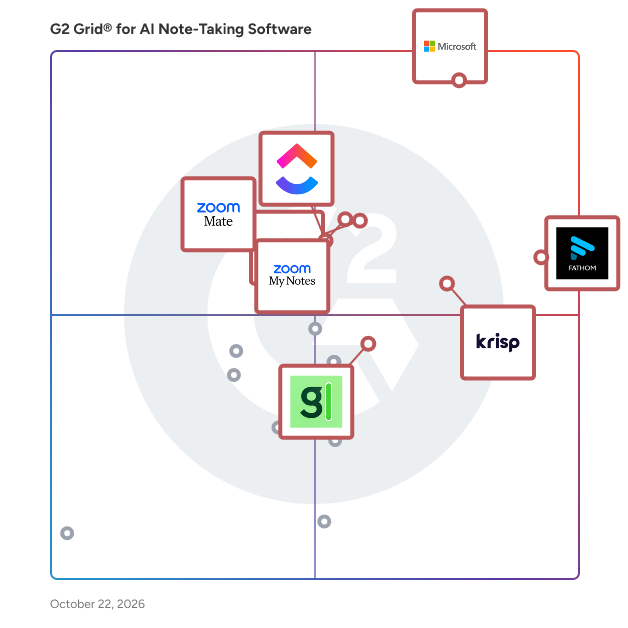
G2 Grid® for AI Note-Taking Software

G2 Grid® for AI Note-Taking Software plotting products by satisfaction and market presence

Highlighted products: Microsoft Teams, Zoom Workplace, Fathom, Krisp, Slack, ClickUp, ZoomMate, and Otter.ai.

Underlying data: [Grid® JSON](https://www.g2.com/categories/ai-note-taking-software/grids.json?focus%5B%5D=microsoft-teams&focus%5B%5D=zoom-workplace&focus%5B%5D=fathom-video&focus%5B%5D=krisp&focus%5B%5D=slack&focus%5B%5D=clickup&focus%5B%5D=zoommate&focus%5B%5D=otter-ai)

OMNI Meeting

OMNI Meeting is an advanced AI-powered platform designed to transform meetings into actionable intelligence. It offers real-time transcription in over 50 languages, ensuring every word is accurately captured without delays. The platform deploys specialized AI agents—such as Sales, Legal, HR, and Security—to provide simultaneous multi-perspective analysis during meetings. Additionally, OMNI Meeting features emotion and sentiment detection, reading between the lines to identify emotional tones, confidence levels, and engagement patterns in real-time. Its universal video platform integration allows seamless operation with Zoom, Google Meet, Microsoft Teams, Webex, and any browser-based video call. With military-grade security, including AES-256 encryption and GDPR-compliant data residency, OMNI Meeting ensures data protection. The platform also offers smart alerts and opportunity detection, automatically identifying key moments, sales opportunities, and critical decision points. Instant reports and export capabilities enable users to generate comprehensive meeting summaries and action items, exportable in various formats. By providing these features, OMNI Meeting enhances decision-making, improves team collaboration, and ensures no critical insight is missed during meetings.

Who Is the Company Behind OMNI Meeting?

Oneaudio

OneAudio is an innovative platform designed to help users capture, transcribe, and organize their audio recordings into concise, actionable notes. By leveraging advanced AI technology, OneAudio simplifies the process of converting spoken ideas into written summaries, making it an essential tool for professionals, students, and anyone looking to streamline their note-taking process. Key Features and Functionality: - Audio Recording and Upload: Users can record audio directly within the platform or upload existing audio files for processing. - AI-Powered Transcription and Summarization: Utilizing the OpenAI GPT 4.1 model, OneAudio transcribes audio recordings and generates concise summaries, capturing the essence of the content. - Note Management: The platform allows users to save, bookmark, and organize their audio notes efficiently. - Flexible Recording Durations: Depending on the subscription plan, users can record audio notes ranging from 5 to 40 minutes per session. - Downloadable Content: Users have the option to download their original audio files for offline access. - AI-Driven Summarization Refinement: The platform offers features to rewrite summaries using AI, enhancing clarity and coherence. Primary Value and User Solutions: OneAudio addresses the common challenge of efficiently capturing and organizing spoken information. By transforming audio recordings into structured notes, it enables users to focus on their ideas without the distraction of manual note-taking. This is particularly beneficial for professionals conducting meetings, students attending lectures, or anyone who prefers verbal brainstorming sessions. The platform's AI-driven summaries ensure that key points are highlighted, making information retrieval quick and effective. With flexible subscription plans, including a free tier for beginners and premium options for advanced users, OneAudio caters to a wide range of needs, ensuring that every user can find a plan that suits their requirements.

Who Is the Company Behind Oneaudio?

OneScribe

OneScribe is an AI-powered conversation intelligence platform designed to transform spoken words into actionable insights. It offers a suite of tools that capture, transcribe, analyze, and organize audio from various sources, including meetings, calls, lectures, and podcasts. By providing real-time transcription, sentiment analysis, and AI-driven summaries, OneScribe enables professionals to focus on their conversations without the distraction of manual note-taking. Supporting over 99 languages and multiple audio formats, it ensures comprehensive coverage for diverse user needs. Key Features and Functionality: - OneScribe: Transcribes audio or video files in 19+ formats, detects speakers by name, and offers full analysis with sentiment, action items, and summaries. - OnePilot: Automatically joins meetings on platforms like Zoom, Google Meet, Teams, Webex, and Slack Huddles, providing real-time transcription and AI summaries with action items and key decisions. - OneLive: Delivers real-time transcription from any audio source, including calls, podcasts, lectures, and voice notes, with keyword tracking and comprehensive post-session analysis. - OneSearch: Offers AI-powered semantic search across all conversations, understanding context and providing speaker attribution on every result. - OneChat: Acts as an AI chat assistant for meeting intelligence, allowing users to interact with transcripts or recordings, receive context-aware answers with citations, and maintain chat history per conversation. Primary Value and User Solutions: OneScribe addresses the common challenge of capturing and utilizing insights from conversations. By automating transcription and analysis, it reduces the time professionals spend on manual note-taking and ensures that critical information is not lost. The platform's real-time capabilities and AI-driven insights enhance decision-making processes, improve meeting productivity, and facilitate better collaboration. With support for multiple languages and integration with various communication platforms, OneScribe provides a versatile solution for teams aiming to harness the full potential of their conversations.

Who Is the Company Behind OneScribe?

Online NotesPad

Online NotesPad is a free, browser-based note-taking application designed to provide users with a private, secure, and efficient platform for capturing and organizing their thoughts. With a focus on simplicity and user privacy, it allows individuals to create, edit, and manage notes directly within their web browser without the need for an account or data synchronization. All notes are stored locally on the user's device, ensuring complete control and confidentiality. Key Features and Functionality: - Markdown Support: Enables rich text formatting with support for headers, lists, code blocks, and more. - Private & Secure: Notes are stored locally in the browser, ensuring complete privacy with no data collection. - Lightning Fast: Features instant search and real-time auto-save to prevent data loss. - Mobile Ready: Accessible from any device, with seamless functionality on both desktop and mobile browsers. - Dark Mode: Offers a dark theme to reduce eye strain during extended use. - Educational Blog Section: Provides tips, tricks, and guides for enhanced note-taking practices. Primary Value and User Solutions: Online NotesPad addresses the need for a straightforward, secure, and efficient note-taking solution without the complexities of account creation or cloud storage. By storing notes locally, it ensures user data remains private and under the user's control. The platform's rich feature set, including Markdown support and real-time auto-save, enhances productivity and organization. Its mobile-friendly design allows users to access and manage their notes from any device, making it a versatile tool for personal and professional use.

Who Is the Company Behind Online NotesPad?

OrbitMeet

OrbitMeet is an AI-powered meeting co-pilot designed to enhance productivity by assisting users before, during, and after meetings. It offers real-time transcription, live note-taking, and speaker identification, ensuring comprehensive and accurate records of discussions. Post-meeting, OrbitMeet automatically generates summaries, action items, and follow-up notes, streamlining documentation and reducing administrative tasks. By automating these processes, OrbitMeet allows teams to focus on meaningful conversations, improving collaboration and efficiency. Key Features: - Real-Time Transcription: Captures conversations as they happen, providing accurate and immediate text records. - Live Note-Taking: Enables dynamic documentation during meetings, ensuring key points are recorded. - Speaker Identification: Distinguishes between different speakers, attributing statements accurately. - Instant Meeting Summaries: Generates concise overviews of discussions immediately after meetings. - Automated Action Item Generation: Identifies and lists tasks arising from meetings, facilitating follow-ups. - Post-Meeting Document Creation: Compiles comprehensive records, including summaries and action items. - Follow-Up Note Drafting: Assists in creating notes for subsequent communications. - Searchable Meeting History: Maintains an organized archive of past meetings for easy reference. Primary Value: OrbitMeet addresses the common challenge of manual note-taking and documentation during meetings. By automating these tasks, it reduces the risk of missing critical information and allows participants to engage more fully in discussions. This leads to more effective meetings, clearer communication, and enhanced team collaboration. OrbitMeet is particularly beneficial for remote and hybrid teams, ensuring that all members have access to accurate and timely meeting records, regardless of their location.

Who Is the Company Behind OrbitMeet?

Organizechatgpt

OrganizeChatGPT is a Chrome extension designed to enhance the ChatGPT user experience by allowing users to efficiently manage and categorize their conversations. This tool enables users to create customizable folders, assign colors, and add icons, facilitating quick access and easy referencing of chat histories. By organizing chats into distinct categories, users can streamline their workflow, save time, and boost productivity. Whether accessing ChatGPT from a personal computer or another device, OrganizeChatGPT ensures that your organized folders are available globally. Key Features: - Customizable Folders: Create folders to categorize chats by topic or project. - Color-Coding: Assign colors to folders for visual distinction and easy recognition. - Icon Assignment: Add logos or icons to folders for enhanced identification. - Global Accessibility: Access organized folders from any computer, ensuring consistency across devices. - Pin Conversations: Highlight important chats by pinning them within folders for quick access. - Bulk Management: Add multiple chats to a folder simultaneously, streamlining the organization process. - Contextual Menu: Utilize right-click options to edit, delete, or add chats to folders directly from the interface. Primary Value: OrganizeChatGPT addresses the challenge of managing numerous ChatGPT conversations by providing a structured and intuitive system for organizing chat histories. By enabling users to categorize, color-code, and pin important conversations, the extension enhances productivity and ensures that critical information is easily accessible. This organized approach reduces the time spent searching for past interactions and allows users to focus more on their tasks, thereby improving overall efficiency.

Who Is the Company Behind Organizechatgpt?

Orma

Orma is an innovative browser extension designed to significantly enhance the productivity of users engaging with AI tools like ChatGPT and Claude. By transforming your browser into a dynamic personal knowledge base, Orma enables users to capture, organize, and interact with web content more effectively, ensuring that AI-generated responses are tailored and contextually relevant. Key Features and Functionality: - Instant AI Enhancement: With a single click, integrate the content you've captured into large language models (LLMs) such as ChatGPT and Claude, allowing for more personalized and precise AI interactions. - Intelligent Content Capturing: Effortlessly convert visited web pages into digestible knowledge pieces. Orma processes and enriches the content, presenting it in a simplified manner that captures all essential information, surpassing traditional bookmarking methods. - Interactive Bookmarks: Engage in conversations with your saved content. Orma's advanced bookmarking system allows you to interact with your captured information as if consulting a knowledgeable friend. - One-Click Summaries and Notes: Generate well-structured study notes from extensive captured content with a single click, and export them as markdown files for easy access and sharing. - Efficient Search Functionality: Quickly locate specific information within your digital memory, even if exact keywords elude you, ensuring that your stored knowledge is always readily accessible. - Organized Workspaces: Naturally group related content into clutter-free workspaces, ideal for research, learning, and managing your digital information seamlessly. Primary Value and User Solutions: Orma addresses the challenge of managing and utilizing vast amounts of online information by providing a streamlined system for capturing, organizing, and interacting with web content. It empowers users to enhance their AI tool interactions, leading to more specific and relevant responses. By transforming the browser into a powerful personal knowledge base, Orma facilitates efficient learning, research, and digital organization, ultimately boosting productivity and ensuring that valuable information is always at your fingertips.

Who Is the Company Behind Orma?

PaperClip

PaperClip is a browser extension designed to help users efficiently track and recall details from AI research papers, machine learning blog posts, and related news articles. By enabling users to memorize and retrieve important findings seamlessly, PaperClip enhances the research experience for professionals and enthusiasts in the fields of machine learning, computer vision, and natural language processing. Key Features and Functionality: - Comprehensive Memorization: Capture and store information from AI research papers, ML blog posts, and news articles directly within your browser. - Effortless Retrieval: Quickly find and access saved information through a simple search interface, ensuring that important insights are always at your fingertips. - Local Data Storage: All data is saved and indexed locally on your machine, ensuring privacy and security without relying on external servers. - Offline Support: Access and search your saved information even without an internet connection, providing uninterrupted productivity. - Data Management: Easily reset or delete your saved data with a single click, giving you full control over your information. Primary Value and User Benefits: PaperClip addresses the challenge of managing and recalling vast amounts of information from AI research materials. By providing a tool that memorizes and organizes key details locally, it empowers users to efficiently navigate and utilize their research findings without compromising privacy. This streamlined approach enhances productivity and ensures that valuable insights are readily accessible whenever needed.

Who Is the Company Behind PaperClip?

Papersapp

Papers is an advanced reference management software designed to streamline the research process for students, academics, and professionals. It offers a comprehensive suite of tools to organize, discover, analyze, and collaborate on scholarly materials, enabling users to focus on their work without the hassle of managing numerous references. Key Features and Functionality: - Organize: Effortlessly import and manage reference materials from various sources, including desktops, databases, journals, and other reference managers. Papers provides intuitive collection management and metadata matching to keep your library organized. - Discover: Access a vast database of over 150 million articles powered by Dimensions. Utilize AI-powered recommendations and explore referenced research through article bibliographies to stay updated with the latest developments in your field. - Analyze: Leverage the AI Assistant to uncover connections within individual articles and across your library. The "Chat with a PDF" feature allows you to ask questions about your literature and receive contextual answers, enhancing comprehension and revealing insights you might have missed. - Connect: Collaborate in real-time with colleagues through shared libraries, perfect for remote teams, lab collaborations, or joint manuscript writing. Securely sync your entire library, including notes and annotations, across desktop, browser, and mobile devices. - Write: Utilize SmartCite to effortlessly cite and manage references within your documents. Access references from your library or through the built-in search engine, and dynamically generate bibliographies using over 10,000 citation styles. Primary Value and User Solutions: Papers addresses the common challenges researchers face in managing and accessing scholarly materials. By providing a centralized platform for organizing references, discovering new research, analyzing content with AI tools, and facilitating collaboration, Papers enhances productivity and efficiency. Its integration with AI technologies, such as the ChatGPT-5 model, ensures users have access to the latest advancements, enabling faster and more intuitive research workflows. In summary, Papers simplifies the research process by offering a robust, AI-enhanced reference management system that caters to the diverse needs of the academic and professional community.

Who Is the Company Behind Papersapp?

Papper

Papper is an innovative iOS application designed to seamlessly integrate handwritten notes with digital task management, enhancing organization and productivity. By leveraging advanced Optical Character Recognition (OCR) and GPT technologies, Papper transforms handwritten notes into digital to-do lists, allowing users to create, print, and scan checklists, and access a diverse range of pre-made lists on various subjects. Key Features and Functionality: - Handwritten Note Conversion: Utilizes sophisticated OCR and GPT technologies to convert handwritten notes into digital tasks. - Printable Checklists: Enables users to create and print personalized checklists for various tasks. - Progress Scanning: Allows scanning of handwritten marks on printed checklists to automatically update task progress within the app. - Pre-Made Checklists: Offers an extensive library of pre-made checklists covering topics like wellbeing, sports, health, psychology, and productivity. - Recurring Task Management: Features 'Checkers' for tracking recurring tasks with customizable grids to monitor habits over time. - Apple Reminders Integration: Seamlessly syncs with Apple Reminders for unified task management. - Notifications and Reminders: Provides customizable notifications to keep users on track with their tasks. Primary Value and User Solutions: Papper addresses the challenge of bridging traditional handwritten note-taking with modern digital task management. By converting handwritten notes into digital formats, it offers users a flexible and efficient way to manage tasks, track progress, and maintain productivity. The app's ability to sync handwritten updates with digital lists ensures that users can enjoy the tactile satisfaction of writing while benefiting from the convenience of digital organization. Additionally, the availability of pre-made checklists and integration with Apple Reminders enhances the user experience by providing ready-to-use resources and seamless synchronization across platforms.

Who Is the Company Behind Papper?

Pastok

Here’s the problem we noticed: the most important context in our lives doesn’t happen in meetings. It happens in hallway chats, random brainstorms, doctor visits, even dinner conversations. But most of that disappears. And even when it’s captured, it rarely comes back exactly when you need it. Knowledge workers still lose ~29% of their week just trying to recover information they already had. The dots never quite connect. Pastok is our attempt to fix that. It turns your Apple Watch and iPhone into ambient, proactive intelligence that remembers, surfaces patterns, and connects the dots for you.

Who Is the Company Behind Pastok?

Shalaka Joshi
SJ
Researched and written by Shalaka Joshi
Updated April 9, 2026