EverHealth Scribe
Who Is the Company Behind EverHealth Scribe?
- Seller: EverHealth Scribe
- HQ Location: N/A
-
LinkedIn® Page: www.linkedin.com
126 employees on LinkedIn®
Total Products under this Category: 527
Last updated: October 22, 2026
Why You Can Trust G2's Software Rankings:
G2's software rankings are built on verified user reviews, rigorous moderation, and a consistent research methodology maintained by a team of analysts and data experts. Each product is measured using the same transparent criteria, with no paid placement or vendor influence. While reviews reflect real user experiences, which can be subjective, they offer valuable insight into how software performs in the hands of professionals. Together, these inputs power the G2 Score, a standardized way to compare tools within every category.
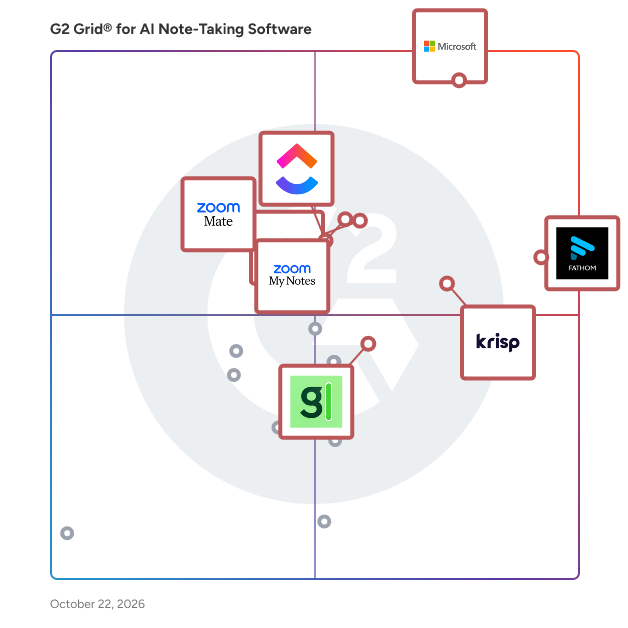
Highlighted products: Microsoft Teams, Fathom, Krisp, Slack, Zoom My Notes, ClickUp, Granola, and ZoomMate.
Underlying data: [Grid® JSON](https://www.g2.com/categories/ai-note-taking-software/grids.json?focus%5B%5D=microsoft-teams&focus%5B%5D=fathom-video&focus%5B%5D=krisp&focus%5B%5D=slack&focus%5B%5D=zoom-my-notes&focus%5B%5D=clickup&focus%5B%5D=granola&focus%5B%5D=zoommate)
Eyre.ai is a European-based, AI-powered video meeting platform designed to enhance online collaboration by prioritizing security, privacy, and productivity. Tailored for professionals and organizations that require strict confidentiality and compliance with European data protection standards, Eyre.ai offers a suite of intelligent features to streamline meeting processes and safeguard sensitive information. Key Features and Functionality: - End-to-End Encryption: Ensures all meetings, notes, and recordings are securely encrypted, granting access solely to authorized participants. - AI-Powered Summaries and Transcripts: Automatically generates concise meeting summaries and transcripts, reducing administrative tasks and enhancing post-meeting productivity. - Intelligent Teleprompter: Provides real-time, adaptive teleprompter support to assist users in delivering confident and structured presentations. - Automated Meeting Agendas: Utilizes advanced AI to create structured agendas based on meeting topics, facilitating focused and efficient discussions. - Multilingual Support: Offers real-time translation capabilities, accommodating international teams and fostering seamless communication across different languages. - Robust Permissions and Team Management: Allows precise control over access and permissions, ensuring that sensitive information is shared appropriately within teams. - Flexible Deployment Options: Provides choices between cloud-based solutions and on-premise deployments, catering to varying organizational needs and compliance requirements. Primary Value and User Solutions: Eyre.ai addresses the critical need for secure and efficient virtual meetings, particularly for organizations operating within regulated industries or those handling sensitive data. By integrating advanced AI functionalities with stringent security measures, Eyre.ai enables users to conduct meetings that are not only productive but also compliant with European data protection laws. This combination of features ensures that users can focus on meaningful collaboration without compromising on privacy or security.
FastTrackr AI is an intelligent assistant tailored for financial advisors and Registered Investment Advisors (RIAs), designed to automate and streamline time-consuming administrative tasks. By integrating seamlessly with existing tools, it enhances productivity and allows advisors to focus more on client engagement. Key Features and Functionality: - Meeting Assistant: Automatically generates pre-meeting preparations from email and CRM data, summarizes in-person and virtual meetings (including Zoom, Teams, and Google Meet), drafts contextual follow-up emails, identifies action items, and updates CRM systems with a single click. - Document Intelligence: Extracts data from various client documents such as brokerage statements, bank records, tax forms, and equity compensation documents. It organizes and summarizes this information for analysis and reporting, enriches insights with current market data, and exports to financial planning software, CRM systems, or Excel. - Client Onboarding: Automates data gathering from meetings and communications, allows clients to confirm pre-filled information, auto-populates CRM and financial planning software, and initiates account opening while delivering necessary disclosures and agreements. Primary Value and Solutions Provided: FastTrackr AI addresses the common challenges faced by financial advisors, such as the extensive time spent on meeting preparations, note-taking, follow-ups, manual data processing, CRM updates, and client onboarding. By automating these workflows, it significantly reduces the administrative burden, enabling advisors to dedicate more time to client relationships and strategic planning. The platform's seamless integration with existing tech stacks ensures a smooth transition without the need for system overhauls, thereby enhancing operational efficiency and client satisfaction.
Connect G2 to Claude or ChatGPT for answers grounded in G2's trusted reviews, comparisons, and pricing from real user insights.
FGenEds is an innovative platform designed to transform traditional lecture slides into concise, easy-to-understand cheat sheets. Recognizing that general education courses can often be tedious and overwhelming, FGenEds offers a solution that simplifies complex information, making studying more efficient and less time-consuming. Key Features and Functionality: - PDF Upload: Users can upload their lecture slides in PDF format directly to the platform. - Automated Summarization: The system processes the uploaded slides and generates concise cheat sheets, highlighting essential information. - User-Friendly Interface: Designed with simplicity in mind, the platform ensures a seamless experience for students of all technical backgrounds. Primary Value and User Benefits: FGenEds addresses the common challenge students face with monotonous and extensive general education lectures. By converting detailed slides into streamlined cheat sheets, it enables users to grasp key concepts quickly, enhancing comprehension and retention. This not only saves valuable study time but also improves academic performance by focusing on the most critical information.
Sales memory for field sales teams. Speak after the visit, fieldbrain drafts the CRM update. fieldbrain is a sales memory for field sales teams. After a customer visit, the rep simply speaks into their phone, tablet or headset, the way they would tell a colleague. fieldbrain recognises the contact, what was discussed, commitments, objections and next steps, prepares a structured CRM update with tasks and follow-ups, and the rep reviews and approves it. With every conversation, a memory per customer grows that belongs to the company, not the individual. Before the next contact, fieldbrain delivers a short briefing: what happened last time, what is open, what to watch for. Sales leaders see customers, activities, tasks, owners and forecast across the team, while reps keep their own operational view. No conversation is recorded. EU hosting, GDPR compliant, data processing agreement available. Mobile-optimised web app for smartphone, tablet and browser. Integrations: HubSpot, Salesforce, Pipedrive, SAP, Zoho, Microsoft Dynamics. Built for field sales teams in consumer goods, industry, retail, insurance, payments and services. Preise: Professional 79 EUR per user per month (790 EUR per year), Business 149 EUR per user per month (1,490 EUR per year).
Flashcard Generator is an AI-powered tool designed to streamline the creation of flashcards, enhancing learning efficiency for students, educators, and professionals. By uploading documents, images, audio, or videos, users can automatically generate accurate and customizable flashcards tailored to their study needs. Key Features and Functionality: - AI-Powered Flashcard Creation: Automatically generate flashcards from various content types, including PDFs, DOCs, images, audio, and videos. - Multimedia Support: Seamlessly upload and convert multiple formats, such as handwritten notes, into interactive flashcards. - Customization: Edit AI-generated flashcards to align with individual learning preferences and requirements. - User-Friendly Interface: Navigate through a simple and intuitive platform suitable for all users. - Collaboration and Sharing: Share custom flashcards with peers to facilitate collaborative learning and knowledge sharing. Primary Value and Problem Solved: Flashcard Generator addresses the challenge of time-consuming flashcard creation by leveraging AI to automate the process. This enables users to focus more on studying and less on preparation, thereby enhancing memory retention through effective spaced repetition and active learning techniques. The tool's support for various content formats and its collaborative features further enrich the learning experience, making it a versatile solution for diverse educational needs.
Flexi is an AI-powered vocabulary builder designed to enhance language learning through personalized flashcards and an effective spaced repetition system. Users can create custom flashcards with translations, definitions, and examples, all generated by AI at no cost. Premium subscribers have the added benefit of image generation for their flashcards. The app's spaced repetition system schedules reviews at increasing intervals, promoting long-term retention of vocabulary. Additionally, Flexi allows users to jot down new words and phrases on the go, which can later be converted into flashcards. To keep learners motivated, the app features daily streak tracking, text-to-speech for accurate pronunciation, and convenient widgets and shortcuts for quick access. Premium features include AI-generated word suggestions tailored to the user's level and interests, as well as the ability to import existing decks from platforms like Anki and Quizlet. By integrating AI-driven content creation with proven learning techniques, Flexi addresses the common challenges of vocabulary acquisition, making language learning more efficient and engaging.
The smart browser for work
Flow is an innovative web-based note-taking application designed to enhance productivity by adapting to users' actions, content, and environment. It offers a dynamic and engaging platform for capturing and interacting with notes, moving beyond traditional folder-based systems. Key Features and Functionality: - Dynamic Content Suggestions: Provides real-time content recommendations tailored to the context of your notes, transforming each note-taking session into an interactive experience. - Predictive Task Generation: Recognizes actionable items within your notes and proactively suggests adding them as tasks, streamlining your workflow and boosting productivity. - Integrated Learning Mode: Utilizes advanced techniques like spaced repetition and automated quiz creation to enhance memory retention, revolutionizing the way you study and recall information. Primary Value and User Solutions: Flow addresses the limitations of traditional note-taking apps by offering a more intuitive and responsive platform. It simplifies the process of capturing and organizing thoughts, reduces the time spent navigating through folders, and enhances learning and productivity through intelligent features. By adapting to individual user needs, Flow transforms note-taking into a more efficient and personalized experience.
Flownote is an AI-powered application designed to streamline the process of capturing and managing meeting notes. By leveraging advanced speech-to-text technology, Flownote transcribes meetings, conversations, and lectures with high accuracy, providing users with detailed summaries and actionable insights. This allows individuals and teams to focus on discussions without the distraction of manual note-taking, ensuring that no critical information is overlooked. Key Features and Functionality: - Real-Time Transcription: Flownote offers automatic transcription with speaker labels and timestamps, supporting multiple languages to cater to diverse user needs. - AI-Generated Summaries: The app delivers concise summaries highlighting key points, action items, and important dates, enabling quick review and follow-up. - Action Item Identification: Flownote automatically detects and organizes tasks and responsibilities discussed during meetings, facilitating efficient task management. - Seamless Export and Sharing: Users can export notes as PDF or text files and share them with team members or clients, promoting collaboration and transparency. - Background Recording: The application supports background recording on iOS devices, allowing users to capture audio while multitasking or when the device is locked. Primary Value and User Benefits: Flownote addresses the common challenge of effective note-taking during meetings by automating the transcription and summarization process. This automation enhances productivity by reducing the time spent on manual note-taking and minimizes the risk of missing important details. By providing accurate transcriptions and actionable summaries, Flownote empowers users to stay organized, improve communication, and focus on meaningful engagement during meetings.
Flowtica AI is an innovative suite of AI-powered tools designed to enhance productivity by seamlessly capturing, organizing, and managing information through voice and handwriting inputs. Its flagship products, Flowtica Newton and Flowtica Scribe, offer users intuitive solutions for note-taking, meeting summaries, and creative ideation, ensuring that valuable insights are never lost. Key Features and Functionality: - Flowtica Newton: - Instant Writing: A palm-sized e-ink pad with a color display that allows users to capture ideas anytime, anywhere. - Talk-to-Write: Converts spoken words into structured text using Flowtica AI, facilitating efficient note-taking. - Scribe & Save: Transforms handwritten notes into digital, searchable documents, enhancing accessibility and organization. - Accurate and Intuitive Note-Taking: Features speech-to-text with real-time annotation, organizing notes with tags and folders to create a comprehensive knowledge base. - Immersive Reading Experience: Provides a paper-like reading experience with a color display, complemented by an all-encompassing encyclopedia companion for voice or pen-annotated searches. - Flowtica Scribe: - Seamless Integration into Daily Life: Lightweight aluminum design suitable for everyday carry, equipped with dual pen tips for writing on both paper and digital surfaces. - Quick-Record Functionality: Allows users to press the pen for quick recording, double-tap for T-Mark to highlight key points, supporting various recording modes and translation for versatile use. - AI Workflow Management: Transcribes speech, organizes notes with tags and folders, and creates a searchable knowledge base for easy access. Primary Value and User Solutions: Flowtica AI addresses the common challenge of capturing and organizing spontaneous ideas, meeting notes, and creative thoughts efficiently. By integrating advanced AI capabilities with user-friendly hardware, Flowtica ensures that users can effortlessly document and retrieve important information, thereby enhancing productivity and reducing the cognitive load associated with manual note-taking and organization. Whether in professional settings, educational environments, or personal use, Flowtica AI empowers users to focus on their ideas while the technology handles the structuring and management of their notes.
Focu is a mindful productivity application designed exclusively for Mac users, integrating AI-powered guidance with structured work sessions to enhance daily efficiency. By combining features like AI-guided journaling, smart check-ins, and thoughtful reflections, Focu helps users cultivate a balanced and productive workday. Operating entirely offline, it ensures user data remains private and secure. Key Features and Functionality: - Focus Page: A dedicated workspace featuring a task list and an integrated Pomodoro timer, allowing users to input tasks manually or utilize AI to extract them from conversations. - Pomodoro Timer: Accessible directly from the menu bar, this timer supports focused 25-minute work sessions, complemented by short and long breaks to maintain productivity. - AI Task Extraction: Automatically identifies and extracts tasks from user conversations, seamlessly adding them to the task list for efficient management. - Morning Intention and Evening Reflection: Guided sessions that help users start their day with clear objectives and conclude with mindful reflections, fostering continuous personal and professional growth. - Smart Check-ins: Periodic prompts that allow users to track mood, energy levels, and work state, promoting self-awareness and timely adjustments to work habits. - Keyboard Shortcuts: Customizable shortcuts designed to enhance productivity by minimizing distractions and streamlining workflow. - Data Protection: Automatic local data backups with options for cloud integration, ensuring data security and easy recovery. - Customizable AI: Supports both local and cloud-based AI models, allowing users to choose their preferred AI processing method. - Dark & Light Mode: Offers automatic or manual selection between dark and light themes to suit user preferences. Primary Value and User Solutions: Focu addresses common productivity challenges by providing a structured yet flexible environment that encourages mindful work habits. Its AI-driven features assist users in setting clear intentions, maintaining focus, and reflecting on daily achievements, thereby reducing reliance on sheer willpower. By operating entirely offline, Focu ensures that all user data remains private and secure, offering peace of mind alongside enhanced productivity.
