AI-Generated Results
Finding matches…
Ideally is an on-demand insights and innovation platform designed to empower businesses of all sizes to rapidly test and develop ideas, concepts, and messages. By integrating customer feedback throughout the innovation process, Ideally transforms consumer testing into a dynamic, ongoing practice, enabling companies to take risks, validate ideas, and measure in-market products effectively.
Key Features and Functionality:
- Rapid Concept Testing: Quickly assess early-stage ideas to identify opportunities and possibilities.
- Customer-Centric Insights: Utilize purpose-built concept testing frameworks and a library of recommended questions to understand customer needs and attitudes.
- Benchmarking and Analysis: Compare concepts against internal or industry data to uncover distinctive attributes and develop comprehensive narratives.
- AI-Powered Reporting: Leverage researcher-built generative AI to analyze data, discover patterns, and reveal opportunities.
- User-Friendly Interface: Access a self-service platform with a beautiful, easy-to-use UI, supported by a team of research experts.
Primary Value and Problem Solved:
Ideally democratizes insights, allowing businesses to iterate and develop ideas effectively without the traditional constraints of time and cost. By integrating customer feedback early and often, it helps companies move from gut-feel decisions to data-driven strategies, ensuring that ideas are refined and validated throughout the development process. This approach reduces the risk associated with innovation, enabling businesses to bring bold products and services to market with confidence.
Not seeing what you're looking for?
Dive deeper into "Xata" on G2 AI

PageProof is a fully encrypted online proofing and creative approval platform that centralizes every file type, reviewer, workflow, and decision in one place. Teams can securely share and review any creative asset – Adobe Creative Cloud files, Microsoft Office documents, Keynote/Pages/Numbers, videos, audio, web banners, emails, websites, 3D, and more – without conversions or workarounds. Smart, built-in tools help deliver pixel-perfect work, including Smart Compare, ColorSep®, spell check, link scanning, automated barcode/QR detection, PDF comment import, checklists, and deep metadata analysis. PageProof Intelligence® adds AI-powered capabilities like Smart Tags for visual search and content-credential verification to trace asset origins and identify AI-generated content. PageProof integrates natively with Adobe Creative Cloud, Adobe Express, Canva, Figma, Final Cut Pro, Asana, monday.com, ClickUp, Airtable, Trello, Slack, Microsoft Teams, and more – keeping feedback and approvals connected across existing workflows. Enterprise features include triple-layer encryption, SSO, SCIM, ISO 27001 certification, digital signing, and data residency and sovereignty controls. PageProof also offers automated FinalFile™ delivery to downstream systems such as DAMs and project management platforms, ensuring approved assets flow seamlessly into the tools teams rely on.

AppSentinels is a complete life-cycle API security platform. AppSentinels continuously discovers all APIs and various attributes about the APIs to bring you full visibility of all your API assets. AppSentinels use cases are,
- Discover and Catalogue All APIs
- Discover Sensitive Data
- Protect against API Attacks
- Shifts-Left API Testing
- Rapid Incident Response
- Streamline Compliance Efforts
To shrink the size of an Outlook PST file, use the DataVare Outlook PST Compact Expert to compress the data inside it. This program makes it easy to shrink and compress Outlook Personal Folder PST files. This keeps Outlook working well and efficiently. After setting up the software, pick out the PST files that you want to shrink. This tool makes it easy to shrink PST files by packing room and attachments closer together without losing data. All forms of ANSI and Unicode can use it. Not having to run any other programs isn't necessary to use our software. It works right and doesn't make any mistakes. Utilizing this app, you can make Outlook a simpler and more useful experience. For example, it works with Windows 11, 10, 8, 8.1, 7, XP, and more. With this tool, it's easy to compress and shrink Outlook PST file data to save space, improve email efficiency, prevent file corruption, and make managing big email archives easier.
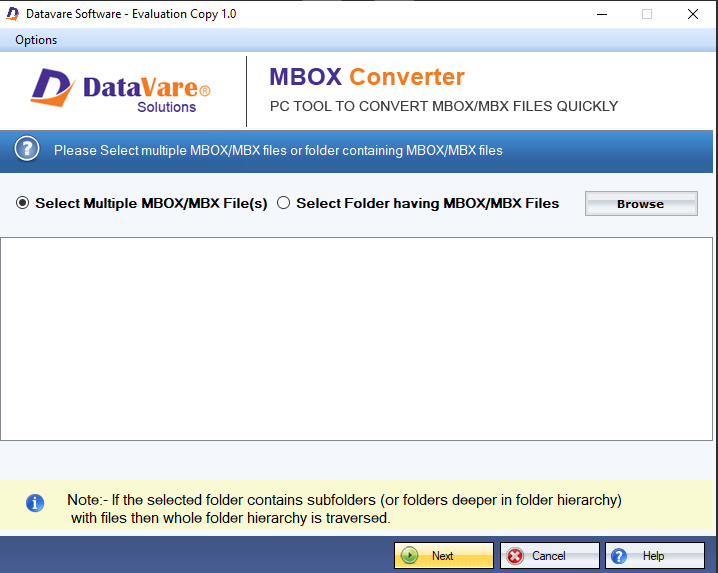
Move all MBOX files to the TGZ format with the DataVare MBOX to TGZ Converter Expert tool. Users can save emails from MBOX files to TGZ files without worrying about how big the MBOX file is. Not losing data is not a problem when transferring MBOX files to TGZ files. It supports all mbox compatible email clients such as - Mozilla Thunderbird, AppleMail, Eudora, Entourage, etc. Users can get a comprehensive view of the loaded MBOX files before they migrate to the TGZ file format. The folder layout is also kept the same during the conversion. All of the information about the migration process is saved in a log file that is made automatically when the process is over. When you convert MBOX files to TGZ format, the Zimbra email client can easily and without any problems read them. Using the free trial version of the program, users could convert the first 25 things in each folder to see how it works.

Installing DataVare TGZ to MSG Converter Expert is the best way to convert from Zimbra to MS Outlook for Windows. Users can send certain TGZ files to MSG with this app. It can export both small and big TGZ files without any problems. The app is simple to use and quick to set up on your Windows. Users can run the tool on any version of Windows, including such as - 11, 10, 8, 8.1, 7, XP, Vista, and older versions. One benefit is that it lets you move a lot of info at once. Users can convert single or multiple TGZ files to the MSG file format without any problems. Users don't need to run Zimbra or MS Outlook for it to work. Get the demo edition of the app for free on your Windows computer. If you buy the full edition of the TGZ to MSG Converter, it works for a lifetime and converts unlimited TGZ files.

The DataVare TGZ to EMLX Converter makes it easy to move data from Zimbra to EMLX file. It is easy for users to turn all the data in their Zimbra emails, including the cc, bcc, subject, from, and to addresses. It doesn't change any files during the conversion process, they stay the same. It will make it easier for users to get to the same file in the format they need without changing the format itself. It checks the loading data and then switches it to the EMLX file with this software. All versions of Windows should be able to run this program without any problems. It also works well with both 32-bit and 64-bit systems. Users will also like this software because it is simple enough for anyone to use, even if they are not tech-savvy. Our expert support team is available 24/7 to answer users' questions and help them as soon as possible. This software is safe and will give you correct results every time.

The DataForSEO Google Sheets API Connector is a highly cost-effective, no-code solution that provides SEO data within the familiar interface of Google Sheets. It’s perfect for SEO professionals, agencies, and individuals looking for a flexible and affordable way to cover core SEO tasks—keyword research, on-page audits, search performance tracking, and backlink analysis. With a pay-as-you-go pricing model, you only pay for the data you need, avoiding overpayment for visual interfaces or features that don’t apply to your specific use case. No matter, if you are managing a personal website or working on large-scale SEO campaigns, this tool makes advanced data easily accessible, ensuring you stay competitive in search rankings without the technical complexity or high costs of traditional solutions. Using the DataForSEO Google Sheets API Connector, you can retrieve data via API without writing a single line of code, all for just a few cents per request. Give it a try!

DataVare EML to Gmail Converter Expert is a comprehensive solution for non-techy users who lack technical knowledge. It has amazing features that make the conversion process too easy. It can import single or bulk EML files to Gmail without any restriction. They can easily operate its user-friendly interface and utility without the need for technical assistance. The software has a dual mode that allows you to import one or more EML files into Gmail once you go through it. Users can export data to Gmail from Thunderbird, Entourage, WLM, and other clients. It was developed with advanced algorithms that facilitate fast and accurate execution. Email properties like CC, BCC, To, From, Links, and Attachments can be exported by the application's interface. The software ensures that users cannot make any annotations during the conversion process, and it securely stores all files in a user-designated location. The utility is standalone, performs independently, and runs on all versions of Windows. It keeps emails in their original format.

Users can upload MBOX files to Office 365 with the help of DataVare MBOX to Office 365 Converter Expert. Users can quickly add MBOX files to Office 365 this way. It's simple enough that even people who aren't good with computers can use it without much trouble. Users can also bring emails from a certain MBOX file to the Exchange 365 server from this page. It gives you a straight conversion service that works every time. It can bring in more than one MBOX file. To keep both the style of emails and the folder structure of MBOX files, you can opt to keep them. There won't be any problems when you switch to Office 365 due to this tool. You can use it with any version of Windows, and it moves the MBOX file to an Office 365 email without any problems. You can also try out a free version of the tool in this app to learn more about how it works.
Features -
This transfer tool lets you add one or more MBOX files.
Makes it possible to convert MBOX files of any size.
It's simple and easy to add MBOX files to Office 365.
It's easy for users to export MBOX files to Microsoft 365.
Include a filter and a sample of the item based on its properties.
Free trial and professional support 24x7
How do I get MBOX files to O365?
- Download and install the software on your system
- In the app, you need to click "Add MBOX Files."
- After that, sign in to your Office 365 account.
- Select the location where you want to store the resultant O365 files
- Then click on the "Upload Now" tab to start the process.
It will only take a few minutes to move all of your emails to Office 365.

DataVare advanced OFT To MBOX Converter Expert is the most well-known product in the software industry for OFT to MBOX file conversion. It has several advanced features that help to convert multiple OFT files into MBOX at once without facing any errors. It supported all Mbox-compatible email clients such as - Mozilla Thunderbird, AppleMail, OperaMail, PocoMail, Eudora, and many more. It provides horizontal and vertical preview options to view all selected OFT files. Throughout the process of conversion, it completely preserves its email properties and data hierarchy. Users can unable to apply the Date filter option and convert OFT files according to a selective date range. Even users have options to store OFT files into single MBOX files or create individual mbox according to folder. The utility operates on all Windows editions such as - 11, 10, 8.1, 8, 7, XP, Vista, etc. The free demo also allows all users to examine its working process and functionality.

The DataVare TGZ to PDF Converter Expert program is one of the safest, most famous, and most reliable ones out there. It is easy for the TGZ 2 PDF Converter program to work with TGZ files of any size or quality. One amazing thing about this program is that it makes it easy to import Zimbra TGZ files into any PDF file format, and users don't even need to run any extra software. With its simple user interface, the Zimbra TGZ to PDF Converter is simple enough that anyone can use it without needing to know much about computers. As long as you have any oversized Zimbra TGZ files, the tool can read them and scan them to make PDF files. Its many smart features make it easy for users to switch TGZ files to PDF files with just a few clicks so that you can print multiple Zimbra emails in that format. A demo edition is provided so that users can get a feel for how the app works. Both the test version and the paid version have all of the features. Users can quickly try out their free edition without having to pay.

The DataVare TGZ to MBOX Converter Expert Software is the best conversion solution for converting Zimbra TGZ files to MBOX format. This is the best way to move files from Zimbra to MBOX. Users can move Zimbra files to MBOX files without losing any info. It can export Zimbra TGZ files to Thunderbird MBOX files of any size. Moving Zimbra TGZ emails to email apps that work with MBOX, like Thunderbird, Apple Mail, Poco Mail, SeaMonkey, and more. This tool has an easy to use interface and is a safe way to migrate files. Everything that comes with Windows OS works with this app. For more information on how it works, all users can also get a free test pack. Users can also get help from the computer support team 24 hours a day, seven days a week.
Download DataVare Office 365 Backup Expert, It only takes a few clicks to back up Office 365 to Outlook PST files. You can save your Office 365 mailbox as an Outlook PST file without losing any info. It also saves Office 365 files in different types of files, like PST, EMLX, EML, MBOX, and MSG. This tool lets you export info from any account at once. The design is simple, and it's easy for users who aren't tech-savvy to comprehend. It keeps your email features and data structure while you back up Office 365 to PST. It creates it easy to use filters by giving you options like an email filter, a date filter, and a user filter. This app will work with all versions of Windows and Outlook.
How to save your Office 365 mailbox as an Outlook PST file?
- Get the app and install it on your computer.
- Enter your Office 365 account login information.
- Pick the files or folders you want to convert or back up.
- Choose a format from the ones given.
- Choose where to save the files that you want ton store
- To begin the backup, click on the Process Now tab.
Get DataVare TGZ to EML Converter Expert here - Installation is easy, and users can do it on Windows 11, 10, 8, 8.1, 7, and other versions. There are a lot of data transfer tasks that the app can do. Because it can convert files on its own, users do not need to install any other tools to operate the program. The tool can export more than one TGZ file to EML at the same time. This software helps users save time and work. It makes switching easy and quick. The tool gives its users full power over how it works so they can get the results they want. Users can choose which TGZ files from local folders to send to the application for conversion using the browse button on the tab. Saving the exported data to a new or current EML file is possible. The program doesn't export any of the data in TGZ files while it converts them. It sends all of an email's properties, like images, links, and files. The exported conversion tool makes your goal of converting easier. You are able to obtain a free sample of TGZ to EML Conversion here. It's possible to try the free version for 30 days. A license for the converting program is available for both people and businesses. Get the trial edition of the app first, and then ask for the full version. There is no expiration date on the license.

With the DataVare TGZ to PST Converter Expert - Users can convert Zimbra TGZ files to MS Outlook PST files in bulk at once. It is possible to move files from Zimbra to Outlook PST format with the whole data. It's easy for this software to switch from Zimbra TGZ files to Outlook PST files, and it doesn't care about file size limits. It works with all versions of Microsoft Outlook and Zimbra Server. When you convert Zimbra Mailbox to Outlook PST, all of your info stays the same. Moving TGZ files is easy with any version of Microsoft Outlook. This is the most effective way to move files from Zimbra to Outlook PST without losing any information. Email, attachments, contacts, notes, messages, and more are just a few of the tools that Zimbra offers. It works with all versions of Windows and Zimbra.tgz files. There is also a free sample version of the pack that users can check out and see how well it works.

Now here is the DataVare OFT To Office 365 Converter software to upload OFT to the Microsoft 365 profile in bulk with attachments. It has various advanced features that help to efficiently import Outlook OFT files into Office 365 without losing any single bit of data. Its graphical user interface is very easy and simple so any kind of user can operate this software very easily without facing any errors. This software is compatible with all Windows versions such as - 11/10/8.1/8/7 and other lower versions. It is compatible with all Outlook versions such as - 2021, 2019, 2016, 2013, 2010, 2007, 2003, and other lower editions. In addition, they also offer a free demo pack to convert a few OFT files into Office 365 to examine its working performance and functionality. For unlimited OFT to Office 365 Conversion users should buy its full license package available for all kinds of home and business users at 3 distinct prices. Users can buy according to their needs.

DataVare PST to Gmail Converter Expert is an application that makes it easy to move mailboxes from PST files to Gmail accounts. This is a powerful tool that works with DataVare PST to Gmail Import. You can easily add Outlook PST files to your Gmail account with this tool. With this software, it's easy to move your PST files to Gmail without any problems. The date, cc, bcc, email address, files, signature, and hyperlinks, as well as all of your emails' meta information, will also be kept during the migration process. A program has an easy-to-use interface. It makes the process of loading data easier, making it the best choice for moving your emails.
Key Features of PST to Gmail Converter -
• Easy-to-use single-panel interface
• Maintains the folder structure automatically
• Keeps all important parts intact
• Gives accurate results
• Keeps attachments during migration
• Works with all versions of Windows OS

DataVare Google Apps Backup Expert is the most well-known program that can back up Google Apps Mail for one or more user accounts. Just load these facts into different file types, such as Outlook PST, EML, EMLX, MBOX, and MSG. Because of this tool, every person will be able to back up their data without any problems. Professionals and regular users with no scientific knowledge can both use this app. The things that this program can do can meet all of the needs of its users. It is possible to use this tool to do its job without installing Microsoft Outlook. Users can try out the free version of the product to see how it works before buying it.
Key Features -
- You can back up your Google Apps emails right away.
- Users can save all of their emails in different types of files, like PST, EML, MSG, EMLX, and MBOX.
- Keep all of the email's properties and data format, like bcc, cc, to, attachments, and so on.
- Work with all versions of Windows OS.

DataVare MBOX to Gmail Converter Expert Tool is the simple and fast way to import MBOX files into Gmail. This tool can move whole MBOX files in bulk to the Gmail account of your choice. It guarantees the preservation of all files and folders throughout the converting process. During the migration procedure, there is no chance of data loss. This program offers a seamless transfer process and supports all email clients based on MBOX. Users can import numerous MBOX files simultaneously due to its mass Thunderbird file-converting feature. Users can easily install this software on any version of Windows. The free trial version of this program allows users to test out more features. The program's capability is restricted because the trial version can only process the initial 25 items in each folder. However, there are no limitations of this kind in the full license version.