Best Video Editing Software - Page 9

How Many Video Editing Software Products Does G2 Track?

Total Products under this Category: 293

Category Stats (Aug 2026)

  • Average Rating: 4.48/5 (↑0.01 vs Jul 2026) The average rating of products in this category, based on all submitted ratings
  • Top Trending Product: Runway (+5.57%) - Among all products in this category, Runway recorded the largest rating increase compared to last month

Last updated: August 04, 2026

How Does G2 Rank Video Editing Software Products?

Why You Can Trust G2's Software Rankings:

  • 30 Analysts and Data Experts
  • 66,500+ Authentic Reviews
  • 293+ Products
  • Unbiased Rankings

G2's software rankings are built on verified user reviews, rigorous moderation, and a consistent research methodology maintained by a team of analysts and data experts. Each product is measured using the same transparent criteria, with no paid placement or vendor influence. While reviews reflect real user experiences, which can be subjective, they offer valuable insight into how software performs in the hands of professionals. Together, these inputs power the G2 Score, a standardized way to compare tools within every category.

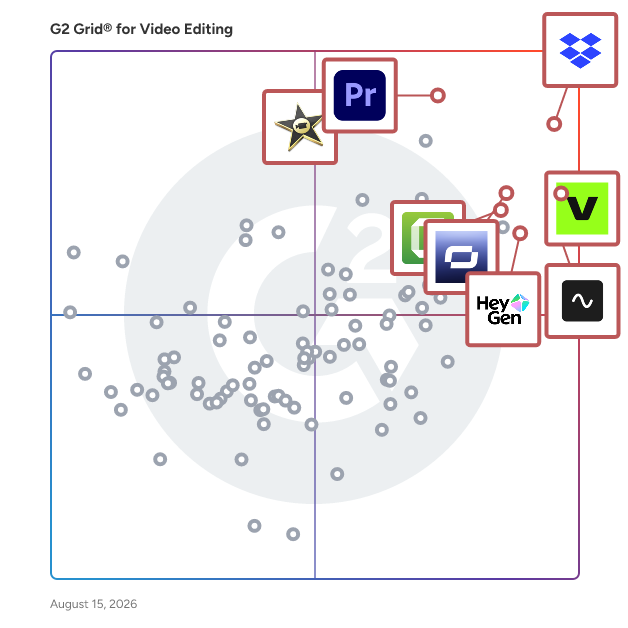
G2 Grid® for Video Editing Software

G2 Grid® for Video Editing Software plotting products by satisfaction and market presence

Highlighted products: Dropbox, VEED, Adobe Premiere Pro, Riverside, Synthesia, Camtasia, iMovie, and Adobe Express.

Underlying data: [Grid® JSON](https://www.g2.com/categories/video-editing/grids.json?focus%5B%5D=dropbox&focus%5B%5D=veed&focus%5B%5D=adobe-premiere-pro&focus%5B%5D=riverside&focus%5B%5D=synthesia&focus%5B%5D=camtasia&focus%5B%5D=imovie&focus%5B%5D=adobe-express)

Sponsored

Vyond

Vyond is an all-in-one AI video platform designed to empower organizations in creating secure, compliant, and engaging business content at scale. With a history spanning over 15 years, Vyond has established itself as a trusted solution for more than 20,000 companies, including 65% of the Fortune 500. Vyond is particularly suited for enterprises looking to enhance their internal communications, training programs, sales enablement, and marketing efforts through high-quality video content. Vyond serves a diverse range of use cases. It is particularly beneficial for companies aiming to streamline onboarding processes, improve training completion rates, and enhance compliance training. By integrating seamlessly with existing tools such as Slack, Learning Management Systems (LMS), and Customer Relationship Management (CRM) systems, Vyond allows employees to create brand-safe content without the need to switch between multiple applications. This integration not only fosters a more efficient workflow but also ensures that video content aligns with organizational branding and compliance standards. Key features of Vyond include AI avatars, AI-assisted scripting, instant translation, and text-to-speech capabilities, which collectively enhance the video creation process. Users can develop custom characters and utilize various animation styles, including animated, photorealistic, mixed-media, and live-action formats, all within a single platform. This versatility allows organizations to cater to different audience preferences and learning styles, making their content more engaging and effective. Additionally, Vyond’s SCORM-compliant LMS integration ensures that training materials can be easily tracked and measured, providing valuable insights into employee engagement and learning outcomes. Vyond stands out in the market by simplifying the technology stack for enterprises while expanding their creative capabilities. The platform’s focus on measurable outcomes—such as faster onboarding, higher training completion, and improved sales enablement—enables organizations to track return on investment (ROI) within their existing systems of record. This emphasis on data-driven results allows businesses to make informed decisions about their video content strategies and optimize their communication efforts. With a commitment to ongoing innovation and customer trust, Vyond is dedicated to evolving its platform to meet the needs of modern enterprises. By bringing next-generation AI capabilities into a compliant and governed environment, Vyond enables organizations to create content more efficiently, communicate more effectively, and reduce their reliance on fragmented solutions. This positions Vyond as a comprehensive tool for any organization looking to leverage video as a key component of their business strategy.

Visit website

Apeaksoft Screen Recorder

Apeaksoft Screen Recorder is a professional tool to record any video/audio and capture screen on your Windows PC or Mac. This screen recorder enables you to record any on-screen activities you want with original image/sound quality. For instance, you can use it to record online videos, Skype calls, GoToMeeting, games, podcast, webinars, lectures, online conference, webcam videos, etc. in full screen or customized screen size.

Average Rating: 4.4/5.0

Total Reviews: 4

How Do G2 Users Rate Apeaksoft Screen Recorder?

  • Quality of Support: 10.0/10 (Category avg: 8.7/10)

Who Is the Company Behind Apeaksoft Screen Recorder?

Who Uses This Product?

  • Company Size: 50% Small, 25% Large

What Do G2 Reviewers Say About Apeaksoft Screen Recorder?

AI-generated summary from verified user reviews

Pros
  • Users find the ease of use of Apeaksoft Screen Recorder beneficial for troubleshooting and communication clarity.
  • Users find the helpfulness of Apeaksoft Screen Recorder invaluable for troubleshooting and improving client communication.
  • Users find Apeaksoft Screen Recorder easy to navigate, making it a useful tool for screen recording needs.
  • Users find that Apeaksoft Screen Recorder's work simplification enhances troubleshooting and reduces communication errors with clients.
Cons
  • Users feel the product lacks a distinctive selection compared to built-in screen recording options available in other software.
  • Users feel the recording issues prevent Apeaksoft Screen Recorder from standing out against built-in options in other software.
  • Users experience upload issues due to large file sizes, often needing additional software for sharing successfully.

What Are Recent G2 Reviews of Apeaksoft Screen Recorder?

What Are G2 Users Discussing About Apeaksoft Screen Recorder?

Bandicut Video Cutter

Bandicut is a video editor that can cut out certain parts of video or merge multiple videos. Because it cuts videos without re-encoding, you can clip/trim parts of video quickly while keeping the original video quality. Users can also extract audio from video to MP3, join multiple video files, or split the video into multiple files. If you want to create a video clip from a video file and upload it to YouTube or Vimeo, please try Bandicut.

Average Rating: 4.3/5.0

Total Reviews: 4

How Do G2 Users Rate Bandicut Video Cutter?

  • Has the product been a good partner in doing business?: 6.7/10 (Category avg: 9.0/10)
  • Ease of Admin: 10.0/10 (Category avg: 9.0/10)
  • Titles and Captions: 10.0/10 (Category avg: 8.4/10)

Who Is the Company Behind Bandicut Video Cutter?

Who Uses This Product?

  • Company Size: 100% Small

What Do G2 Reviewers Say About Bandicut Video Cutter?

AI-generated summary from verified user reviews

Pros
  • Users praise Bandicut for its high quality video cuts and quick audio extraction without losing original fidelity.
  • Users love the fast processing speed of Bandicut, facilitating quick and efficient video editing on standard machines.
  • Users value the speedy creation capabilities of Bandicut, enabling quick and high-quality video editing even on basic systems.
  • Users appreciate the fast video processing of Bandicut, allowing precise cuts and quality retention on standard machines.
Cons
  • Users find Bandicut Video Cutter lacking in advanced features, limiting its effectiveness for complex editing tasks.
  • Users find the limited selection of advanced features in Bandicut restricts its usability for complex editing tasks.

What Are Recent G2 Reviews of Bandicut Video Cutter?

What Are G2 Users Discussing About Bandicut Video Cutter?

Cinema8

Cinema8 is an AI-driven video technology platform designed to support businesses in creating, managing, and optimising interactive video content. As a type of video hosting and engagement solution, Cinema8 helps users generate leads, improve audience engagement, and streamline workflows with AI automation. It provides tools for video editing, screen recording, and interactive features such as branching pathways, pop-up cards, and lead generation forms. Suitable for marketers, educators, and product teams, Cinema8 enables secure video hosting, advanced analytics, and A/B testing to improve ROI and strategy performance. The platform offers solutions for complex use cases, including interactive training, product demonstrations, and shoppable videos, making it an all-in-one system for leveraging video as a growth tool.

Average Rating: 5.0/5.0

Total Reviews: 8

How Do G2 Users Rate Cinema8?

  • Has the product been a good partner in doing business?: 10.0/10 (Category avg: 9.0/10)
  • Quality of Support: 10.0/10 (Category avg: 8.7/10)
  • Ease of Admin: 10.0/10 (Category avg: 9.0/10)
  • Titles and Captions: 10.0/10 (Category avg: 8.4/10)

Who Is the Company Behind Cinema8?

  • Seller: Cinema8
  • Year Founded: 2021
  • HQ Location: Cambridge, GB
  • Twitter: @cinema8official
    251 Twitter followers
  • LinkedIn® Page: www.linkedin.com
    16 employees on LinkedIn®

Who Uses This Product?

  • Company Size: 44% Small, 33% Medium

What Do G2 Reviewers Say About Cinema8?

AI-generated summary from verified user reviews

Pros
  • Users value the integration of interactive video and training in Cinema8, enhancing engagement and performance tracking seamlessly.
  • Users value the ease of creating interactive content with Cinema8, enhancing engagement and tracking student progress effectively.
  • Users value the personalization features of Cinema8, enhancing engagement with customized interactive learning experiences.
  • Users value the versatility of Cinema8, seamlessly integrating interactive video and training for enhanced engagement and measurement.
  • Users value the robust analytics of Cinema8, effectively tracking engagement and improving interactive learning experiences.
Cons
  • Users find the learning curve challenging, particularly for beginners, but it eventually becomes easier with use.
  • Users find the learning difficulty challenging initially, but support helps to improve familiarity with the interface.
  • Users find the steep learning curve challenging initially, but support aids in overcoming it swiftly.
  • Users find the complex setup of Cinema8 challenging, wishing for clearer guidance to enhance their experience.
  • Users feel the lack of guidance in setup slows down their ability to utilize Cinema8's powerful features effectively.

What Are Recent G2 Reviews of Cinema8?

What Are G2 Users Discussing About Cinema8?

Gihosoft Free Video Joiner

Gihosoft Free Video Joiner, is a video joiner software, also called as a video merger or a video combiner. It can be used to join several MP4, MKV, AVI or MOV videos to a big one at a fast speed.

Average Rating: 4.5/5.0

Total Reviews: 4

How Do G2 Users Rate Gihosoft Free Video Joiner?

  • Quality of Support: 9.2/10 (Category avg: 8.7/10)

Who Is the Company Behind Gihosoft Free Video Joiner?

  • Seller: Gihosoft
  • Year Founded: 2013
  • HQ Location: Shenzhen, China
  • Twitter: @Gihosoft
    122 Twitter followers
  • LinkedIn® Page: www.linkedin.com
    6 employees on LinkedIn®

Who Uses This Product?

  • Company Size: 80% Small, 20% Medium

What Are Recent G2 Reviews of Gihosoft Free Video Joiner?

What Are G2 Users Discussing About Gihosoft Free Video Joiner?

Vadoo

Vadoo is a comprehensive platform offering two primary services: 1. Vadoo AI: An all-in-one artificial intelligence video platform that simplifies the creation and editing of short-form videos. It allows users to transform text prompts into engaging videos within minutes, offering features such as customizable themes, voiceovers, subtitles, and advanced editing tools. The platform supports multi-language captioning in over 50 languages, making it suitable for a global audience. Additionally, Vadoo AI provides seamless integration with social media platforms like YouTube, Instagram, and TikTok, allowing users to export and share their content effortlessly. 2. Vadoo.tv: A professional video hosting solution that offers a sophisticated suite of video marketing tools to help businesses grow with video. It provides features like video hosting, customizable video players, landing pages, and marketing integrations, enabling users to manage and share video content effectively. Together, these services empower users to create, edit, host, and share high-quality video content seamlessly.

Average Rating: 4.6/5.0

Total Reviews: 469

How Do G2 Users Rate Vadoo?

  • Has the product been a good partner in doing business?: 9.4/10 (Category avg: 9.0/10)
  • Quality of Support: 9.0/10 (Category avg: 8.7/10)
  • Ease of Admin: 9.2/10 (Category avg: 9.0/10)
  • Titles and Captions: 6.7/10 (Category avg: 8.4/10)

Who Is the Company Behind Vadoo?

  • Seller: Vadoo
  • HQ Location: Bangalore
  • Twitter: @vadoo
    4 Twitter followers
  • LinkedIn® Page: www.linkedin.com
    14 employees on LinkedIn®

Who Uses This Product?

  • Who Uses This: CEO, Owner
  • Top Industries: Marketing and Advertising, E-Learning
  • Company Size: 96% Small, 1% Medium

What Do G2 Reviewers Say About Vadoo?

AI-generated summary from verified user reviews

Pros
  • Users value the accuracy of Vadoo, finding it delivers optimal results for faceless videos effectively.
  • Users love the AI Excellence of Vadoo, effortlessly creating diverse content from a single, user-friendly dashboard.
  • Users appreciate the ease of generating diverse content with Vadoo's intuitive captioning features, enhancing their creative workflow.
  • Users love the versatile content creation capabilities of Vadoo, enabling them to easily produce engaging multimedia.
  • Users value the customization options of Vadoo, enhancing their video editing experience and collaboration capabilities.
Cons
  • Users find that AI limitations can disrupt their creativity due to occasional delays from outside APIs.
  • Users feel Vadoo is not worth the money, citing issues with credits and unresponsive support impacting value.
  • Users feel the feature deficiency in Vadoo leads to wasted credits and unresponsive support, undermining value.
  • Users express concerns about hidden costs, as subscription cancellations lead to lost credits and unhelpful support.
  • Users criticize Vadoo for its limited features, feeling it doesn't provide enough value for the cost.

What Are Recent G2 Reviews of Vadoo?

What Are G2 Users Discussing About Vadoo?

Video2Edit

Video2Edit is an online platform dedicated to video editing and conversion. It provides a range of tools to handle various video processing tasks directly in the browser. Here's a summary of its main features and services: Video Conversion: Converts videos between various formats, including MP4, AVI, MOV, MKV, and more. Supports conversion to and from formats optimized for different devices and platforms. Video Editing: Tools for cutting, trimming, and merging video clips. Options to rotate and flip videos. Allows users to adjust video settings such as bitrate, resolution, and frame rate. Video Compression: Reduces video file sizes while maintaining quality. Useful for optimizing videos for web use and storage. Other: Extracts audio tracks from video files and saves them in various audio formats like MP3 and AAC. Converts video clips into GIF animations, with options to adjust the duration and frame rate. Overall, Video2Edit provides a comprehensive suite of video editing and conversion tools, making it a versatile and accessible platform for managing video content for various needs.

Average Rating: 4.1/5.0

Total Reviews: 4

How Do G2 Users Rate Video2Edit?

  • Quality of Support: 8.3/10 (Category avg: 8.7/10)
  • Titles and Captions: 9.4/10 (Category avg: 8.4/10)

Who Is the Company Behind Video2Edit?

Who Uses This Product?

  • Company Size: 100% Small

What Do G2 Reviewers Say About Video2Edit?

AI-generated summary from verified user reviews

Pros
  • Users find Video2Edit's ease of use to be wonderful and perfect for their editing needs.

What Are Recent G2 Reviews of Video2Edit?

Vizard

Vizard is an AI video generator that turns one video into 10+ viral short clips for TikTok, YouTube Shorts, Instagram Reels and more. Automate tedious edits and start posting daily while saving time to focus on the creative stuff. Join our 2M+ communities to start your creator journey! 🎞 Auto segment video We know it's hard to cut independent elements out of raw footage and rearrange them into something new. No worries, Vizard automatically separates your video into various elements. You can then drag and drop changes elements with our easy-to-use editors to create new videos. 🎥 Integrate With Zoom Simply connect Vizard to your Zoom account, and you can start editing Zoom recordings right from Vizard. 🎬 Edit by scenes Say goodbye to traditional timeline editing, and edit videos like how you'd edit PowerPoint slides. Split your video into multiple scenes and add visuals to polish them in simple ways. ✂️ Trim by text Need to make finer edits to your videos? Vizard auto-transcribes your video, and you can trim your video by deleting the corresponding transcription. Save hours of going through footage and cleaning up your video. 🎨 Design with layouts With Vizard, get access to a wide range of pre-selected layout and background designs. Turn your raw footage into a polished end product that fit different social media platforms with just a few clicks. You don't need any prior experience. Plus, you can resize your videos to make them fit any social channel. ➕ Auto captioning Auto-generate subtitles for your video with an accuracy rate of over 97%. You can also choose from a variety of fonts, colors and styles to make sure that your subtitles stay on brand.

Average Rating: 4.5/5.0

Total Reviews: 4

How Do G2 Users Rate Vizard?

  • Quality of Support: 9.4/10 (Category avg: 8.7/10)
  • Titles and Captions: 8.9/10 (Category avg: 8.4/10)

Who Is the Company Behind Vizard?

  • Seller: Vizard. Corp
  • Year Founded: 2023
  • HQ Location: Palo Alto, US
  • Twitter: @vizard_ai
    369 Twitter followers
  • LinkedIn® Page: www.linkedin.com
    30 employees on LinkedIn®

Who Uses This Product?

  • Company Size: 75% Small

What Do G2 Reviewers Say About Vizard?

AI-generated summary from verified user reviews

Pros
  • Users appreciate the ease of use of Vizard, enjoying a smooth setup and valuable features for video editing.
  • Users love Vizard for its high quality video editing, especially for creating impressive short clips and b-rolls.
  • Users find Vizard to be a time-saving tool that enhances their editing workflow significantly.
  • Users praise Vizard for its excellent video editing capabilities, transforming long videos into engaging shorts with creative b-rolls.
Cons
  • Users prefer credit-based purchases for flexibility over mandatory subscription plans with Vizard.
  • Users face subtitle issues with Vizard, including incorrect loading and lack of editing options post-generation.

What Are Recent G2 Reviews of Vizard?

Wildmoka

Wildmoka enables you to deliver your content to any platform, for any audience – at speed and scale. Audiences today expect content that’s instant, engaging, and tailored to their platform of choice. Media teams must move fast, scale efficiently, and maximize every moment. Wildmoka empowers broadcasters, sports organizations, and content creators to clip, edit, distribute, and monetize high-quality video in real time—without heavy resources or complexity. With AI-driven automation and cloud-based workflows, teams can transform live events, repurpose media, and launch multi-platform channels faster than ever. From instant sports highlights to branded social clips and always-on digital channels, Wildmoka delivers the flexibility, efficiency, and speed required to stay ahead in today’s competitive media landscape. Your media drives your business—Wildmoka powers the future of your media. ------ Why Wildmoka? In a digital-first world, every organization needs to move fast and optimize resources. Wildmoka helps teams: ✅ Create content at speed to keep up with real-time events and audience expectations ✅ Deliver to every platform in the right format, maximizing reach and engagement ✅ Scale their efforts efficiently, with AI-driven automation reducing manual work ✅ Maintain high-quality output while accelerating workflows ✅ Capture audience attention with tailored, platform-optimized content ✅ Increase revenue opportunities through content monetization and expanded distribution ------ The Three Pillars of Wildmoka 🌍 Hyper Distribution: Maximize Reach Across Every Platform Audiences are everywhere—your content should be too. Wildmoka ensures frictionless, high-quality distribution to social, web, OTT, and broadcast platforms. AI-powered automation optimizes formats, layouts, and branding, delivering platform-native experiences instantly. Whether it’s breaking news, live sports, or branded entertainment, Wildmoka helps teams deliver the right content, in the right place, at the right time. ⚡ Live Event Coverage: Real-Time Content, Maximum Impact Engagement is highest when events happen. Wildmoka enables real-time clipping, editing, and publishing so teams can capture and distribute highlights as the action unfolds. Live-to-VOD workflows, AI-generated highlights, and intelligent automation ensure every key moment is monetized and amplified—without the need for large production teams. Whether for sports, news, or entertainment, Wildmoka helps broadcasters maximize the value of live content. 📺 Channel Creation & Management: Build and Scale Digital-First Channels From 24/7 digital channels to pop-up event streams, Wildmoka enables teams to create, operate, and monetize dynamic live and on-demand channels. Flexible scheduling, live-to-VOD transformation, and built-in monetization tools ensure that teams can scale operations efficiently, delivering a consistent, branded viewing experience across multiple platforms.

Average Rating: 4.5/5.0

Total Reviews: 4

Who Is the Company Behind Wildmoka?

  • Seller: Backlight
  • Company Website:
  • Year Founded: 2021
  • HQ Location: Boston, Massachusetts
  • Twitter: @Backlight
    341 Twitter followers
  • LinkedIn® Page: www.linkedin.com
    273 employees on LinkedIn®

Who Uses This Product?

  • Company Size: 25% Large

What Do G2 Reviewers Say About Wildmoka?

AI-generated summary from verified user reviews

Pros
  • Users love Wildmoka's ease of creation, appreciating quick setups and intuitive features that streamline video editing and publishing.
  • Users find Wildmoka's ease of use remarkable, allowing seamless setup and efficient video editing right from the start.
  • Users highlight Wildmoka's real-time clipping efficiency, enhancing their video editing and publishing workflow significantly.
  • Users find the initial setup easy, allowing quick and uncomplicated access to Wildmoka's powerful video editing features.
  • Users highlight Wildmoka’s efficient real-time clipping and multi-platform publishing, transforming video editing and distribution positively.
Cons
  • Users note the feature deficiency in Wildmoka, particularly for advanced editing tools and capabilities.
  • Users find Wildmoka's difficult editing capabilities limit complex video edits, often requiring additional software for advanced tasks.
  • Users note the feature limitations of Wildmoka, specifically missing advanced editing tools and inaccurate transcription capabilities.
  • Users feel Wildmoka's limited editing capabilities hinder advanced video editing, requiring additional tools for complex tasks.
  • Users find Wildmoka to have limited editing features, which hampers their ability to create more complex video edits.

What Are Recent G2 Reviews of Wildmoka?

What Are G2 Users Discussing About Wildmoka?

Clideo

Clideo is a comprehensive online multimedia platform that simplifies video, audio, and image editing directly from your browser, eliminating the need for software installations. Designed for both novices and professionals, Clideo offers a user-friendly interface that supports over 500 file formats, making it accessible across various devices, including desktops, tablets, and smartphones. With a suite of tools for trimming, merging, compressing, and adding subtitles, Clideo empowers users to create high-quality content efficiently. Its cloud-based processing ensures fast and secure editing, with files encrypted during upload and deleted after processing to maintain user privacy. Trusted by over 5 million monthly users, including enterprises like Google, Amazon, and Microsoft, Clideo is a versatile solution for diverse media editing needs. Key Features and Functionality: - All-in-One Online Media Suite: Offers tools for trimming, merging, compressing, subtitling, translating, screen recording, and more, all accessible in a single browser interface. - Secure Cloud Processing: Files are encrypted during upload and removed from servers after use, giving users control over privacy and security. - Cross-Device, No-Install Access: Fully functional on desktop and mobile (iPhone, Android, Clideo works wherever you are. No downloads or compatibility concerns. - Multilingual Subtitles & Voice Translation: Auto-generate or upload subtitles; translate videos with AI voiceover for international reach. - Comprehensive Editing Tools: Includes features like video trimming, merging, resizing, adding music, text overlays, and creating slideshows. - Format Conversion: Supports various formats, including MP4, AVI, MOV, and more, ensuring compatibility across all devices. Primary Value and User Solutions: Clideo addresses the need for accessible, efficient, and secure media editing by providing a comprehensive suite of tools that cater to both beginners and professionals. Its browser-based platform eliminates the complexities associated with traditional software installations, allowing users to edit videos, images, and audio files directly online. The platform's support for over 500 file formats ensures compatibility across various devices and platforms, making it a versatile solution for content creators, marketers, educators, and businesses. By offering features like multilingual subtitles, AI voice translation, and secure cloud processing, Clideo empowers users to produce high-quality, engaging content efficiently, while maintaining control over their privacy and security.

Average Rating: 2.8/5.0

Total Reviews: 3

How Do G2 Users Rate Clideo?

  • Quality of Support: 7.8/10 (Category avg: 8.7/10)
  • Titles and Captions: 5.6/10 (Category avg: 8.4/10)

Who Is the Company Behind Clideo?

  • Seller: Cludo
  • Year Founded: 2015
  • HQ Location: København SV, Capital Region
  • LinkedIn® Page: www.linkedin.com
    45 employees on LinkedIn®

Who Uses This Product?

  • Company Size: 67% Small, 33% Medium

Fast Video Maker

Fast Video Maker is an easy-to-use Windows video editing and video creation software designed for content creators, educators, marketers, businesses, and home users. It helps you create professional-quality videos by combining photos, video clips, text, and audio in a simple, intuitive workspace. Whether you're creating YouTube videos, product demonstrations, business presentations, training materials, social media content, or family slideshows, Fast Video Maker provides the essential tools to turn your ideas into polished videos without the complexity of traditional video editing software. The latest Fast Video Maker 2.0 introduces a redesigned interface, a multi-track editing timeline, live preview, Picture-in-Picture support, improved media management, and enhanced text editing tools to make video creation faster and more organized. Unlike cloud-based editors, Fast Video Maker runs entirely on Windows, allowing users to edit projects locally without uploading large media files. This provides a smoother editing experience while keeping full control over project files. Fast Video Maker supports project resolutions including HD, Full HD, 4K, and 8K, allowing users to create high-resolution videos with a simple and consistent workflow. Users select the desired project resolution when creating a new project, and the software maintains those dimensions throughout editing and export. Key Features Modern and intuitive Windows interface Multi-track video editing timeline Live Preview while editing Picture-in-Picture (Video in Video) Combine videos, photos, text, and audio Easy drag-and-drop media management Advanced text editing tools Resize and reposition media elements Supports HD, Full HD, 4K, and 8K project resolutions Smooth and reliable Windows desktop performance Fast Video Maker is built for users who want an efficient, offline video editing solution without unnecessary complexity, making it suitable for beginners as well as experienced content creators.

Average Rating: 5.0/5.0

Total Reviews: 3

How Do G2 Users Rate Fast Video Maker?

  • Has the product been a good partner in doing business?: 10.0/10 (Category avg: 9.0/10)
  • Quality of Support: 10.0/10 (Category avg: 8.7/10)
  • Ease of Admin: 10.0/10 (Category avg: 9.0/10)

Who Is the Company Behind Fast Video Maker?

  • Seller: FastPCTools
  • HQ Location: Jaipur, IN
  • Twitter: @fastytd
    333 Twitter followers
  • LinkedIn® Page: www.linkedin.com
    1 employees on LinkedIn®

Who Uses This Product?

  • Company Size: 33% Medium, 33% Small

What Are Recent G2 Reviews of Fast Video Maker?

GOM Mix Max

1. Complete UI/UX Composition and UI/UX/ “User-Friendly Interface” - Simple, Easy to use, and Human-centered UI/UX, Stylish New Design - For ease of use, it is possible to change the location of the preview and menu area / Set the hotkeys / Effect search /add effect overlays to Favorites. - New home screen: You can easily check the updated features - Added in-product Tutorial Guide: for User Convenience 2. Customizable/ Adjustable Editing Features - User can adjust and apply the template in detail (finely adjust the time to apply the effect, etc.) - Additional Timeline functions: In addition to the basic menu function cut/paste, editing features such as inserting into the middle or back of the video are added. - Unlimited multi-track: Various clip layouts / Multi-track for simultaneous editing of multiple sources / Unlimited number of tracks can be added - Video/Audio Separation: Video track can contain text, image, and video sources on the same track 3. NEW Features - Chroma Key: By inserting an image in the background, it is possible to create a more complete video - PIP (Picture in Picture): Displays the screen inside the screen and is usually supported by display devices. Since it is a frequently used feature, it is added to the GOM Mix Max. PIP displays a small screen inside the screen. You can position the screen in any corner position you want, also it is possible to adjust its size. 4. Encoding - Reduced Encoding Time: SW is 3 times lighter than the existing GOM Mix Pro, and encoding is 3 times faster now (697MB → 127MB) - Video editing program works faster in an environment upgraded to inter-core i5 or higher - Encoding size divided by sizes optimized for YouTube 5. “Colorful video editing” with rich basic sources - More than 130 effects including filters, templates, sound sources, etc., and more than 130 kinds of overlay & transition effects that are installed as standard in the program

Average Rating: 3.8/5.0

Total Reviews: 3

Who Is the Company Behind GOM Mix Max?

  • Seller: GOM & Company
  • Year Founded: 1999
  • HQ Location: Seoul, KR
  • Twitter: @gomlab
    833 Twitter followers
  • LinkedIn® Page: www.linkedin.com
    12 employees on LinkedIn®

Who Uses This Product?

  • Company Size: 67% Small

What Are Recent G2 Reviews of GOM Mix Max?

Jupitrr AI

Jupitrr AI – Turn Talking Footage into Polished Videos in Seconds Jupitrr AI is an AI-powered video editing platform designed to help businesses, creators, and teams transform raw talking footage into professional, branded videos—without the need for a production team. Our mission is simple: make video creation as fast and effortless as writing a post. With Jupitrr, you can drop in a video file and receive a fully edited version in seconds. The platform automatically enhances your content with dynamic subtitles, stock visuals, web images, GIFs, music, and sound effects that match context. Every edit is powered by AI, allowing you to focus on your message while Jupitrr handles the heavy lifting. For businesses and teams, Jupitrr goes beyond editing. We provide custom brand presets, ensuring every video you produce is aligned with your brand guidelines—fonts, colours, logos, and layouts applied consistently at scale. Marketing teams can use Jupitrr to set up a video content pipeline: from long-form recordings to short social clips, automatically formatted for LinkedIn, Instagram, YouTube, and more. Key features include: • Magic Edit – Upload your talking head video and get an edited version in seconds. • Custom Brand Presets – Ensure every video matches your brand’s look and feel. • AI-Powered Enhancements – Smart subtitles, overlays, emojis, transitions, and sound effects that improve engagement. • Audio-to-Video Conversion – Turn podcasts or MP3s into engaging, shareable videos. • Collaboration & Workflow Integration – Streamlined approvals, Slack integration, and export-ready formats for all platforms. Jupitrr is used by startups, small businesses, and marketing teams that need consistent video output but lack time, resources, or technical know-how. Whether you’re a founder building a personal brand, a marketing lead driving campaigns, or an agency scaling video content for clients, Jupitrr makes high-quality production achievable in minutes. Our customers value Jupitrr because it saves hours of manual editing, reduces costs, and makes video creation accessible to non-technical users. Instead of juggling freelancers, agencies, or complex software, you can rely on a single AI tool to deliver professional results—faster and more affordable than ever before.

Average Rating: 3.5/5.0

Total Reviews: 3

How Do G2 Users Rate Jupitrr AI?

  • Quality of Support: 10.0/10 (Category avg: 8.7/10)

Who Is the Company Behind Jupitrr AI?

  • Seller: Jupitrr
  • Year Founded: 2023
  • HQ Location: London, GB
  • LinkedIn® Page: www.linkedin.com
    6 employees on LinkedIn®

Who Uses This Product?

  • Company Size: 100% Small

What Do G2 Reviewers Say About Jupitrr AI?

AI-generated summary from verified user reviews

Pros
  • Users find Jupitrr AI's features for quick and easy video edits highly beneficial for their projects.
  • Users value the helpfulness of Jupitrr AI, appreciating features like B-rolls and responsive customer support.
  • Users love the easy video enhancement features, enabling quick edits and dynamic content creation effortlessly.
  • Users appreciate the easy B-roll and voiceover integration, enabling quick and efficient video edits.
Cons
  • Users find editing issues in Jupitrr AI frustrating due to unresponsive sections and lack of advanced features.
  • Users find the feature deficiency in Jupitrr AI frustrating, especially regarding basic editing options and functionality.
  • Users find feature limitations in Jupitrr AI frustrating, as basic editing lacks necessary capabilities and functionality often fails.
  • Users often experience slow performance with Jupitrr AI due to bugs and choppy playback, frustrating their editing process.

What Are Recent G2 Reviews of Jupitrr AI?

OneTake AI

OneTake AI instantly converts raw footage into a professional video the moment you upload. Refine the edited video in chat when you want: titles, colors, platform styles, Shorts, and translations in 20+ languages (your own voice, lip-synced). Every change creates a version you can compare and roll back.

Average Rating: 4.3/5.0

Total Reviews: 3

How Do G2 Users Rate OneTake AI?

  • Has the product been a good partner in doing business?: 8.3/10 (Category avg: 9.0/10)
  • Quality of Support: 10.0/10 (Category avg: 8.7/10)
  • Titles and Captions: 7.5/10 (Category avg: 8.4/10)

Who Is the Company Behind OneTake AI?

Who Uses This Product?

  • Company Size: 100% Small

What Do G2 Reviewers Say About OneTake AI?

AI-generated summary from verified user reviews

Pros
  • Users love the ease of use of OneTake AI, simplifying video editing with automatic text and graphics addition.
  • Users love the high-quality automated editing of OneTake AI, which streamlines video enhancement effortlessly.
  • Users love the speed of OneTake AI, quickly enhancing videos with automatic edits and text graphics.
  • Users love the speedy creation of OneTake AI, efficiently enhancing videos without tedious manual editing.
  • Users love how OneTake AI provides automatic enhancements, making video editing quick and effortless for talking head clips.
Cons
  • Users find that while OneTake AI performs well, it has editing limitations requiring manual adjustments for refinement.

What Are Recent G2 Reviews of OneTake AI?

Quickchannel

Quickchannel is a secure, enterprise video platform that enables organizations to create, manage, and distribute branded video communication, live and on-demand, all in one place. Designed for businesses where compliance and control are critical, Quickchannel makes it effortless to deliver high-quality video experiences without technical complexity. From live streaming events and webinars to internal communications and training, everything can be managed centrally in a fully branded environment. Quickchannel stands out as one of the most compliant video platforms on the market. The platform ensures robust security, full GDPR compliance, and adherence to WCAG accessibility standards, making it a trusted choice for both public and private sector organizations with high regulatory requirements. With Quickchannel, teams can confidently scale their video communication while maintaining full control over brand, data, and user experience.

Average Rating: 4.8/5.0

Total Reviews: 10

How Do G2 Users Rate Quickchannel?

  • Has the product been a good partner in doing business?: 9.4/10 (Category avg: 9.0/10)
  • Quality of Support: 9.4/10 (Category avg: 8.7/10)
  • Ease of Admin: 8.9/10 (Category avg: 9.0/10)
  • Titles and Captions: 9.2/10 (Category avg: 8.4/10)

Who Is the Company Behind Quickchannel?

Who Uses This Product?

  • Company Size: 40% Large, 30% Small

What Do G2 Reviewers Say About Quickchannel?

AI-generated summary from verified user reviews

Pros
  • Users find Quickchannel to be very easy to use with an intuitive interface and efficient support.
  • Users commend the excellent video quality of Quickchannel, enhancing their live streaming experience significantly.
  • Users love Quickchannel for its reliable and high-quality live streaming, making events and interactions seamless and efficient.
  • Users highlight the quick and friendly customer support, enhancing their overall experience with Quickchannel.
  • Users value the strong focus on security and privacy of Quickchannel, ensuring a reliable experience for everyone.
Cons
  • Users note feature limitations in Quickchannel, craving more customization options and payment flexibility for events.
  • Users feel the expensive pricing of Quickchannel makes it less accessible despite its benefits and features.
  • Users express a desire for more missing features, including customizable graphs and flexible payment options.
  • Users note a poor interface design in Quickchannel, highlighting issues with data structure and visual displays.
  • Users note the poor organization of Quickchannel's interface, highlighting issues with data structure and categorization.

What Are Recent G2 Reviews of Quickchannel?

Switcher

Switcher is a video production platform for iOS that turns iPhones and iPads into a complete live streaming studio. It helps you create professional-quality broadcasts, manage multiple camera angles, and integrate custom graphics, while supporting monetization through donations and paid event access. With Switcher, creating professional level live streams is easy. Wirelessly create, edit, & stream live video from anywhere, using the gear you or your team already own — iPhones & iPads. Switch in real-time between up to 9 camera angles, add custom graphics and overlays, and seamlessly integrate prerecorded video. Perfect for for worship services, sports broadcasts, live events, webinars, educators, marketing teams, and creators! Multistream directly to Facebook, YouTube, LinkedIn, Twitch, and any RTMP-compatible platform for ultimate flexibility and reach. Broadcast videos to multiple platforms simultaneously, including your own website, all from your iOS mobile device. Collect donations, sell access to your broadcasts and events, charge membership, or even point your growing audience to sponsor sites or resource links. Whether you’re solo streaming or collaborating with a team of volunteers, Switcher has the most reliable streaming solution that's also easy to use!

Average Rating: 5.0/5.0

Total Reviews: 3

How Do G2 Users Rate Switcher?

  • Has the product been a good partner in doing business?: 8.3/10 (Category avg: 9.0/10)
  • Quality of Support: 8.3/10 (Category avg: 8.7/10)
  • Ease of Admin: 10.0/10 (Category avg: 9.0/10)

Who Is the Company Behind Switcher?

  • Seller: Switcherstudio
  • Year Founded: 2014
  • HQ Location: Louisville, US
  • Twitter: @SwitcherStudio
    2,663 Twitter followers
  • LinkedIn® Page: www.linkedin.com
    34 employees on LinkedIn®

Who Uses This Product?

  • Company Size: 100% Small

What Are Recent G2 Reviews of Switcher?

What Are G2 Users Discussing About Switcher?

Neeraja Prakash
NP
Researched and written by Neeraja Prakash
Updated April 9, 2026