Best Punch List Software - Page 3

Last updated: October 3, 2024

How Many Punch List Software Products Does G2 Track?

Total Products under this Category: 130

Category Stats (Nov 2026)

  • Average Rating: 4.44/5 (↑0.01 vs Oct 2026) The average rating of products in this category, based on all submitted ratings
  • Top Trending Product: CONQA (+14.29%) - Among all products in this category, CONQA recorded the largest rating increase compared to last month

Last updated: November 24, 2026

How Does G2 Rank Punch List Software Products?

Why You Can Trust G2's Software Rankings:

  • 30 Analysts and Data Experts
  • 13,800+ Authentic Reviews
  • 130+ Products
  • Unbiased Rankings

G2's software rankings are built on verified user reviews, rigorous moderation, and a consistent research methodology maintained by a team of analysts and data experts. Each product is measured using the same transparent criteria, with no paid placement or vendor influence. While reviews reflect real user experiences, which can be subjective, they offer valuable insight into how software performs in the hands of professionals. Together, these inputs power the G2 Score, a standardized way to compare tools within every category.

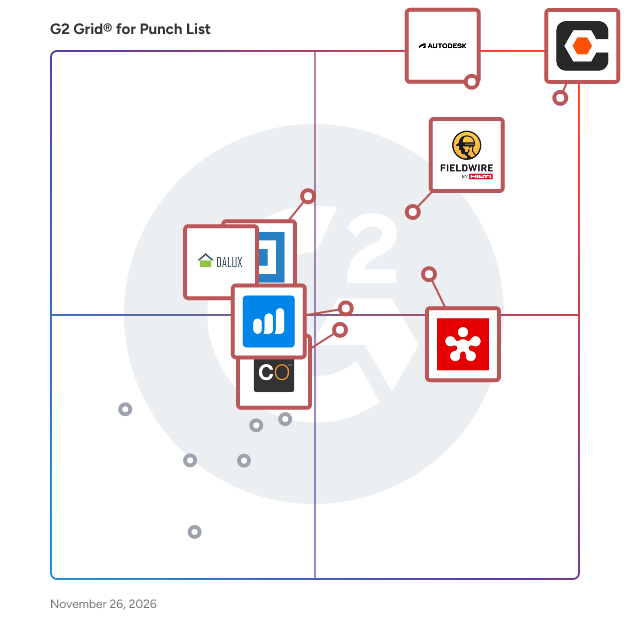
G2 Grid® for Punch List Software

G2 Grid® for Punch List Software plotting products by satisfaction and market presence

Highlighted products: Procore, Autodesk Forma (formerly Autodesk Construction Cloud), Fieldwire by Hilti, Revizto, Bluebeam, Dashpivot, UDA ConstructionOnline, and Dalux.

Underlying data: [Grid® JSON](https://www.g2.com/categories/punch-list/grids.json?focus%5B%5D=procore&focus%5B%5D=autodesk-forma-formerly-autodesk-construction-cloud&focus%5B%5D=fieldwire-by-hilti&focus%5B%5D=revizto&focus%5B%5D=bluebeam&focus%5B%5D=dashpivot&focus%5B%5D=uda-constructiononline&focus%5B%5D=dalux)

Congrid

Congrids main focus is to provide excellent tools for construction sites to improve documentation, especially quality related reporting. All tools are designed to be used on-site and provide all the necessary features for daily site documentation and reporting. Currently Congrid services include mobile safety measurements (TR mittaus in Finnish), a punch list application including RFIs and other remarks. Data from the field is stored to the Congrid Live service which collects all the data.

Average Rating: 4.5/5.0

Total Reviews: 1

How Do G2 Users Rate Congrid?

  • List Generation: 8.3/10 (Category avg: 8.5/10)
  • Action History: 8.3/10 (Category avg: 8.4/10)
  • Messaging and Communication: 8.3/10 (Category avg: 8.7/10)

Who Is the Company Behind Congrid?

Who Uses This Product?

  • Company Size: 100% Small

What Are Recent G2 Reviews of Congrid?

Construction Inspector

Web and app software for iPhone and Android that dramatically enhances the construction site inspection process to give builders technology they can depend on. Use Imfuna Construction Inspector to observe and record data about a property or building site's condition, then produce a customizable high-quality branded PDF report that can be shared online. Efficient, reliable, consistent, and transparent. Embrace the power of digital with Imfuna.

Average Rating: 4.0/5.0

Total Reviews: 1

How Do G2 Users Rate Construction Inspector?

  • List Generation: 8.3/10 (Category avg: 8.5/10)
  • Action History: 6.7/10 (Category avg: 8.4/10)
  • Messaging and Communication: 8.3/10 (Category avg: 8.7/10)

Who Is the Company Behind Construction Inspector?

  • Seller: Imfuna
  • Year Founded: 2009
  • HQ Location: Walnut Creek, US
  • LinkedIn® Page: www.linkedin.com
    17 employees on LinkedIn®

Who Uses This Product?

  • Company Size: 100% Medium

What Are Recent G2 Reviews of Construction Inspector?

Deltek ArchiSnapper

Deltek ArchiSnapper is a field reporting and punch list app that turns site visits into professional, company-branded PDF field reports in minutes — not hours. The mobile app lets architects, engineers, and contractors capture photos, annotate drawings, log observations, and generate one-click reports directly from the job site. It replaces manual processes — pen-and-paper checklists, Word formatting, photo matching — with a paperless workflow built for how architecture & engineering teams actually work in the field. Best for: Architecture and engineering firms of any size collaborating with owners and contractors and need a fast way to document site inspections, manage punch lists, and share field reports with project teams and contractors from anywhere. Use cases:  Conduct paperless site inspections using a mobile device to capture photos, annotations, and observations  Generate company-branded PDF field reports with one click and send them to stakeholders immediately after a site visit  Manage punch lists and checklists digitally, assigning tasks and tracking resolution with photo evidence  Coordinate with contractors by sharing updates, floor plans with location pins, and automated weekly observation emails  Connect field reporting data to Deltek Vantagepoint or Deltek Ajera to eliminate duplicate data entry Key Features:  On-site photo capture with drawing annotation  One-click branded PDF report generation  Digital punch lists and checklists with task assignment  Floor plans with location pointers  Automated email scheduling for open observations  Digital signatures and predefined answer templates  Form cloning for repeated inspection types  Native integration with Deltek Vantagepoint and Ajera Why A&E firms choose ArchiSnapper:  Reports that used to take hours now take minutes. ArchiSnapper generates formatted, company-branded PDF reports with one click — no manual photo matching, no Word formatting, no delays between site visit and delivery.  A field app designed for how architects and engineers work. ArchiSnapper is purpose-built for A&E inspection and punch list workflows, not adapted from generic contractor tools. It handles the documentation, annotations, and reporting patterns specific to architectural and engineering fieldwork.  Field data flows straight into your ERP. Native integration with Deltek Vantagepoint and Ajera connects field staff and finance teams in one workflow, eliminating redundant data entry and reducing errors across project accounting. Used by: Architecture and engineering firms — from small practices to large multi-office operations — rely on ArchiSnapper to streamline field reporting and punch list management. More than 10,000 architects, engineers, and contractors use ArchiSnapper worldwide.

Average Rating: 4.0/5.0

Total Reviews: 1

How Do G2 Users Rate Deltek ArchiSnapper?

  • Has the product been a good partner in doing business?: 8.3/10 (Category avg: 9.0/10)
  • List Generation: 8.3/10 (Category avg: 8.5/10)
  • Action History: 8.3/10 (Category avg: 8.4/10)
  • Messaging and Communication: 8.3/10 (Category avg: 8.7/10)

Who Is the Company Behind Deltek ArchiSnapper?

  • Seller: Deltek
  • Year Founded: 1983
  • HQ Location: Herndon, VA
  • LinkedIn® Page: www.linkedin.com
    4,856 employees on LinkedIn®

Who Uses This Product?

  • Company Size: 50% Large, 50% Small

What Do G2 Reviewers Say About Deltek ArchiSnapper?

AI-generated summary from verified user reviews

Pros
  • Users value the ease of use of Deltek ArchiSnapper, simplifying report creation with customizable templates and photo integration.
  • Users value the ease of photo integration with company templates in Deltek ArchiSnapper, streamlining report creation.
  • Users value the customizable templates and easy photo integration for streamlined reporting with Deltek ArchiSnapper.
Cons
  • Users desire more customization options like font changes and landscape mode for better usability.
  • Users desire more customization options like font changes and landscape mode for improved page layout flexibility.

What Are Recent G2 Reviews of Deltek ArchiSnapper?

What Are G2 Users Discussing About Deltek ArchiSnapper?

AI can help you find the answers. G2 helps you trust them.

Connect G2 to Claude or ChatGPT for answers grounded in G2's trusted reviews, comparisons, and pricing from real user insights.

How it works

digiQC

digiQC makes your quality management paperless and organizes all the essential elements of your Quality Control checklists in one place. digiQC app make it possible for site engineer to record and capture real-time data.

Average Rating: 4.0/5.0

Total Reviews: 1

How Do G2 Users Rate digiQC?

  • List Generation: 5.0/10 (Category avg: 8.5/10)
  • Action History: 6.7/10 (Category avg: 8.4/10)
  • Messaging and Communication: 8.3/10 (Category avg: 8.7/10)

Who Is the Company Behind digiQC?

Who Uses This Product?

  • Company Size: 100% Medium

What Are Recent G2 Reviews of digiQC?

Finalcad

FINALCAD provides mobile construction software and predictive analytics helping construction stakeholders anticipate and fix issues found during the buildings journey. Our mission: increase quality, reduce its cost and make it accessible to all. Since 2011, FINALCAD has helped more than 8000 projects in 30 countries, and keeps on advancing the digital transition of the construction industry.

Average Rating: 5.0/5.0

Total Reviews: 1

Who Is the Company Behind Finalcad?

  • Seller: FINALCAD
  • Year Founded: 2011
  • HQ Location: Paris, FR
  • LinkedIn® Page: www.linkedin.com
    32 employees on LinkedIn®

Who Uses This Product?

  • Company Size: 100% Medium

What Are Recent G2 Reviews of Finalcad?

What Are G2 Users Discussing About Finalcad?

FTQ360 Quality Management & Inspection Software

FTQ360 lets you easily reduce quality defects, review activities, analyze trends, improve accountability and save time on management.

Average Rating: 5.0/5.0

Total Reviews: 1

How Do G2 Users Rate FTQ360 Quality Management & Inspection Software?

  • Has the product been a good partner in doing business?: 10.0/10 (Category avg: 9.0/10)

Who Is the Company Behind FTQ360 Quality Management & Inspection Software?

  • Seller: FTQ360
  • Year Founded: 2010
  • HQ Location: Annapolis, US
  • LinkedIn® Page: www.linkedin.com
    6 employees on LinkedIn®

Who Uses This Product?

  • Company Size: 100% Medium

What Are Recent G2 Reviews of FTQ360 Quality Management & Inspection Software?

What Are G2 Users Discussing About FTQ360 Quality Management & Inspection Software?

Insite

Insite is all-in-one construction software for contractors. It replaces paperwork with one platform for quality, safety, progress, documents and workforce, giving real-time visibility from site to office, with Pulse AI built in. Site teams run inspections, ITPs and QA with hold points and photo evidence, snagging with drawing pins, site diaries and progress photos, H&S inspections, toolbox talks, incident reports, permits, pre-start checklists, RFIs, variations and condition surveys on iOS, Android or web, even offline. Records appear instantly in live dashboards and export as client-ready PDF or Excel reports. Key modules: - Workforce Management: QR, kiosk and phone sign-in, automatic timesheets, inductions, RAMS, competency cards, fire roll call and a company directory with insurance tracking - Form Builder: turn your existing paperwork into branded digital forms, then schedule, approve and share them across projects - Drawings: ISO 19650 revisions, overlay and side-by-side compare, mark-ups, transmittals and pins that raise snags and RFIs - Documents: permissioned folders, bulk upload, in-app Word and Excel editing, and one viewer for PDF, CAD, images and video - Programme: import from Microsoft Project or Asta, Gantt planning with critical path, baselines and a delay register Pulse AI answers questions about live project data in plain English, such as "Who is signed in on site today?", and creates site diaries, snags and observations by voice. The MCP connector brings Insite data into ChatGPT, Claude, Gemini and Copilot. Built for subcontractors, main contractors, house builders, M&E, fit-out, civil engineering and utilities teams. External collaborators are free and unlimited on Premium and Premium Plus, and every rollout includes UK-based onboarding, training and support. Starter is self-serve from £120 per month, with a 14-day free trial and no card needed.

Average Rating: 5.0/5.0

Total Reviews: 2

How Do G2 Users Rate Insite?

  • Has the product been a good partner in doing business?: 10.0/10 (Category avg: 9.0/10)

Who Is the Company Behind Insite?
Who Uses This Product?

  • Company Size: 100% Small

What Are Recent G2 Reviews of Insite?

IssMan

IssMan is a quality assurance and punch list app that supports on-site issue and defect management with photo documentation that allows you to track issues and defects by taking photos and adding mark-ups and notes directly on your device.

Average Rating: 4.0/5.0

Total Reviews: 1

How Do G2 Users Rate IssMan?

  • List Generation: 8.3/10 (Category avg: 8.5/10)
  • Action History: 5.0/10 (Category avg: 8.4/10)
  • Messaging and Communication: 10.0/10 (Category avg: 8.7/10)

Who Is the Company Behind IssMan?

Who Uses This Product?

  • Company Size: 100% Small

What Are Recent G2 Reviews of IssMan?

Open Experience

Open Experience is the platform for the construction phase – the part of a building project where plans become built reality, and where it is decided whether what was built can later be proven. The problem: after acceptance of the works, the burden of proof is reversed (section 640 of the German Civil Code, BGB). Whoever claims a defect after acceptance has to prove it – often years later, when the component in question has long been closed up. Anyone who documents the construction phase with gaps loses tomorrow's dispute with today's records. The solution is a continuous, evidence-grade project file. Five software modules work in the same project, with the same location reference and the same time stamp: • Construction Defects – capture defects on site with photo, location and responsible party, assign them to the contractors with a deadline and track them through to the completion notice. Defect notices and reports are generated at the push of a button; deadline tracking runs automatically into the warranty period. • Construction Photos – site photos with automatic time stamp and location. The built-in AI (DIGISCHUTZ) pixelates people and faces automatically, so the documentation stays GDPR-compliant without rework. • Construction Diary – daily reports written on site: companies present, workforce, services performed, obstructions, special incidents. Fulfils the site-diary basic service of HOAI service phase 8 (the German fee structure's site-supervision phase) without evening paperwork. • Construction Checklists – work through inspection plans digitally and document them with photos. Every finding becomes a defect directly. • Construction Time – dates, rectification and warranty deadlines, closely linked with Construction Defects. What sets Open Experience apart from pure software vendors is its own hardware. DIGIBAU 360, a 360° helmet camera, records every site walk completely and files the footage located and ordered in time – the result is a walkable image record of the entire construction phase. The Construction Webcam captures progress around the clock and, thanks to its SIM card, needs neither Wi-Fi nor LAN. Construction Weather proves with local measurements what the weather on site actually was – the basis for traceable obstruction notices and claims. Typical users are architects and specialist planners in site supervision, general contractors and joint ventures, project managers and owner's representatives, and housing-industry portfolio holders who carry the file from the construction phase into the warranty period. Contractors receive free access as soon as their client works with the platform. Open Experience was founded in 2009 and is a pioneer of mobile construction documentation in the German-speaking countries. Data is hosted on servers in Germany. Since 2017 the company has organised the "Forum Digitale Transformation" (ISSN 2512-8108) and regularly exhibits at BAU Munich, digitalBAU and BIM World MUNICH.

Average Rating: 5.0/5.0

Total Reviews: 1

How Do G2 Users Rate Open Experience?

  • List Generation: 10.0/10 (Category avg: 8.5/10)

Who Is the Company Behind Open Experience?

Who Uses This Product?

  • Company Size: 100% Small

What Are Recent G2 Reviews of Open Experience?

PlanCheckerPro

PlanCheckerPro is an AI-powered plan review tool for architects, designers, contractors, and permit expeditors. Upload a PDF plan set, enter the project address, and get a detailed punchlist of issues organized by category before you submit to the building department. Reviews check against ICC standards including IBC, IFC, IMC, and IPC, plus jurisdiction-specific requirements: Title 24, CALGreen, NFPA 13 and 72, ADA/CBC 11B accessibility, and ASCE 7. Each review produces a categorized punchlist covering structural, fire, mechanical, plumbing, accessibility, energy, and site issues. Teams can share results via link, invite collaborators, leave comments, and track punchlist items to completion. Results are shareable with clients and consultants without requiring a login.

Average Rating: 5.0/5.0

Total Reviews: 1

Who Is the Company Behind PlanCheckerPro?

Who Uses This Product?

  • Company Size: 100% Small

What Are Recent G2 Reviews of PlanCheckerPro?

SnagTick

SnagTick is a web and mobile application for snagging and defect management for construction. It connects developers with contractors, field team with head office and snags with their solutions.

Average Rating: 4.5/5.0

Total Reviews: 1

How Do G2 Users Rate SnagTick?

  • Has the product been a good partner in doing business?: 10.0/10 (Category avg: 9.0/10)

Who Is the Company Behind SnagTick?

Who Uses This Product?

  • Company Size: 100% Medium

What Are Recent G2 Reviews of SnagTick?

What Are G2 Users Discussing About SnagTick?

Time Lock Documentation Software

TimeLocksDocs.com design applications for any iPhone, Android phone or tablet to streamline workflows for inspectors, engineers, architects and tradespeople. iPhone and iPad apps store documents effortlessly in iCloud.

Average Rating: 4.5/5.0

Total Reviews: 1

Who Is the Company Behind Time Lock Documentation Software?

Who Uses This Product?

  • Company Size: 100% Large

What Do G2 Reviewers Say About Time Lock Documentation Software?

AI-generated summary from verified user reviews

Pros
  • Users value the precise accessibility of Time Lock Documentation Software, enhancing compliance and security during document handling.
  • Users value the document management features of Time Lock Documentation Software for enhancing compliance and security.
Cons
  • Users experience access limitations with large file uploads and simultaneous user access, causing occasional lag issues.
  • Users experience slow performance due to limitations on large file uploads and simultaneous user access causing lag.

What Are Recent G2 Reviews of Time Lock Documentation Software?

Trimble ProjectSight

Founded in 1978, Trimble is a global technology company connecting the physical and digital worlds. Within this enterprise, Trimble ProjectSight captures over 30 years of deep, construction-specific operational workflows. Today, ProjectSight serves as a highly trusted, scalable command center for the construction industry across the globe. ProjectSight is a comprehensive, configurable construction project management platform designed to bridge the gap between field execution and back-office financials. It delivers robust functionality across document control, drawing management, and field operations. To modernize workflows, ProjectSight pairs core tools with democratized 3D constructible model viewing via Trimble Connect, natively embedded add-ons like ProjectSight 360° Capture, and practical AI automation to eliminate tedious data entry. ProjectSight customers are empowered to: - Scale Without Penalty: Grow confidently. Enterprise offerings feature predictable pricing, unlimited projects, unmetered storage, and unlimited free collaborators. - Eliminate Data Silos: Bridge field activity and financials through routine, automated syncing with Trimble ERPs (Vista and Spectrum), actively protecting your margins without manual double-entry. - Democratize BIM & Reality Capture: Empower field teams to view 3D models and utilize the natively embedded 360° reality capture add-on without expensive design licenses, instantly translating visual clashes into actionable RFIs. Manage Projects from a Control Hub: Centralize drawings, specifications, field operations, and communications into a single source of truth. For General Contractors: - Portfolio Control, Project Freedom: Create guardrails via corporate portfolio templates for company-wide executive reporting, while safely adapting to unique project requirements. - Frictionless Collaboration: Build trust by inviting external stakeholders directly into your system to view drawings and approve submittals without triggering per-user software fees. - Multi-Project Command: Extract clean data via our open API to feed external Business Intelligence platforms for portfolio-wide visibility. For Speciality Subcontractors: - "Cover Your Assets": Maintain an independent, secure audit trail to protect your business rather than relying solely on a GC’s software. Streamline Submittal Routing: Jumpstart log creation with AI-assisted drafting, then leverage Submittal Manager to trim 50-75% off the time it takes to compile complex PDF packages using a managed content library. - Eliminate Destructive Rework: With our 360° capture add-on, use split-screen comparisons of reality captures and 3D models to precisely locate utilities behind finished surfaces. - The Connected Ecosystem Advantage: Unify operations by seamlessly bridging specialized estimating systems with field execution and back-office financials. Scalable Foundations for Growing Teams In addition to our Enterprise offerings we offer scalable entry points as well. Our Free plan empowers small teams to manage up to 3 projects and 2 GB of storage with core document control. As your pipeline expands, our Go plan unlocks unlimited projects, 15 GB of storage, and custom security roles—ensuring you have the right tools at every stage of growth. Speak to a representative to learn more.

Average Rating: 4.0/5.0

Total Reviews: 1

Who Is the Company Behind Trimble ProjectSight?

  • Seller: Trimble
  • Year Founded: 1978
  • HQ Location: Sunnyvale, CA
  • LinkedIn® Page: www.linkedin.com
    18,122 employees on LinkedIn®
  • Ownership: NASDAQ
  • Total Revenue (USD mm): $3,147

Who Uses This Product?

  • Company Size: 100% Medium

What Are Recent G2 Reviews of Trimble ProjectSight?

What Are G2 Users Discussing About Trimble ProjectSight?

Walkthru

Walkthru is a punch list app for residential builders, remodelers and superintendents. Users add items from a phone during a walkthrough. Each item is tagged by room and trade and assigned to a subcontractor. Walkthru texts each sub a link to their own list with photos and the job address; subs don't need an app or an account. Subs mark items fixed, and the builder reviews and closes them or sends them back. Other features include offline use, photo markup, Spanish translation, PDF export, live Google Sheets and Excel sync, a calendar feed, shared team access, and an API and MCP server for AI assistants. The free plan includes one active project. Pro costs $19 per month or $190 per year per company, with no per-user fees.

Average Rating: 4.5/5.0

Total Reviews: 1

Who Is the Company Behind Walkthru?

Who Uses This Product?

  • Company Size: 100% Small

What Are Recent G2 Reviews of Walkthru?

WorkStraight

Use WorkStraight to securely create, receive, and track work requests from your team, customers, or outside contractors. Assign work to multiple users, require approval, receive notifications, print work orders, download report data, integrate QuickBooks, asset management, create invoices, manage customers, and more.

Average Rating: 5.0/5.0

Total Reviews: 1

How Do G2 Users Rate WorkStraight?

  • Has the product been a good partner in doing business?: 10.0/10 (Category avg: 9.0/10)

Who Is the Company Behind WorkStraight?

Who Uses This Product?

  • Company Size: 100% Large

What Are Recent G2 Reviews of WorkStraight?

What Are G2 Users Discussing About WorkStraight?

Neya Kumaresan
NK
Researched and written by Neya Kumaresan