Best Enterprise Image Recognition Software

How Many Image Recognition Software Products Does G2 Track?

Total Products under this Category: 826

Category Stats (Nov 2026)

  • Average Rating: 4.47/5 The average rating of products in this category, based on all submitted ratings
  • Top Trending Product: Tractable (+1.45%) - Among all products in this category, Tractable recorded the largest rating increase compared to last month

Last updated: November 01, 2026

How Does G2 Rank Image Recognition Software Products?

Why You Can Trust G2's Software Rankings:

  • 30 Analysts and Data Experts
  • 3,400+ Authentic Reviews
  • 826+ Products
  • Unbiased Rankings

G2's software rankings are built on verified user reviews, rigorous moderation, and a consistent research methodology maintained by a team of analysts and data experts. Each product is measured using the same transparent criteria, with no paid placement or vendor influence. While reviews reflect real user experiences, which can be subjective, they offer valuable insight into how software performs in the hands of professionals. Together, these inputs power the G2 Score, a standardized way to compare tools within every category.

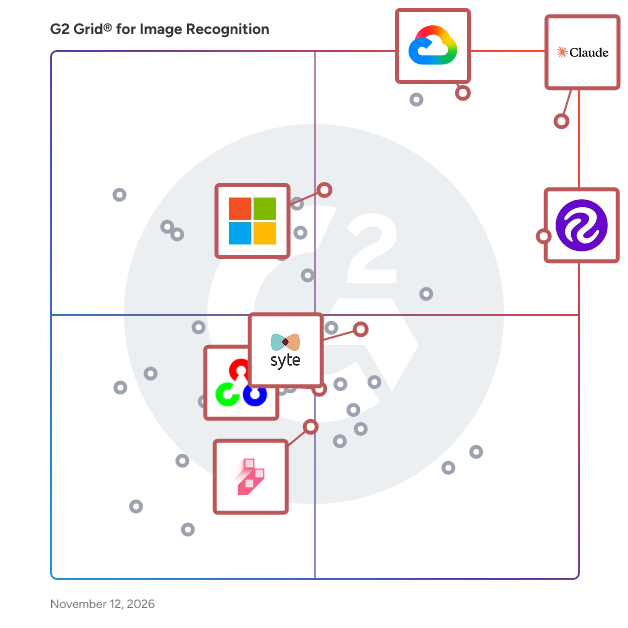
G2 Grid® for Image Recognition Software

G2 Grid® for Image Recognition Software plotting products by satisfaction and market presence

Highlighted products: Claude, Google Cloud Vision API, Roboflow, Microsoft Computer Vision API, Syte, OpenCV, and Dataloop.

Underlying data: [Grid® JSON](https://www.g2.com/categories/image-recognition/grids.json?focus%5B%5D=claude&focus%5B%5D=google-cloud-vision-api&focus%5B%5D=roboflow&focus%5B%5D=microsoft-computer-vision-api&focus%5B%5D=syte&focus%5B%5D=opencv&focus%5B%5D=dataloop-dataloop&segment=enterprise)

Claude

Claude is an AI assistant from Anthropic that helps people and teams get work done through conversation, coding, delegated tasks, and collaboration. Available on desktop, web, and mobile, Claude is built on a family of frontier models (Claude Mythos, Opus, Sonnet, and Haiku) that range from the most capable to the most cost-effective, so teams can match intelligence to the task. Key Features and Functionality: - Chat: Collaborate with Claude on writing, analysis, research, and problem solving, with file uploads, projects that keep context across conversations, memory, web search, and artifacts for real-time documents and code. - Code: Build software with Claude Code, a coding agent that plans, writes, edits, tests, and debugs across large codebases, available in the terminal, desktop app, web, and mobile, with native GitHub and IDE integrations. - Cowork: Delegate multi-step tasks to Claude in plain language. Claude works across local files, connected apps, and the desktop, and returns finished documents, spreadsheets, presentations, and organized folders. An open plugin system bundles skills, data connectors, and workflows. - Tag: Bring Claude into Slack and other team tools. Tag Claude into any channel or thread and it drafts, analyzes, and answers in context, using shared documents and channel memory. - Specialized products: Claude Security (vulnerability detection and patch suggestions for security teams), Claude Design (designs, prototypes, and presentations from natural language), and Claude Science (an AI workbench for scientific research). - Connectors and extended context: Connect Claude to the tools and data teams already use, including the Model Context Protocol, and analyze large documents and codebases with long context and extended thinking. - Enterprise-grade security: Claude Enterprise includes Single Sign-On (SSO), role-based permissions, audit logs, and custom data retention controls. Primary Value and User Solutions: Claude gives individuals and organizations one assistant for everyday knowledge work, software development, and delegated tasks. Employees get faster research, writing, analysis, and coding. Teams collaborate with Claude where they already work. Enterprises get the administrative controls and security needed to deploy AI across the business.

Average Rating: 4.7/5.0

Total Reviews: 1,658

How Do G2 Users Rate Claude?

  • Object Detection: 9.2/10 (Category avg: 8.8/10)
  • Ease of Use: 9.3/10 (Category avg: 8.9/10)
  • Custom Image Detection: 9.0/10 (Category avg: 8.6/10)
  • Bounding Boxes: 7.9/10 (Category avg: 8.4/10)

Who Is the Company Behind Claude?

Who Uses This Product?

  • Who Uses This: Student, Founder
  • Top Industries: Computer Software, Information Technology and Services
  • Company Size: 58% Small, 33% Medium

What Do G2 Reviewers Say About Claude?

AI-generated summary from verified user reviews

Pros
  • Users value Claude's ease of use, allowing for clear, structured, and organized content creation effortlessly.
  • Users value Claude for its deep discussion capabilities and effective context management for intellectual pursuits.
  • Users find Claude to be exceptionally helpful for deep discussions, aiding in intellectual work and creative projects.
  • Users commend the accuracy of Claude, noting its well-articulated and thoroughly researched answers.
  • Users value Claude's clarity and structured communication, which greatly enhances health education and patient interactions.
Cons
  • Users face usage limitations with Claude, including access restrictions, performance inconsistency, and file handling issues.
  • Users note significant limitations with Claude, including focus on text, lack of visual support, and slow responsiveness.
  • Users find Claude's limited functionality restricts visual content creation and rapid research, impacting efficiency and usability.
  • Users find that Claude can be overly cautious and long-winded, hindering quick and effective responses.
  • Users find the resource limitations frustrating, impacting productivity and increasing costs for their workload management.

What Are Recent G2 Reviews of Claude?

Google Cloud Vision API

Detect and classify multiple objects, images, and more using Google Cloud's pre-trained Vision API or custom trained Vision AutoML. Google Cloud's Vision AI helps developers easily leverage the power of machine learning to understand images with industry-leading prediction accuracy.

Average Rating: 4.4/5.0

Total Reviews: 140

How Do G2 Users Rate Google Cloud Vision API?

  • Object Detection: 9.2/10 (Category avg: 8.8/10)
  • Ease of Use: 9.0/10 (Category avg: 8.9/10)
  • Custom Image Detection: 9.0/10 (Category avg: 8.6/10)
  • Bounding Boxes: 8.9/10 (Category avg: 8.4/10)

Who Is the Company Behind Google Cloud Vision API?

  • Seller: Google
  • Year Founded: 1998
  • HQ Location: Mountain View, CA
  • LinkedIn® Page: www.linkedin.com
    301,144 employees on LinkedIn®
  • Ownership: NASDAQ:GOOG
  • Phone: +1 (650) 253-0000

Who Uses This Product?

  • Who Uses This: Software Engineer
  • Top Industries: Computer Software, Information Technology and Services
  • Company Size: 56% Small, 25% Large

What Are Recent G2 Reviews of Google Cloud Vision API?

What Are G2 Users Discussing About Google Cloud Vision API?

Roboflow

Roboflow has everything you need to build and deploy computer vision applications. Over 1,000,000 users from businesses of every size — from startups to public companies — use the company's end-to-end platform for image and video collection, organization, annotation, preprocessing, model training, and deployment. Roboflow provides tools for each step in the computer vision deployment lifecycle and integrates with your existing solutions so you can tailor your pipeline to meet your needs.

Average Rating: 4.7/5.0

Total Reviews: 161

How Do G2 Users Rate Roboflow?

  • Object Detection: 9.3/10 (Category avg: 8.8/10)
  • Ease of Use: 9.3/10 (Category avg: 8.9/10)
  • Custom Image Detection: 9.5/10 (Category avg: 8.6/10)
  • Bounding Boxes: 9.4/10 (Category avg: 8.4/10)

Who Is the Company Behind Roboflow?

  • Seller: Roboflow
  • Year Founded: 2019
  • HQ Location: Remote, US
  • LinkedIn® Page: www.linkedin.com
    144 employees on LinkedIn®

Who Uses This Product?

  • Who Uses This: Founder, Researcher
  • Top Industries: Computer Software, Research
  • Company Size: 77% Small, 15% Medium

What Do G2 Reviewers Say About Roboflow?

AI-generated summary from verified user reviews

Pros
  • Users value the ease of use in Roboflow, enabling efficient annotation and project organization for streamlined workflows.
  • Users commend Roboflow for its high efficiency in annotating large datasets quickly and effectively.
  • Users value the annotation efficiency of Roboflow, completing large datasets significantly faster than alternative methods.
  • Users appreciate the data labeling efficiency of Roboflow, streamlining computer vision workflows for faster results.
  • Users appreciate the effortless dataset management and version control of Roboflow, enhancing efficiency in computer vision workflows.
Cons
  • Users find Roboflow to be expensive, particularly with advanced features and large datasets that complicate affordability.
  • Users find a lack of features in Roboflow's basic tier, limiting complex labeling and advanced workflows.
  • Users find the limited functionality in the basic tier restricts their labeling capabilities and workflow flexibility.
  • Users find annotation issues in Roboflow, particularly with support for multi-attribute annotations and uneven feature availability.
  • Users find inefficient labeling due to limited multi-attribute support and cumbersome data management processes.

What Are Recent G2 Reviews of Roboflow?

AI can help you find the answers. G2 helps you trust them.

Connect G2 to Claude or ChatGPT for answers grounded in G2's trusted reviews, comparisons, and pricing from real user insights.

How it works

Microsoft Computer Vision API

The Microsoft Computer Vision API is a cloud-based service that provides advanced algorithms to process and analyze visual data from images and videos. It enables developers to extract rich information, facilitating the development of applications that can interpret and understand visual content. Key Features and Functionality: - Image Analysis: Detects and classifies objects, scenes, and activities within images, offering detailed content understanding. - Optical Character Recognition (OCR): Accurately extracts printed and handwritten text from images and documents in multiple languages. - Intelligent Tagging and Captioning: Generates descriptive tags and captions to enhance content searchability and accessibility. - Facial Detection: Identifies faces, estimates age, gender, and emotions, enabling secure authentication workflows. - Spatial Analysis: Understands how people move through a physical space in near-real time. Primary Value and Solutions Provided: The Microsoft Computer Vision API automates the extraction of meaningful information from visual content, reducing the need for manual image review and data entry. It enhances customer experiences by enabling applications to adapt to visual inputs in real time. Additionally, it improves compliance and security through features like sensitive content detection and facial recognition for authentication. By integrating this API, businesses can streamline operations, develop intelligent applications, and gain deeper insights from their visual data.

Average Rating: 4.1/5.0

Total Reviews: 49

How Do G2 Users Rate Microsoft Computer Vision API?

  • Object Detection: 10.0/10 (Category avg: 8.8/10)
  • Ease of Use: 8.2/10 (Category avg: 8.9/10)
  • Custom Image Detection: 5.0/10 (Category avg: 8.6/10)

Who Is the Company Behind Microsoft Computer Vision API?

  • Seller: Microsoft
  • Year Founded: 1975
  • HQ Location: Redmond, Washington
  • LinkedIn® Page: www.linkedin.com
    232,750 employees on LinkedIn®
  • Ownership: MSFT
  • Phone: +1 (877) 276-2464

Who Uses This Product?

  • Top Industries: Hospital & Health Care
  • Company Size: 47% Small, 31% Medium

What Do G2 Reviewers Say About Microsoft Computer Vision API?

AI-generated summary from verified user reviews

Pros
  • Users value the effective communication of Microsoft Computer Vision API, enhancing collaboration through seamless integration and documentation.
  • Users appreciate the high accuracy of image analysis capabilities of Microsoft Computer Vision API, enhancing various applications.
  • Users value the broad and accurate image analysis capabilities of the Microsoft Computer Vision API, enhancing their development experience.
  • Users value the easy integrations offered by Microsoft Computer Vision API, enhancing overall development efficiency and project ease.
  • Users praise the accuracy and breadth of Microsoft Computer Vision API's facial recognition and image analysis features.
Cons
  • Users experience accuracy issues with the Microsoft Computer Vision API, especially with low-quality or complex images affecting results.
  • Users find the high costs at scale of Microsoft Computer Vision API a significant drawback for extensive usage.
  • Users often face integration issues with the Microsoft Computer Vision API, leading to functionality disruptions and failures.
  • Users express concerns about limited customization for advanced use cases, impacting their ability to fine-tune models effectively.

What Are Recent G2 Reviews of Microsoft Computer Vision API?

What Are G2 Users Discussing About Microsoft Computer Vision API?

Syte

Syte is the world’s first product discovery platform. Powered by visual AI, we’re spearheading the evolution of eCommerce by enabling brands and retailers to seamlessly connect shoppers with products they love. Our solutions, including camera search, personalization engines, and smart in-store tools, empower shoppers to discover and purchase products in the same way they live their lives -- instant, intuitive, visual. Leading brands and retailers partner with Syte to provide on-demand, hyper-personalized experiences that drive conversion, increase average order value, and spark lifelong loyalty. for more information visit www.syte.ai

Average Rating: 4.6/5.0

Total Reviews: 76

How Do G2 Users Rate Syte?

  • Object Detection: 9.0/10 (Category avg: 8.8/10)
  • Ease of Use: 9.0/10 (Category avg: 8.9/10)
  • Custom Image Detection: 9.2/10 (Category avg: 8.6/10)
  • Bounding Boxes: 8.6/10 (Category avg: 8.4/10)

Who Is the Company Behind Syte?

  • Seller: Syte
  • Year Founded: 2015
  • HQ Location: Tel Aviv
  • LinkedIn® Page: www.linkedin.com
    64 employees on LinkedIn®

Who Uses This Product?

  • Top Industries: Retail, Apparel & Fashion
  • Company Size: 41% Large, 38% Medium

What Are Recent G2 Reviews of Syte?

What Are G2 Users Discussing About Syte?

OpenCV

OpenCV is a tool that has has C++, C, Python and Java interfaces and supports Windows, Linux, Mac OS, iOS and Android for computational efficiency and with a strong focus on real-time applications, written in optimized C/C++, the library can take advantage of multi-core processing and enabled to take advantage of the hardware acceleration of the underlying heterogeneous compute platform

Average Rating: 4.5/5.0

Total Reviews: 40

How Do G2 Users Rate OpenCV?

  • Object Detection: 9.4/10 (Category avg: 8.8/10)
  • Ease of Use: 7.8/10 (Category avg: 8.9/10)
  • Custom Image Detection: 8.3/10 (Category avg: 8.6/10)
  • Bounding Boxes: 8.3/10 (Category avg: 8.4/10)

Who Is the Company Behind OpenCV?

  • Seller: OpenCV
  • Year Founded: 2000
  • HQ Location: N/A
  • LinkedIn® Page: www.linkedin.com
    54 employees on LinkedIn®

Who Uses This Product?

  • Top Industries: Computer Software, Information Technology and Services
  • Company Size: 38% Small, 30% Medium

What Are Recent G2 Reviews of OpenCV?

What Are G2 Users Discussing About OpenCV?

Dataloop

Dataloop is a cutting-edge AI Development Platform that's transforming the way organizations build AI applications. Our platform is meticulously crafted to cater to developers at the heart of the AI development process, making it simpler and more intuitive to work with data and AI models. Our comprehensive solution spans the full AI development lifecycle, offering tools and functionalities that streamline data management, annotation, model selection, and deployment. Dataloop's platform is built with a focus on collaboration, allowing developers, data scientists, and engineers to work together seamlessly, breaking down traditional silos and fostering innovation. Key features include an intuitive drag-and-drop interface for constructing data pipelines, a vast library of pre-built AI elements and models, and robust data curation and annotation capabilities. These features are designed to empower developers to rapidly prototype, iterate, and deploy AI solutions, keeping pace with the fast-evolving demands of the market. Dataloop is committed to advancing AI development by providing a developer-centric platform that addresses the complexities and challenges of AI and data management. Our vision is to democratize AI development, enabling every organization to harness the power of AI and drive forward their innovative solutions.

Average Rating: 4.4/5.0

Total Reviews: 86

How Do G2 Users Rate Dataloop?

  • Object Detection: 9.0/10 (Category avg: 8.8/10)
  • Ease of Use: 8.8/10 (Category avg: 8.9/10)
  • Custom Image Detection: 8.7/10 (Category avg: 8.6/10)
  • Bounding Boxes: 9.4/10 (Category avg: 8.4/10)

Who Is the Company Behind Dataloop?

  • Seller: Dataloop
  • Year Founded: 2017
  • HQ Location: Herzliya, IL
  • LinkedIn® Page: www.linkedin.com
    45 employees on LinkedIn®

Who Uses This Product?

  • Top Industries: Computer Software, Information Technology and Services
  • Company Size: 40% Medium, 33% Small

What Do G2 Reviewers Say About Dataloop?

AI-generated summary from verified user reviews

Pros
  • Users value the ease of use of Dataloop, appreciating its simple interface and easy navigation for annotating.
  • Users enjoy the annotation efficiency of Dataloop, finding it easy to use despite its various features.
  • Users highlight the easy annotation capabilities of Dataloop, praised for its simple and user-friendly interface.
  • Users appreciate the simple and easy-to-navigate user interface of Dataloop, enhancing their overall experience.
  • Users value Dataloop for its easy integrations, enhancing their existing workflows seamlessly and effectively.
Cons
  • Users feel that the UI changes increased complexity, making it difficult to navigate and use Dataloop effectively.
  • Users find the confusing syntax in Dataloop's UI changes to detract from their overall experience.
  • Users find the difficult navigation after the UI change makes using Dataloop a bit confusing.
  • Users note a significant lack of communication from the community, highlighting the need for improvement in support.
  • Users suggest adding a demo section for first-time users to enhance guidance and ease of use.

What Are Recent G2 Reviews of Dataloop?

What Are G2 Users Discussing About Dataloop?

Bijou Barry
BB
Researched and written by Bijou Barry
Updated