  # Best Digital Accessibility Tools  - Page 3

  *By [Gauri Pawsey](https://research.g2.com/insights/author/gauri-pawsey)*

   Digital accessibility tools offer solutions that target specific steps in the digital accessibility process to ensure that those with disabilities are able to properly access and use websites and web applications.

For those with disabilities, internet usage may have to be facilitated with other assistive technology which is where digital accessibility tools play a significant role. These tools may be standalone products or plug-ins. Some of these tools are used by development and design teams to monitor websites or perform audits for measurable accessibility metrics. Other tools include screen readers and text readers, which are intended for use by users themselves and assist them in modifying or facilitating their website experience in real time.

This category includes tools that provide specific accessibility functionality, as opposed to providing all the components involved with digital accessibility, which can be found in the [Digital Accessibility Platforms](https://www.g2.com/categories/digital-accessibility-platforms) category.

To qualify for inclusion in the Digital Accessibility Tools category, a product must:

- Be a standalone product or plug-in that offers tools to address specific steps in the digital accessibility process, such as accessibility testing, accessibility automatic error fixing, user experience for disabled visitors, etc.


## How Many Digital Accessibility Tools  Products Does G2 Track?
**Total Products under this Category:** 79

### Category Stats (May 2026)
- **Average Rating**: 4.46/5
- **New Reviews This Quarter**: 47
- **Buyer Segments**: Small-Business 49% │ Mid-Market 38% │ Enterprise 13%
- **Top Trending Product**: AudioEye (+0.001)
*Last updated: May 18, 2026*

  
## How Does G2 Rank Digital Accessibility Tools  Products?

**Why You Can Trust G2's Software Rankings:**

- 30 Analysts and Data Experts
- 8,000+ Authentic Reviews
- 79+ Products
- Unbiased Rankings

G2's software rankings are built on verified user reviews, rigorous moderation, and a consistent research methodology maintained by a team of analysts and data experts. Each product is measured using the same transparent criteria, with no paid placement or vendor influence. While reviews reflect real user experiences, which can be subjective, they offer valuable insight into how software performs in the hands of professionals. Together, these inputs power the G2 Score, a standardized way to compare tools within every category.
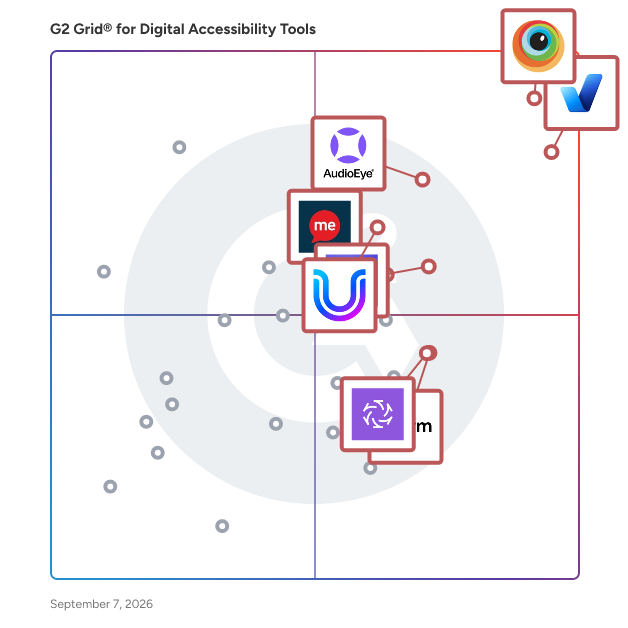
  
## Which Digital Accessibility Tools  Is Best for Your Use Case?

- **Leader:** [BrowserStack](https://www.g2.com/products/browserstack/reviews)
- **Highest Performer:** [Clym Inc.](https://www.g2.com/products/clym-inc/reviews)
- **Easiest to Use:** [WideAccess](https://www.g2.com/products/wideaccess/reviews)
- **Top Trending:** [BrowserStack](https://www.g2.com/products/browserstack/reviews)
- **Best Free Software:** [accessiBe](https://www.g2.com/products/accessibe/reviews)

  
---

**Sponsored**

### All in One Accessibility

The All in One Accessibility is an AI-powered accessibility solution that enables websites to be accessible among people with hearing or vision impairments, elderly, motor impairment, color blindness, dyslexia, cognitive &amp; learning impairments, seizure and epileptic, ADHD problems, epilepsy, parkinson disease, and elderly people. It allows users to select the accessibility features as per their needs and peruse the content. It just takes 2 minutes to install. It reduces the risk of time-consuming accessibility lawsuits. All in One Accessibility improves accessibility compliance for the standards WCAG 2.0, WCAG 2.1, WCAG 2.2, ADA Title III, Section 508, European EAA EN 301 549, Canada ACA, California Unruh, Israeli Standard 5568, Australian DDA, UK Equality Act, Ontario AODA, France RGAA, German BITV, Brazilian Inclusion law LBI 13.146/2015, Spain UNE 139803:2012, JIS X 8341, Italian Stanca Act, and Switzerland DDA, Indian RPD Act, PDF/UA, Austrian Web Accessibility Act (WZG), ATAG 2.0, and more. It includes 72 plus features like screen reader, content adjustments, color and contrast adjustments, orientation adjustments, multi-language support, virtual keyboard, dictionary, and accessibility profiles. Dynamic widget icon sizes can be set as per mobile and desktop websites. The color and position of the widget can also be changed as per your website’s look and feel. It supports 190+ languages all the major open-source platforms like Drupal, WordPress, Magento, Joomla, Shopify, BigCommerce, Wix, etc. It supports GDPR, HIPPA, CCPA, SOC Type 2, ISO 9001:2005, ISO 27001:2022. All in One Accessibility dashboard includes automated accessibility compliance reports, and customization for the user&#39;s interface (color, screen reader voice, widget position, widget icon, language, etc.) to match the site&#39;s look and feel. It is a comprehensive solution with paid add-ons like manual accessibility audit, remediation, document / PDF accessibility remediation, VPAT report / ACR. Overall, All in One Accessibility serves as a vital resource for businesses and organizations committed to fostering an inclusive digital environment. By providing a robust set of features and compliance with essential accessibility standards, it not only enhances user experience but also promotes equal access to information and services online.


[Visit website](https://www.g2.com/external_clickthroughs/record?secure%5Bad_program%5D=ppc&amp;secure%5Bad_slot%5D=category_product_list&amp;secure%5Bcategory_id%5D=2694&amp;secure%5Bdisplayable_resource_id%5D=2694&amp;secure%5Bdisplayable_resource_type%5D=Category&amp;secure%5Bmedium%5D=sponsored&amp;secure%5Bplacement_reason%5D=page_category&amp;secure%5Bplacement_resource_ids%5D%5B%5D=2694&amp;secure%5Bprioritized%5D=false&amp;secure%5Bproduct_id%5D=1315697&amp;secure%5Bresource_id%5D=2694&amp;secure%5Bresource_type%5D=Category&amp;secure%5Bsource_type%5D=category_page&amp;secure%5Bsource_url%5D=https%3A%2F%2Fwww.g2.com%2Fcategories%2Fdigital-accessibility-tools%3Fpage%3D6&amp;secure%5Btoken%5D=685d960dd844ac35242a38661105abb57a325f98cde112d82a9c1611ee72dc2e&amp;secure%5Burl%5D=https%3A%2F%2Fwww.skynettechnologies.com%2Fall-in-one-accessibility&amp;secure%5Burl_type%5D=free_trial)

---

  ## What Are the Top-Rated Digital Accessibility Tools  Products in 2026?
### 1. [ExcellentWebCheck](https://www.g2.com/products/excellentwebcheck/reviews)
  At ExcellentWebCheck, we&#39;re dedicated to making the web more accessible for everyone. We offer comprehensive accessibility scanning and monitoring solutions to help organizations ensure that their websites are fully accessible to users with disabilities, in compliance with international guidelines and accessibility legislation such as ADA, AODA, Section 508, and the EU Accessibility Act. Website Accessibility refers to the ability for everyone to use the web without barriers. People with a Visual, Hearing, Cognitive, Speech, Mobility, or Neural disability should be able to navigate the web without barriers. At ExcellentWebCheck, we help companies ensure digital accessibility and compliance with the international guidelines from W3C, the WCAG (Web Content Accessibility Guidelines). Contact us to learn more about how we can help you create a more inclusive and accessible online experience for all of your users.


  **Average Rating:** 5.0/5.0
  **Total Reviews:** 1
**How Do G2 Users Rate ExcellentWebCheck?**

- **AI Text-to-Speech:** 10.0/10 (Category avg: 8.5/10)
- **Quality Assurance Dashboard:** 8.3/10 (Category avg: 8.4/10)
- **Ease of Use:** 10.0/10 (Category avg: 9.1/10)
- **Recommendations:** 6.7/10 (Category avg: 8.8/10)

**Who Is the Company Behind ExcellentWebCheck?**

- **Seller:** [ExcellentWebCheck](https://www.g2.com/sellers/excellentwebcheck)
- **HQ Location:** Rotterdam, NL
- **LinkedIn® Page:** http://www.linkedin.com/company/solureal (1 employees on LinkedIn®)

**Who Uses This Product?**
  - **Company Size:** 100% Mid-Market


### 2. [Glassbox](https://www.g2.com/products/glassbox/reviews)
  Glassbox is a customer intelligence and digital experience analytics platform designed to help enterprises understand, optimize, and enhance the customer experience and digital accessibility of their digital channels. One of the standout features of Glassbox is its capability to securely capture 100% of user sessions across both web and mobile applications. This end-to-end visibility allows teams to analyze every step of the customer journey, effectively pinpointing friction points and enabling real-time action. By utilizing advanced artificial intelligence, Glassbox captures and analyzes data from every online interaction, providing businesses with a comprehensive view of customer behavior and preferences. This wealth of data empowers organizations to act swiftly, transforming raw data into actionable insights that improve both the customer experience and the conversion rate. Large global enterprises in sectors such as finance, insurance, and healthcare, Glassbox serves as a vital tool for uncovering the root causes of customer challenges. It assists organizations in remediating customer experience issues and creating digital journeys that are inclusive, seamless, and engaging. The platform’s AI-powered insights not only enhance accessibility monitoring but also incorporate fraud prevention capabilities, giving organizations the agility to respond to issues within minutes and adapt to the evolving needs of their customers. Glassbox has been recognized by G2 as a leader in customer intelligence solutions and product analytics, reflecting its effectiveness in delivering the clarity and confidence that enterprises require. By providing a robust framework for creating compliant, accessible, and impactful digital experiences, Glassbox stands out in its category, offering unique selling points that cater to the diverse needs of its users. With its focus on data-driven decision-making and customer-centric strategies, Glassbox is positioned as a crucial ally for organizations aiming to thrive in the digital landscape.


  **Average Rating:** 4.9/5.0
  **Total Reviews:** 788
**How Do G2 Users Rate Glassbox?**

- **AI Text-to-Speech:** 10.0/10 (Category avg: 8.5/10)
- **Ease of Use:** 9.7/10 (Category avg: 9.1/10)

**Who Is the Company Behind Glassbox?**

- **Seller:** [Glassbox](https://www.g2.com/sellers/glassbox)
- **Company Website:** https://www.glassbox.com/
- **Year Founded:** 2010
- **HQ Location:** London
- **Twitter:** @GlassboxDigital (1,808 Twitter followers)
- **LinkedIn® Page:** https://www.linkedin.com/company/10491772/ (273 employees on LinkedIn®)

**Who Uses This Product?**
  - **Who Uses This:** Digital Analyst, Product Owner
  - **Top Industries:** Financial Services, Insurance
  - **Company Size:** 77% Enterprise, 18% Mid-Market


#### What Are Glassbox's Pros and Cons?

**Pros:**

- Ease of Use (210 reviews)
- Session Replay (190 reviews)
- Insights (174 reviews)
- Helpful (132 reviews)
- Customer Understanding (122 reviews)

**Cons:**

- Session Issues (70 reviews)
- Not Intuitive (65 reviews)
- Session Management (62 reviews)
- Learning Curve (61 reviews)
- Missing Features (54 reviews)

### 3. [myEcho](https://www.g2.com/products/myecho/reviews)
  First, download the myEcho app for your iPhone.


  **Average Rating:** 4.0/5.0
  **Total Reviews:** 1
**How Do G2 Users Rate myEcho?**

- **Ease of Use:** 8.3/10 (Category avg: 9.1/10)

**Who Is the Company Behind myEcho?**

- **Seller:** [myEcho](https://www.g2.com/sellers/myecho)
- **HQ Location:** EAST SUSSEX, GB
- **LinkedIn® Page:** http://www.linkedin.com/company/myecho-ltd (3 employees on LinkedIn®)

**Who Uses This Product?**
  - **Company Size:** 100% Enterprise


### 4. [Pcloudy](https://www.g2.com/products/pcloudy/reviews)
  Pcloudy is an Agentic AI digital experience testing platform that brings together real devices, real browsers, and intelligent AI agents—guided by human oversight—to validate functionality, performance, and AI behavior across your Web, Mobile Apps, and APIs. Recognized as the industry’s fastest device cloud with instant device connections, Pcloudy is trusted by 500+ global enterprises and powers over 2 million + test runs every month across 5000+ real device &amp; browser combinations. With 300k+ registered users and enterprise-grade security (SOC 2, ISO 27001, GDPR), Pcloudy ensures every release meets the highest standards of speed, quality, and reliability.


  **Average Rating:** 4.4/5.0
  **Total Reviews:** 85
**How Do G2 Users Rate Pcloudy?**

- **Ease of Use:** 8.9/10 (Category avg: 9.1/10)

**Who Is the Company Behind Pcloudy?**

- **Seller:** [Opkey](https://www.g2.com/sellers/opkey-6a22c45a-4e85-4789-a309-b7465b198654)
- **Year Founded:** 2015
- **HQ Location:** Dublin,California
- **Twitter:** @opkey_ssts (311 Twitter followers)
- **LinkedIn® Page:** https://www.linkedin.com/company/opkey/ (394 employees on LinkedIn®)

**Who Uses This Product?**
  - **Top Industries:** Information Technology and Services, Computer Software
  - **Company Size:** 40% Mid-Market, 36% Small-Business


#### What Are Pcloudy's Pros and Cons?

**Pros:**

- Ease of Use (28 reviews)
- Customer Support (18 reviews)
- Device Variety (18 reviews)
- User Interface (15 reviews)
- Integrations (13 reviews)

**Cons:**

- Slow Speed (9 reviews)
- Slow Performance (7 reviews)
- Performance Lag (5 reviews)
- Device Management (4 reviews)
- Performance Issues (4 reviews)

### 5. [uRemediate](https://www.g2.com/products/uremediate/reviews)
  uRemediate™ is based on a powerful and low-impact JavaScript rules library and runs on the customer’s local browser, but requires no integration and no download. uRemediate™ binds to your website based on macro-rules configured when uRemediate™ is set up to instantly provide accommodations to end-users no matter what their level of ability. Because uRemediate™ is downloaded from the cloud to your browser directly, it’s fast and easily customizable.


  **Average Rating:** 4.0/5.0
  **Total Reviews:** 1
**How Do G2 Users Rate uRemediate?**

- **Quality Assurance Dashboard:** 10.0/10 (Category avg: 8.4/10)
- **Ease of Use:** 8.3/10 (Category avg: 9.1/10)
- **Recommendations:** 10.0/10 (Category avg: 8.8/10)

**Who Is the Company Behind uRemediate?**

- **Seller:** [User1st](https://www.g2.com/sellers/user1st)
- **Year Founded:** 2012
- **HQ Location:** Washington, District of Columbia
- **Twitter:** @User1st (3,022 Twitter followers)
- **LinkedIn® Page:** https://www.linkedin.com/company/user1st/ (20 employees on LinkedIn®)

**Who Uses This Product?**
  - **Company Size:** 100% Small-Business


### 6. [A11yInspect](https://www.g2.com/products/a11yinspect/reviews)
  A11yInspect detects accessibility issues faster, boosts accuracy and provides more coverage to meet accessibility standards, while saving 40% of your team’s time. Download for Free. No login, no credit card required. Available on Chrome, Edge &amp; Firefox. Check out what A11yInspect can do for you: 1) 530+ accessibility checks across 30 Success Criteria with less than 1% false positive rate 2) Results grouped by WCAG. Test for Section 508, EN 301 549, etc 3) Issues categorized as Fails, Validates &amp; Suggestions with Success Criteria and Severity mapping to prioritize fixes 4) Includes an Accessibility color contrast checker, CSS overview, unit converter and color combination guide 5) Visually highlights issues along with the code 6) Wide Range of Bookmarklets designed to assist in manual accessibility testing 7) Identifies the relevant part of the code to help you evaluate the accessibility of the element 8) Save time and effort by downloading a screenshot that captures the issue


**Who Is the Company Behind A11yInspect?**

- **Seller:** [BarrierBreak](https://www.g2.com/sellers/barrierbreak)
- **Year Founded:** 2004
- **HQ Location:** Mumbai, IN
- **LinkedIn® Page:** https://www.linkedin.com/company/barrierbreak-technologies (286 employees on LinkedIn®)


### 7. [AccessGO](https://www.g2.com/products/accessgo/reviews)
  AccessGO is a website accessibility solution that helps businesses and government agencies in Germany comply with upcoming legal requirements for web accessibility. The product is designed specifically for small and medium-sized organizations, providing a German-language and GDPR-compliant platform. AccessGO includes a website plugin that allows visitors to personalize the display of the website to personal preferences and needs. The platform helps teams automatically optimize the website to remove accessibility barriers for all users. Additionally, AccessGO enables managers to generate legally-compliant accessibility declarations tailored to the individual website.


**Who Is the Company Behind AccessGO?**

- **Seller:** [Deutsche Gesellschaft für Barrierefreiheit](https://www.g2.com/sellers/deutsche-gesellschaft-fur-barrierefreiheit)
- **Year Founded:** 2025
- **HQ Location:** Berlin, DE
- **LinkedIn® Page:** https://www.linkedin.com/company/accessgoaccessibility/ (8 employees on LinkedIn®)


### 8. [Accessibility](https://www.g2.com/products/accessibility/reviews)
  We created Accessibility to change the way you surf the Web &amp; change the world! In an increasingly connected world, accessibility is a crucial issue to ensure that all users can interact effectively with digital platforms. With Accessibility, you have the tool that helps technologically to make your website accessible to all, complying with the regulations and certifications that regulate universal accessibility. Our team is highly trained to ensure the implementation of best practices and comply with the 4 accessible principles: Perceptible, Operable, Understandable, Robust. In addition, we ensure that your website complies with the regulations under law 21180 and the digital transformation law under law 20422, which aims to make all websites accessible by the year 2024. We want to make the internet a more accessible and equitable place, so our services seek to change the world, generating a significant contribution in people&#39;s lives. Get the solution to your accessibility problems in one line and contribute to create a more inclusive world for everyone. With Accessibility, we are building together a more accessible web with equal opportunities for all. \*Accessibility is by no means a total web accessibility solution. Yes, it is a tool that helps to improve navigation for people with disabilities.


**Who Is the Company Behind Accessibility?**

- **Seller:** [Vladimir Torres](https://www.g2.com/sellers/vladimir-torres)
- **Year Founded:** 2023
- **HQ Location:** Santiago, CL
- **LinkedIn® Page:** https://www.linkedin.com/company/accessibilitycl/ (6 employees on LinkedIn®)

**Who Uses This Product?**
  - **Company Size:** 100% Small-Business


### 9. [Accessiway](https://www.g2.com/products/accessiway/reviews)
  Accessiway provides a unified digital accessibility solution pairing automated scanning with expert analysis to achieve WCAG 2.2 AA compliance across websites, mobile apps, and digital touchpoints. The platform audits each touchpoint through automated checks and manual specialist review, ranks barriers by severity, and tracks remediation via a centralized dashboard. Teams receive guidance to resolve issues, with re-testing to verify conformance. Continuous monitoring flags new barriers from content or code changes. An integrated widget lets end users adjust contrast, text size, and screen reading directly on-page. A separate PDF remediation service handles document tagging and structural accessibility. Usability is validated through testing with people with disabilities. Accessiway Academy delivers role-specific training for design, development, and content teams, while a governance service assists organizations with accessibility complaints and regulatory requests.


**Who Is the Company Behind Accessiway?**

- **Seller:** [AccessiWay](https://www.g2.com/sellers/accessiway)
- **HQ Location:** Turin, IT
- **LinkedIn® Page:** https://www.linkedin.com/company/accessiway (129 employees on LinkedIn®)

**Who Uses This Product?**
  - **Company Size:** 100% Small-Business


### 10. [Accesstive](https://www.g2.com/products/accesstive/reviews)
  The compliance platform for website accessibility. Find. Fix. Prove. Accesstive is the compliance platform for website accessibility. Three audit layers. AI-powered fixes. Human expert review on every plan. Litigation-ready documentation. Built for businesses operating under ADA and EAA regulations. Find every violation: Start with the Free Accessibility Checker. Instant scan. Every WCAG 2.1 and 2.2 violation surfaced before you commit to anything. Step up to the Accessibility Live Audit. Real-time page audit that goes beyond flagging issues. It shows which disability group is affected by each violation. It generates AI-powered fix suggestions so your developers get exact code, not a list of problems. Every deploy audited. Every change covered. For deeper coverage, the Human Expert Audit combines real accessibility specialists with AI-assisted methodology. Available on all plans, basic and on-demand. What automation cannot catch, humans do. Fix it at code level: The Accessibility Fix Hub tracks every violation from detection to verified closure. The Accessibility Toolkit deploys fixes directly. Accessibility Consulting puts human experts on the actual remediation work. No overlay. No surface fix. Code-level resolution. Prove it holds up: The Prove pillar is where compliance becomes documented and defensible. Accesstive generates Compliance Reports with timestamped audit trails, Accessibility Statements that meet EAA and BFSG legal requirements, and VPATs for enterprise and government procurement. Litigation support is built in - the documentation Accesstive produces is built for auditors, regulators, and legal scrutiny, not dashboard scores. 22% of sites sued under the ADA had an overlay installed when the lawsuit landed. The widget was running. The site was still not compliant. Accesstive is not an overlay. It is a compliance platform that covers the site continuously, documents the work completely, and puts human expertise behind every plan. Run a Free Accessibility Check at accesstive.com


  **Average Rating:** 5.0/5.0
  **Total Reviews:** 1
**How Do G2 Users Rate Accesstive?**

- **AI Text-to-Speech:** 10.0/10 (Category avg: 8.5/10)
- **Ease of Use:** 10.0/10 (Category avg: 9.1/10)

**Who Is the Company Behind Accesstive?**

- **Seller:** [Accesstive](https://www.g2.com/sellers/accesstive)
- **HQ Location:** N/A
- **LinkedIn® Page:** https://www.linkedin.com/company/accesstive (1 employees on LinkedIn®)

**Who Uses This Product?**
  - **Company Size:** 900% Small-Business, 200% Enterprise


#### What Are Accesstive's Pros and Cons?

**Pros:**

- Ease of Use (12 reviews)
- Accessibility Features (11 reviews)
- Reading Accessibility (9 reviews)
- Accessibility (5 reviews)
- Bug Detection (4 reviews)

**Cons:**

- Confusing Interface (1 reviews)
- Difficult Setup (1 reviews)
- Inaccuracy (1 reviews)
- Lack of Clarity (1 reviews)
- Lack of Educational Resources (1 reviews)

### 11. [Equatio](https://www.g2.com/products/equatio/reviews)
  Equatio is a digital math accessibility tool that empowers students to learn math and science in ways that suit their needs. Whether typing, handwriting, or speaking, students can create and interact with mathematical expressions. With built-in speech-to-math, math-to-speech, visual math tools, and STEM resources, Equatio helps remove barriers to learning, making math more engaging for all learners. Key benefits of Equatio include: Digital and accessible math: Supports low-vision and visually impaired students with automatic alt text generation, equation prediction, and assistive technology compatibility. Creating independent learners: Offers multiple input methods like handwriting recognition and speech-to-math, supporting students with dyslexia, dyscalculia and math anxiety. Visualizing math problems: Features an interactive math whiteboard where students can freehand annotations, shapes, and graphs to better understand mathematical concepts. Equatio integrates with Google Workspace, Microsoft 365, major LMS platforms (Canvas, Schoology, D2L, Blackboard, Moodle), and tools like Desmos, making it the go-to solution for accessible math education in K-12, higher education and beyond.


**Who Is the Company Behind Equatio?**

- **Seller:** [Everway (formerly Texthelp and n2y)](https://www.g2.com/sellers/everway-formerly-texthelp-and-n2y)
- **HQ Location:** Huron, OH
- **LinkedIn® Page:** https://www.linkedin.com/company/1136517/ (169 employees on LinkedIn®)


### 12. [Eye-Able®](https://www.g2.com/products/eye-able/reviews)
  Eye-Able Platform combines all the necessary functions and tools for digital accessibility in one solution. After simple setup without installation, organizations have access to all functions: checking accessibility, fixing problems, documenting compliance, and monitoring progress. Eye-Able enables everyone to participate equally in digital life. Companies benefit from an inclusive user experience, an expanded user base, and stronger customer loyalty. The Eye-Able Platform enables organizations to proactively identify and resolve digital barriers, thereby optimizing the user experience.


**Who Is the Company Behind Eye-Able®?**

- **Seller:** [Web Inclusion](https://www.g2.com/sellers/web-inclusion)
- **Year Founded:** 2020
- **HQ Location:** Margetshöchheim, DE
- **LinkedIn® Page:** https://www.linkedin.com/company/web-inclusion-gmbh/ (151 employees on LinkedIn®)


### 13. [Eyes AI](https://www.g2.com/products/eyes-ai/reviews)
  Eyes AI is an innovative AI tool designed to enhance your online visibility and streamline your marketing efforts. Starting at just $39 a month, Eyes AI helps you get discovered across ChatGPT, Google Overviews, and other AI search platforms. The platform offers automated content creation, profile optimization, and social media post generation, empowering businesses to improve their digital presence effortlessly. Maximize your impact in the evolving digital landscape with Eyes AI&#39;s user-friendly solutions tailored for growth and engagement.


**Who Is the Company Behind Eyes AI?**

- **Seller:** [Eyes AI](https://www.g2.com/sellers/eyes-ai)
- **Year Founded:** 2025
- **HQ Location:** N/A
- **LinkedIn® Page:** https://www.linkedin.com/company/eyes-ai/ (1 employees on LinkedIn®)


### 14. [Fable Accessible Usability Scale](https://www.g2.com/products/fable-accessible-usability-scale/reviews)

**Who Is the Company Behind Fable Accessible Usability Scale?**

- **Seller:** [Fable Tech Labs](https://www.g2.com/sellers/fable-tech-labs)
- **Year Founded:** 2018
- **HQ Location:** Toronto, Ontario
- **Twitter:** @makeitfable (1,844 Twitter followers)
- **LinkedIn® Page:** https://www.linkedin.com/company/makeitfable/ (215 employees on LinkedIn®)


### 15. [GetWCAG](https://www.g2.com/products/getwcag/reviews)
  GetWCAG — The Fastest Way to Achieve Website Accessibility and WCAG &amp; EAA Conformance GetWCAG is a premium SaaS platform designed to help organizations deliver truly accessible, inclusive, and compliant websites. With unmatched speed, powerful automated testing, and actionable insights, GetWCAG empowers your team to confidently work toward WCAG 2.2, EN 301 549, and European Accessibility Act (EAA) conformance. Unlike overlays or accessibility widgets — which often fail to address real accessibility issues and fall short of legal and ethical standards — GetWCAG performs a deep and meaningful analysis of your site. It identifies real barriers to access, from missing alternative text and poor color contrast to broken keyboard navigation, incorrect ARIA roles, inaccessible forms, and dynamic content errors. Every finding comes with a clear explanation and actionable recommendations so you can prioritize and fix the most critical issues first. Speed is at the core of GetWCAG. Our platform is built to scan thousands of pages in just minutes, making it one of the fastest automated accessibility testing tools on the market. This makes it perfect for enterprises, agencies, and public-sector organizations managing large, complex websites with frequent updates. You can also schedule scans to run automatically — daily, weekly, or monthly — to maintain compliance over time without the burden of manual testing. GetWCAG provides real-time accessibility scores and severity-based classifications, helping you understand where your site stands and what actions to take. The platform also generates detailed, downloadable reports you can share with stakeholders, auditors, or regulators. To support your transparency efforts, GetWCAG includes an Accessibility Statement Generator, enabling you to clearly communicate your accessibility status and demonstrate your ongoing commitment to inclusion. Whether you manage a single site or a sprawling digital ecosystem, GetWCAG is built to scale. With enterprise-ready features such as multi-user collaboration, high-priority scan queues, and audit-ready tracking, teams of any size can confidently deliver accessible, compliant websites at scale. Start scanning with GetWCAG today and take the first step toward creating an inclusive, audit-ready digital experience. With speed, clarity, and accuracy, GetWCAG helps you identify, prioritize, and resolve accessibility issues — ensuring your organization is ready for the future of digital accessibility.


**Who Is the Company Behind GetWCAG?**

- **Seller:** [GetWcag](https://www.g2.com/sellers/getwcag)
- **Year Founded:** 2025
- **HQ Location:** N/A
- **LinkedIn® Page:** https://www.linkedin.com/company/getwcag/ (1 employees on LinkedIn®)

**Who Uses This Product?**
  - **Company Size:** 100% Small-Business


### 16. [Grackle PDF](https://www.g2.com/products/grackle-pdf/reviews)
  Grackle PDF is a powerful accessibility checker and remediation tool for PDF documents. Designed for ease of use, it scans PDFs for accessibility issues and guides users through fixing them to meet standards like WCAG, PDF/UA, and Section 508. Grackle PDF ensures that your documents are readable and navigable for everyone—including people using assistive technologies. Whether you&#39;re remediating a single file or managing compliance at scale, Grackle PDF simplifies the process and helps you create inclusive content with confidence.


**Who Is the Company Behind Grackle PDF?**

- **Seller:** [Grackle Docs](https://www.g2.com/sellers/grackle-docs)
- **Year Founded:** 2016
- **HQ Location:** Toronto, CA
- **Twitter:** @GrackleDocs (248 Twitter followers)
- **LinkedIn® Page:** https://www.linkedin.com/company/grackledocs/ (49 employees on LinkedIn®)


### 17. [Imagerr AI](https://www.g2.com/products/imagerr-ai/reviews)
  Imagerr AI is your ultimate solution for boosting accessibility on your website with our cutting-edge AI alt text generator. With just a few clicks, you can create SEO-friendly descriptions for images in seconds, making your website more inclusive and user-friendly for all visitors. Our innovative tool helps you improve your website&#39;s accessibility effortlessly, ensuring that all users can fully engage with your content. Key Features and Benefits: AI Alt Text Generator: Instantly generate descriptive alt text for your images using advanced artificial intelligence technology. SEO-Friendly Descriptions: Enhance your website&#39;s search engine optimization by providing relevant and optimized image descriptions. WordPress Plugin Included: Seamlessly integrate Imagerr AI with your WordPress website for easy accessibility management. The plugin can also generate the alt texts for your images in bulk. Besides the image Alt text, this plugin can generate the following too: &amp;nbsp;&amp;nbsp;&amp;nbsp;&amp;nbsp;&amp;nbsp;– Image Title &amp;nbsp;&amp;nbsp;&amp;nbsp;&amp;nbsp;&amp;nbsp;– Image Caption &amp;nbsp;&amp;nbsp;&amp;nbsp;&amp;nbsp;&amp;nbsp;– Image Description Don&#39;t miss out on the opportunity to make your website more accessible and user-friendly. Try Imagerr AI today and revolutionize the way you manage image descriptions on your website.


**Who Is the Company Behind Imagerr AI?**

- **Seller:** [Imagerr AI](https://www.g2.com/sellers/imagerr-ai)
- **HQ Location:** N/A
- **LinkedIn® Page:** https://www.linkedin.com/company/No-Linkedin-Presence-Added-Intentionally-By-DataOps (1 employees on LinkedIn®)


### 18. [Inkable Docs](https://www.g2.com/products/inkable-docs/reviews)
  Inkable Docs is a Google Docs add on that helps teams create and maintain accessible documents at scale. It runs directly inside Google Docs and scans documents for accessibility issues related to structure, images, tables, links, and formatting. Issues are surfaced in a sidebar and users can jump directly to the exact location in the document to fix them. Inkable Docs is designed for continuous compliance. It supports day to day document creation by faculty, staff, and content authors rather than one time remediation projects. Automated fixes are available for common issues such as missing alt text, improper heading structure, inaccessible tables, and unclear link text. The product is commonly used by universities, public sector organizations, and teams that rely heavily on Google Workspace and need to meet ADA, Section 508, and WCAG requirements without requiring specialized accessibility expertise or complex workflows.


**Who Is the Company Behind Inkable Docs?**

- **Seller:** [Inkable Docs](https://www.g2.com/sellers/inkable-docs)
- **HQ Location:** N/A
- **LinkedIn® Page:** https://www.linkedin.com/company/inkable-docs/ (1 employees on LinkedIn®)


### 19. [Insi](https://www.g2.com/products/insi/reviews)
  WordPress accessibility plugin that uses virtual browser technology to scan websites and identify accessibility issues that other tools miss, providing clear remediation guidance within your WordPress workflow.


**Who Is the Company Behind Insi?**

- **Seller:** [Insi](https://www.g2.com/sellers/insi)
- **HQ Location:** N/A
- **LinkedIn® Page:** https://www.linkedin.com/company/No-Linkedin-Presence-Added-Intentionally-By-DataOps (1 employees on LinkedIn®)


### 20. [OrbitNote](https://www.g2.com/products/orbitnote/reviews)
  OrbitNote transforms how students and educators interact with PDF documents, enabling greater accessibility and collaboration. With a simple one-click OCR scanning feature, OrbitNote converts printed text into accessible, editable PDFs, giving students the tools they need to succeed, including text-to-speech, highlighting, vocabulary support, and freehand drawing. Students can express their ideas flexibly by typing, drawing, and adding images directly onto PDFs. Teachers can use OrbitNote to provide real-time feedback through voice notes, allowing students to make improvements before submission. Collaboration is made easy as both teachers and students can actively engage with the document, making OrbitNote ideal for group projects, planning, and study sessions. Designed to work with Google Classroom and other learning management systems, OrbitNote helps educators seamlessly integrate interactive PDFs into their workflow


**Who Is the Company Behind OrbitNote?**

- **Seller:** [Everway (formerly Texthelp and n2y)](https://www.g2.com/sellers/everway-formerly-texthelp-and-n2y)
- **HQ Location:** Huron, OH
- **LinkedIn® Page:** https://www.linkedin.com/company/1136517/ (169 employees on LinkedIn®)


### 21. [PDFix Desktop Pro](https://www.g2.com/products/pdfix-desktop-pro/reviews)
  PDFix Desktop Pro is the industry’s most advanced workstation for automated PDF remediation, document conversion, and structured data extraction. Designed to solve the accessibility bottleneck, it empowers organizations to meet strict global mandates like the European Accessibility Act (EAA), ADA Title II, and Section 508 without the prohibitive costs of manual remediation. The Primary Value: Efficiency at Scale For most organizations, achieving WCAG 2.2 and PDF/UA compliance is a slow, manual process prone to human error. PDFix Desktop Pro transforms this workflow by integrating a high-performance AI Layout Recognition engine. It automatically identifies complex document structures - such as nested tables, multi-column layouts, and logical reading orders - allowing accessibility professionals to remediate files up to 80% faster than traditional methods. Key Features &amp; Functionality Intelligent AI Auto-Tagging: Instantly generate a semantic tag tree for untagged PDFs. The AI recognizes headings, lists, tables, and figures with surgical precision. Built-in Validation (VeraPDF): Ensure 100% compliance with an integrated validator based on the Matterhorn Protocol. It provides real-time error detection and direct navigation to issues. Advanced Table &amp; List Remediation: Handle the most difficult PDF elements with specialized tools for spanning rows, header scopes, and complex list hierarchies. Automated Batch Processing: (Enterprise Feature) Run remediation pipelines across thousands of documents simultaneously, applying layout templates to ensure consistency across large datasets. AI Alt-Text Generation: Leverage integrated machine learning models to automatically describe images, decorative artifacts, and complex charts. Next-Gen Conversion: Transform static PDFs into Responsive HTML5 or structured JSON/XML, making content mobile-friendly and ready for web integration. Security &amp; Compliance Standards PDFix is built for regulated industries including Government, Finance, and Healthcare. Unlike cloud-dependent tools, PDFix Desktop Pro operates entirely on-premises. Your sensitive data never leaves your secure local environment, ensuring total privacy while achieving compliance with: ISO 14289 (PDF/UA-1 &amp; PDF/UA-2) WCAG 2.1 &amp; 2.2 (Level AA) EN 301 549 (European Standard) Section 508 ADA Title II PDFix Desktop Pro isn&#39;t just an editor; it is a productivity powerhouse that ensures your digital content is inclusive, searchable, and legally sound.


**Who Is the Company Behind PDFix Desktop Pro?**

- **Seller:** [PDFix](https://www.g2.com/sellers/pdfix)
- **Year Founded:** 2016
- **HQ Location:** Stupava, SK
- **LinkedIn® Page:** https://www.linkedin.com/company/pdfix-inc. (8 employees on LinkedIn®)


### 22. [PDFix SDK](https://www.g2.com/products/pdfix-sdk/reviews)
  The Enterprise Engine for Automated PDF Accessibility PDFix SDK is a high-performance, cross-platform development library designed to automate PDF accessibility (WCAG 2.1/2.2 &amp; PDF/UA) and structured data extraction at scale. It allows developers to integrate professional-grade remediation directly into their own applications, converting millions of static PDFs into accessible, compliant, and machine-readable documents without manual intervention. The Primary Value: Removing the Manual Bottleneck For organizations managing massive document repositories, manual remediation is impossible. PDFix SDK solves this by providing a programmatic AI Layout Recognition engine. This engine automatically identifies document structures - headings, multi-column text, complex tables, and reading orders - ensuring your organization meets ADA Title II, Section 508, and EAA mandates through pure automation. Key Features &amp; Functionality Automated Accessibility (Auto-Tagging) Programmatically generate semantic tag trees. The SDK identifies headings, lists, and tables to ensure screen-reader compatibility automatically. High-Volume Batch Processing Built for speed and stability, the SDK processes large-scale document sets in backend environments (Windows, Linux, macOS). Structured Data Extraction (JSON/XML/HTML) Convert PDF content into structured formats. It preserves the logical reading order and table relationships, making data available for external databases or web views. Integrated VeraPDF Validation Automate compliance testing. The SDK includes the industry-standard VeraPDF engine to validate documents against PDF/UA standards as part of your automated pipeline. Responsive HTML5 Derivation Automatically transform PDFs into Responsive HTML, allowing documents to be viewed seamlessly on mobile devices while maintaining full WCAG compliance. On-Premises Security The SDK runs entirely within your infrastructure. No data is ever uploaded to a third-party cloud, ensuring 100% privacy and compliance with GDPR, HIPAA, and FERPA. Why PDFix for Scale &amp; Enterprise Document Accessibility? Large organizations face a compliance gap where manual tagging cannot keep up with the volume of generated content. PDFix is engineered specifically to close this gap: High-Velocity Processing: Process thousands of pages per minute. Layout Templates for Consistency: For repetitive documents like bank statements or invoices, PDFix uses rule-based Layout Templates. Security-First Architecture: Unlike cloud services, the SDK runs on-premises and automate accessibility without sensitive data ever leaving environment. Audit-Ready Compliance: Every automated workflow includes integrated VeraPDF validation, generating detailed logs and reports (JSON/XML) to prove compliance for legal audits.


**Who Is the Company Behind PDFix SDK?**

- **Seller:** [PDFix](https://www.g2.com/sellers/pdfix)
- **Year Founded:** 2016
- **HQ Location:** Stupava, SK
- **LinkedIn® Page:** https://www.linkedin.com/company/pdfix-inc. (8 employees on LinkedIn®)


### 23. [Read Easy.ai](https://www.g2.com/products/read-easy-ai/reviews)
  Make the text of your website or app easy to read for people with low literacy skills. Read Easy.ai is built for editors, readers and developers.


**Who Is the Company Behind Read Easy.ai?**

- **Seller:** [Read Easy.ai](https://www.g2.com/sellers/read-easy-ai)
- **HQ Location:** N/A
- **LinkedIn® Page:** https://www.linkedin.com/company/No-Linkedin-Presence-Added-Intentionally-By-DataOps (1 employees on LinkedIn®)


### 24. [Subly](https://www.g2.com/products/subly-subly/reviews)
  Subly | The First AI-Powered Accessibility Platform for Pre-Recorded Video &amp; Audio Subly is the first AI-powered platform built to automate accessibility checks and fixes for pre-recorded video and audio content. Previously a manual, fragmented process relying on human review, Subly introduces an AI Agent that scans files frame by frame, automatically detecting issues against WCAG, ADA, and EAA standards. The AI Agent generates precise, time-coded reports that flag problems such as missing captions, flashing visuals, inaccurate timings, colour contrast failures, and more—catching what human reviewers often miss. These insights help teams move faster, reduce risk, and improve video and audio accessibility before publishing. Issues can then be fixed instantly in Subly’s Accessibility Editor. Use AI to auto-correct or fine-tune manually. Add or proof captions, transcripts, translations, audio descriptions, insert disclaimers, or adjust visual elements like colour contrast—all in one unified, scalable platform. Built-in expert services are available when human precision is needed. Subly is not a captioning tool. It’s the first end-to-end accessibility platform for video and audio—automating the check, simplifying the fix, and helping teams meet compliance standards with confidence. Available via web and API, it supports marketing, internal comms, education, and media production teams across the globe. These capabilities reflect the new Subly—relaunched in April 2025. Previously focused on captioning, Subly has evolved into a comprehensive video and audio accessibility platform, powered by AI and built for teams who care about inclusion, speed, and compliance at scale.


  **Average Rating:** 4.8/5.0
  **Total Reviews:** 8
**How Do G2 Users Rate Subly?**

- **Ease of Use:** 10.0/10 (Category avg: 9.1/10)

**Who Is the Company Behind Subly?**

- **Seller:** [Subly](https://www.g2.com/sellers/subly)
- **Year Founded:** 2019
- **HQ Location:** London
- **LinkedIn® Page:** https://www.linkedin.com/company/getsubly/about/ (20 employees on LinkedIn®)

**Who Uses This Product?**
  - **Company Size:** 88% Small-Business, 13% Mid-Market


#### What Are Subly's Pros and Cons?

**Pros:**

- Ease of Use (4 reviews)
- Transcription (3 reviews)
- Automatic Translation (2 reviews)
- Helpful (2 reviews)
- Time-Saving (2 reviews)

**Cons:**

- Expensive (3 reviews)
- Cost (2 reviews)
- Subscription Issues (2 reviews)
- Feature Improvements (1 reviews)
- Limited Features (1 reviews)

### 25. [UNGUESS](https://www.g2.com/products/unguess/reviews)
  The crowdsourcing platform for effective tests and real insights in UX, Accessibility, Quality and Safety. Whether you are developing a website, a mobile app or a software solution, we support the improvement of user experience, accessibility, quality and security with unparalleled speed and scalability. Engage a real crowd of skilled humans. Get powerful insights and answers at any time needed. With UNGUESS you have much more than a crowdtesting platform: it’s everything your digital solutions deserve, in one place. Learn more: https://unguess.io/


  **Average Rating:** 4.8/5.0
  **Total Reviews:** 27
**How Do G2 Users Rate UNGUESS?**

- **Ease of Use:** 9.5/10 (Category avg: 9.1/10)

**Who Is the Company Behind UNGUESS?**

- **Seller:** [UNGUESS](https://www.g2.com/sellers/unguess)
- **Year Founded:** 2015
- **HQ Location:** Milan, IT
- **LinkedIn® Page:** https://www.linkedin.com/company/9372849 (367 employees on LinkedIn®)

**Who Uses This Product?**
  - **Company Size:** 41% Enterprise, 33% Small-Business


    ## What Is Digital Accessibility Tools ?
  [Web Accessibility Software](https://www.g2.com/categories/web-accessibility)
  ## What Software Categories Are Similar to Digital Accessibility Tools ?
    - [Digital Governance Software](https://www.g2.com/categories/digital-governance)
    - [Website Accessibility Plugins Software](https://www.g2.com/categories/website-accessibility-plugins)
    - [Digital Accessibility Platforms ](https://www.g2.com/categories/Digital-accessibility-platforms)
    - [AI Accessibility Tools Software](https://www.g2.com/categories/ai-accessibility-tools)

  
---

## How Do You Choose the Right Digital Accessibility Tools ?

### What You Should Know About Digital Accessibility Tools

### What are Digital Accessibility Tools?

Digital accessibility tools are software applications, plugins, and other features designed to ensure that digital content and technology are accessible to disabled people. These tools help reduce the barriers that prevent disabled individuals from accessing and interacting with digital information, websites, and applications.

Some disabled people need assistive technology to use the internet, which is where digital accessibility tools play a significant role. These tools may be standalone products or plugins. Development and design teams use some of these tools to monitor websites or perform audits for accessibility metrics. Other tools include screen and text readers, which disabled users employ to modify or facilitate their website experience in real time. The objective of these tools is to ensure that all individuals can access and use digital content and technology equitably

### What are the Common Features of Digital Accessibility Tools?

Digital accessibility tools target different accessibility issues.

**Screen readers**** :** These tools convert text into synthesized speech so visually impaired individuals can access and understand digital content.

**Magnification tools:** These applications allow visually impaired users to enlarge the text, images, or other elements on digital interfaces to make them easier to read.

**Voice recognition:** This feature lets anyone with physical difficulty typing control and navigate digital interfaces using voice commands.

**Captioning and transcription:** These provide captions or transcripts for audio and video content, enabling deaf or hard-of-hearing individuals to access content via a written format.

**Keyboard accessibility:** This feature enhances keyboard navigation and provides alternative keyboard input methods for people who cannot use a traditional mouse or touchscreen.

**Color contrast adjustors:** This modifies the colors and contrast levels of digital content, which can aid visually-impaired people in seeing information more clearly.

**Alternative text (alt-text) generation:** These tools come up with descriptive text about images, and oftentimes also have the ability to convert the alt text into synthesized speech.

**Accessibility evaluation:** These evaluations analyze websites and digital content for accessibility issues and provide suggestions for improvement based on recognized accessibility standards, such as the Web Content Accessibility Guidelines (WCAG).

**Assistive input:** Digital accessibility tools often include alternative input devices, like specialized keyboards, switches, joysticks, or eye-tracking systems, which help people with physical disabilities interact with digital interfaces.

### What are the Benefits of Digital Accessibility Tools?

Customers and visitors to business websites are the ones primarily using digital accessibility tools, businesses themselves can also greatly benefit from them.

**Expanded customer base:** Because these applications help disabled people access digital content, incorporating them extends a business’s reach. Disabled people make up 20% of the US population; prioritizing them is essential for businesses that want to expand their customer base.

**Improved user experience:** Digital accessibility tools help make digital interfaces easier to use and navigate, providing more clarity to all users. This enhances the overall customer experience and increases user satisfaction.

**Legal compliance:** Several countries have laws and regulations that mandate digital accessibility for businesses. By implementing digital accessibility solutions, businesses ensure compliance, avoiding potential legal issues, fines, or reputation damage.

**SEO performance:** Search engines prioritize accessible content and rank it higher in their results. Knowing this, businesses should optimize their websites for accessibility because it can improve their online presence and attract more traffic.

**Improved brand image:** By committing to accessibility, businesses can improve their reputation and establish themselves as socially responsible and inclusive. Consumers use their spending power as a vote for brands they want to align with so it’s crucial for businesses to maintain a positive image.

### Who Uses Digital Accessibility Tools?

**E-commerce businesses:** Creating more accessible websites and mobile apps means that e-commerce businesses are able to reach a wider audience and make their customers’ digital shopping experience more engaging and enjoyable.

**Healthcare institutions:** Healthcare institutions turn to digital accessibility tools on their digital platforms to help disabled people access important information, schedule appointments, and manage their overall healthcare needs.

**Financial institutions:** With an increasing amount of financial institutions developing a digital presence and offering online services, they need to make sure their digital platforms are accessible, so that everyone can access and manage their own financial information.

**Educational institutions:** Schools, universities, and e-learning platforms employ digital accessibility tools to ensure that all students have equal access to learning materials.

**Government agencies:** At both the national and local level, governing bodies need to provide equal online access to important information and services.

**Software designers and developers:** When creating and maintaining websites and software, designers and developers use these tools to test their products for accessibility and to comply with digital accessibility standards.

### What are the Alternatives to Digital Accessibility Tools?

**Digital accessibility platforms** : These tools are often thought of as standalone applications that aid in various aspects of digital accessibility. For example, magnifier tools enlarge text and images to help individuals with visual impairments see and understand content better – that is the sole purpose of that tool. Digital accessibility platforms, on the other hand, combine various aspects of digital accessibility into one solution. This also includes accessibility testing tools, reports about accessibility scores, and dashboards for monitoring purposes.

### Challenges with Digital Accessibility Tools

While digital accessibility tools are meant to make digital interfaces more accessible and inclusive, some obstacles can get in the way of accomplishing that goal.

**Compatibility:** Digital accessibility tools may not be compatible with all types of websites and applications. Buyers have to confirm before deciding which tools to purchase.

**Evolving technological landscape:** It can be difficult for digital accessibility tools to keep up with the rapid advancement of technology, including new web standards, frameworks, and development techniques.

**Lack of awareness:** Many developers and designers omit digital accessibility features because they aren’t aware of accessibility guidelines and best practices.

**Cost:** The cost may deter small businesses from investing in digital accessibility tools.

**Testing and monitoring:** Regular monitoring is crucial to maintaining accessibility. However, it can be challenging to test all aspects of a digital platform comprehensively, especially when considering different devices, browsers, and assistive technologies.

### How to Buy Digital Accessibility Tools

#### Requirements Gathering (RFI/RFP) for Digital Accessibility Tools

Before selecting a tool, it’s important that organizations consider a few key requirements to ensure they select the best possible tool to meet their needs. Here are some important factors to consider:

**Compliance:** Make sure the tools offer features that align with recognized accessibility standards such as WCAG 2.1 or 2.2.&amp;nbsp;

**Compatibility:** The tools have to be compatible with the digital products they will be used on.

**Scalability:** Consider whether the tools can scale with the organization’s growth along with advancing technologies. Also, consider if the tool will be able to handle large volumes of data or any future changes in the digital infrastructure.

**User-friendliness:** Evaluate the ease of implementation of the tools within your organization and consider factors such as the learning curve of the team and the level of training and documentation needed.

**Data privacy:** Make sure the accessibility tools adhere to strong security standards and protect user data.

#### Compare Digital Accessibility Tools Products

**Create a long list**

After writing down requirements, buyers can browse products at a high level to make a long list. These products won’t necessarily meet every need&amp;nbsp; Buyers can visit G2’s category for digital accessibility tools to add products to their “My List” within g2.com.

**Create a short list**

Once buyers have created a short list, they can further sort their options by checking the product’s ratings on the G2 Grid® and reading user reviews to understand their peers’ experience with the software. This way, buyers can find the best software for their needs.

**Conduct demos**

After narrowing down the selection, buyers should contact the vendors to schedule demonstrations of the solution. Businesses can contact many vendors directly on g2.com to request demos by selecting the “Get a Quote” button. At each demo, buyers must be sure to ask the same questions and use case scenarios to best evaluate each product.

#### Selection of Digital Accessibility Tools

**Negotiation**

The amount of features included or the number of user accounts needed usually determines the price or by.

**Final decision**

Whoever will be overseeing the digital accessibility tools regularly should be the one to decide which software to purchase.

### Digital Accessibility Tools Trends

**Automation and AI-driven solutions**

AI is increasingly being used to improve digital accessibility For example, AI tools can provide real-time captioning and transcription services and automatically generate alt-text for images.

**Inclusive design frameworks and tools**

Designers and developers are utilizing inclusive design frameworks for their digital products. These frameworks provide pre-defined, built-in accessibility guidelines and components, adding consistency and efficiency to the process.

**Global accessibility standards**

An emphasized focus on global accessibility standards is encouraging digital accessibility software providers to align with these regulations to help organizations stay compliant across platforms and regions.


