# Best CAD Viewers - Page 5

*By [Daniel Rivera](https://research.g2.com/insights/author/daniel-rivera)*


CAD viewers offer users the ability to view, annotate, and sometimes edit various CAD file types such as DWG, STL, DXF, and IGES. Within CAD viewer software, designers can access all geometrical and metadata for a particular design file, which then enables them to make annotations, navigate layers and components, and measure distances, surfaces, and angles. CAD viewers are leveraged by any design department that needs access to files that perform 3D or 2D modeling. CAD viewers are often used in conjunction with other design software systems such as [general-purpose CAD software](https://www.g2.com/categories/general-purpose-cad).

To qualify for inclusion in the CAD Viewers category, a product must:

- Access and view various CAD file types
- Provide access to view geometrical and metadata within the design file
- Export and batch convert CAD files


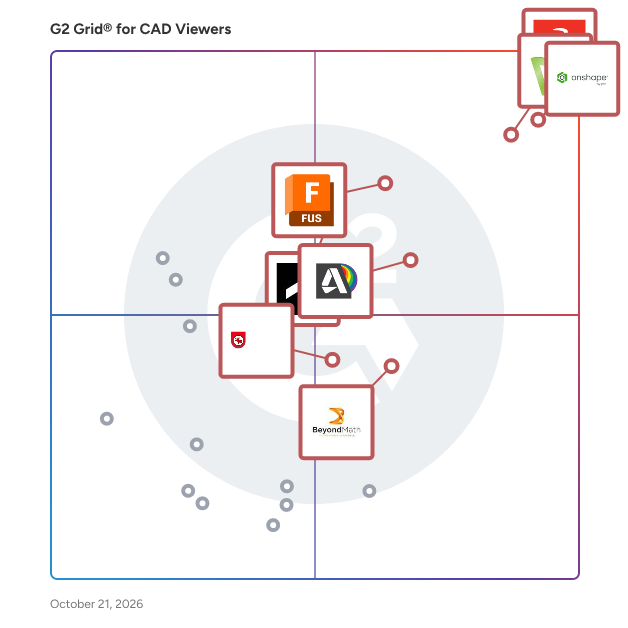
## G2 Grid® for CAD Viewers
![G2 Grid® for CAD Viewers plotting products by satisfaction and market presence](https://www.g2.com/categories/cad-viewers/grids.png?focus%5B%5D=16895&focus%5B%5D=2985&focus%5B%5D=5307&focus%5B%5D=1795&focus%5B%5D=105863&focus%5B%5D=3322&focus%5B%5D=105864&focus%5B%5D=1281014)
Highlighted products: Onshape, DraftSight, Autodesk Fusion, SOLIDWORKS, Autodesk Viewer, Autodesk DWG TrueView, IrfanView, and CADMATIC eBrowser.
Underlying data: [Grid® JSON](https://www.g2.com/categories/cad-viewers/grids.json?focus%5B%5D=onshape&amp;focus%5B%5D=draftsight&amp;focus%5B%5D=autodesk-fusion&amp;focus%5B%5D=solidworks&amp;focus%5B%5D=autodesk-viewer&amp;focus%5B%5D=autodesk-dwg-trueview&amp;focus%5B%5D=irfanview&amp;focus%5B%5D=cadmatic-cadmatic-ebrowser)


## How Many CAD Viewers Products Does G2 Track?
**Total Products under this Category:** 78

### Category Stats (Jul 2026)
- **Average Rating**: 4.24/5 The average rating of products in this category, based on all submitted ratings
- **Top Trending Product**: 3D Viewer MAX (+5.0%) - Among all products in this category, 3D Viewer MAX recorded the largest rating increase compared to last month
*Last updated: July 09, 2026*


## How Does G2 Rank CAD Viewers Products?

**Why You Can Trust G2's Software Rankings:**

- 30 Analysts and Data Experts
- 2,700+ Authentic Reviews
- 78+ Products
- Unbiased Rankings

G2's software rankings are built on verified user reviews, rigorous moderation, and a consistent research methodology maintained by a team of analysts and data experts. Each product is measured using the same transparent criteria, with no paid placement or vendor influence. While reviews reflect real user experiences, which can be subjective, they offer valuable insight into how software performs in the hands of professionals. Together, these inputs power the G2 Score, a standardized way to compare tools within every category.


## Which CAD Viewers Is Best for Your Use Case?

- **Leader:** [Onshape](https://www.g2.com/products/onshape/reviews)
- **Highest Performer:** [IrfanView](https://www.g2.com/products/irfanview/reviews)
- **Easiest to Use:** [Onshape](https://www.g2.com/products/onshape/reviews)
- **Top Trending:** [CADMATIC eBrowser](https://www.g2.com/products/cadmatic-cadmatic-ebrowser/reviews)
- **Best Free Software:** [Onshape](https://www.g2.com/products/onshape/reviews)


---

**Sponsored**

### Queue-it

Queue-it is the leading provider of Virtual Waiting Rooms and Traffic Management solutions, empowering 1,000+ organizations globally to deliver peak-demand events by controlling load and protecting critical infrastructure—without over-scaling or re-architecting their stack. Supporting 36 billion visitors annually across websites and mobile apps, Queue-it helps governments, retailers, and ticketing companies deliver reliable, fair, and transparent online experiences when traffic surges. Teams get flexible, granular control over traffic flow to protect an entire site or app, specific landing pages, or key bottlenecks like login, “add to cart,” checkout, payment gateways, and API calls. Key features include Bot Detection and Mitigation, detailed traffic analytics, and fully branded virtual waiting rooms designed for both scheduled events and 24/7 protection—plus exclusive access mechanisms and wait-experience features that keep visitors informed and engaged. Founded in 2010, Queue-it has over 15 years of experience leading the way in peak traffic admission control and virtual waiting room technology. With offices in Denmark, the U.S., Australia, Korea, and Japan, Queue-it serves the biggest enterprise customers globally with 24/7, 365-day support to help ensure they have the control they need to consistently deliver online experiences that earn trust from their users.


[Visit website](https://www.g2.com/external_clickthroughs/record?secure%5Bad_program%5D=ppc&amp;secure%5Bad_slot%5D=category_product_list&amp;secure%5Bcategory_id%5D=1957&amp;secure%5Bchosen_at%5D=2026-07-09T18%3A32%3A18Z&amp;secure%5Bdisplayable_resource_id%5D=1564&amp;secure%5Bdisplayable_resource_type%5D=Category&amp;secure%5Bmedium%5D=sponsored&amp;secure%5Bplacement_reason%5D=retargeted_product&amp;secure%5Bplacement_resource_ids%5D%5B%5D=2660&amp;secure%5Bprioritized%5D=false&amp;secure%5Bproduct_id%5D=2660&amp;secure%5Bresource_id%5D=1957&amp;secure%5Bresource_type%5D=Category&amp;secure%5Bsource_type%5D=category_page&amp;secure%5Bsource_url%5D=https%3A%2F%2Fwww.g2.com%2Fcategories%2Fcad-viewers%3Fpage%3D5&amp;secure%5Btoken%5D=451db0cf1498125e9c3c849a7de6b9ef2f9f74f48f5aa889236e75a8f53d7592&amp;secure%5Burl%5D=https%3A%2F%2Fwww.queue-it.com%2F&amp;secure%5Burl_type%5D=company_website)

---


## What Is CAD Viewers?

[CAD Software](https://www.g2.com/categories/cad)

## What Software Categories Are Similar to CAD Viewers?

- [General-Purpose CAD Software](https://www.g2.com/categories/general-purpose-cad)
- [Mechanical Computer-aided Design (MCAD) Software](https://www.g2.com/categories/mechanical-computer-aided-design-mcad)


---

## How Do You Choose the Right CAD Viewers?

### What You Should Know About CAD Viewers Software

### What is CAD Viewers Software?

CAD software is a huge cost for any design team. Since so many teams work on a particular design, it can often be difficult for all teams to have the same CAD software to share and access design files. Instead of purchasing a compatible CAD software product, or being left out of the design phase of a project, design teams can use CAD viewers software to view, annotate, and edit designs. This saves money, time, and keeps all necessary parties involved during the design phase of a project.

Key Benefits of CAD Viewers Software

- Improve collaboration by supporting a wide variety of file types for users to access 
- Save money by having one neutral CAD software for all users to access other CAD designs
- Allow users to save time by batch exporting CAD files

### Why Use CAD Viewers Software?

There are over 50 different file formats in computer-aided design. Product designers, architects, manufacturers, and engineers all work with computer-aided design software and most of them work with various products that can support any of the 50 or more computer-aided design file types. With all of these different file types, it can hinder cross team collaboration if two different teams don’t use the same product that supports the same design file. CAD viewers software mitigate this issue by providing a neutral ground that allows users to view all different CAD design files. This way users can annotate, edit, and collaborate without working on the same design software.

### Who Uses CAD Viewers Software?

**Architects —** Although most CAD software is geared toward product designers and civil engineers, architects still use many of the same file types. This includes DWG and DXF files. Architects may be working with other various teams that use different proprietary file formats. Because of this, it’s important to have access to CAD viewers software that enables these teams to view those files.

**Product designers —** Product designers that use various CAD software can use CAD viewers that translate design files. This way if a product designer working in a certain file format needs another designer to look at it, they can both look at it without needing the same software.

**Civil engineers —** Civil engineers work with CAD software on a daily basis, often working with various file types. As such it’s important that they have access to software that allows each engineer to view, annotate, and make edits to each design.

### Kinds of CAD Viewers Software

An important aspect to note about CAD files is that some are neutral file types while others are proprietary files. Neutral or open-source formats were invented as intermediate formats for converting between two proprietary formats. These are very popular for their ability to handle all different types of CAD files. On the other hand, users can run into problems when they encounter proprietary file formats. For example, popular CAD products such as SolidWorks, and Solid Edge can only use CAD files in their own format. So if users want to work with those files, they have to work with those products.

Below are the most common CAD files, and ones that should be supported by most CAD viewers.There are over 50 types of CAD files that are used in computer-aided design. While some CAD viewers have great accessibility and allow users to view most types, others only allow users to view and annotate the most common files.

**DWG —** A DWG file viewer allows users to view the native format of products such as Draftsight, AutoCAD, BricsCAD and more. It is perhaps the most common CAD file type for 2D drawings since it is used by some of the largest vendors in the CAD market. DWG files are supported non-natively by many other CAD products because of its widespread use in computer-aided design.

**DWF —** DWF stands for design web format. This file type is a highly compressed version of a CAD file that&#39;s useful for viewing, printing, and transmitting designs. DWF files are saved in a compressed format to reduce the size of the file. These files are native to AutoCAD and other Autodesk products. Because these files are so common it’s important to choose a CAD viewer that supports DWF files. Similar to DWG files, DWG files are usually used for 2D drawings.

**IGES —** IGES file types are used for 3D CAD files. Although it is no longer developed, the IGES file is still widely used to transfer data between CAD, CAM, and CAE software programs. It is a neutral file type and can be used by most CAD products.

**STEP —** STEP is one of the most widely used CAD file formats for 3D files. It is also a neutral file type which allows it to support many different file types.

### CAD Viewers Software Features

**View 2D files —** The main function of most CAD viewers is that it allows users to view different 2D file formats.This feature allows users to access all geometrical and metadata for a particular design file.

**View 3D files —** CAD viewers also allow users to view 3D files of designs. This feature allows users to access all geometrical and metadata for a particular design file, but in a 3D format.

**Annotate —** This feature enables users to make annotations, navigate layers and components, and measure distances, surfaces, and angles.

**Editing —** Some CAD viewers not only allow users to measure and annotate, but also edit the design itself.

**Collaboration —** Collaboration features allow multiple users to annotate and edit CAD files at the same time. Some collaboration tools allow users to share designs through a URL so those viewing CAD files do not need to install their own CAD viewer to view the CAD file.

**Batch conversion —** Batch conversion features allow users to save selected files and convert them to a different file all at once. This can be very helpful for users who need to convert many files all at once.

**Track changes —** Most CAD viewers allow users to manage, track, and import changes back to the original design software. Users can also undo recent changes or see which users made which changes. This further enhances design intent and allows users to not lose previous work that contributed to overall design.

### Trends Related to CAD Viewers Software

**Mobile CAD viewers —** As software becomes increasingly mobile, it makes sense for users to have accessibility to all the CAD files they need anytime from anywhere. Because of this, more major CAD vendors are introducing CAD viewers software that are available on a mobile device. While it may not have all of the functionality of a desktop product, it still can give users the basic functionality they need.

### Potential Issues with CAD Viewers Software

**Unsupported file types —** As noted above, not all CAD viewers have access to all different file types. It’s important to choose a CAD viewer that will be compatible with the file types that users work with the most.

### Software and Services Related to CAD Viewers Software

[**General-purpose CAD software**](https://www.g2.com/categories/general-purpose-cad) **—** Product designers use general-purpose CAD software as the basis for most of their designs. The CAD software that a designer chooses will determine the file type that they ultimately design in. If you are working across various teams and don’t want to use a CAD viewer tool, then it’s important to choose a CAD software that either allows various file formats, or one used across all teams.