# Best CAD Viewers - Page 3

*By [Daniel Rivera](https://research.g2.com/insights/author/daniel-rivera)*


CAD viewers offer users the ability to view, annotate, and sometimes edit various CAD file types such as DWG, STL, DXF, and IGES. Within CAD viewer software, designers can access all geometrical and metadata for a particular design file, which then enables them to make annotations, navigate layers and components, and measure distances, surfaces, and angles. CAD viewers are leveraged by any design department that needs access to files that perform 3D or 2D modeling. CAD viewers are often used in conjunction with other design software systems such as [general-purpose CAD software](https://www.g2.com/categories/general-purpose-cad).

To qualify for inclusion in the CAD Viewers category, a product must:

- Access and view various CAD file types
- Provide access to view geometrical and metadata within the design file
- Export and batch convert CAD files


## How Many CAD Viewers Products Does G2 Track?
**Total Products under this Category:** 78

### Category Stats (Jul 2026)
- **Average Rating**: 4.24/5 The average rating of products in this category, based on all submitted ratings
- **Top Trending Product**: 3D Viewer MAX (+5.0%) - Among all products in this category, 3D Viewer MAX recorded the largest rating increase compared to last month
*Last updated: July 04, 2026*


## How Does G2 Rank CAD Viewers Products?

**Why You Can Trust G2's Software Rankings:**

- 30 Analysts and Data Experts
- 2,700+ Authentic Reviews
- 78+ Products
- Unbiased Rankings

G2's software rankings are built on verified user reviews, rigorous moderation, and a consistent research methodology maintained by a team of analysts and data experts. Each product is measured using the same transparent criteria, with no paid placement or vendor influence. While reviews reflect real user experiences, which can be subjective, they offer valuable insight into how software performs in the hands of professionals. Together, these inputs power the G2 Score, a standardized way to compare tools within every category.


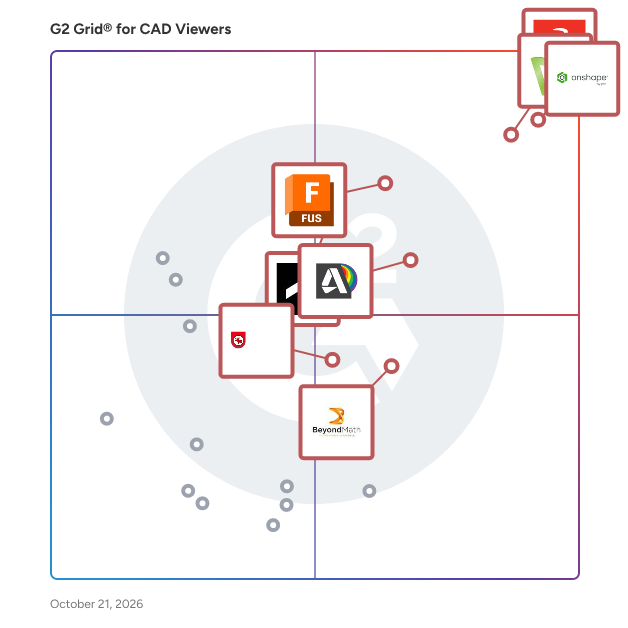
## Which CAD Viewers Is Best for Your Use Case?

- **Leader:** [Onshape](https://www.g2.com/products/onshape/reviews)
- **Highest Performer:** [IrfanView](https://www.g2.com/products/irfanview/reviews)
- **Easiest to Use:** [Onshape](https://www.g2.com/products/onshape/reviews)
- **Top Trending:** [CADMATIC eBrowser](https://www.g2.com/products/cadmatic-cadmatic-ebrowser/reviews)
- **Best Free Software:** [Onshape](https://www.g2.com/products/onshape/reviews)


---

**Sponsored**

### CMS IntelliCAD

CMS IntelliCAD® is a sophisticated CAD software solution designed to meet the diverse needs of professionals in engineering, architecture, and consulting. This full-featured software provides users with an extensive array of 2D and 3D drawing tools that are compatible with Autodesk® AutoCAD®, making it an ideal choice for anyone who relies on CAD drawings for their work. With its intelligent design and powerful capabilities, CMS IntelliCAD serves as a reliable alternative for those seeking advanced CAD functionalities without the associated high costs. Targeted primarily at engineers, architects, and consultants, CMS IntelliCAD caters to a wide range of users who require precision and efficiency in their design processes. The software is particularly beneficial for professionals who need to create detailed drawings, models, and documentation. Its compatibility with .DWG file extensions ensures seamless integration with existing projects, allowing users to work with files from various sources without losing data integrity. Additionally, the software supports Building Information Modeling (BIM), enhancing its utility for modern architectural and engineering practices, which increasingly rely on collaborative and data-rich environments. One of the standout features of CMS IntelliCAD is its extensive customization options. Users can take advantage of a comprehensive programming toolkit that includes support for LISP, VBA, .Net, and IRX development. This flexibility allows users to tailor the software to their specific workflows, enhancing productivity and streamlining repetitive tasks. The ability to create custom commands and automate processes can significantly reduce the time spent on drafting and design, making it a valuable asset for busy professionals who need to maximize their efficiency. Moreover, CMS IntelliCAD offers extended interoperability with various file formats, including DGN, .STEP, .IGES, and .PDF. This broad compatibility ensures that users can collaborate effectively with colleagues and clients who may be using different software solutions. The software&#39;s robust features, combined with its affordability, make it an attractive option for businesses and individuals looking to enhance their CAD capabilities without compromising on quality or performance. CMS IntelliCAD stands out in the CAD software landscape by providing a powerful, customizable, and cost-effective solution for professionals in various fields. Its intelligent design, extensive compatibility, and support for advanced programming make it a practical choice for those who require a reliable tool for their design and drafting needs. The combination of these features positions CMS IntelliCAD as a strong contender in the competitive CAD market, appealing to both seasoned professionals and newcomers alike.


[Visit website](https://www.g2.com/external_clickthroughs/record?secure%5Bad_program%5D=ppc&amp;secure%5Bad_slot%5D=category_product_list&amp;secure%5Bcategory_id%5D=1957&amp;secure%5Bchosen_at%5D=2026-07-05T01%3A42%3A15Z&amp;secure%5Bdisplayable_resource_id%5D=291&amp;secure%5Bdisplayable_resource_type%5D=Category&amp;secure%5Bmedium%5D=sponsored&amp;secure%5Bplacement_reason%5D=neighbor_category&amp;secure%5Bplacement_resource_ids%5D%5B%5D=291&amp;secure%5Bprioritized%5D=false&amp;secure%5Bproduct_id%5D=5497&amp;secure%5Bresource_id%5D=1957&amp;secure%5Bresource_type%5D=Category&amp;secure%5Bsource_type%5D=category_page&amp;secure%5Bsource_url%5D=https%3A%2F%2Fwww.g2.com%2Fcategories%2Fcad-viewers%3Fpage%3D3&amp;secure%5Btoken%5D=457d8b0b4564c7ae80cf533f9464fdaaab0d4d360cf50316b600a051057b5ef3&amp;secure%5Burl%5D=https%3A%2F%2Fintellicadms.com%2Fsite%2F&amp;secure%5Burl_type%5D=custom_url)

---

## What Are the Top-Rated CAD Viewers Products in 2026?
### 1. [PCBflow](https://www.g2.com/products/pcbflow/reviews)
Online DFM for Printed Circuit Boards Get instant, actionable feedback about PCB manufacturability before handoff. Accelerate time-to-market for your prototypes and NPIs. For any industry, from consumer electronics, medical devices to automotive and aerospace, PCBflow empowers and connects PCB designers to manufacturers and part suppliers to accelerate, simplify and improve the handoff process from design to manufacture. A Secure, cloud-based, collaborative environment with no IT investment, nothing to download or install! Supporting designs in ODB++, IPC2581, Gerber274x and many other common CAD formats.


**Average Rating:** 4.3/5.0
**Total Reviews:** 2
**How Do G2 Users Rate PCBflow?**

- **File size:** 8.3/10 (Category avg: 8.1/10)
- **Dimensioning tools:** 6.7/10 (Category avg: 8.2/10)

**Who Is the Company Behind PCBflow?**

- **Seller:** [Siemens Digital Industries Software](https://www.g2.com/sellers/siemens-digital-industries-software)
- **Year Founded:** 1980
- **HQ Location:** Plano, Texas
- **Twitter:** @siemenssoftware (36,972 Twitter followers)
- **LinkedIn® Page:** https://www.linkedin.com/company/28423178/ (20,941 employees on LinkedIn®)

**Who Uses This Product?**
- **Company Size:** 100% Small-Business


#### What Are PCBflow's Pros and Cons?

**Pros:**

- 3D Modeling (1 reviews)
- Accuracy (1 reviews)
- Cloud Computing (1 reviews)
- Design Visualization (1 reviews)
- Ease of Use (1 reviews)

**Cons:**

- Expensive (1 reviews)
- Lack of Features (1 reviews)
- Not User-Friendly (1 reviews)


### What Do G2 Reviewers Say About PCBflow?
*AI-generated summary from verified user reviews*

**Pros:**

- Users value the **seamless integration** of PCBflow with PADS, simplifying the transition from design to production.
- Users find PCBflow&#39;s **accuracy in analysis** invaluable, providing detailed insights and recommendations for their designs.
- Users find PCBFlow&#39;s **cloud-based analysis tool** invaluable for advanced manufacturing and pricing insights.
- Users find PCBFlow&#39;s **design visualization** invaluable, providing detailed analysis and insights for improved manufacturing and pricing decisions.
- Users find PCBflow&#39;s **ease of use** impressive, facilitating a smooth transition from design to production.

**Cons:**

- Users find PCBflow **expensive** , especially small users who may struggle with subscription fees and limited budgets.
- Users find the **lack of essential features** in PCBflow, leading to unnecessary reports that clutter the experience.
- Users find PCBflow **not user-friendly** for small users, as costs may burden those with limited budgets.

#### What Are Recent G2 Reviews of PCBflow?

**"[Fabrication Analysis of my prototype using Siemens PCBFlow tool](https://www.g2.com/survey_responses/pcbflow-review-10345448)"**

**Rating:** 4.5/5.0 stars
*— AMIN S.*

[Read full review](https://www.g2.com/survey_responses/pcbflow-review-10345448)

---

**"[Starter of PCBflow](https://www.g2.com/survey_responses/pcbflow-review-10311399)"**

**Rating:** 4.0/5.0 stars
*— Junli J.*

[Read full review](https://www.g2.com/survey_responses/pcbflow-review-10311399)

---


### 2. [PloView](https://www.g2.com/products/ploview/reviews)
PloView is viewer for viewing drawing of HPGL, PDF, DXF, DWG, GERBER, IGES, TIFF, JPEG file. Color and width change, black and white/color change, background color change, pen ON/OFF. Merge ON/OFF. Rotation, mirror, grid displaying. Thumbnail displaying. Measurement function. Connected line search.


**Average Rating:** 3.0/5.0
**Total Reviews:** 1

**Who Is the Company Behind PloView?**

- **Seller:** [Isoplotec](https://www.g2.com/sellers/isoplotec)
- **HQ Location:** N/A
- **LinkedIn® Page:** https://www.linkedin.com/company/No-Linkedin-Presence-Added-Intentionally-By-DataOps (1 employees on LinkedIn®)

**Who Uses This Product?**
- **Company Size:** 100% Small-Business


#### What Are G2 Users Discussing About PloView?

- [What is PloView used for?](https://www.g2.com/discussions/what-is-ploview-used-for)

### 3. [QwikVue](https://www.g2.com/products/qwikvue/reviews)
QwikVue is a versatile viewing application developed by Logical Systems, LLC, designed to seamlessly integrate with AutoEDMS systems. It enables users to view and print a variety of file formats, including AutoCAD DWG files (up to version 2019, Microstation DGN files, Microsoft Office documents (DOC, DOCX, XLS, XLSX, and image files such as TIF, BMP, JPG, and GIF. QwikVue offers an intuitive interface with easy-to-remember mouse controls for zooming, panning, and rotating, ensuring efficient navigation through documents. Additional features include support for viewing PDFs inserted into DWG files as XRefs, customizable viewing backgrounds, and options for printing with various settings like force colors to black, watermarking, and lineweight adjustments. By providing accurate viewing and printing capabilities without the need for native CAD software, QwikVue enhances productivity and streamlines document management processes for AutoEDMS users.


**Average Rating:** 3.5/5.0
**Total Reviews:** 1
**How Do G2 Users Rate QwikVue?**

- **File size:** 8.3/10 (Category avg: 8.1/10)
- **Dimensioning tools:** 8.3/10 (Category avg: 8.2/10)

**Who Is the Company Behind QwikVue?**

- **Seller:** [Logical Systems](https://www.g2.com/sellers/logical-systems)
- **Year Founded:** 2013
- **HQ Location:** Madison, US
- **LinkedIn® Page:** https://www.linkedin.com/company/logical-systems-of-sd/ (5 employees on LinkedIn®)

**Who Uses This Product?**
- **Company Size:** 100% Small-Business


### 4. [SimLab CAD Viewer](https://www.g2.com/products/simlab-cad-viewer/reviews)
SimLab CAD Viewer is a mobile application that allows you to view and navigate, on the go, computer-aided 3D designs and architectural models on iOS and Android devices. SimLab CAD Viewer reads the SimLab Archive File (\*.ZIM) exported either from SimLab Composer or the Android/iPad Exporter plug-in which is available for SketchUp, Rhino, SolidWorks, Inventor, 3ds Max, Maya, and Modo. The SimLab Archive Files (\*.ZIM) include all the necessary data needed for displaying models on smartphones and tablets. The data include geometries, colors, materials, textures, cameras, scene states, and animations.


**Average Rating:** 5.0/5.0
**Total Reviews:** 1

**Who Is the Company Behind SimLab CAD Viewer?**

- **Seller:** [SimLab Soft](https://www.g2.com/sellers/simlab-soft)
- **Year Founded:** 2007
- **HQ Location:** Amman, JO
- **Twitter:** @SimLabSoft (275 Twitter followers)
- **LinkedIn® Page:** https://www.linkedin.com/company/simlab-soft (22 employees on LinkedIn®)

**Who Uses This Product?**
- **Company Size:** 100% Small-Business


#### What Are Recent G2 Reviews of SimLab CAD Viewer?

**"[Beast app for making 3D modles](https://www.g2.com/survey_responses/simlab-cad-viewer-review-6969818)"**

**Rating:** 5.0/5.0 stars
*— zabihullah D.*

[Read full review](https://www.g2.com/survey_responses/simlab-cad-viewer-review-6969818)

---


### 5. [WORKXPLORE](https://www.g2.com/products/workxplore/reviews)
WORKXPLORE is distinguished by having a powerful combination of full feature capabilities, highest overall functionality, and incredible speed. It is specifically developed to dramatically increase collaboration, productivity and effectiveness throughout your cross-functional product development activities including: design, process development, manufacturing, quality, sales and customer communication, purchasing, product documentation and others.


**Average Rating:** 4.0/5.0
**Total Reviews:** 1
**How Do G2 Users Rate WORKXPLORE?**

- **File size:** 8.3/10 (Category avg: 8.1/10)
- **Dimensioning tools:** 8.3/10 (Category avg: 8.2/10)

**Who Is the Company Behind WORKXPLORE?**

- **Seller:** [Hexagon AB](https://www.g2.com/sellers/hexagon-ab-82cd7afb-c519-4285-8d60-9b5f99ae6850)
- **HQ Location:** Stockholm
- **Twitter:** @HexagonAB (13,376 Twitter followers)
- **LinkedIn® Page:** https://www.linkedin.com/company/hexagon-ab/ (852 employees on LinkedIn®)

**Who Uses This Product?**
- **Company Size:** 100% Small-Business


#### What Are Recent G2 Reviews of WORKXPLORE?

**"[Review of one of the best CAD file viewer and analyzer WORKXPLORE](https://www.g2.com/survey_responses/workxplore-review-8777543)"**

**Rating:** 4.0/5.0 stars
*— Pradip R.*

[Read full review](https://www.g2.com/survey_responses/workxplore-review-8777543)

---


### 6. [Acme CAD See](https://www.g2.com/products/acme-cad-see/reviews)
DWG drawing and image file viewer , browser and Print.


**Who Is the Company Behind Acme CAD See?**

- **Seller:** [DWG Tool](https://www.g2.com/sellers/dwg-tool)
- **HQ Location:** N/A
- **LinkedIn® Page:** https://www.linkedin.com/company/No-Linkedin-Presence-Added-Intentionally-By-DataOps (1 employees on LinkedIn®)


### 7. [AMOB 3D Software](https://www.g2.com/products/amob-3d-software/reviews)
AMOB 3D BENDING SOFTWARE is at the cutting-edge of tube bending applications. Extremely easy to operate, it allows direct programming using coordinates or LRA, as well as importing CAD files.


**Who Is the Company Behind AMOB 3D Software?**

- **Seller:** [AMOB](https://www.g2.com/sellers/amob)
- **Year Founded:** 1960
- **HQ Location:** Vila Nova de Famalicão, PT
- **Twitter:** @AMOB_SA (569 Twitter followers)
- **LinkedIn® Page:** https://www.linkedin.com/company/amob/ (131 employees on LinkedIn®)


### 8. [bananaz](https://www.g2.com/products/bananaz/reviews)
Copilot for Mechanical Engineers. Master design changes, enhance team collaboration, automate documentation, and gain actionable design insights. All embedded into your existing CAD and PDM software. Bananaz picks up where your design tools fall short. AI-powered Validation, Compliance, and Coordination that integrates seamlessly to your design software and turbo-charge your engineers.  Freeing your team to focus on meaningful design and innovation Intelligent Design Validation &amp; Change Management: \* Detecting Differences across 2D drawing and 3D models guiding users through the individual design changes. \* Checklist Compliance verifies whether your design adheres to defined geometrical product specifications on every iteration. \* Issue tracking creates an easy to-do list based on the team communication to ensure the execution meets the requirements. Integrated Collaboration &amp; Workflow Visibility: \* Design Activity Tracking - Auto-generated change logs and visual differences to provide full visibility into the design process. \* Real-Time Notifications Get real-time alerts for design updates, mentions, and tasks requiring your attention. \* Team Comments &amp; Annotations Direct collaboration on 3D and 2D files with synced comments and annotations across versions. \* CAD/PDM Integration - Access control connects seamlessly to your existing design stack, syncs automatically, no manual uploads. Custom Automation &amp; Rule Definition: \* Custom Rules Enforcement - Automated design review tasks - customized to your organization’s standards and processes. \* Flexible Design Review Workflows that align with your organization requirements and adapt to dynamic needs across different projects. \* Automatic Reports Generation - redlining, inspection balloons, audit trail and changes reports are auto-generated according to company templates.


**Average Rating:** 5.0/5.0
**Total Reviews:** 2

**Who Is the Company Behind bananaz?**

- **Seller:** [bananaz.ai](https://www.g2.com/sellers/bananaz-ai)
- **Year Founded:** 2023
- **HQ Location:** Tel Aviv, IL
- **LinkedIn® Page:** https://www.linkedin.com/company/bananaz-ai/ (23 employees on LinkedIn®)

**Who Uses This Product?**
- **Company Size:** 50% Mid-Market, 50% Small-Business


#### What Are bananaz's Pros and Cons?

**Pros:**

- Accuracy (1 reviews)
- Drawing Efficiency (1 reviews)
- Ease of Use (1 reviews)
- Efficiency (1 reviews)
- Features (1 reviews)

**Cons:**

- Limited Options (1 reviews)
- Missing Features (1 reviews)
- Software Limitations (1 reviews)


### What Do G2 Reviewers Say About bananaz?
*AI-generated summary from verified user reviews*

**Pros:**

- Users highly value the **accuracy** of bananaz, enabling them to catch discrepancies early and streamline design reviews.
- Users value the **drawing efficiency** of bananaz, greatly reducing review time and minimizing costly design discrepancies.
- Users value the **ease of use** of bananaz, enhancing team alignment and saving time during design reviews.
- Users love the **efficiency** of bananaz, significantly reducing time spent on design reviews and preventing costly mistakes.
- Users appreciate the **2D granular compare tool** in bananaz for its clarity and time-saving benefits in design reviews.

**Cons:**

- Users find the **limited options** for marking up drawings post-approval constraining for their QA workflows.
- Users find the **lack of direct markup on approved files** limiting, affecting their QA workflow efficiency.
- Users find the **software limitations** of Bananaz frustrating, especially concerning post-approval markup of drawings.

#### What Are Recent G2 Reviews of bananaz?

**"[bananaz Transformed the Way We Review and Approve Designs](https://www.g2.com/survey_responses/bananaz-review-11422557)"**

**Rating:** 5.0/5.0 stars
*— Yuval N.*

[Read full review](https://www.g2.com/survey_responses/bananaz-review-11422557)

---

**"[Streamlined Design Reviews for Mechanical Engineering Teams](https://www.g2.com/survey_responses/bananaz-review-11428407)"**

**Rating:** 5.0/5.0 stars
*— Rimma B.*

[Read full review](https://www.g2.com/survey_responses/bananaz-review-11428407)

---


### 9. [BeyondMath](https://www.g2.com/products/beyondmath/reviews)
BeyondMath is an AI-driven simulation platform that revolutionizes engineering design by enabling rapid, accurate assessments of complex physical phenomena without the need for physical prototypes or extensive computational resources. By leveraging advanced artificial intelligence trained on the fundamental equations governing the physical world, BeyondMath accelerates engineering iterations by a factor of 1,000 compared to traditional methods, significantly reducing both time and cost.


**Who Is the Company Behind BeyondMath?**

- **Seller:** [BeyondMath](https://www.g2.com/sellers/beyondmath)
- **Year Founded:** 2022
- **HQ Location:** London, GB
- **LinkedIn® Page:** https://linkedin.com/company/beyondmath (19 employees on LinkedIn®)


### 10. [CADMATIC Draw](https://www.g2.com/products/cadmatic-draw/reviews)
CADMATIC Draw is a comprehensive CAD software tailored for both 2D drafting and 3D modeling, offering an intuitive interface and a suite of advanced features. It enables users to create, edit, and manage detailed drawings efficiently, supporting a wide array of file formats such as DWG, DXF, IFC, and PDF. This versatility ensures seamless collaboration across various CAD platforms and simplifies the integration of existing design archives. With customizable menus and toolbars, CADMATIC Draw allows users to personalize their workspace, enhancing productivity and streamlining the design process. Key Features and Functionality: - Versatile Drawing Capabilities: Supports both 2D drafting and 3D modeling, accommodating a broad spectrum of design requirements. - Extensive File Compatibility: Ensures smooth collaboration with support for DWG, DXF, IFC, and PDF formats. - Customizable Interface: Allows users to tailor menus and toolbars to their specific needs, optimizing workflow efficiency. - Automated Tools: Features such as find and replace for drawing attributes, queue printing, and familiar shortcuts from other CAD software enhance productivity. - Unified Standards and Libraries: Provides common templates and user symbol libraries in multi-user environments, ensuring consistency and ease of teamwork. Primary Value and User Solutions: CADMATIC Draw addresses the need for a user-friendly yet powerful CAD solution that bridges the gap between 2D and 3D design processes. Its extensive file compatibility facilitates effortless collaboration among project stakeholders using different CAD systems. The software&#39;s customizable interface and automated tools significantly reduce manual tasks, allowing designers to focus on creativity and precision. By offering unified drawing standards and symbol libraries, CADMATIC Draw ensures consistency across projects, enhancing overall design quality and team collaboration.


**Who Is the Company Behind CADMATIC Draw?**

- **Seller:** [Cadmatic](https://www.g2.com/sellers/cadmatic)
- **Year Founded:** 1982
- **HQ Location:** Turku, FI
- **Twitter:** @CADMATICGroup (188 Twitter followers)
- **LinkedIn® Page:** https://www.linkedin.com/company/cadmatic/ (309 employees on LinkedIn®)


### 11. [CAD ROOMS](https://www.g2.com/products/cad-rooms/reviews)
CAD Rooms is a purpose-built cloud PDM &amp; PLM solution that eliminates the bureaucratic overhead of traditional systems. Designed for engineering teams, it provides comprehensive CAD version control, check-in/check-out functionality, advanced CAD diffing, and blazingly fast file sync across devices. Workflow features include professional ECO workflows, 3D measurements and comments, support for 90+ CAD formats, and enterprise-grade security. Perfect for SMEs with physical products, product development teams, and growing engineering organizations.


**Who Is the Company Behind CAD ROOMS?**

- **Seller:** [CAD Rooms](https://www.g2.com/sellers/cad-rooms)
- **Year Founded:** 2025
- **HQ Location:** Copenhagen, DK
- **LinkedIn® Page:** https://www.linkedin.com/company/cad-rooms/ (4 employees on LinkedIn®)


### 12. [CORTONA2D VIEWER](https://www.g2.com/products/cortona2d-viewer/reviews)
Cortona2D Viewer enables you to view various graphic formats including CGM, BMP, ICON, GIF and JPEG to name just a few. Cortona2D Viewer works as a pluggable component for Internet Explorer and Office applications (Microsoft PowerPoint, Microsoft Word). At this time the Cortona2D Viewer is available on the Windows platform. Cortona2D Viewer is more than just a viewer! The powerful API allows for integration of Cortona2D Viewer into any third-party application supporting ActiveX technology. With Cortona2D Viewer, you can create a wide range of 2D applications.


**Who Is the Company Behind CORTONA2D VIEWER?**

- **Seller:** [Cortona3D](https://www.g2.com/sellers/cortona3d)
- **HQ Location:** Malahide, IE
- **LinkedIn® Page:** https://www.linkedin.com/company/cortona3d (14 employees on LinkedIn®)


### 13. [Encube Technologies](https://www.g2.com/products/encube-technologies/reviews)
Encube Technologies operates as a visual collaboration platform.


**Who Is the Company Behind Encube Technologies?**

- **Seller:** [Encube Technologies](https://www.g2.com/sellers/encube-technologies)
- **Year Founded:** 2021
- **HQ Location:** Stockholm, SE
- **LinkedIn® Page:** https://www.linkedin.com/company/getencube (25 employees on LinkedIn®)


### 14. [Enolsoft DXF Viewer](https://www.g2.com/products/enolsoft-dxf-viewer/reviews)
DXF Viewer for Mac is a lightweight, fast and dedicated CAD viewer designed for macOS and Windows. It allows you to effortlessly open, view, measure, annotate, export and print DXF &amp; DWG files without installing bulky AutoCAD software. With intuitive controls and complete toolset, it becomes your handy daily assistant for CAD drawing review.


**Who Is the Company Behind Enolsoft DXF Viewer?**

- **Seller:** [Enolsoft](https://www.g2.com/sellers/enolsoft)
- **HQ Location:** N/A
- **LinkedIn® Page:** https://www.linkedin.com/company/No-Linkedin-Presence-Added-Intentionally-By-DataOps (1 employees on LinkedIn®)


### 15. [GerbView](https://www.g2.com/products/gerbview/reviews)
GerbView™ is a professional Gerber viewer and converter for PCB engineers. View, print, and convert Gerber (RS-274D/X/X2/X3), Excellon, ODB++, DXF, and PDF files with ease. Create layered or multi-page PDFs, add annotations, measure traces and pads, and convert between PCB and CAD formats. Ideal for design review, documentation, and fabrication workflows. Try GerbView to simplify how you visualize and share your PCB data.


**Who Is the Company Behind GerbView?**

- **Seller:** [Software Companions](https://www.g2.com/sellers/software-companions)
- **Year Founded:** 1997
- **HQ Location:** Grorud, NO
- **Twitter:** @SoftCompanions (33 Twitter followers)
- **LinkedIn® Page:** https://www.linkedin.com/company/software-companions/ (1 employees on LinkedIn®)


### 16. [Glovius CAD viewer](https://www.g2.com/products/glovius-cad-viewer/reviews)
Glovius is a modern CAD viewer for Windows, iOS, Android, and Web Browsers. Glovius offers powerful tools for 3D and 2D CAD data consumption, analysis, workflow automation, and report generation. Glovius CAD viewer supports CATIA, NX, STEP, IGES, Pro/ENGINEER and Creo, SOLIDWORKS, Inventor, and Solid Edge files. Take accurate measurements, cut dynamic sections, compare differences between models, analyze part &amp; assembly CAD files, and export to STEP, IGES, 3D PDF, HTML, 3MF, and STL formats. Glovius is used by thousands of OEM’s and their suppliers in Manufacturing, Aerospace, Automotive, and Hi-Tech industries.


**Who Is the Company Behind Glovius CAD viewer?**

- **Seller:** [Glovius](https://www.g2.com/sellers/glovius)
- **Year Founded:** 1991
- **HQ Location:** Pune, IN
- **Twitter:** @glovius (51 Twitter followers)
- **LinkedIn® Page:** https://www.linkedin.com/company/3745878 (2 employees on LinkedIn®)


### 17. [JETCAM CAD Viewer](https://www.g2.com/products/jetcam-cad-viewer/reviews)
The JETCAM CAD Viewer is a free tool to allow viewing of all major 2D CAD files across all local and network drives. It&#39;s provided free, &#39;as is&#39; and without warranty. Extremely lightweight, JETCAM CAD Viewer can be installed on unlimited computers within your company. It provides instant viewing of all major CAD files, along with native JETCAM component files.


**Who Is the Company Behind JETCAM CAD Viewer?**

- **Seller:** [JETCAM](https://www.g2.com/sellers/jetcam-b1062fc5-569f-4917-8414-41a0015ba104)
- **Year Founded:** 1986
- **HQ Location:** Monaco, MC
- **LinkedIn® Page:** https://www.linkedin.com/company/jetcam-international-s-a-r-l (11 employees on LinkedIn®)

**Who Uses This Product?**
- **Company Size:** 100% Enterprise


#### What Are Recent G2 Reviews of JETCAM CAD Viewer?

**"[Review of JETCAM CAD viewer](https://www.g2.com/survey_responses/jetcam-cad-viewer-review-5411609)"**

**Rating:** 5.0/5.0 stars
*— Akash J.*

[Read full review](https://www.g2.com/survey_responses/jetcam-cad-viewer-review-5411609)

---


#### What Are G2 Users Discussing About JETCAM CAD Viewer?

- [What is JETCAM CAD Viewer used for?](https://www.g2.com/discussions/what-is-jetcam-cad-viewer-used-for)

### 18. [nanoCAD 3DScan](https://www.g2.com/products/nanocad-india-nanocad-3dscan/reviews)
Specialized software for processing 3D scanning data nanoCAD 3DScan is a specialized software tool for processing 3D scanning data, addressing engineering and informational challenges in areas like geodesy, mechanical engineering, construction, infrastructure, and metrological monitoring.


**Who Is the Company Behind nanoCAD 3DScan?**

- **Seller:** [nanoCAD India](https://www.g2.com/sellers/nanocad-india)
- **HQ Location:** N/A
- **LinkedIn® Page:** https://www.linkedin.com/company/nanocadindia/ (1 employees on LinkedIn®)


### 19. [PloComp Ver.12.0](https://www.g2.com/products/plocomp-ver-12-0/reviews)
PloComp is viewer which views in piles, or arranges and views plural drawing files. Old and new drawing comparison can be performed by recognition of different colors and change area by cloud mark. (1) Support many file formats Input: HPGL, HP-GL/2, HP RTL, PDF, DXF, DWG, GERBER, NC-Drill,IGES, EMF, TIFF, JPEG, Bitmap, PCX, FPX, GIF, PNG Output: PDF, HPGL, HP-GL/2, HP RTL, EMF, TIFF, DXF, DWG, JPEG,Bitmap, IGES, PCX, FPX, GIF, PNG, Printer, Plotter (2) High-speed display of vector drawing, and many commands about display (3) Display a maximum of 20 plural drawings in piles, or arrange and display. Displaying ON/OFF of the piled-up drawing is carried out per drawing. (4) Compare two drawings and add cloud mark automatic to change area (5) Color and width change of line, whole drawing black and white / color change, background color change, pen ON/OFF (6) Display mode: Copy / Merge / Xor / Command in data (7) Rotation, mirror, thumbnail displaying (8) Vector font / TrueType font change of character font (9) Measurement function of coordinates, length, area, line width, and angle (10) Connected line search, the total line length measurement (11) Drawing edit of comment File: New or vector input file of (1) is read (page number links to layer number), edited, and saving enables to output file of (1). Figure: Polyline, Arc, Circle, Horizontal line, Vertical line, Slanting line, Opposite side angle line, Regular polygon, Ellipse, Offset line, Free curve, Cloud shape line, Spline, Surface, Rectangle, Long circle, Text, Bitmap, Macro, Dimension (Horizontal, Vertical, Parallel, Angle, Radius, Diameter) Edit: Setup, Select (individual selecting, rectangular area selecting, polygon area selecting), Move copy, Delete, Divide/Delete/Move/RouteChange polyline section, Delete line in selected area boundary, Trim, Change property, Change vertex R, Chamfer, Connect Line, Rotate copy, Scale Up/Down copy, Macro-izing, Macro breakup, ReDo, UnDo.


**Who Is the Company Behind PloComp Ver.12.0?**

- **Seller:** [Isoplotec](https://www.g2.com/sellers/isoplotec)
- **HQ Location:** N/A
- **LinkedIn® Page:** https://www.linkedin.com/company/No-Linkedin-Presence-Added-Intentionally-By-DataOps (1 employees on LinkedIn®)


### 20. [Rasterex](https://www.g2.com/products/rasterex/reviews)
Rasterex Software AS provides intelligent software for technical document management and imaging software solutions.


**Who Is the Company Behind Rasterex?**

- **Seller:** [Rasterex Software AS](https://www.g2.com/sellers/rasterex-software-as)
- **Year Founded:** 1985
- **HQ Location:** Oslo, NO
- **LinkedIn® Page:** https://www.linkedin.com/company/18474211 (4 employees on LinkedIn®)


### 21. [Rayon](https://www.g2.com/products/rayon/reviews)
Rayon is a collaborative space design software made for professionals working on floor plans every day. It is a web-based tool that supports various file formats, including DWG, DXF, PDF, and image files. It boasts a variety of use cases for the creative minds of the architectural industry including floor planning, mood boarding and the redlining of drawings. Rayon enables users to draw walls, add doors, annotate floor plans, and to store and reuse furniture blocks. Users can generate PDFs of finalised floor plans, calculate square footage, and create tables.


**Average Rating:** 4.5/5.0
**Total Reviews:** 2
**How Do G2 Users Rate Rayon?**

- **Has the product been a good partner in doing business?:** 7.5/10 (Category avg: 8.4/10)
- **Ease of Admin:** 8.3/10 (Category avg: 8.5/10)

**Who Is the Company Behind Rayon?**

- **Seller:** [Rayon Design](https://www.g2.com/sellers/rayon-design)
- **Year Founded:** 2021
- **HQ Location:** Paris, FR
- **LinkedIn® Page:** https://www.linkedin.com/company/rayon-app/ (31 employees on LinkedIn®)

**Who Uses This Product?**
- **Company Size:** 50% Enterprise, 50% Mid-Market


#### What Are Recent G2 Reviews of Rayon?

**"[Link Rayon &amp; Rule CAD Plan](https://www.g2.com/survey_responses/rayon-review-9325522)"**

**Rating:** 5.0/5.0 stars
*— Rajat G.*

[Read full review](https://www.g2.com/survey_responses/rayon-review-9325522)

---

**"[All In One Architectural Design Software](https://www.g2.com/survey_responses/rayon-review-9319843)"**

**Rating:** 4.0/5.0 stars
*— Jainam J.*

[Read full review](https://www.g2.com/survey_responses/rayon-review-9319843)

---


### 22. [Rollup](https://www.g2.com/products/rollup/reviews)
The modern collaboration + low-code platform for engineering teams building the next generation of complex hardware.


**Who Is the Company Behind Rollup?**

- **Seller:** [Rollup AI](https://www.g2.com/sellers/rollup-ai)
- **LinkedIn® Page:** https://www.linkedin.com/company/rollup-inc


### 23. [ShareCAD](https://www.g2.com/products/sharecad/reviews)
ShareCAD is a secure cloud platform for storing, sharing, and viewing CAD and design files directly in the browser. Teams can upload large files, share them with clients, and allow recipients to preview models without downloading or installing software. Built for engineering, construction, and technical teams, ShareCAD simplifies file delivery, improves collaboration, and eliminates friction in reviewing complex files.


**Who Is the Company Behind ShareCAD?**

- **Seller:** [ShareCAD](https://www.g2.com/sellers/sharecad)
- **HQ Location:** N/A
- **LinkedIn® Page:** https://www.linkedin.com/company/No-Linkedin-Presence-Added-Intentionally-By-DataOps (1 employees on LinkedIn®)


### 24. [SUPERVIEW](https://www.g2.com/products/superview/reviews)
SUPERVIEW is the perfect 3D CAD viewer for interactive viewing of 3D CAD files, complete with PMI / MBD information, the ability to interrogate, markup, measure and add dimensions, delivering superior accuracy for job quotes and the shop floor. Outputs optimized polygonal formats such as 3DPDF, WebGL, Obj and STL


**Who Is the Company Behind SUPERVIEW?**

- **Seller:** [Transmagic](https://www.g2.com/sellers/transmagic)
- **Year Founded:** 2001
- **HQ Location:** Westminster, US
- **LinkedIn® Page:** http://www.linkedin.com/company/transmagic-inc- (9 employees on LinkedIn®)


### 25. [True IntelliCAD 11 Software](https://www.g2.com/products/true-intellicad-11-software-true-intellicad-11-software/reviews)
JTS IntelliCAD is an economical 2D Drafting and 3D Wireframe Modeling CAD software meant for Engineers, Architects and other technical consultants. JTS IntelliCAD works in native DWG &amp; DXF CAD software to create and edit drawings.


**Average Rating:** 4.0/5.0
**Total Reviews:** 1
**How Do G2 Users Rate True IntelliCAD 11 Software?**

- **Has the product been a good partner in doing business?:** 6.7/10 (Category avg: 8.4/10)
- **Ease of Admin:** 6.7/10 (Category avg: 8.5/10)

**Who Is the Company Behind True IntelliCAD 11 Software?**

- **Seller:** [True IntelliCAD 11 Software](https://www.g2.com/sellers/true-intellicad-11-software-5a698c06-b9b9-4339-9fac-03d5d0221d36)
- **Year Founded:** 2006
- **HQ Location:** Hyderabad, IN
- **LinkedIn® Page:** http://www.linkedin.com/company/jytra-engineering-services (51 employees on LinkedIn®)

**Who Uses This Product?**
- **Company Size:** 100% Small-Business


#### What Are Recent G2 Reviews of True IntelliCAD 11 Software?

**"[A very handy tool](https://www.g2.com/survey_responses/true-intellicad-11-software-review-9743805)"**

**Rating:** 4.0/5.0 stars
*— Wing Commander N.*

[Read full review](https://www.g2.com/survey_responses/true-intellicad-11-software-review-9743805)

---


## What Is CAD Viewers?

[CAD Software](https://www.g2.com/categories/cad)

## What Software Categories Are Similar to CAD Viewers?

- [General-Purpose CAD Software](https://www.g2.com/categories/general-purpose-cad)
- [Mechanical Computer-aided Design (MCAD) Software](https://www.g2.com/categories/mechanical-computer-aided-design-mcad)


---

## How Do You Choose the Right CAD Viewers?

### What You Should Know About CAD Viewers Software

### What is CAD Viewers Software?

CAD software is a huge cost for any design team. Since so many teams work on a particular design, it can often be difficult for all teams to have the same CAD software to share and access design files. Instead of purchasing a compatible CAD software product, or being left out of the design phase of a project, design teams can use CAD viewers software to view, annotate, and edit designs. This saves money, time, and keeps all necessary parties involved during the design phase of a project.

Key Benefits of CAD Viewers Software

- Improve collaboration by supporting a wide variety of file types for users to access 
- Save money by having one neutral CAD software for all users to access other CAD designs
- Allow users to save time by batch exporting CAD files

### Why Use CAD Viewers Software?

There are over 50 different file formats in computer-aided design. Product designers, architects, manufacturers, and engineers all work with computer-aided design software and most of them work with various products that can support any of the 50 or more computer-aided design file types. With all of these different file types, it can hinder cross team collaboration if two different teams don’t use the same product that supports the same design file. CAD viewers software mitigate this issue by providing a neutral ground that allows users to view all different CAD design files. This way users can annotate, edit, and collaborate without working on the same design software.

### Who Uses CAD Viewers Software?

**Architects —** Although most CAD software is geared toward product designers and civil engineers, architects still use many of the same file types. This includes DWG and DXF files. Architects may be working with other various teams that use different proprietary file formats. Because of this, it’s important to have access to CAD viewers software that enables these teams to view those files.

**Product designers —** Product designers that use various CAD software can use CAD viewers that translate design files. This way if a product designer working in a certain file format needs another designer to look at it, they can both look at it without needing the same software.

**Civil engineers —** Civil engineers work with CAD software on a daily basis, often working with various file types. As such it’s important that they have access to software that allows each engineer to view, annotate, and make edits to each design.

### Kinds of CAD Viewers Software

An important aspect to note about CAD files is that some are neutral file types while others are proprietary files. Neutral or open-source formats were invented as intermediate formats for converting between two proprietary formats. These are very popular for their ability to handle all different types of CAD files. On the other hand, users can run into problems when they encounter proprietary file formats. For example, popular CAD products such as SolidWorks, and Solid Edge can only use CAD files in their own format. So if users want to work with those files, they have to work with those products.

Below are the most common CAD files, and ones that should be supported by most CAD viewers.There are over 50 types of CAD files that are used in computer-aided design. While some CAD viewers have great accessibility and allow users to view most types, others only allow users to view and annotate the most common files.

**DWG —** A DWG file viewer allows users to view the native format of products such as Draftsight, AutoCAD, BricsCAD and more. It is perhaps the most common CAD file type for 2D drawings since it is used by some of the largest vendors in the CAD market. DWG files are supported non-natively by many other CAD products because of its widespread use in computer-aided design.

**DWF —** DWF stands for design web format. This file type is a highly compressed version of a CAD file that&#39;s useful for viewing, printing, and transmitting designs. DWF files are saved in a compressed format to reduce the size of the file. These files are native to AutoCAD and other Autodesk products. Because these files are so common it’s important to choose a CAD viewer that supports DWF files. Similar to DWG files, DWG files are usually used for 2D drawings.

**IGES —** IGES file types are used for 3D CAD files. Although it is no longer developed, the IGES file is still widely used to transfer data between CAD, CAM, and CAE software programs. It is a neutral file type and can be used by most CAD products.

**STEP —** STEP is one of the most widely used CAD file formats for 3D files. It is also a neutral file type which allows it to support many different file types.

### CAD Viewers Software Features

**View 2D files —** The main function of most CAD viewers is that it allows users to view different 2D file formats.This feature allows users to access all geometrical and metadata for a particular design file.

**View 3D files —** CAD viewers also allow users to view 3D files of designs. This feature allows users to access all geometrical and metadata for a particular design file, but in a 3D format.

**Annotate —** This feature enables users to make annotations, navigate layers and components, and measure distances, surfaces, and angles.

**Editing —** Some CAD viewers not only allow users to measure and annotate, but also edit the design itself.

**Collaboration —** Collaboration features allow multiple users to annotate and edit CAD files at the same time. Some collaboration tools allow users to share designs through a URL so those viewing CAD files do not need to install their own CAD viewer to view the CAD file.

**Batch conversion —** Batch conversion features allow users to save selected files and convert them to a different file all at once. This can be very helpful for users who need to convert many files all at once.

**Track changes —** Most CAD viewers allow users to manage, track, and import changes back to the original design software. Users can also undo recent changes or see which users made which changes. This further enhances design intent and allows users to not lose previous work that contributed to overall design.

### Trends Related to CAD Viewers Software

**Mobile CAD viewers —** As software becomes increasingly mobile, it makes sense for users to have accessibility to all the CAD files they need anytime from anywhere. Because of this, more major CAD vendors are introducing CAD viewers software that are available on a mobile device. While it may not have all of the functionality of a desktop product, it still can give users the basic functionality they need.

### Potential Issues with CAD Viewers Software

**Unsupported file types —** As noted above, not all CAD viewers have access to all different file types. It’s important to choose a CAD viewer that will be compatible with the file types that users work with the most.

### Software and Services Related to CAD Viewers Software

[**General-purpose CAD software**](https://www.g2.com/categories/general-purpose-cad) **—** Product designers use general-purpose CAD software as the basis for most of their designs. The CAD software that a designer chooses will determine the file type that they ultimately design in. If you are working across various teams and don’t want to use a CAD viewer tool, then it’s important to choose a CAD software that either allows various file formats, or one used across all teams.