Voci Technologies
Who Is the Company Behind Voci Technologies?
- Seller: Voci Technologies
- HQ Location: N/A
-
LinkedIn® Page: www.linkedin.com
1 employees on LinkedIn®
Total Products under this Category: 122
Last updated: November 12, 2026
Why You Can Trust G2's Software Rankings:
G2's software rankings are built on verified user reviews, rigorous moderation, and a consistent research methodology maintained by a team of analysts and data experts. Each product is measured using the same transparent criteria, with no paid placement or vendor influence. While reviews reflect real user experiences, which can be subjective, they offer valuable insight into how software performs in the hands of professionals. Together, these inputs power the G2 Score, a standardized way to compare tools within every category.
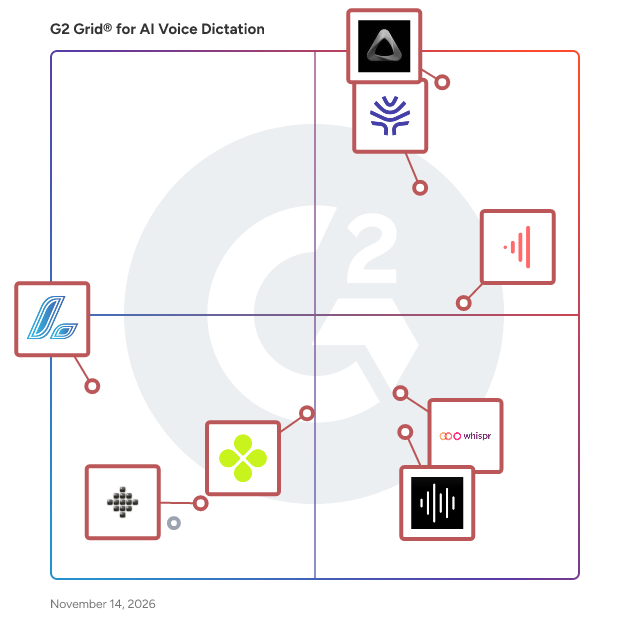
Highlighted products: Superwhisper, Willow Voice, VoiceDash, Whispr, VoiceX, Dictation Daddy, Laxis, and Resonant.
Underlying data: [Grid® JSON](https://www.g2.com/categories/ai-voice-dictation/grids.json?focus%5B%5D=superwhisper&focus%5B%5D=willow-voice&focus%5B%5D=voicedash&focus%5B%5D=whispr&focus%5B%5D=voicex&focus%5B%5D=dictation-daddy&focus%5B%5D=laxis&focus%5B%5D=resonant)
Voibe is voice-to-text dictation software for Mac and Windows, enabling text input via voice commands across applications. Using a push-to-talk mechanism, users hold a hotkey, speak, and release to insert transcribed text at the cursor.Voibe handles natural speech, accents, and technical terms with accurate punctuation. The software offers two modes: on-device mode processes transcription locally on Apple Silicon Macs, ensuring audio remains private, while zero-retention cloud mode uses open-source models and deletes recordings post-transcription. Both modes avoid storing or training on user audio. Voibe supports push-to-talk and hands-free dictation, with features like Live Dictation for real-time editing, custom vocabulary for names and jargon, spoken punctuation, memory shortcuts, and Developer Mode for coding contexts. Compatible with email, documents, chat, browsers, and code editors, Voibe runs on macOS Ventura or later and modern Windows PCs.
VoiceInk is a native macOS application that transforms spoken words into text almost instantly, utilizing advanced AI-powered voice recognition technology. Designed with a strong emphasis on privacy, it processes all data locally on your device, ensuring that your information remains secure and never leaves your computer. Supporting over 100 languages, VoiceInk offers high transcription accuracy and is optimized for Apple Silicon Macs, making it an ideal tool for writers, professionals, and anyone seeking to dictate faster than they can type. With a one-time purchase, users gain lifetime access without the need for subscriptions. Key Features: - Offline AI Transcription: Processes voice input locally on macOS with near-perfect accuracy, ensuring fast and reliable transcription without internet dependency. - Privacy First: 100% offline processing guarantees that user voice data remains private and never transmitted to external servers. - Context Awareness: AI adapts transcription based on active app context and screen content for more relevant and accurate text output. - Customizable Shortcuts and Modes: Supports global keyboard shortcuts and multiple AI-powered modes optimized for different writing styles and contexts. - Personal Dictionary: Allows users to train the AI with custom words, industry-specific terms, and smart text replacements to improve transcription quality. - Open Source with Professional Support: Open-source codebase for transparency and community contributions, alongside paid licenses offering automatic updates and priority support. Primary Value and User Solutions: VoiceInk addresses the need for a fast, accurate, and privacy-focused voice-to-text solution for macOS users. By processing all data locally, it ensures complete privacy and security, making it suitable for professionals handling sensitive information. Its support for over 100 languages and customizable features cater to a diverse user base, enhancing productivity by allowing users to dictate text faster than typing. The one-time purchase model offers a cost-effective solution without recurring fees, appealing to users seeking a reliable and efficient dictation tool.
Connect G2 to Claude or ChatGPT for answers grounded in G2's trusted reviews, comparisons, and pricing from real user insights.
VoicePrivate is dictation software for Mac and Windows. The speech recognition runs on your computer, so your audio is never sent to a transcription server. It types into any app, including EHRs, Word and email. It comes in five editions. Healthcare has 74,000+ medical terms and SOAP note templates. Legal has 12,000+ legal terms and deposition templates. Finance has 10,000+ financial terms and Insurance has 7,000+ insurance terms. General is for everyone else. Every paid plan includes a custom dictionary, voice commands, and file import (MP3, M4A, WAV, FLAC, OGG, AAC). Exports are TXT, JSON, Markdown, SRT and WebVTT. It supports 99 languages. It runs on macOS 13 or later on Apple Silicon, and on Windows 10 and 11. Recognition needs no internet connection after a one-time model download. An active licence needs an occasional online check.
VoiceSync is an AI-powered dental charting and clinical notes software designed to streamline documentation during patient visits. By leveraging advanced voice dictation and natural language processing, it enables real-time generation of SOAP notes, periodontal charting, and treatment documentation directly from spoken interactions. This innovative solution achieves 99.2% accuracy in recognizing dental-specific terminology, significantly reducing documentation time by 75% and saving dentists over two hours daily. VoiceSync seamlessly integrates with major practice management systems, including Dentrix, Eaglesoft, and Open Dental, ensuring a smooth workflow within existing clinical environments. Key Features and Functionality: - Real-Time Voice Transcription: Converts live speech into text during patient interactions, distinguishing between multiple speakers such as doctors, hygienists, and patients. - AI Clinical Note Generation: Automatically structures notes into SOAP, procedure, and progress formats, extracting key clinical findings from conversations. - Smart Action Item Extraction: Identifies commitments made during discussions, creating assignable tasks with due dates to ensure follow-ups are not missed. - Voice-Activated Commands: Allows hands-free control with customizable voice commands like "Add to treatment plan" or "Flag for follow-up," enhancing efficiency during appointments. - Seamless Integration: Directly integrates with practice management systems such as Dentrix, Eaglesoft, and Open Dental, facilitating automatic chart updates and reducing manual data entry. Primary Value and User Benefits: VoiceSync addresses the common challenge of time-consuming manual documentation in dental practices. By automating the creation of clinical notes through voice input, it minimizes administrative burdens, allowing dentists to focus more on patient care. The high accuracy in dental terminology recognition ensures precise records, reducing the risk of errors. Additionally, the integration with existing practice management systems streamlines workflows, enhancing overall practice efficiency and productivity.
VoiceType AI is an advanced voice-to-text application designed to revolutionize the way users create written content. By leveraging cutting-edge artificial intelligence, it enables users to dictate emails, documents, and messages, converting spoken words into accurately transcribed and well-formatted text in real time. This hands-free approach not only accelerates the writing process but also reduces typing fatigue, making it an invaluable tool for professionals, writers, and anyone seeking to enhance their productivity. Key Features and Functionality: - Universal Compatibility: Seamlessly integrates across various applications, including browsers, email clients, document editors, and messaging platforms, allowing users to dictate text wherever they work. - Real-Time Transcription: Converts speech to text instantly, boasting an output speed of over 273 words per minute, significantly outpacing traditional typing methods. - AI-Powered Auto-Formatting: Automatically applies proper punctuation, capitalization, and structure to transcribed text, ensuring clarity and professionalism without manual editing. - Context-Aware Intelligence: Understands the user's environment and adapts transcriptions accordingly, providing accurate and contextually appropriate text. - Whisper Mode: Recognizes and transcribes soft-spoken or whispered speech, enabling discreet usage in quiet or shared spaces. - Multilingual Support: Supports dictation in over 35 languages, catering to a diverse user base and facilitating global communication. Primary Value and User Solutions: VoiceType AI addresses the common challenges associated with traditional typing, such as time consumption and physical strain. By enabling users to articulate their thoughts verbally, it streamlines the content creation process, allowing for faster and more efficient writing. This is particularly beneficial for professionals who draft numerous emails and documents daily, as well as individuals with disabilities or conditions like dyslexia, offering an accessible and user-friendly alternative to conventional typing. Additionally, its context-aware and auto-formatting features ensure that the output is not only swift but also polished and professional, reducing the need for extensive revisions.
Write with your voice, everywhere. Voicy is an AI-powered dictation app for Mac, Windows, Linux, iOS, and Android. Lightning-fast dictation with over 99% accuracy in 50 languages. On average, users of Voicy can write 3x faster compared to standard typing on the keyboard. Additionally Voicy automatically: - Cleans up your text - Adds punctuation and grammar corrections - Formats your text depending on where you're writing (email, Slack, docs)
I lead AI transformation at a 3,000-person company — setting product vision, writing code, managing teams, doing sales. Built VoxTap because I live in the terminal and IDE all day, and typing the same commands over and over was killing me. VoxTap is 100% offline voice-to-text for macOS that types at your cursor in any app. Terminal, Cursor, VS Code, Slack, everywhere. No cloud. No subscription. No signup. Just press a hotkey and talk. Why I built this: → macOS Dictation breaks in developer tools → SuperWhisper costs $849 → Cloud tools send your voice to servers → I wanted something that just works What you get: ✅ On-device AI — runs on Apple Silicon Neural Engine ✅ System-wide — types at cursor in ANY app ✅ 100% private — zero network calls during transcription ✅ $29 one-time — no subscription, ever ✅ 45-min free trial — no signup, no credit card
Whisper Keyboard is an advanced AI-powered voice input application designed to enhance typing efficiency and user interaction. By integrating OpenAI's Whisper speech recognition engine, it ensures accurate and swift voice-to-text conversion, operating entirely on-device to maintain user privacy. The application seamlessly integrates with Apple's MLX ecosystem, optimizing the performance of M-series chips for a smooth user experience. Its intuitive design, especially tailored for Mac's Dynamic Island, offers a visually appealing and responsive interface. Beyond mere transcription, Whisper Keyboard facilitates real-time interactions with large language models, enabling users to perform software operations through voice commands. This continuous evolution of features positions Whisper Keyboard as a cutting-edge tool in voice-assisted computing. Key Features: - On-Device AI Speech Recognition: Utilizes Whisper's engine for precise voice-to-text conversion without compromising privacy. - Apple MLX Ecosystem Integration: Leverages M-series chip capabilities for enhanced performance. - Dynamic Island Design: Offers a sleek and responsive interface tailored for Mac users. - Real-Time Large Language Model Interaction: Allows live interactions with advanced language models for voice-activated software operations. - Continuous Feature Development: Regular updates introduce new functionalities, keeping the application at the forefront of AI voice input technology. Primary Value and User Solutions: Whisper Keyboard addresses the need for faster and more efficient text input by transforming voice into text with high accuracy. It eliminates the limitations of traditional typing, offering a hands-free solution that enhances productivity. The application's real-time interaction with large language models enables users to execute complex software commands through simple voice instructions, streamlining workflows. By operating entirely on-device, it ensures user data remains private, providing a secure and reliable tool for professionals and casual users alike.
Whisperstream is Windows-native dictation that runs on your PC. Press a hotkey, speak, and your words are cleaned up, formatted for the app you're in, and pasted into the focused window. Audio never leaves your device, because the transcription model runs locally on your CPU. Why people love Whisperstream: 1. Your audio never leaves your machine. The transcription model runs locally on your CPU. No cloud calls for transcription, no compliance paperwork. Any history of your dictations is stored locally and encrypted on your own device, never synced, with retention you control. We physically cannot access your audio. On a supported GPU, the AI cleanup runs on-device too, so your text stays local as well. 2. It cleans up what you said. Filler words, false starts, and stray punctuation are removed automatically, so what lands is what you meant, not a raw transcript. No API key required on a supported GPU; an optional cloud key covers other hardware. 3. It formats for the app you're in. Whisperstream detects the app you're dictating into and adapts: code syntax in your editor, clean prose in email, a quick line in chat. One hotkey, the right output everywhere, no per-app setup. 4. Whisperstream 2.0 is free and open source under GPL-3.0-only. No subscription or paid upgrade is required. 5. Windows-native, built for Windows 11. A Tauri v2 desktop app with WebView2, designed for Windows from day one. Not a Mac app with a Windows wrapper. 6. Works offline. No network connection required for transcription. Use it on a plane, on a coffee shop wifi you don't trust, in any environment where outbound calls are blocked. 7. Free, open-source dictation that runs on your computer. No account, no credit card. 8. A private, searchable history. Every dictation is saved to a local history you can search and replay, encrypted on your device and never synced. On by default, off whenever you want, with retention you control. 9. Transcribe files, not just live speech. Drop in a meeting recording, voice memo, or interview and get a transcript from the same on-device model. No upload, no account, no length limit. Why teams choose Whisperstream: People think faster than they type, and dictation closes the gap. But only if your audio isn't going to someone else's server, and only if the price isn't a subscription you'll forget to cancel. Whisperstream transcribes on NVIDIA Parakeet TDT v3 via ONNX Runtime across 25 languages, fully on-device, then cleans up and formats the result with a built-in local model when your hardware supports it. No telemetry by default, no screen capture.
Writevoice lets you write at the speed of thought. Click record, speak naturally, and get clean, accurate text ready for docs, tickets, or your CRM. It’s fast, precise, and privacy-first: we never store your recordings or transcripts. Teams use Writevoice to capture call notes, draft specs, and produce long-form content quickly. Works alongside your existing tools and workflows.
