Best AI Note-Taking Software - Page 27

How Many AI Note-Taking Software Products Does G2 Track?

Total Products under this Category: 528

Category Stats (Sep 2026)

  • Average Rating: 4.49/5 (↓0.06 vs Aug 2026) The average rating of products in this category, based on all submitted ratings
  • Top Trending Product: Ask Your PDF (+5.56%) - Among all products in this category, Ask Your PDF recorded the largest rating increase compared to last month

Last updated: September 01, 2026

How Does G2 Rank AI Note-Taking Software Products?

Why You Can Trust G2's Software Rankings:

  • 30 Analysts and Data Experts
  • 164,900+ Authentic Reviews
  • 528+ Products
  • Unbiased Rankings

G2's software rankings are built on verified user reviews, rigorous moderation, and a consistent research methodology maintained by a team of analysts and data experts. Each product is measured using the same transparent criteria, with no paid placement or vendor influence. While reviews reflect real user experiences, which can be subjective, they offer valuable insight into how software performs in the hands of professionals. Together, these inputs power the G2 Score, a standardized way to compare tools within every category.

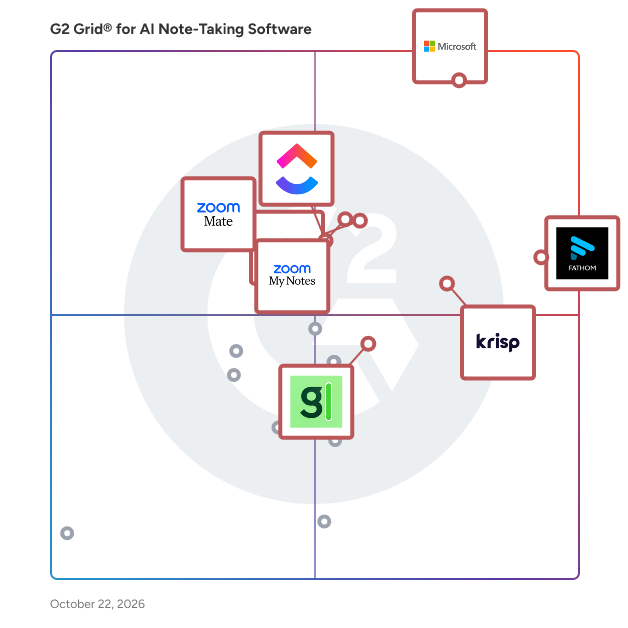
G2 Grid® for AI Note-Taking Software

G2 Grid® for AI Note-Taking Software plotting products by satisfaction and market presence

Highlighted products: Microsoft Teams, Zoom Workplace, Fathom, Krisp, Slack, ClickUp, ZoomMate, and Otter.ai.

Underlying data: [Grid® JSON](https://www.g2.com/categories/ai-note-taking-software/grids.json?focus%5B%5D=microsoft-teams&focus%5B%5D=zoom-workplace&focus%5B%5D=fathom-video&focus%5B%5D=krisp&focus%5B%5D=slack&focus%5B%5D=clickup&focus%5B%5D=zoommate&focus%5B%5D=otter-ai)

Retime

Retime is an intuitive scheduling platform designed to streamline the process of organizing meetings and appointments. By integrating seamlessly with popular calendar services, Retime empowers users to define their availability, share booking links, and manage their schedules efficiently. Its user-friendly interface and robust features make it an ideal solution for individuals and teams seeking to optimize their time management. Key Features and Functionality: - Agenda Management: Easily create and manage discussion points for team meetings, ensuring all topics are covered. - Action Items: Assign and track tasks resulting from meetings to maintain accountability and progress. - Availability Definition: Set your preferred meeting times, allowing others to book slots that fit your schedule. - Advanced Options: Customize meeting settings with features like date overrides and time zone scheduling to accommodate diverse needs. - Calendar Synchronization: Integrate with Google Calendar and Office 365 to maintain a unified view of your commitments. - Video Conferencing Integration: Schedule and host meetings via Google Meet and Zoom directly through the platform. Primary Value and User Solutions: Retime addresses the common challenges of scheduling by providing a centralized platform that simplifies the coordination of meetings. It eliminates the back-and-forth communication typically associated with finding suitable meeting times, thereby saving users valuable time. By offering integrations with widely-used calendar and video conferencing tools, Retime ensures a cohesive scheduling experience. Its features, such as agenda management and action item tracking, enhance meeting productivity and follow-through, making it an essential tool for professionals aiming to manage their time effectively.

Who Is the Company Behind Retime?

Revisely

Revisely is an AI-powered platform designed to enhance learning and teaching experiences for students, educators, and professionals. It offers a suite of tools that streamline the creation of educational resources, making study and instruction more efficient and personalized. Key Features and Functionality: - AI Flashcard Generator: Quickly converts notes, textbooks, or documents into interactive flashcards, facilitating effective memorization and review. - AI Quiz Generator: Automatically generates quizzes from provided content, enabling users to test knowledge and reinforce learning. - AI Notes Generator: Transforms documents, notes, or videos into clear, structured summaries, aiding in efficient information retention. - AI Video Summarizer: Condenses lengthy videos into concise summaries, allowing users to grasp key points without watching the entire content. Primary Value and Solutions Provided: Revisely addresses the challenge of time-consuming resource creation by leveraging AI to automate and personalize learning materials. It empowers users to generate high-quality educational content swiftly, enhancing study efficiency and teaching effectiveness. By simplifying content creation and offering tailored resources, Revisely supports continuous learning and professional development.

Who Is the Company Behind Revisely?

Rizemail

RizeMail is an innovative email summarization service designed to enhance productivity by condensing lengthy emails into concise summaries. By forwarding emails to summ@rizemail.app, users receive a brief overview of the content, enabling quicker comprehension and response. Key Features and Functionality: - Email Summarization: Transforms detailed emails into succinct summaries, highlighting essential information. - User-Friendly Process: Simply forward emails to summ@rizemail.app to receive instant summaries. - Time Efficiency: Reduces the time spent reading and processing lengthy emails. Primary Value and User Benefits: RizeMail addresses the challenge of managing extensive email communications by providing quick, digestible summaries. This service is particularly beneficial for professionals and individuals seeking to streamline their email workflow, ensuring they stay informed without being overwhelmed by information.

Who Is the Company Behind Rizemail?

Saga

Who Is the Company Behind Saga?

SALLY

SALLY is an AI-powered co-pilot designed to enhance sales calls by providing real-time guidance, automating note-taking, and ensuring compliance. It transforms every sales conversation into a winning opportunity by offering actionable insights and streamlining post-call workflows. Key Features and Functionality: - Live Transcription: Accurately transcribes conversations in real time, capturing who said what. - Instant Answers from Documentation: Retrieves context-aware answers from product documentation and knowledge bases within seconds. - Smart Suggestions and Talking Tracks: Offers on-the-spot suggestions, relevant data points, and objection-handling strategies. - Cross-Document Intelligence: Surfaces answers from multiple documents simultaneously, ensuring comprehensive preparedness. - Automated Notes and Action Items: Generates clear meeting notes with assigned owners, due dates, and next steps automatically. - Auto Follow-ups and Workflows: Creates presentations, reports, and follow-up emails instantly, triggering post-call workflows to prevent tasks from slipping through the cracks. - Deployment Flexibility: Offers both cloud and on-premise deployment options to suit various security and data control requirements. - Platform Compatibility: Seamlessly integrates with platforms like Zoom, Microsoft Teams, Google Meet, WebEx, and others. Primary Value and User Solutions: SALLY empowers sales teams by enhancing their efficiency and effectiveness during sales calls. By providing real-time guidance and automating administrative tasks, it allows sales representatives to focus on engaging with clients and closing deals. The platform's ability to pull instant answers from documentation ensures that reps are always prepared, while automated follow-ups and workflow integrations streamline post-call activities. This comprehensive support system reduces administrative burdens, minimizes compliance concerns, and ultimately drives higher conversion rates and revenue growth for businesses.

Who Is the Company Behind SALLY?

Saner.ai

Saner.AI is an AI-powered productivity assistant specifically designed to help individuals, particularly those with ADHD, manage their notes, emails, and tasks more effectively. By centralizing information from various sources like Email, Drive, and Slack, Saner.AI provides a unified platform that reduces the need to switch between multiple applications, thereby enhancing focus and efficiency. Key Features and Functionality: - Intuitive User Interface: Offers a clean, distraction-free environment for capturing and organizing ideas without unnecessary clutter. - All-in-One Tool: Consolidates information and tasks from various platforms, making everything searchable and accessible in one place. - Personal Knowledge Assistant (Skai): Helps recall notes, synthesizes insights, and provides clear, direct answers to user queries. - Universal Task Assistant: Automatically extracts tasks from emails and documents, breaks them into manageable steps, sets tailored reminders, and suggests solutions to aid completion. - Multilingual Support: Allows users to interact with the platform in their preferred language, facilitating global collaboration. - Mobile Accessibility: Provides native iOS and Android apps with offline functionality and real-time synchronization across devices for on-the-go productivity. Primary Value and User Solutions: Saner.AI addresses the challenges of managing scattered information and maintaining focus, especially for individuals with ADHD. By integrating note-taking, email management, and task scheduling into a single interface, it reduces cognitive overload and minimizes context switching. This consolidation allows users to capture information quickly, find and synthesize insights effortlessly, recall forgotten knowledge, and handle tasks efficiently, ultimately transforming chaos into clarity and enhancing overall productivity.

Who Is the Company Behind Saner.ai?

  • Seller: Saner.ai
  • Year Founded: 2023
  • HQ Location: Wilmington, US
  • LinkedIn® Page: www.linkedin.com
    7 employees on LinkedIn®

Save ChatGPT to Notion

Save ChatGPT to Notion is a Chrome extension that helps you export, sync, and back up ChatGPT conversations to your Notion workspace. It’s designed for people and teams who want to turn AI chats into a searchable knowledge base, preserve important discussions, and maintain a reliable archive. You can export a full conversation with one click, or selectively export only the turns/messages you need. The extension supports standard 1:1 chats as well as ChatGPT Group Chats, keeping author attribution and message order. It also supports bulk sync to back up multiple chats and keep your Notion database up to date. Key features One-click export of ChatGPT conversations to a Notion database Group Chats export (supports /gg/ pages), preserving authors and message order Selective export 1:1 chats: export selected Q&A turns only Group chats: export selected messages as a single Notion page Bulk sync & backup for multiple chats (including Group Chats, with caps) Smart formatting: preserves Markdown structure, code blocks, images, lists Version control options: skip, overwrite, or duplicate existing pages Project export/sync: export ChatGPT Projects to Notion in one flow Deep Researcher support: export document content with formatting preserved TextDocs integration: export TextDocs tool documents as sub-pages in Notion Copy message as Markdown to clipboard (useful for quick reuse) Typical use cases Research and long-term archiving of AI insights Study notes and learning summaries Work documentation and client/support drafts Team collaboration using ChatGPT Group Chats Building a searchable “AI knowledge base” in Notion How it works Connect to Notion via OAuth Choose a target Notion database Export a full chat, selectively export parts, or run bulk sync/backup Open and organize the result in Notion (with source URL and timestamps) Data saved to Notion (example fields) Title (from the chat/page title) URL (source link for context and de-duplication) ChatTime (conversation time / fallback to current time) Tags (e.g., “Part”, “Group Chat”, “Selection”) Official website: https://chatgpt2notion.com/ Support: chatgpt2notion@gmail.com Issues: https://github.com/joysey/chatgpt-to-notion/issues

Who Is the Company Behind Save ChatGPT to Notion?

SavetoAI

SavetoAI is an innovative platform designed to streamline the process of saving and organizing online content. It enables users to effortlessly capture articles, videos, and other digital materials, ensuring easy access and management. By integrating advanced artificial intelligence, SavetoAI offers personalized recommendations and efficient categorization, enhancing the user's content curation experience. Key Features and Functionality: - Seamless Content Capture: Quickly save web articles, videos, and images with a single click. - Intelligent Organization: AI-driven categorization and tagging for efficient content management. - Personalized Recommendations: Receive suggestions based on saved content and user preferences. - Cross-Device Synchronization: Access saved content across multiple devices for convenience. - Offline Access: View saved materials without an internet connection. - Collaborative Sharing: Share curated content with friends or colleagues effortlessly. Primary Value and User Solutions: SavetoAI addresses the challenge of information overload by providing a centralized platform for saving and organizing online content. Users can easily retrieve and manage their saved materials, leading to improved productivity and knowledge retention. The AI-powered recommendations and categorization further enhance the user experience by offering relevant content suggestions and streamlined organization.

Who Is the Company Behind SavetoAI?

ScatterNote

ScatterNote is an innovative note-taking application designed to transform disorganized thoughts into structured, actionable notes. It offers a user-friendly interface that allows individuals to capture ideas quickly and organize them efficiently, enhancing productivity and clarity. Key Features and Functionality: - Intuitive Organization: Easily categorize and tag notes for seamless retrieval and management. - Cross-Platform Accessibility: Access your notes from various devices, ensuring your information is always at your fingertips. - Rich Text Editing: Utilize a variety of formatting options to customize your notes to your preference. - Collaboration Tools: Share notes with others and collaborate in real-time, fostering teamwork and idea exchange. - Secure Cloud Storage: Safeguard your notes with encrypted cloud storage, providing peace of mind and data protection. Primary Value and User Solutions: ScatterNote addresses the common challenge of managing scattered ideas by providing a centralized platform for note organization. It enhances productivity by enabling users to quickly capture, organize, and retrieve information, thereby streamlining workflows and reducing the time spent searching for notes. The collaborative features promote effective communication and idea sharing among teams, making it an invaluable tool for both personal and professional use.

Who Is the Company Behind ScatterNote?

Shalaka Joshi
SJ
Researched and written by Shalaka Joshi
Updated April 9, 2026