# Best AI Note-Taking Software

*By [Shalaka Joshi](https://research.g2.com/insights/author/shalaka-joshi)*

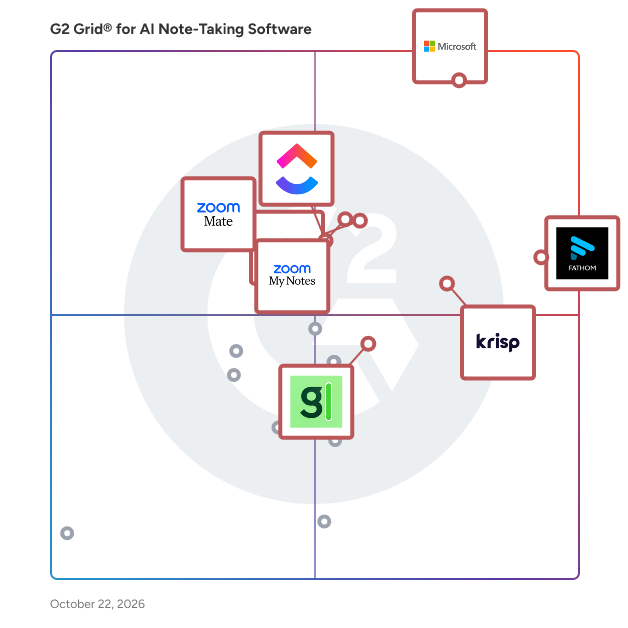
The best AI note-taking software in 2026 is Microsoft Teams, rated 4.4 out of 5 on G2 based on 19,100+ verified reviews. However, Fathom stands out as the highest-rated tool at 5.0 stars, earning top marks for accurate meeting summaries and async-ready capture with timestamped action items.

1. Microsoft Teams — 4.4/5 (19,100+ reviews): Microsoft 365-native meeting capture and recap
2. Zoom Workplace — 4.5/5 (56,400+ reviews): AI meeting summaries with unified collaboration
3. Fathom — 5/5 (6,800+ reviews): Async-ready meeting capture with timestamped action items
4. Slack — 4.5/5 (39,100+ reviews): AI-summarized channel catch-up with workflow automation
5. Krisp — 4.6/5 (1,300+ reviews): Bot-free meeting transcription with noise cancellation

*Updated June 2026. Based on 2026 G2 verified review data across 5 products.*


AI note-taking software uses artificial intelligence, including NLP, speech-to-text, and machine learning, to automatically capture, transcribe, organize, and summarize information from meetings and conversations, integrating with calendars, video conferencing platforms, and CRM tools to help sales, customer success, support, and project management teams save time and increase productivity.

### Core Capabilities of AI Note-Taking Software

To qualify for inclusion in the AI Note-Taking category, a product must:

- Capture and convert conversations into accurate, real-time text
- Provide AI-powered capabilities to condense long conversations into concise summaries
- Integrate with video conferencing platforms and CRM tools
- Provide the ability for teams to share notes and collaborate on follow-up action items
- Support multiple languages and understand various accents to ensure accuracy

### Common Use Cases for AI Note-Taking Software

Business teams across sales, customer success, and project management use AI note-taking tools to eliminate manual note-taking and ensure key information is captured and acted upon. Common use cases include:

- Automatically transcribing and summarizing meetings so participants can stay engaged rather than taking notes
- Extracting follow-up action items and syncing them to CRM or project management tools
- Sharing structured meeting notes with teammates and stakeholders who were unable to attend

### How AI Note-Taking Software Differs from Other Tools

Unlike traditional [note-taking software](https://www.g2.com/categories/note-taking-software), which requires users to manually type, format, and manage notes, AI note-taking software automates the entire capture and summarization process. Its deep integrations with video conferencing, calendars, and [CRM software](https://www.g2.com/categories/crm) make it purpose-built for business workflows, going beyond general note-taking apps to deliver automated insights directly into the tools teams already use.

### Insights from G2 on AI Note-Taking Software

Based on category trends on G2, transcription accuracy and seamless CRM integration stand out as the most valued capabilities. Significant time savings from eliminated manual note-taking and improved meeting follow-through as primary outcomes of adoption.


## Top AI Note-Taking Software at a Glance
| # | Product | Rating | Best For | What Users Say |
|---|---------|--------|----------|----------------|
| 1 | [Microsoft Teams](https://www.g2.com/products/microsoft-teams/reviews) | 4.4/5.0 (17,535 reviews) | Microsoft 365-native meeting capture and recap | "[Teams Makes Collaboration and Video Calls Effortless/Wonderful](https://www.g2.com/survey_responses/microsoft-teams-review-12992757)" |
| 2 | [Zoom Workplace](https://www.g2.com/products/zoom-workplace/reviews) | 4.5/5.0 (53,479 reviews) | AI meeting summaries with unified collaboration | "[Responsive Desktop App with Powerful Tools, AI Features, and Noise Cancellation](https://www.g2.com/survey_responses/zoom-workplace-review-12977340)" |
| 3 | [Fathom](https://www.g2.com/products/fathom-video/reviews) | 5.0/5.0 (6,873 reviews) | Async-ready meeting capture with timestamped action items | "[Essential for Sales Calls and Follow-Up](https://www.g2.com/survey_responses/fathom-review-12950761)" |
| 4 | [Slack](https://www.g2.com/products/slack/reviews) | 4.5/5.0 (37,395 reviews) | AI-summarized channel catch-up with workflow automation | "[Intuitive, Reliable Slack That Streamlines Daily Work with Powerful Integrations](https://www.g2.com/survey_responses/slack-review-12992022)" |
| 5 | [Krisp](https://www.g2.com/products/krisp/reviews) | 4.6/5.0 (1,274 reviews) | Bot-free meeting transcription with noise cancellation | "[Excellent Voice Isolation and Easy Setup for Meetings and Gaming](https://www.g2.com/survey_responses/krisp-review-12998991)" |
| 6 | [Otter.ai](https://www.g2.com/products/otter-ai/reviews) | 4.4/5.0 (493 reviews) | Real-time meeting transcription with searchable action items | "[Otter Makes Meeting Summaries and Key Highlights Effortless](https://www.g2.com/survey_responses/otter-ai-review-12340187)" |
| 7 | [ZoomMate](https://www.g2.com/products/zoommate/reviews) | 4.6/5.0 (259 reviews) | Zoom-native meeting summaries and action-item capture | "[Meeting Summaries and Catch-Up Make It Easy to Stay Focused](https://www.g2.com/survey_responses/zoommate-review-12933710)" |
| 8 | [ClickUp](https://www.g2.com/products/clickup/reviews) | 4.6/5.0 (12,258 reviews) | AI-captured meeting notes inside unified project workflows | "[Intuitive Interface but Slow Performance with Tasks](https://www.g2.com/survey_responses/clickup-review-12993610)" |
| 9 | [Fellow](https://www.g2.com/products/fellow/reviews) | 4.7/5.0 (2,406 reviews) | Meeting capture with AI-driven action items | "[Fantastic Meeting Task Automation That Keeps My Day Organised](https://www.g2.com/survey_responses/fellow-review-12897019)" |
| 10 | [tl;dv](https://www.g2.com/products/tl-dv/reviews) | 4.7/5.0 (516 reviews) | Cross-platform meeting transcription with CRM-integrated summaries | "[the best cure for boring video admin work and manual typing](https://www.g2.com/survey_responses/tl-dv-review-12950585)" |


## How Many AI Note-Taking Software Products Does G2 Track?
**Total Products under this Category:** 404

### Category Stats (Jun 2026)
- **Average Rating**: 4.53/5 The average rating of products in this category, based on all submitted ratings
- **Top Trending Product**: Obsidian (+1.5%) - Among all products in this category, Obsidian recorded the largest rating increase compared to last month
*Last updated: June 09, 2026*


## How Does G2 Rank AI Note-Taking Software Products?

**Why You Can Trust G2's Software Rankings:**

- 30 Analysts and Data Experts
- 160,400+ Authentic Reviews
- 404+ Products
- Unbiased Rankings

G2's software rankings are built on verified user reviews, rigorous moderation, and a consistent research methodology maintained by a team of analysts and data experts. Each product is measured using the same transparent criteria, with no paid placement or vendor influence. While reviews reflect real user experiences, which can be subjective, they offer valuable insight into how software performs in the hands of professionals. Together, these inputs power the G2 Score, a standardized way to compare tools within every category.


## Which AI Note-Taking Software Is Best for Your Use Case?

- **Leader:** [Microsoft Teams](https://www.g2.com/products/microsoft-teams/reviews)
- **Highest Performer:** [Fellow](https://www.g2.com/products/fellow/reviews)
- **Easiest to Use:** [Slack](https://www.g2.com/products/slack/reviews)
- **Top Trending:** [Granola](https://www.g2.com/products/granola/reviews)
- **Best Free Software:** [Zoom Workplace](https://www.g2.com/products/zoom-workplace/reviews)


---

**Sponsored**

### Fathom

Fathom is the #1-rated AI meeting partner that captures what matters and turns every conversation into clear, actionable outcomes. It surfaces decisions, makes every meeting searchable, and syncs insights directly into CRM and productivity tools – eliminating manual work. Named to G2’s 2026 Best Software Awards Top 100, and recognized by HubSpot as its 2025 Most Used App of the Year, Fathom is trusted by hundreds of thousands of companies worldwide to help individuals stay focused, teams stay aligned, and organizations move faster.


[Visit website](https://www.g2.com/external_clickthroughs/record?secure%5Bad_program%5D=ppc&amp;secure%5Bad_slot%5D=category_product_list&amp;secure%5Bcategory_id%5D=1011248&amp;secure%5Bdisplayable_resource_id%5D=1011248&amp;secure%5Bdisplayable_resource_type%5D=Category&amp;secure%5Bmedium%5D=sponsored&amp;secure%5Bplacement_reason%5D=page_category&amp;secure%5Bplacement_resource_ids%5D%5B%5D=1011248&amp;secure%5Bprioritized%5D=false&amp;secure%5Bproduct_id%5D=156120&amp;secure%5Bresource_id%5D=1011248&amp;secure%5Bresource_type%5D=Category&amp;secure%5Bsource_type%5D=category_page&amp;secure%5Bsource_url%5D=https%3A%2F%2Fwww.g2.com%2Fcategories%2Fai-note-taking-software%3Fpage%3D26&amp;secure%5Btoken%5D=b654f41bde5f0a2a3ed3b60fb6bee67f47851dc6b91d9323ea6cc37435cdcc10&amp;secure%5Burl%5D=https%3A%2F%2Fwww.fathom.ai%2F&amp;secure%5Burl_type%5D=company_website)

---

## What Are the Top-Rated AI Note-Taking Software Products in 2026?
### 1. [Microsoft Teams](https://www.g2.com/products/microsoft-teams/reviews)
Microsoft Teams is a comprehensive collaboration platform developed by Microsoft, designed to streamline communication and teamwork within organizations. It integrates chat, video conferencing, file storage, and application integration into a single interface, facilitating seamless collaboration across various devices and operating systems. As part of the Microsoft 365 suite, Teams enhances productivity by providing a centralized hub for team interactions and project management. Key Features and Functionality: - Chat and Messaging: Facilitates real-time text communication with individuals or groups, supporting rich text, emojis, stickers, and GIFs. - Video Conferencing: Offers high-quality video meetings with features like screen sharing, custom backgrounds, and live captions, accommodating both small team huddles and large webinars. - File Sharing and Collaboration: Enables secure file storage and sharing through integration with OneDrive and SharePoint, allowing multiple users to co-author documents simultaneously. - Integration with Applications: Supports integration with a wide range of Microsoft and third-party applications, enhancing workflow efficiency by bringing various tools into one platform. - Security and Compliance: Provides enterprise-grade security measures, including data encryption for meetings, chats, calls, and files, ensuring compliance with industry standards. Primary Value and Solutions Provided: Microsoft Teams addresses the challenges of modern workplace collaboration by unifying communication channels, reducing the need for multiple disparate tools. It enhances team productivity by centralizing resources, facilitating real-time collaboration, and ensuring secure information sharing. By integrating with the broader Microsoft 365 ecosystem, Teams offers a cohesive environment that supports remote work, hybrid teams, and in-person collaboration, adapting to the diverse needs of today&#39;s workforce.


**Average Rating:** 4.4/5.0
**Total Reviews:** 17,535

**Who Is the Company Behind Microsoft Teams?**

- **Seller:** [Microsoft](https://www.g2.com/sellers/microsoft)
- **Year Founded:** 1975
- **HQ Location:** Redmond, Washington
- **Twitter:** @microsoft (13,091,739 Twitter followers)
- **LinkedIn® Page:** https://www.linkedin.com/company/microsoft/ (231,632 employees on LinkedIn®)
- **Ownership:** MSFT

**Who Uses This Product?**
- **Who Uses This:** Software Engineer, Project Manager
- **Top Industries:** Information Technology and Services, Computer Software
- **Company Size:** 39% Enterprise, 38% Mid-Market


#### What Are Microsoft Teams's Pros and Cons?

**Pros:**

- Ease of Use (845 reviews)
- Team Collaboration (813 reviews)
- Communication (591 reviews)
- File Sharing (540 reviews)
- Easy Communication (519 reviews)

**Cons:**

- Slow Loading (403 reviews)
- Performance Issues (266 reviews)
- User Interface (239 reviews)
- Connectivity Issues (180 reviews)
- Performance Delays (163 reviews)


### What Do G2 Reviewers Say About Microsoft Teams?
*AI-generated summary from verified user reviews*

**Pros:**

- Users find Microsoft Teams **extremely easy to use** , seamlessly integrating communication and collaboration across devices.
- Users love the **seamless team collaboration** with improved file sharing and integrated tools in Microsoft Teams.
- Users value the **effective communication features** of Microsoft Teams, enhancing collaboration and organization for remote and hybrid work.
- Users value the **efficient file sharing** capabilities in Microsoft Teams, enhancing collaboration and organization for teams.
- Users value the **easy communication** facilitated by Microsoft Teams, enhancing collaboration and organization among team members.

**Cons:**

- Users are frustrated with the **slow loading** times in Microsoft Teams, impacting overall productivity and experience.
- Users experience **performance issues** with Microsoft Teams, including slow loading times and heavy resource consumption.
- Users find the **user interface complex** and sometimes slow, causing frustration during chats and video calls.
- Users experience **connectivity issues** with Microsoft Teams, especially on older systems or in low-bandwidth situations.
- Users experience **performance delays** with Microsoft Teams, including slowdowns and notification overload impacting their workflow.

#### What Are Recent G2 Reviews of Microsoft Teams?

**"[Bringing Work Together: A Practical Review of Microsoft Teams](https://www.g2.com/survey_responses/microsoft-teams-review-12997916)"**

**Rating:** 5.0/5.0 stars
*— Annarita D.*

[Read full review](https://www.g2.com/survey_responses/microsoft-teams-review-12997916)

---

**"[Teams Makes Collaboration and Video Calls Effortless/Wonderful](https://www.g2.com/survey_responses/microsoft-teams-review-12992757)"**

**Rating:** 5.0/5.0 stars
*— Jacqueline S.*

[Read full review](https://www.g2.com/survey_responses/microsoft-teams-review-12992757)

---


#### What Are G2 Users Discussing About Microsoft Teams?

- [What software do you need for Microsoft teams?](https://www.g2.com/discussions/what-software-do-you-need-for-microsoft-teams) - 18 comments, 10 upvotes
- [What is the use of Microsoft teams?](https://www.g2.com/discussions/what-is-the-use-of-microsoft-teams) - 19 comments, 6 upvotes
- [What are the best features of Microsoft teams?](https://www.g2.com/discussions/what-are-the-best-features-of-microsoft-teams) - 20 comments, 7 upvotes
- [What are Microsoft teams features?](https://www.g2.com/discussions/what-are-microsoft-teams-features) - 13 comments, 4 upvotes

### 2. [Zoom Workplace](https://www.g2.com/products/zoom-workplace/reviews)
Goodbye app overload. Hello effortless work. Work can be complicated. Your tools shouldn&#39;t be. Zoom Workplace connects all the ways you collaborate — from meetings to docs to chat and more — with built-in AI and seamless integrations that help teams focus and work flawlessly. Zoom Communications: Unified, Effortless Connection for Modern Work Bring every way your teams communicate—meetings, chat, calls, email, and scheduling—into one seamless experience. With Zoom, collaboration happens faster and more naturally across channels, without switching apps or losing context. From spontaneous chats to scheduled meetings and calls, everything stays connected, searchable, and secure—powered by one intuitive platform built for how modern teams work. Zoom Productivity: Workflows Connected, Work Effortless Transform how work gets done with AI-first collaboration that keeps people, content, and actions in one place. From brainstorming on whiteboards to co-creating in docs, sharing clips, and automating follow-ups, Zoom connects every step of your workflow. With Zoom Hub and integrated video management, knowledge stays organized, accessible, and actionable—so teams can move from idea to outcome without friction. Zoom Spaces: Smarter, Connected Workplaces for Every Team Bring your physical and hybrid environments to life with intelligent, connected spaces. Zoom Spaces unifies meeting rooms, desk reservations, digital signage, and visitor management into one seamless experience—making it simple to collaborate, navigate, and manage the workplace. Whether employees are remote, hybrid, or on-site, Zoom creates a consistent, secure, and flexible environment that keeps teams connected wherever work happens. Zoom Employee Engagement: Connect, Inspire, and Empower Every Employee Foster belonging and alignment with Workvivo by Zoom—a modern employee experience platform that unites communication, culture, and community in one place. From company-wide updates to recognition, feedback, and social engagement, Workvivo gives every employee a voice and a sense of connection. Built right into Zoom Workplace, it helps organizations strengthen culture, boost engagement, and keep teams informed and inspired—no matter where they work.


**Average Rating:** 4.5/5.0
**Total Reviews:** 53,479

**Who Is the Company Behind Zoom Workplace?**

- **Seller:** [Zoom](https://www.g2.com/sellers/zoom-a5000ea1-6d30-4ab4-b591-20723189ac97)
- **Company Website:** https://www.zoom.com
- **Year Founded:** 2011
- **HQ Location:** San Jose, CA
- **Twitter:** @zoom (1,042,714 Twitter followers)
- **LinkedIn® Page:** https://www.linkedin.com/company/2532259/ (13,494 employees on LinkedIn®)

**Who Uses This Product?**
- **Who Uses This:** Owner, Software Engineer
- **Top Industries:** Information Technology and Services, Computer Software
- **Company Size:** 51% Small-Business, 31% Mid-Market


#### What Are Zoom Workplace's Pros and Cons?

**Pros:**

- Ease of Use (4634 reviews)
- Video Quality (2115 reviews)
- Reliability (2006 reviews)
- Features (1641 reviews)
- Meetings (1519 reviews)

**Cons:**

- Limited Features (1266 reviews)
- Zoom Issues (1210 reviews)
- Meeting Issues (1180 reviews)
- Connection Issues (877 reviews)
- Video Issues (804 reviews)


### What Do G2 Reviewers Say About Zoom Workplace?
*AI-generated summary from verified user reviews*

**Pros:**

- Users find Zoom Workplace to be **easy to use** , enhancing their experience with its smooth interface and features.
- Users appreciate the **excellent video quality** of Zoom Workplace, enhancing communication and making meetings more effective.
- Users commend the **reliability** of Zoom Workplace, consistently experiencing stable connections and high-quality video performance.
- Users find that **Zoom enhances communication** efficiently with vendors and colleagues, especially during challenging times like Covid.
- Users enjoy the **excellent video conferencing quality** of Zoom Workplace, facilitating clear communication and collaboration effortlessly.

**Cons:**

- Users find Zoom Workplace has **limited features** that hinder group interactions and overall usability during meetings.
- Users express frustration over **background noise and security issues** , making Zoom calls disruptive and challenging to navigate.
- Users often face **meeting issues** , including time limits and audio problems that disrupt their experience.
- Users report frequent **connection issues** that hinder their experience and reduce the overall usability of Zoom Workplace.
- Users report **video quality issues** and discomfort with on-camera participation, detracting from the overall experience.

#### What Are Recent G2 Reviews of Zoom Workplace?

**"[Responsive Desktop App with Powerful Tools, AI Features, and Noise Cancellation](https://www.g2.com/survey_responses/zoom-workplace-review-12977340)"**

**Rating:** 4.5/5.0 stars
*— Angad S.*

[Read full review](https://www.g2.com/survey_responses/zoom-workplace-review-12977340)

---

**"[Reliable Meetings with Smart AI Summaries and Seamless Collaboration](https://www.g2.com/survey_responses/zoom-workplace-review-12831216)"**

**Rating:** 5.0/5.0 stars
*— Sundeep G.*

[Read full review](https://www.g2.com/survey_responses/zoom-workplace-review-12831216)

---


#### What Are G2 Users Discussing About Zoom Workplace?

- [Is Zoom Workplace worth it?](https://www.g2.com/discussions/is-zoom-workplace-worth-it) - 30 comments, 38 upvotes
- [What are your tips for using Zoom Workplace effectively?](https://www.g2.com/discussions/what-are-your-tips-for-using-zoom-workplace-effectively) - 10 comments, 11 upvotes
- [What does Zoom do?](https://www.g2.com/discussions/what-does-zoom-do) - 30 comments, 12 upvotes
- [What are the features offered by Zoom?](https://www.g2.com/discussions/what-are-the-features-offered-by-zoom) - 5 comments, 2 upvotes
- [How do you add features in Zoom?](https://www.g2.com/discussions/how-do-you-add-features-in-zoom) - 17 comments, 1 upvote

### 3. [Fathom](https://www.g2.com/products/fathom-video/reviews)
Fathom is the #1-rated AI meeting partner that captures what matters and turns every conversation into clear, actionable outcomes. It surfaces decisions, makes every meeting searchable, and syncs insights directly into CRM and productivity tools – eliminating manual work. Named to G2’s 2026 Best Software Awards Top 100, and recognized by HubSpot as its 2025 Most Used App of the Year, Fathom is trusted by hundreds of thousands of companies worldwide to help individuals stay focused, teams stay aligned, and organizations move faster.


**Average Rating:** 5.0/5.0
**Total Reviews:** 6,873

**Who Is the Company Behind Fathom?**

- **Seller:** [Fathom](https://www.g2.com/sellers/fathom)
- **Company Website:** https://www.fathom.ai/
- **Year Founded:** 2020
- **HQ Location:** San Francisco, CA
- **LinkedIn® Page:** https://www.linkedin.com/company/fathom-video (184 employees on LinkedIn®)

**Who Uses This Product?**
- **Who Uses This:** CEO, Founder
- **Top Industries:** Marketing and Advertising, Computer Software
- **Company Size:** 78% Small-Business, 20% Mid-Market


#### What Are Fathom's Pros and Cons?

**Pros:**

- AI Summary (1501 reviews)
- Accuracy (1443 reviews)
- Helpful (1364 reviews)
- Ease of Use (1360 reviews)
- Note-taking (1114 reviews)

**Cons:**

- Meeting Management (415 reviews)
- Recording Issues (342 reviews)
- Missing Features (249 reviews)
- Call Issues (213 reviews)
- Recording Limitations (212 reviews)


### What Do G2 Reviewers Say About Fathom?
*AI-generated summary from verified user reviews*

**Pros:**

- Users love the **AI summary feature** of Fathom for its helpfulness in identifying action items and organizing notes.
- Users value the **high accuracy** of Fathom&#39;s transcripts, enhancing efficiency and significantly reducing post-meeting workload.
- Users value Fathom for its **automatic note-taking and organization** , enhancing focus and productivity during meetings.
- Users love the **straightforward UI** of Fathom, making it easy to manage meetings and recordings efficiently.
- Users appreciate Fathom&#39;s **efficient note-taking** , allowing them to focus on discussions while it automatically captures essential details.

**Cons:**

- Users dislike that Fathom requires **joining as a participant** , complicating ad hoc meetings and impacting reporting accuracy.
- Users encounter **recording issues** , including unwanted recordings and glitches when reinstating recordings during meetings.
- Users struggle with **missing features** for call management and transcript readability, affecting their overall experience with Fathom.
- Users often face **call issues** , such as auto-joining calls and difficulties with transcripts, impacting their experience.
- Users face **recording limitations** with automatic recordings that can accumulate, complicating management of action items.

#### What Are Recent G2 Reviews of Fathom?

**"[Essential for Sales Calls and Follow-Up](https://www.g2.com/survey_responses/fathom-review-12950761)"**

**Rating:** 5.0/5.0 stars
*— Yasu C.*

[Read full review](https://www.g2.com/survey_responses/fathom-review-12950761)

---

**"[Excellent Free Plan, Solid Support, and a robust MCP](https://www.g2.com/survey_responses/fathom-review-13001468)"**

**Rating:** 4.5/5.0 stars
*— Robert M.*

[Read full review](https://www.g2.com/survey_responses/fathom-review-13001468)

---


### 4. [Slack](https://www.g2.com/products/slack/reviews)
Slack is your single workspace that connects you with the people and tools you work with everyday, no matter where you are or what you do. With Slack you get real-time messaging through calls and chat, a searchable record of all your files and conversations, and integrations with a growing number of handy bots and apps. Now everyone can finally be on the same page and get their work done. Slack: It’s where work happens.


**Average Rating:** 4.5/5.0
**Total Reviews:** 37,395

**Who Is the Company Behind Slack?**

- **Seller:** [Salesforce](https://www.g2.com/sellers/salesforce)
- **Company Website:** https://www.salesforce.com/
- **Year Founded:** 1999
- **HQ Location:** San Francisco, CA
- **Twitter:** @salesforce (579,511 Twitter followers)
- **LinkedIn® Page:** https://www.linkedin.com/company/3185/ (83,223 employees on LinkedIn®)

**Who Uses This Product?**
- **Who Uses This:** Software Engineer, Project Manager
- **Top Industries:** Computer Software, Information Technology and Services
- **Company Size:** 41% Small-Business, 41% Mid-Market


#### What Are Slack's Pros and Cons?

**Pros:**

- Ease of Use (3619 reviews)
- Team Collaboration (3149 reviews)
- Communication (2993 reviews)
- Integrations (2215 reviews)
- Features (1936 reviews)

**Cons:**

- Notification Issues (1137 reviews)
- Missing Features (941 reviews)
- Limited Features (757 reviews)
- Overwhelming Experience (751 reviews)
- Channel Management (688 reviews)


### What Do G2 Reviewers Say About Slack?
*AI-generated summary from verified user reviews*

**Pros:**

- Users appreciate the **ease of use** of Slack, enhancing team communication and organization effortlessly.
- Users value the **effective team collaboration** in Slack, with organized channels enhancing communication and problem-solving.
- Users appreciate the **ease of communication** in Slack, facilitating quick messages and organized collaboration with their teams.
- Users appreciate the **seamless integrations** of Slack, streamlining their workflow and keeping updates accessible without hassle.
- Users love Slack for its **organized communication features** , allowing easy collaboration and efficient integration with other tools.

**Cons:**

- Users find Slack&#39;s **notification issues** overwhelming, leading to distractions and important messages being easily buried.
- Users find **important messages get buried** in Slack channels, complicating communication and focus on essential updates.
- Users note the **limited features** of Slack, causing challenges in customization and interactivity for better productivity.
- Users face **overwhelming experience** with constant alerts and message sprawl that disrupt workflow and increase stress.
- Users face challenges with **channel management** , including potential data exposure and overwhelming notifications in larger organizations.

#### What Are Recent G2 Reviews of Slack?

**"[Slack’s Clean UI and Flawless Integrations Make Collaboration Effortless](https://www.g2.com/survey_responses/slack-review-12981503)"**

**Rating:** 4.5/5.0 stars
*— Harshil S.*

[Read full review](https://www.g2.com/survey_responses/slack-review-12981503)

---

**"[Intuitive, Reliable Slack That Streamlines Daily Work with Powerful Integrations](https://www.g2.com/survey_responses/slack-review-12992022)"**

**Rating:** 5.0/5.0 stars
*— Edwin R.*

[Read full review](https://www.g2.com/survey_responses/slack-review-12992022)

---


#### What Are G2 Users Discussing About Slack?

- [What integrations have you found most effective for streamlining communication in Slack?](https://www.g2.com/discussions/what-integrations-have-you-found-most-effective-for-streamlining-communication-in-slack) - 20 comments, 4 upvotes
- [What is Slack used for?](https://www.g2.com/discussions/what-is-slack-used-for) - 22 comments, 7 upvotes
- [Is Slack a good tool?](https://www.g2.com/discussions/is-slack-a-good-tool) - 20 comments, 22 upvotes
- [What is unique about slack?](https://www.g2.com/discussions/what-is-unique-about-slack) - 11 comments, 4 upvotes
- [What does slack software do?](https://www.g2.com/discussions/what-does-slack-software-do) - 29 comments, 1 upvote

### 5. [Krisp](https://www.g2.com/products/krisp/reviews)
Krisp is a voice productivity and real-time AI communication platform that helps teams, contact centers, and developers deliver clearer conversations through real-time noise suppression, accent conversion, voice translation, transcription, summarization, and other AI-driven voice features. It provides a privacy-first, scalable audio solutions for calls, meetings, customer support, and embedded voice applications. Krisp brings together three AI-powered products in one platform—AI Meeting Assistant, AI Call Center, and Real-Time AI Voice SDK. It runs on-device or in the cloud and integrates seamlessly with all major conferencing platforms and developer environments. AI Meeting Assistant - Live transcription and recording without required bots - AI-generated meeting summaries, action items, and CRM sync - Noise, echo, and background voice cancellation for crisp audio - Multilingual support and custom vocabulary for industry terms AI Call Center - Real-time accent conversion for global customer communication - Instant voice translation across 80+ languages - AI Agent Assist for live knowledge prompts, after-call summaries, and coaching - Advanced noise, echo, and voice cancellation for clear, effective calls Real-Time AI Voice SDK - Voice isolation and turn-taking for natural voice AI interactions - Outbound Background Voice Cancellation (BVC) for real-time communication - Inbound and outbound Noise Cancellation (NC) - Accent Conversion for calls - Cross-platform libraries and wrappers for web, mobile, desktop, and server deployments Krisp is SOC 2, GDPR, HIPAA, and PCI-DSS certified and does not store voice data. Deployed on more than 200 million devices and processing over 80 billion minutes of conversations each month, it gives organizations a unified way to improve meeting productivity, raise contact center performance, and build advanced voice-enabled products


**Average Rating:** 4.6/5.0
**Total Reviews:** 1,274

**Who Is the Company Behind Krisp?**

- **Seller:** [Krisp Technologies, Inc.](https://www.g2.com/sellers/krisp-technologies-inc)
- **Company Website:** https://krisp.ai/
- **Year Founded:** 2017
- **HQ Location:** Berkeley, California
- **Twitter:** @krispHQ (6,531 Twitter followers)
- **LinkedIn® Page:** https://www.linkedin.com/company/krisphq/ (374 employees on LinkedIn®)

**Who Uses This Product?**
- **Who Uses This:** CEO, Software Engineer
- **Top Industries:** Computer Software, Information Technology and Services
- **Company Size:** 49% Small-Business, 20% Mid-Market


#### What Are Krisp's Pros and Cons?

**Pros:**

- Ease of Use (269 reviews)
- Noise Cancellation (224 reviews)
- Transcription (166 reviews)
- Reliability (154 reviews)
- Easy Setup (142 reviews)

**Cons:**

- Audio Issues (60 reviews)
- Inaccurate Transcription (57 reviews)
- Poor Transcription Accuracy (51 reviews)
- AI Inaccuracy (47 reviews)
- Noise Issues (44 reviews)


### What Do G2 Reviewers Say About Krisp?
*AI-generated summary from verified user reviews*

**Pros:**

- Users love the **ease of use** of Krisp, enhancing focus and simplifying meeting management effortlessly.
- Users love Krisp&#39;s **noise cancellation** , making meetings clear and distraction-free, even in noisy environments.
- Users highlight the **effective transcription and noise cancellation** features of Krisp, enhancing productivity during meetings.
- Users value the **reliability** of Krisp, ensuring efficient meeting management and quality voice transcription during important discussions.
- Users value the **easy setup** of Krisp, highlighting its straightforward installation process for seamless use.

**Cons:**

- Users struggle with **audio issues** on Krisp, facing delays and device conflicts that hinder communication during meetings.
- Users are frustrated by **inaccurate transcriptions** , often resulting in mismatched words that hinder usability.
- Users experience **poor transcription accuracy** , often finding inaccuracies that disrupt their overall usage of Krisp.
- Users experience **AI inaccuracy** with Krisp, as it struggles with background noise and speaker identification.
- Users experience **noise issues** with Krisp, including awkward pauses and missed parts of conversation during calls.

#### What Are Recent G2 Reviews of Krisp?

**"[Krisp Keeps Calls Clear with Recordings, Notes, and Excellent Noise Cancellation](https://www.g2.com/survey_responses/krisp-review-12974458)"**

**Rating:** 5.0/5.0 stars
*— Angela a.*

[Read full review](https://www.g2.com/survey_responses/krisp-review-12974458)

---

**"[Excellent Voice Isolation and Easy Setup for Meetings and Gaming](https://www.g2.com/survey_responses/krisp-review-12998991)"**

**Rating:** 4.0/5.0 stars
*— Conrad F.*

[Read full review](https://www.g2.com/survey_responses/krisp-review-12998991)

---


#### What Are G2 Users Discussing About Krisp?

- [Is krisp Noise Cancellation free?](https://www.g2.com/discussions/is-krisp-noise-cancellation-free) - 4 comments, 1 upvote
- [Does krisp record your conversations?](https://www.g2.com/discussions/does-krisp-record-your-conversations) - 4 comments, 1 upvote
- [Is krisp a good software?](https://www.g2.com/discussions/is-krisp-a-good-software) - 10 comments, 1 upvote
- [What does krisp app do?](https://www.g2.com/discussions/what-does-krisp-app-do) - 6 comments

### 6. [Otter.ai](https://www.g2.com/products/otter-ai/reviews)
Otter.ai is the leading AI Meeting Assistant that helps sales, marketing, product, finance, operations design, customer success, customer support and cross functional teams automatically record, transcribe, and summarize all their meetings, making it easy to recall action items and easily share key insights. Otter integrates with leading video conference platforms, including Zoom, Microsoft Teams, and Google Meet, to automatically join and generate meeting notes. Otter AI Chat is like having ChatGPT for your meetings, it allows meeting participants to ask Otter questions about the meeting, including “what did I miss”, or “write a follow-up email to all participants”. Otter offers iOS and Android Apps to make it easy to record and transcribe in-person meetings. Otter also allows users to import and transcribe pre-recorded audio and video files. Designed specifically for the workflow of sales teams, OtterPilot for Sales shortens sales cycles by capturing critical information in real-time and automating follow-up emails and sentiment analysis. OtterPilot for Sales integrates with Salesforce and Hubspot to help automate call reporting. Improve win rates by sharing best practices and coaching reps based on data-driven insights. Boost productivity and free up time by automating tedious tasks like note-taking and data entry so SDRs, Sale Reps, Account Executives, Customer Success Managers, Sales Leaders and CROs can focus all of their attention on the customer and closing more deals. Otter.ai has over 15 million registered users and has transcribed over a billion meetings. Otter was named a top AI App by The Wall Street Journal in June 2023.


**Average Rating:** 4.4/5.0
**Total Reviews:** 493

**Who Is the Company Behind Otter.ai?**

- **Seller:** [Otter.ai](https://www.g2.com/sellers/otter-ai)
- **Company Website:** https://otter.ai/
- **HQ Location:** Mountain View, California
- **Twitter:** @otter_ai (17,074 Twitter followers)
- **LinkedIn® Page:** https://www.linkedin.com/company/35593855/ (282 employees on LinkedIn®)

**Who Uses This Product?**
- **Who Uses This:** CEO, Account Executive
- **Top Industries:** Computer Software, Marketing and Advertising
- **Company Size:** 70% Small-Business, 20% Mid-Market


#### What Are Otter.ai's Pros and Cons?

**Pros:**

- Ease of Use (145 reviews)
- Helpful (123 reviews)
- Accuracy (105 reviews)
- Transcription (100 reviews)
- Meetings (96 reviews)

**Cons:**

- Recording Issues (66 reviews)
- Accuracy Issues (55 reviews)
- AI Inaccuracy (47 reviews)
- Inaccuracy (46 reviews)
- Missing Features (46 reviews)


### What Do G2 Reviewers Say About Otter.ai?
*AI-generated summary from verified user reviews*

**Pros:**

- Users find Otter.ai incredibly **easy to use** , effortlessly transcribing conversations and providing clear summaries with minimal errors.
- Users find Otter.ai **extremely helpful** for real-time note-taking and sharing, enhancing meeting efficiency and recall.
- Users value the **high accuracy** of Otter.ai, achieving 95% reliable transcripts and detailed meeting summaries.
- Users appreciate the **accuracy and ease of transcription** from Otter.ai during client calls and podcast interviews.
- Users appreciate the **meeting summaries** of Otter.ai, finding them accurate and easily accessible for quick reference.

**Cons:**

- Users express disappointment over **recording issues** , particularly when Otter fails to join calls or struggles with multiple speakers.
- Users experience **accuracy issues** with Otter.ai, requiring significant post-meeting review and corrections to transcripts.
- Users experience **AI inaccuracy** with Otter.ai, needing to review and correct transcripts due to context and noise issues.
- Users often face **inaccuracy issues** with Otter.ai, needing to correct transcripts due to missed context and accents.
- Users note the **missing features** in Otter.ai like limited language support and less reliable speaker identification.

#### What Are Recent G2 Reviews of Otter.ai?

**"[Otter Makes Meeting Summaries and Key Highlights Effortless](https://www.g2.com/survey_responses/otter-ai-review-12340187)"**

**Rating:** 4.5/5.0 stars
*— Hawa L.*

[Read full review](https://www.g2.com/survey_responses/otter-ai-review-12340187)

---

**"[Efficient Transcription, Keeps Work Organized.](https://www.g2.com/survey_responses/otter-ai-review-12559937)"**

**Rating:** 5.0/5.0 stars
*— Pratiksha S.*

[Read full review](https://www.g2.com/survey_responses/otter-ai-review-12559937)

---


#### What Are G2 Users Discussing About Otter.ai?

- [What is Otter.ai used for?](https://www.g2.com/discussions/what-is-otter-ai-used-for) - 2 comments, 1 upvote
- [How good is Otter AI?](https://www.g2.com/discussions/how-good-is-otter-ai)
- [How do you transcribe on Otter AI?](https://www.g2.com/discussions/how-do-you-transcribe-on-otter-ai) - 1 comment, 1 upvote
- [Does Otter AI work with Microsoft teams?](https://www.g2.com/discussions/does-otter-ai-work-with-microsoft-teams) - 1 comment, 1 upvote
- [What does otter AI do?](https://www.g2.com/discussions/what-does-otter-ai-do) - 2 comments, 1 upvote

### 7. [ZoomMate](https://www.g2.com/products/zoommate/reviews)
ZoomMate is an AI workspace integrated into Zoom Workplace, designed to enhance productivity by transforming discussions into actionable outcomes. This innovative solution serves as a personal AI teammate that comprehensively understands, learns from, and acts on your daily tasks. By bridging the gap between conversation and execution, ZoomMate ensures that the decisions made during meetings and chats are effectively followed through, allowing users to focus on their core responsibilities. The target audience for ZoomMate includes professionals and teams who rely on collaborative tools to manage their workflows. Whether in corporate environments, remote teams, or educational institutions, users benefit from a seamless integration of AI capabilities into their existing Zoom ecosystem. ZoomMate is particularly useful for individuals who often find themselves juggling multiple tasks and tools, as it streamlines the process of tracking and completing work initiated during discussions. One of the standout features of ZoomMate is its ability to operate within the context of ongoing conversations. Unlike traditional AI assistants that require users to input specific commands, ZoomMate actively engages in the workflow by understanding the nuances of discussions and identifying next steps without needing explicit instructions. This proactive approach not only saves time but also reduces the cognitive load on users, allowing them to concentrate on strategic decision-making rather than administrative follow-ups. Additionally, ZoomMate consolidates various functions into a single platform, eliminating the need for multiple applications and licenses. This integration enhances data security by keeping sensitive information within the Zoom environment, reducing the risk associated with using disparate tools. The orchestration capabilities of ZoomMate allow it to manage tasks across different systems, ensuring that all team members are aligned and informed about project developments. In essence, ZoomMate redefines how teams collaborate and execute tasks by embedding AI directly into the workflow. Its unique ability to learn from interactions and provide context-aware assistance makes it a valuable asset for any organization looking to enhance productivity and streamline operations. By focusing on the follow-through of conversations, ZoomMate empowers users to achieve their goals more efficiently, transforming meetings into tangible results.


**Average Rating:** 4.6/5.0
**Total Reviews:** 259

**Who Is the Company Behind ZoomMate?**

- **Seller:** [Zoom](https://www.g2.com/sellers/zoom-a5000ea1-6d30-4ab4-b591-20723189ac97)
- **Company Website:** https://www.zoom.com
- **Year Founded:** 2011
- **HQ Location:** San Jose, CA
- **Twitter:** @zoom (1,042,714 Twitter followers)
- **LinkedIn® Page:** https://www.linkedin.com/company/2532259/ (13,494 employees on LinkedIn®)

**Who Uses This Product?**
- **Top Industries:** Computer Software, Information Technology and Services
- **Company Size:** 41% Small-Business, 34% Mid-Market


#### What Are ZoomMate's Pros and Cons?

**Pros:**

- Ease of Use (134 reviews)
- Features (85 reviews)
- Helpful (68 reviews)
- Useful (68 reviews)
- Efficiency (63 reviews)

**Cons:**

- Missing Features (28 reviews)
- Inaccuracy (26 reviews)
- Limited Features (26 reviews)
- Accuracy Issues (23 reviews)
- Zoom Issues (21 reviews)


### What Do G2 Reviewers Say About ZoomMate?
*AI-generated summary from verified user reviews*

**Pros:**

- Users praise the **ease of use** of ZoomMate, highlighting its simplicity and quick setup for conferences.
- Users value the **ease of use and exceptional productivity** provided by Zoom AI Companion for meetings and collaboration.
- Users find the **ease of recording meeting minutes** with Zoom AI Companion enhances productivity and communication efficiency.
- Users find the **AI Companion&#39;s meeting summaries** exceptionally useful, simplifying communication and enhancing overall productivity.
- Users value the **efficiency** of Zoom AI Companion, which simplifies meeting tasks and enhances productivity seamlessly.

**Cons:**

- Users find the **missing features** in ZoomMate, such as limited functionality, frustrating during their experience.
- Users find that **meeting summaries lack nuance** , often missing key details and context in technical discussions.
- Users feel the **limited features** of ZoomMate restrict functionality, often requiring additional tools for full capability.
- Users report **accuracy issues** with Zoom AI Companion, as it often misses words and generates irrelevant content.
- Users experience **Zoom issues** like unresponsiveness in low-coverage areas and complications with recent UI changes.

#### What Are Recent G2 Reviews of ZoomMate?

**"[Meeting Summaries and Catch-Up Make It Easy to Stay Focused](https://www.g2.com/survey_responses/zoommate-review-12933710)"**

**Rating:** 5.0/5.0 stars
*— Verified User in Civic &amp; Social Organization*

[Read full review](https://www.g2.com/survey_responses/zoommate-review-12933710)

---

**"[Zoom AI Companion Boosts Productivity with Smart Meeting Summaries &amp; Action Items](https://www.g2.com/survey_responses/zoommate-review-12924533)"**

**Rating:** 5.0/5.0 stars
*— Verified User in Education Management*

[Read full review](https://www.g2.com/survey_responses/zoommate-review-12924533)

---


### 8. [ClickUp](https://www.g2.com/products/clickup/reviews)
ClickUp is the world’s first Converged AI Workspace, bringing together all work apps, data, and workflows. ClickUp eliminates all forms of work sprawl to provide 100% context and a single place for humans and agents to work, together. Trusted by more than 20 million users worldwide, ClickUp is on a mission to maximize human productivity.


**Average Rating:** 4.6/5.0
**Total Reviews:** 12,258

**Who Is the Company Behind ClickUp?**

- **Seller:** [ClickUp](https://www.g2.com/sellers/clickup)
- **Company Website:** https://ClickUp.com
- **Year Founded:** 2017
- **HQ Location:** San Diego, California
- **Twitter:** @clickup (69,539 Twitter followers)
- **LinkedIn® Page:** https://www.linkedin.com/company/12949663/ (1,526 employees on LinkedIn®)

**Who Uses This Product?**
- **Who Uses This:** CEO, Project Manager
- **Top Industries:** Marketing and Advertising, Computer Software
- **Company Size:** 77% Small-Business, 19% Mid-Market


#### What Are ClickUp's Pros and Cons?

**Pros:**

- Ease of Use (4219 reviews)
- Task Management (3218 reviews)
- Features (3118 reviews)
- Project Management (2787 reviews)
- Organization (2588 reviews)

**Cons:**

- Missing Features (2038 reviews)
- Learning Curve (1750 reviews)
- Limited Features (1333 reviews)
- Not Intuitive (1180 reviews)
- Slow Loading (1156 reviews)


### What Do G2 Reviewers Say About ClickUp?
*AI-generated summary from verified user reviews*

**Pros:**

- Users love the **intuitive ease of use** in ClickUp, enhancing productivity through seamless collaboration and organization.
- Users value ClickUp for its **robust task management features** , enhancing organization, productivity, and team collaboration effectively.
- Users value ClickUp&#39;s **robust features** , enhancing productivity and streamlining operations with extensive customization and automation.
- Users appreciate the **flexibility and integration** of ClickUp, enabling efficient project management and team collaboration.
- Users commend **ClickUp&#39;s organizational capabilities** , facilitating effective collaboration and streamlined task management for teams.

**Cons:**

- Users find **missing features** in ClickUp frustrating, particularly those locked behind a paywall and limited visibility on quotas.
- Users experience a **steep learning curve** when starting with ClickUp, requiring time to adapt and navigate its features.
- Users find ClickUp has **limited features** , especially in integrations, formulas, and personal plan options.
- Users find ClickUp **not intuitive** , requiring time and effort to understand its features and setup effectively.
- Users often experience **slow loading** times in ClickUp, which can hinder the overall user experience.

#### What Are Recent G2 Reviews of ClickUp?

**"[ClickUp keeps getting better - AI features are a game changer](https://www.g2.com/survey_responses/clickup-review-7811844)"**

**Rating:** 5.0/5.0 stars
*— Miguel O.*

[Read full review](https://www.g2.com/survey_responses/clickup-review-7811844)

---

**"[Intuitive Interface but Slow Performance with Tasks](https://www.g2.com/survey_responses/clickup-review-12993610)"**

**Rating:** 4.0/5.0 stars
*— Daniel C.*

[Read full review](https://www.g2.com/survey_responses/clickup-review-12993610)

---


#### What Are G2 Users Discussing About ClickUp?

- [What features of ClickUp make it a preferred choice for project management in agile teams?](https://www.g2.com/discussions/what-features-of-clickup-make-it-a-preferred-choice-for-project-management-in-agile-teams) - 6 comments, 6 upvotes
- [What is ClickUp used for?](https://www.g2.com/discussions/what-is-clickup-used-for) - 10 comments, 4 upvotes
- [Does Google use ClickUp?](https://www.g2.com/discussions/does-google-use-clickup) - 4 comments, 3 upvotes
- [Who uses ClickUp?](https://www.g2.com/discussions/who-uses-clickup) - 14 comments, 4 upvotes
- [Is ClickUp really free?](https://www.g2.com/discussions/is-clickup-really-free) - 12 comments, 3 upvotes

### 9. [Fellow](https://www.g2.com/products/fellow/reviews)
Fellow is the only AI meeting assistant built from the ground up with privacy and security at its core. With both bot and botless recording options, Fellow gives teams full control over how meetings are captured — whether through a visible meeting bot or seamless, native recording with no bot required. Every recording, transcript, and summary is protected by enterprise-grade privacy and access controls, ensuring only the right people see the right information. Fellow delivers the most accurate AI meeting notes, transcripts, and summaries — and with Ask Fellow, you can instantly search across all your past meetings to surface key decisions, action items, and context without digging through notes. Leaders at Shopify, Aledade, Vidyard, and HubSpot trust Fellow to save their teams time and money by revolutionizing the way they meet.


**Average Rating:** 4.7/5.0
**Total Reviews:** 2,406

**Who Is the Company Behind Fellow?**

- **Seller:** [Fellow Insights](https://www.g2.com/sellers/fellow-insights)
- **Year Founded:** 2017
- **HQ Location:** Ottawa, Ontario, Canada
- **LinkedIn® Page:** https://www.linkedin.com/company/appfellow/ (63 employees on LinkedIn®)

**Who Uses This Product?**
- **Who Uses This:** Team Lead, Product Manager
- **Top Industries:** Computer Software, Information Technology and Services
- **Company Size:** 38% Mid-Market, 32% Small-Business


#### What Are Fellow's Pros and Cons?

**Pros:**

- Ease of Use (691 reviews)
- Meeting Notes (533 reviews)
- Note-taking (502 reviews)
- Action Items (439 reviews)
- Organization (418 reviews)

**Cons:**

- Meeting Management (238 reviews)
- Task Management (88 reviews)
- Calendar Integration (82 reviews)
- Template Issues (82 reviews)
- Integration Issues (80 reviews)


### What Do G2 Reviewers Say About Fellow?
*AI-generated summary from verified user reviews*

**Pros:**

- Users commend the **ease of use** of Fellow, highlighting its simplicity in setup and superb recap features for meetings.
- Users value the **automated note-taking and meeting summaries** of Fellow, enhancing their meeting efficiency and organization.
- Users find Fellow&#39;s **automatic note-taking feature** invaluable for enhancing meeting efficiency and teamwork.
- Users love the **efficient tracking of action items** within Fellow, streamlining meeting preparations and follow-ups.
- Users value the **organization features** of Fellow, enhancing project management and collaboration through effective note consolidation and task setting.

**Cons:**

- Users experience frequent **crashes during note searches** , disrupting their meeting management and planning efficiency.
- Users express the need for improved **task management capabilities** in Fellow to better track and organize actions.
- Users experience **integration issues** with calendars, affecting the ability to join meetings and update schedules promptly.
- Users find the **template issues** in Fellow frustrating, noting they lack intuitiveness and aesthetic appeal.
- Users experience **integration issues** with Fellow, limiting its compatibility with various meeting platforms and tools.

#### What Are Recent G2 Reviews of Fellow?

**"[Super Responsive Support &amp; a Product That Always Delivers Answers](https://www.g2.com/survey_responses/fellow-review-12752228)"**

**Rating:** 5.0/5.0 stars
*— Bruno K.*

[Read full review](https://www.g2.com/survey_responses/fellow-review-12752228)

---

**"[Fantastic Meeting Task Automation That Keeps My Day Organised](https://www.g2.com/survey_responses/fellow-review-12897019)"**

**Rating:** 4.5/5.0 stars
*— chloe.wilson@shortcuts.com.au W.*

[Read full review](https://www.g2.com/survey_responses/fellow-review-12897019)

---


#### What Are G2 Users Discussing About Fellow?

- [How is Fellow being used by leadership teams to drive effective meeting management and team collaboration in corporations?](https://www.g2.com/discussions/how-is-fellow-being-used-by-leadership-teams-to-drive-effective-meeting-management-and-team-collaboration-in-corporations) - 1 comment
- [What is Fellow used for?](https://www.g2.com/discussions/what-is-fellow-used-for) - 2 comments
- [What does Fellow do?](https://www.g2.com/discussions/what-does-fellow-do) - 7 comments
- [How do you become a fellow of a university?](https://www.g2.com/discussions/how-do-you-become-a-fellow-of-a-university) - 1 comment
- [How do you use the fellow app?](https://www.g2.com/discussions/how-do-you-use-the-fellow-app) - 2 comments

### 10. [tl;dv](https://www.g2.com/products/tl-dv/reviews)
tl;dv is an AI meeting assistant and official partner of Anthropic. It automatically records video, transcribes and get AI Insights from Google Meet, Zoom and MS Teams for FREE. With tl;dv you can: 🎥 Video record meetings automatically in top quality 💬 Receive highly accurate transcription with speaker tags 🌎 Transcribe into 40+ languages 📌 Timestamp and highlight important call moments 🔗 Share links to recordings automatically to Slack and e-mail 🔍 Search your call library for any word spoken in meetings 💡 Integrate call insights into CRMs like Salesforce or Hubspot 🎞 Edit recording &amp; create clips ✔ Revisit and edit meeting action points and takeaways 🙋‍♀️ Tag stakeholders and colleagues at any point during call 📝 Generate AI Notes following popular templates (or your own) ✍ Generate insights across 100s of meetings 💡 Improve team performance with BANT/MEDDIC scorecards (or your own) 💡 Improve how your team handles customer objections. At tl;dv we are committed to protecting the confidentiality, integrity, and availability of your data at all times. Our services are designed with a privacy-first approach and are encrypted &amp; GDPR compliant. Keeping your data safe is our priority. Over two million users have already levelled up their calls with tl;dv 🙌 tl;dv is not only a free alternative to other meeting recorders, but also the one that makes the most use of AI to surface insights and help you onboard faster and improve your team performance in an efficient way. tl;dv offers a very generous free plan, as well as a plan for AI enthusiasts and another for scaling Sales &amp; CS teams.


**Average Rating:** 4.7/5.0
**Total Reviews:** 516

**Who Is the Company Behind tl;dv?**

- **Seller:** [tldx Solutions GmbH](https://www.g2.com/sellers/tldx-solutions-gmbh)
- **Year Founded:** 2021
- **HQ Location:** Aachen, NRW
- **Twitter:** @tldview (9,784 Twitter followers)
- **LinkedIn® Page:** https://www.linkedin.com/company/tl-dv (63 employees on LinkedIn®)

**Who Uses This Product?**
- **Who Uses This:** CEO, Founder
- **Top Industries:** Computer Software, Marketing and Advertising
- **Company Size:** 71% Small-Business, 22% Mid-Market


#### What Are tl;dv's Pros and Cons?

**Pros:**

- Ease of Use (225 reviews)
- AI Summary (169 reviews)
- Meetings (165 reviews)
- Helpful (158 reviews)
- Accuracy (139 reviews)

**Cons:**

- Recording Issues (71 reviews)
- AI Inaccuracy (50 reviews)
- Missing Features (43 reviews)
- Meeting Management (39 reviews)
- Accuracy Issues (35 reviews)


### What Do G2 Reviewers Say About tl;dv?
*AI-generated summary from verified user reviews*

**Pros:**

- Users praise the **ease of use** of tl;dv, enhancing productivity and simplifying meeting note management effortlessly.
- Users love the **transcription and AI-assisted summaries** of tl;dv, enhancing focus and productivity during meetings.
- Users praise **tl;dv for enhancing meeting focus** by providing automatic transcripts, improving productivity and personal reflection.
- Users appreciate the **significant boost in productivity** and focus during meetings with tl;dv&#39;s comprehensive features.
- Users value the **high accuracy** of tl;dv, enabling efficient call reviews and seamless content automation.

**Cons:**

- Users experience a **recording time limit** with tl;dv, particularly for longer sessions and free accounts.
- Users often experience **AI inaccuracy** with speaker recognition and language identification, complicating their note-taking process.
- Users express frustration over **missing features** , particularly regarding auto transcribe limits and the lack of bulk download options.
- Users find the **meeting management** capabilities challenging, particularly with delays and glitches affecting the experience.
- Users note **accuracy issues** with transcriptions, impacting their effectiveness in professional settings despite some progress with updates.

#### What Are Recent G2 Reviews of tl;dv?

**"[the best cure for boring video admin work and manual typing](https://www.g2.com/survey_responses/tl-dv-review-12950585)"**

**Rating:** 5.0/5.0 stars
*— Anastasia B.*

[Read full review](https://www.g2.com/survey_responses/tl-dv-review-12950585)

---

**"[Intuitive HR Interview Tool That Saves Time with Smart Summaries and Great Support](https://www.g2.com/survey_responses/tl-dv-review-12948020)"**

**Rating:** 5.0/5.0 stars
*— Aleksandra N.*

[Read full review](https://www.g2.com/survey_responses/tl-dv-review-12948020)

---


#### What Are G2 Users Discussing About tl;dv?

- [How has tl;dv supported your meeting recording and note-taking processes, and what features do you find most useful?](https://www.g2.com/discussions/how-has-tl-dv-supported-your-meeting-recording-and-note-taking-processes-and-what-features-do-you-find-most-useful)

### 11. [Lindy](https://www.g2.com/products/lindy-lindy/reviews)
Lindy is an AI workflow automation platform that helps businesses streamline operations by handling repetitive tasks at scale. With Lindy, you can build AI agents—without writing a single line of code—to automate tasks like responding to emails, scheduling meetings, enriching leads, recording and summarizing calls, and more. Key Features: ✅ No-Code AI Agent Builder – Create custom AI-powered assistants in minutes. ✅ 200+ App Integrations – Connect seamlessly with your CRM, email, calendar, and other business tools. ✅ End-to-End Automation – Automate outreach, data entry, meeting summaries, and follow-ups. ✅ Get Started with a Template – Hundred of templates to help you deploy AI agents as executive assistants, customer support chatbots, medical scribes, sales assistants, and more. ✅ Scalable &amp; Adaptable – Customize workflows to fit your business needs, from small teams to enterprises. Check it out at lindy.ai


**Average Rating:** 4.9/5.0
**Total Reviews:** 171

**Who Is the Company Behind Lindy?**

- **Seller:** [Lindy](https://www.g2.com/sellers/lindy)
- **Year Founded:** 2023
- **HQ Location:** San Francisco, California, United States
- **Twitter:** @getlindy (24,175 Twitter followers)
- **LinkedIn® Page:** https://fr.linkedin.com/company/lindyai (53 employees on LinkedIn®)

**Who Uses This Product?**
- **Who Uses This:** CEO, Founder
- **Top Industries:** Marketing and Advertising, Consulting
- **Company Size:** 79% Small-Business, 5% Mid-Market


#### What Are Lindy's Pros and Cons?

**Pros:**

- Ease of Use (125 reviews)
- Automation (57 reviews)
- Intuitive (44 reviews)
- Time-saving (42 reviews)
- Easy Setup (41 reviews)

**Cons:**

- Expensive (42 reviews)
- High Subscription Cost (35 reviews)
- Learning Curve (21 reviews)
- Limited Features (14 reviews)
- AI Inaccuracy (9 reviews)


### What Do G2 Reviewers Say About Lindy?
*AI-generated summary from verified user reviews*

**Pros:**

- Users appreciate Lindy&#39;s **ease of use** , allowing quick setup and functionality without technical expertise.
- Users praise Lindy&#39;s **automation capabilities** , finding it simplifies tasks and enhances workflow integration effortlessly.
- Users praise Lindy&#39;s **intuitive setup** , allowing seamless automation with easy, natural interactions and no technical expertise required.
- Users find Lindy to be a **time-saving tool** that simplifies creating AI agents and automates tedious tasks.
- Users love the **easy setup** of Lindy, enabling quick functionality without technical skills or extensive effort.

**Cons:**

- Users find the **upgrade plan too expensive** , making it inaccessible for many middle-class individuals.
- Users find the **high subscription cost** of Lindy burdensome, making it less accessible for the average person.
- Users find the initial setup of Lindy to be **overwhelming and confusing** , especially for beginners in any field.
- Users feel that the **limited features** of Lindy hinder their ability to fully utilize the platform&#39;s potential.
- Users find Lindy&#39;s **AI inaccuracies** frustrating, as mistakes can lead to wasted credits and inefficient solutions.

#### What Are Recent G2 Reviews of Lindy?

**"[Lindy.ai is Like Hiring a Virtual Assistant Team for a Fraction of the Cost](https://www.g2.com/survey_responses/lindy-review-11790383)"**

**Rating:** 4.5/5.0 stars
*— Vera Lúcia H.*

[Read full review](https://www.g2.com/survey_responses/lindy-review-11790383)

---

**"[Effortless AI Automation, Perfect for Task Management](https://www.g2.com/survey_responses/lindy-review-12703079)"**

**Rating:** 4.0/5.0 stars
*— Naqeeb K.*

[Read full review](https://www.g2.com/survey_responses/lindy-review-12703079)

---


### 12. [Fireflies.ai](https://www.g2.com/products/fireflies-ai/reviews)
Fireflies is an AI voice assistant that helps transcribe, summarize take notes, and complete actions during meetings. Our AI assistant, Fred, integrates with all the leading web-conferencing platforms in the world like Zoom, Google Meet, Webex, &amp; Microsoft Teams along with business applications like Hubspot, Slack, Trello, Asana, Salesforce, and more. Record: Instantly record meetings across all major web-conferencing platforms. Invite Fireflies or have it automatically capture them. Transcribe: Fireflies can transcribe live meetings or audio files that you upload. Skim the transcripts &amp; listen to the audio simultaneously. Summarize: AI Super Summaries provides you with detailed meeting overviews, outlines, meeting notes, keywords and action items. Quickly track and skim through an entire meeting in 5 minutes! Collaborate: Add comments &amp; flag important moments on calls for teammates to easily review. Search: Review an hour long call in less than 5 minutes. Filter to action items, dates, metrics, and other important topics. Integrate: Your meeting notes, transcripts, and recordings are more valuable when they are automatically synced with tools and platforms you already use. Log meeting notes, transcripts, and recordings in your CRM &amp; collaboration apps like Salesforce, Hubspot, Slack, Zapier, and lots more. Analyze: Conversation Intelligence generates insights around talk time, topic trends, sentiment, and much more. The conversation intelligence suite allows you to identify what’s working and what is not on calls. Insights help you coach your sales team to close more deals. They help your recruiters hire top talent faster by identifying trends across candidate interviews. Your entire organization can build better products by tuning into the voice of your customer. Discover what messaging works and what doesn’t from customer and team interactions.


**Average Rating:** 4.7/5.0
**Total Reviews:** 747

**Who Is the Company Behind Fireflies.ai?**

- **Seller:** [Fireflies.ai](https://www.g2.com/sellers/fireflies-ai)
- **Year Founded:** 2016
- **HQ Location:** San Francisco, CA
- **Twitter:** @firefliesai (7,516 Twitter followers)
- **LinkedIn® Page:** https://www.linkedin.com/company/10931378 (121 employees on LinkedIn®)

**Who Uses This Product?**
- **Who Uses This:** CEO, Founder
- **Top Industries:** Consulting, Marketing and Advertising
- **Company Size:** 79% Small-Business, 18% Mid-Market


#### What Are Fireflies.ai's Pros and Cons?

**Pros:**

- AI Summary (102 reviews)
- Ease of Use (89 reviews)
- Transcription (86 reviews)
- Time-saving (84 reviews)
- Transcripts (78 reviews)

**Cons:**

- AI Inaccuracy (39 reviews)
- Meeting Management (32 reviews)
- Expensive (26 reviews)
- AI Limitations (23 reviews)
- Poor Summarization (21 reviews)


### What Do G2 Reviewers Say About Fireflies.ai?
*AI-generated summary from verified user reviews*

**Pros:**

- Users find **Fireflies.ai&#39;s real-time transcription** and task management features to be incredibly helpful and simple to use.
- Users praise the **ease of use** of Fireflies.ai, enhancing productivity and simplifying meeting management effortlessly.
- Users appreciate the **high accuracy** of Fireflies.ai&#39;s transcription, achieving 95% correctness and enhancing workflow efficiency.
- Users love the **time-saving features** of Fireflies.ai, transforming their workflow and enhancing meeting efficiency.
- Users value the **high accuracy** of Fireflies.ai transcripts, significantly enhancing their note-taking and meeting follow-up capabilities.

**Cons:**

- Users notice occasional **AI inaccuracies** that require corrections but do not significantly hinder the overall experience.
- Users often struggle with **website navigation and invite management** , raising concerns about privacy and data handling.
- Users find the pricing of Fireflies.ai to be **expensive** , especially for personal purchases and limited branding options.
- Users express concerns about **AI limitations** regarding data storage, privacy, and the need for improved functionalities.
- Users find the **poor summarization** limits effectiveness, with unnecessary details complicating useful information sharing.

#### What Are Recent G2 Reviews of Fireflies.ai?

**"[Fast, Accurate Transcription for Voice Notes and Meetings](https://www.g2.com/survey_responses/fireflies-ai-review-12703398)"**

**Rating:** 4.5/5.0 stars
*— Çağrı P.*

[Read full review](https://www.g2.com/survey_responses/fireflies-ai-review-12703398)

---

**"[Great Automated Summaries, Seamless Slack/CRM Sync, and a Lifesaving Global Search](https://www.g2.com/survey_responses/fireflies-ai-review-12754153)"**

**Rating:** 4.0/5.0 stars
*— Denis M.*

[Read full review](https://www.g2.com/survey_responses/fireflies-ai-review-12754153)

---


#### What Are G2 Users Discussing About Fireflies.ai?

- [How has Fireflies.ai supported your meeting transcription, and what features do you find most useful?](https://www.g2.com/discussions/how-has-fireflies-ai-supported-your-meeting-transcription-and-what-features-do-you-find-most-useful) - 1 comment
- [Does fireflies AI work with teams?](https://www.g2.com/discussions/fireflies-ai-does-fireflies-ai-work-with-teams) - 2 comments, 1 upvote
- [Does fireflies AI work with teams?](https://www.g2.com/discussions/does-fireflies-ai-work-with-teams) - 1 comment, 1 upvote
- [Does fireflies Ai record video?](https://www.g2.com/discussions/fireflies-ai-does-fireflies-ai-record-video) - 1 comment, 1 upvote
- [Does fireflies Ai record video?](https://www.g2.com/discussions/does-fireflies-ai-record-video) - 5 comments, 2 upvotes

### 13. [Obsidian](https://www.g2.com/products/obsidian/reviews)
Obsidian stores notes privately on your device, so you can access them quickly, even offline. No one else can read them, not even us.


**Average Rating:** 4.5/5.0
**Total Reviews:** 11

**Who Is the Company Behind Obsidian?**

- **Seller:** [Obsidian](https://www.g2.com/sellers/obsidian)
- **Year Founded:** 2020
- **HQ Location:** Toronto, ON
- **LinkedIn® Page:** https://www.linkedin.com/company/obsidianmd/ (26 employees on LinkedIn®)

**Who Uses This Product?**
- **Company Size:** 64% Small-Business, 36% Mid-Market


#### What Are Recent G2 Reviews of Obsidian?

**"[Lightweight Markdown Notes, Offline-Friendly, and Easy to Start with Obsidian](https://www.g2.com/survey_responses/obsidian-review-12464253)"**

**Rating:** 4.0/5.0 stars
*— Indrajeet D.*

[Read full review](https://www.g2.com/survey_responses/obsidian-review-12464253)

---

**"[Unmatched Local-First Markdown Notes with a Powerful Graph View](https://www.g2.com/survey_responses/obsidian-review-12626165)"**

**Rating:** 5.0/5.0 stars
*— Simone B.*

[Read full review](https://www.g2.com/survey_responses/obsidian-review-12626165)

---


### 14. [Granola](https://www.g2.com/products/granola/reviews)
Granola is an AI-powered meeting notepad that transcribes and summarizes conversations without joining calls as a bot. It works across Zoom, Google Meet, Microsoft Teams, and other platforms. Users can take their own notes during meetings, which Granola combines with its AI transcription to generate structured summaries, action items, and follow-ups. It syncs with your calendar to automatically detect meetings, and includes an AI chat feature that lets you ask questions about past conversations.


**Average Rating:** 4.7/5.0
**Total Reviews:** 33

**Who Is the Company Behind Granola?**

- **Seller:** [Granola](https://www.g2.com/sellers/granola)
- **Year Founded:** 2023
- **HQ Location:** London, GB
- **LinkedIn® Page:** https://www.linkedin.com/company/meetgranola (109 employees on LinkedIn®)

**Who Uses This Product?**
- **Top Industries:** Computer Software
- **Company Size:** 58% Small-Business, 33% Mid-Market


#### What Are Granola's Pros and Cons?

**Pros:**

- Ease of Use (9 reviews)
- Note-taking (8 reviews)
- Daily Use (7 reviews)
- Easy Setup (7 reviews)
- Intuitive (6 reviews)

**Cons:**

- Integration Issues (2 reviews)
- AI Inaccuracy (1 reviews)
- Lack of Integration (1 reviews)
- Limited Features (1 reviews)
- Limited Language Support (1 reviews)


### What Do G2 Reviewers Say About Granola?
*AI-generated summary from verified user reviews*

**Pros:**

- Users find Granola&#39;s **ease of use** exceptional, enhancing productivity through its intuitive design and effective note-taking capabilities.
- Users love the **effortless note-taking** of Granola, allowing them to focus on conversations without losing important details.
- Users value Granola for its **user-friendly interface** , making note-taking during busy schedules incredibly efficient and effective.
- Users appreciate the **easy setup** of Granola, enhancing their productivity and allowing for immediate usability across platforms.
- Users highlight Granola&#39;s **intuitive design** , making note-taking and accessing information simple and efficient across platforms.

**Cons:**

- Users find that Granola&#39;s **integration issues** hinder productivity, making synchronization with other systems less efficient.
- Users acknowledge the **AI inaccuracy** in Granola, noting it sometimes misinterprets prompts, affecting user experience.
- Users desire **better integration** with tools like Drive for a more seamless experience and document management.
- Users find the **limited features** of Granola frustrating, particularly the lack of a web version for flexibility.
- Users desire **limited language support** , particularly for Spanish, to enhance usability and integration with other tools.

#### What Are Recent G2 Reviews of Granola?

**"[Effortless Meeting Summaries with Intuitive Features](https://www.g2.com/survey_responses/granola-review-12721810)"**

**Rating:** 4.5/5.0 stars
*— Lisa K.*

[Read full review](https://www.g2.com/survey_responses/granola-review-12721810)

---

**"[The game-changing notetaker that let’s you stay present in meetings](https://www.g2.com/survey_responses/granola-review-12552067)"**

**Rating:** 5.0/5.0 stars
*— Aprielle D.*

[Read full review](https://www.g2.com/survey_responses/granola-review-12552067)

---


### 15. [MeetGeek](https://www.g2.com/products/meetgeek/reviews)
MeetGeek is an AI meeting assistant that automatically video records, transcribes, summarizes, and provides the key points from every meeting. Automatic note-taking keeps you focused on the conversation while it writes down all the important details for you. Now it’s easy to share customer feedback, requirements, or important updates with your team. They can easily stay in the loop and share knowledge while having fewer meetings. Using conversation analytics and tailored tips, you can finally understand where your meetings suffer and take action to improve them over time. Ideal for: - Consultants &amp; Agencies - Focus on running high-quality consulting sessions, while all important information is automatically captured for you. - Sales &amp; Account Managers - Extract insights from sales calls to enrich your CRM with more data to close deals faster. - Hiring &amp; Recruiting - Focus on candidates’ competencies, instead of note-taking and make hiring decisions faster.


**Average Rating:** 4.6/5.0
**Total Reviews:** 486

**Who Is the Company Behind MeetGeek?**

- **Seller:** [MeetGeek](https://www.g2.com/sellers/meetgeek)
- **Company Website:** https://meetgeek.ai
- **Year Founded:** 2020
- **HQ Location:** EU, RO
- **Twitter:** @MeetgeekA (248 Twitter followers)
- **LinkedIn® Page:** https://www.linkedin.com/company/meetgeek-ai/about (28 employees on LinkedIn®)

**Who Uses This Product?**
- **Who Uses This:** CEO, Founder
- **Top Industries:** Marketing and Advertising, Computer Software
- **Company Size:** 78% Small-Business, 20% Mid-Market


#### What Are MeetGeek's Pros and Cons?

**Pros:**

- AI Summary (49 reviews)
- Ease of Use (45 reviews)
- Transcripts (29 reviews)
- Meetings (27 reviews)
- Accuracy (24 reviews)

**Cons:**

- Accuracy Issues (16 reviews)
- AI Inaccuracy (14 reviews)
- Meeting Management (14 reviews)
- Transcript Accuracy (13 reviews)
- Limited Language Support (12 reviews)


### What Do G2 Reviewers Say About MeetGeek?
*AI-generated summary from verified user reviews*

**Pros:**

- Users value the **effortless detail capture** of MeetGeek, enhancing collaboration with accurate, searchable meeting summaries.
- Users value the **ease of use** of MeetGeek, with its intuitive interface simplifying meeting management effortlessly.
- Users love that MeetGeek provides **clear summaries and action items** , allowing them to focus more on conversations.
- Users highlight the **ease of use** and intuitive interface of MeetGeek, making daily meetings much more efficient.
- Users highly value the **accuracy of meeting notes** provided by MeetGeek, enhancing their overall meeting experience.

**Cons:**

- Users experience **accuracy issues** with MeetGeek&#39;s notes, impacting accountability and relevance in business discussions.
- Users find the **AI inaccuracies** in MeetGeek lead to ineffective meeting summaries and a lack of relevant insights.
- Users find the **meeting management features overly intrusive** , causing discomfort with unprompted joining and automatic transcript sharing.
- Users note that the **transcript accuracy** can be inconsistent, affecting accountability when reviewing meeting notes.
- Users experience **limited language support** , particularly struggling with translation and accuracy in transcriptions.

#### What Are Recent G2 Reviews of MeetGeek?

**"[Easy to Use, Highly Customizable Meeting Emails and Impressive Workflows](https://www.g2.com/survey_responses/meetgeek-review-12944158)"**

**Rating:** 5.0/5.0 stars
*— Amanda G.*

[Read full review](https://www.g2.com/survey_responses/meetgeek-review-12944158)

---

**"[Powerful, User-Friendly Scheduling with Smart AI and Seamless Calendar Integration](https://www.g2.com/survey_responses/meetgeek-review-12863529)"**

**Rating:** 4.5/5.0 stars
*— Konjengbam  M.*

[Read full review](https://www.g2.com/survey_responses/meetgeek-review-12863529)

---


#### What Are G2 Users Discussing About MeetGeek?

- [What is Meetgeek.ai used for?](https://www.g2.com/discussions/what-is-meetgeek-ai-used-for) - 4 comments

### 16. [Avoma](https://www.g2.com/products/avoma/reviews)
Avoma is the only AI-first Growth Acceleration Platform designed for customer-facing teams at startups and scaleups. By combining AI Meeting Assistance with Conversational Intelligence and Revenue Intelligence, Avoma empowers teams to streamline workflows, enhance customer interactions, and accelerate growth. With Avoma, you can automatically schedule and record meetings, receive full transcripts and AI-generated notes, and sync actionable insights directly to your CRM. Its AI-powered technology helps capture crucial customer information before, during, and after meetings—providing real-time insights and auto-scoring sales and customer calls with AI-powered scorecards. Avoma’s advanced Revenue Intelligence capabilities streamline forecasting and pipeline reviews with deal engagement activity, deal health and risk scores, and automated win/loss analysis. Built to empower both customer-facing reps and leaders, Avoma provides actionable insights at every stage of the customer journey. For more information, visit avoma.com.


**Average Rating:** 4.6/5.0
**Total Reviews:** 1,349

**Who Is the Company Behind Avoma?**

- **Seller:** [Avoma](https://www.g2.com/sellers/avoma)
- **Year Founded:** 2017
- **HQ Location:** Palo Alto, California
- **Twitter:** @AvomaInc (391 Twitter followers)
- **LinkedIn® Page:** https://www.linkedin.com/company/18128169/ (64 employees on LinkedIn®)

**Who Uses This Product?**
- **Who Uses This:** Customer Success Manager, Account Executive
- **Top Industries:** Computer Software, Marketing and Advertising
- **Company Size:** 53% Small-Business, 46% Mid-Market


#### What Are Avoma's Pros and Cons?

**Pros:**

- Helpful (19 reviews)
- Transcripts (18 reviews)
- Accuracy (15 reviews)
- Ease of Use (15 reviews)
- Transcription (15 reviews)

**Cons:**

- Recording Issues (11 reviews)
- AI Inaccuracy (10 reviews)
- Accuracy Issues (9 reviews)
- Transcript Accuracy (9 reviews)
- Inaccurate Transcripts (8 reviews)


### What Do G2 Reviewers Say About Avoma?
*AI-generated summary from verified user reviews*

**Pros:**

- Users value the **seamless functionality** of Avoma for reliable call recording and efficient review processes.
- Users value the **accurate and seamless transcription** of Avoma, enhancing their sales call reviews and efficiency.
- Users appreciate the **high accuracy** of Avoma&#39;s transcriptions, enhancing their efficiency and review process.
- Users find Avoma&#39;s **ease of use** exceptional, seamlessly recording and summarizing meetings while providing reliable insights.
- Users value Avoma&#39;s **AI-powered transcription and summaries** , greatly simplifying meeting follow-ups and enhancing team collaboration.

**Cons:**

- Users face issues with **recording accuracy** , encountering transcription errors and unreliable auto-scroll functionality.
- Users note that **AI inaccuracy** can lead to misinterpretations, especially with background noise and multiple speakers present.
- Users report **accuracy issues** with Avoma&#39;s transcription, especially in noisy environments or with multiple speakers.
- Users find that the **transcript accuracy** of Avoma can be inconsistent, especially with background noise or multiple speakers.
- Users experience **inaccurate transcripts** with Avoma, especially in noisy environments, which can lead to misinterpretations.

#### What Are Recent G2 Reviews of Avoma?

**"[Stress-Free Meeting Tracking with Structured Notes and Easy Search](https://www.g2.com/survey_responses/avoma-review-12413291)"**

**Rating:** 4.5/5.0 stars
*— Sanket P.*

[Read full review](https://www.g2.com/survey_responses/avoma-review-12413291)

---

**"[Avoma Makes Meeting Notes, Summaries, and Action Items Effortless](https://www.g2.com/survey_responses/avoma-review-12500213)"**

**Rating:** 5.0/5.0 stars
*— Miles H.*

[Read full review](https://www.g2.com/survey_responses/avoma-review-12500213)

---


#### What Are G2 Users Discussing About Avoma?

- [What is Avoma used for?](https://www.g2.com/discussions/what-is-avoma-used-for)

### 17. [CogniAIX - Conversation AI Productivity Tool](https://www.g2.com/products/cogniaix-conversation-ai-productivity-tool/reviews)
CogniAIX is a type of AI-powered conversation intelligence and meeting automation solution that helps professional teams capture spoken dialogue, extract actionable insights, and convert discussion outcomes into structured, trackable tasks — all within a single platform. Designed for organizations where meetings, interviews, and voice-based communication are central to daily operations, CogniAIX bridges the gap between what is said in a conversation and what actually gets executed afterward. The platform works by recording or accepting uploaded audio files (MP3, WAV, M4A, OGG, FLAC, AAC), then running them through its built-in AI agent, Cognia, which transcribes the audio in real time, identifies key decisions, flags action items, and generates structured meeting summaries. Users can convert flagged transcript lines directly into tasks with assigned owners, priority levels, and due dates — without switching to a separate project management tool. All transcripts, tasks, and meeting summaries are stored in a centralized Conversation Hub, which serves as a searchable knowledge base for the entire organization. CogniAIX is suited for a range of professional roles, including project managers, team leads, researchers, operations and HR personnel, marketing managers, and content creators or podcasters who need to organize and retrieve spoken content efficiently. Key features and capabilities include: Intelligent Transcription &amp; Analysis: Converts live or uploaded audio into text in real time, using Natural Language Processing to identify decisions, action items, and key insights from within the conversation. Automated Task Management: Allows users to convert specific transcript lines into detailed tasks, complete with assignee, due date, priority level, and contextual notes, directly from the transcript view. Centralized Conversation Hub: Stores all meeting transcripts, summaries, and tasks in one searchable archive, enabling users to query past conversations and retrieve specific decisions or follow-ups on demand. Automated Distribution: Delivers AI-generated meeting summaries (&quot;tidy minutes&quot;) via email immediately after a session ends, and supports PDF export and copy/paste for sharing content across other tools. Security &amp; Data Sovereignty: Operates on a security-first architecture with cloud encryption, no third-party data sharing, user-controlled file scope, and a one-click deletion feature for searchable text. CogniAIX is accessible via web and mobile applications and supports both live recording and file upload workflows, making it usable across in-person meetings, remote calls, and asynchronous audio review scenarios.


**Average Rating:** 4.7/5.0
**Total Reviews:** 16

**Who Is the Company Behind CogniAIX - Conversation AI Productivity Tool?**

- **Seller:** [CognitiAIX](https://www.g2.com/sellers/cognitiaix)
- **HQ Location:** N/A
- **LinkedIn® Page:** https://www.linkedin.com/company/106642645/ (1 employees on LinkedIn®)

**Who Uses This Product?**
- **Company Size:** 59% Mid-Market, 35% Small-Business


#### What Are Recent G2 Reviews of CogniAIX - Conversation AI Productivity Tool?

**"[Boosts Accountability with AI-Powered Efficiency](https://www.g2.com/survey_responses/cogniaix-conversation-ai-productivity-tool-review-12552858)"**

**Rating:** 4.5/5.0 stars
*— Racharla V.*

[Read full review](https://www.g2.com/survey_responses/cogniaix-conversation-ai-productivity-tool-review-12552858)

---

**"[Instant Insight, Seamless Workflow Integration](https://www.g2.com/survey_responses/cogniaix-conversation-ai-productivity-tool-review-12593107)"**

**Rating:** 4.5/5.0 stars
*— M ADITYA C.*

[Read full review](https://www.g2.com/survey_responses/cogniaix-conversation-ai-productivity-tool-review-12593107)

---


### 18. [Jamie](https://www.g2.com/products/jamie/reviews)
Jamie is your AI meeting assistant that turns conversations into clear notes, highlights action items, and identifies speakers – all without joining as a bot. It works across all video platforms and offline, supports 90+ languages, and integrates with tools like Notion, Asana, Google Docs, and OneNote. Jamie keeps your data encrypted, GDPR-compliant, and secure in Europe, so you can focus on your meetings and never miss a key point.


**Average Rating:** 4.5/5.0
**Total Reviews:** 24

**Who Is the Company Behind Jamie?**

- **Seller:** [Jamie](https://www.g2.com/sellers/jamie)
- **Year Founded:** 2021
- **HQ Location:** Cologne, DE
- **Twitter:** @meetjamie_ai (457 Twitter followers)
- **LinkedIn® Page:** https://www.linkedin.com/company/meetjamie-ai (32 employees on LinkedIn®)

**Who Uses This Product?**
- **Top Industries:** Computer Software, Marketing and Advertising
- **Company Size:** 83% Small-Business, 4% Mid-Market


#### What Are Jamie's Pros and Cons?

**Pros:**

- Ease of Use (16 reviews)
- Note Management (10 reviews)
- Accuracy (6 reviews)
- Transcription (5 reviews)
- Meeting Management (4 reviews)

**Cons:**

- AI Inaccuracy (3 reviews)
- Inaccurate Transcription (2 reviews)
- Poor Audio Quality (2 reviews)
- Recording Issues (2 reviews)
- Audio Issues (1 reviews)


### What Do G2 Reviewers Say About Jamie?
*AI-generated summary from verified user reviews*

**Pros:**

- Users love the **ease of use** of Jamie, seamlessly working across platforms without needing plugins or bots.
- Users appreciate Jamie&#39;s **seamless note management** , which automatically sorts and organizes topic-based meeting notes effortlessly.
- Users commend Jamie for its **exceptional accuracy** in transcription and summarization, making note-taking efficient and reliable.
- Users love Jamie for its **accurate transcriptions** and excellent speaker recognition, enhancing team collaboration and usability.
- Users appreciate the **seamless meeting management** with Jamie, citing outstanding note quality and enhanced team collaboration.

**Cons:**

- Users find the **speaker identification unreliable** , impacting the overall effectiveness of Jamie&#39;s performance.
- Users experience **inaccurate transcription** , losing important meeting details and facing challenges with recording dates and voice recognition.
- Users often experience **poor audio quality** , which affects the effectiveness and accuracy of Jamie&#39;s features.
- Users face significant **recording issues** with Jamie, including missed voices and meeting notes lagging behind.
- Users experience frequent **audio issues** , leading to frustrating bugs and a need for constant troubleshooting and support.

#### What Are Recent G2 Reviews of Jamie?

**"[Effortless Business Communication with Jamie](https://www.g2.com/survey_responses/jamie-review-12217133)"**

**Rating:** 5.0/5.0 stars
*— Maximilian F.*

[Read full review](https://www.g2.com/survey_responses/jamie-review-12217133)

---

**"[Easy, High-Quality Transcription with Seamless Meeting Connectivity](https://www.g2.com/survey_responses/jamie-review-12963754)"**

**Rating:** 4.5/5.0 stars
*— Verified User in Public Policy*

[Read full review](https://www.g2.com/survey_responses/jamie-review-12963754)

---


### 19. [Read AI](https://www.g2.com/products/read-ai-read-ai/reviews)
Read AI is an AI copilot for wherever you work, making your meetings, emails, and messages more productive with summaries, content discovery, and recommendations.


**Average Rating:** 4.0/5.0
**Total Reviews:** 42

**Who Is the Company Behind Read AI?**

- **Seller:** [Read AI](https://www.g2.com/sellers/read-ai)
- **Year Founded:** 2021
- **HQ Location:** Seattle, US
- **LinkedIn® Page:** https://www.linkedin.com/company/readinc/ (111 employees on LinkedIn®)

**Who Uses This Product?**
- **Top Industries:** Information Technology and Services, Marketing and Advertising
- **Company Size:** 63% Small-Business, 40% Mid-Market


#### What Are Read AI's Pros and Cons?

**Pros:**

- Transcripts (10 reviews)
- Action Items (8 reviews)
- Ease of Use (8 reviews)
- Meeting Notes (8 reviews)
- Note-taking (7 reviews)

**Cons:**

- Meeting Management (8 reviews)
- Integration Issues (4 reviews)
- Poor Customer Support (4 reviews)
- Expensive (3 reviews)
- Inadequate Summarization (3 reviews)


### What Do G2 Reviewers Say About Read AI?
*AI-generated summary from verified user reviews*

**Pros:**

- Users value the **ease of use and accurate transcriptions** from Read AI, enhancing meeting efficiency and productivity.
- Users find Read AI&#39;s **action item summaries and flexible recaps** to be invaluable for multitasking during meetings.
- Users highlight the **ease of use** of Read AI, appreciating its seamless integration and automatic meeting participation.
- Users appreciate the **ease of use** of Read AI, enjoying quick note-taking and accurate transcriptions during meetings.
- Users commend the **accurate transcription and summarization** , enhancing productivity and streamlining note-taking for meetings and podcasts.

**Cons:**

- Users find the **meeting recorder&#39;s presence too obvious** , which can complicate face-to-face interactions and attendance. 
- Users experience **integration issues** that complicate setup and need faster customer support to resolve questions effectively.
- Users report **poor customer support** , making issues difficult to resolve and leading to frustration with the product.
- Users feel that Read AI is **expensive** , especially with high costs for multiple users and necessary upgrades.
- Users find that **inadequate summarization** sometimes leads to missing key points and context in fast-paced discussions.

#### What Are Recent G2 Reviews of Read AI?

**"[Super Useful Meeting Transcriptions with Video, Recaps, and Insights](https://www.g2.com/survey_responses/read-ai-review-12839208)"**

**Rating:** 4.0/5.0 stars
*— Matthew W.*

[Read full review](https://www.g2.com/survey_responses/read-ai-review-12839208)

---

**"[Effortless Meeting Summaries,  Storage/arrangement Improvement](https://www.g2.com/survey_responses/read-ai-review-12868368)"**

**Rating:** 4.0/5.0 stars
*— Pamela R.*

[Read full review](https://www.g2.com/survey_responses/read-ai-review-12868368)

---


### 20. [monday AI Work Platform](https://www.g2.com/products/monday-com/reviews)
monday.com is the AI Work Platform where people and agents operate as one team - with shared cross-department context, enterprise-grade trust, and an easy-to-use interface built for adoption at scale. With monday.com, agents work alongside teams in the same boards, workflows, and goals they already use every day, creating a new kind of teamwork where people and agents move work forward together. Beyond agents, monday.com gives every team more ways to turn AI into real business impact. With monday vibe, teams can build custom work apps for their specific needs, and with monday sidekick, every user gets a personal AI assistant to help solve business challenges, move faster, and get more done. monday.com gives organizations the visibility, permissions, human oversight, and compliance standards they need to deploy AI with confidence. AI doesn’t operate in a black box - it operates within the same trusted guardrails teams already rely on. Because monday.com is already used across departments, agents can access the broader context of how work connects across marketing, sales, product, IT, HR, operations, and more. That means smarter decisions, faster execution, and fewer silos - all in one place. Today, over 250,000 customers and more than 60% of Fortune 500 companies trust monday.com with how they run their business.


**Average Rating:** 4.7/5.0
**Total Reviews:** 15,089

**Who Is the Company Behind monday AI Work Platform?**

- **Seller:** [monday.com](https://www.g2.com/sellers/monday-com-d88207e4-9e92-412d-903b-61cd13ca592b)
- **Company Website:** https://monday.com/
- **Year Founded:** 2012
- **HQ Location:** Tel Aviv
- **Twitter:** @mondaydotcom (40,761 Twitter followers)
- **LinkedIn® Page:** https://www.linkedin.com/company/mondaydotcom (3,837 employees on LinkedIn®)

**Who Uses This Product?**
- **Who Uses This:** Project Manager, CEO
- **Top Industries:** Marketing and Advertising, Information Technology and Services
- **Company Size:** 61% Small-Business, 30% Mid-Market


#### What Are monday AI Work Platform's Pros and Cons?

**Pros:**

- Ease of Use (3935 reviews)
- Team Collaboration (2721 reviews)
- Project Management (2666 reviews)
- Organization (2606 reviews)
- Task Management (2368 reviews)

**Cons:**

- Missing Features (1681 reviews)
- Learning Curve (1163 reviews)
- Limited Features (1003 reviews)
- Not Intuitive (822 reviews)
- Limited Customization (728 reviews)


### What Do G2 Reviewers Say About monday AI Work Platform?
*AI-generated summary from verified user reviews*

**Pros:**

- Users find monday Work Management to be **easy to use** , making organization and task management efficient and straightforward.
- Users value the **effective team collaboration** enabled by Monday, enhancing cross-functional projects and communication effortlessly.
- Users praise the **intuitive project management features** of monday Work Management, enhancing workflow efficiency and team collaboration.
- Users value how monday Work Management promotes **organization** , facilitating access to information and enhancing team collaboration.
- Users appreciate the **efficient task management** features of monday Work Management, enabling smooth collaboration and automation.

**Cons:**

- Users find the **missing messaging features** frustrating, as well as a lack of user-friendly automation options.
- Users find the **learning curve steep** , particularly for implementation across departments and handling large datasets effectively.
- Users find monday Work Management has **limited features** , lacking essential tools and causing confusion over available integrations.
- Users find monday Work Management **not intuitive** , struggling with complex setups and limited user-friendly features.
- Users express frustration over **limited customization** , finding collaboration and task management more challenging than necessary.

#### What Are Recent G2 Reviews of monday AI Work Platform?

**"[Intuitive, Modern Project Management That Keeps Everyone Aligned](https://www.g2.com/survey_responses/monday-ai-work-platform-review-12994940)"**

**Rating:** 5.0/5.0 stars
*— Rebecca W.*

[Read full review](https://www.g2.com/survey_responses/monday-ai-work-platform-review-12994940)

---

**"[Our Go-To Platform for Marketing Projects](https://www.g2.com/survey_responses/monday-ai-work-platform-review-12980779)"**

**Rating:** 4.5/5.0 stars
*— Jenny E.*

[Read full review](https://www.g2.com/survey_responses/monday-ai-work-platform-review-12980779)

---


#### What Are G2 Users Discussing About monday AI Work Platform?

- [What sets monday.com apart from other project management tools in terms of user experience and customization?](https://www.g2.com/discussions/what-sets-monday-com-apart-from-other-project-management-tools-in-terms-of-user-experience-and-customization) - 3 upvotes
- [What is monday marketer used for?](https://www.g2.com/discussions/what-is-monday-marketer-used-for)
- [Is Monday com any good?](https://www.g2.com/discussions/is-monday-com-any-good) - 10 upvotes
- [Does Monday com have a chat feature?](https://www.g2.com/discussions/does-monday-com-have-a-chat-feature) - 5 upvotes
- [What is Monday platform?](https://www.g2.com/discussions/what-is-monday-platform) - 6 upvotes

### 21. [Recall](https://www.g2.com/products/recall-recall/reviews)
Recall is a self-organizing personal AI knowledge base that saves, summarizes, organizes, and lets you chat with your content, including articles, YouTube videos, podcasts, PDFs, and personal notes, all in one place. Recall gives you answers from your own knowledge, the open web, or both, using the AI model of your choice, including ChatGPT, Claude, and Gemini. Related ideas are automatically connected and visualized in a knowledge graph and resurface as you browse, helping you discover relationships in your knowledge you otherwise would have missed. Beyond analysis and understanding, Recall enhances long-term memory using active recall and spaced repetition quizzes, on a schedule optimized for retention. Used by over 500,000 people worldwide, including professionals at Bloomberg and Harvard, Recall is available on web, iOS, Android, Chrome, and Firefox. It combines Notion&#39;s editor, Obsidian&#39;s knowledge graph, NotebookLM&#39;s source-chat, and Perplexity&#39;s research depth, without the manual setup, source limits, or missing personal context. One product replacing many, grounded in your knowledge, with the most powerful AI models at your fingertips. Recall turns your knowledge into your edge.


**Average Rating:** 4.5/5.0
**Total Reviews:** 4

**Who Is the Company Behind Recall?**

- **Seller:** [Recall](https://www.g2.com/sellers/recall)
- **Year Founded:** 2022
- **HQ Location:** Amsterdam, NL
- **LinkedIn® Page:** https://www.linkedin.com/company/getrecall-ai (7 employees on LinkedIn®)

**Who Uses This Product?**
- **Company Size:** 100% Small-Business


#### What Are Recent G2 Reviews of Recall?

**"[Game-Changer for Organising Notes with Great Support](https://www.g2.com/survey_responses/recall-review-12930098)"**

**Rating:** 4.0/5.0 stars
*— Verified User in Higher Education*

[Read full review](https://www.g2.com/survey_responses/recall-review-12930098)

---

**"[Recall stops the &quot;Collector&#39;s Trap”](https://www.g2.com/survey_responses/recall-review-12924942)"**

**Rating:** 5.0/5.0 stars
*— Ricardo Y.*

[Read full review](https://www.g2.com/survey_responses/recall-review-12924942)

---


### 22. [Caption.Ed](https://www.g2.com/products/caption-ed/reviews)
Caption.Ed is a live captioning, note-taking and AI-powered meeting assistant that helps organisations boost productivity, promote accessibility, and turn conversations into actionable insights. By automatically capturing and analysing spoken content, Caption.Ed ensures that no important detail is missed, enabling teams to focus on discussion rather than note-taking. Key features and benefits include: - Automatic transcription &amp; summaries: Generate accurate transcripts and AI-powered summaries from calls, meetings, and webinars, ensuring clarity and accountability. - Real-time captions: Improve accessibility and engagement during live meetings, helping participants follow along and contribute effectively. - Actionable insights: Automatically highlight key discussion points, decisions, and action items to keep teams aligned and informed. - Seamless integrations: Works with Zoom, Microsoft Teams, Google Meet, and other collaboration tools. Enterprise-level security and single sign-on (SSO) make deployment easy and secure. - Time savings: Reduce hours spent on note-taking, follow-ups, and manual documentation. - Enhanced collaboration: Streamline communication, knowledge sharing, and team alignment across departments and remote teams. - Works in 55+ languages: Perfect for global organisations Who it’s for: - Professionals, students, and organisations needing accurate, actionable meeting insights. - Legal teams, healthcare consultants, sales leaders, financial advisors, and client-facing teams who rely on precise records and accountability. - HR, product, and executive teams looking to improve internal communication, collaboration, and productivity across distributed teams. Why Caption.Ed: Whether you’re a fast-growing startup, a college campus or an enterprise organisation, Caption.Ed provides a reliable, AI-driven solution to transform spoken conversations into actionable insights. Its intuitive interface, advanced AI capabilities, and seamless integrations make it a must-have tool for teams seeking to work smarter, stay organised, and maximise the value of every conversation.


**Average Rating:** 5.0/5.0
**Total Reviews:** 4

**Who Is the Company Behind Caption.Ed?**

- **Seller:** [CareScribe](https://www.g2.com/sellers/carescribe)
- **Year Founded:** 2018
- **HQ Location:** Bristol, GB
- **LinkedIn® Page:** https://www.linkedin.com/company/carescribeltd/ (46 employees on LinkedIn®)

**Who Uses This Product?**
- **Company Size:** 50% Enterprise, 25% Mid-Market


#### What Are Caption.Ed's Pros and Cons?

**Pros:**

- Easy Recording (3 reviews)
- Useful (3 reviews)
- Accuracy (2 reviews)
- Ease of Use (2 reviews)
- Recording (2 reviews)

**Cons:**

- Integration Issues (1 reviews)


### What Do G2 Reviewers Say About Caption.Ed?
*AI-generated summary from verified user reviews*

**Pros:**

- Users appreciate the **ease of recording** with Caption.Ed, enhancing engagement in meetings and lectures effortlessly.
- Users highlight the **real-time captioning accuracy** of Caption.Ed, enhancing engagement in meetings and lectures.
- Users highlight the **high accuracy** of Caption.Ed, enhancing participation and comprehension during calls and meetings.
- Users find the **user-friendly interface** of Caption.Ed makes it easy to start captioning quickly and effectively.
- Users praise the **easy recording features** of Caption.Ed, enhancing participation and engagement in discussions significantly.

**Cons:**

- Users experience **integration issues** with telephony software, affecting their overall experience with Caption.Ed.

#### What Are Recent G2 Reviews of Caption.Ed?

**"[Accurate, Fast, and Effortless Captioning Across Platforms](https://www.g2.com/survey_responses/caption-ed-review-12058389)"**

**Rating:** 5.0/5.0 stars
*— Daniel W.*

[Read full review](https://www.g2.com/survey_responses/caption-ed-review-12058389)

---

**"[Catches Every Detail So I Can Focus on My Work](https://www.g2.com/survey_responses/caption-ed-review-12878175)"**

**Rating:** 5.0/5.0 stars
*— Samantha W.*

[Read full review](https://www.g2.com/survey_responses/caption-ed-review-12878175)

---


### 23. [Decisions AI](https://www.g2.com/products/decisions-ai/reviews)
Decisions is an AI-driven meeting management solution built for enterprise teams that rely on Microsoft Teams and Office 365. Designed to transform the way organizations meet, Decisions brings structure, accountability, and clarity to every stage of the meeting process—before, during, and after. Whether your teams are meeting in-person, remote, or hybrid, Decisions helps ensure that every conversation leads to action and impact. Meetings are where key decisions happen, yet too often they lack direction, focus, or follow-through. Decisions solves this with intelligent tools that streamline agenda planning, time management, real-time collaboration, and post-meeting documentation—all embedded directly into your Microsoft environment. With AI features like smart agenda suggestions, instant meeting summaries, and personalized briefings, leaders save hours while staying aligned and informed—without switching tools or changing how they work. Enterprise leaders choose Decisions because it scales with complex teams and governance needs. From Fortune 500 companies to global nonprofits, our customers trust Decisions to standardize meeting processes across departments, drive cross-functional collaboration, and improve meeting culture. AI credits are included with every license, making it easy to roll out transformative capabilities across the organization quickly and cost-effectively. With Decisions, teams can build agendas collaboratively, run more focused meetings, and leave with clear decisions, tasks, and documentation—automatically synced to Microsoft Planner and To Do. Feedback tools and engagement metrics provide visibility into what’s working and where to improve, so every meeting gets smarter over time. If your organization is ready to elevate meetings from time sinks to strategic drivers, it’s time to try Decisions.


**Average Rating:** 4.4/5.0
**Total Reviews:** 398

**Who Is the Company Behind Decisions AI?**

- **Seller:** [Decisions AI](https://www.g2.com/sellers/decisions-ai)
- **Company Website:** https://www.meetingdecisions.com/
- **Year Founded:** 2016
- **HQ Location:** Oslo, NO
- **Twitter:** @decisions (466 Twitter followers)
- **LinkedIn® Page:** https://www.linkedin.com/company/meetingdecisions/ (72 employees on LinkedIn®)

**Who Uses This Product?**
- **Who Uses This:** Executive Assistant, Project Manager
- **Top Industries:** Hospital &amp; Health Care, Information Technology and Services
- **Company Size:** 39% Small-Business, 36% Mid-Market


#### What Are Decisions AI's Pros and Cons?

**Pros:**

- Ease of Use (75 reviews)
- Agenda Management (57 reviews)
- Meeting Minutes (57 reviews)
- Action Items (49 reviews)
- Efficiency (38 reviews)

**Cons:**

- Meeting Management (30 reviews)
- Learning Curve (19 reviews)
- AI Inaccuracy (18 reviews)
- Task Management (17 reviews)
- Limited Functionality (16 reviews)


### What Do G2 Reviewers Say About Decisions AI?
*AI-generated summary from verified user reviews*

**Pros:**

- Users appreciate the **ease of use** of Decisions AI, enhancing collaboration and streamlining meeting management seamlessly.
- Users appreciate the **ease of agenda management** with Decisions AI, enhancing meeting efficiency and productivity.
- Users value the **ease of generating meeting minutes** with Decisions AI, enhancing organization and communication efficiency.
- Users love the **easy action item tracking** in Decisions AI, enhancing post-meeting productivity and collaboration.
- Users benefit from the **outstanding efficiency** of Decisions AI, enhancing productivity and streamlining their workflow effortlessly.

**Cons:**

- Users find **meeting management cumbersome** , struggling with task importing and setup complexities that hinder effective organization.
- Users find the **learning curve challenging** with Decisions AI, making it difficult to navigate and use effectively.
- Users report **AI inaccuracy** in Decisions AI, leading to irrelevant task assignments and context misinterpretation.
- Users find the **task management process complicated** due to setup challenges and difficulties in interacting with planner tools.
- Users find the **limited functionality** of Decisions AI cumbersome, requiring extra time for basic task management.

#### What Are Recent G2 Reviews of Decisions AI?

**"[Quick, Accurate Note-Taking That Saves Me Tons of Time](https://www.g2.com/survey_responses/decisions-ai-review-12953715)"**

**Rating:** 5.0/5.0 stars
*— nermeenragab A.*

[Read full review](https://www.g2.com/survey_responses/decisions-ai-review-12953715)

---

**"[Revolutionized Meeting Minutes and Recaps](https://www.g2.com/survey_responses/decisions-ai-review-12259845)"**

**Rating:** 5.0/5.0 stars
*— Jude M .*

[Read full review](https://www.g2.com/survey_responses/decisions-ai-review-12259845)

---


### 24. [Tactiq](https://www.g2.com/products/tactiq/reviews)
Tactiq is an AI-powered tool designed to enhance meeting productivity by providing real-time transcription and automated summaries. By integrating with platforms like Google Meet, Zoom, and Microsoft Teams, Tactiq captures live speech and converts it into accurate text, ensuring that no detail is missed during discussions. Leveraging OpenAI&#39;s technology, it generates concise summaries, extracts key action items, and organizes meeting insights, allowing teams to focus on collaboration without the distraction of manual note-taking. Key Features and Functionality: - Real-Time Transcription: Tactiq offers live speech-to-text conversion during meetings, supporting over 30 languages, which is particularly beneficial for international teams. - AI-Generated Summaries: Utilizing advanced AI, Tactiq distills lengthy meeting transcripts into concise summaries, highlighting key points and decisions made during the session. - Action Item Extraction: The tool identifies and assigns action items to relevant participants, streamlining follow-ups and ensuring accountability. - Speaker Identification: Tactiq detects and labels speakers, providing clarity on who contributed specific insights or decisions. - Integration with Productivity Tools: Users can export transcripts and summaries to platforms like Google Docs, Notion, Slack, and more, facilitating seamless collaboration and documentation. - Custom AI Prompts: Users can create and save custom AI prompts to generate specific meeting outputs, enhancing the relevance and utility of the summaries. Primary Value and User Solutions: Tactiq addresses the common challenges of manual note-taking and information overload in meetings. By automating transcription and summarization, it saves time, reduces the risk of missing critical information, and enhances team alignment. The tool&#39;s ability to extract actionable items and integrate with existing workflows ensures that meetings lead to tangible outcomes, boosting overall productivity and efficiency.


**Average Rating:** 4.2/5.0
**Total Reviews:** 17

**Who Is the Company Behind Tactiq?**

- **Seller:** [tactiq](https://www.g2.com/sellers/tactiq)
- **Year Founded:** 2020
- **HQ Location:** Sydney, AU
- **Twitter:** @TactiqHQ (792 Twitter followers)
- **LinkedIn® Page:** https://www.linkedin.com/company/tactiqhq/ (17 employees on LinkedIn®)

**Who Uses This Product?**
- **Top Industries:** Information Technology and Services
- **Company Size:** 82% Small-Business, 12% Mid-Market


#### What Are Tactiq's Pros and Cons?

**Pros:**

- Ease of Use (1 reviews)
- Easy Recording (1 reviews)
- Meetings (1 reviews)
- Time-saving (1 reviews)
- Transcription (1 reviews)

**Cons:**

- Accuracy Issues (1 reviews)
- AI Limitations (1 reviews)
- Inaccuracy (1 reviews)
- Integration Issues (1 reviews)
- Long Waiting Time (1 reviews)


### What Do G2 Reviewers Say About Tactiq?
*AI-generated summary from verified user reviews*

**Pros:**

- Users find **Tactiq&#39;s ease of use** remarkable, simplifying the capture and summarization of Google Meet discussions effectively.
- Users value the **easy recording** feature of Tactiq, enabling seamless capture and summarization of Google Meet discussions.
- Users love the **easy capture and summary** of Google Meet discussions, enhancing follow-ups and action tracking.
- Users praise Tactiq for its **time-saving automated transcripts** , simplifying meeting summaries and follow-up tasks.
- Users appreciate the **easy transcription and summarization** of Google Meet discussions, enhancing meeting clarity and follow-up efficiency.

**Cons:**

- Users note **accuracy issues** when transcribing non-native English speech, highlighting a need for better accent support.
- Users find the **clunky and inaccurate AI** of Tactiq frustrating, complicating cancellation and disconnection processes.
- Users report **inaccuracy** in Tactiq, leading to frustrating experiences with account cancellation and overall functionality.
- Users experience **integration issues** with Tactiq, facing difficulties in account cancellation and app disconnection.
- Users experience **long waiting times** for account cancellation, which complicates the overall user experience with Tactiq.

#### What Are Recent G2 Reviews of Tactiq?

**"[Helpful tool for meeting transcripts and summaries](https://www.g2.com/survey_responses/tactiq-review-11578463)"**

**Rating:** 5.0/5.0 stars
*— Sabri S.*

[Read full review](https://www.g2.com/survey_responses/tactiq-review-11578463)

---

**"[Effortless AI Meeting Summaries That Keep Me Focused](https://www.g2.com/survey_responses/tactiq-review-12668643)"**

**Rating:** 4.0/5.0 stars
*— Nasreen M.*

[Read full review](https://www.g2.com/survey_responses/tactiq-review-12668643)

---


#### What Are G2 Users Discussing About Tactiq?

- [What is Tactiq used for?](https://www.g2.com/discussions/what-is-tactiq-used-for)
- [Is Google Live Transcribe free?](https://www.g2.com/discussions/is-google-live-transcribe-free)
- [How does Google Live Transcribe work?](https://www.g2.com/discussions/how-does-google-live-transcribe-work)
- [How do I transcribe in Google Meet?](https://www.g2.com/discussions/how-do-i-transcribe-in-google-meet)

### 25. [Brighthire.com](https://www.g2.com/products/brighthire-com/reviews)
BrightHire is an AI-powered interview intelligence platform designed to enhance the hiring process by improving interview quality, efficiency, and fairness. By integrating seamlessly with existing tools like Zoom, Google Meet, and various Applicant Tracking Systems (ATS), BrightHire enables organizations to conduct structured, consistent interviews, capture comprehensive insights, and make data-driven hiring decisions. Key Features and Functionality: - Interview Planning: Utilize AI to create inclusive job descriptions and structured interview plans swiftly, ensuring a consistent and unbiased approach to candidate evaluation. - AI-Powered Interview Notes: Automatically record and transcribe interviews, generating detailed notes and highlights that allow interviewers to focus entirely on the candidate without the distraction of manual note-taking. - Decision Support: Provide hiring teams with interview highlights and collaborative tools to facilitate informed, equitable hiring decisions. - Interviewer Development: Offer AI-driven coaching and insights to help interviewers enhance their skills and improve the overall candidate experience. - Seamless Integrations: Integrate effortlessly with existing workflows, including ATS, video conferencing platforms, and collaboration tools like Slack and Teams, ensuring minimal disruption to current processes. Primary Value and Problem Solved: BrightHire addresses common challenges in the hiring process, such as unstructured interviews, biased decision-making, and inefficient workflows. By providing tools for structured interview planning, automated note-taking, and data-driven decision support, BrightHire helps organizations: - Reduce the number of interviews per hire by 27%, leading to a more efficient hiring process. - Increase pipeline efficiency by 35%, ensuring a smoother candidate journey. - Decrease candidate drop-off rates by 19%, enhancing the overall candidate experience. In essence, BrightHire empowers companies to make faster, more informed, and equitable hiring decisions, ultimately building stronger, more diverse teams.


**Average Rating:** 4.3/5.0
**Total Reviews:** 2

**Who Is the Company Behind Brighthire.com?**

- **Seller:** [BrightHire](https://www.g2.com/sellers/brighthire)
- **Year Founded:** 2019
- **HQ Location:** New York, US
- **Twitter:** @BrightHireAI (221 Twitter followers)
- **LinkedIn® Page:** https://www.linkedin.com/company/brighthire (59 employees on LinkedIn®)

**Who Uses This Product?**
- **Company Size:** 50% Small-Business, 50% Enterprise


#### What Are Recent G2 Reviews of Brighthire.com?

**"[Structured, Fair Interviews with Brighthire That Deliver Real Insights](https://www.g2.com/survey_responses/brighthire-com-review-12246599)"**

**Rating:** 5.0/5.0 stars
*— Sony T.*

[Read full review](https://www.g2.com/survey_responses/brighthire-com-review-12246599)

---


## What Is AI Note-Taking Software?

[Artificial Intelligence Software](https://www.g2.com/categories/artificial-intelligence)

## What Software Categories Are Similar to AI Note-Taking Software?

- [Conversation Intelligence Software](https://www.g2.com/categories/conversation-intelligence)
- [Transcription Software](https://www.g2.com/categories/transcription)
- [AI Meeting Assistants Software](https://www.g2.com/categories/ai-meeting-assistants)


---
## What Are the Most Common Questions About AI Note-Taking Software?
*AI-generated · Last updated: June  3, 2026*
### AI Note-Taking Software that makes notes searchable and shareable within minutes after meetings end
Based on G2 reviews, these products are most often associated with fast, searchable meeting notes and easy sharing workflows.

- [Microsoft Teams](https://www.g2.com/products/microsoft-teams) — searchable summaries for internal collaboration.
- [Zoom Workplace](https://www.g2.com/products/zoom-workplace) — quick AI meeting minutes and recaps.
- [Fathom](https://www.g2.com/products/fathom-video) — instant transcripts with action items.
- [Otter.ai](https://www.g2.com/products/otter-ai) — searchable notes for missed details.


### Which AI Note-Taking Software prevent meeting data breaches and ensure compliance with data protection laws
Based on G2 reviews, buyers most often mention these products when secure meeting records, controlled sharing, and compliant environments matter.

- [Microsoft Teams](https://www.g2.com/products/microsoft-teams) — secure internal meetings and monitored data.
- [Fathom](https://www.g2.com/products/fathom-video) — detailed records for compliant documentation.
- [Slack](https://www.g2.com/products/slack) — centralized communication with searchable history.


### Which AI Note-Taking Software protect meeting privacy and comply with GDPR requirements
Based on G2 reviews, these products are the clearest options for privacy-sensitive note capture and controlled meeting documentation workflows.

- [Fathom](https://www.g2.com/products/fathom-video) — supports detailed records for regulated workflows.
- [Microsoft Teams](https://www.g2.com/products/microsoft-teams) — secure collaboration inside managed environments.
- [Fellow](https://www.g2.com/products/fellow) — privacy-respecting meeting notes and recaps.


### What should buyers look for in ai note taking tools
According to verified users, the most important buying criteria are accurate transcription, clear summaries, searchable history, and reliable action item capture. Reviewers also value quick sharing after meetings, strong calendar or meeting-platform integrations, and the ability to revisit exact moments in a transcript or recording. Many mention that the best experience lets them stay focused on the conversation instead of typing notes. Common pain points to watch for include speaker mix-ups, weak handling of accents or overlapping voices, limited free plans, and bots or prompts that feel intrusive in meetings. Buyers also often prefer tools that organize follow-ups clearly and fit into existing workflows.


### How do teams use AI Note-Taking Software for action items
According to verified users, teams mainly use AI note-taking software to turn conversations into clear next steps right after meetings. Reviewers describe using these tools to capture decisions, assign follow-up tasks, draft recap emails, and keep a searchable record of what was agreed. This is especially useful for sales calls, client meetings, project reviews, interviews, and cross-functional updates where details can get lost quickly. Users consistently mention that action item extraction helps reduce manual note-taking, improves accountability, and makes it easier to hand work off across teams. Many also value being able to return to transcripts or summaries later to confirm ownership, deadlines, and discussion context.


