# Best Voice Recognition Software - Page 5

*By [Tian Lin](https://research.g2.com/insights/author/tian-lin)*


Voice recognition software converts spoken language into text, often using AI-driven speech recognition for greater accuracy and contextual understanding. The process of converting speech into text, known as automatic speech recognition (ASR), relies on machine learning (ML) to analyze and transcribe speech.

Voice recognition software streamlines operations in customer service, healthcare, legal, retail, finance, and more, as well as improves workplace productivity. Call centers use it for [transcription](https://www.g2.com/categories/transcription) and automated responses, healthcare professionals for documentation, and retail for voice-enabled shopping. Banks leverage voice biometrics for secure authentication, while automotive and smart device industries enable hands-free controls.

Voice recognition software enables users to interact with systems through speech by transcribing spoken language into text, supporting core functions such as transcription, dictation, and voice-based data entry. It is used by business teams to streamline communication and integrate speech input directly into digital workflows. Removing the need for manual typing allows faster information capture and more efficient data entry using speech, particularly in environments where speed or accessibility is important.

As part of a broader software ecosystem, voice recognition software integrates with business applications such as [CRM software](https://www.g2.com/categories/crm), call center platforms, and productivity tools through APIs and web services. It also works alongside technologies like [natural language processing (NLP)](https://www.g2.com/categories/natural-language-processing-nlp)and other types of conversational intelligence software to improve contextual understanding and [transcription](https://www.g2.com/categories/transcription)accuracy.

To qualify for inclusion in the Voice Recognition category, a product must:

- Convert spoken words into written text
- Identify speech patterns to recognize words
- Understand and process speech in at least one language
- Capture and analyze sound from a microphone or audio file
- Provide some level of correction for misrecognized words


---
## What Are the Most Common Questions About Voice Recognition Software?
*AI-generated · Last updated: May 26, 2026*
### Which affordable voice recognition solution for small tech firms?
Based on G2 reviews, small tech firms looking for an affordable voice recognition solution often prioritize easy setup, fast integration, and time savings from automating transcription or meeting notes. According to verified users, products in this category stand out when they reduce manual note-taking, support quick onboarding, and fit well into lightweight workflows for meetings, calls, or developer use cases. G2 reviewers mention that buyers should also watch for tradeoffs such as limited free plans, pricing concerns at scale, or weaker performance with accents, noisy audio, or multilingual conversations. For smaller teams, the strongest options in recent reviews tend to balance usability with practical workflow value rather than broad enterprise complexity.

**Here are some of the top-rated products on G2:**

- [Deepgram](https://www.g2.com/products/deepgram/reviews) – used by small teams and developers for low-latency speech-to-text, voice agents, and fast API-based setup
- [Krisp](https://www.g2.com/products/krisp/reviews) – helps small teams reduce background noise, capture transcripts, and create meeting notes with simple setup
- [Otter.ai](https://www.g2.com/products/otter-ai/reviews) – supports automatic meeting notes, searchable transcripts, and summaries for lightweight team collaboration


### What is the best speech-to-text app for large corporate use?
Based on G2 reviews, [Deepgram](https://www.g2.com/products/deepgram/reviews) stands out for large corporate use because reviewers consistently describe strong real-time transcription performance, developer-friendly APIs, and reliability in production workflows. According to verified users, it is commonly used for high-volume voice applications, call transcription, meetings, and AI voice agents where speed and accuracy matter. G2 reviewers mention easy integration, low latency, and useful features such as smart formatting, keyword handling, and support for extracting structured information from audio. At the same time, some users note tradeoffs around pricing predictability at scale, language coverage gaps, and the need for manual review in noisy or highly specialized audio.


### What highly rated voice recognition service for call centers?
Based on G2 reviews, highly rated voice recognition services for call centers are valued for clear call transcription, speaker separation, and the ability to reduce manual QA or note-taking. According to verified users, buyers in this category often look for tools that can handle live calls, summarize conversations, support agent workflows, and perform reasonably well with accents or background noise. G2 reviewers mention that call center teams also benefit from features tied to compliance, coaching, action items, and searchable transcripts. Common limitations mentioned in reviews include weaker performance with overlapping speakers, inconsistent multilingual handling, and costs that can rise with heavier usage. The strongest reviewed options are typically those that combine speed, usable transcripts, and workflow-friendly integrations.


### What is the best voice transcription software for business meetings?
Based on G2 reviews, [Deepgram](https://www.g2.com/products/deepgram/reviews) is the strongest recent option in this dataset for business meeting transcription because users repeatedly highlight fast speech-to-text, real-time processing, and easy integration into meeting and application workflows. According to verified users, it helps convert meetings, calls, and recorded conversations into structured text quickly, saving teams from replaying recordings or taking manual notes. G2 reviewers mention strong performance in handling accents, low latency for live use, and straightforward setup through APIs and documentation. Reviewers also note that results can still require manual review when audio is noisy, speakers overlap, or multilingual support is needed, so buyers should match it to their meeting complexity.


### What&#39;s the most reliable voice recognition platform for software developers?
Based on G2 reviews, reliability for software developers in voice recognition usually comes down to easy API integration, strong documentation, low-latency processing, and predictable behavior in production. According to verified users, developer teams favor platforms that help them launch speech-to-text features quickly for voice agents, call analytics, meeting transcription, or real-time applications. G2 reviewers mention that dependable tools in this category are often praised for SDK quality, straightforward setup, and the ability to process audio accurately enough to reduce downstream editing. Reviewers also point out common reliability concerns such as hallucinated words, rate limits, background-noise issues, multilingual gaps, or higher costs at scale. For developer use cases, reviewed buyers repeatedly prioritize implementation speed and production readiness.


### What is the best voice recognition software for small businesses?
Based on G2 reviews, [Deepgram](https://www.g2.com/products/deepgram/reviews) is the strongest match in this recent review set for small businesses that need voice recognition software for transcription, voice-enabled apps, or meeting workflows. According to verified users, it is appreciated for fast setup, clear API documentation, and real-time speech-to-text that helps reduce manual work. G2 reviewers mention it saves time on calls, meetings, notes, and customer interactions, while also fitting voice agent and lightweight automation use cases. Some reviewers do flag concerns around pricing at scale, limited support for certain languages, and occasional transcript errors in noisy or accent-heavy audio. Even so, recent feedback points to a strong balance of usability, speed, and practical business value.


### What leading voice recognition app for remote teams in tech?
Based on G2 reviews, remote tech teams usually favor voice recognition apps that capture meeting details automatically, reduce manual note-taking, and help distributed teammates stay aligned after calls. According to verified users, products in this category are most useful when they provide searchable transcripts, summaries, action items, and clear speaker tracking across virtual meetings. G2 reviewers mention that low-friction setup and integrations with common meeting workflows are especially helpful for remote collaboration. Reviewers also note that performance can vary when calls include heavy accents, multiple speakers talking over each other, or noisy home-office environments. For tech teams, the leading options in recent reviews are the ones that support follow-up, documentation, and team visibility without adding much overhead to meetings.


### Which voice recognition tool is best for IT companies?
Based on G2 reviews, [Deepgram](https://www.g2.com/products/deepgram/reviews) is the best fit in this review set for IT companies because reviewers consistently emphasize developer usability, strong real-time transcription, and practical value for production systems. According to verified users, IT teams use it for speech-to-text in applications, voice agents, live calls, meetings, and audio intelligence workflows. G2 reviewers mention clear API documentation, fast setup, low-latency processing, and flexibility for integrating voice features into broader tech stacks. Some users also mention concerns around multilingual support, occasional hallucinated words, and pricing predictability when usage grows. Still, the recent review volume and recurring implementation feedback make it the clearest winner here for IT-focused use cases.


### What&#39;s the top-rated voice control app for office productivity?
Based on G2 reviews, top-rated voice control and voice productivity apps are usually the ones that help users stay focused in meetings, reduce typing, and make follow-up easier with transcripts, notes, or searchable records. According to verified users, office productivity buyers value features like automatic meeting summaries, speaker identification, quick access to action items, and reliable transcription for daily calls. G2 reviewers mention that these tools are especially helpful for reviewing missed details, drafting emails after meetings, and keeping a shared record of discussions. Reviewers also point out recurring limits, including weaker accuracy with accents, noisy audio, or longer recordings. In recent reviews, productivity-oriented options stand out most when they combine ease of use with clear post-meeting organization.

**Here are some of the top-rated products on G2:**

- [Deepgram](https://www.g2.com/products/deepgram/reviews) – supports fast transcription and real-time voice workflows for turning calls and meetings into usable text
- [Krisp](https://www.g2.com/products/krisp/reviews) – combines noise cancellation, transcripts, summaries, and note-taking for everyday meeting productivity
- [Otter.ai](https://www.g2.com/products/otter-ai/reviews) – helps teams capture searchable meeting notes, summaries, and action items for follow-up


### What top voice command software for desktop workspaces?
Based on G2 reviews, top voice-focused software for desktop workspaces is generally judged by how well it supports hands-free work, rapid transcription, and smooth everyday use across meetings, documents, or app-based workflows. According to verified users, buyers want tools that are simple to launch, reliable enough for daily note capture, and helpful for turning spoken input into usable text without heavy cleanup. G2 reviewers mention value in products that improve call clarity, create records of conversations, or help users work faster when typing is inconvenient. Reviewers also note common drawbacks such as background-noise sensitivity, accent handling issues, and limited free usage. In desktop workflows, the most appreciated tools are the ones that stay easy to use while reducing repetitive manual work.

**Here are some of the top-rated products on G2:**

- [Deepgram](https://www.g2.com/products/deepgram/reviews) – useful for desktop-connected voice workflows that need fast transcription, low latency, and API-based integration
- [Krisp](https://www.g2.com/products/krisp/reviews) – improves desktop calling with noise cancellation, transcripts, and meeting notes for daily work
- [Otter.ai](https://www.g2.com/products/otter-ai/reviews) – supports desktop meeting capture with summaries, searchable notes, and simple follow-up documentation


## How Many Voice Recognition Software Products Does G2 Track?
**Total Products under this Category:** 185

### Category Stats (Jun 2026)
- **Average Rating**: 4.5/5 The average rating of products in this category, based on all submitted ratings
- **Top Trending Product**: Read AI (+0.011) - Among all products in this category, Read AI recorded the largest rating increase compared to last month
*Last updated: June 01, 2026*


## How Does G2 Rank Voice Recognition Software Products?

**Why You Can Trust G2's Software Rankings:**

- 30 Analysts and Data Experts
- 4,200+ Authentic Reviews
- 185+ Products
- Unbiased Rankings

G2's software rankings are built on verified user reviews, rigorous moderation, and a consistent research methodology maintained by a team of analysts and data experts. Each product is measured using the same transparent criteria, with no paid placement or vendor influence. While reviews reflect real user experiences, which can be subjective, they offer valuable insight into how software performs in the hands of professionals. Together, these inputs power the G2 Score, a standardized way to compare tools within every category.
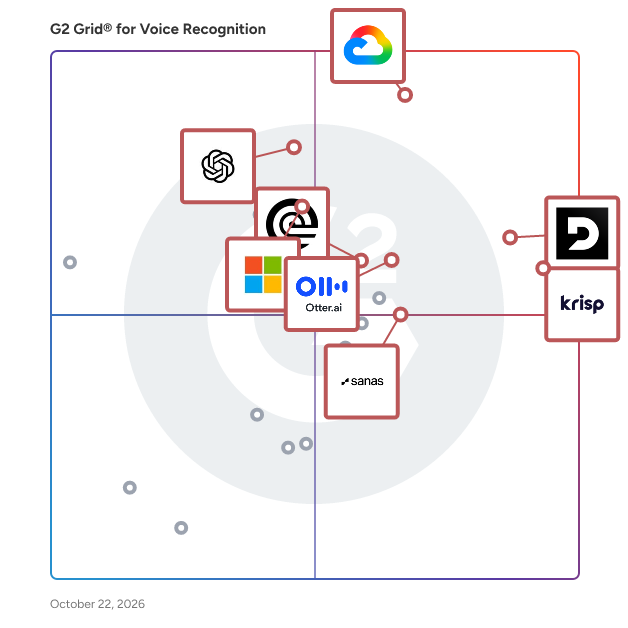

## Which Voice Recognition Software Is Best for Your Use Case?

- **Leader:** [Deepgram](https://www.g2.com/products/deepgram/reviews)
- **Highest Performer:** [Speechmatics](https://www.g2.com/products/speechmatics/reviews)
- **Easiest to Use:** [Krisp](https://www.g2.com/products/krisp/reviews)
- **Top Trending:** [Deepgram](https://www.g2.com/products/deepgram/reviews)
- **Best Free Software:** [Deepgram](https://www.g2.com/products/deepgram/reviews)


---

**Sponsored**

### AssemblyAI - Speech to Text API

Founded in 2017 and headquartered in San Francisco, AssemblyAI is a Voice AI platform serving over 200,000 developers worldwide. AssemblyAI specializes in providing speech recognition and understanding capabilities through API-based services, with a focus on conversation intelligence and voice agent applications. Companies ranging from early-stage startups to Fortune 500 enterprises across technology, healthcare, legal, and telecommunications industries rely on this comprehensive speech processing API. Developers leverage AssemblyAI&#39;s API to build speech-to-text transcription, speaker diarization, sentiment analysis, entity recognition, and summarization into their product lines. Core features include real-time and batch audio processing, automatic language detection across 40+ languages, PII redaction for compliance requirements, and custom vocabulary support. By addressing the challenge of extracting actionable insights from voice data at scale, AssemblyAI enables organizations to automate conversation analysis, improve quality assurance processes, enhance customer experience monitoring, and build voice-enabled applications. Common implementations include call center analytics, meeting transcription services, voice assistant development, and compliance recording systems. AssemblyAI&#39;s accuracy in multi-speaker environments and specialized conversation intelligence features accurately identifies and separates different speakers in conversations while maintaining high transcription accuracy, even with background noise, accents, and technical terminology. Unlike general-purpose speech recognition services, the API provides purpose-built features for conversation analysis and enables rapid integration into your ecosystems, typically allowing developers to implement production-ready voice capabilities within days rather than months. Operating on a usage-based pricing model, AssemblyAI offers flexible billing options with zero commitments required for customers of all sizes. Developers can start for free and pay as they go, with no upfront commitments—only paying for what they use. Our API provides production-ready access with high default concurrency and automatic scaling, including unlimited concurrency options and customizable rate limits for any workload. Get started with AssemblyAI today—sign up for free and receive $50 in credits to explore our Voice AI capabilities.


[Visit website](https://www.g2.com/external_clickthroughs/record?secure%5Bad_program%5D=ppc&amp;secure%5Bad_slot%5D=category_product_list&amp;secure%5Bcategory_id%5D=406&amp;secure%5Bdisplayable_resource_id%5D=406&amp;secure%5Bdisplayable_resource_type%5D=Category&amp;secure%5Bmedium%5D=sponsored&amp;secure%5Bplacement_reason%5D=page_category&amp;secure%5Bplacement_resource_ids%5D%5B%5D=406&amp;secure%5Bprioritized%5D=false&amp;secure%5Bproduct_id%5D=120623&amp;secure%5Bresource_id%5D=406&amp;secure%5Bresource_type%5D=Category&amp;secure%5Bsource_type%5D=category_page&amp;secure%5Bsource_url%5D=https%3A%2F%2Fwww.g2.com%2Fcategories%2Fvoice-recognition%3Fpage%3D6&amp;secure%5Btoken%5D=a181ec730deb5bfc8898ada31a02c2311690a2b6136af1dd5844826d5d0f1a40&amp;secure%5Burl%5D=https%3A%2F%2Fwww.assemblyai.com%2F%3Futm_source%3DG2%26utm_medium%3Dcpc%26utm_campaign%3Dcomps%26utm_content%3Dfree_trial&amp;secure%5Burl_type%5D=free_trial)

---

## What Are the Top-Rated Voice Recognition Software Products in 2026?
### 1. [Legalinternai](https://www.g2.com/products/legalinternai/reviews)
Legal Intern AI is a secure, AI-powered speech-to-text application designed specifically for legal professionals. It automates the transcription of voice inputs into precise legal documents, significantly reducing manual workload and minimizing human errors. By streamlining documentation processes, Legal Intern AI enhances productivity and ensures the confidentiality of sensitive client information. Key Features and Functionality: - Automated Transcription: Converts voice recordings into accurate legal documents, eliminating the need for manual transcription. - Data Security: Incorporates advanced security measures to protect sensitive client data, ensuring compliance with legal standards. - Time Efficiency: Automates repetitive tasks, allowing legal professionals to focus on more critical aspects of their work. - Consistent Quality: Delivers uniform and high-quality documentation without the variability associated with human interns. Primary Value and User Solutions: Legal Intern AI addresses common challenges faced by law firms, such as inconsistent intern quality, time-consuming manual tasks, and security risks associated with traditional documentation methods. By automating transcription and document creation, it reduces errors, saves time, and enhances data security. This allows legal professionals to improve overall productivity and maintain high standards of client confidentiality.


**Who Is the Company Behind Legalinternai?**

- **Seller:** [Legal Intern AI](https://www.g2.com/sellers/legal-intern-ai)
- **HQ Location:** N/A
- **LinkedIn® Page:** https://www.linkedin.com/company/No-Linkedin-Presence-Added-Intentionally-By-DataOps (1 employees on LinkedIn®)


### 2. [Listener – Reliable Automatic Speech Recognition (ASR)](https://www.g2.com/products/listener-reliable-automatic-speech-recognition-asr/reviews)
Listener provides, Accurate Speech Recognition: Utilizes advanced machine learning algorithms and natural language processing techniques to transcribe speech with high accuracy Real-Time Transcription: Capable of transcribing audio in real-time, making it suitable for live applications Noise Robustness: Designed to perform well even in noisy environments, ensuring reliable transcription Customizable Models: Supports customization to recognize specific business terms, proper nouns, and industry-specific jargon Keyword Spotting: Includes features for keyword spotting and hint word recognition, enhancing its utility in various applications Multilingual Support: Offers support for multiple languages, including US, UK, and Indian accented English, as well as Spanish, Portuguese, French, German, and Italian, and many more Flexible Deployment: Available as a Software as a Service (SaaS) or for on-premise deployment, catering to different business needs Scalable Architecture: Features a distributed client-server architecture that supports easy scaling and redundancy for high reliability SDK and WebSocket Support: Provides an SDK library and WebSocket-based live transcription with bidirectional streaming Stereo Transcription: Stereo transcription for separated customer and agent tags for contact centers. Grammar-Based Recognition: Capable of processing simple to complex grammars, useful for tasks like directory lookups and command recognition Consulting Services: Offers consulting for the design and development of complex grammar models.


**Who Is the Company Behind Listener – Reliable Automatic Speech Recognition (ASR)?**

- **Seller:** [GoVivace](https://www.g2.com/sellers/govivace)
- **Year Founded:** 2009
- **HQ Location:** McLean, US
- **LinkedIn® Page:** https://www.linkedin.com/company/govivace-inc/ (25 employees on LinkedIn®)

**Who Uses This Product?**
- **Company Size:** 100% Small-Business


### 3. [ListenHub](https://www.g2.com/products/listenhub/reviews)
ListenHub is an advanced audio management platform designed to streamline the monitoring and analysis of audio content across various channels. It offers a comprehensive suite of tools that enable users to efficiently track, manage, and gain insights from their audio data. Key Features and Functionality: - Real-Time Audio Monitoring: Continuously track audio content across multiple platforms to ensure comprehensive coverage. - Advanced Analytics: Utilize sophisticated tools to analyze audio data, providing actionable insights and trends. - Customizable Alerts: Set up personalized notifications to stay informed about specific audio events or mentions. - Seamless Integration: Easily connect ListenHub with existing systems and workflows for a cohesive user experience. - User-Friendly Interface: Navigate the platform effortlessly with an intuitive design tailored for efficiency. Primary Value and User Solutions: ListenHub addresses the challenge of managing and analyzing vast amounts of audio content by providing a centralized platform that simplifies these processes. Users benefit from real-time monitoring, in-depth analytics, and customizable alerts, enabling them to make informed decisions and respond promptly to relevant audio events. This solution is particularly valuable for businesses and individuals seeking to enhance their audio content strategy and maintain a competitive edge in the market.


**Who Is the Company Behind ListenHub?**

- **Seller:** [ListenHub](https://www.g2.com/sellers/listenhub)
- **HQ Location:** N/A
- **LinkedIn® Page:** https://www.linkedin.com/company/No-Linkedin-Presence-Added-Intentionally-By-DataOps (1 employees on LinkedIn®)


### 4. [MediNav](https://www.g2.com/products/medinav/reviews)
MediNav is an innovative digital medical assistant designed to streamline the documentation process for healthcare professionals. By leveraging advanced speech recognition and natural language processing technologies, MediNav listens to doctors&#39; verbal inputs, accurately transcribes them, and intelligently pre-fills medical forms. This significantly reduces administrative tasks, allowing doctors to dedicate more time to patient care. The system continuously learns from user corrections, enhancing its accuracy and efficiency over time. Key Features and Functionality: - Speech Recognition and Transcription: Converts spoken language into text with high accuracy. - Automated Form Completion: Extracts relevant information from transcriptions to populate medical forms automatically. - Continuous Learning: Improves performance by learning from user corrections and feedback. - Cross-Platform Compatibility: Accessible via laptops, tablets, and smartphones without the need for additional hardware. - Security and Compliance: Ensures data protection with user authentication and adherence to GDPR standards. Primary Value and Problem Solved: MediNav addresses the challenge of time-consuming medical documentation by automating the transcription and form-filling processes. This automation reduces administrative burdens, lowers personnel costs, and enhances data accuracy. Consequently, healthcare providers can focus more on patient interactions, improving overall care quality and patient satisfaction.


**Who Is the Company Behind MediNav?**

- **Seller:** [MediNav](https://www.g2.com/sellers/medinav)
- **Year Founded:** 2020
- **HQ Location:** Timisoara, RO
- **LinkedIn® Page:** https://www.linkedin.com/company/medinav/ (4 employees on LinkedIn®)


### 5. [Modulate Platform](https://www.g2.com/products/modulate-platform/reviews)
Modulate transforms voice into real-time intelligence. Voice is the most natural way people communicate, but most systems do not truly understand it. Conversations are recorded and transcribed, yet the meaning behind tone, emotion, and intent is lost. Modulate is built differently. It is a voice-native platform designed to understand conversations as they happen. By analyzing acoustic, emotional, and behavioral signals in real time, Modulate reveals what others miss and enables teams to act in the moment. At the core is Velma, Modulate’s proprietary voice-native AI. Velma coordinates hundreds of specialized models to detect signals like fraud, manipulation, escalation, and authenticity, even in noisy, multilingual, and high-pressure environments.


**Who Is the Company Behind Modulate Platform?**

- **Seller:** [Modulate](https://www.g2.com/sellers/modulate)
- **Company Website:** https://www.modulate.ai/
- **Year Founded:** 2019
- **HQ Location:** Somerville, US
- **LinkedIn® Page:** https://www.linkedin.com/company/modulate-ai/ (51 employees on LinkedIn®)


### 6. [Noise.ai](https://www.g2.com/products/noise-ai/reviews)
Noise.ai is an advanced artificial intelligence platform designed to enhance audio quality by effectively reducing unwanted noise. Utilizing cutting-edge machine learning algorithms, it identifies and suppresses background disturbances, ensuring clear and crisp sound output. This technology is particularly beneficial for professionals in music production, podcasting, and broadcasting, as well as for improving voice clarity in virtual meetings and calls. Key Features and Functionality: - Real-Time Noise Reduction: Processes audio in real-time, allowing for immediate improvement in sound quality during live recordings or streams. - Adaptive Learning: Continuously learns and adapts to different noise environments, enhancing its effectiveness over time. - User-Friendly Interface: Offers an intuitive interface that simplifies the noise reduction process, making it accessible to users of all technical levels. - Compatibility: Integrates seamlessly with various audio editing software and platforms, providing flexibility in different workflows. - Customizable Settings: Allows users to adjust noise reduction levels and parameters to suit specific needs and preferences. Primary Value and Solutions Provided: Noise.ai addresses the common challenge of background noise interference in audio recordings and live communications. By delivering high-quality noise reduction, it ensures that users can produce professional-grade audio content without the need for expensive equipment or complex setups. This solution is invaluable for content creators, educators, and business professionals who rely on clear audio to effectively communicate their messages.


**Who Is the Company Behind Noise.ai?**

- **Seller:** [Noise](https://www.g2.com/sellers/noise-f0fc09c2-9a38-453a-8c95-7d841896c402)
- **HQ Location:** N/A
- **LinkedIn® Page:** https://www.linkedin.com/company/No-Linkedin-Presence-Added-Intentionally-By-DataOps (1 employees on LinkedIn®)


### 7. [Open Voice OS](https://www.g2.com/products/open-voice-os/reviews)
OpenVoiceOS is a community-driven, open-source voice AI platform for creating custom voice-controlled ​interfaces across devices with NLP, a customizable UI, and a focus on privacy and security.


**Who Is the Company Behind Open Voice OS?**

- **Seller:** [Open Voice OS](https://www.g2.com/sellers/open-voice-os)
- **HQ Location:** N/A
- **LinkedIn® Page:** https://www.linkedin.com/company/No-Linkedin-Presence-Added-Intentionally-By-DataOps (1 employees on LinkedIn®)


### 8. [Origlio](https://www.g2.com/products/origlio/reviews)
Origlio is an audio message transcription service designed for WhatsApp and Telegram users, enabling quick and accurate conversion of voice messages into text. This tool is particularly beneficial for individuals who are unable to listen to audio messages due to time constraints or situational limitations. Key Features and Functionality: - Instant Transcription: Forward audio messages to Origlio and receive text transcripts within seconds. - Paragraph Formatting: Transcripts are organized into paragraphs with timestamps, allowing users to easily navigate and reference specific sections. - Language Detection and Correction: Origlio can detect the language of the audio message and correct it if autodetection fails. - Translation Services (Upcoming): A forthcoming feature will enable transcription and translation of audio messages from one language to another. - AI Enhancement: Utilizes advanced AI technologies to ensure high accuracy in transcription and translation processes. Primary Value and User Solutions: Origlio addresses the challenge of managing audio messages in situations where listening is impractical. By providing swift and precise transcriptions, it allows users to read and comprehend voice messages at their convenience, enhancing communication efficiency and accessibility. This service is especially useful for professionals in meetings, individuals in noisy environments, or anyone who prefers reading over listening.


**Who Is the Company Behind Origlio?**

- **Seller:** [Origlio](https://www.g2.com/sellers/origlio)
- **HQ Location:** N/A
- **LinkedIn® Page:** https://www.linkedin.com/company/No-Linkedin-Presence-Added-Intentionally-By-DataOps (1 employees on LinkedIn®)


### 9. [Panels](https://www.g2.com/products/panels/reviews)
Panels is a specialized service dedicated to providing high-quality audio datasets tailored for the development and enhancement of Voice AI technologies. By collaborating closely with both frontier voice laboratories and emerging startups, Panels curates data that aligns precisely with each team&#39;s specific requirements, facilitating the creation and deployment of superior audio models more efficiently. Key Features and Functionality: - High-Quality Speaker-Separated Audio: Panels offers a proprietary, large-scale multilingual dataset featuring speaker-separated audio across diverse topic domains, ensuring clarity and precision in voice data. - Single Speaker Scripted Recordings: The service provides single-speaker audio recordings that encompass a variety of recording environments, aiding in the development of versatile voice models. - Turn-Taking Evaluation Data: Panels supplies multilingual datasets designed for evaluating human-agent turn-taking models in task-driven, real-world scenarios, enhancing the responsiveness and naturalness of Voice AI interactions. - Custom Dataset Design: Recognizing the unique needs of each project, Panels offers the flexibility to design bespoke datasets tailored to specific requirements. Primary Value and Problem Solved: Panels addresses the critical need for high-quality, customized audio data in the Voice AI industry. By delivering meticulously curated datasets, Panels empowers voice teams to build and deploy more accurate and efficient audio models, accelerating the development process and improving the overall performance of Voice AI applications. This targeted approach ensures that models are trained on data that closely mirrors real-world scenarios, leading to more reliable and effective voice-enabled solutions.


**Who Is the Company Behind Panels?**

- **Seller:** [Panels](https://www.g2.com/sellers/panels)
- **HQ Location:** San Francisco, US
- **LinkedIn® Page:** https://www.linkedin.com/company/panelsinc (113 employees on LinkedIn®)


### 10. [Parrot Talk](https://www.g2.com/products/parrot-talk/reviews)
Parrot Talk is an innovative voice cloning application that enables users to replicate and interact with customized voice samples. By recording a clear, high-quality voice sample, users can create a digital voice model that the application learns to mimic within seconds. This allows for engaging and personalized interactions with the cloned voice. Key Features and Functionality: - Voice Cloning: Easily record and clone any voice by providing a high-quality sample. - User-Friendly Interface: Simple steps to record, name, and save voice samples for immediate use. - Sample Voices: Access to pre-existing sample voices, such as &quot;Peter,&quot; for demonstration and testing. - Parrot Pro Upgrade: Option to upgrade for unlimited access and enhanced features. Primary Value and User Solutions: Parrot Talk offers a unique platform for users to create and interact with personalized voice models, enhancing communication and entertainment experiences. It provides a straightforward solution for voice cloning, catering to both personal and professional needs. Users are encouraged to use the application responsibly and only clone voices they have permission to use.


**Who Is the Company Behind Parrot Talk?**

- **Seller:** [Parrot Talk](https://www.g2.com/sellers/parrot-talk)
- **HQ Location:** N/A
- **LinkedIn® Page:** https://www.linkedin.com/company/No-Linkedin-Presence-Added-Intentionally-By-DataOps (1 employees on LinkedIn®)


### 11. [Phonexia Speech Platform](https://www.g2.com/products/phonexia-speech-platform/reviews)
Phonexia Speech Platform is an on-premises/private-cloud software solution that provides a unique range of industry-leading voice biometrics and speech recognition technologies for processing and analyzing audio data securely. The platform enables organizations to extract actionable insights from voice and speech, such as identifying speakers, detecting voice deepfakes, recognizing languages, and transcribing conversations effortlessly. Designed for secure deployment and high-stakes environments in government and commercial scenarios, the platform can be utilized through a Virtual Appliance with an intuitive graphical user interface (GUI) and easy-to-integrate REST API, or via Docker images with gRPC API. The platform offers 15 technologies for voice biometrics and speech recognition, all optimized for modular and seamless performance: Voice Biometrics Technologies: Speaker Identification Deepfake Detection Speaker Diarization Gender Identification Age Estimation Emotion Recognition Authenticity Verification Speech Recognition Technologies: Language Identification (140 languages) Speech to Text (60+ languages) Speech Translation (50+ languages) Keyword Spotting Time Analysis of Speech Voice Activity Detection Audio Quality Estimation Denoiser Phonexia is a Czech software company that has been an independent provider of on-premises voice biometrics and speech recognition technologies since its establishment in 2006, trusted by intelligence, law enforcement, and call center customers in over 60 countries. The company has a close partnership with Brno University of Technology&#39;s Speech@FIT group and has excelled in NIST Speaker Recognition Evaluations since 2008, delivering forensic-grade accuracy and high-performance software for mission-critical scenarios. Request a free online demo at https://www.phonexia.com/product/speech-platform#form to see how Phonexia Speech Platform can enhance your audio intelligence operations.


**Who Is the Company Behind Phonexia Speech Platform?**

- **Seller:** [Phonexia](https://www.g2.com/sellers/phonexia)
- **Year Founded:** 2006
- **HQ Location:** Brno, CZ
- **Twitter:** @Phonexia (818 Twitter followers)
- **LinkedIn® Page:** https://www.linkedin.com/company/742249 (58 employees on LinkedIn®)


### 12. [Real-time video and audio API provider](https://www.g2.com/products/real-time-video-and-audio-api-provider/reviews)
Daily offers a robust real-time video and audio API designed for developers aiming to create immersive, high-scale, video-first communication experiences. With options ranging from a fully featured Prebuilt UI to comprehensive SDKs, Daily facilitates the seamless integration of live video and audio functionalities into applications. Its Global Mesh Network infrastructure supports real-time sessions with up to 100,000 participants, maintaining latencies under 200 milliseconds to ensure high-quality, interactive experiences. Key Features and Functionality: - Flexible Integration Options: Developers can choose between a Prebuilt UI for quick deployment or leverage SDKs to build customized experiences tailored to specific needs. - Global Mesh Network: With server clusters across 10 geographic regions and 30 network availability zones, Daily ensures rapid connections worldwide, enhancing the reliability and speed of video and audio sessions. - Comprehensive Feature Set: Daily includes advanced features such as RTMP output for live streaming, noise cancellation technology for clearer audio, transcription services for accessibility, and custom analytics to monitor and optimize performance. Primary Value and User Solutions: Daily addresses the complexities associated with integrating real-time video and audio into applications by providing a scalable, low-latency solution. It empowers developers to build engaging, interactive platforms without the need to develop intricate infrastructure from scratch. By offering a range of integration options and a suite of advanced features, Daily enables the creation of high-quality, real-time communication experiences that can scale to accommodate large audiences, thereby enhancing user engagement and satisfaction.


**Who Is the Company Behind Real-time video and audio API provider?**

- **Seller:** [Daily](https://www.g2.com/sellers/daily)
- **HQ Location:** Kobenhavn K, Capital Region
- **Twitter:** @trydaily (5,407 Twitter followers)


### 13. [Rev](https://www.g2.com/products/rev-ai-rev/reviews)
Rev.ai is an advanced speech recognition platform that offers highly accurate and efficient transcription services for audio and video content. Leveraging state-of-the-art machine learning models, Rev.ai provides both asynchronous and real-time transcription capabilities, catering to a wide range of applications across various industries. Its user-friendly API allows developers to seamlessly integrate speech-to-text functionality into their applications, enhancing accessibility and productivity. Key Features and Functionality: - High Accuracy: Utilizes cutting-edge neural network models trained on extensive datasets to deliver precise transcriptions, even in challenging audio conditions. - Asynchronous and Real-Time Transcription: Supports both batch processing of pre-recorded files and live streaming transcription, accommodating diverse user needs. - Multilingual Support: Offers transcription services in over 58 languages for asynchronous processing and 9 languages for real-time streaming, making it suitable for global applications. - Customization: Allows users to create custom vocabularies to improve accuracy for industry-specific terminology. - Advanced Features: Includes auto-punctuation, inverse text normalization (ITN), speaker diarization, profanity filtering, and disfluency removal to enhance the quality and readability of transcriptions. - Security and Compliance: Adheres to stringent security standards, including SOC 2 Type II and HIPAA compliance, ensuring the protection of sensitive data. Primary Value and Solutions Provided: Rev.ai addresses the need for accurate and efficient transcription services across various sectors, including healthcare, media, education, and customer service. By automating the conversion of speech to text, it enables organizations to: - Enhance Accessibility: Provides real-time captions and transcriptions, making content accessible to individuals with hearing impairments. - Improve Productivity: Streamlines workflows by offering quick and reliable transcriptions, allowing professionals to focus on core tasks without the manual effort of note-taking. - Facilitate Data Analysis: Generates accurate transcripts that can be analyzed for insights, sentiment analysis, and topic extraction, aiding in decision-making processes. - Support Multilingual Communication: Breaks language barriers by offering transcription services in multiple languages, enabling effective communication in diverse environments. By integrating Rev.ai&#39;s speech recognition capabilities, users can significantly enhance the efficiency, accessibility, and analytical potential of their audio and video content.


**Who Is the Company Behind Rev?**

- **Seller:** [Rev.ai](https://www.g2.com/sellers/rev-ai-96e23933-a510-4ec1-bc0d-2918fc16986e)
- **HQ Location:** N/A
- **LinkedIn® Page:** https://www.linkedin.com/company/No-Linkedin-Presence-Added-Intentionally-By-DataOps (1 employees on LinkedIn®)


### 14. [RTZR STT](https://www.g2.com/products/rtzr-stt/reviews)
AI, ASR, Diarization, Speech, ML


**Who Is the Company Behind RTZR STT?**

- **Seller:** [Return Zero Inc. ](https://www.g2.com/sellers/return-zero-inc)
- **Year Founded:** 2018
- **HQ Location:** Seoul, KR
- **LinkedIn® Page:** https://www.linkedin.com/company/rtzr/ (16 employees on LinkedIn®)


### 15. [Rubidium](https://www.g2.com/products/rubidium/reviews)
Rubidium is a speech recognition software that covers the entire scope of a voice dialogue system: input, output, and interaction.


**Who Is the Company Behind Rubidium?**

- **Seller:** [Rubidium](https://www.g2.com/sellers/rubidium)
- **Year Founded:** 1995
- **HQ Location:** N/A
- **LinkedIn® Page:** http://www.linkedin.com/company/rubidium-ltd. (11 employees on LinkedIn®)


### 16. [SaidText](https://www.g2.com/products/saidtext/reviews)
SaidText is an AI-driven voice interface designed to enhance efficiency in industrial and manufacturing environments. By enabling frontline workers to capture critical updates hands-free, SaidText converts spoken information into structured, actionable data, facilitating faster responses and improved operational visibility. Key Features and Functionality: - Voice-to-Action Ticketing: Workers can report issues or requests through voice commands, which are automatically transcribed and organized into a centralized workflow. - Real-Time Dashboard: Managers receive instant notifications with detailed ticket information, including audio, transcriptions, images, and videos, allowing for real-time tracking and status updates. - Dedicated Chat for Each Request: A dedicated chat feature for each ticket enables clear and efficient communication between workers and managers, streamlining the resolution process. - OSHA-Ready Compliance: The platform ensures workplace safety with fast reporting and clear communication, aligning with OSHA standards. - AI-Driven Insights: SaidText learns from daily operations, building a knowledge base that helps predict future issues and continuously improve internal procedures. Primary Value and Solutions Provided: SaidText addresses common challenges in industrial settings, such as unstructured communication and inefficient workflows. By transforming verbal updates into organized data, it reduces downtime by 5-10%, enhances safety compliance, and preserves valuable operational knowledge. This leads to increased productivity, faster issue resolution, and a more streamlined manufacturing process.


**Who Is the Company Behind SaidText?**

- **Seller:** [Saidtext](https://www.g2.com/sellers/saidtext)
- **HQ Location:** N/A
- **LinkedIn® Page:** https://www.linkedin.com/company/No-Linkedin-Presence-Added-Intentionally-By-DataOps (1 employees on LinkedIn®)


### 17. [Sarvam](https://www.g2.com/products/sarvam/reviews)
Sarvam is building the bedrock of Sovereign AI for India. The company is developing India&#39;s full-stack sovereign AI platform, building across research, models, infrastructure and applications with a singular focus on making AI genuinely work for IndiaSarvam works with leading enterprises and public institutions and is backed by Lightspeed, Peak XV, and Khosla Ventures. Sarvam partners with India’s leading brands, including Tata Capital, SBI Life, CRED, IDFC, and LIC.


**Who Is the Company Behind Sarvam?**

- **Seller:** [Sarvam AI](https://www.g2.com/sellers/sarvam-ai)
- **HQ Location:** N/A
- **LinkedIn® Page:** https://www.linkedin.com/company/sarvam-ai (227 employees on LinkedIn®)


### 18. [Sayhi](https://www.g2.com/products/sayhi/reviews)
SayHi is a versatile communication platform designed to enhance user interactions through real-time messaging and voice capabilities. It offers a seamless experience for both personal and professional communication needs. Key Features and Functionality: - Real-Time Messaging: Facilitates instant text communication between users. - Voice Communication: Provides high-quality voice call functionality. - User-Friendly Interface: Ensures ease of use with an intuitive design. - Cross-Platform Compatibility: Accessible on various devices and operating systems. - Secure Communication: Implements robust security measures to protect user data. Primary Value and User Solutions: SayHi addresses the need for efficient and reliable communication by offering a platform that combines real-time messaging and voice features. It simplifies connectivity, enhances collaboration, and ensures secure interactions, making it an ideal solution for individuals and businesses seeking effective communication tools.


**Who Is the Company Behind Sayhi?**

- **Seller:** [SayHi](https://www.g2.com/sellers/sayhi)
- **HQ Location:** N/A
- **LinkedIn® Page:** https://www.linkedin.com/company/No-Linkedin-Presence-Added-Intentionally-By-DataOps (1 employees on LinkedIn®)


### 19. [Scout Voice](https://www.g2.com/products/scout-voice/reviews)
Scout Voice is a desktop voice dictation application designed for Windows and macOS that enables users to convert speech into text in real time across any application. By pressing a hotkey and speaking naturally, users can see their words instantly appear at the cursor, streamlining the writing process and enhancing productivity. Key Features and Functionality: - Universal Compatibility: Works seamlessly with all desktop applications, allowing voice input wherever typing is possible. - Adaptive Tone: Automatically adjusts the tone and style of the dictated text to match the context of different applications, ensuring appropriate communication across platforms. - Magic Edit: Empowers users to transform existing text through voice commands, enabling tasks like rewriting, reshaping, or creating new content effortlessly. - Custom Dictionary: Allows the addition of specific names, products, and jargon to ensure accurate recognition and transcription of specialized terms. - Multilingual Support: Supports multiple languages, including English, Spanish, French, German, Portuguese, Hindi, Chinese, Japanese, Korean, Italian, Dutch, Polish, Turkish, Russian, Arabic, and Swedish, catering to a diverse user base. Primary Value and User Solutions: Scout Voice addresses the challenge of time-consuming typing by offering a faster, hands-free alternative for text input. Professionals who generate extensive written content daily, such as emails, reports, and notes, can significantly reduce their workload and increase efficiency. The application&#39;s adaptive tone feature ensures that communications are appropriately styled for different platforms, enhancing clarity and professionalism. Additionally, the Magic Edit function and custom dictionary support provide users with powerful tools to refine and personalize their content, making Scout Voice a comprehensive solution for modern, efficient, and accurate voice-to-text transcription.


**Who Is the Company Behind Scout Voice?**

- **Seller:** [Scout Voice](https://www.g2.com/sellers/scout-voice)
- **HQ Location:** N/A
- **LinkedIn® Page:** https://www.linkedin.com/company/No-Linkedin-Presence-Added-Intentionally-By-DataOps (1 employees on LinkedIn®)


### 20. [Scribewave](https://www.g2.com/products/scribewave/reviews)
Scribewave is an AI-powered transcription service designed to convert audio and video files into accurate text swiftly and securely. Supporting over 90 languages, it caters to professionals such as journalists, researchers, and content creators who require reliable transcription solutions. With a focus on user privacy, Scribewave ensures GDPR compliance and offers a seamless experience without limitations on file size or duration. Key Features and Functionality: - Automatic Transcription: Utilizes advanced AI algorithms to transcribe audio and video files with high accuracy. - Multilingual Support: Supports transcription in over 90 languages, accommodating a diverse user base. - Speaker Recognition: Identifies and differentiates between multiple speakers within a recording. - Subtitle Generation: Creates subtitles for videos, exportable in formats like SRT and VTT. - Audio-to-Video Conversion: Transforms audio files into videos with waveforms and subtitles, customizable with logos and colors. - Flexible Export Options: Allows exporting transcriptions in various formats, including text documents and subtitle files. - Privacy and Security: Ensures data protection with GDPR compliance and offers options to permanently delete data after processing. Primary Value and User Solutions: Scribewave addresses the need for fast, accurate, and secure transcription services across multiple languages. By automating the transcription process, it saves users significant time—up to three hours per hour of content—allowing them to focus on analysis and content creation. Its commitment to privacy and compliance with data protection regulations makes it a trustworthy choice for handling sensitive information. Additionally, the platform&#39;s support for various file formats and lack of size restrictions provide flexibility and convenience for users with diverse transcription needs.


**Who Is the Company Behind Scribewave?**

- **Seller:** [Scribewave](https://www.g2.com/sellers/scribewave)
- **Year Founded:** 2023
- **HQ Location:** Leuven, BE
- **LinkedIn® Page:** https://www.linkedin.com/company/scribewave (1 employees on LinkedIn®)


### 21. [Sensory Phrase Spotted Commands](https://www.g2.com/products/sensory-phrase-spotted-commands/reviews)
Recognize multiple voice commands at once, respond in real time, and keep everything running fully on-device and in low power with minimal memory.


**Who Is the Company Behind Sensory Phrase Spotted Commands?**

- **Seller:** [Sensory](https://www.g2.com/sellers/sensory)
- **Year Founded:** 1994
- **HQ Location:** N/A
- **LinkedIn® Page:** https://www.linkedin.com/company/sensory-inc-/ (54 employees on LinkedIn®)


### 22. [Sensory Speech-to-Text](https://www.g2.com/products/sensory-speech-to-text/reviews)
Real-time transcription that runs accurately on modern operating systems and chipsets, with no cloud dependency or metered fees and no compromise on privacy - speech-to-text that you can trust anywhere.


**Who Is the Company Behind Sensory Speech-to-Text?**

- **Seller:** [Sensory](https://www.g2.com/sellers/sensory)
- **Year Founded:** 1994
- **HQ Location:** N/A
- **LinkedIn® Page:** https://www.linkedin.com/company/sensory-inc-/ (54 employees on LinkedIn®)


### 23. [Sensory VoiceHub](https://www.g2.com/products/sensory-voicehub/reviews)
Sensory VoiceHub is the self‑service development portal from Sensory Inc., a Santa Clara–based pioneer in on‑device AI for voice, sound, and biometrics. Sensory’s technologies power billions of devices worldwide, and VoiceHub brings that embedded expertise into a browser‑based tool that lets teams build production‑grade voice models without needing in‑house machine learning specialists. VoiceHub is a no‑code / low‑code web platform for designing, training, and testing custom wake words, command‑and‑control vocabularies, grammars, and natural‑language voice UIs that run fully on‑device. Developers can specify phrases, intents, languages, target hardware, and model sizes, then have high‑accuracy models automatically trained and ready to download, often within hours, for deployment on MCUs, DSPs, mobile apps, and edge devices. For product teams, VoiceHub dramatically shortens the path from idea to working on‑device voice UI—reducing what used to take weeks of data science and tooling work to a guided workflow they can manage in a web browser. It allows embedded engineers, UX designers, and system integrators to experiment with multiple wake words, command sets, and languages, validate them quickly on real hardware, and then carry proven models into production while preserving privacy and minimizing cloud dependence. This gives OEMs and solution providers an efficient way to create branded voice experiences, front‑ends for LLM voice agents, and voice‑enabled products across automotive, IoT, consumer, and industrial use cases, without building a custom ML pipeline from scratch.


**Who Is the Company Behind Sensory VoiceHub?**

- **Seller:** [Sensory](https://www.g2.com/sellers/sensory)
- **Year Founded:** 1994
- **HQ Location:** N/A
- **LinkedIn® Page:** https://www.linkedin.com/company/sensory-inc-/ (54 employees on LinkedIn®)


### 24. [Sign AI](https://www.g2.com/products/sign-ai/reviews)
Sign AI is an advanced artificial intelligence platform designed to bridge communication gaps between Deaf and hearing communities by providing real-time, bi-directional sign language interpretation. Developed by a Deaf-led team, Sign AI aims to capture the depth and complexity of American Sign Language (ASL), ensuring it is fully represented in the AI revolution. The platform delivers on-demand interpretation services, enabling seamless communication across various contexts, thereby promoting inclusivity and accessibility. Key Features and Functionality: - Real-Time Interpretation: Offers immediate, bi-directional translation between ASL and spoken language, facilitating fluid conversations without delays. - AI-Driven Accuracy: Utilizes advanced AI algorithms to ensure high precision in interpreting complex ASL expressions and nuances. - User-Friendly Interface: Designed with an intuitive interface accessible across multiple devices, making it easy for users to engage with the platform. - 24/7 Availability: Provides on-demand access to interpretation services anytime and anywhere, addressing the shortage of human interpreters. - Cultural Fluency: Developed in collaboration with Deaf experts to ensure interpretations are culturally appropriate and sensitive. Primary Value and Solutions: Sign AI addresses the critical shortage of sign language interpreters, which often creates significant barriers for the Deaf and Hard of Hearing (HoH) community. By offering an AI-powered virtual interpreter, Sign AI ensures that individuals have consistent and reliable access to communication services, enhancing their ability to participate fully in educational, professional, and social settings. This innovation not only promotes inclusivity but also empowers Deaf individuals by providing them with the tools necessary for effective communication in a predominantly hearing world.


**Who Is the Company Behind Sign AI?**

- **Seller:** [Sign-Ai](https://www.g2.com/sellers/sign-ai)
- **Year Founded:** 2025
- **HQ Location:** Seattle, US
- **LinkedIn® Page:** https://www.linkedin.com/company/sign-ai-com (9 employees on LinkedIn®)


### 25. [SLPeaceBot](https://www.g2.com/products/slpeacebot/reviews)
SLPeaceBot™ is an innovative voice-activated tool designed to streamline the documentation process for Speech-Language Pathologists (SLPs) and their assistants. By enabling users to dictate session notes, it transforms spoken words into structured SOAP notes almost instantly. This technology significantly reduces the time spent on paperwork, allowing clinicians to focus more on patient care. With customizable templates and multi-language support, SLPeaceBot™ ensures that documentation is both efficient and tailored to individual needs. Moreover, it adheres to HIPAA compliance standards, guaranteeing the security and privacy of patient data. Key Features and Functionality: - Voice-to-Note Generation: Converts spoken session summaries into comprehensive SOAP notes, facilitating quick and accurate documentation. - HIPAA-Compliant Documentation: Ensures all generated notes meet stringent privacy and security standards, safeguarding patient information. - Customizable Note Templates: Offers flexibility to tailor documentation formats to suit specific clinical requirements. - Multi-Language Support: Accommodates diverse patient demographics by generating notes in various languages. - Time Efficiency: Claims to save clinicians over 260 hours annually by reducing the time spent on manual documentation. - Instant Note Generation: Provides rapid conversion of dictated notes, enhancing workflow efficiency. - Manual Proofreading Option: Allows users to review and edit notes before finalization, ensuring accuracy and completeness. Primary Value and User Solutions: SLPeaceBot™ addresses the common challenge faced by SLPs of balancing extensive documentation with quality patient care. By automating the note-taking process through voice recognition, it alleviates the administrative burden, enabling clinicians to dedicate more time to their patients. The tool&#39;s customizable and multilingual capabilities ensure that documentation is both relevant and accessible, catering to the diverse needs of practitioners. Additionally, its compliance with HIPAA standards provides peace of mind regarding the confidentiality and security of patient records.


**Who Is the Company Behind SLPeaceBot?**

- **Seller:** [SLPeaceBot](https://www.g2.com/sellers/slpeacebot)
- **HQ Location:** N/A
- **LinkedIn® Page:** https://www.linkedin.com/company/No-Linkedin-Presence-Added-Intentionally-By-DataOps (1 employees on LinkedIn®)


## What Is Voice Recognition Software?

[Deep Learning Software](https://www.g2.com/categories/deep-learning)

## What Software Categories Are Similar to Voice Recognition Software?

- [Transcription Software](https://www.g2.com/categories/transcription)
- [AI Meeting Assistants Software](https://www.g2.com/categories/ai-meeting-assistants)


---

## How Do You Choose the Right Voice Recognition Software?

### What You Should Know About Voice Recognition Software 

### What is Voice Recognition Software?

Voice recognition software, also known as automatic speech recognition (ASR) software or speech recognition, is a computer program or system designed to convert spoken language or audio input into written text.&amp;nbsp;

However, ASR software offers a range of features beyond speech recognition, including transcription services, voice command processing, etc. It utilizes advanced algorithms and machine learning techniques to analyze and interpret audio signals, identifying words and phrases and accurately transcribing them into text.&amp;nbsp;

This technology facilitates natural and efficient human-computer interaction by enabling voice commands, transcription services, voice assistants, and various applications across industries, including accessibility, customer service, and automation.

### What are the Common Features of Voice Recognition Software?

The following are some essential aspects of voice recognition software that can assist users in several ways:

**Speech-to-text conversion:** The tool can accurately translate spoken words, phrases, and commands into written text, promoting effective communication and automating numerous processes using natural language input.

**Natural language processing (NLP):** This feature considers the context, recognizes various accents, and deciphers speech subtleties, allowing the software to comprehend and respond to human communication with more accuracy and contextual relevance.

**Voice commands:** This feature allows users to interact with various devices and apps using spoken commands. This simple engagement style allows for hands-free control, particularly useful when physical input is unfeasible or cumbersome, such as when operating smart home appliances, navigating GPS systems, or managing chores on a computer or mobile device.

### What are the Benefits of Voice Recognition Software?

The following are some of the benefits of voice recognition software.

**Automation:** Voice recognition software significantly reduces the need for manual data entry, transcription, and repetitive tasks that involve converting spoken words into written text.&amp;nbsp;

For example, it can automate medical transcription in healthcare, allowing healthcare professionals to focus more on patient care than documentation. In business, it can expedite the creation of written documents from spoken notes, improving overall productivity.

**Improved accessibility:** This software is vital for individuals with disabilities. For those with mobility impairments or conditions that limit their ability to type, this technology enables them to interact with computers, smartphones, and other devices using their voice. It empowers them to access information, communicate, and perform tasks independently, enhancing their overall quality of life and participation in personal and professional activities.

**Enhanced user experience:** It allows for natural language interactions with devices and applications. Instead of navigating complex menus or interfaces, users can simply speak commands or questions in a conversational manner. This makes the technology more user-friendly and approachable, particularly for those who may not be tech-savvy. It also enhances customer experiences in applications like voice assistants, making interactions more human and intuitive.

**Time saving:** For professionals who rely on transcription services, it can significantly reduce the time required to convert audio recordings into written documents. This time-saving aspect can increase efficiency and enable faster turnaround times in various industries, such as journalism, legal, and research.&amp;nbsp;

Additionally, for everyday users, it expedites tasks like composing emails, creating documents, and taking notes, allowing them to be more productive in less time.

### Who Uses Voice Recognition Software?

The following personas use voice recognition software.

**Customer support representatives:** Customer support representatives often use voice recognition software in call centers to assist customers efficiently. It enables them to transcribe and analyze customer interactions, ensuring accurate records and providing insights for improving service quality. This technology streamlines the workflow, allowing representatives to focus on resolving customer issues promptly.

**Sales teams:** Sales teams benefit from voice recognition software, allowing them to dictate and transcribe sales notes, emails, and follow-up tasks. By automating documentation processes, sales professionals can maintain more comprehensive records of customer interactions, leading to improved customer relationships and sales performance.

**Content creators:** Content creators, including writers, journalists, and bloggers, leverage voice recognition software to transform spoken ideas into written content quickly. This streamlines the content creation process, increases productivity, and allows creators to capture ideas on the go, whether in the field or traveling.

**Automotive and IoT developers:** Developers working on automotive infotainment systems and internet of things (IoT) devices integrate voice recognition software to create voice-activated features. This enhances user experience by allowing drivers and users to interact with technology hands-free, ensuring safety and convenience.

#### **Software ​​and Services Related to Voice Recognition Software**

In addition to speech recognition software, the following related software can be utilized:

[Natural language processing (NLP) software](https://www.g2.com/categories/natural-language-processing-nlp) **:** Although these two software categories are sometimes confused, they are different.&amp;nbsp;While voice recognition simply gathers and transcribes speech information, NLP software is more concerned with interpreting the information.

Voice recognition and NLP software combine to create the voice-operated systems we use daily. Voice recognition software handles the process of gathering auditory commands. Natural language processing, on the other hand, understands what was said and what has to be done with the information provided.

[Natural language generation (NLG) software](https://www.g2.com/categories/natural-language-generation-nlg) **:** Like NLP software, voice recognition software is frequently used with NLG products. NLG tools process data and create responses, auditory or otherwise.

Many applications will use voice recognition and natural language processing to intake and process commands that are then handed to an NLG application that outputs a response for the user.

[Transcription services](https://www.g2.com/categories/transcription-services) **:** An audio recording may be sent to a transcription service, turning it into a written document. Professional transcribers are used by most, if not all, of the services; this means that an actual human will be listening to the audio, preventing mistakes and improving accuracy. These services may be pricey, so companies that would want to transcribe internally and cut expenses should give voice recognition software some thought.

### Challenges with Voice Recognition Software

Software solutions can come with their own set of challenges.&amp;nbsp;

**Accents and dialects:** One of the most challenging problems for voice recognition software is effectively recognizing and interpreting speech with various accents and dialects.&amp;nbsp;

People from various backgrounds or linguistic origins may pronounce words differently, utilize different vocabularies, or speak differently. To attain great accuracy, ASR systems must often be trained on a wide range of accents and dialects. Failure to accommodate this variability can result in misinterpretations, mistakes, and annoyance for users who do not have a standard dialect. It&#39;s a continuing struggle since language is dynamic and ever-changing.

**Background noise:** In noisy environments, voice recognition software may face difficulties comprehending spoken language. The software&#39;s ability to precisely record and transcribe spoken words may be hampered by background noise, including discussions, traffic, machinery, or ambient sounds.&amp;nbsp;

This problem is especially noticeable in settings like manufacturing facilities, crowded public areas, and call centers where it could be challenging to get clear audio input. While there are efforts to mitigate this issue through advanced techniques like audio filtering and noise cancellation, it still poses a significant challenge in some situations.

**Continuous learning:** To increase accuracy, voice recognition software uses data training and machine learning. For these systems to function as intended or improve upon it, ongoing learning and modification are necessary.&amp;nbsp;

As new words, phrases, and dialects appear, the software&#39;s language models must be updated regularly. Individual users could also gain from specialized training to consider their particular speaking patterns. Because of the constant need for updates and training, users and developers may find it difficult to allocate the time and resources necessary to maintain maximum performance.

### How to Buy Voice Recognition Software

#### Requirements gathering (RFI/RFP) for voice recognition software

First, pinpoint your organization&#39;s needs and prioritize them for voice recognition, considering factors like transcription, voice commands, or customer service automation.&amp;nbsp;

Next, create a request for information (RFI ) or request for proposal (RFP) tailored to voice recognition software, including project goals and evaluation criteria. Finally, distribute the RFI/RFP to potential software vendors, seeking detailed responses that address how their solutions meet your voice recognition needs and objectives.

#### Compare Voice Recognition Software Products

**Create a long list**

Start by conducting comprehensive market research specifically focused on voice recognition software providers. Explore industry reports, user reviews, and trusted recommendations to identify a diverse array of potential vendors.&amp;nbsp;

Next, contact these vendors, requesting essential information about their voice recognition solutions, such as product brochures, case studies, and references. Once you&#39;ve gathered this data, perform an initial evaluation to compile a list of potential solutions that closely match your organization&#39;s unique requirements and objectives, considering factors like pricing, features, and scalability.

**Create a short list**

Narrow your choices by assessing the voice recognition software solutions on your long list. Dive deeper with product demonstrations, conversations with vendor representatives, and further research into their performance track record and customer feedback.&amp;nbsp;

Additionally, consider running a proof of concept (PoC) or pilot project with select vendors to evaluate how well their solutions perform in your real-world environment.&amp;nbsp;

Lastly, prioritize scalability by ensuring the chosen solutions meet your organization&#39;s future needs and assess their compatibility for seamless integration with your existing systems.

**Conduct demos**

To evaluate voice recognition software effectively, start by crafting a targeted demo script tailored to your organization&#39;s needs. Include use cases like voice command testing, transcription accuracy assessment, and integration testing to assess the software&#39;s suitability.&amp;nbsp;

Ask vendors about key features, customization options, training needs, and ongoing support during the demos. Focus on aspects such as ease of use, response time, and the overall user experience.&amp;nbsp;

Additionally, engage end-users or relevant stakeholders in the demo process to gather their feedback and impressions, which are vital in assessing usability and overall user satisfaction.

#### Selection of Voice Recognition Software

**Choose a selection team**

Assemble a cross-functional team that includes representatives from IT, operations, user experience, and any other relevant departments. Ensuring that end-users have a voice in the selection process is important.

**Negotiation**

Negotiate with the selected vendor(s) regarding licensing terms, pricing, and any additional services or support required. Seek competitive pricing based on your organization&#39;s budget.

**Final decision**

For the final selection of voice recognition software, identify the key decision-maker or decision-making team accountable for the final choice. Thoroughly evaluate all collected information, including vendor responses, demo outcomes, and end-user feedback.&amp;nbsp;

Ensure the selected solution aligns with your organization&#39;s strategic objectives and budgetary considerations. Lastly, formulate a precise implementation plan specifying timelines, assigning responsibilities, and addressing training prerequisites. Effectively communicate the decision and implementation strategy to all pertinent stakeholders to seamlessly integrate the chosen voice recognition software.

### Voice Recognition Software Trends

**Advanced NLP&amp;nbsp;**

Advanced NLP techniques are rapidly being used in voice recognition software. These advances enable the program to recognize spoken words and their context and purpose. Interactions with voice assistants and applications will become more conversational and contextually relevant as a result.&amp;nbsp;

Users, for example, can ask follow-up inquiries or give complicated orders with more confidence that the program will correctly grasp their objectives. Improved natural language processing also makes speech recognition systems more flexible to varied accents and dialects, resulting in a more inclusive user experience.

**Integration with IoT&amp;nbsp;**

Voice recognition software is rapidly integrating with IoT devices as the IoT ecosystem evolves. This trend allows users to manage and interact with numerous smart gadgets in their homes or workplaces using voice commands.&amp;nbsp;

Users can, for example, use voice commands to alter the thermostat, control lighting, lock doors, or check equipment status. Integrating speech recognition with IoT improves convenience and adds to task automation, making households and businesses more efficient and responsive.

**Cross-platform compatibility**

Voice recognition software is becoming more adaptable and compatible with various operating systems and devices. This is an important development since customers want a consistent experience across several devices, such as smartphones, tablets, desktop computers, and smart speakers.&amp;nbsp;

Users may access speech recognition functions on the devices and platforms of their choosing, thanks to improved cross-platform compatibility. This adaptability is critical for companies and developers seeking to deliver consistent voice-driven experiences across a wide range of hardware and software settings, therefore increasing customer satisfaction and adoption.

### Voice Recognition Software FAQs

### Most Popular FAQs

#### Which Voice Recognition Software has the best reviews?

Several voice recognition platforms consistently earn top marks from verified users, with standout ratings across accuracy, ease of use, and support quality.

- [Speechmatics](https://www.g2.com/products/speechmatics/reviews): An AI-powered speech recognition engine known for its exceptional multilingual accuracy and high average star rating, making it a top-reviewed choice among professional and enterprise users.
- [Krisp](https://www.g2.com/products/krisp/reviews): A noise-cancellation and transcription platform that earns consistently high ratings for its call clarity features and strong likelihood-to-recommend scores across teams of all sizes.
- [Mihup](https://www.g2.com/products/mihup/reviews): A conversational AI and voice recognition solution with a perfect 5.0 average rating among its reviewers, praised for meeting requirements and quality of support.
- [Deepgram](https://www.g2.com/products/deepgram/reviews): A developer-focused speech-to-text API with the largest volume of verified reviews in this category and a strong 4.56 average rating, valued for its real-time transcription performance.

#### What are the best voice recognition softwares?

The best voice recognition software in the market combines high transcription accuracy, ease of integration, and reliable support—here are the leading options based on user reviews.

- [Deepgram](https://www.g2.com/products/deepgram/reviews): A powerful speech-to-text and text-to-speech API built for developers building voice agents and real-time transcription pipelines with high accuracy at scale.
- [Krisp](https://www.g2.com/products/krisp/reviews): A voice AI solution that removes background noise and clarifies accents in real time, widely used by remote workers and call center teams to improve call quality.
- [Otter.ai](https://www.g2.com/products/otter-ai/reviews): A meeting transcription and collaboration tool that automatically generates real-time notes, summaries, and action items from voice conversations and meetings.
- [AssemblyAI - Speech to Text API](https://www.g2.com/products/assemblyai-speech-to-text-api/reviews): A robust AI transcription API offering features like speaker diarization, sentiment analysis, and auto-chapters, popular among developers and content teams.

#### What are the leading voice recognition apps for remote teams in tech?

For remote teams in the technology sector, voice recognition tools that excel at meeting transcription, noise suppression, and API integration tend to perform best based on reviewer feedback.

- [Krisp](https://www.g2.com/products/krisp/reviews): Widely adopted by remote tech teams to eliminate distracting background noise and automatically produce meeting summaries during live calls.
- [Otter.ai](https://www.g2.com/products/otter-ai/reviews): A go-to meeting assistant for distributed technology teams that captures real-time transcripts, enables collaboration on notes, and integrates with video conferencing tools.
- [Deepgram](https://www.g2.com/products/deepgram/reviews): Preferred by engineering and product teams in software companies for its streaming API, allowing real-time voice processing directly within applications.
- [Speechmatics](https://www.g2.com/products/speechmatics/reviews): Favored by tech organizations that require enterprise-grade accuracy across multiple languages and accents, with flexible on-premises or cloud deployment options.

#### What&#39;s the most reliable voice recognition platform for software developers?

Software developers consistently favor voice recognition platforms that offer well-documented APIs, fast response times, and flexible integration options within their applications.

- [Deepgram](https://www.g2.com/products/deepgram/reviews): A developer-first speech API with comprehensive documentation, support for streaming and batch transcription, and strong performance in building AI voice agents—highly recommended by developers in G2&#39;s review data.
- [AssemblyAI - Speech to Text API](https://www.g2.com/products/assemblyai-speech-to-text-api/reviews): A developer-friendly transcription API with pre-built AI models for entity detection, summarization, and speaker identification, designed for quick integration into apps and workflows.
- [OpenAI Whisper](https://www.g2.com/products/openai-whisper/reviews): An open-source speech recognition model from OpenAI that developers use for offline and custom transcription tasks, praised for its high accuracy and language breadth.
- [Gladia](https://www.g2.com/products/gladia/reviews): A speech intelligence API focused on real-time transcription and audio enrichment, gaining traction among developers who need low-latency voice processing in their products.

#### What software is used for voice recognition?

Voice recognition software spans a wide range of use cases, from API-based transcription tools for developers to meeting assistants and noise cancellation platforms for business teams.

- [Deepgram](https://www.g2.com/products/deepgram/reviews): A cloud-based speech-to-text and TTS API used by developers to add real-time voice transcription and voice agent capabilities to applications.
- [Rev](https://www.g2.com/products/rev/reviews): A human- and AI-powered transcription service used by professionals in media, legal, and enterprise settings who require high-accuracy transcripts for recorded audio and video.
- [Azure AI Speech](https://www.g2.com/products/azure-ai-speech/reviews): Microsoft&#39;s enterprise speech recognition service integrated into the Azure ecosystem, used by IT teams for voice-enabled applications, command recognition, and transcription workflows.
- [Google Cloud Speech-to-Text](https://www.g2.com/products/google-cloud-speech-to-text/reviews): Google&#39;s speech recognition API leveraging deep learning to convert audio to text, widely used in enterprise applications requiring multi-language support and integration with Google Cloud services.

### Small Business FAQs

#### What is the most affordable Voice Recognition Software for SMBs?

Affordability is a key consideration for small and medium-sized businesses evaluating voice recognition tools, explore the top-rated SMB options on G2 to compare pricing and value across vendors.

- [Otter.ai](https://www.g2.com/products/otter-ai/reviews): Offers a freemium plan and low-cost paid tiers that make it accessible for small teams seeking automated meeting transcription without a large budget.
- [Krisp](https://www.g2.com/products/krisp/reviews): Provides a free individual tier and competitively priced plans that are popular with freelancers and small businesses needing noise cancellation on calls.
- [AssemblyAI - Speech to Text API](https://www.g2.com/products/assemblyai-speech-to-text-api/reviews): Features a pay-as-you-go pricing model that scales with usage, making it a cost-effective choice for SMBs with variable transcription needs.
- [Gladia](https://www.g2.com/products/gladia/reviews): A speech API with developer-friendly pricing tiers suited for startups and small teams that need real-time transcription capabilities without committing to enterprise contracts.

#### What is the best Voice Recognition Software for startups?

Startups need voice recognition tools that are fast to set up, developer-friendly, and scalable, see G2&#39;s [small business voice recognition](https://www.g2.com/categories/voice-recognition/small-business) rankings for verified startup reviews and ratings.

- [Deepgram](https://www.g2.com/products/deepgram/reviews): A startup-favored API with flexible pricing and extensive documentation that lets early-stage teams embed voice transcription and voice AI directly into their products.
- [AssemblyAI - Speech to Text API](https://www.g2.com/products/assemblyai-speech-to-text-api/reviews): Designed for fast integration with clear developer documentation and modular AI features that allow startups to add transcription, summarization, and analysis with minimal overhead.
- [Otter.ai](https://www.g2.com/products/otter-ai/reviews): Helps startup teams keep aligned across remote and hybrid environments by automatically recording and transcribing meetings, syncing notes, and generating summaries.
- [Gladia](https://www.g2.com/products/gladia/reviews): Offers a lightweight, API-first approach to speech recognition that suits lean startup engineering teams looking for flexible, scalable audio processing.

#### Which Voice Recognition Software is the most user-friendly for startups?

Ease of use is consistently cited as a top priority by startup reviewers in this category, visit G2&#39;s [small business voice recognition](https://www.g2.com/categories/voice-recognition/small-business) page to filter by ease-of-use ratings.

- [Otter.ai](https://www.g2.com/products/otter-ai/reviews): Consistently earns top ease-of-use scores among SMB reviewers with its intuitive interface, one-click meeting recording, and automatic note-sharing features that require no technical setup.
- [Krisp](https://www.g2.com/products/krisp/reviews): Praised by startup users for its plug-and-play setup that integrates with any conferencing tool, delivering immediate noise cancellation without configuration complexity.
- [Rev](https://www.g2.com/products/rev/reviews): Offers a simple upload-and-receive workflow for transcription that requires no technical knowledge, making it ideal for non-developer startup employees who need reliable transcripts quickly.

#### How does voice recognition software help small businesses improve productivity?

Voice recognition software helps small businesses reduce manual documentation, speed up communication, and free teams to focus on higher-value work, see how SMBs are using these tools on [G2&#39;s small business voice recognition page](https://www.g2.com/categories/voice-recognition/small-business).

Small business reviewers frequently cite time savings from automated meeting transcription as the primary productivity benefit, converting hour-long calls into structured notes and action items without manual effort.&amp;nbsp;

Tools like [Otter.ai](http://otter.ai) and [Krisp](https://www.g2.com/products/krisp/reviews) help remote-first teams stay aligned and minimize the administrative overhead of recapping conversations. For product and engineering teams at startups, API-based tools like [Deepgram](https://www.g2.com/products/deepgram/reviews) and [AssemblyAI](https://www.g2.com/products/assemblyai-speech-to-text-api/reviews) eliminate the need to build custom speech recognition infrastructure, accelerating development timelines significantly.

#### What are the most recommended voice recognition tools for solopreneurs and micro-teams?

Solopreneurs and micro-teams benefit most from voice recognition tools that are low-cost, easy to set up, and work out of the box.

- [Otter.ai](https://www.g2.com/products/otter-ai/reviews): An ideal solo-use transcription assistant that records, transcribes, and organizes meeting notes automatically, helping individual practitioners manage client calls without a support team.
- [Krisp](https://www.g2.com/products/krisp/reviews): Popular among solopreneurs who work from home or shared spaces, providing instant noise removal on client and partner calls to maintain a professional audio presence.
- [Rev](https://www.g2.com/products/rev/reviews): A reliable on-demand transcription option for micro-teams that need accurate transcripts for client deliverables, podcasts, or legal documentation without ongoing software subscriptions.

### Enterprise FAQs

#### What are the best-rated Voice Recognition Software for tech enterprises?

Technology enterprises require voice recognition platforms with high accuracy, scalable APIs, and enterprise-grade security—explore [G2&#39;s enterprise voice recognition rankings](https://www.g2.com/categories/voice-recognition/enterprise) for detailed ratings from enterprise reviewers in tech.

- [Speechmatics](https://www.g2.com/products/speechmatics/reviews): A high-accuracy, enterprise-ready ASR platform with a 4.85 average star rating that supports complex deployment environments and is trusted by global technology organizations.
- [Deepgram](https://www.g2.com/products/deepgram/reviews): An enterprise-scalable voice AI platform used by tech companies for real-time transcription, voice agent development, and high-volume audio processing at competitive latency.
- [Mihup](https://www.g2.com/products/mihup/reviews): An enterprise conversational AI platform with a perfect 5.0 average rating from its enterprise reviewers, recognized for call center automation and customer engagement capabilities.
- [AssemblyAI - Speech to Text API](https://www.g2.com/products/assemblyai-speech-to-text-api/reviews): A widely adopted enterprise transcription API in the technology sector, praised for its developer ecosystem, compliance-ready infrastructure, and rich AI feature set.

#### What are the most reliable Voice Recognition Software tools for enterprises?

Reliability in enterprise voice recognition means consistent uptime, strong support SLAs, and accurate performance under production load—review verified enterprise ratings on [G2&#39;s enterprise voice recognition page](https://www.g2.com/categories/voice-recognition/enterprise).

- [Speechmatics](https://www.g2.com/products/speechmatics/reviews): Delivers industry-leading accuracy across 50+ languages with flexible on-premises and cloud deployment options, earning high reliability ratings from enterprise customers in production environments.
- [Google Cloud Speech-to-Text](https://www.g2.com/products/google-cloud-speech-to-text/reviews): Backed by Google&#39;s global infrastructure, this enterprise speech API offers high availability and seamless integration with GCP services, trusted by large organizations for mission-critical transcription workloads.
- [Azure AI Speech](https://www.g2.com/products/azure-ai-speech/reviews): Microsoft&#39;s enterprise speech recognition service with robust SLA guarantees, deep integration with Microsoft 365 and Azure ecosystems, and support for custom speech model training.
- [Deepgram](https://www.g2.com/products/deepgram/reviews): Provides enterprise-grade SLAs, dedicated support, and consistently fast transcription latency, making it a reliable backbone for enterprise voice AI infrastructure.

#### What are the best-reviewed Voice Recognition Software for enterprise app integration?

Enterprises evaluating voice recognition software for app integration prioritize robust APIs, webhook support, and compatibility with existing tech stacks—visit [G2&#39;s enterprise voice recognition category](https://www.g2.com/categories/voice-recognition/enterprise) to compare integration-focused reviews.

- [Deepgram](https://www.g2.com/products/deepgram/reviews): Offers a versatile set of REST and WebSocket APIs for real-time and batch speech processing, widely integrated into enterprise customer service platforms, voice agents, and telephony systems.
- [AssemblyAI - Speech to Text API](https://www.g2.com/products/assemblyai-speech-to-text-api/reviews): Provides a full suite of integration-ready endpoints with pre-built connectors and a well-documented SDK, enabling enterprise developers to embed transcription and audio intelligence into existing applications quickly.
- [IBM Watson Speech to Text](https://www.g2.com/products/ibm-watson-speech-to-text/reviews): A veteran enterprise speech solution designed for deep IBM Cloud and hybrid cloud integration, preferred by organizations with existing IBM infrastructure and compliance requirements.
- [Azure AI Speech](https://www.g2.com/products/azure-ai-speech/reviews): Tightly integrated with Microsoft&#39;s enterprise application suite—including Teams, Dynamics, and Power Platform—making it the natural choice for organizations standardizing on the Microsoft stack.

#### What should enterprise teams look for when evaluating voice recognition vendors?

Enterprise procurement teams evaluating voice recognition solutions should assess accuracy benchmarks, language support, deployment flexibility, compliance certifications, and support quality before committing—use [G2&#39;s enterprise voice recognition category](https://www.g2.com/categories/voice-recognition/enterprise) to compare vendors side by side using verified review data.

Enterprise reviewers in this category consistently flag transcription accuracy across accents and languages, low-latency real-time processing, and responsive technical support as the most critical evaluation criteria.&amp;nbsp;

Security and data residency requirements are especially prominent for organizations in regulated industries such as financial services, healthcare, and insurance, all well-represented segments in the reviewer base. Teams should also evaluate whether vendors support custom model training, as enterprises with domain-specific vocabulary in legal, medical, or technical fields frequently require model customization to achieve acceptable accuracy levels.

#### Which voice recognition platforms offer the best multilingual support for global enterprises?

Global enterprises operating across regions require voice recognition platforms with broad language coverage and consistent cross-language accuracy—see enterprise reviewer ratings for multilingual support on [G2&#39;s enterprise voice recognition page](https://www.g2.com/categories/voice-recognition/enterprise).

- [Speechmatics](https://www.g2.com/products/speechmatics/reviews): Recognized by enterprise reviewers as one of the strongest performers for multilingual transcription, supporting over 50 languages with high accuracy, including less-resourced languages often underserved by competing platforms.
- [Google Cloud Speech-to-Text](https://www.g2.com/products/google-cloud-speech-to-text/reviews): Supports 125+ languages and language variants, leveraging Google&#39;s deep learning infrastructure to deliver broad coverage for multinational enterprise deployments.
- [Azure AI Speech](https://www.g2.com/products/azure-ai-speech/reviews): Provides extensive language support with neural voice models across dozens of locales, and allows custom speech model training to improve accuracy for specific regional accents or domain vocabularies.
- [Deepgram](https://www.g2.com/products/deepgram/reviews): Offers multilingual transcription capabilities with expanding language support, particularly valued by global enterprises building AI-powered customer interaction systems.

**Last updated on April 24, 2026**


