Speech Sentinel
Who Is the Company Behind Speech Sentinel?
- Seller: Speech Sentinel
- HQ Location: Dundee, GB
-
LinkedIn® Page: www.linkedin.com
3 employees on LinkedIn®
Total Products under this Category: 311
Last updated: October 22, 2026
Why You Can Trust G2's Software Rankings:
G2's software rankings are built on verified user reviews, rigorous moderation, and a consistent research methodology maintained by a team of analysts and data experts. Each product is measured using the same transparent criteria, with no paid placement or vendor influence. While reviews reflect real user experiences, which can be subjective, they offer valuable insight into how software performs in the hands of professionals. Together, these inputs power the G2 Score, a standardized way to compare tools within every category.
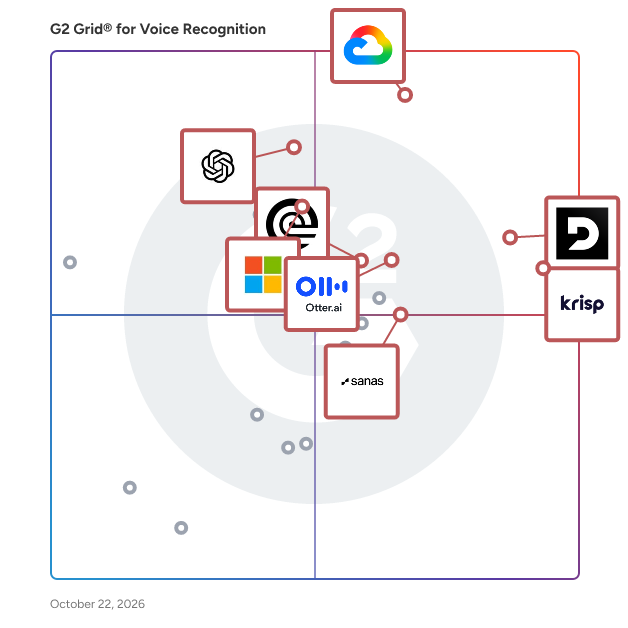
Highlighted products: Google Cloud Speech-to-Text, Deepgram, Krisp, OpenAI Whisper, Otter.ai, Rev, Azure AI Speech, and Sanas.
Underlying data: [Grid® JSON](https://www.g2.com/categories/voice-recognition/grids.json?focus%5B%5D=google-cloud-speech-to-text&focus%5B%5D=deepgram&focus%5B%5D=krisp&focus%5B%5D=openai-whisper&focus%5B%5D=otter-ai&focus%5B%5D=rev&focus%5B%5D=azure-ai-speech&focus%5B%5D=sanas)
Speech to Note is an AI-powered speech recognition tool designed to convert spoken words into accurate, shareable text notes instantly. By leveraging advanced speech-to-text technology, it enables users to transcribe their thoughts, lectures, meetings, or any audio content into concise summaries without the need for typing. This platform supports over 40 languages, making it accessible to a diverse user base. With features like offline mode, customizable note formats, and seamless organization through folders and tags, Speech to Note streamlines the note-taking process, enhancing productivity and efficiency. Key Features and Functionality: - Real-Time Transcription: Instantly transcribe spoken words into text, capturing every detail accurately. - Multi-Language Support: Supports over 40 languages, catering to a global audience. - Customizable Note Formats: Choose from over 30 smart note formats, including summaries, outlines, Q&A formats, and flashcards, to suit various needs. - Offline Mode: Save and access notes without an internet connection, ensuring productivity anytime, anywhere. - Organizational Tools: Utilize folders and tags to categorize and manage notes efficiently. - Sharing and Exporting: Share notes via links or export them in various formats for collaboration and further use. - Mobile Accessibility: Capture ideas, meetings, and conversations on-the-go with the AI-powered mobile app. Primary Value and User Solutions: Speech to Note addresses the common challenge of manual note-taking by providing a hands-free, efficient solution for converting speech into structured text. It is particularly beneficial for professionals, students, and individuals who need to capture information quickly and accurately. By automating the transcription process, it allows users to focus more on their interactions and less on writing, thereby enhancing engagement and productivity. The platform's versatility in supporting multiple languages and customizable formats makes it a valuable tool for diverse applications, from academic settings to professional environments.
Connect G2 to Claude or ChatGPT for answers grounded in G2's trusted reviews, comparisons, and pricing from real user insights.
SpeedyAudios is a service designed to transcribe WhatsApp audio messages into text, enabling users to quickly and efficiently read their messages instead of listening to them. By simply forwarding audio messages to the SpeedyAudios bot on WhatsApp, users receive accurate text transcriptions within seconds. This service is particularly beneficial in situations where listening to audio messages is inconvenient, such as in quiet environments, during meetings, or when searching for specific information within lengthy messages. Key Features: - Quick Transcription: Instantly converts WhatsApp audio messages into text. - Ease of Use: Requires only forwarding the audio to the SpeedyAudios bot. - High Accuracy: Provides reliable and precise transcriptions. - Convenience: Ideal for reviewing messages in situations where listening is impractical. Primary Value: SpeedyAudios addresses the common inconvenience of listening to lengthy or untimely audio messages by offering a swift and accurate transcription service. This enhances productivity and accessibility, allowing users to read and search through their messages efficiently, regardless of their environment or circumstances.
Stage Captions is a browser-based real-time captioning platform for live events, conferences, panels, presentations, classrooms and public talks. It helps event organizers, accessibility teams, AV teams, universities and production agencies provide live captions without the complexity and cost of traditional captioning workflows. With Stage Captions, presenters can start a captioning session directly from the browser, capture audio from a laptop microphone, USB audio interface or mixer feed, and share captions with attendees instantly. Captions can be displayed in multiple ways: * on attendee phones via QR code * on venue screens * as an OBS / Resolume browser source * on livestreams * on LED walls or production displays Everything runs in the browser, so attendees do not need to install an app. Stage Captions is especially useful for accessibility-focused events, university events, conferences, public talks, and events with international speakers, technical terms, names, acronyms, or specialized terminology. Key features include: * Browser-based setup with no software installation * Real-time AI transcription * QR code access for attendees * Venue screen and livestream caption display * OBS / Resolume integration * Custom dictionaries for names, technical terms, acronyms, and branded phrases * Support for 50+ transcription languages * Simple setup for AV teams and event staff It is designed to help teams make live events more accessible, easier to follow, and simpler to support from an AV perspective.
Stimuler is an AI-powered speech coaching application designed to help non-native English speakers enhance their fluency and confidence. By leveraging advanced audio and text analysis technologies, Stimuler provides real-time feedback on pronunciation, vocabulary, fluency, and stress. This personalized coaching is ideal for individuals aiming for career advancement, studying abroad, or personal growth. With a presence in over 200 countries and a user base exceeding 4 million, Stimuler offers an accessible and effective solution for improving English communication skills. Key Features and Functionality: - 60-Second Speech Analysis: Users can record a 60-second speech and receive instant feedback on pronunciation, fluency, vocabulary, and more within 20 seconds. - Real-life IELTS Simulation: Engage in live video mock tests that mirror the real IELTS experience with a proprietary AI interviewer, providing exhaustive performance insights and an overall IELTS Speaking band score. - Diverse Speaking Topics: Access over 100 topics suitable for IELTS, TOEFL, or casual English conversation practice. - Speech Insights: Obtain a comprehensive analysis of speech, including filler words, pace, tone, and awkward pauses, offering a 360-degree view of speaking proficiency. - Tailored Tips: Receive personalized feedback and improvement tips after each session, crafted to address individual strengths and weaknesses. - Proprietary Voice AI Technology: Utilizes state-of-the-art AI refined through millions of user speeches, ensuring unparalleled feedback accuracy and insights. - Fast and Flexible: Provides comprehensive feedback in less than 30 seconds, accommodating users with varying practice time availability. - Affordable Premium Perks: Offers premium features, including a tailored practice roadmap and full-length IELTS Speaking mock tests, at a nominal subscription fee. Primary Value and User Solutions: Stimuler addresses the challenges faced by non-native English speakers in achieving fluency and confidence. By offering real-time, personalized feedback and a variety of practice modes, it enables users to improve their English speaking skills effectively. The platform's accessibility and affordability make it a valuable tool for individuals preparing for language proficiency tests like IELTS and TOEFL, as well as those seeking to enhance their public speaking abilities or advance their careers. With its AI-driven approach, Stimuler democratizes access to quality English language coaching, empowering users worldwide to achieve their communication goals.
What is Summary AI? Summary AI is an AI note taker and meeting assistant that helps professionals and students record, transcribe, translate, and summarize meetings, conversations, lectures, interviews, calls, and recordings. It turns spoken content and uploaded files into searchable transcripts, organized notes, key points, decisions, and action items, so you can spend less time taking notes and more time focusing on the conversation. AI Meeting Notes Summary AI helps you capture meetings and conversations without manually writing everything down. - Record meetings, interviews, calls, lectures, and conversations - Capture meetings on Zoom, Google Meet, Microsoft Teams and Apple Watch - Get real-time transcription as people speak - Generate structured meeting notes and meeting minutes - Capture key points, decisions, and action items - Search transcripts and use timestamps to find specific moments - Translate conversations in real time across 120+ languages - Ask questions about your recordings and notes with AI Chat - Share summaries after a meeting - Transcription for Audio & Video Turn recordings into searchable text and get more from your content without listening to everything again. -Transcribe audio recordings into text - Transcribe video files and spoken content - Convert voice recordings to written notes - Upload audio and video files - Search transcripts to quickly find information - Generate summaries from long recordings - AI Summaries for Your Content Get the important information from long recordings and documents without going through everything from beginning to end. Summary AI can summarize: - Meetings and conversations - Audio recordings - Videos - PDFs - Documents Use AI Chat to ask questions about your content, clarify information, or find specific answers from your recordings and uploaded files. Built for Work, Study & Everyday Use - For professionals: Record team meetings, client calls, interviews, and one-on-ones while staying focused on the conversation. - For students: Record lectures and classes, create searchable transcripts, generate summaries, and return to specific moments with timestamps. - For everyday use: Capture phone calls, voice notes, ideas, conversations, and in-person meetings wherever they happen. Record Across Devices - Apple Watch: Start and control recordings directly from your Apple Watch - Record conversations, lectures, calls, and voice notes - Access your summaries across multiple devices - Keep recordings and notes easy to revisit - One App for Notes, Transcription & Summaries Summary AI brings AI note-taking, meeting notes, transcription, translation, and AI summarization together in one app. Record. Transcribe. Translate. Summarize. Share.
Supavoice is a macOS application that transforms spoken words into text with AI-powered precision, enabling users to transcribe content seamlessly across any application. By leveraging advanced voice models, Supavoice ensures high accuracy and contextual understanding, making it an essential tool for professionals seeking efficient and accurate voice-to-text conversion. Key Features and Functionality: - Transcription Modes: Offers multiple modes tailored to different needs, including Simple Format for clean transcription, Email Mode for structured communication, Note Mode for capturing thoughts, and Message Mode for quick, conversational typing. Users can also create custom modes to fit their unique workflows. - Custom Vocabulary: Allows users to add specialized terms, unique names, and technical jargon, enhancing transcription accuracy by personalizing the application's language recognition. - Cutting-Edge Voice Models: Powered by GPT-4O and GPT-4O mini models, providing industry-leading transcription accuracy with intelligent context understanding and minimal errors. - Lightweight & Universal: Operates efficiently across all macOS applications without consuming significant system resources, eliminating the need for app switching. - Flexible API & Privacy: Users can utilize their own OpenAI API key, ensuring complete control over data and costs. Supavoice maintains user privacy with zero data collection and a transparent, one-time payment model without hidden subscriptions. Primary Value and User Solutions: Supavoice addresses the need for efficient and accurate voice-to-text transcription, enabling users to: - Enhance Productivity: Quickly convert speech into text, reducing typing time and allowing for faster content creation. - Improve Communication: Dictate professional emails, messages, and documents with proper formatting, streamlining communication processes. - Capture Ideas Instantly: Record thoughts and meeting notes in real-time without disrupting focus, ensuring no valuable information is lost. - Maintain Privacy and Control: By using personal API keys and ensuring no data collection, users have full control over their information and costs. Supavoice empowers professionals to write at the speed of speech, enhancing productivity and communication across various applications.
Swell AI helps podcasters and YouTubers convert their podcasts and videos into articles. Upload your recordings and Swell AI writes detailed content mimicking your unique voice. Sign up for free at the link.
Average Rating: 2.3/5.0
Total Reviews: 2
AI-generated summary from verified user reviews
"Big time saver turning audio/video into written content."
Rating: 4.5/5.0 stars
— Mike M.
Swifly is a voice typing app for macOS, Windows and iPhone. It helps individuals, freelancers and teams turn spoken ideas into text for emails, messages, documents and AI prompts in the applications they already use. Its writing workflow combines speech recognition, text refinement and translation. Magic Polish and Rewrite help users reshape dictated drafts. A personalized dictionary learns vocabulary and corrections, while reusable snippets make frequently needed text easier to insert. Perfect Match tracks dictations that require no edits. The iPhone app also includes a keyboard with 75 languages. Feature availability varies by platform. Swifly supports everyday writing tasks, from composing a short message to drafting a longer document. Users can speak a first draft, refine the wording and adapt the text to the language they need. The dictionary and snippets help personalize this workflow for recurring names, terminology and passages of text. Swifly Basic is free and includes 20,000 words per month, or 2,000 words with Privacy Mode enabled, without requiring a credit card. Paid plans are available for individuals and teams. A 14-day Pro trial is available and requires a payment card. Current plans and pricing are listed at https://www.swifly.me/product/pricing. The product is intended for people who write throughout their workday and want to use speech as part of that process. Its combination of dictation and writing tools can be used for correspondence, notes and prompts. Users should consult the official website for current platform availability, plan allowances and the features included in each plan.
TalkNotes is an AI-powered transcription service designed to convert spoken language into accurate, structured text across more than 50 languages. With a user base exceeding 15,000 and a 4.5/5 rating on the App Store, TalkNotes offers a reliable solution for individuals and professionals seeking efficient speech-to-text capabilities. Key Features and Functionality: - Accurate Transcription: Achieves industry-leading Word Error Rates (WER), such as 6.4% for English and 7.6% for French, ensuring high-quality transcriptions. - Multilingual Support: Supports over 50 languages, including English, French, German, and more, catering to a diverse user base. - Regional Accent Recognition: Recognizes various dialects and regional accents, enhancing transcription accuracy across different speech patterns. - Technical Terminology Recognition: Excels at identifying specialized vocabulary across multiple fields, making it suitable for professional use. - Easy Editing and Organization: Provides an intuitive interface for users to edit, organize, and format transcribed text effortlessly. - Privacy-First Approach: Ensures user privacy by deleting audio files immediately after transcription. Primary Value and User Solutions: TalkNotes addresses the need for efficient and accurate transcription services in various sectors, including business, education, media, and legal fields. By converting speech into text with high accuracy, it saves users significant time and effort in note-taking, documentation, and content creation. Its multilingual capabilities and support for regional accents make it a versatile tool for global users. The platform's commitment to privacy and user-friendly features further enhance its value, providing a seamless and secure transcription experience.
TalkTastic is an innovative voice keyboard application designed exclusively for macOS, enabling users to compose text across all applications using their voice. By integrating advanced artificial intelligence and multimodal large language models, TalkTastic offers a seamless and efficient dictation experience that surpasses traditional speech-to-text tools. Its context-aware capabilities ensure that transcriptions are not only accurate but also reflect the user's intended tone and style, making it an invaluable tool for writers, professionals, and anyone seeking to enhance their productivity. Key Features and Functionality: - Universal macOS Integration: TalkTastic operates across all macOS applications, allowing users to dictate text in emails, documents, and other platforms without switching between tools. - Context-Aware AI Transcription: Utilizing multimodal AI, the application analyzes on-screen content to understand the context, resulting in highly accurate transcriptions that correctly interpret specific names, technical terms, and ambiguous words. - Smart Rewrites: The AI learns the user's writing style and can automatically refine dictated text to sound polished and natural, reducing the need for manual editing. - Superior Accuracy Engine: By combining the strengths of Apple Dictation, on-device Whisper, ChatGPT, Claude, and Google Gemini, TalkTastic delivers unparalleled transcription accuracy. - Fine-Grained Privacy Controls: Users have complete control over their data, with the ability to manage when the application listens and to delete snapshots immediately after processing, ensuring privacy and security. Primary Value and User Solutions: TalkTastic addresses the common challenges associated with typing and traditional dictation software by offering a more intuitive and efficient method of text input. Its context-aware AI reduces errors and the time spent on corrections, while the Smart Rewrites feature ensures that the output aligns with the user's personal writing style. By enabling hands-free operation, it enhances productivity for professionals, writers, and individuals with motor impairments. Additionally, its robust privacy controls provide users with confidence that their data remains secure. Overall, TalkTastic transforms the writing process, allowing users to focus on their ideas rather than the mechanics of typing.
TalkText is an AI-powered speech-to-text application designed to enhance productivity by enabling users to dictate text naturally and have it transcribed into polished, professional writing. By eliminating filler words and correcting mistakes, TalkText streamlines the writing process, allowing users to compose emails, create content, and write code more efficiently. Key Features and Functionality: - Natural Speech Recognition: Converts spoken language into clear, refined text by removing fillers like "um" and "uh," ensuring the output is concise and professional. - Universal Compatibility: Integrates seamlessly with any application or website on macOS, providing flexibility across various platforms. - Restyle Capability: Allows users to select text and command TalkText to rewrite it in different tones or styles, such as making it more confident, friendly, or even playful. - Multilingual Support: Supports over 30 languages, including English, Spanish, French, and German, catering to a diverse user base. - Privacy Assurance: Ensures user privacy by processing audio in real-time without storing it, and refrains from using data to train AI models or selling it to third parties. Primary Value and User Solutions: TalkText addresses the challenge of slow and error-prone typing by offering a faster, more accurate alternative through voice dictation. By enabling users to speak at their natural pace—approximately 150 words per minute compared to the average typing speed of 40 words per minute—TalkText increases productivity by up to 3.75 times. Its AI-driven features ensure that the transcribed text is not only accurate but also polished, reducing the need for extensive editing. This makes TalkText an invaluable tool for professionals, writers, and anyone looking to enhance their writing efficiency on macOS devices.
Talk to Tala is an AI-powered language tutor designed for hands-on learners seeking to enhance their conversational skills. Unlike traditional language learning methods that emphasize rote memorization, Tala encourages free-flowing conversations from the outset, allowing users to make mistakes and learn more effectively. By immersing learners in engaging dialogues tailored to their interests, Tala facilitates a natural and enjoyable language acquisition process. Key Features and Functionality: - Natural Learning Experience: Engage in conversations without tedious repetition, focusing on topics that interest you. - Confidence Building: Practice speaking at your own pace with advanced speech recognition technology, improving pronunciation and gaining confidence. - Flexibility and Support: Adjust listening speeds and access look-up tools for words and phrases, accommodating learners at all levels. - Instant Feedback: Receive immediate feedback without disrupting the flow of conversation, facilitating continuous improvement. - Quick Translation: Access translations when needed to stay engaged and understand the context. - Voice Recognition: Enhance pronunciation through advanced speech recognition technology. - Easy Phrase Look-Up: Quickly find and understand phrases to expand your vocabulary. The primary value of Talk to Tala lies in its ability to provide a supportive and flexible environment for language learners to practice speaking without fear of embarrassment. By facilitating natural conversations and offering real-time feedback, Tala helps users build confidence and achieve fluency more efficiently.
