# Best Video Content Creation Software - Page 9

*By [Neeraja Prakash](https://research.g2.com/insights/author/neeraja-prakash)*


Video content creation software streamlines the production of engaging videos, allowing businesses to craft visually appealing and informative content without needing technical expertise. These tools leverage a combination of editing capabilities, effects, templates, and user-friendly interfaces to empower users to produce engaging videos that capture the attention of their target audience. These tools enable businesses to incorporate video content into their marketing, training, and communication strategies. Video content can enhance a business’s brand visibility, engagement, and communication with internal and external stakeholders.

Various departments across a business use video content creation software. It can be used in marketing departments to create promotional content, in HR departments to create training and onboarding videos, and by communication teams for internal and external messaging. These tools help solve the challenges of engaging internal and external stakeholders through effective visual storytelling.

Video content creation software often integrates with other tools like [video hosting platforms](https://www.g2.com/categories/video-hosting), [social media management software](https://www.g2.com/categories/social-media-mgmt), and [analytics platforms](https://www.g2.com/categories/analytics-platforms). It complements existing software by providing the means to create video content, which can then be distributed and analyzed using other software in the ecosystem.

To qualify for inclusion in the Video Content Creation category, a product must:

- Allow for the import of multiple file types
- Provide a template library to create video content
- Enable video clips and elements to be moved around through drag-and-drop functionality
- Allow video content to be downloaded and distributed
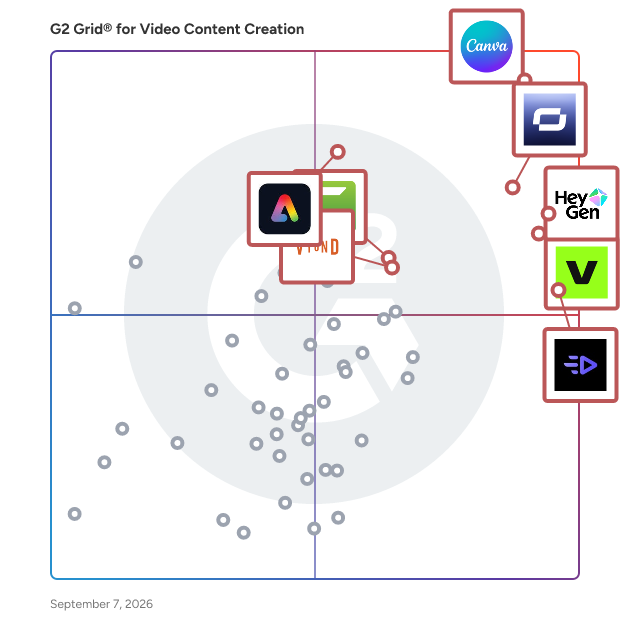


## Top Video Content Creation Software at a Glance
| # | Product | Rating | Best For | What Users Say |
|---|---------|--------|----------|----------------|
| 1 | [Canva](https://www.g2.com/products/canva/reviews) | 4.7/5.0 (6,429 reviews) | Brand-templated social video with non-designers | "[Canva Makes Quick, Beautiful Designs Easy—with Templates, AI Tools, and Social Posting](https://www.g2.com/survey_responses/canva-review-12974557)" |
| 2 | [Synthesia](https://www.g2.com/products/synthesia/reviews) | 4.6/5.0 (2,746 reviews) | AI avatar training videos with multilingual voiceover | "[2 Years Later - still an amazing enablement productivity tool!](https://www.g2.com/survey_responses/synthesia-review-11304103)" |
| 3 | [VEED](https://www.g2.com/products/veed/reviews) | 4.6/5.0 (2,132 reviews) | AI-assisted social video editing with auto-subtitles | "[Easy Video Editing with Quick Turnaround](https://www.g2.com/survey_responses/veed-review-11784336)" |
| 4 | [HeyGen](https://www.g2.com/products/heygen/reviews) | 4.8/5.0 (1,858 reviews) | AI avatar video creation with realistic lip-sync | "[Unique Speech-to-Video with Reliable Audio Upload and Transcription](https://www.g2.com/survey_responses/heygen-review-13039371)" |
| 5 | [Creatify AI](https://www.g2.com/products/creatify-labs-inc-creatify-ai/reviews) | 4.8/5.0 (1,562 reviews) | UGC-style video ads with AI avatars | "[Fast, Polished Video Ads in Minutes with Creatify AI](https://www.g2.com/survey_responses/creatify-ai-review-13036285)" |
| 6 | [Adobe Express](https://www.g2.com/products/adobe-express/reviews) | 4.5/5.0 (823 reviews) | Social video creation with Adobe ecosystem sync | "[Effortless Design and Video Creation with Time-Saving AI Features](https://www.g2.com/survey_responses/adobe-express-review-11931770)" |
| 7 | [Camtasia](https://www.g2.com/products/camtasia/reviews) | 4.6/5.0 (1,702 reviews) | Screen recording with cursor-level editing control | "[Intuitive, Medium-Weight Editor That Delivers Professional Results](https://www.g2.com/survey_responses/camtasia-review-12891940)" |
| 8 | [Wondershare Filmora](https://www.g2.com/products/wondershare-filmora/reviews) | 4.4/5.0 (593 reviews) | Beginner-friendly video editing with built-in effects | "[Powerful Yet Intuitive: Filmora Makes Pro Video Editing Effortless](https://www.g2.com/survey_responses/wondershare-filmora-review-13021178)" |
| 9 | [Vyond](https://www.g2.com/products/vyond/reviews) | 4.8/5.0 (498 reviews) | Animated training videos without animation skills | "[Easy, Engaging eLearning Videos with Great Training and Support](https://www.g2.com/survey_responses/vyond-review-12634568)" |
| 10 | [Animaker](https://www.g2.com/products/animaker/reviews) | 4.7/5.0 (1,043 reviews) | Animated explainer videos without design skills | "[Drag-and-Drop Simplicity with Pro-Quality Animations in Minutes](https://www.g2.com/survey_responses/animaker-review-13038500)" |


## How Many Video Content Creation Software Products Does G2 Track?
**Total Products under this Category:** 149

### Category Stats (Jun 2026)
- **Average Rating**: 4.63/5 The average rating of products in this category, based on all submitted ratings
- **Top Trending Product**: Perso Dubbing (+5.65%) - Among all products in this category, Perso Dubbing recorded the largest rating increase compared to last month
*Last updated: June 25, 2026*


## How Does G2 Rank Video Content Creation Software Products?

**Why You Can Trust G2's Software Rankings:**

- 30 Analysts and Data Experts
- 32,000+ Authentic Reviews
- 149+ Products
- Unbiased Rankings

G2's software rankings are built on verified user reviews, rigorous moderation, and a consistent research methodology maintained by a team of analysts and data experts. Each product is measured using the same transparent criteria, with no paid placement or vendor influence. While reviews reflect real user experiences, which can be subjective, they offer valuable insight into how software performs in the hands of professionals. Together, these inputs power the G2 Score, a standardized way to compare tools within every category.


## Which Video Content Creation Software Is Best for Your Use Case?

- **Leader:** [Canva](https://www.g2.com/products/canva/reviews)
- **Highest Performer:** [Animaker](https://www.g2.com/products/animaker/reviews)
- **Easiest to Use:** [Canva](https://www.g2.com/products/canva/reviews)
- **Top Trending:** [Synthesia](https://www.g2.com/products/synthesia/reviews)
- **Best Free Software:** [Synthesia](https://www.g2.com/products/synthesia/reviews)


---

**Sponsored**

### Vyond

Vyond is an all-in-one AI video platform designed to empower organizations in creating secure, compliant, and engaging business content at scale. With a history spanning over 15 years, Vyond has established itself as a trusted solution for more than 20,000 companies, including 65% of the Fortune 500. Vyond is particularly suited for enterprises looking to enhance their internal communications, training programs, sales enablement, and marketing efforts through high-quality video content. Vyond serves a diverse range of use cases. It is particularly beneficial for companies aiming to streamline onboarding processes, improve training completion rates, and enhance compliance training. By integrating seamlessly with existing tools such as Slack, Learning Management Systems (LMS), and Customer Relationship Management (CRM) systems, Vyond allows employees to create brand-safe content without the need to switch between multiple applications. This integration not only fosters a more efficient workflow but also ensures that video content aligns with organizational branding and compliance standards. Key features of Vyond include AI avatars, AI-assisted scripting, instant translation, and text-to-speech capabilities, which collectively enhance the video creation process. Users can develop custom characters and utilize various animation styles, including animated, photorealistic, mixed-media, and live-action formats, all within a single platform. This versatility allows organizations to cater to different audience preferences and learning styles, making their content more engaging and effective. Additionally, Vyond’s SCORM-compliant LMS integration ensures that training materials can be easily tracked and measured, providing valuable insights into employee engagement and learning outcomes. Vyond stands out in the market by simplifying the technology stack for enterprises while expanding their creative capabilities. The platform’s focus on measurable outcomes—such as faster onboarding, higher training completion, and improved sales enablement—enables organizations to track return on investment (ROI) within their existing systems of record. This emphasis on data-driven results allows businesses to make informed decisions about their video content strategies and optimize their communication efforts. With a commitment to ongoing innovation and customer trust, Vyond is dedicated to evolving its platform to meet the needs of modern enterprises. By bringing next-generation AI capabilities into a compliant and governed environment, Vyond enables organizations to create content more efficiently, communicate more effectively, and reduce their reliance on fragmented solutions. This positions Vyond as a comprehensive tool for any organization looking to leverage video as a key component of their business strategy.


[Visit website](https://www.g2.com/external_clickthroughs/record?secure%5Bad_program%5D=ppc&amp;secure%5Bad_slot%5D=category_product_list&amp;secure%5Bcategory_id%5D=1006913&amp;secure%5Bdisplayable_resource_id%5D=1006913&amp;secure%5Bdisplayable_resource_type%5D=Category&amp;secure%5Bmedium%5D=sponsored&amp;secure%5Bplacement_reason%5D=page_category&amp;secure%5Bplacement_resource_ids%5D%5B%5D=1006913&amp;secure%5Bprioritized%5D=false&amp;secure%5Bproduct_id%5D=7533&amp;secure%5Bresource_id%5D=1006913&amp;secure%5Bresource_type%5D=Category&amp;secure%5Bsource_type%5D=category_page&amp;secure%5Bsource_url%5D=https%3A%2F%2Fwww.g2.com%2Fcategories%2Fvideo-content-creation%3Fpage%3D9&amp;secure%5Btoken%5D=68817e6c1a678b3d29cf530bdde7572b6b99a03670b0ddb177105e2a2321c8f2&amp;secure%5Burl%5D=https%3A%2F%2Fthink.vyond.com%2Fsignup%3Futm_source%3Dg2%26utm_medium%3Dppc%26utm_campaign%3Dfree_trial&amp;secure%5Burl_type%5D=free_trial)

---


## What Is Video Content Creation Software?

[Video Software](https://www.g2.com/categories/video)

## What Software Categories Are Similar to Video Content Creation Software?

- [Video Editing Software](https://www.g2.com/categories/video-editing)
- [Content Creation Software](https://www.g2.com/categories/content-creation)
- [AI Video Generators](https://www.g2.com/categories/ai-video-generators)


---
## What Are the Most Common Questions About Video Content Creation Software?
*AI-generated · Last updated: June  3, 2026*
### Which video content creation platform offers the best editing features
Based on G2 reviews, several video content creation platforms stand out for editing workflows, depending on the type of content your team creates.

- [Canva](https://www.g2.com/products/canva) — quick edits, templates, brand consistency.
- [VEED](https://www.g2.com/products/veed) — subtitles, script editing, short clips.
- [Synthesia](https://www.g2.com/products/synthesia) — text-to-video editing for training.
- [Camtasia](https://www.g2.com/products/camtasia) — screen recording and tutorial editing.


### What platform provides collaborative video editing for teams
According to verified users, collaborative video editing in this category usually means sharing projects, commenting on drafts, maintaining brand consistency, and letting non-specialists contribute without heavy training. Reviews most often describe Canva and VEED as strong for team workflows because they make it easy to work on shared content, keep assets organized, and move quickly across social, presentation, and marketing projects. Some users also highlight tools like Synthesia and Vyond for teams creating structured training or learning content, especially when multiple stakeholders need to review messaging, localization, or scenario-based videos before publishing.


### What is the best tool for producing high-quality marketing videos
Based on G2 reviews, buyers in this category most often shortlist tools that balance speed, polish, and ease of production.

- [Creatify AI](https://www.g2.com/products/creatify-labs-inc-creatify-ai) — UGC-style ads and product videos.
- [VEED](https://www.g2.com/products/veed) — social marketing videos with captions.
- [Canva](https://www.g2.com/products/canva) — branded marketing assets and quick videos.
- [Synthesia](https://www.g2.com/products/synthesia) — polished explainers and training-style promos.


### What are the most important features in video content creation tools
According to verified users, the most important features in video content creation tools are ease of use, templates, fast editing, and the ability to create polished output without needing advanced production skills. Reviews also repeatedly mention subtitles, voiceover or dubbing options, AI-assisted generation, resizing for different channels, and simple collaboration as high-value capabilities. Buyers also care about practical workflow tools such as screen recording, script-based editing, stock assets, brand controls, and integrations that reduce switching between platforms. Across recent reviews, the strongest products help teams move from idea to publishable video quickly while keeping editing accessible for non-specialists.


### How do teams use video content creation for training
G2 reviewers mention that teams frequently use video content creation for onboarding, product tutorials, internal process walkthroughs, customer education, and multilingual training. Recent reviews describe teams creating explainer videos, how-to content, scenario-based learning, SOP walkthroughs, and interactive course materials without needing a full studio setup. Many users value tools that let them turn scripts, presentations, or screen recordings into repeatable training assets quickly. Reviewers also highlight benefits like easier updates, more consistent delivery, and less dependence on live sessions. For distributed teams, video helps standardize knowledge sharing while making content easier to reuse across departments, regions, and employee learning paths.


