Best Vector Graphics Software - Page 7

How Many Vector Graphics Software Products Does G2 Track?

Total Products under this Category: 105

Category Stats (Nov 2026)

  • Average Rating: 4.39/5 (↓0.02 vs Oct 2026) The average rating of products in this category, based on all submitted ratings
  • Top Trending Product: Drawtify (+1.11%) - Among all products in this category, Drawtify recorded the largest rating increase compared to last month

Last updated: November 12, 2026

How Does G2 Rank Vector Graphics Software Products?

Why You Can Trust G2's Software Rankings:

  • 30 Analysts and Data Experts
  • 10,600+ Authentic Reviews
  • 105+ Products
  • Unbiased Rankings

G2's software rankings are built on verified user reviews, rigorous moderation, and a consistent research methodology maintained by a team of analysts and data experts. Each product is measured using the same transparent criteria, with no paid placement or vendor influence. While reviews reflect real user experiences, which can be subjective, they offer valuable insight into how software performs in the hands of professionals. Together, these inputs power the G2 Score, a standardized way to compare tools within every category.

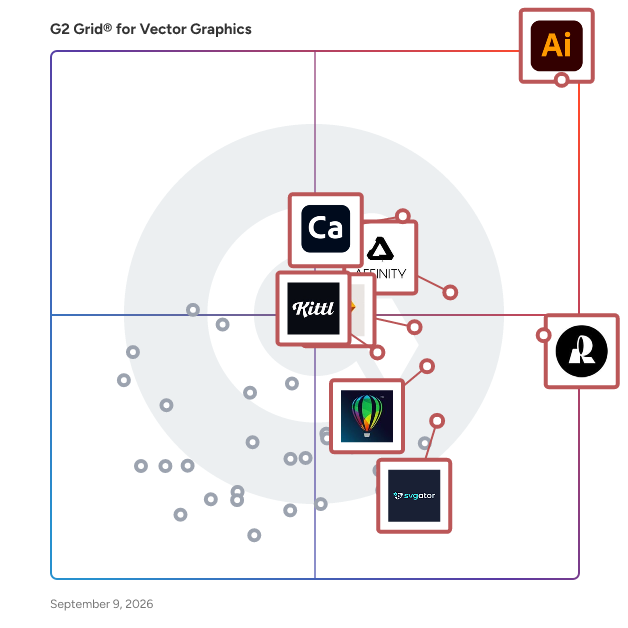
G2 Grid® for Vector Graphics Software

G2 Grid® for Vector Graphics Software plotting products by satisfaction and market presence

Highlighted products: Adobe Illustrator, Recraft, Adobe Capture, Affinity Designer, Sketch, CorelDRAW, Kittl, and SVGator.

Underlying data: [Grid® JSON](https://www.g2.com/categories/vector-graphics/grids.json?focus%5B%5D=adobe-illustrator&focus%5B%5D=recraft&focus%5B%5D=adobe-capture&focus%5B%5D=affinity-designer&focus%5B%5D=sketch&focus%5B%5D=coreldraw&focus%5B%5D=kittl&focus%5B%5D=svgator)

svgapp.ai

svgapp.ai is an AI-powered animated mascot generator for SaaS teams, product teams, marketers, creators, and anyone using AI agents. Create a branded mascot once, then generate consistent poses and animations for onboarding, empty states, loading screens, error states, product UI, websites, social content, and marketing campaigns. Through the Model Context Protocol (MCP), agents such as Codex, Claude Code, Cursor, Windsurf, GitHub Copilot, and OpenCode can create and integrate consistent mascot assets using shared art style and brand palette settings.

Who Is the Company Behind svgapp.ai?

Svgdiagram by Boring Dystopia

SVG Diagram is a web app for creating editable SVG diagrams from text prompts. It supports flowcharts, timelines, architecture diagrams, charts, funnels and matrices. Users can edit diagrams in the browser and export SVG or PNG files for documents, presentations and reports. Free diagram makers and paid AI generation plans are available.

Who Is the Company Behind Svgdiagram by Boring Dystopia?

SVGMaker

SVGMaker is an AI-powered platform designed to simplify the creation, editing, and conversion of vector graphics. By leveraging advanced artificial intelligence, it enables users to generate high-quality, scalable SVGs from text descriptions, convert raster images into clean vector formats, and edit existing SVGs with natural language commands. This intuitive tool caters to designers, developers, and content creators, streamlining the vector graphic design process without requiring extensive design skills. Key Features and Functionality: - AI-Powered SVG Generation: Create custom vector graphics from text prompts, specifying styles, colors, and complexity levels to match your design needs. - Image to SVG Conversion: Transform raster images (e.g., PNG, JPEG) into scalable vector graphics, preserving details and reducing file sizes for web and UI applications. - Advanced SVG Editing: Modify existing SVGs using natural language instructions, allowing for easy adjustments to colors, shapes, and styles without manual design work. - Design-Ready Styles: Apply various visual styles, such as flat, minimalist, or isometric, to your SVGs, ensuring consistency with modern design trends. - Collaboration and Sharing: Share your SVG creations effortlessly with simple links, facilitating collaboration among teams, agencies, and educational settings. - Developer Integration: Utilize the SVGMaker API and MCP Server to integrate vector graphic generation and editing directly into development environments, enhancing workflow efficiency. Primary Value and User Solutions: SVGMaker addresses the challenges of creating professional-quality vector graphics by providing an accessible, AI-driven solution that eliminates the need for extensive design expertise. It empowers users to produce, edit, and convert SVGs quickly and efficiently, reducing the time and effort traditionally required in vector graphic design. This makes it an invaluable tool for individuals and teams seeking to enhance their visual content with high-quality, scalable graphics.

Who Is the Company Behind SVGMaker?

AI can help you find the answers. G2 helps you trust them.

Connect G2 to Claude or ChatGPT for answers grounded in G2's trusted reviews, comparisons, and pricing from real user insights.

How it works

SVGProof

SVGProof turns raster logos into real vectors: clean paths, flat colors and exact shared edges, ready for a printer, a vinyl cutter or a design tool. It is built for logos made with ChatGPT, Midjourney, Gemini and Ideogram, whose soft edges, noise and near-duplicate shades break generic tracers, and it handles blurry, tiny and JPEG copies too. Preview and edit for free without an account: remove the background, merge near-duplicate colors or snap them to your brand palette. A download costs one credit per logo and covers every format (SVG, EPS, AI, PDF, DXF, PNG). Pay once, no subscription needed. Images are deleted about 30 minutes after last use and not saved to permanent storage. For platforms: one HTTP request returns the SVG, batches of 100, and an MCP server for AI assistants.

Who Is the Company Behind SVGProof?

Toolbag

Marmoset Toolbag is a powerful yet tidy GPU-powered real-time rendering, animation, and texture baking suite - essential tools for your 3D art production workflow. Assemble your art leveraging physically-accurate lighting and materials, streamline your production pipeline with Toolbag's custom shader and Python scripting support, and export your scenes to Marmoset Viewer for industry-leading rendering quality in interactive, real-time 3D on the web.

Average Rating: 4.5/5.0

Total Reviews: 12

Who Is the Company Behind Toolbag?

  • Seller: Marmoset
  • Year Founded: 2012
  • HQ Location: United States
  • LinkedIn® Page: www.linkedin.com
    19 employees on LinkedIn®

Who Uses This Product?

  • Top Industries: Computer Games
  • Company Size: 85% Small, 15% Medium

What Are Recent G2 Reviews of Toolbag?

What Are G2 Users Discussing About Toolbag?

VecSnap

VecSnap is an online tool that converts raster images (PNG, JPG, WebP, AVIF, GIF, BMP and TIFF) into SVG files. Instead of tracing pixels, it redraws the image as shapes: circles and rings are kept as real shapes, curves use few anchor points, and the words of a logo can be kept as text in their matching font. The result can be inspected before paying, at any zoom and with every anchor point shown, beside the open-source tracer potrace on the same image. Colors, shapes and corners can be edited on the drawing, and a sticker border can be added in one step. A centerline mode produces single-line paths for pen plotters, engraving and laser marking. Downloads include SVG for the web or for design apps such as Figma and Illustrator, PDF, DXF (in millimeters or inches, one layer per color), EPS and PNG at any size. A REST API with webhooks, and Node and Python SDKs, are available for developers. Converting and previewing are free, up to 10 images a day. One credit unlocks an image, with every format and re-run included; credits come in packs that never expire or in monthly plans.

Who Is the Company Behind VecSnap?

  • Seller: VecSnap
  • Year Founded: 2026
  • HQ Location: Singapore

VectorArtLab

VectorArtLab helps small businesses, print shops and freelancers get print-ready files without design software or a subscription. Design studio: describe what you need, or start from one of 90 ready-made items, and get two AI designs in your colours with your logo. It covers business cards, flyers, posters, menus, invitations, T-shirt and tote prints, product labels, stickers and social media posts. Print products come as CMYK PDFs with bleed and crop marks, shirt prints as transparent 300 DPI PNGs for DTF, and social posts at each platform's exact size. Image to vector: upload a PNG, JPG or WebP and it is traced into clean vector shapes, delivered as SVG, a vector PDF drawn as paths, EPS and a 300 DPI PNG. Before buying, set the number of colours, replace or merge colours, erase stray marks, add text and remove the background. Image tools: upscale photos to print at 300 DPI, and cut out backgrounds as full-size transparent PNGs. Pricing is per design, after a free preview: $3.99 per design, with credit packs for volume. No subscription, no account required. Files can be used commercially without royalties or attribution.

Who Is the Company Behind VectorArtLab?

Vectorgram.ai

Vectorgram is an online raster-to-vector converter. It turns PNG, JPEG, WebP and BMP images into clean, fully editable SVG files: logos, sketches, lettering, illustrations and photos become crisp vector curves that scale to any size without a single jagged edge. Where generic converters return a tangled mesh of thousands of nodes, Vectorgram redraws an image as smooth, minimal geometry - the way a careful draftsman would, in seconds instead of hours. The result opens directly in Illustrator, Figma, Inkscape, CorelDRAW and most CAD and cutting software, and stays light enough to edit by hand: colors remain separate shapes, transparent backgrounds are preserved, and corners come out sharp. You can test a conversion right on the homepage - upload an image and see the vector result in seconds, no registration required. KEY FEATURES - PNG, JPEG, WebP and BMP to clean, editable SVG - Low node count: paths a designer can actually edit, not untangle - Palette read from your image - no manual color sampling - Transparent backgrounds preserved - Manual controls for detail, gradients and corner smoothing - Batch conversion of up to 100 files at once - REST API with key authentication for automations and pipelines - Fully in-browser: nothing to install, uploaded files are deleted automatically WHO IT IS FOR - Designers who need a handoff-ready SVG from a client's PNG or JPEG - Crafters and cutting-machine owners (Cricut, Silhouette) preparing cut files - Print and sign shops scaling artwork for large-format output - Developers and teams automating image-to-vector conversion via the API Vectorgram runs as a web service on vectorgram.ai, with paid plans from $9/month that add higher resolution, batch conversion, manual controls and API access. Try your first conversion without signing up.

Who Is the Company Behind Vectorgram.ai?

Vector Ink

Vector Ink redefines vector graphic design with its web and Android-based platform, boasting a user-friendly, responsive interface that ensures a consistent experience across phones, tablets, and desktops. Its cloud integration allows for effortless saving and syncing, enabling work continuity from anywhere, on any device. The software shines with unique features: the Path Builder Tool simplifies complex shapes, making it a favorite among logo designers, while the Draw Tool, equipped with a line stabilizer, enhances line smoothness and accuracy, ideal for detailed illustrations. The innovative Virtual Stylus transforms finger drawing by preventing the finger from obscuring the contact point, ensuring precision. Vector Ink's color palettes inspire with automatically generated, editable color schemes. Basic image tracing converts images to vector silhouettes, broadening creative possibilities. Comprehensive file support includes SVG, PNG, and JPG, complemented by intuitive export options. Alongside standard tools like the Pen, Selection, and Boolean operations, Vector Ink is a powerhouse for creatives.

Average Rating: 5.0/5.0

Total Reviews: 1

Who Is the Company Behind Vector Ink?

Who Uses This Product?

  • Company Size: 100% Small

What Are Recent G2 Reviews of Vector Ink?

VectorPop

VectorPop is a desktop app that converts raster images like PNG, JPEG, BMP, and WEBP into scalable vector graphics. It processes images locally, ensuring privacy by operating entirely offline. The software offers three vectorization modes tailored for flat logos, detailed illustrations, and black-and-white line drawings, each with adjustable settings and a live preview feature. Users can export files in SVG, PDF, or high-definition PNG formats, with compatibility for tools like Adobe Illustrator, Inkscape, and Figma. Additional features include background removal, automatic optimization, and batch processing. The free version allows unlimited vectorization with up to three SVG exports per day, while all presets and tools remain accessible. VectorPop is available for Windows and Linux.

Who Is the Company Behind VectorPop?

Vectr

Vectr is a web-based graphics editor platform that used to create vector graphics easily and intuitively to bring designs into reality.

Average Rating: 4.4/5.0

Total Reviews: 24

How Do G2 Users Rate Vectr?

  • Ease of Admin: 9.2/10 (Category avg: 8.4/10)

Who Is the Company Behind Vectr?

Who Uses This Product?

  • Company Size: 58% Medium, 42% Small

What Are Recent G2 Reviews of Vectr?

What Are G2 Users Discussing About Vectr?

Neeraja Prakash
NP
Researched and written by Neeraja Prakash
Updated October 8, 2024