Best Vector Graphics Software - Page 5

How Many Vector Graphics Software Products Does G2 Track?

Total Products under this Category: 81

Category Stats (Sep 2026)

  • Average Rating: 4.39/5 (↑0.01 vs Aug 2026) The average rating of products in this category, based on all submitted ratings
  • Top Trending Product: SVGsmith (+14.29%) - Among all products in this category, SVGsmith recorded the largest rating increase compared to last month

Last updated: September 01, 2026

How Does G2 Rank Vector Graphics Software Products?

Why You Can Trust G2's Software Rankings:

  • 30 Analysts and Data Experts
  • 10,400+ Authentic Reviews
  • 81+ Products
  • Unbiased Rankings

G2's software rankings are built on verified user reviews, rigorous moderation, and a consistent research methodology maintained by a team of analysts and data experts. Each product is measured using the same transparent criteria, with no paid placement or vendor influence. While reviews reflect real user experiences, which can be subjective, they offer valuable insight into how software performs in the hands of professionals. Together, these inputs power the G2 Score, a standardized way to compare tools within every category.

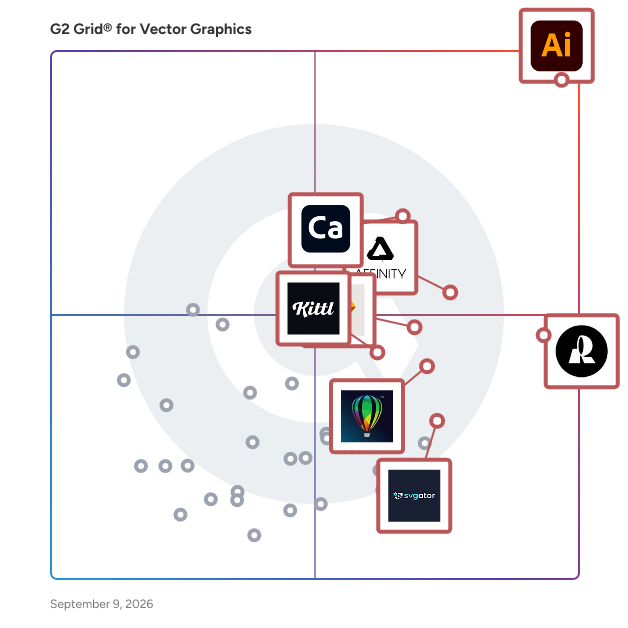
G2 Grid® for Vector Graphics Software

G2 Grid® for Vector Graphics Software plotting products by satisfaction and market presence

Highlighted products: Adobe Illustrator, Recraft, Adobe Capture, Affinity Designer, Sketch, CorelDRAW, Kittl, and SVGator.

Underlying data: [Grid® JSON](https://www.g2.com/categories/vector-graphics/grids.json?focus%5B%5D=adobe-illustrator&focus%5B%5D=recraft&focus%5B%5D=adobe-capture&focus%5B%5D=affinity-designer&focus%5B%5D=sketch&focus%5B%5D=coreldraw&focus%5B%5D=kittl&focus%5B%5D=svgator)

CleanVector

CleanVector turns AI generated ideas and uploaded PNG, JPG, or WebP images into clean, editable SVG assets. Users can generate illustrations and logos, remove baked-in backgrounds, refine vector paths and colors, create reusable mascots, and export production-ready SVG or transparent PNG files. Teams can also automate workflows through the CleanVector API and MCP server.

Who Is the Company Behind CleanVector?

GlyPho

GlyPho is an AI-powered SVG generation platform for makers, designers, developers, and product teams. It turns text prompts into editable vector assets—including logos, icons, illustrations, patterns, product graphics, empty states, documentation visuals, and launch assets—that users can inspect, copy, download, and reuse. GlyPho focuses on production-ready, editable SVG output rather than raster images, with a free entry point and paid plans for higher-volume workflows, private libraries, and commercial use.

Who Is the Company Behind GlyPho?

GraphicsFlow

Who Is the Company Behind GraphicsFlow?

  • Seller: Printavo
  • Year Founded: 2012
  • HQ Location: Chicago, Illinois
  • Twitter: @printavo
    2,437 Twitter followers
  • LinkedIn® Page: www.linkedin.com
    13 employees on LinkedIn®

Impact Digitizing

Impact Digitizing is an embroidery digitizing service that converts artwork into machine-readable stitch files such as DST, PES, JEF, and EXP formats. The platform transforms raster images, vector files, sketches, and photographs into embroidery designs with stitch placement, thread tension, and pull compensation. Digitizers test each design on in-house embroidery machines before delivery. The service handles left chest logos, cap logos, jacket backs, 3D puff embroidery, sleeves, appliqué, and patch digitizing. Impact Digitizing accepts AI, EPS, PDF, PNG, JPG, and PSD file formats. The platform also provides vector art conversion, logo design, and custom embroidered patches. Clients access a dashboard to manage orders, request edits, and view invoices. Support is available through multiple channels. The service includes unlimited edits at no additional cost, with standard orders typically completed within a day and expedited requests finished in several hours.

Who Is the Company Behind Impact Digitizing?

ITG

Who Is the Company Behind ITG?

  • Seller: ITG
  • Year Founded: 2008
  • HQ Location: New York, US
  • LinkedIn® Page: www.linkedin.com
    945 employees on LinkedIn®

Photo Variants

Photo Variants is a photo editing software designed specifically for Windows users who want to take their photo editing skills to the next level. With a plethora of features that allow you to adjust, edit, and retouch your photos, Photo Variants is a game-changer for both amateur and professional photographers alike. Why Choose Photo Variants? 1. User-Friendly Interface Photo Variants boasts an intuitive interface that makes it easy for users of all skill levels to navigate. Whether you’re a seasoned pro or a beginner, you can quickly find the tools you need to create stunning images. 2. Comprehensive Editing Tools From basic adjustments like brightness and contrast to advanced retouching capabilities, Photo Variants offers everything you need to enhance your photos. You can effortlessly remove blemishes, smooth skin, and even change backgrounds with just a few clicks. 3. Stunning Effects and Filters Transform your photos into works of art with Photo Variants’ extensive library of effects and filters. Whether you want to create a vintage look or add a modern touch, the possibilities are endless. You can experiment with various styles to find the perfect one for your project. 4. Raster and Vector Graphics Integration One of the standout features of Photo Variants is its ability to handle both raster and vector graphics. This means you can not only edit photos but also create graphic design elements from scratch. Add text, logos, or custom shapes to your images and make them truly unique. 5. Customizable Templates Save time and enhance your workflow with Photo Variants’ customizable templates.

Average Rating: 5.0/5.0

Total Reviews: 1

Who Is the Company Behind Photo Variants?

Who Uses This Product?

  • Company Size: 100% Large

What Are Recent G2 Reviews of Photo Variants?

Screenshot to Figma

Convert UI screenshots to Figma, perfectly vectorized

Who Is the Company Behind Screenshot to Figma?

Sivi AI

Sivi is a Large Design Model that generates ads, banners, social posts, thumbnails, and graphic designs from a text prompt. Describe what you need, and Sivi produces a fully layered, editable design with your brand colors, fonts, and logo applied automatically. No templates. No manual resizing. Every design is built element by element, not generated as a flat image. Output in any size, including custom and all standard IAB ad dimensions. Supports 72+ languages natively. Available as an API for automated workflows, an SDK for embedding a design studio into your product, and an MCP server for AI agent integrations. Used by marketers, agencies, and developers who need production-ready creative at scale without a design bottleneck. Free to try.

Average Rating: 5.0/5.0

Total Reviews: 2

How Do G2 Users Rate Sivi AI?

  • Ease of Admin: 6.7/10 (Category avg: 8.5/10)

Who Is the Company Behind Sivi AI?

Who Uses This Product?

  • Company Size: 100% Small

What Do G2 Reviewers Say About Sivi AI?

AI-generated summary from verified user reviews

Pros
  • Users value the creativity boost from Sivi AI, enabling them to create visual content effortlessly and cost-free.
  • Users value the free services of Sivi AI, enabling them to create visual content without any cost.

What Are Recent G2 Reviews of Sivi AI?

svgapp.ai

svgapp.ai is an AI-powered animated mascot generator for SaaS teams, product teams, marketers, creators, and anyone using AI agents. Create a branded mascot once, then generate consistent poses and animations for onboarding, empty states, loading screens, error states, product UI, websites, social content, and marketing campaigns. Through the Model Context Protocol (MCP), agents such as Codex, Claude Code, Cursor, Windsurf, GitHub Copilot, and OpenCode can create and integrate consistent mascot assets using shared art style and brand palette settings.

Who Is the Company Behind svgapp.ai?

Neeraja Prakash
NP
Researched and written by Neeraja Prakash
Updated October 8, 2024