Best Vector Graphics Software - Page 4

How Many Vector Graphics Software Products Does G2 Track?

Total Products under this Category: 81

Category Stats (Sep 2026)

  • Average Rating: 4.39/5 (↑0.01 vs Aug 2026) The average rating of products in this category, based on all submitted ratings
  • Top Trending Product: SVGsmith (+14.29%) - Among all products in this category, SVGsmith recorded the largest rating increase compared to last month

Last updated: September 01, 2026

How Does G2 Rank Vector Graphics Software Products?

Why You Can Trust G2's Software Rankings:

  • 30 Analysts and Data Experts
  • 10,400+ Authentic Reviews
  • 81+ Products
  • Unbiased Rankings

G2's software rankings are built on verified user reviews, rigorous moderation, and a consistent research methodology maintained by a team of analysts and data experts. Each product is measured using the same transparent criteria, with no paid placement or vendor influence. While reviews reflect real user experiences, which can be subjective, they offer valuable insight into how software performs in the hands of professionals. Together, these inputs power the G2 Score, a standardized way to compare tools within every category.

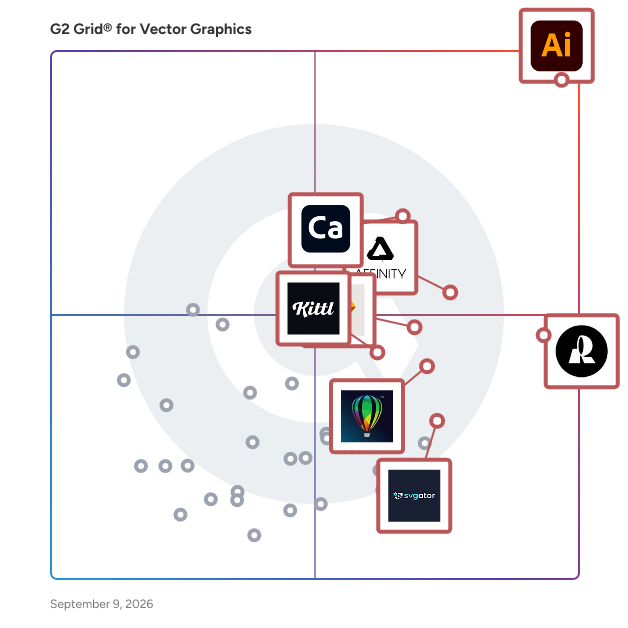
G2 Grid® for Vector Graphics Software

G2 Grid® for Vector Graphics Software plotting products by satisfaction and market presence

Highlighted products: Adobe Illustrator, Recraft, Adobe Capture, Affinity Designer, Sketch, CorelDRAW, Kittl, and SVGator.

Underlying data: [Grid® JSON](https://www.g2.com/categories/vector-graphics/grids.json?focus%5B%5D=adobe-illustrator&focus%5B%5D=recraft&focus%5B%5D=adobe-capture&focus%5B%5D=affinity-designer&focus%5B%5D=sketch&focus%5B%5D=coreldraw&focus%5B%5D=kittl&focus%5B%5D=svgator)

Secured Inkscape on Windows 2016

Secured Inkscape on Windows Server 2016, supported by Cognosys, offers a robust and secure environment for vector graphic design. This solution combines the powerful features of Inkscape, a leading open-source vector graphics editor, with the stability and security of Windows Server 2016. Ideal for designers and organizations seeking a reliable platform for creating and editing vector graphics, this package ensures enhanced performance and security. Key Features and Functionality: - Inkscape Integration: Provides access to Inkscape's comprehensive suite of tools for creating and editing vector graphics, including drawing, shape tools, text support, and path operations. - Secure Environment: Utilizes Windows Server 2016's security features to protect against vulnerabilities, ensuring a safe workspace for graphic design projects. - Cognosys Support: Backed by Cognosys, offering professional support and maintenance to address any technical issues promptly. - Scalability: Leverages the scalability of Windows Server 2016, allowing for efficient handling of large design files and complex projects. Primary Value and User Solutions: This product addresses the need for a secure and efficient vector graphic design environment by combining Inkscape's powerful features with the robust security and performance of Windows Server 2016. Users benefit from a reliable platform that supports complex design tasks while ensuring data integrity and system stability. The inclusion of Cognosys support further enhances the user experience by providing expert assistance and maintenance, reducing downtime and improving productivity.

Average Rating: 4.8/5.0

Total Reviews: 4

How Do G2 Users Rate Secured Inkscape on Windows 2016?

  • Ease of Admin: 8.3/10 (Category avg: 8.5/10)

Who Is the Company Behind Secured Inkscape on Windows 2016?

Who Uses This Product?

  • Company Size: 75% Small, 25% Large

What Do G2 Reviewers Say About Secured Inkscape on Windows 2016?

AI-generated summary from verified user reviews

Pros
  • Users value the Layers features of Secured Inkscape, enhancing their vector design experience for various projects.
  • Users value the customization options in Secured Inkscape, enhancing their design process for metal art files.
  • Users value the ease of design in Secured Inkscape, appreciating its intuitive features for creating vector files.
  • Users admire the Layer features in Secured Inkscape, finding them essential for innovative graphic design projects.
Cons
  • Users find complexity in design feature integration that hinders ease of use during the trial phase.

What Are Recent G2 Reviews of Secured Inkscape on Windows 2016?

What Are G2 Users Discussing About Secured Inkscape on Windows 2016?

Vectorize Image

Easily convert raster images into clean, scalable SVG files for professional use. Whether you're creating logos, preparing designs for printing, or generating SVGs for Cricut and laser cutting, our AI vectorizer delivers precise and editable results. Built for real-world use cases, this tool helps you turn images into production-ready vector graphics quickly and efficiently.

Average Rating: 4.0/5.0

Total Reviews: 4

Who Is the Company Behind Vectorize Image?

Who Uses This Product?

  • Company Size: 50% Small, 25% Medium

What Are Recent G2 Reviews of Vectorize Image?

Summitsoft

Summitsoft is a graphic design studio for illustration and design.

Average Rating: 4.5/5.0

Total Reviews: 3

How Do G2 Users Rate Summitsoft?

  • Ease of Admin: 10.0/10 (Category avg: 8.5/10)

Who Is the Company Behind Summitsoft?

Who Uses This Product?

  • Company Size: 67% Small, 33% Medium

What Do G2 Reviewers Say About Summitsoft?

AI-generated summary from verified user reviews

Pros
  • Users appreciate the affordability of Summitsoft, enjoying its one-time purchase for quality design tools.
  • Users find Summitsoft's tools easy to use, making logo design accessible for all skill levels without training.
  • Users value the versatile font collections, enjoying the user-friendly design tools for creative projects.
  • Users value the professional logo design from Summitsoft, appreciating the ease of launch and support availability.
  • Users find the online support from Summitsoft to be consistently available and highly effective for all companies.
Cons
  • Users report several compatibility issues with Summitsoft, which hinder smooth usage and integration with other systems.
  • Users find the limited advanced features of Summitsoft restricts their creativity and usability in design projects.
  • Users find the outdated user interface of Summitsoft frustrating, impacting overall usability and experience.
  • Users report poor customer support, often experiencing delays which hinder their overall satisfaction with Summitsoft.

What Are Recent G2 Reviews of Summitsoft?

To SVG

To SVG is a web-based software that converts images (PNG, JPG, WEBP and more) into high-quality, scalable SVG files. It helps designers, developers, and businesses vectorize images, optimize SVG files, remove backgrounds using AI, and access a free SVG icon library — all without installing any software. To SVG is fast, easy to use, and works entirely in the browser, making it ideal for web design, branding, and UI workflows.

Average Rating: 4.5/5.0

Total Reviews: 3

Who Is the Company Behind To SVG?

  • Seller: ToSVG
  • HQ Location: N/A
  • LinkedIn® Page: linkedin.com
    1 employees on LinkedIn®

Who Uses This Product?

  • Company Size: 67% Medium, 33% Small

What Do G2 Reviewers Say About To SVG?

AI-generated summary from verified user reviews

Pros
  • Users love the affordable pricing of To SVG, enjoying high-quality outputs with no costs or limitations.
  • Users appreciate the high-quality SVG output, enjoying a rare combination of ease and freedom without limitations.
  • Users love the completely free access to high-quality SVG outputs without any limitations or watermarks.
Cons
  • Users note the limited options offered by To SVG, which may be frustrating for those seeking advanced functionality.

What Are Recent G2 Reviews of To SVG?

VectoSolve

VectoSolve is an AI-powered image vectorization platform that converts raster images (PNG, JPG, WEBP) into clean, scalable SVG vector files in seconds. Designed for graphic designers, web developers, digital marketers, and creative professionals, VectoSolve leverages advanced AI to trace images with precision — delivering optimized vector paths with minimal file sizes and perfect quality at any scale. Key features include: - AI PNG/JPG/WEBP to SVG conversion - Image upscaling - Background removal - AI logo & brand identity generation - Batch processing for bulk conversions - SVG Marketplace to buy and sell designs - Chrome Extension for quick access - Export to SVG, PNG, DXF, EPS, PDF and more Trusted by 1,400+ users with 50,000+ images converted and a 4.9/5 rating, VectoSolve is the go-to vectorization tool for professionals who need fast, accurate, and production-ready vector graphics for web, print, Cricut, laser cutting, embroidery, and vinyl cutting.

Average Rating: 4.0/5.0

Total Reviews: 3

Who Is the Company Behind VectoSolve?

Who Uses This Product?

  • Company Size: 133% Small

What Are Recent G2 Reviews of VectoSolve?

Bluepic

Create brand-compliant graphic generators that anyone – employees, partners, or visitors – can customize in seconds. No design skills needed, no mistakes possible. The design will follow your Brand identity guaranteed! Bluepic is a software for creating Design-Generator-Widgets, that can be embedded into third party applications or websites. The technology can also be used to build AI-Agents and marketing automations.

Average Rating: 5.0/5.0

Total Reviews: 3

How Do G2 Users Rate Bluepic?

  • Ease of Admin: 10.0/10 (Category avg: 8.5/10)

Who Is the Company Behind Bluepic?

Who Uses This Product?

  • Company Size: 100% Small

What Do G2 Reviewers Say About Bluepic?

AI-generated summary from verified user reviews

Pros
  • Users love the dynamic and responsive design capabilities of Bluepic, enhancing brand identity and collaboration significantly.
  • Users praise the dynamic and responsive templates of Bluepic, which enhance brand identity and streamline collaboration.
  • Users appreciate the easy cloud integration of Bluepic, enabling seamless collaboration with other software.
  • Users appreciate the enhanced team collaboration in Bluepic, which streamlines workflow with innovative features like input forms.
  • Users praise the kind and helpful customer support of Bluepic, enhancing the overall user experience.
Cons
  • Users find the learning difficulty of Bluepic's extensive features can be overwhelming for newcomers without better onboarding.

What Are Recent G2 Reviews of Bluepic?

Pointorama

Pointorama is an AI-powered indoor mapping software that automates point cloud processing into precise floor plans, elevation drawings, and 3D visualizations. Designed for speed, accuracy and ease of use, Pointorama streamlines workflows for surveyors, architects, and facility managers—delivering results faster and with minimal effort.

Average Rating: 4.5/5.0

Total Reviews: 2

Who Is the Company Behind Pointorama?

Who Uses This Product?

  • Company Size: 100% Small, 50% Medium

What Do G2 Reviewers Say About Pointorama?

AI-generated summary from verified user reviews

Pros
  • Users appreciate the speed and accuracy of Pointorama, turning 3D data into ready-to-use plans efficiently.
  • Users appreciate the fast and accurate AI integration of Pointorama, saving time with professional floor plans in minutes.
  • Users highlight the ease of learning Pointorama, benefiting from its quick and accurate transformation of scan data.
  • Users appreciate the efficiency improvement of Pointorama, transforming scan data into ready-to-use floor plans swiftly.
Cons
  • Users find the platform difficult for beginners, requiring time to master point cloud processing effectively.
  • Users find the learning curve steep initially, particularly for newcomers to point cloud processing.

What Are Recent G2 Reviews of Pointorama?

SVGs.app

Stop hunting for icons that almost fit. SVGs.app uses AI to generate unique, production-ready vector graphics from simple text prompts in seconds. Choose from curated styles like “Notion Style” or “Minimal Outline,” get perfectly consistent SVGs, and download them instantly. Publish to the community and earn credits when your designs get likes. Turn ideas into professional, scalable graphics for websites, apps, and presentations. Fast, easy, and on-brand.

Average Rating: 4.8/5.0

Total Reviews: 2

Who Is the Company Behind SVGs.app?

Who Uses This Product?

  • Company Size: 100% Small

What Do G2 Reviewers Say About SVGs.app?

AI-generated summary from verified user reviews

Pros
  • Users value the affordable and flexible pricing of SVGs.app, making it accessible for everyone.
  • Users find the ease of learning with SVGs.app invaluable, allowing for quick and efficient illustration creation.
  • Users love the ease of use of SVGs.app, allowing anyone to create designs effortlessly regardless of skill level.
  • Users value the affordable pricing and easy-to-learn style presets that ensure consistency in their visuals.
  • Users value the helpful online support of SVGs.app, enhancing their experience and assisting with their queries.
Cons
  • Users find the restrictive usage credit-based system challenging, especially if they're heavy users of the service.
  • Users find that manual refinement is often necessary for AI-generated vectors, which can be limiting for frequent use.

What Are Recent G2 Reviews of SVGs.app?

SVGsmith

SVGsmith is the ultimate browser-based tool for converting raster images (PNG, JPEG) and PDFs into pristine, optimized SVG icons in mere seconds. Designed specifically for FileMaker developers, icon designers, and design agencies, SVGsmith eliminates the need for complex software like Adobe Illustrator, streamlining your workflow. Our cutting-edge technology ensures 100% FileMaker-compatible SVGs, featuring professional Bézier curves and accurate multi-color extraction. Beyond individual conversions, SVGsmith offers powerful batch processing capabilities, allowing you to transform multiple images simultaneously. Experience unparalleled security and convenience with a completely browser-based platform that poses zero data upload risk. Say goodbye to manual tracing and complicated vectorization processes. Start your journey to effortless SVG creation today with a free 7-day trial – no credit card required.

Average Rating: 4.0/5.0

Total Reviews: 2

How Do G2 Users Rate SVGsmith?

  • Ease of Admin: 6.7/10 (Category avg: 8.5/10)

Who Is the Company Behind SVGsmith?

Who Uses This Product?

  • Company Size: 50% Medium, 50% Small

What Are Recent G2 Reviews of SVGsmith?

XFCut Pro

XFCut Software, Inc. offers a vinyl cutter software plug-in compatible with CorelDRAW and Adobe Illustrator, designed to streamline the design-to-production workflow for users. The software supports over 700 cutting machine models, providing precise control for vinyl cutters and cutting plotters, and features intuitive tools for both beginners and professionals. Intended clients include sign makers and graphic design professionals seeking effective and user-friendly cutting solutions. XFCut has gained a loyal global customer base, boasting over 500,000 users in more than 80 countries.

Average Rating: 4.3/5.0

Total Reviews: 2

Who Is the Company Behind XFCut Pro?

Who Uses This Product?

  • Company Size: 67% Small, 33% Medium

What Are Recent G2 Reviews of XFCut Pro?

Easy Cut Studio for Windows

Easy Cut Studio is the all-in-one design, print and cut software that allows you to cut any design, SVG images, TrueType font, vinyl, decals, stickers, labels, stencils, display graphics, and signs you want using your vinyl cutting plotter. The software can import various file formats but also provides a full set of drawing and editing tools to create your own designs for printing and cutting. Easy Cut Studio has many advanced features to make your sign cutting with ease, such as contour cutting, node editing, create lattices, cut preview, weld shapes together, make rhinestone templates, convert raster images (including BMP, PNG, GIF, JPG, etc.) to SVG for cutting, objects/text on path, stencil function, working with layers, and so on. It includes support cut to over 800 vinyl cutter makes and models, including Roland, Graphtec, GCC, VEVOR, Mutoh, Mimaki, LOKLiK, Siser, Secabo, Summa, ANAgraph Express, UKCutter, USCutter, PixMax, JinKa, Liyu, Ioline, Tenneth, Creation PCut, Refine, KASA, OmniSign Plus, Helo, Saga, SSK, Redsail, SignMax, KNK, SkyCut, Rabbit, Jaguar, MUSE, Signkey, Foison, Workhorse, ROHS, DGI, Vicsign, E-Cut, Silhouette, HP, Gerber FasTrack, KASA, MYCut, JiaChen, YingHe, Vinyl Express and etc. New drivers for all the latest printers, engravers, vinyl cutters, and cutting plotters. fully compatible with Windows 11

Average Rating: 5.0/5.0

Total Reviews: 1

Who Is the Company Behind Easy Cut Studio for Windows?

Who Uses This Product?

  • Company Size: 100% Medium

What Do G2 Reviewers Say About Easy Cut Studio for Windows?

AI-generated summary from verified user reviews

Pros
  • Users praise the ease of use of Easy Cut Studio, allowing efficient design and cutting of vinyl graphics effortlessly.
  • Users appreciate the efficiency improvement of Easy Cut Studio, making complex vinyl projects easier and quicker to design.
  • Users love the efficiency for designing and cutting vinyl graphics, especially for complex, multi-layered projects.
  • Users praise the user-friendly interface of Easy Cut Studio, enhancing efficiency in designing and cutting vinyl graphics.
What Are Recent G2 Reviews of Easy Cut Studio for Windows?

XYRIS

Xyris is your ultimate tool for crafting high-performance animated SVG graphics. With a super intuitive interface, it empowers creators of all skill levels to design captivating animations effortlessly.

Average Rating: 5.0/5.0

Total Reviews: 1

Who Is the Company Behind XYRIS?

Who Uses This Product?

  • Company Size: 100% Medium, 100% Small

What Do G2 Reviewers Say About XYRIS?

AI-generated summary from verified user reviews

Pros
  • Users value the user-friendly interface of XYRIS, enhancing their control and speeding up the documentation process.
  • Users appreciate the efficiency improvement with XYRIS, enhancing documentation speed and reducing reliance on CAD screenshots.
  • Users find XYRIS to be intuitive, enhancing speed and control in technical illustration and documentation processes.
  • Users value the user-friendly quality of XYRIS, enhancing efficiency and control in technical illustration tasks.
  • Users enjoy the minimalist interface of XYRIS, which simplifies animation creation with extensive element flexibility.
Cons
  • Users find the interface user-friendly, but note a significant learning curve for advanced features that may hinder usability.
  • Users find the limited export options of XYRIS restrictive, impacting their ability to utilize the platform fully.
  • Users experience performance issues with XYRIS, especially when managing complex assemblies, leading to unexpected shutdowns.

What Are Recent G2 Reviews of XYRIS?

AI Refiner

AI refine copywriting, images, and layer, perfect vector conversion

Who Is the Company Behind AI Refiner?

Neeraja Prakash
NP
Researched and written by Neeraja Prakash
Updated October 8, 2024