Best Punch List Software - Page 5

How Many Punch List Software Products Does G2 Track?

Total Products under this Category: 73

Category Stats (Sep 2026)

  • Average Rating: 4.43/5 (↑0.01 vs Aug 2026) The average rating of products in this category, based on all submitted ratings
  • Top Trending Product: Revizto (+0.35%) - Among all products in this category, Revizto recorded the largest rating increase compared to last month

Last updated: September 27, 2026

How Does G2 Rank Punch List Software Products?

Why You Can Trust G2's Software Rankings:

  • 30 Analysts and Data Experts
  • 12,300+ Authentic Reviews
  • 73+ Products
  • Unbiased Rankings

G2's software rankings are built on verified user reviews, rigorous moderation, and a consistent research methodology maintained by a team of analysts and data experts. Each product is measured using the same transparent criteria, with no paid placement or vendor influence. While reviews reflect real user experiences, which can be subjective, they offer valuable insight into how software performs in the hands of professionals. Together, these inputs power the G2 Score, a standardized way to compare tools within every category.

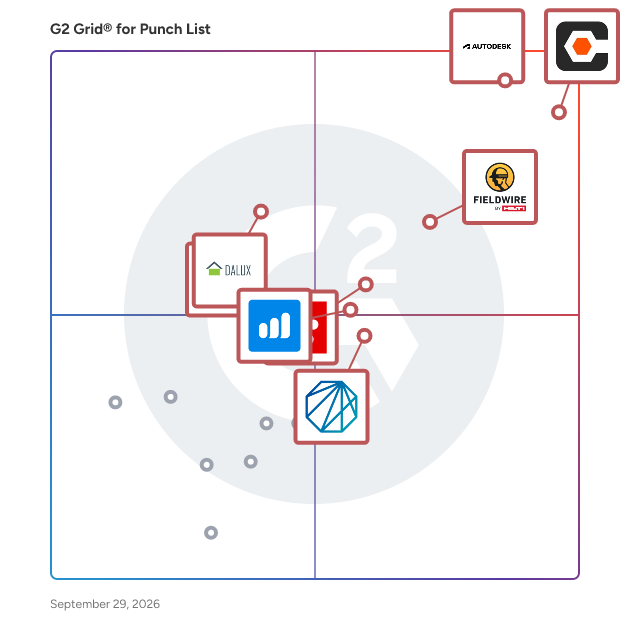
G2 Grid® for Punch List Software

G2 Grid® for Punch List Software plotting products by satisfaction and market presence

Highlighted products: Procore, Autodesk Forma (formerly Autodesk Construction Cloud), Fieldwire by Hilti, Revizto, Bluebeam, Dashpivot, Newforma, and Dalux.

Underlying data: [Grid® JSON](https://www.g2.com/categories/punch-list/grids.json?focus%5B%5D=procore&focus%5B%5D=autodesk-forma-formerly-autodesk-construction-cloud&focus%5B%5D=fieldwire-by-hilti&focus%5B%5D=revizto&focus%5B%5D=bluebeam&focus%5B%5D=dashpivot&focus%5B%5D=newforma&focus%5B%5D=dalux)

MySnagHub

SnagHub streamlines the snagging process for construction projects — from initial defect capture through to sign-off. Designed for site managers, contractors, and subcontractors who need a simple, reliable way to document and resolve issues without spreadsheets or paperwork. Key Features: Photo-first snagging — Capture defects with photos directly from your phone, with descriptions, deadlines, and trade assignments Project & room hierarchy — Organise snags by project, floor, and room for clear accountability across large sites Team collaboration — Assign snags to specific team members, track completion status, and manage approvals with full audit trails Completion workflows — Fitters submit completion photos for manager review, with approve/reject flows and blocking reasons Automated reporting — Generate professional PDF snagging reports filtered by status, room, or date range, and share them via link Daily digest notifications — Automated email summaries keep managers informed of progress without checking the app Deadline tracking — Visual indicators flag overdue items so nothing slips through the cracks Offline-ready architecture — Designed for construction sites with unreliable connectivity (PWA coming soon) Who it's for: Site managers running snagging on residential and commercial builds Main contractors coordinating multiple subcontractor teams Property developers managing handover and defect resolution Fit-out companies tracking punch lists across multiple units What makes it different: SnagHub is purpose-built for how construction teams actually work on-site — on their phones, often with limited signal, under time pressure. It's not a repurposed project management tool; every feature is designed around the snagging workflow.

Who Is the Company Behind MySnagHub?

myTrack

myTrack is an advanced contractor data management software designed to streamline workforce and resource tracking for organizations managing contractors, labor, equipment, rental equipment, and materials. The platform provides a centralized hub for tracking contractors across routine maintenance, Turnarounds/Shutdowns, and capital projects, offering real-time insights to improve efficiency, reduce costs, and maintain compliance. With its user-friendly interface and powerful automation capabilities, myTrack ensures that organizations have full visibility and control over their contingent workforce and project resources, no matter the scale. This software is ideal for businesses in industries such as oil & gas, utilities, mining, metals, chemicals, agriscience, EPC, manufacturing, and industrial operations, where managing contractors and resources is critical to success. Whether a company works with a small team of contractors or oversees a large-scale workforce, myTrack equips managers with the tools they need to make data-driven decisions, streamline operations, and improve accountability across all projects. Key Benefits and Features of myTrack: Comprehensive Resource Tracking myTrack allows organizations to track labor hours, equipment usage, rental equipment, and material costs daily. This eliminates the risk of overbilling and/or double billing. Automated Contract Enforcement The platform ensures that contractors adhere to established terms and agreements by automatically monitoring compliance with contractual obligations. This reduces risks, enforces accountability, and ensures projects are executed as planned. myTrack can support time & material and lump sum contracts. Real-Time Spend Insights With built-in cost tracking, myTrack monitors labor and resource spend to help managers stay on budget. Users can identify cost overruns early and take corrective actions to ensure financial goals are met. Automation and Efficiency myTrack automates manual processes, such as time tracking, reporting, and compliance monitoring, freeing up time for managers to focus on strategic tasks rather than administrative burdens. Customizable Dashboards and Reports The software provides intuitive dashboards and customizable reporting tools, making it easy to monitor workforce performance, resource allocation, and project progress in one place. By addressing common workforce management challenges, myTrack delivers value for organizations looking to improve operational efficiency, ensure compliance, and reduce costs. It’s particularly suited for industries that rely heavily on contractors and equipment-intensive projects, providing the visibility and control needed to achieve success. myTrack empowers organizations by centralizing workforce and resource data, automating critical processes, and delivering actionable insights. It’s a powerful solution for businesses that demand accountability, transparency, and efficiency in managing contractors and resources. Whether you’re tracking labor hours or monitoring equipment and material spend, myTrack helps you stay on top of your operations while driving productivity and cost savings.

Average Rating: 4.8/5.0

Total Reviews: 3

How Do G2 Users Rate myTrack?

  • Has the product been a good partner in doing business?: 10.0/10 (Category avg: 9.0/10)

Who Is the Company Behind myTrack?

  • Seller: Management Controls
  • Year Founded: 1989
  • HQ Location: Houston, Texas, United States
  • Twitter: @MgmtControlsInc
    145 Twitter followers
  • LinkedIn® Page: www.linkedin.com
    179 employees on LinkedIn®

Who Uses This Product?

  • Company Size: 100% Medium

What Do G2 Reviewers Say About myTrack?

AI-generated summary from verified user reviews

Pros
  • Users find myTrack extremely user-friendly, enjoying its streamlined interface and efficient multi-functionality.
  • Users find myTrack highly efficient with seamless integration and user-friendly features that enhance functionality and productivity.
  • Users love the user-friendly design of myTrack, streamlining functionality and enhancing overall efficiency.
  • Users commend the reporting capabilities in myTrack, particularly the ease of creating custom reports and exporting data.
  • Users love the user-friendly interface of myTrack, simplifying training and enhancing overall efficiency.
Cons
  • Users miss certain missing features from TRACK that are currently unavailable in myTrack and hope for future updates.
  • Users find the reporting tool cumbersome, hoping future updates with Microsoft Power BI will improve the experience.
  • Users find the current reporting tool cumbersome, hoping the transition to Power BI will improve the experience.
  • Users often face application bugs in myTrack, leading to frustration and hindered productivity.
What Are Recent G2 Reviews of myTrack?

Onsite System

Onsite is a comprehensive construction management software designed to digitize and streamline building projects from start to finish. It helps teams stay on budget and aligned with timelines by providing real-time updates, intuitive project tracking, and centralized communication. The platform improves collaboration among owners, developers, consultants, and contractors, reducing miscommunication and delays. Features like eSnagging and document management systems automate workflows, reduce costs, and ensure quality control on mega projects. Onsite supports integration with popular tools like Google Drive, Salesforce, and Microsoft Azure, enhancing flexibility. Trusted by major construction companies worldwide, Onsite empowers teams to deliver high-quality projects efficiently and on time.

Who Is the Company Behind Onsite System?

  • Seller: Onsite
  • Year Founded: 2012
  • HQ Location: Dubai, AE
  • LinkedIn® Page: www.linkedin.com
    43 employees on LinkedIn®

Project Lens

Project Lens is jobsite photo documentation and project coordination software for contractors. It keeps photos, videos, documents, and conversations organized by project and accessible on mobile and web. Teams can capture and annotate jobsite photos, assign tasks, follow checklists, manage schedules, and see who did what and when through project activity history. AI Rundowns turn voice recordings and photos into structured job documentation. The web app includes tools for creating estimates and photo reports. Contractors can share photo galleries and reports with clients to show progress, explain findings, and provide a clear record of completed work, from the first estimate to the final walkthrough.

Who Is the Company Behind Project Lens?

Punch List

Designed for jobs with 5 or more field users, Punch List version 3.05 and our exclusive Concierge Service provides everything you need to put Punch List to work quickly.

Who Is the Company Behind Punch List?

Punchlist Manager.NET

Punchlist Manager.Net allows your enterprise to communicate with homeowner and trades via the Internet 24/7/365.

Who Is the Company Behind Punchlist Manager.NET?

Punch List Software

Punch List Software is a modern software tool that allows your team to keep track of repairs and incomplete work items in a project that needs to be done. It helps create a more efficient work process and reduce errors.

Who Is the Company Behind Punch List Software?

PunchPad

PunchPad is a punch list management software designed for builders, general contractors, and remodelers to track, manage, and share construction punch lists during active projects. The software focuses specifically on punch list workflows rather than full project management. PunchPad allows users to create punch list items during jobsite walkthroughs, attach photos and location details, assign responsibility to subcontractors, and track item status from open to completion. The platform is built to replace common punch list methods such as paper notes, spreadsheets, PDFs, and text messages. PunchPad is primarily used during project closeout phases, quality control walkthroughs, and ongoing jobsite inspections. Builders and contractors use the app on mobile devices while walking the site to log issues in real time without stopping or backtracking. Each punch list item can include descriptive notes, photos for documentation, assigned subcontractors, due dates, and current status. A key function of PunchPad is its live punch list report. Users can share a single, always-up-to-date punch list report with subcontractors and project stakeholders. Subcontractors do not need their own accounts, logins, or app access to view the report. This approach is intended to reduce version control issues that often occur when punch lists are shared as static documents or email attachments. PunchPad is designed for small to mid-sized construction teams that want a focused tool for punch lists without the complexity of broader construction management platforms. The software does not include scheduling, budgeting, estimating, or document management features. Instead, it emphasizes speed, simplicity, and clarity for punch list tracking on active jobsites. Primary features and capabilities include: • Creating punch list items quickly during jobsite walkthroughs • Attaching photos, locations, and notes to individual items • Assigning items to subcontractors and tracking responsibility • Viewing item status such as open, assigned, unresolved, and completed • Sharing a single live punch list report that stays current in real time PunchPad is typically used by builders, general contractors, and remodelers working on residential and light commercial construction projects who need a straightforward system for managing punch lists and jobsite issues without relying on full project management software.

Who Is the Company Behind PunchPad?

Site Report Pro

Site Report Pro can help anyone that needs to produce and maintain a Punch List: a list of work not conforming to a particular specification. Punch Lists are often used on site projects to detail outstanding lists of items that are not yet complete to a satisfactory standard.

Who Is the Company Behind Site Report Pro?

  • Seller: SiteReportPro
  • Year Founded: 2016
  • HQ Location: Wilmslow, GB
  • Twitter: @sitereportpro
    346 Twitter followers
  • LinkedIn® Page: www.linkedin.com
    1 employees on LinkedIn®

SiteSnag

Who Is the Company Behind SiteSnag?

  • Seller: SiteSnag
  • Year Founded: 2026
  • HQ Location: Portsmouth, GB
  • LinkedIn® Page: www.linkedin.com
    1 employees on LinkedIn®

Snagmaster

Snagmaster provides an overview of management processes and workflow by presenting real time management information via a web-based portal with an interactive and secure dashboard that provides views for both main and sub-contractor.

Who Is the Company Behind Snagmaster?

  • Seller: Snagmaster
  • HQ Location: N/A
  • Twitter: @snagmaster
    17 Twitter followers
  • LinkedIn® Page: www.linkedin.com
    1 employees on LinkedIn®

SnagRelay

Who Is the Company Behind SnagRelay?

Vital InSite

An innovative, turnkey Project Management and Collaboration platform personalized to your needs. A sleek, responsive, modular design ensures your system fits your company or project. Your dedicated Systems Engineer will get your system up and running, then personally support your system for success. Expert consultancy, real support (no 800 numbers,) and training are always included without additional cost. Find out why PM Vitals is shaking things up and changing the way people view software.

Who Is the Company Behind Vital InSite?

  • Seller: PMVitals
  • Year Founded: 2013
  • HQ Location: Greenville, US
  • Twitter: @PMVitals
    12 Twitter followers
  • LinkedIn® Page: www.linkedin.com
    22 employees on LinkedIn®
Neya Kumaresan
NK
Researched and written by Neya Kumaresan
Updated October 3, 2024