Qiita Team
Who Is the Company Behind Qiita Team?
- Seller: Increments
- Year Founded: 2012
- HQ Location: Nakamura-ku, Nagoya, JP
-
LinkedIn® Page: www.linkedin.com
21 employees on LinkedIn®
Total Products under this Category: 308
Last updated: October 15, 2026
Why You Can Trust G2's Software Rankings:
G2's software rankings are built on verified user reviews, rigorous moderation, and a consistent research methodology maintained by a team of analysts and data experts. Each product is measured using the same transparent criteria, with no paid placement or vendor influence. While reviews reflect real user experiences, which can be subjective, they offer valuable insight into how software performs in the hands of professionals. Together, these inputs power the G2 Score, a standardized way to compare tools within every category.
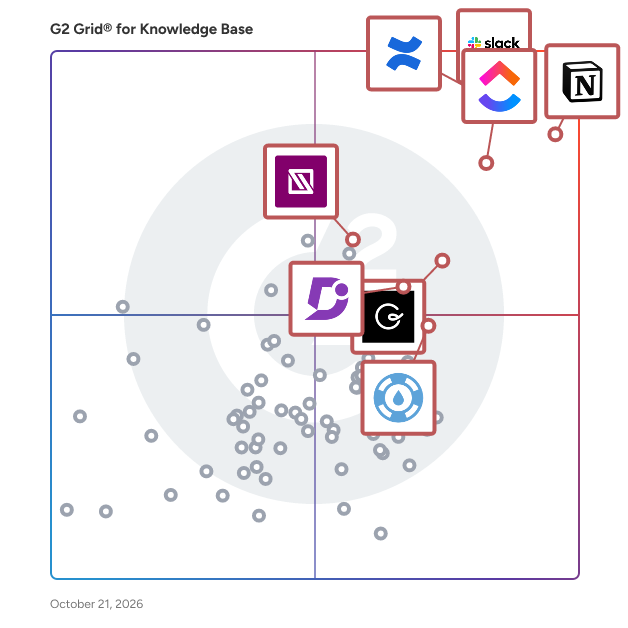
Highlighted products: Slack, Notion, Confluence, ClickUp, Guru, Document360, IT Glue, and Helpjuice.
Underlying data: [Grid® JSON](https://www.g2.com/categories/knowledge-base-software/grids.json?focus%5B%5D=slack&focus%5B%5D=notion&focus%5B%5D=confluence&focus%5B%5D=clickup&focus%5B%5D=guru&focus%5B%5D=document360&focus%5B%5D=it-glue&focus%5B%5D=helpjuice)
Document software for proposals, scopes, and technical documentation. Quixli is built for the work you hand to someone else and then wait on: client proposals, quotes, scopes of work, user guides, architecture docs, runbooks, and handover packs. Instead of starting from a blank page, create documents from reusable templates, share them with a single link instead of a PDF, and understand how they're actually used. What makes it different? Know how documents are used — see when a document is opened, which sections receive the most attention, what gets skipped, and whether readers return later. Quixli measures what was on screen and for how long; it does not claim to know whether someone read the text. Built for client proposals — interactive pricing tables, package selectors, in-scope/out-of-scope comparisons, cross-referenced terms, and variables that populate client details throughout the document. Made for technical teams — Mermaid diagrams, Excalidraw, syntax-highlighted code, math formulas, tables, charts, timelines, collapsible sections, tabs, footnotes, and synced content blocks that stay consistent across documents. Everything in one place — embed Figma, Google Docs & Sheets, YouTube, Vimeo, Loom, PDFs, and file attachments, so recipients follow one link instead of six. Secure sharing — protect links with a PIN, set expiration dates, and export any document to PDF when needed. Recipients can always see exactly what analytics are collected from the document link. Free plan available. No credit card required.
Raq.com is a business workspace for teams and AI agents. Keep the AI agent you already use, whether that's Claude, ChatGPT, Codex or Grok. Connect it to Raq.com once and it can work across 75+ business tools: Task Board, Project Base, CRM, Form Builder, E-Sign, Help Desk, Team Comms, Client Portal, Automations, Site Uptime, and AI image, video, writing and document tools. What it creates is saved in your account, so your team and their agents work from the same files with the same permissions. One subscription covers every tool, so you spend less on separate subscriptions. Custom Tools are included, and websites can be built and hosted on Raq.com too. Raq.com also has its own agent, Supercomputer, plus Nature Work and Orchestrator for running and reviewing long coding-agent sessions. Core AI text and chat requests use Zero Data Retention endpoints by default. Free trial, no credit card. Made by Vu AI Ltd in the UK.
Average Rating: 5.0/5.0
Total Reviews: 1
AI-generated summary from verified user reviews
"It's like my own intelligence, surveillance and reconnaissance team"
Rating: 5.0/5.0 stars
— Tristan O.
Connect G2 to Claude or ChatGPT for answers grounded in G2's trusted reviews, comparisons, and pricing from real user insights.
Reattend offers a platform designed to preserve and enhance a team's collective memory through shared knowledge and experiences. The service is aimed at organizations looking to improve collaboration and retain valuable insights from their team members. By capturing discussions and decisions, Reattend helps teams stay informed and connected. This solution is particularly beneficial for businesses in dynamic environments where information retention is crucial.
Semedy's Knowledge Management System (KMS) is a software platform that manages different types of knowledge in one place. Its unique integration methods bring efficiency, scalability, and sustainability to highly specialized processes. The KMS efficiently manages all asset types, ranging from metadata to complex ontologies. Semedy ensures that your knowledge is available and actionable within your downstream systems, with complete flexibility and assured semantic and structural integrity.
Sentra is a managed organization memory for teams and their AI agents. It connects to more than 200 tools, including Slack, Gmail, Outlook, Google Drive, Microsoft Teams, Jira, Confluence, Notion, GitHub, Salesforce and HubSpot, and turns what flows through them into facts that record who said what, when it became true and when it stopped, with the source system's permissions attached. Employees ask questions in Slack or the Sentra app, and AI agents built on Claude, ChatGPT, Gemini, Cursor or custom frameworks read the same memory over a REST API and MCP, so people and agents work from one current answer instead of stale documents. Sentra tracks decisions and commitments, prepares meeting briefs, and flags when facts change or conflict. It is SOC 2 Type II and ISO 27001 certified, deploys in the cloud, an isolated VPC or on-prem, and does not train on customer data. Sentra at sentra.app is unrelated to Sentra.io, the data security company.
La transmission du savoir au service des performances de votre entreprise. Shiroo est un outil de knowledge management, ou gestion des connaissances, qui prend la forme d’une application disponible sur PC et smartphone. Shiroo est aussi complet que simple à utiliser. Parlez à Shiroo, il capte et structure automatiquement les informations sous forme de fiches de connaissances, les diffuse aux personnes ciblées et les rend accessibles via un chatbot vocal et textuel. Une interaction aussi naturelle que de discuter avec un collègue. → Booster votre productivité et vos performances : ne perdez plus de temps à rechercher une information. → Gérer les connaissance devient un plaisir : explicitez une expertise, formalisez un process de manière efficace et intuitive. → Pérenniser l’expertise de l’entreprise : faciliter la transmission du savoir et capitaliser sur les connaissances et expertises de votre entreprise.
Siedisk is an AI-assisted tool for creating and managing knowledge bases and FAQ pages, enhancing your customer support efforts.
SOPX turns process videos into structured, step-by-step digital SOPs. Film any process on a phone, upload the video, and get a fully editable SOP with step titles, descriptions, and trimmed video clips for each step. Published and ready to share in under 10 minutes. No writing required. SOPX is built for teams that run physical operations: manufacturing, food production, field services, logistics, laboratories, healthcare, and hospitality. If your processes happen on a factory floor, a production line, or out in the field, SOPX handles them. This is not a screen-capture tool. It works for real-world, hands-on work. How it works: Record any process with your phone or upload an existing video. SOPX uses AI to break the video into individual steps, generating a step title, a rich text description, and a trimmed video clip for each one. Review, edit, and publish. The result is a structured digital SOP your team can access by link or QR code. You can organize SOPs into workspaces by department, production line, etc. Already have SOPs in PDF format? Upload them and SOPX parses them into structured digital procedures automatically, extracting steps, descriptions, images, and image carousels. Key capabilities: - Video-to-SOP conversion with AI-generated steps with video clips, titles, and descriptions - PDF import that converts existing procedures into structured digital SOPs - Manual SOP creation with images, image carousels, and custom video - AI translation into 50+ languages for multilingual teams - Versioning so every update is tracked and teams always see the latest version - Sharing via direct link or QR code (public links available) - Export to PDF or Word for offline use or compliance documentation - Organization-wide search across all procedures - Organize SOPs into a folder structure using Workspaces - Granular access control with Teams and individual access Problems SOPX solves: Operations teams at small and mid-sized companies (20 to 300 employees) often have no SOPs at all, or their documentation is scattered across shared drives, email, and paper binders. Processes live in people's heads. When experienced workers leave, that knowledge leaves with them. New hires rely on shadowing, which slows down senior staff and leads to inconsistent execution across shifts. SOPX gives these teams a fast, practical way to document what they do. Film the process once, and you have a visual, step-by-step reference that any worker can follow. No more shadowing, easy to update. No more tribal knowledge walking out the door. One standard procedure is followed the same way by every operator on every shift. For teams with a multilingual workforce, SOPX translates any SOP into 50+ languages in seconds, so every worker can follow instructions in the language they understand best. Getting started: SOPX is self-serve. Sign up, upload a video, and publish your first SOP. No sales call, no implementation project, no IT dependency. A free trial is available with 10 AI-generated SOPs and 2 users, no credit card required.
Average Rating: 5.0/5.0
Total Reviews: 1
"Effortless, User-Friendly, and Highly Recommendable"
Rating: 5.0/5.0 stars
— Klemen Z.
sovara is the sovereign work management platform for regulated enterprises and public organizations that want an alternative to US IT platforms such as Jira and Confluence, without compromising on control or flexibility. It delivers predictable operations, costs, and system evolution through EU-hosting, competitive pricing, and an AI-native architecture. sovara offers one system for project management, software development, issue tracking, and knowledge management.
A shared wiki for team notes and knowledge, stored securely in Microsoft 365. Sprocket Orbit - Collaborative AI wiki for Microsoft Teams Sprocket Orbit is a collaborative markdown wiki that lives inside Microsoft Teams and your Microsoft 365 tenant. It gives your team a fast, flexible space to write how-tos, runbooks, meeting notes, decisions, and onboarding docs, and connects your AI assistants so their work stops disappearing into chat windows. The problem it solves Most teams want a space for working knowledge that's faster and more flexible than SharePoint pages, but tools like Notion and Obsidian live outside Microsoft 365, which puts company knowledge outside your compliance boundary. OneNote and Loop don't fill the gap either: OneNote's proprietary format and free-form canvas resist structure and AI editing, and Loop locks you into Microsoft's own Copilot inside containers you don't fully control. Orbit is built to answer a different question: can your team and the AI assistants they already use read and write the same notes together, without copy-paste in the middle? Real-time co-authoring Edit the same note simultaneously with your team. Everyone's cursor is visible, and no one's changes are ever overwritten. AI assistants work alongside your team Orbit speaks the Model Context Protocol (MCP), so Copilot, Claude, Codex, and other MCP-compatible assistants connect directly to your workspace. They search, read, and update notes with the same permissions and version history as any team member, and every change they make is tracked like a human edit. Ask Claude to draft a support runbook from a conversation and it patches the note in Orbit. Ask Copilot what the team decided about a rollout and it reads the answer straight from your wiki. Documentation gets captured as part of the work, not written up after the fact. Connected documentation Link related notes as you write. Backlinks, full-text search, and a workspace graph keep information easy to locate as your wiki grows. Writing that feels effortless A plain editor that formats as you type: headings, checklists, tables, diagrams, and maths, with no toolbar in the way. Your documents never leave your organisation Orbit authenticates with your Microsoft accounts and writes every note directly to the SharePoint sites and OneDrive folders you designate. There's no separate data store and nothing is copied to Orbit's servers. Your existing permissions, retention policies, and compliance tooling apply exactly as they do for any other file in your tenant. If someone can't open a file in SharePoint, they can't open it in Orbit, so your IT team stays in control. No lock-in Every note is a standard markdown file in OneDrive or SharePoint. If you ever stop using Orbit, your content stays exactly where it always was, with no export step required. You can keep reading and editing the files with any tool you like. Getting started Install Orbit from the Teams Store using your Microsoft identity. Ten seats are included, with no request form and no credit card. Choose a SharePoint site or OneDrive folder where your notes will be stored. Invite your team and start writing together, right inside Microsoft Teams. Orbit is free to install, with the first 10 seats included on every tenant.
30+ SharePoint web parts for intranets, knowledge bases, org charts, and digital workplaces. Sprocket 365 is a collection of 30+ SharePoint web parts, full-page applications, and site-wide tools that turn SharePoint into a complete digital workplace. No custom development required. Organisations use Sprocket to solve common SharePoint frustrations: scattered knowledge, missing intranet features, poor employee onboarding, and limited people directories. Instead of building from scratch or living with gaps, install Sprocket and start building in minutes. Why organisations choose Sprocket: ✓ Structured knowledge bases with compliance tracking and required reading ✓ Interactive org charts and people directories from Entra ID ✓ Professional intranets without writing a line of code ✓ Guided onboarding experiences for new starters ✓ Site templates, custom headers, and full visual control ✓ Runs inside your tenant. No data leaves your organisation. Knowledge Base and Compliance - Knowledge Hub with wiki-style navigation, compliance tracking, and policy management - Read Lists for assigning pages, documents, and videos as required reading with full admin reporting - Page History for revision tracking on governance-critical content People and Culture - People Hub with interactive staff directory and org chart powered by Microsoft Entra ID, integrated with Microsoft Teams - Birthdays and Milestones for celebrating new starters, birthdays, and work anniversaries - Employee Recognition for publicly acknowledging achievements on SharePoint pages Intranet and Communication - Accordion, Calendar, Events, Hero, Documents, Custom List, Search Box, Embed, Feedback, and many more web parts - Global Alerts for communicating important information across all SharePoint sites with expiry dates and dismissible options Onboarding and Employee Experience - Onboarding web part for guided, structured new starter experiences - Favourites for bookmarking pages, documents, and links across the intranet Site Templates - Professionally designed SharePoint site templates applied in minutes through the - Template Gallery Site-Wide Customisation - Custom SharePoint header with your own navigation and branding - Google Analytics and Azure Application Insights tracking - CSS and JavaScript overrides for complete visual control - Word to SharePoint page and PDF conversion for building knowledge bases from existing documents Administration - Dedicated Management Portal for licence management, upgrades, and configuration Single-click upgrades -Rolling 30-day active-user licensing. Pay only for the users who use it. Built on SharePoint Framework (SPFx). Sprocket runs inside your Microsoft 365 tenant using Microsoft's recommended development approach. No data leaves your organisation. Fully compatible with SharePoint Online modern sites.
Average Rating: 4.0/5.0
Total Reviews: 1
Rating: 4.0/5.0 stars
— Gricelda J.
Stacker Docs is an AI knowledge base for company documents. Employees ask questions in plain language and get answers drawn from the company's own policies, handbooks, SOPs and playbooks, with the source document cited in every answer. Every document is stored as plain markdown in a GitHub or Azure DevOps repository that the company already owns. Non-technical staff read and edit in a formatted (WYSIWYG) editor, and Stacker Docs commits their changes to the repository for them, so nobody needs to learn git or markdown. Technical teams, if they prefer, can keep working on the same files with their usual tools. A company that stops using Stacker Docs keeps the repository and its full history, so there is nothing to export. Answers run on the organization's own AI provider API key, so the AI vendor relationship and its cost stay with the company. Stacker Docs does not use customer documents to train any model. Stacker Docs is built for companies of about 50 to 500 people, especially software companies and professional services firms that want one current source of truth, and an internal AI over it, without needing to build and manage a retrieval (RAG) pipeline. - Storage-based pricing with no per-seat fees. The first 2 MB, an estimated 230 documents, is free. - Single sign-on is available with Microsoft Entra ID. - Export any document to Word or PDF. - Only members of the organization can see or ask about its documents. Stacker Docs needs a GitHub or Azure DevOps repository and an AI provider API key.
