Best GIS Software - Page 22

How Many GIS Software Products Does G2 Track?

Total Products under this Category: 431

Category Stats (Sep 2026)

  • Average Rating: 4.3/5 (↑0.01 vs Aug 2026) The average rating of products in this category, based on all submitted ratings
  • Top Trending Product: Smappen (+9.51%) - Among all products in this category, Smappen recorded the largest rating increase compared to last month

Last updated: September 15, 2026

How Does G2 Rank GIS Software Products?

Why You Can Trust G2's Software Rankings:

  • 30 Analysts and Data Experts
  • 8,200+ Authentic Reviews
  • 431+ Products
  • Unbiased Rankings

G2's software rankings are built on verified user reviews, rigorous moderation, and a consistent research methodology maintained by a team of analysts and data experts. Each product is measured using the same transparent criteria, with no paid placement or vendor influence. While reviews reflect real user experiences, which can be subjective, they offer valuable insight into how software performs in the hands of professionals. Together, these inputs power the G2 Score, a standardized way to compare tools within every category.

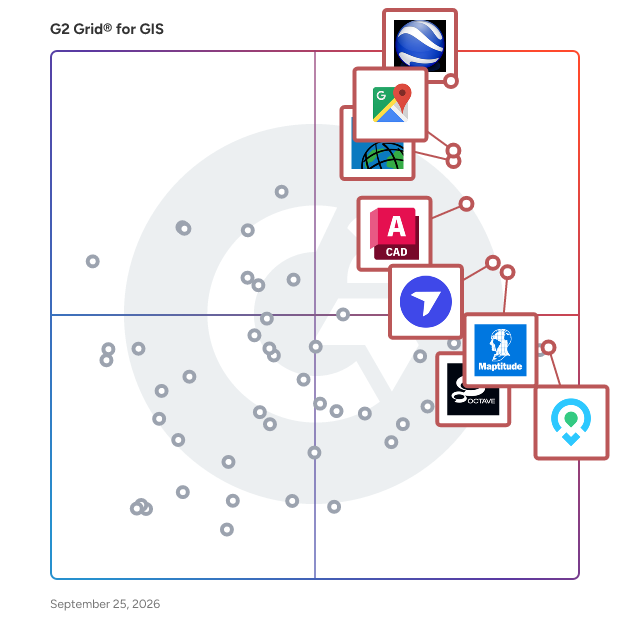
G2 Grid® for GIS Software

G2 Grid® for GIS Software plotting products by satisfaction and market presence

Highlighted products: Google Earth Pro, Google Maps Platform, Esri ArcGIS, AutoCAD, DroneDeploy, Maptitude, Mapme, and Octave Imagine.

Underlying data: [Grid® JSON](https://www.g2.com/categories/gis/grids.json?focus%5B%5D=google-earth-pro&focus%5B%5D=google-maps-platform&focus%5B%5D=esri-arcgis&focus%5B%5D=autocad&focus%5B%5D=dronedeploy&focus%5B%5D=maptitude&focus%5B%5D=mapme&focus%5B%5D=octave-imagine)

LAStools

LAStools is a software suite to classify, tile, convert, filter, raster, triangulate, contour, clip, and polygonize LiDAR data.

Who Is the Company Behind LAStools?

Layometry

Layometry is a 3D tile layout planner that runs in the browser. You enter the real dimensions of the room and of the tile, and it draws the layout the way it will actually be installed: how many full tiles fit, where the cuts land, what size each cut piece is, and how the joint meets in a corner. Most tile calculators divide floor area by tile area. Layometry computes the geometry. Grout width is added to every tile, so the grid pitch is tile plus joint — one millimetre changes the number of full tiles on a long wall and the size of the edge cut. Layout pattern, grid rotation from −90° to +90°, symmetric layout and grid offset all move the cuts, and you see the result immediately. Walls that are out of square are measured four times — width at the bottom and top, height left and right — and the grid stays level while the wedge-shaped edge cuts absorb the error, exactly as a tiler works from a base line. Floors can take a custom outline of up to 64 corners, including L-shapes and conca

Who Is the Company Behind Layometry?

LiDAR360

LiDAR360 is a powerful LiDAR point cloud processing and analysis platform built for large-scale geospatial, forestry, mining, terrain, 3D reality modeling, and engineering applications. The software supports more than 10 advanced point cloud processing algorithms, can process over 300GB of point cloud data on a single workstation, and also provides distributed computing for ultra-large projects. LiDAR360 offers a complete workflow for strip adjustment, data management, quality statistics, intelligent classification, vector editing, terrain product generation, forestry analysis, mining safety monitoring, building modeling, geological analysis, spectral analysis, and image processing. With AI-based classification, feature extraction, multi-source data processing, and industry-specific modules, LiDAR360 helps professionals efficiently transform LiDAR, imagery, raster, vector, and model data into accurate, production-ready deliverables.

Who Is the Company Behind LiDAR360?

Light Pollution Map

Light Pollution Map is an interactive tool that visualizes global artificial light pollution using satellite night-light data. Users can click on the map to access brightness readings for locations ranging from cities to remote areas. The platform uses the Bortle Scale, from Bortle 1 (darkest skies) to Bortle 9 (bright city skies), and provides Sky Quality Meter readings in magnitudes per square arcsecond. Features include certified dark sky markers, aurora forecasts, moon phase info, golden hour timing, and day-night terminator indicators. Users can customize views with basemap options like streets, dark mode, and satellite imagery. Weather overlays show cloud cover and precipitation for viewing conditions. The search function allows exploration of light pollution in specific areas. Additional tools include location history tracking, sky photo analysis, and adjustable color styles, helping users find ideal stargazing and astrophotography spots.

Who Is the Company Behind Light Pollution Map?

LISTECH

LISTECH, a subsidiary of Hexagon, specializes in developing advanced geospatial software solutions tailored for surveying, civil engineering, construction, and infrastructure projects. Established in 1988, LISTECH has been at the forefront of creating tools that enable professionals to visualize, compute, design, validate, and exchange geospatial data efficiently. Their software suite is designed to address the complex challenges inherent in these industries, transforming raw data into actionable insights that enhance productivity and decision-making. Key Features and Functionality: - LISTECH Neo: A next-generation software platform that integrates surveying, civil engineering, GIS, and BIM functionalities. Neo offers tools for data visualization, computation, design, validation, and seamless data exchange, supporting a wide range of geospatial projects. - LISCAD: A comprehensive surveying and civil engineering software compatible with all major surveying instruments. LISCAD streamlines field-to-office workflows, enhancing efficiency and accuracy in data processing. - LISTECH Cover: A support service providing users with access to technical assistance, software updates, and upgrades, ensuring that their tools remain current and effective. Primary Value and User Solutions: LISTECH's software solutions are engineered to solve the intricate problems associated with geospatial data management in surveying and engineering fields. By offering intuitive and integrated tools, LISTECH empowers professionals to process and interpret complex datasets, leading to improved project planning, execution, and overall productivity. Their commitment to innovation ensures that users have access to cutting-edge technology that meets the evolving demands of the industry.

Who Is the Company Behind LISTECH?

  • Seller: LISTECH
  • Year Founded: 1988
  • HQ Location: Melbourne, AU
  • LinkedIn® Page: www.linkedin.com
    5 employees on LinkedIn®

LocusLabs

LocusLabs gives global venues, enterprises and brands a digital platform to communicate, share and manage everything about their physical space.

Who Is the Company Behind LocusLabs?

  • Seller: LocusLabs
  • Year Founded: 2004
  • HQ Location: Atlanta, US
  • Twitter: @locuslabs
    465 Twitter followers
  • LinkedIn® Page: www.linkedin.com
    60 employees on LinkedIn®

LorikGISTools

LorikGISTools, made by Lorienne, is software that allows users to modify, create, and enrich SIG geographic databases using a toolbox in a geo-processing environment. With a simple and efficient interface, it is possible to select a tool, test the desired processes, and subsequently create the resulting layer for export. By integrating vector databases, georeferenced images or digital terrain models, the processing tools can be used to identify, modify or create data. On-the-fly testing facilitates parameter adjustment through to validation for the creation of new layers and the export of Shape (or Geotiff in the case of images). PRINCIPLES In a fully georeferenced space, different layers are imported. Processing tools are available for each layer type. A "test on the fly" mode allows the user to adjust the parameters for optimal results. It is possible to work on all or part of a layer. Once the parameters are validated, the temporary layer can be created for export or reused for other processing. Depending on the license level, the user can export the temporary layers resulting from their processing and reuse them like any other GIS layers (export in SHP for vectors and in GEOTIFF for images). Three license levels are offered: free environment, advanced mode and expert mode. TOOLS EXAMPLES POLYGON: • Aggregation • Simplification • Skeleton • Split POLYLINE: • Texts extension • Connection • Netword aligment • Free extremities POINTS: • Altitude • Alignment on polyline • Alignement on polygon • Attribution retrieval DEM: • Contour lines creation • Relief images creation

Who Is the Company Behind LorikGISTools?

  • Seller: Lorienne
  • Year Founded: 1991
  • HQ Location: Montreuil, FR
  • LinkedIn® Page: www.linkedin.com
    6 employees on LinkedIn®

LUCIAD

Who Is the Company Behind LUCIAD?

Map Display API

Build an amazing map experience that makes your application stand out from the crowd. Display a map with the required level of detail – fresh and reliable on a global scale. Customize the look and feel to fit your business and customer.

Who Is the Company Behind Map Display API?

  • Seller: TomTom
  • Year Founded: 1991
  • HQ Location: Amsterdam, North Holland, Netherlands
  • Twitter: @TomTomDevs
    5,917 Twitter followers
  • LinkedIn® Page: www.linkedin.com
    5,191 employees on LinkedIn®
  • Ownership: AMS: TOM2

Map Editor

Map Editor is an application that delivers fast and intuitive real-time collaboration on a map using any device.

Who Is the Company Behind Map Editor?

MapGage

Integrate Maps, CAD & Sensors to your Field Inspections & Maintenance Operations

Who Is the Company Behind MapGage?

Daniel Rivera
DR
Researched and written by Daniel Rivera
Updated March 4, 2025