# Best General-Purpose CAD Software

*By [Daniel Rivera](https://research.g2.com/insights/author/daniel-rivera)*


General-purpose computer-aided design (CAD) is a prototyping software for engine designs, architectural sketches, 3D models, prototypes, and mock-ups of construction sites and building projects. General-purpose CAD works with the integration of [3D modeling software](https://www.g2.com/categories/3d-modeling), [BIM software](https://www.g2.com/categories/building-design-and-building-information-modeling-bim), [civil engineering software](https://www.g2.com/categories/civil-engineering-design), or [graphic design software](https://www.g2.com/categories/graphic-design) to chart technical, nuanced, and intricate designs.

General-purpose CAD software is general engineering and design software that all industries can use to develop plant designs in the initial stages of a product&#39;s lifecycle. It is used in a project model&#39;s ideation, creation, and planning stages. Once a plan or mockup is ready, the CAD document circulates within RnD, testing, and project management teams for approvals and further design intrications.

To qualify for inclusion in the General-Purpose Computer-Aided Design (CAD) category, a product must:

- Have 2D technical drawing capabilities
- Have 3D modeling capabilities
- Possess the ability to be used across several industries


## Top General-Purpose CAD Software at a Glance
| # | Product | Rating | Best For | What Users Say |
|---|---------|--------|----------|----------------|
| 1 | [AutoCAD](https://www.g2.com/products/autocad/reviews) | 4.4/5.0 (1,837 reviews) | 2D drafting with universal DWG compatibility | "[AutoCAD Delivers Precision Drafting and Professional, Productive Workflows](https://www.g2.com/survey_responses/autocad-review-13040322)" |
| 2 | [Designcenter Solid Edge](https://www.g2.com/products/designcenter-solid-edge/reviews) | 4.3/5.0 (596 reviews) | Synchronous modeling for multi-CAD design reuse | "[Unique Interface, Synchronous Design, and Great Support Boost Efficiency](https://www.g2.com/survey_responses/designcenter-solid-edge-review-12709304)" |
| 3 | [Onshape](https://www.g2.com/products/onshape/reviews) | 4.7/5.0 (699 reviews) | Cloud-native CAD with real-time collaboration | "[Intuitive, Browser-Based CAD with Regular Updates and Great Training Resources](https://www.g2.com/survey_responses/onshape-review-13107140)" |
| 4 | [SketchUp](https://www.g2.com/products/sketchup/reviews) | 4.5/5.0 (1,299 reviews) | Fast architectural massing and client visualization | "[SketchUp Makes 3D Modeling Fast, Approachable, and Easy to Present](https://www.g2.com/survey_responses/sketchup-review-13033539)" |
| 5 | [ZWCAD](https://www.g2.com/products/zwcad/reviews) | 4.6/5.0 (349 reviews) | AutoCAD-compatible 2D drafting with perpetual licensing | "[Major Time Saver for Drafting; Smart Mouse, Smart Plotting, and Smart Voice Shine](https://www.g2.com/survey_responses/zwcad-review-13104636)" |
| 6 | [MicroStation](https://www.g2.com/products/microstation/reviews) | 4.0/5.0 (407 reviews) | Infrastructure drafting with large reference file coordination | "[MicroStation Delivers Precision Control for Massive Civil and Infrastructure Models](https://www.g2.com/survey_responses/microstation-review-12853055)" |
| 7 | [Autodesk Fusion](https://www.g2.com/products/autodesk-fusion/reviews) | 4.5/5.0 (510 reviews) | CAD-to-CAM workflows with cloud collaboration | "[Autodesk Fusion Streamlines Parametric 3D Design from Idea to Prototype](https://www.g2.com/survey_responses/autodesk-fusion-review-13041979)" |
| 8 | [DraftSight](https://www.g2.com/products/draftsight/reviews) | 4.2/5.0 (208 reviews) | AutoCAD-compatible 2D drafting without AutoCAD cost | "[DraftSight: Low-Cost, Comfortable UI, and Strong DWG Performance](https://www.g2.com/survey_responses/draftsight-review-12958423)" |
| 9 | [AutoCAD LT](https://www.g2.com/products/autocad-lt/reviews) | 4.3/5.0 (280 reviews) | 2D drafting without 3D modeling overhead | "[Reliable and easy to use](https://www.g2.com/survey_responses/autocad-lt-review-13069696)" |
| 10 | [Inventor](https://www.g2.com/products/inventor/reviews) | 4.4/5.0 (423 reviews) | Parametric mechanical design with AutoCAD interoperability | "[Versatile Design Tool with Room for Improvement](https://www.g2.com/survey_responses/inventor-review-7829390)" |

---
## What Are the Most Common Questions About General-Purpose CAD Software?
*AI-generated · Last updated: May 26, 2026*
### What most reliable General Purpose CAD based on reviews from engineer avoiding costly implementations?
Based on G2 reviews, reliability in General-Purpose CAD Software is most often tied to stable day-to-day drafting, familiar workflows, and fewer implementation hurdles. Reviewers frequently describe AutoCAD as dependable for precise 2D drafting, revisions, layering, and broad file compatibility, but they also repeatedly mention subscription cost and hardware demands. According to verified users, ZWCAD stands out when buyers want a more budget-conscious option with an AutoCAD-like interface, DWG compatibility, lightweight performance, and easier switching for established drafting workflows. G2 reviewers mention that products seen as reliable for cost-conscious teams are the ones that reduce retraining, open existing files smoothly, and keep routine drafting work moving without major disruption.

**Here are some of the top-rated products on G2:**

- [ZWCAD](https://www.g2.com/products/zwcad/reviews/zwcad-review-12782007) – budget-friendly DWG drafting with familiar commands and smooth performance on standard computers
- [AutoCAD](https://www.g2.com/products/autocad/reviews/autocad-review-12860214) – precise technical drafting with strong layer control and reliable drawing modification workflows
- [DraftSight](https://www.g2.com/products/draftsight/reviews/draftsight-review-9780623) – 2D drafting alternative used to reduce licensing costs while preserving familiar CAD work


### What are the best General Purpose CAD tools for engineer needing design validation?
Based on G2 reviews, engineers looking for design validation often favor CAD tools that combine modeling with simulation, clash checking, or early issue detection. According to verified users, SOLIDWORKS is often associated with simulation, virtual checks, and converting designs into manufacturing-ready outputs, which helps teams catch problems before production. G2 reviewers mention Autodesk Fusion for bringing modeling, simulation, and manufacturing steps into one workflow, especially for prototyping and fabrication-oriented use cases. Reviewers also describe Inventor as useful for assemblies, 3D modeling, and identifying issues before manufacturing. Across the category, buyers appear to value products that help validate fit, motion, manufacturability, or design accuracy without relying entirely on downstream tools.

**Here are some of the top-rated products on G2:**

- [SOLIDWORKS](https://www.g2.com/products/solidworks/reviews/solidworks-review-12735771) – supports part design, assemblies, and simulation to reduce prototyping and design errors
- [Autodesk Fusion](https://www.g2.com/products/autodesk-fusion/reviews/autodesk-fusion-review-12816734) – combines 3D design, prototyping, and simulation-oriented workflows in one platform
- [Inventor](https://www.g2.com/products/inventor/reviews/inventor-review-11446385) – helps teams review parts and assemblies in 3D before sending designs to manufacture


### Which General Purpose CAD platforms maintain performance as manufacturing &amp; product design teams scale?
Based on G2 reviews, Onshape is the clearest fit for teams prioritizing performance as collaboration expands. Verified users consistently highlight its cloud-based access, centralized data, version control, and real-time collaboration, which reduce local file management issues and make it easier for distributed teams to work from different devices. G2 reviewers mention that Onshape helps avoid server setup, simplifies sharing with non-CAD users, and keeps design history in one place. While some users note occasional server or loading delays, the strongest recurring theme is that scaling teams benefit from its browser-based model and built-in collaboration structure more than from traditional file-based workflows. That makes Onshape a standout option for growing manufacturing and product design organizations.


### What General Purpose CAD solutions with proven design validation for manufacturing &amp; product design teams?
Based on G2 reviews, design validation is most often linked to tools that help teams test assemblies, catch clashes, review fit, and reduce physical rework before production. According to verified users, SOLIDWORKS is frequently used to model parts, run simulation-oriented checks, and generate production-ready drawings. G2 reviewers mention Autodesk Fusion for unifying CAD, CAM, and simulation-related workflows so teams can move from concept to fabrication with fewer handoff gaps. Inventor is also described as helpful for visualizing assemblies, resolving design issues, and checking manufacturability before parts are made. Across these reviews, the strongest validation signals come from products that let engineers inspect, revise, and communicate technical designs clearly before they reach the shop floor.


### Which General Purpose CAD platforms excel at  3d modeling with strong user adoption?
Based on G2 reviews, AutoCAD has the strongest recent user adoption signal in this dataset, and reviewers still describe it as a trusted option for both 2D work and selected 3D use cases. According to verified users, AutoCAD is valued for precision, widespread familiarity, reusable templates, reliable file sharing, and strong layer management, all of which contribute to broad day-to-day usage. G2 reviewers mention that it supports 3D visualization and modeling for some workflows, though several users also note that its 3D capabilities can be less ideal than more specialized tools. For buyers prioritizing both adoption and modeling flexibility, the review data suggests AutoCAD remains one of the most widely used and recognized options in the category.


### How comparing General Purpose CAD providers that prioritize collaboration tools and implementation speed?
Based on G2 reviews, collaboration and implementation speed show up most clearly in tools that are easy to set up, easy to share, and reduce file-handling friction across teams. According to verified users, Onshape stands out for browser-based collaboration, version control, centralized documents, and simple sharing with teammates and non-CAD stakeholders. G2 reviewers mention Autodesk Fusion for consolidating design workflows into one environment while remaining relatively easy to start and use across devices. Designcenter Solid Edge is also associated with Teamcenter integration, cloud sharing, and accessible setup for organizations that need coordinated design work. In this category, buyers appear to prefer platforms that shorten onboarding, simplify access, and keep collaboration inside the product rather than across separate systems.


### What highest rated General Purpose CAD for manufacturing &amp; product design teams optimizing rendering speed?
Based on G2 reviews, rendering speed is discussed less often than drafting, modeling, and file performance, but several products do surface for teams that care about faster visual output. G2 reviewers mention Coohom for quick, high-quality rendering and faster design visualization, especially compared with workflows that previously required longer render times. According to verified users, SketchUp is often chosen for fast conceptual modeling and quick iterations, though some reviewers report slowdowns or crashes on heavy files. Autodesk Fusion is also described as a unified option for design and rendering-related work, especially in prototyping workflows. For buyers optimizing rendering speed, the review data points toward tools that help teams iterate visuals quickly without adding heavy workflow complexity.

**Here are some of the top-rated products on G2:**

- [Coohom](https://www.g2.com/products/coohom/reviews/coohom-review-12396750) – cloud-based 3D design tool praised for fast rendering and strong visualization output
- [SketchUp](https://www.g2.com/products/sketchup/reviews/sketchup-review-12541302) – quick conceptual modeling platform used for rapid iterations and presentation-ready visuals
- [Autodesk Fusion](https://www.g2.com/products/autodesk-fusion/reviews/autodesk-fusion-review-12391106) – supports rendering alongside 3D modeling and product development workflows


### What top General Purpose CAD solutions for 11-50 employees focused on  3d modeling?
Based on G2 reviews, smaller manufacturing and product design teams often value a mix of approachable modeling tools, manageable setup, and efficient collaboration. According to verified users, Designcenter Solid Edge is often positioned well for small to mid-sized businesses because it combines modeling, drafting, and related design workflows in one environment. G2 reviewers mention Autodesk Fusion as a strong fit for teams that want integrated CAD and CAM capabilities without juggling separate products. Reviewers also highlight SOLIDWORKS for straightforward 3D modeling, assemblies, and broad familiarity among engineers. For teams in the 11-50 employee range, the reviews suggest the best fit usually depends on whether the priority is ease of adoption, integrated workflows, or more simulation-heavy product development.

**Here are some of the top-rated products on G2:**

- [Designcenter Solid Edge](https://www.g2.com/products/designcenter-solid-edge/reviews/designcenter-solid-edge-review-12730586) – approachable all-in-one modeling and drafting option noted as suitable for SMEs
- [Autodesk Fusion](https://www.g2.com/products/autodesk-fusion/reviews/autodesk-fusion-review-12391106) – integrated 3D design and manufacturing workflows for prototyping and product design teams
- [SOLIDWORKS](https://www.g2.com/products/solidworks/reviews/solidworks-review-12677529) – user-friendly 3D modeling and assembly platform for detailed product design work


### What most trusted General Purpose CAD by engineer based on user reviews and team collaboration?
Based on G2 reviews, trust is usually earned through precision, file reliability, familiar workflows, and the ability to coordinate work across teams. According to verified users, AutoCAD is repeatedly described as an industry-standard drafting environment that engineers rely on for accurate drawings, revisions, and collaboration through common file formats. G2 reviewers mention MicroStation as a trusted option for large, multidisciplinary infrastructure work because of its reference handling, precision, and ability to manage complex files. Onshape also stands out for collaborative trust signals, especially where teams need centralized version control and real-time sharing. In practice, the most trusted platforms in this review set are the ones buyers already know can support consistent outputs and teamwork under real project conditions.


### What best General Purpose CAD platforms for manufacturing &amp; product design teams managing performance?
Based on G2 reviews, teams managing performance look for CAD platforms that stay stable with larger files, support efficient revisions, and avoid slowing daily engineering work. According to verified users, Onshape is attractive for performance management because its cloud model removes some local hardware constraints and simplifies collaboration. G2 reviewers mention Designcenter Solid Edge for speed in model edits and broad design workflows, although some users still note slowdowns on very large assemblies. AutoCAD remains relevant for dependable drafting performance in technical documentation, but reviewers also caution that heavier files can feel resource-intensive. Overall, the best fit depends on whether performance means cloud accessibility, large-assembly handling, or consistent drafting responsiveness across a growing team.

**Here are some of the top-rated products on G2:**

- [Onshape](https://www.g2.com/products/onshape/reviews/onshape-review-12462851) – cloud-based CAD used to handle complex models without relying on high-end local hardware
- [Designcenter Solid Edge](https://www.g2.com/products/designcenter-solid-edge/reviews/designcenter-solid-edge-review-12622225) – fast model editing and integrated workflows for teams moving designs to customers quickly
- [AutoCAD](https://www.g2.com/products/autocad/reviews/autocad-review-12702586) – reliable drafting and documentation platform valued for precision, collaboration, and revision speed


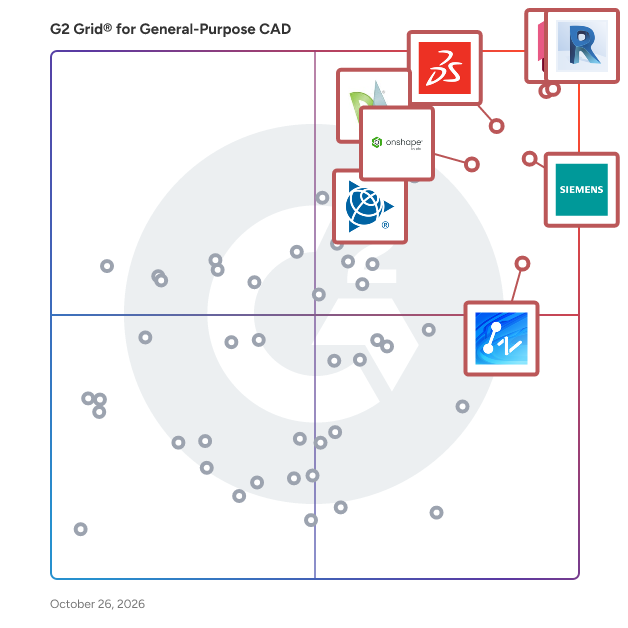
## G2 Grid® for General-Purpose CAD Software
![G2 Grid® for General-Purpose CAD Software plotting products by satisfaction and market presence](https://www.g2.com/categories/general-purpose-cad/grids.png?focus%5B%5D=1797&focus%5B%5D=1792&focus%5B%5D=16895&focus%5B%5D=1798&focus%5B%5D=2981&focus%5B%5D=2994&focus%5B%5D=5307&focus%5B%5D=2985)
Highlighted products: AutoCAD, Designcenter Solid Edge, Onshape, SketchUp, ZWCAD, MicroStation, Autodesk Fusion, and DraftSight.
Underlying data: [Grid® JSON](https://www.g2.com/categories/general-purpose-cad/grids.json?focus%5B%5D=autocad&amp;focus%5B%5D=designcenter-solid-edge&amp;focus%5B%5D=onshape&amp;focus%5B%5D=sketchup&amp;focus%5B%5D=zwcad&amp;focus%5B%5D=microstation&amp;focus%5B%5D=autodesk-fusion&amp;focus%5B%5D=draftsight)


## How Many General-Purpose CAD Software Products Does G2 Track?
**Total Products under this Category:** 117

### Category Stats (Jul 2026)
- **Average Rating**: 4.37/5 (↑0.01 vs Jun 2026) The average rating of products in this category, based on all submitted ratings
- **Top Trending Product**: HiCAD (+50.0%) - Among all products in this category, HiCAD recorded the largest rating increase compared to last month
*Last updated: July 16, 2026*


## How Does G2 Rank General-Purpose CAD Software Products?

**Why You Can Trust G2's Software Rankings:**

- 30 Analysts and Data Experts
- 10,400+ Authentic Reviews
- 117+ Products
- Unbiased Rankings

G2's software rankings are built on verified user reviews, rigorous moderation, and a consistent research methodology maintained by a team of analysts and data experts. Each product is measured using the same transparent criteria, with no paid placement or vendor influence. While reviews reflect real user experiences, which can be subjective, they offer valuable insight into how software performs in the hands of professionals. Together, these inputs power the G2 Score, a standardized way to compare tools within every category.


## Which General-Purpose CAD Software Is Best for Your Use Case?

- **Leader:** [AutoCAD](https://www.g2.com/products/autocad/reviews)
- **Highest Performer:** [Shapr3D](https://www.g2.com/products/shapr3d/reviews)
- **Easiest to Use:** [ZWCAD](https://www.g2.com/products/zwcad/reviews)
- **Top Trending:** [MicroStation](https://www.g2.com/products/microstation/reviews)
- **Best Free Software:** [AutoCAD](https://www.g2.com/products/autocad/reviews)


## What Are the Top-Rated General-Purpose CAD Software Products in 2026?
### 1. [AutoCAD](https://www.g2.com/products/autocad/reviews)
Redefine how you create with Autodesk® AutoCAD®. Autodesk AI empowers you to reimagine your creative process in AutoCAD, delivering advanced automation and meaningful performance enhancements that help you design faster and work smarter. Intelligent features reduce repetitive tasks and surface actionable insights, so you can spend more time creating with precision and confidence. Use natural, conversational interactions to ask questions, check standards unique to your team, and quickly validate designs against established workflows. Securely managed data supports informed decision making and helps turn ideas into high quality results more efficiently. A truly collaborative design experience brings teams together through Forma Data Management. Purpose built cloud storage makes it easy to save, manage, and access project files while supporting collaborative design processes. Multiple users can add markups to a single drawing on desktop or web with Multi-user Markup, improving transparency and reducing errors. Checkout transforms collaborative drafting by allowing contributors to work on specific geometry, submit edits for review, and merge changes smoothly by eliminating manual collation and file conflicts. Your data and intellectual property remain secure and governed, giving you confidence across every stage of design. Optimize productivity with seven specialized toolsets, including Electrical, Mechanical, and Plant 3D. Automate routine tasks with AutoLISP, tailor workflows to your discipline, and extend AutoCAD through APIs and thousands of apps on the Autodesk App Store.


**Average Rating:** 4.4/5.0
**Total Reviews:** 1,837
**How Do G2 Users Rate AutoCAD?**

- **Has the product been a good partner in doing business?:** 8.5/10 (Category avg: 8.4/10)
- **Drawing:** 9.5/10 (Category avg: 8.9/10)
- **File Import :** 8.7/10 (Category avg: 8.3/10)
- **Views:** 8.5/10 (Category avg: 8.6/10)

**Who Is the Company Behind AutoCAD?**

- **Seller:** [Autodesk](https://www.g2.com/sellers/autodesk)
- **Company Website:** https://www.autodesk.com
- **Year Founded:** 1982
- **HQ Location:** San Francisco
- **Twitter:** @autodesk (273,215 Twitter followers)
- **LinkedIn® Page:** https://www.linkedin.com/company/autodesk/ (15,352 employees on LinkedIn®)

**Who Uses This Product?**
- **Who Uses This:** Architect, Designer
- **Top Industries:** Architecture &amp; Planning, Civil Engineering
- **Company Size:** 46% Small-Business, 34% Mid-Market


#### What Are AutoCAD's Pros and Cons?

**Pros:**

- Ease of Use (183 reviews)
- Drawing (116 reviews)
- Features (72 reviews)
- 3D Modeling (70 reviews)
- Detailed Engineering Drawings (66 reviews)

**Cons:**

- Expensive (65 reviews)
- Learning Curve (48 reviews)
- High Cost (46 reviews)
- Difficult Learning (45 reviews)
- High Hardware Requirements (42 reviews)


### What Do G2 Reviewers Say About AutoCAD?
*AI-generated summary from verified user reviews*

**Pros:**

- Users find **AutoCAD&#39;s ease of use** essential for drafting and designing, enhancing both productivity and precision.
- Users value the **ease of drafting** in AutoCAD, enabling efficient 2D and 3D designs for various projects.
- Users value the **precision and professional standards** of AutoCAD, enhancing their drafting and design experiences significantly.
- Users appreciate the **precision and reliability** of AutoCAD for both 2D drafting and basic 3D design projects.
- Users value AutoCAD for its **detailed engineering drawings** , which enhance precision and professional standards in design work.

**Cons:**

- Users find the **high subscription cost** of AutoCAD burdensome, especially for students and small businesses.
- Users highlight the **steep learning curve** of AutoCAD, making it challenging for beginners to learn quickly.
- Users express frustration over the **high cost** of AutoCAD licenses, complicating access for individuals and small businesses.
- Users find the **difficult learning curve** of AutoCAD overwhelming, especially due to numerous complex commands for beginners.
- Users report that AutoCAD has **high hardware requirements** , causing slow performance and leading to lost work on complex projects.

#### What Are Recent G2 Reviews of AutoCAD?

**"[Precision, Versatility, and Pro-Level Customization for Efficient Design](https://www.g2.com/survey_responses/autocad-review-12888769)"**

**Rating:** 4.0/5.0 stars
*— Ovidiu P.*

[Read full review](https://www.g2.com/survey_responses/autocad-review-12888769)

---

**"[AutoCAD Delivers Precision Drafting and Professional, Productive Workflows](https://www.g2.com/survey_responses/autocad-review-13040322)"**

**Rating:** 5.0/5.0 stars
*— Muzammil M.*

[Read full review](https://www.g2.com/survey_responses/autocad-review-13040322)

---


#### What Are G2 Users Discussing About AutoCAD?

- [What is AutoCAD Architecture used for?](https://www.g2.com/discussions/what-is-autocad-architecture-used-for) - 2 comments, 2 upvotes
- [What is AutoCAD Mechanical used for?](https://www.g2.com/discussions/autocad-mechanical-what-is-autocad-mechanical-used-for) - 1 comment
- [What is AutoCAD Map 3D used for?](https://www.g2.com/discussions/autodesk-map-3d-what-is-autocad-map-3d-used-for) - 1 comment
- [Which software is useful for mechanical engineers?](https://www.g2.com/discussions/which-software-is-useful-for-mechanical-engineers) - 1 comment
- [How do I draw a road map in AutoCAD?](https://www.g2.com/discussions/how-do-i-draw-a-road-map-in-autocad)

### 2. [Designcenter Solid Edge](https://www.g2.com/products/designcenter-solid-edge/reviews)
Designcenter Solid Edge is a portfolio of affordable, easy to deploy, maintain, and use software tools that advance all aspects of the product development process – mechanical and electrical design, simulation, manufacturing, technical documentation, data management, and cloud-based collaboration. Developed on Siemens&#39; industry-leading technologies, Designcenter Solid Edge provides the most innovative and comprehensive approach to product development for the mainstream market.


**Average Rating:** 4.3/5.0
**Total Reviews:** 596
**How Do G2 Users Rate Designcenter Solid Edge?**

- **Has the product been a good partner in doing business?:** 8.8/10 (Category avg: 8.4/10)
- **Drawing:** 8.9/10 (Category avg: 8.9/10)
- **File Import :** 8.5/10 (Category avg: 8.3/10)
- **Views:** 8.6/10 (Category avg: 8.6/10)

**Who Is the Company Behind Designcenter Solid Edge?**

- **Seller:** [Siemens Digital Industries Software](https://www.g2.com/sellers/siemens-digital-industries-software)
- **Company Website:** https://www.sw.siemens.com/
- **Year Founded:** 1980
- **HQ Location:** Plano, Texas
- **Twitter:** @siemenssoftware (36,972 Twitter followers)
- **LinkedIn® Page:** https://www.linkedin.com/company/28423178/ (20,941 employees on LinkedIn®)

**Who Uses This Product?**
- **Who Uses This:** Design Engineer, Mechanical Engineer
- **Top Industries:** Mechanical or Industrial Engineering, Automotive
- **Company Size:** 53% Small-Business, 30% Mid-Market


#### What Are Designcenter Solid Edge's Pros and Cons?

**Pros:**

- Ease of Use (98 reviews)
- 3D Modeling (62 reviews)
- Features (62 reviews)
- Efficiency (58 reviews)
- Design Ease (50 reviews)

**Cons:**

- Learning Curve (47 reviews)
- Difficult Learning (46 reviews)
- Performance Issues (40 reviews)
- Slow Performance (39 reviews)
- Not User-Friendly (32 reviews)


### What Do G2 Reviewers Say About Designcenter Solid Edge?
*AI-generated summary from verified user reviews*

**Pros:**

- Users praise the **ease of use** of Designcenter Solid Edge, enhancing their design experience with straightforward functionality.
- Users commend Solid Edge for its **Synchronous Technology** , which streamlines geometry changes and boosts productivity.
- Users praise the **Synchronous Technology** in Solid Edge for streamlining geometry changes and enhancing overall efficiency.
- Users value the **efficiency** of Designcenter Solid Edge, experiencing quicker model edits and faster modifications.
- Users value the **design ease** of Designcenter in Solid Edge, streamlining workflows and enhancing productivity on projects.

**Cons:**

- Users find the **steep learning curve** for advanced features challenging, especially when transitioning from simpler CAD tools.
- Users find the **difficult learning curve** with advanced features of Solid Edge challenging, particularly for beginners.
- Users experience **performance issues** with Designcenter Solid Edge, especially when handling large assemblies, impacting efficiency.
- Users often find the **slow performance** of Designcenter Solid Edge frustrating, especially with large assemblies and tight deadlines.
- Users find the **interface not user-friendly** , leading to a steep learning curve and a sluggish experience overall.

#### What Are Recent G2 Reviews of Designcenter Solid Edge?

**"[Unique Interface, Synchronous Design, and Great Support Boost Efficiency](https://www.g2.com/survey_responses/designcenter-solid-edge-review-12709304)"**

**Rating:** 5.0/5.0 stars
*— Rohan H.*

[Read full review](https://www.g2.com/survey_responses/designcenter-solid-edge-review-12709304)

---

**"[Solid Edge offers a comprehensive suite covering CAD/CAM/CAE/PLM.](https://www.g2.com/survey_responses/designcenter-solid-edge-review-7522339)"**

**Rating:** 5.0/5.0 stars
*— Nirav S.*

[Read full review](https://www.g2.com/survey_responses/designcenter-solid-edge-review-7522339)

---


#### What Are G2 Users Discussing About Designcenter Solid Edge?

- [What is Solid Edge used for?](https://www.g2.com/discussions/what-is-solid-edge-used-for) - 2 comments, 1 upvote
- [Is Solidworks or Solid Edge better?](https://www.g2.com/discussions/is-solidworks-or-solid-edge-better) - 4 comments, 1 upvote
- [Is Solid Edge free?](https://www.g2.com/discussions/is-solid-edge-free) - 3 comments
- [What file type does Solid Edge use?](https://www.g2.com/discussions/what-file-type-does-solid-edge-use) - 2 comments
- [Is Solid Edge good?](https://www.g2.com/discussions/is-solid-edge-good) - 2 comments

### 3. [Onshape](https://www.g2.com/products/onshape/reviews)
Onshape by PTC is the leading cloud-native CAD &amp; PDM platform that runs on any device, anywhere-requiring zero IT. Onshape is for product design companies who are fed up with the errors, time waste, and hidden costs of outdated file-based CAD &amp; PDM. Only Onshape: - Eliminates CAD crashes and never loses data - Enables secure, real-time collaboration - Tracks all activity and provides infinite restore - Has built-in PDM with branching and merging


**Average Rating:** 4.7/5.0
**Total Reviews:** 699
**How Do G2 Users Rate Onshape?**

- **Has the product been a good partner in doing business?:** 9.3/10 (Category avg: 8.4/10)
- **Drawing:** 8.8/10 (Category avg: 8.9/10)
- **File Import :** 8.6/10 (Category avg: 8.3/10)
- **Views:** 8.9/10 (Category avg: 8.6/10)

**Who Is the Company Behind Onshape?**

- **Seller:** [PTC](https://www.g2.com/sellers/ptc)
- **Company Website:** https://www.ptc.com
- **Year Founded:** 1985
- **HQ Location:** Boston, Massachusetts
- **Twitter:** @PTC (37,560 Twitter followers)
- **LinkedIn® Page:** https://www.linkedin.com/company/1935/ (8,145 employees on LinkedIn®)

**Who Uses This Product?**
- **Who Uses This:** Mechanical Engineer, Owner
- **Top Industries:** Mechanical or Industrial Engineering, Design
- **Company Size:** 79% Small-Business, 17% Mid-Market


#### What Are Onshape's Pros and Cons?

**Pros:**

- Ease of Use (28 reviews)
- Collaboration (22 reviews)
- Online Accessibility (21 reviews)
- Features (15 reviews)
- Sharing (15 reviews)

**Cons:**

- Missing Features (18 reviews)
- Lack of Features (10 reviews)
- Drawing Issues (7 reviews)
- Internet Dependency (7 reviews)
- Limited CAD Features (7 reviews)


### What Do G2 Reviewers Say About Onshape?
*AI-generated summary from verified user reviews*

**Pros:**

- Users value the **ease of use** of Onshape, enjoying its straightforward interface and seamless cloud access.
- Users value the **easy team communication** in Onshape, enhancing collaboration with simultaneous document access.
- Users value the **cloud-based accessibility** of Onshape, enabling work from anywhere without software installation worries.
- Users value the **cloud-based accessibility** of Onshape, enabling project continuity from any device without performance concerns.
- Users value the **easy document sharing** features of Onshape, enabling collaboration with non-CAD users seamlessly.

**Cons:**

- Users note the **missing features** in Onshape compared to SolidWorks, especially in sheet metal and CAM options.
- Users feel the **lack of features** in Onshape compared to Solidworks hinders efficiency and collaboration opportunities.
- Users find the **drawing issues** in Onshape cumbersome, lacking essential functionalities and complicating the design process.
- Users find the **internet dependency** of Onshape frustrating, especially with slow or unstable connections impacting performance.
- Users note the **limited CAD features** in Onshape, particularly in sheet metal modeling and drawing environments.

#### What Are Recent G2 Reviews of Onshape?

**"[Intuitive, Browser-Based CAD with Regular Updates and Great Training Resources](https://www.g2.com/survey_responses/onshape-review-13107140)"**

**Rating:** 5.0/5.0 stars
*— Kent F.*

[Read full review](https://www.g2.com/survey_responses/onshape-review-13107140)

---

**"[FeatureScript Makes Onshape a Powerful, Flexible CAD Platform](https://www.g2.com/survey_responses/onshape-review-13106033)"**

**Rating:** 4.5/5.0 stars
*— Bradlei T.*

[Read full review](https://www.g2.com/survey_responses/onshape-review-13106033)

---


#### What Are G2 Users Discussing About Onshape?

- [What is Onshape used for?](https://www.g2.com/discussions/what-is-onshape-used-for) - 1 comment

### 4. [SketchUp](https://www.g2.com/products/sketchup/reviews)
SketchUp helps architects and designers turn their ideas into reality with simple, powerful 3D modeling software. Whether your design is massive or miniature, we&#39;ll be with you every step of the way. Sketch it, share your vision, refine concepts, and bring them into the real world. Owned by Trimble Inc., an entrepreneurial company focused on leveraging technology to change how the world works, SketchUp is intuitive and interoperable. From the ability to create stunning renderings, to powerful sharing and presentation tools, it&#39;s easy to see why professionals trust SketchUp to build their ideas.


**Average Rating:** 4.5/5.0
**Total Reviews:** 1,299
**How Do G2 Users Rate SketchUp?**

- **Has the product been a good partner in doing business?:** 8.5/10 (Category avg: 8.4/10)
- **Drawing:** 8.7/10 (Category avg: 8.9/10)
- **File Import :** 8.1/10 (Category avg: 8.3/10)
- **Views:** 8.8/10 (Category avg: 8.6/10)

**Who Is the Company Behind SketchUp?**

- **Seller:** [Trimble](https://www.g2.com/sellers/trimble)
- **Year Founded:** 1978
- **HQ Location:** Sunnyvale, CA
- **Twitter:** @TrimbleCorpNews (12,061 Twitter followers)
- **LinkedIn® Page:** https://www.linkedin.com/company/5160/ (10,997 employees on LinkedIn®)
- **Ownership:** NASDAQ

**Who Uses This Product?**
- **Who Uses This:** Architect, Designer
- **Top Industries:** Architecture &amp; Planning, Design
- **Company Size:** 75% Small-Business, 18% Mid-Market


#### What Are SketchUp's Pros and Cons?

**Pros:**

- Ease of Use (14 reviews)
- 3D Modeling (10 reviews)
- Ease of Learning (9 reviews)
- Intuitive (8 reviews)
- Drawing (7 reviews)

**Cons:**

- Poor Rendering Quality (7 reviews)
- Expensive (5 reviews)
- Limited Rendering Capabilities (5 reviews)
- Plugin Issues (5 reviews)
- Poor Rendering (5 reviews)


### What Do G2 Reviewers Say About SketchUp?
*AI-generated summary from verified user reviews*

**Pros:**

- Users appreciate the **ease of use** in SketchUp, enabling quick and intuitive 3D modeling without a steep learning curve.
- Users love SketchUp for its **intuitive ease of use** , enabling quick model creation with natural-feeling tools.
- Users find SketchUp to be **extremely easy to learn** , allowing quick model creation with intuitive tools.
- Users love SketchUp for its **intuitive design** , making 3D modeling quick and accessible without a steep learning curve.
- Users appreciate the **ease of use** in SketchUp, allowing quick and intuitive creation of 3D models.

**Cons:**

- Users criticize the **poor rendering quality** of SketchUp, hindering detailed and professional-grade modeling efforts.
- Users find SketchUp to be **expensive** , with many essential features locked behind paid plugins and subscription fees.
- Users find **limited rendering capabilities** in SketchUp frustrating for detailed work, especially in professional and complex projects.
- Users face **plugin issues** with SketchUp, as essential features often require costly third-party extensions for advanced work.
- Users find SketchUp&#39;s **poor rendering** limits its utility for detailed CAD work and sophisticated projects, requiring additional plugins.

#### What Are Recent G2 Reviews of SketchUp?

**"[SketchUp Makes 3D Modeling Fast, Approachable, and Easy to Present](https://www.g2.com/survey_responses/sketchup-review-13033539)"**

**Rating:** 5.0/5.0 stars
*— Muzammil M.*

[Read full review](https://www.g2.com/survey_responses/sketchup-review-13033539)

---

**"[SketchUp: Designers’ Ultimate &quot;Ideation Engine&quot;](https://www.g2.com/survey_responses/sketchup-review-12704602)"**

**Rating:** 5.0/5.0 stars
*— Jayant G.*

[Read full review](https://www.g2.com/survey_responses/sketchup-review-12704602)

---


#### What Are G2 Users Discussing About SketchUp?

- [What is SketchUp used for?](https://www.g2.com/discussions/what-is-sketchup-used-for) - 3 comments

### 5. [ZWCAD](https://www.g2.com/products/zwcad/reviews)
ZWCAD is a fast, powerful, and compatible 2D CAD solution for architects, designers, and engineers in the AEC and manufacturing industries. Its unparalleled compatibility and compelling price make it the best alternative to expensive subscription-based CAD solutions. Its lightning-fast performance, innovative features, and a complete set of tools enable professionals to bring their creative visions to life effortlessly.


**Average Rating:** 4.6/5.0
**Total Reviews:** 349
**How Do G2 Users Rate ZWCAD?**

- **Has the product been a good partner in doing business?:** 9.1/10 (Category avg: 8.4/10)
- **Drawing:** 9.4/10 (Category avg: 8.9/10)
- **File Import :** 9.3/10 (Category avg: 8.3/10)
- **Views:** 9.1/10 (Category avg: 8.6/10)

**Who Is the Company Behind ZWCAD?**

- **Seller:** [ZWSOFT](https://www.g2.com/sellers/zwsoft)
- **Company Website:** https://www.zwsoft.com
- **Year Founded:** 1998
- **HQ Location:** Guangzhou, Guangdong
- **Twitter:** @ZWSOFT (1,609 Twitter followers)
- **LinkedIn® Page:** https://www.linkedin.com/company/796054/ (363 employees on LinkedIn®)

**Who Uses This Product?**
- **Who Uses This:** Engineer, Designer
- **Top Industries:** Architecture &amp; Planning, Civil Engineering
- **Company Size:** 67% Small-Business, 26% Mid-Market


#### What Are ZWCAD's Pros and Cons?

**Pros:**

- Ease of Use (71 reviews)
- Efficiency (33 reviews)
- Powerful Performance (26 reviews)
- Tool Efficiency (25 reviews)
- Easy Learning (18 reviews)

**Cons:**

- Update Issues (9 reviews)
- Slow Performance (8 reviews)
- Software Freezing (8 reviews)
- Missing Features (7 reviews)
- Lack of Features (6 reviews)


### What Do G2 Reviewers Say About ZWCAD?
*AI-generated summary from verified user reviews*

**Pros:**

- Users find ZWCAD&#39;s **ease of use** impressive, allowing a smooth transition from AutoCAD with minimal relearning.
- Users praise the **efficiency** of ZWCAD, significantly speeding up design work and saving time and costs.
- Users appreciate the **powerful performance** of ZWCAD, enhancing efficiency and saving both time and costs.
- Users find ZWCAD&#39;s **tool efficiency** enhances design speed, increasing productivity and saving both time and costs.
- Users find ZWCAD&#39;s **easy learning curve** enhances efficiency, allowing faster problem-solving and accurate designs in 2D.

**Cons:**

- Users report **update issues** , struggling with compatibility and needing better graphics and plugin functionality.
- Users experience **slow performance** with ZWCAD, particularly with large files and during initial startup.
- Users experience **software freezing** with ZWCAD, causing frustration during multitasking with multiple drawing files open.
- Users note **missing features** in ZWCAD, particularly lacking advanced 3D modeling tools and parametric functions needed for complex projects.
- Users notice a significant **lack of features** in ZWCAD, particularly in 3D modeling and advanced tools.

#### What Are Recent G2 Reviews of ZWCAD?

**"[Major Time Saver for Drafting; Smart Mouse, Smart Plotting, and Smart Voice Shine](https://www.g2.com/survey_responses/zwcad-review-13104636)"**

**Rating:** 5.0/5.0 stars
*— Vijay V.*

[Read full review](https://www.g2.com/survey_responses/zwcad-review-13104636)

---

**"[Streamlining technical drawings with a familiar CAD environment](https://www.g2.com/survey_responses/zwcad-review-12485911)"**

**Rating:** 5.0/5.0 stars
*— Priya K.*

[Read full review](https://www.g2.com/survey_responses/zwcad-review-12485911)

---


### 6. [MicroStation](https://www.g2.com/products/microstation/reviews)
MicroStation is a specialized computer-aided design (CAD) software solution tailored specifically for infrastructure design. It is designed to assist architects and engineers in transforming their creative visions into tangible projects, enabling them to present their designs effectively to clients and deliver high-quality results to the community. By providing a comprehensive suite of tools that are integrated into the platform, MicroStation allows users to work efficiently and flexibly, streamlining the design process without the need for additional add-ons. Targeted primarily at professionals in architecture and engineering, MicroStation serves a diverse range of industries, including transportation, utilities, and urban planning. Its capabilities cater to users who require robust design and documentation tools to handle complex infrastructure projects. As project demands grow in complexity and scale, MicroStation equips users with the necessary resources to manage these challenges effectively, ensuring timely and budget-conscious delivery of designs. One of the key features of MicroStation is its ability to facilitate the design, documentation, and visualization of infrastructure models in both 2D and 3D formats. This versatility allows users to create detailed and accurate representations of their projects, enhancing communication with stakeholders and clients. The software supports collaborative workflows, enabling seamless interaction among team members and external parties, which is essential for successful project execution. MicroStation also emphasizes risk minimization and automation acceleration. By providing advanced tools for modeling and analysis, users can identify potential issues early in the design process, reducing the likelihood of costly revisions later on. The software’s automation features streamline repetitive tasks, allowing professionals to focus on more strategic aspects of their projects. This efficiency not only helps in meeting deadlines but also enhances the overall quality of the work produced. WHAT&#39;S NEW IN MICROSTATION 2026: Python Assistant (tech Preview) - An AI assistant to create Python scripts more easily. Python scripting and automation are now accessible to a broader range of users. Bentley Copilot (Tech preview) - Accelerate help, learning, and onboarding with an AI-powered assistant. Instant guidance that bridges AutoCAD-to-MicroStation differences and turns questions into productivity gains. 3D Geospatial Context Dialog (Tech preview) - Access curated global datasets in MicroStation for immersive, real-world context for infrastructure designs. Provides efficient streaming and open-standard interoperability. Configurations Wizard - Guided workflows and best-practice templates enable fast, error-free configurations set up for consistent standards—accessible to everyone, regardless of technical expertise. Component Center 2.0 - Component management with a modern library offering deeper integration, smarter governance, and iTwin-ready workflows. Ensure consistency, compliance, and collaboration across projects. Updated Space Mouse integration - Experience smoother, faster 3D navigation—modern modes, SmartUI customization, and certified compatibility for complex models.


**Average Rating:** 4.0/5.0
**Total Reviews:** 407
**How Do G2 Users Rate MicroStation?**

- **Has the product been a good partner in doing business?:** 7.7/10 (Category avg: 8.4/10)
- **Drawing:** 8.9/10 (Category avg: 8.9/10)
- **File Import :** 8.2/10 (Category avg: 8.3/10)
- **Views:** 8.2/10 (Category avg: 8.6/10)

**Who Is the Company Behind MicroStation?**

- **Seller:** [Bentley Systems](https://www.g2.com/sellers/bentley-systems)
- **Company Website:** https://www.bentley.com/
- **Year Founded:** 1984
- **HQ Location:** Exton, PA
- **Twitter:** @BentleySystems (17,564 Twitter followers)
- **LinkedIn® Page:** https://www.linkedin.com/company/4929/ (5,621 employees on LinkedIn®)

**Who Uses This Product?**
- **Who Uses This:** Project Engineer, Transportation Engineer
- **Top Industries:** Civil Engineering, Architecture &amp; Planning
- **Company Size:** 33% Enterprise, 33% Small-Business


#### What Are MicroStation's Pros and Cons?

**Pros:**

- Ease of Use (46 reviews)
- 3D Modeling (36 reviews)
- Detailed Engineering Drawings (21 reviews)
- Tool Efficiency (20 reviews)
- Efficiency (19 reviews)

**Cons:**

- Difficult Learning (15 reviews)
- Learning Curve (14 reviews)
- Difficult Configuration (11 reviews)
- Slow Performance (10 reviews)
- Outdated Interface (9 reviews)


### What Do G2 Reviewers Say About MicroStation?
*AI-generated summary from verified user reviews*

**Pros:**

- Users find MicroStation&#39;s **ease of use** and customizable interface ideal for both beginners and advanced learners.
- Users value the **powerful 3D modeling capabilities** of MicroStation, enhancing architectural and engineering design workflows effectively.
- Users value the **detailed engineering drawings** feature of MicroStation, enhancing efficiency in 3D and 2D integrations.
- Users value the **tool efficiency** of MicroStation, enabling smooth handling of large projects and diverse file types.
- Users find MicroStation&#39;s **efficiency features** greatly enhance productivity, enabling quick adjustments and effective project handling.

**Cons:**

- Users find the **difficult learning curve** of MicroStation challenging, particularly for newcomers transitioning from other software.
- Users experience a **steep learning curve** with MicroStation, particularly those transitioning from AutoCAD or new to the interface.
- Users often struggle with the **difficult configuration** of MicroStation, facing a steep learning curve and complex customization.
- Users face **slow performance** issues with MicroStation, citing frequent freezes and cumbersome workflows that hinder productivity.
- Users find the **outdated interface** challenging and non-intuitive, hindering productivity and comprehension.

#### What Are Recent G2 Reviews of MicroStation?

**"[MicroStation Delivers Precision Control for Massive Civil and Infrastructure Models](https://www.g2.com/survey_responses/microstation-review-12853055)"**

**Rating:** 4.0/5.0 stars
*— Ahmed M.*

[Read full review](https://www.g2.com/survey_responses/microstation-review-12853055)

---

**"[Powerful Data Integration and Modeling, But Steep Learning Curve](https://www.g2.com/survey_responses/microstation-review-11908438)"**

**Rating:** 4.0/5.0 stars
*— Mark T.*

[Read full review](https://www.g2.com/survey_responses/microstation-review-11908438)

---


#### What Are G2 Users Discussing About MicroStation?

- [What is MicroStation used for?](https://www.g2.com/discussions/what-is-microstation-used-for)

### 7. [Autodesk Fusion](https://www.g2.com/products/autodesk-fusion/reviews)
Autodesk Fusion connects capabilities, data, and people across the entire product development lifecycle. Fusion provides you with CAD, CAM, CAE and PCB tools along with PLM/PDM and MES (manufacturing execution system) capabilities to facilitate seamless workflows across your entire organization. Key features: - 3D Design and Modeling: Autodesk Fusion offers a robust set of tools for creating 3D models and designs, making it ideal for product development and industrial design. - Manufacturing Integration: With Autodesk Fusion, you can design and manufacture products using the same platform, streamlining the process from concept to production. - Electronics Design: PCB design capabilities are integrated into the Autodesk Fusion platform, allowing for the creation of electronic components as part of the overall product design process. - Simulation and Analysis: Autodesk Fusion includes simulation tools to test and optimize designs before manufacturing, reducing the need for physical prototypes. - Cloud Collaboration: As a cloud-based platform, Autodesk Fusion enables seamless collaboration among design and engineering teams, regardless of location. - Generative Design: This feature allows you to input design goals and constraints, and Autodesk Fusion will generate multiple design options that meet these criteria. By integrating the entire product development process into one platform, Autodesk Fusion allows users to bring products to market faster and more efficiently.


**Average Rating:** 4.5/5.0
**Total Reviews:** 510
**How Do G2 Users Rate Autodesk Fusion?**

- **Has the product been a good partner in doing business?:** 8.8/10 (Category avg: 8.4/10)
- **Drawing:** 9.1/10 (Category avg: 8.9/10)
- **File Import :** 8.4/10 (Category avg: 8.3/10)
- **Views:** 8.8/10 (Category avg: 8.6/10)

**Who Is the Company Behind Autodesk Fusion?**

- **Seller:** [Autodesk](https://www.g2.com/sellers/autodesk)
- **Company Website:** https://www.autodesk.com
- **Year Founded:** 1982
- **HQ Location:** San Francisco
- **Twitter:** @autodesk (273,215 Twitter followers)
- **LinkedIn® Page:** https://www.linkedin.com/company/autodesk/ (15,352 employees on LinkedIn®)

**Who Uses This Product?**
- **Who Uses This:** Owner, Design Engineer
- **Top Industries:** Mechanical or Industrial Engineering, Design
- **Company Size:** 68% Small-Business, 22% Mid-Market


#### What Are Autodesk Fusion's Pros and Cons?

**Pros:**

- Ease of Use (29 reviews)
- Features (21 reviews)
- Design Efficiency (16 reviews)
- Features Functionality (15 reviews)
- Ease of Learning (14 reviews)

**Cons:**

- Difficult Learning (11 reviews)
- Learning Curve (11 reviews)
- Assembly Difficulties (9 reviews)
- Missing Features (9 reviews)
- Performance Issues (9 reviews)


### What Do G2 Reviewers Say About Autodesk Fusion?
*AI-generated summary from verified user reviews*

**Pros:**

- Users highlight the **ease of use** in Autodesk Fusion, enhancing productivity and simplifying the design process.
- Users appreciate the **flexible and intuitive tools** in Autodesk Fusion, enhancing productivity for diverse design projects.
- Users benefit from the **design efficiency** of Autodesk Fusion, enhancing productivity with customizable tools and intuitive navigation.
- Users love the **user-friendly interface** and extensive capabilities of Autodesk Fusion 360 for seamless design experiences.
- Users find Autodesk Fusion to have a **user-friendly learning curve** , especially for those familiar with CAD software.

**Cons:**

- Users find **difficult learning** curves in Autodesk Fusion, especially for large assemblies, compared to other CAD/CAM software.
- Users face a significant **learning curve** with Autodesk Fusion, complicating design adjustments and assembly tasks.
- Users face **assembly difficulties** with Autodesk Fusion, finding it less intuitive compared to other CAD software alternatives.
- Users note the **missing features** in Autodesk Fusion, particularly compared to competitors, limiting functionality and usability.
- Users report **performance issues** with Autodesk Fusion, including bugs, glitches, and difficulty with real-time editing.

#### What Are Recent G2 Reviews of Autodesk Fusion?

**"[Autodesk Fusion Streamlines Parametric 3D Design from Idea to Prototype](https://www.g2.com/survey_responses/autodesk-fusion-review-13041979)"**

**Rating:** 5.0/5.0 stars
*— Muzammil M.*

[Read full review](https://www.g2.com/survey_responses/autodesk-fusion-review-13041979)

---

**"[Autodesk Fusion 360 is a great parametric 3D modeling software](https://www.g2.com/survey_responses/autodesk-fusion-review-5236244)"**

**Rating:** 5.0/5.0 stars
*— Damaris C.*

[Read full review](https://www.g2.com/survey_responses/autodesk-fusion-review-5236244)

---


#### What Are G2 Users Discussing About Autodesk Fusion?

- [What is Fusion 360 used for?](https://www.g2.com/discussions/what-is-fusion-360-used-for) - 1 comment
- [Is Fusion 360 still free for hobbyists?](https://www.g2.com/discussions/fusion-360-is-fusion-360-still-free-for-hobbyists) - 1 comment
- [Is Fusion 360 a CAD software?](https://www.g2.com/discussions/is-fusion-360-a-cad-software) - 1 comment
- [What is Fusion 360 software used for?](https://www.g2.com/discussions/what-is-fusion-360-software-used-for)
- [What functionality does Fusion 360 offer its users?](https://www.g2.com/discussions/fusion-360-what-functionality-does-fusion-360-offer-its-users)

### 8. [DraftSight](https://www.g2.com/products/draftsight/reviews)
A feature-rich DraftSight is a versatile 2D CAD solution tailored for professionals such as architects, engineers, construction service providers, professional CAD users, designers, educators, and hobbyists. Serving industries such as architecture, engineering, construction, facilities management, manufacturing, landscape architecture, and industrial design, the software boasts an extensive range of features that enable users to efficiently create, edit, view, and markup 2D and 3D DWG files. With its user-friendly interface, DraftSight ensures a smooth transition from any existing CAD application. Whether you&#39;re involved in detailed architectural drawings or complex engineering designs, DraftSight&#39;s comprehensive 2D CAD capabilities make it an ideal choice for all your design needs.


**Average Rating:** 4.2/5.0
**Total Reviews:** 208
**How Do G2 Users Rate DraftSight?**

- **Has the product been a good partner in doing business?:** 8.3/10 (Category avg: 8.4/10)
- **Drawing:** 9.3/10 (Category avg: 8.9/10)
- **File Import :** 8.3/10 (Category avg: 8.3/10)
- **Views:** 7.6/10 (Category avg: 8.6/10)

**Who Is the Company Behind DraftSight?**

- **Seller:** [Dassault Systemes](https://www.g2.com/sellers/dassault-systemes)
- **Year Founded:** 1981
- **HQ Location:** Velizy-Villacoublay
- **Twitter:** @Dassault3DS (74,082 Twitter followers)
- **LinkedIn® Page:** https://www.linkedin.com/company/3896/ (27,414 employees on LinkedIn®)
- **Ownership:** EPA: DSY.PA

**Who Uses This Product?**
- **Who Uses This:** Design Engineer, Mechanical Engineer
- **Top Industries:** Mechanical or Industrial Engineering, Manufacturing
- **Company Size:** 62% Small-Business, 32% Mid-Market


#### What Are DraftSight's Pros and Cons?

**Pros:**

- Ease of Use (13 reviews)
- Features Functionality (9 reviews)
- Easy Learning (6 reviews)
- Design Efficiency (4 reviews)
- Drawing Tools (4 reviews)

**Cons:**

- Drawing Issues (2 reviews)
- Expensive (2 reviews)
- Poor Customer Support (2 reviews)
- Software Instability (2 reviews)
- Training Deficiency (2 reviews)


### What Do G2 Reviewers Say About DraftSight?
*AI-generated summary from verified user reviews*

**Pros:**

- Users find DraftSight **easy to use** , especially for those familiar with AutoCAD, enhancing drafting efficiency.
- Users appreciate the **ease of use and comprehensive features** of DraftSight, which support efficient drafting and editing.
- Users find DraftSight **easy to learn** , making it perfect for novices and experienced designers alike.
- Users value the **design efficiency** of DraftSight, enabling quick, effective production of electrical and mechanical drawings.
- Users appreciate the **easy-to-use drawing tools** in DraftSight, enhancing collaboration and speeding up the drafting process.

**Cons:**

- Users struggle with **drawing issues** , including difficulties with copy/paste and persistent printing problems.
- Users are concerned about the **high cost** of DraftSight, which increased after growing its user base.
- Users often face **poor customer support** , making it difficult to resolve issues with DraftSight effectively.
- Users report experiencing **frequent crashes** with DraftSight, impacting their overall stability and experience on modest hardware.
- Users desire more **training resources** for DraftSight, feeling inadequately supported in learning the software effectively.

#### What Are Recent G2 Reviews of DraftSight?

**"[Professional-Grade 2D CAD with a Fast, Intuitive Interface](https://www.g2.com/survey_responses/draftsight-review-12639225)"**

**Rating:** 5.0/5.0 stars
*— Jose P.*

[Read full review](https://www.g2.com/survey_responses/draftsight-review-12639225)

---

**"[DraftSight: Low-Cost, Comfortable UI, and Strong DWG Performance](https://www.g2.com/survey_responses/draftsight-review-12958423)"**

**Rating:** 5.0/5.0 stars
*— Deepak K.*

[Read full review](https://www.g2.com/survey_responses/draftsight-review-12958423)

---


#### What Are G2 Users Discussing About DraftSight?

- [What is DraftSight used for?](https://www.g2.com/discussions/draftsight-what-is-draftsight-used-for)
- [Is DraftSight 2018 still free?](https://www.g2.com/discussions/is-draftsight-2018-still-free)
- [How much is DraftSight 2020?](https://www.g2.com/discussions/how-much-is-draftsight-2020)
- [What is DraftSight used for?](https://www.g2.com/discussions/what-is-draftsight-used-for)
- [Is DraftSight 2020 free?](https://www.g2.com/discussions/is-draftsight-2020-free)

### 9. [AutoCAD LT](https://www.g2.com/products/autocad-lt/reviews)
Create precise 2D drawings faster with the easy-to-use drafting tools in Autodesk® AutoCAD LT® software. Share your work with confidence using TrustedDWG™ technology, the original and most accurate way to store and exchange design data. Simplified 2D drafting and documentation tools help you produce detailed technical drawings that you can easily edit and repurpose. Collaborate with colleagues using connected desktop, cloud, and mobile Autodesk® AutoCAD® solutions. AutoCAD LT software – engineered for the future.


**Average Rating:** 4.3/5.0
**Total Reviews:** 280
**How Do G2 Users Rate AutoCAD LT?**

- **Has the product been a good partner in doing business?:** 8.7/10 (Category avg: 8.4/10)
- **Drawing:** 9.5/10 (Category avg: 8.9/10)
- **File Import :** 8.9/10 (Category avg: 8.3/10)
- **Views:** 7.8/10 (Category avg: 8.6/10)

**Who Is the Company Behind AutoCAD LT?**

- **Seller:** [Autodesk](https://www.g2.com/sellers/autodesk)
- **Year Founded:** 1982
- **HQ Location:** San Francisco
- **Twitter:** @autodesk (273,215 Twitter followers)
- **LinkedIn® Page:** https://www.linkedin.com/company/autodesk/ (15,352 employees on LinkedIn®)
- **Ownership:** NASDAQ:ADSK

**Who Uses This Product?**
- **Who Uses This:** Project Engineer, Designer
- **Top Industries:** Architecture &amp; Planning, Construction
- **Company Size:** 52% Small-Business, 36% Mid-Market


#### What Are AutoCAD LT's Pros and Cons?

**Pros:**

- Ease of Use (7 reviews)
- Easy Learning (4 reviews)
- Compatibility (3 reviews)
- Simple (3 reviews)
- Drawing Tools (2 reviews)

**Cons:**

- Lack of Features (5 reviews)
- 3D Modeling (4 reviews)
- Expensive (2 reviews)
- Update Issues (2 reviews)
- Drawing Issues (1 reviews)


### What Do G2 Reviewers Say About AutoCAD LT?
*AI-generated summary from verified user reviews*

**Pros:**

- Users appreciate the **ease of use** of AutoCAD LT, finding it intuitive and efficient for their design tasks.
- Users appreciate the **ease of use** in AutoCAD LT, making it simple to learn and efficient for design tasks.
- Users appreciate the **high compatibility** of AutoCAD LT, ensuring smooth collaboration across various industry standards.
- Users value the **simple and effective interface** of AutoCAD LT, making it a reliable everyday drafting tool.
- Users value the **professional-grade 2D drafting tools** of AutoCAD LT, highlighting its ease of use and smooth performance.

**Cons:**

- Users find the **lack of features** in AutoCAD LT limiting, especially missing 3D capabilities and automation tools.
- Users find the **lack of 3D modeling support** in AutoCAD LT limiting for their design projects.
- Users find the **price point to be expensive** and feel pressured to upgrade for continued use post-2024.
- Users find **update issues** in AutoCAD LT challenging, as updates can disrupt familiarity and cause new problems.
- Users often face **drawing issues** that complicate 3D design and require additional effort to manage perspective lines.

#### What Are Recent G2 Reviews of AutoCAD LT?

**"[Reliable and easy to use](https://www.g2.com/survey_responses/autocad-lt-review-13069696)"**

**Rating:** 5.0/5.0 stars
*— Zain Ul A.*

[Read full review](https://www.g2.com/survey_responses/autocad-lt-review-13069696)

---

**"[AutoCAD’s Drawing History Makes Revisiting Older Versions Effortless](https://www.g2.com/survey_responses/autocad-lt-review-12739632)"**

**Rating:** 4.0/5.0 stars
*— Naman J.*

[Read full review](https://www.g2.com/survey_responses/autocad-lt-review-12739632)

---


#### What Are G2 Users Discussing About AutoCAD LT?

- [What is AutoCAD LT used for?](https://www.g2.com/discussions/autocad-lt-what-is-autocad-lt-used-for) - 1 comment
- [What are the main features of AutoCAD?](https://www.g2.com/discussions/autocad-lt-what-are-the-main-features-of-autocad)
- [Is AutoCAD LT free?](https://www.g2.com/discussions/is-autocad-lt-free) - 3 comments
- [What is AutoCAD LT used for?](https://www.g2.com/discussions/what-is-autocad-lt-used-for) - 2 comments
- [What is LT version of AutoCAD?](https://www.g2.com/discussions/what-is-lt-version-of-autocad) - 2 comments

### 10. [Inventor](https://www.g2.com/products/inventor/reviews)
Autodesk® Inventor® 2021 software provides engineers and designers professional grade design and engineering solution for 3D mechanical design, simulation, visualization, and documentation. With Inventor software, engineers can integrate 2D and 3D data into a single design environment, creating a virtual representation of the final product that enables them to validate the form, fit, and function of the product before it is ever built. Autodesk Inventor includes powerful parametric, direct edit and freeform modeling tools as well as multi-CAD translation capabilities and industry standard DWG™ drawings. Helping you to reduce development costs, get to market faster, and make great products. Speak to Autodesk Sales at 1-844-335-4986.


**Average Rating:** 4.4/5.0
**Total Reviews:** 423
**How Do G2 Users Rate Inventor?**

- **Has the product been a good partner in doing business?:** 8.2/10 (Category avg: 8.4/10)
- **Drawing:** 8.6/10 (Category avg: 8.9/10)
- **File Import :** 8.2/10 (Category avg: 8.3/10)
- **Views:** 8.0/10 (Category avg: 8.6/10)

**Who Is the Company Behind Inventor?**

- **Seller:** [Autodesk](https://www.g2.com/sellers/autodesk)
- **Year Founded:** 1982
- **HQ Location:** San Francisco
- **Twitter:** @autodesk (273,215 Twitter followers)
- **LinkedIn® Page:** https://www.linkedin.com/company/autodesk/ (15,352 employees on LinkedIn®)
- **Ownership:** NASDAQ:ADSK

**Who Uses This Product?**
- **Who Uses This:** Design Engineer, Mechanical Engineer
- **Top Industries:** Mechanical or Industrial Engineering, Machinery
- **Company Size:** 43% Mid-Market, 35% Small-Business


#### What Are Inventor's Pros and Cons?

**Pros:**

- Ease of Use (4 reviews)
- Features (2 reviews)
- 3D Modeling (1 reviews)
- Accuracy (1 reviews)
- Assembly Design (1 reviews)

**Cons:**

- Assembly Issues (1 reviews)
- Complexity (1 reviews)
- Crashes (1 reviews)
- Difficult Learning (1 reviews)
- Insufficient Training (1 reviews)


### What Do G2 Reviewers Say About Inventor?
*AI-generated summary from verified user reviews*

**Pros:**

- Users value the **ease of use** in Inventor, which enhances learning and boosts productivity in solid modeling.
- Users enjoy the **user-friendly features** of Inventor, especially the shortcuts and design gallery that enhance creativity.
- Users appreciate the **user-friendly interface** of Inventor, making solid modeling accessible for all skill levels.
- Users value the **accuracy** of Inventor, appreciating its reliable and precise solid modeling capabilities.
- Users value the **user-friendly interface** of Inventor, enhancing both learning and assembly design experience.

**Cons:**

- Users experience lagging issues with **heavy assemblies** in Inventor, impacting their workflow and efficiency.
- Users find the **complexity** of Inventor overwhelming, struggling to remember all the necessary information and functions.
- Users experience frustrating **crashes** with Inventor, leading to lost progress and the need to restart frequently.
- Users find the **difficult learning** curve of Inventor challenging due to the extensive information required.
- Users find the **insufficient training** a barrier, especially for teaching novice students effectively.

#### What Are Recent G2 Reviews of Inventor?

**"[Versatile Design Tool with Room for Improvement](https://www.g2.com/survey_responses/inventor-review-7829390)"**

**Rating:** 4.5/5.0 stars
*— Adhikari V.*

[Read full review](https://www.g2.com/survey_responses/inventor-review-7829390)

---

**"[Highly Customizable and Efficient, But Occasional Crashes](https://www.g2.com/survey_responses/inventor-review-11897737)"**

**Rating:** 5.0/5.0 stars
*— Verified User in Professional Training &amp; Coaching*

[Read full review](https://www.g2.com/survey_responses/inventor-review-11897737)

---


#### What Are G2 Users Discussing About Inventor?

- [What is Inventor used for?](https://www.g2.com/discussions/what-is-inventor-used-for) - 1 comment
- [Who invented Autodesk?](https://www.g2.com/discussions/who-invented-autodesk)
- [What are the features of CAD software?](https://www.g2.com/discussions/what-are-the-features-of-cad-software)
- [What is Autodesk Inventor and what can it do?](https://www.g2.com/discussions/what-is-autodesk-inventor-and-what-can-it-do) - 1 comment
- [What is Inventor software used for?](https://www.g2.com/discussions/what-is-inventor-software-used-for) - 1 comment

### 11. [SOLIDWORKS](https://www.g2.com/products/solidworks/reviews)
SOLIDWORKS delivers connected, easy-to-use tools that help you innovate and accelerate every aspect of your product development process.


**Average Rating:** 4.5/5.0
**Total Reviews:** 628
**How Do G2 Users Rate SOLIDWORKS?**

- **Has the product been a good partner in doing business?:** 8.3/10 (Category avg: 8.4/10)
- **Drawing:** 9.5/10 (Category avg: 8.9/10)
- **File Import :** 8.5/10 (Category avg: 8.3/10)
- **Views:** 9.3/10 (Category avg: 8.6/10)

**Who Is the Company Behind SOLIDWORKS?**

- **Seller:** [Solidworks](https://www.g2.com/sellers/solidworks)
- **Year Founded:** 1993
- **HQ Location:** Waltham, MA
- **Twitter:** @SOLIDWORKS (178,616 Twitter followers)
- **LinkedIn® Page:** https://www.linkedin.com/showcase/solidworks/
- **Ownership:** EPA: DSY

**Who Uses This Product?**
- **Who Uses This:** Design Engineer, Mechanical Design Engineer
- **Top Industries:** Mechanical or Industrial Engineering, Design
- **Company Size:** 51% Small-Business, 39% Mid-Market


#### What Are SOLIDWORKS's Pros and Cons?

**Pros:**

- Ease of Use (37 reviews)
- Features (29 reviews)
- 3D Modeling (27 reviews)
- User Interface (21 reviews)
- Simulation Tools (16 reviews)

**Cons:**

- Performance Issues (17 reviews)
- Slow Performance (15 reviews)
- High System Requirements (14 reviews)
- Complexity (11 reviews)
- Expensive (11 reviews)


### What Do G2 Reviewers Say About SOLIDWORKS?
*AI-generated summary from verified user reviews*

**Pros:**

- Users value the **user-friendly interface** of SOLIDWORKS, which simplifies complex tasks and enhances productivity.
- Users appreciate the **user-friendly interface** of SOLIDWORKS, enhancing productivity with easy file conversion and robust features.
- Users appreciate the **ease of creating accurate 3D models** with SOLIDWORKS, enhancing design and simulation capabilities.
- Users value the **user-friendly interface** of SOLIDWORKS, facilitating quick learning and efficient design processes.
- Users value the **in-built simulation tools** in SOLIDWORKS, which enhance testing and analysis efficiency for complex designs.

**Cons:**

- Users experience **performance issues** like lag and crashes, especially with large assemblies, affecting usability.
- Users experience **slow performance** with SOLIDWORKS, especially when managing large assemblies on less powerful machines.
- Users face **high system requirements** with SOLIDWORKS, affecting performance and accessibility for less powerful machines.
- Users find the **complexity** of SOLIDWORKS challenging, especially during installation and when working with mesh models.
- Users find SOLIDWORKS to be **expensive** , especially with high system requirements and costly licensing impacting accessibility.

#### What Are Recent G2 Reviews of SOLIDWORKS?

**"[A USER FRIENDLY AND IMPORTANT SOFTWARE FOR THE ENGINEERS](https://www.g2.com/survey_responses/solidworks-review-12735771)"**

**Rating:** 5.0/5.0 stars
*— Vivek  B.*

[Read full review](https://www.g2.com/survey_responses/solidworks-review-12735771)

---

**"[Great CAD for 3d modeling and CFD preparation](https://www.g2.com/survey_responses/solidworks-review-9520299)"**

**Rating:** 4.0/5.0 stars
*— Samantha T.*

[Read full review](https://www.g2.com/survey_responses/solidworks-review-9520299)

---


#### What Are G2 Users Discussing About SOLIDWORKS?

- [What is SOLIDWORKS used for?](https://www.g2.com/discussions/what-is-solidworks-used-for) - 3 comments, 1 upvote
- [Where is the Features toolbar in Solidworks?](https://www.g2.com/discussions/where-is-the-features-toolbar-in-solidworks) - 1 comment
- [What is included in solidworks standard?](https://www.g2.com/discussions/what-is-included-in-solidworks-standard)
- [What is solidworks software used for?](https://www.g2.com/discussions/what-is-solidworks-software-used-for)
- [What are features in Solidworks?](https://www.g2.com/discussions/what-are-features-in-solidworks) - 1 comment

### 12. [Tinkercad](https://www.g2.com/products/tinkercad/reviews)
Tinkercad is a free, web-based application that empowers users to create 3D designs, simulate electronic circuits, and develop code, all within a user-friendly interface. Launched in 2011 and now part of the Autodesk family, Tinkercad has become a popular platform for hobbyists, educators, and students to explore and develop their design and engineering skills. Key Features and Functionality: - 3D Design: Users can easily build and modify 3D models using a library of shapes and tools, making it accessible for beginners and efficient for experienced designers. - Circuits Simulation: Tinkercad offers a virtual environment to design and test electronic circuits, supporting components like Arduino microcontrollers and providing a hands-on approach to learning electronics. - Codeblocks: This feature allows users to create 3D models through block-based coding, integrating programming concepts with design to enhance computational thinking skills. - Educational Resources: The platform provides tutorials, lesson plans, and classroom management tools, making it an excellent resource for educators to incorporate STEM learning into their curriculum. Primary Value and User Solutions: Tinkercad addresses the need for an accessible, all-in-one platform for learning and creating in the realms of 3D design, electronics, and coding. By offering a free, browser-based solution, it eliminates barriers to entry, allowing users of all ages and skill levels to develop their creativity and technical abilities. Its integration of design and coding fosters a comprehensive understanding of the design process, preparing users for more advanced applications in engineering and technology fields.


**Average Rating:** 4.5/5.0
**Total Reviews:** 115
**How Do G2 Users Rate Tinkercad?**

- **Has the product been a good partner in doing business?:** 9.4/10 (Category avg: 8.4/10)
- **Drawing:** 6.9/10 (Category avg: 8.9/10)
- **File Import :** 6.1/10 (Category avg: 8.3/10)
- **Views:** 9.0/10 (Category avg: 8.6/10)

**Who Is the Company Behind Tinkercad?**

- **Seller:** [Autodesk](https://www.g2.com/sellers/autodesk)
- **Year Founded:** 1982
- **HQ Location:** San Francisco
- **Twitter:** @autodesk (273,215 Twitter followers)
- **LinkedIn® Page:** https://www.linkedin.com/company/autodesk/ (15,352 employees on LinkedIn®)
- **Ownership:** NASDAQ:ADSK

**Who Uses This Product?**
- **Who Uses This:** Student
- **Top Industries:** Primary/Secondary Education, Education Management
- **Company Size:** 63% Small-Business, 28% Mid-Market


#### What Are Tinkercad's Pros and Cons?

**Pros:**

- Ease of Use (14 reviews)
- 3D Modeling (7 reviews)
- Design (7 reviews)
- Ease of Learning (7 reviews)
- Learning Resources (7 reviews)

**Cons:**

- Design Limitations (5 reviews)
- Limited Features (5 reviews)
- Limited Functionality (4 reviews)
- Limited Options (4 reviews)
- Missing Features (4 reviews)


### What Do G2 Reviewers Say About Tinkercad?
*AI-generated summary from verified user reviews*

**Pros:**

- Users appreciate the **ease of use** in Tinkercad, finding it ideal for students and teaching environments.
- Users love the **ease of 3D modeling** with Tinkercad, finding it perfect for both beginners and advanced creators.
- Users praise Tinkercad for its **user-friendly interface** , enabling easy creation of both simple and complex 3D designs.
- Users find Tinkercad&#39;s **ease of learning** ideal for both kids and beginners, enhancing interactive project creation.
- Users value the **interactive learning resources** in Tinkercad, enhancing their 3D design and STEM education experience.

**Cons:**

- Users find the **design limitations** of Tinkercad restrictive, impacting their ability to create complex projects.
- Users find Tinkercad&#39;s **limited features** hinder creativity, lacking essential tools and capabilities for more advanced projects.
- Users find **limited functionality** in Tinkercad, citing missing tools for advanced design and significant limitations in CAD capabilities.
- Users find the **limited design options** of Tinkercad inadequate for more complex and professional applications.
- Users note the **missing features** in Tinkercad, suggesting a need for more advanced tools and components.

#### What Are Recent G2 Reviews of Tinkercad?

**"[Intuitive, Free, and Perfect for Beginners](https://www.g2.com/survey_responses/tinkercad-review-12521057)"**

**Rating:** 5.0/5.0 stars
*— Adam A.*

[Read full review](https://www.g2.com/survey_responses/tinkercad-review-12521057)

---

**"[Tinkercad: Free, Beginner-Friendly 3D Design with Easy Drag-and-Drop](https://www.g2.com/survey_responses/tinkercad-review-13047001)"**

**Rating:** 5.0/5.0 stars
*— Muzammil M.*

[Read full review](https://www.g2.com/survey_responses/tinkercad-review-13047001)

---


#### What Are G2 Users Discussing About Tinkercad?

- [What do you like most about Tinkercad for 3D design, and what challenges have you encountered?](https://www.g2.com/discussions/what-do-you-like-most-about-tinkercad-for-3d-design-and-what-challenges-have-you-encountered)
- [What is Tinkercad used for?](https://www.g2.com/discussions/what-is-tinkercad-used-for)
- [What does Tinkercad mean?](https://www.g2.com/discussions/what-does-tinkercad-mean)
- [What programming language does Tinkercad use?](https://www.g2.com/discussions/what-programming-language-does-tinkercad-use) - 1 comment
- [How good is Tinkercad?](https://www.g2.com/discussions/how-good-is-tinkercad)

### 13. [Altium Develop](https://www.g2.com/products/altium-develop/reviews)
Altium Develop is a collaborative platform for electronic product development that connects requirements management (via Requirements Portal), ECAD design, supply chain, and manufacturing into a single, unified environment. Built on Altium Designer® and Altium 365®, it enables real-time collaboration across engineering, design, and operations teams, reducing delays caused by disconnected tools and file-based workflows. Designed for electronics teams and organizations managing complex PCB and hardware development, Altium Develop supports cross-functional collaboration throughout the entire product lifecycle. Through Requirements Portal, stakeholders can contribute to and review requirements in a centralized workspace, helping ensure alignment from definition through design and delivery. Key capabilities include: • Real-time collaboration: Shared workspace for ECAD design, reviews, and project coordination • Component and supply chain visibility: Access to live component data, pricing, and availability • Requirements management (Requirements Portal): Capture, review, and link product requirements to design decisions for end-to-end traceability • BOM and workflow management: Manage bill of materials, sourcing, and change processes in one platform • ECAD-MCAD co-design: Enable collaboration between electrical and mechanical teams By centralizing design data, workflows, and collaboration, Altium Develop improves visibility, reduces rework, and helps teams bring electronic products to market faster. The platform is particularly well suited for organizations looking to streamline PCB design processes, enhance collaboration, and scale development across distributed teams. Altium Develop is used by teams evaluating alternatives to tools like Autodesk Fusion, KiCad, Cadence OrCAD, and SOLIDWORKS for PCB design and collaborative electronics development, including requirements management for hardware and electronics systems.


**Average Rating:** 4.5/5.0
**Total Reviews:** 1,019
**How Do G2 Users Rate Altium Develop?**

- **Has the product been a good partner in doing business?:** 8.5/10 (Category avg: 8.4/10)
- **Drawing:** 8.5/10 (Category avg: 8.9/10)
- **File Import :** 8.1/10 (Category avg: 8.3/10)
- **Views:** 8.9/10 (Category avg: 8.6/10)

**Who Is the Company Behind Altium Develop?**

- **Seller:** [Altium](https://www.g2.com/sellers/altium-caf10713-ff96-44ab-90af-cc9c6c9ef346)
- **Company Website:** https://www.altium.com/
- **Year Founded:** 1985
- **HQ Location:** La Jolla, CA
- **Twitter:** @altium (9,901 Twitter followers)
- **LinkedIn® Page:** https://www.linkedin.com/company/11855/ (1,242 employees on LinkedIn®)

**Who Uses This Product?**
- **Who Uses This:** Electrical Engineer, Student
- **Top Industries:** Electrical/Electronic Manufacturing, Automotive
- **Company Size:** 59% Small-Business, 29% Mid-Market


#### What Are Altium Develop's Pros and Cons?

**Pros:**

- Ease of Use (272 reviews)
- Features (218 reviews)
- PCB Design (145 reviews)
- Collaboration (136 reviews)
- Efficiency (101 reviews)

**Cons:**

- Learning Curve (93 reviews)
- Expensive (91 reviews)
- Missing Features (65 reviews)
- Complex Interface (57 reviews)
- Slow Performance (51 reviews)


### What Do G2 Reviewers Say About Altium Develop?
*AI-generated summary from verified user reviews*

**Pros:**

- Users value the **intuitive ease of use** of Altium Develop, enhancing their PCB design efficiency and workflow.
- Users love the **extensive collaboration features** of Altium Develop, enhancing teamwork and speeding up design processes.
- Users appreciate the **user-friendly interface** of Altium Designer, praising its ease of use and seamless integration.
- Users value the **collaborative environment** of Altium Develop, enhancing teamwork during design and prototype testing.
- Users praise Altium Develop for its **efficiency** , with streamlined workflows and quick project setup enhancing productivity.

**Cons:**

- Users face a **steep learning curve** with Altium Develop, requiring considerable time to gain proficiency.
- Users find Altium Develop **expensive** , which hinders access for hobbyists and beginners trying to enter the ecosystem.
- Users find Altium Develop&#39;s **missing features** frustrating, limiting options for editing and project management capabilities.
- Users find the **complex interface** challenging, needing more intuitive menus and tutorials for better usability.
- Users experience **slow performance** with Altium Develop, particularly during internet-dependent tasks and project loading times.

#### What Are Recent G2 Reviews of Altium Develop?

**"[Best choice for small teams](https://www.g2.com/survey_responses/altium-develop-review-8722469)"**

**Rating:** 4.5/5.0 stars
*— Jozsef D.*

[Read full review](https://www.g2.com/survey_responses/altium-develop-review-8722469)

---

**"[New positive experiences with Altium Develop](https://www.g2.com/survey_responses/altium-develop-review-10672843)"**

**Rating:** 4.5/5.0 stars
*— David T.*

[Read full review](https://www.g2.com/survey_responses/altium-develop-review-10672843)

---


#### What Are G2 Users Discussing About Altium Develop?

- [What is Altium 365 used for?](https://www.g2.com/discussions/what-is-altium-365-used-for) - 2 comments
- [Who uses Altium?](https://www.g2.com/discussions/who-uses-altium) - 3 comments
- [How much does Altium Designer cost?](https://www.g2.com/discussions/how-much-does-altium-designer-cost) - 1 comment
- [Is Altium Designer free?](https://www.g2.com/discussions/is-altium-designer-free) - 3 comments
- [What is Altium Designer used for?](https://www.g2.com/discussions/what-is-altium-designer-used-for) - 3 comments

### 14. [Creo](https://www.g2.com/products/creo-2025-08-26/reviews)
Creo helps you deliver your best designs in less time with numerous productivity and usability enhancements. Manufacturers rely on PTC to deliver innovative CAD tools for designing composites, conducting real-time simulation, driving generative design, and streamlining additive and subtractive manufacturing. And Creo continues to expand Model-Based Definition capabilities, as well as several core modeling functions that make Creo easier for every user. Creo 11 provides an on-premises solution, while Creo+ delivers a SaaS solution that drives cloud-enabled collaboration and license management / deployment tools.


**Average Rating:** 4.1/5.0
**Total Reviews:** 189
**How Do G2 Users Rate Creo?**

- **Has the product been a good partner in doing business?:** 8.2/10 (Category avg: 8.4/10)
- **Drawing:** 9.1/10 (Category avg: 8.9/10)
- **File Import :** 8.9/10 (Category avg: 8.3/10)
- **Views:** 8.7/10 (Category avg: 8.6/10)

**Who Is the Company Behind Creo?**

- **Seller:** [PTC](https://www.g2.com/sellers/ptc)
- **Year Founded:** 1985
- **HQ Location:** Boston, Massachusetts
- **Twitter:** @PTC (37,560 Twitter followers)
- **LinkedIn® Page:** https://www.linkedin.com/company/1935/ (8,145 employees on LinkedIn®)
- **Ownership:** NASDAQ: PTC

**Who Uses This Product?**
- **Who Uses This:** Design Engineer, Mechanical Design Engineer
- **Top Industries:** Mechanical or Industrial Engineering, Automotive
- **Company Size:** 37% Enterprise, 36% Mid-Market


#### What Are Creo's Pros and Cons?

**Pros:**

- Ease of Use (10 reviews)
- Features (9 reviews)
- Modeling (7 reviews)
- Modeling Efficiency (7 reviews)
- 3D Modeling (6 reviews)

**Cons:**

- Complexity (4 reviews)
- Not User-Friendly (4 reviews)
- Performance Issues (4 reviews)
- 3D Modeling Issues (3 reviews)
- Difficult Configuration (3 reviews)


### What Do G2 Reviewers Say About Creo?
*AI-generated summary from verified user reviews*

**Pros:**

- Users find Creo&#39;s **ease of use** invaluable, especially for newcomers adapting to CAD modeling.
- Users value the **engineering discipline** of Creo, which enhances structural thinking and supports complex designs and simulations.
- Users find the **easy interface** of Creo simplifies part modeling, enhancing productivity and efficiency in their work.
- Users value the **modeling efficiency** of Creo, appreciating its easy interface and robust correction tools.
- Users praise the **easy part modeling** in Creo, thanks to its intuitive interface and powerful parametric tools.

**Cons:**

- Users find Creo&#39;s **complexity overwhelming** , with deep menus and parametric constraints that hinder usability for newcomers.
- Users find Creo **not user-friendly** , with a complex interface that can be frustrating for beginners and slow with heavy tasks.
- Users face significant **performance issues** with Creo, especially when working with large assemblies, affecting productivity and workflow.
- Users often face **3D modeling issues** in Creo, finding the interface and surfacing tools less intuitive compared to competitors.
- Users struggle with the **difficult configuration** of Creo, finding its complexity overwhelming and time-consuming to master.

#### What Are Recent G2 Reviews of Creo?

**"[Creo Supercharged Our Complex Projects with Generative Design and Multi-CAD Compatibility](https://www.g2.com/survey_responses/creo-review-13118176)"**

**Rating:** 4.0/5.0 stars
*— Vijay V.*

[Read full review](https://www.g2.com/survey_responses/creo-review-13118176)

---

**"[Creo Inspires Structural Thinking and Engineering Discipline](https://www.g2.com/survey_responses/creo-review-12070261)"**

**Rating:** 5.0/5.0 stars
*— Jay V.*

[Read full review](https://www.g2.com/survey_responses/creo-review-12070261)

---


#### What Are G2 Users Discussing About Creo?

- [What is Creo Parametric used for?](https://www.g2.com/discussions/what-is-creo-parametric-used-for) - 2 comments, 1 upvote
- [Who uses Creo Parametric?](https://www.g2.com/discussions/who-uses-creo-parametric) - 1 comment, 1 upvote
- [Why Creo is called parametric?](https://www.g2.com/discussions/why-creo-is-called-parametric) - 1 comment
- [What are the special features in Creo Modelling?](https://www.g2.com/discussions/what-are-the-special-features-in-creo-modelling)
- [What is Creo software used for?](https://www.g2.com/discussions/what-is-creo-software-used-for)

### 15. [Shapr3D](https://www.g2.com/products/shapr3d/reviews)
Shapr3D is the leading multi-platform CAD software, delivering precision, flexibility, and efficiency across devices, including iPad, Mac, Windows, and Vision Pro. Built on Siemens Parasolid®, Shapr3D offers advanced modeling tools and seamless collaboration, streamlining the design process from concept to production. With Shapr3D, you can: - Accelerate early-stage design workflows, quickly exploring concepts and iterating on ideas. - Create precise, manufacturing-ready models with History-Based Parametric Modeling. - Conduct real-time design reviews and spatial collaboration using immersive Vision Pro workflows. - Integrate with industry-standard CAD tools for smooth data exchange and compatibility. - Collaborate efficiently through secure cloud workflows with instant synchronization across teams. - Protect your designs with enterprise-grade security and compliance. Shapr3D is tailored to address the challenges of traditional CAD systems. Its cross-platform capabilities streamline early-stage conceptual design and single-part modeling for manufacturing tooling and fixtures, eliminating bottlenecks and enabling faster time-to-market with improved team collaboration. Adopted by industry leaders and professionals worldwide, Shapr3D is redefining CAD for product design, architecture, and engineering. From exploring initial concepts to creating precise, manufacturing-ready models, and conducting real-time design reviews with Vision Pro, Shapr3D delivers a reliable solution for today’s most demanding workflows. Since its founding in 2015, Shapr3D has been at the forefront of CAD innovation, equipping professionals and enterprises to tackle modern design challenges with confidence. Download Shapr3D from the App Store, Microsoft Store, or our website.


**Average Rating:** 4.8/5.0
**Total Reviews:** 169
**How Do G2 Users Rate Shapr3D?**

- **Has the product been a good partner in doing business?:** 9.7/10 (Category avg: 8.4/10)
- **Drawing:** 9.5/10 (Category avg: 8.9/10)
- **File Import :** 8.4/10 (Category avg: 8.3/10)
- **Views:** 9.3/10 (Category avg: 8.6/10)

**Who Is the Company Behind Shapr3D?**

- **Seller:** [Shapr3D](https://www.g2.com/sellers/shapr3d)
- **Year Founded:** 2015
- **HQ Location:** Budapest, Hungary
- **Twitter:** @shapr3d (9,640 Twitter followers)
- **LinkedIn® Page:** https://www.linkedin.com/company/shapr3d/ (151 employees on LinkedIn®)

**Who Uses This Product?**
- **Who Uses This:** Student, Founder
- **Top Industries:** Design, Mechanical or Industrial Engineering
- **Company Size:** 84% Small-Business, 10% Mid-Market


#### What Are Shapr3D's Pros and Cons?

**Pros:**

- Ease of Use (7 reviews)
- Easy Learning (5 reviews)
- Intuitive (5 reviews)
- 3D Visualization (3 reviews)
- User Interface (3 reviews)

**Cons:**

- Expensive (2 reviews)
- Learning Curve (2 reviews)
- Limited Rendering Capabilities (2 reviews)
- Missing Features (2 reviews)
- Performance Issues (2 reviews)


### What Do G2 Reviewers Say About Shapr3D?
*AI-generated summary from verified user reviews*

**Pros:**

- Users praise the **ease of use** of Shapr3D, noting its intuitive interface and smooth performance on iPad.
- Users find Shapr3D to be **easy to learn** , allowing quick design and smooth transitions between devices.
- Users appreciate the **intuitive interface** of Shapr3D, enabling easy navigation and quick project initiation.
- Users love the **engaging 3D visualization** in Shapr3D, making design an enjoyable and rewarding experience.
- Users love the **top-notch UI/UX** of Shapr3D, with its thoughtful design and seamless responsiveness across devices.

**Cons:**

- Users note that the **pricing is high** for small DIY enthusiasts, which may limit accessibility and adoption.
- Users note a **steep learning curve** with Shapr3D, requiring time to understand its complex features and functionalities.
- Users desire **better rendering capabilities** in Shapr3D, feeling limited by the lack of instruments and textures.
- Users are frustrated by **missing features** in Shapr3D, including confusing selection methods and UI issues for managing subscriptions.
- Users report significant **performance issues** with Shapr3D, finding it finicky and problematic compared to earlier versions.

#### What Are Recent G2 Reviews of Shapr3D?

**"[Ideal for Architectural Concepting — Clean UI, Natural Apple Pencil &amp; Seamless iPad/Desktop Sync](https://www.g2.com/survey_responses/shapr3d-review-13053179)"**

**Rating:** 4.0/5.0 stars
*— Muzammil M.*

[Read full review](https://www.g2.com/survey_responses/shapr3d-review-13053179)

---

**"[Amazingly powerful yet simple](https://www.g2.com/survey_responses/shapr3d-review-12522253)"**

**Rating:** 5.0/5.0 stars
*— William C.*

[Read full review](https://www.g2.com/survey_responses/shapr3d-review-12522253)

---


#### What Are G2 Users Discussing About Shapr3D?

- [Can you 3D print from Shapr3D?](https://www.g2.com/discussions/can-you-3d-print-from-shapr3d) - 1 comment, 1 upvote
- [Is Shapr3D any good?](https://www.g2.com/discussions/is-shapr3d-any-good) - 4 comments
- [What can you do with Shapr3D free version?](https://www.g2.com/discussions/what-can-you-do-with-shapr3d-free-version) - 6 comments
- [What can you do with Shapr3D?](https://www.g2.com/discussions/what-can-you-do-with-shapr3d) - 9 comments

### 16. [Coohom](https://www.g2.com/products/coohom/reviews)
Coohom, an AI-powered spatial design and rendering platform, empowering designers and businesses to go from concept to stunning visualization. Faster than ever. Trusted by 80M+ users and 47,000+ enterprises across 200+ countries, Coohom serves interior design, furniture manufacturing, kitchen &amp; bath, and e-commerce businesses with a complete suite of AI-driven tools: generate whole-house designs in 5 minutes, create AI kitchen layouts in under 1 minute, and replace costly photoshoots with 8K virtual product imagery at 90% lower cost. With 478M+ 3D models, seamless CAD/CAM integration, and a cloud-based platform accessible anywhere, Coohom helps businesses design smarter, sell faster, and grow at scale.


**Average Rating:** 4.5/5.0
**Total Reviews:** 129
**How Do G2 Users Rate Coohom?**

- **Has the product been a good partner in doing business?:** 8.7/10 (Category avg: 8.4/10)
- **Drawing:** 8.8/10 (Category avg: 8.9/10)
- **File Import :** 8.2/10 (Category avg: 8.3/10)
- **Views:** 8.8/10 (Category avg: 8.6/10)

**Who Is the Company Behind Coohom?**

- **Seller:** [Coohom](https://www.g2.com/sellers/coohom)
- **Company Website:** https://www.coohom.com/
- **Year Founded:** 2018
- **HQ Location:** New York
- **Twitter:** @coohom (856 Twitter followers)
- **LinkedIn® Page:** https://www.linkedin.com/company/coohom/ (149 employees on LinkedIn®)

**Who Uses This Product?**
- **Who Uses This:** Architect
- **Top Industries:** Architecture &amp; Planning, Design
- **Company Size:** 86% Small-Business, 8% Mid-Market


#### What Are Coohom's Pros and Cons?

**Pros:**

- Ease of Use (31 reviews)
- Rendering Capabilities (21 reviews)
- 3D Modeling (18 reviews)
- Features (16 reviews)
- Efficiency (15 reviews)

**Cons:**

- Slow Performance (6 reviews)
- Difficult Learning (5 reviews)
- Expensive (5 reviews)
- Extra Costs (5 reviews)
- Lack of Features (5 reviews)


### What Do G2 Reviewers Say About Coohom?
*AI-generated summary from verified user reviews*

**Pros:**

- Users appreciate the **ease of use** of Coohom, enabling quick and intuitive 3D design without prior experience.
- Users love the **fast rendering capabilities** of Coohom, enabling quick design transformations and efficient decision-making.
- Users love Coohom&#39;s **fast real-time 3D rendering** , making the design process smooth and efficient for all skill levels.
- Users love Coohom&#39;s **fast real-time rendering** and vast library, enhancing design efficiency and creativity.
- Users value the **swift design process** of Coohom, which turns ideas into realistic 3D models quickly and efficiently.

**Cons:**

- Users experience **slow performance** with Coohom, particularly with advanced rendering and large scene exports.
- Users find Coohom initially **difficult to learn** , with overwhelming features and setup challenges for beginners.
- Users believe the **subscription costs are high** , particularly from the second month, making it less appealing overall.
- Users face **extra costs** for premium features in Coohom, limiting access and functionalities in the free-tier.
- Users note the **lack of features** in Coohom, especially more options for free users and additional templates.

#### What Are Recent G2 Reviews of Coohom?

**"[Coohom Makes Pro Interior Designs Fast with an Intuitive 3D Workflow](https://www.g2.com/survey_responses/coohom-review-12945263)"**

**Rating:** 5.0/5.0 stars
*— shalini s.*

[Read full review](https://www.g2.com/survey_responses/coohom-review-12945263)

---

**"[Intuitive and Fast 3D Rendering for Designers](https://www.g2.com/survey_responses/coohom-review-12945120)"**

**Rating:** 4.5/5.0 stars
*— Sachin G.*

[Read full review](https://www.g2.com/survey_responses/coohom-review-12945120)

---


#### What Are G2 Users Discussing About Coohom?

- [What is Coohom 3D Visualization used for?](https://www.g2.com/discussions/what-is-coohom-3d-visualization-used-for) - 1 comment

### 17. [Ares Commander](https://www.g2.com/products/ares-commander/reviews)
THE ARES TRINITY OF CAD SOFTWARE: Modern DWG Editing for Desktop, Mobile and Cloud Create and modify DWG drawings anywhere, on any device, and enjoy unrivaled flexibility The n°1 alternative to AutoCAD for 2D/3D CAD in dwg. Much more than a cost-effective alternative for CAD in DWG, our Trinity concept combines the strengths of desktop computers, mobile devices and cloud computing into a unique ecosystem. With ARES Commander, you keep the ability to work offline on your main computers as usual. With ARES Kudo and ARES Touch you further add the agility of Cloud and Mobile CAD.


**Average Rating:** 4.8/5.0
**Total Reviews:** 19
**How Do G2 Users Rate Ares Commander?**

- **Has the product been a good partner in doing business?:** 9.4/10 (Category avg: 8.4/10)
- **Drawing:** 9.4/10 (Category avg: 8.9/10)
- **File Import :** 8.2/10 (Category avg: 8.3/10)
- **Views:** 9.0/10 (Category avg: 8.6/10)

**Who Is the Company Behind Ares Commander?**

- **Seller:** [Graebert](https://www.g2.com/sellers/graebert)
- **Year Founded:** 1977
- **HQ Location:** Berlin, Berlin
- **Twitter:** @graebertcad (1,035 Twitter followers)
- **LinkedIn® Page:** https://www.linkedin.com/company/graebert-gmbh (93 employees on LinkedIn®)

**Who Uses This Product?**
- **Company Size:** 53% Small-Business, 47% Mid-Market


#### What Are Ares Commander's Pros and Cons?

**Pros:**

- Ease of Use (2 reviews)
- CAD Compatibility (1 reviews)
- Cloud Integration (1 reviews)
- Collaboration (1 reviews)
- Powerful Performance (1 reviews)

**Cons:**

- Large Model Handling (1 reviews)
- Limited Rendering Capabilities (1 reviews)
- Performance Issues (1 reviews)


### What Do G2 Reviewers Say About Ares Commander?
*AI-generated summary from verified user reviews*

**Pros:**

- Users appreciate the **ease of use** in Ares Commander, enhancing productivity and accessibility across devices.
- Users value Ares Commander&#39;s **CAD compatibility** , as it offers essential features similar to AUTOCAD at a lower cost.
- Users value the **cloud integration** of Ares Commander, enabling seamless access to DWG files from any device.
- Users value the **powerful collaboration tools** of Ares Commander, enhancing teamwork and accessibility across devices.
- Users value the **powerful performance** of Ares Commander, enhancing productivity through smooth operation with various features.

**Cons:**

- Users experience **lag with large DWG files** in Ares Commander, particularly with solids and hatches affecting performance.
- Users experience **limited rendering capabilities** with Ares Commander, particularly with large solids and hatches causing lag.
- Users report **performance issues** with Ares Commander, noting lag when handling large DWG files and poor material rendering.

#### What Are Recent G2 Reviews of Ares Commander?

**"[Simplified UI and Smooth Performance at a Great Price](https://www.g2.com/survey_responses/ares-commander-review-12081242)"**

**Rating:** 5.0/5.0 stars
*— Deepak K.*

[Read full review](https://www.g2.com/survey_responses/ares-commander-review-12081242)

---

**"[ARES CAD Software](https://www.g2.com/survey_responses/ares-commander-review-9902353)"**

**Rating:** 5.0/5.0 stars
*— Kusum T.*

[Read full review](https://www.g2.com/survey_responses/ares-commander-review-9902353)

---


#### What Are G2 Users Discussing About Ares Commander?

- [What is Ares Commander used for?](https://www.g2.com/discussions/what-is-ares-commander-used-for)

### 18. [Octave BricsCAD](https://www.g2.com/products/octave-bricscad/reviews)
BricsCAD the first all-in-one CAD design solution in .dwg that answers all your needs; 2D drafting, 3D modeling, mechanical design, and BIM. The BricsCAD® family of products brings a cost-effective, multi-platform CAD solution to Windows, macOS, and Linux. BricsCAD is available as a permanent/perpetual license &amp; subscription license, for networked or stand-alone computers. You can also add Maintenance for ease of keeping up-to-date. Familiarity for other CAD users and full LISP support can help reduce a new BricsCAD® users’ learning curve to a day or less. With innovative machine learning tools, you increase drawing accuracy while saving time.


**Average Rating:** 4.5/5.0
**Total Reviews:** 130
**How Do G2 Users Rate Octave BricsCAD?**

- **Has the product been a good partner in doing business?:** 9.0/10 (Category avg: 8.4/10)
- **Drawing:** 9.3/10 (Category avg: 8.9/10)
- **File Import :** 8.5/10 (Category avg: 8.3/10)
- **Views:** 8.6/10 (Category avg: 8.6/10)

**Who Is the Company Behind Octave BricsCAD?**

- **Seller:** [Octave](https://www.g2.com/sellers/octave-9e5a428c-f303-4735-9417-dff1ef5736d4)
- **HQ Location:** Madison, US
- **LinkedIn® Page:** https://www.linkedin.com/company/octaveintelligence/ (3,001 employees on LinkedIn®)

**Who Uses This Product?**
- **Who Uses This:** Owner
- **Top Industries:** Construction, Architecture &amp; Planning
- **Company Size:** 72% Small-Business, 24% Mid-Market


#### What Are Octave BricsCAD's Pros and Cons?

**Pros:**

- 3D Modeling (2 reviews)
- CAD Compatibility (2 reviews)
- Compatibility (2 reviews)
- Easy Learning (2 reviews)
- Cloud Integration (1 reviews)

**Cons:**

- Slow Simulation (2 reviews)
- Software Freezing (2 reviews)
- 3D Modeling (1 reviews)
- Difficult Configuration (1 reviews)
- Difficult Learning (1 reviews)


### What Do G2 Reviewers Say About Octave BricsCAD?
*AI-generated summary from verified user reviews*

**Pros:**

- Users value the **intuitive 3D modeling** capabilities of Octave BricsCAD, seamlessly enhancing their CAD experience.
- Users value the **CAD compatibility** of Octave BricsCAD, enjoying seamless integration with DWG files and AutoCAD routines.
- Users value the **compatibility with DWG files** , enabling smooth transitions from other CAD software effortlessly.
- Users find BricsCAD **easy to learn** , appreciating its all-in-one capabilities for 2D and 3D tasks.
- Users commend the **seamless integration with AWS** that enhances cloud scalability and automation capabilities in BricsCAD.

**Cons:**

- Users experience **slow simulation** while working in 3D Layout, facing performance lags and frustrating visibility issues.
- Users report frequent **software freezing** , particularly when handling parametric blocks and during updates, leading to frustration.
- Users find the **3D Layout functionality inadequate** , as it leads to disorganization and performance issues in Paperspace.
- Users find **difficult configuration** challenging, particularly for new users unfamiliar with advanced features and customization options.
- Users find **difficult learning** due to limited resources and complexity in accessing advanced features effectively.

#### What Are Recent G2 Reviews of Octave BricsCAD?

**"[Intuitive, Full-Featured DWG CAD with Fast Performance on Large Files](https://www.g2.com/survey_responses/octave-bricscad-review-12314690)"**

**Rating:** 4.5/5.0 stars
*— Nijat I.*

[Read full review](https://www.g2.com/survey_responses/octave-bricscad-review-12314690)

---

**"[BricsCAD + AWS: Reliable, Cloud-Scalable DWG Automation with Strong .NET Scripting](https://www.g2.com/survey_responses/octave-bricscad-review-12403533)"**

**Rating:** 4.0/5.0 stars
*— Prasanth K.*

[Read full review](https://www.g2.com/survey_responses/octave-bricscad-review-12403533)

---


#### What Are G2 Users Discussing About Octave BricsCAD?

- [What is BricsCAD BIM?](https://www.g2.com/discussions/what-is-bricscad-bim)
- [Is BricsCAD shape free?](https://www.g2.com/discussions/is-bricscad-shape-free)
- [Is BricsCAD free?](https://www.g2.com/discussions/is-bricscad-free) - 2 comments
- [What is BricsCAD used for?](https://www.g2.com/discussions/what-is-bricscad-used-for) - 2 comments

### 19. [Autodesk Architecture, Engineering &amp; Construction Collection](https://www.g2.com/products/autodesk-architecture-engineering-construction-collection/reviews)
Integrated BIM tools for building design, civil infrastructure, and construction. Get access to a set of integrated tools that equip you to meet any project challenge – now and in the future. Use powerful BIM and CAD workflows enabled by a comprehensive set of software and services to deliver your best work and stay competitive. Why a collection? • Be ready for anything with a full set of BIM tools Get an essential set of tools, including Revit and AutoCAD, at a great price. And with access to over a dozen more tools, you can try new workflows or projects. • Easier software and license management Eliminate the headache of managing multiple product licenses. Get insights on product use. Easily download, install, and use as many products within the collection as you want, whenever you like. • Access the latest and previous releases Ensure software compatibility with all team members by accessing previous versions when you need them. Stay current with the latest releases. Deploy updates whenever you want. • Choose access for individuals or teams Choose between subscriptions that provide single-user access for an individual or give teams permission to share licenses with multi-user access.


**Average Rating:** 4.6/5.0
**Total Reviews:** 24
**How Do G2 Users Rate Autodesk Architecture, Engineering &amp; Construction Collection?**

- **Has the product been a good partner in doing business?:** 8.7/10 (Category avg: 8.4/10)
- **Drawing:** 8.9/10 (Category avg: 8.9/10)
- **File Import :** 8.3/10 (Category avg: 8.3/10)
- **Views:** 8.3/10 (Category avg: 8.6/10)

**Who Is the Company Behind Autodesk Architecture, Engineering &amp; Construction Collection?**

- **Seller:** [Autodesk](https://www.g2.com/sellers/autodesk)
- **Year Founded:** 1982
- **HQ Location:** San Francisco
- **Twitter:** @autodesk (273,215 Twitter followers)
- **LinkedIn® Page:** https://www.linkedin.com/company/autodesk/ (15,352 employees on LinkedIn®)
- **Ownership:** NASDAQ:ADSK

**Who Uses This Product?**
- **Top Industries:** Architecture &amp; Planning
- **Company Size:** 40% Mid-Market, 36% Enterprise


#### What Are Recent G2 Reviews of Autodesk Architecture, Engineering &amp; Construction Collection?

**"[Autodesk AEC Collection Review](https://www.g2.com/survey_responses/autodesk-architecture-engineering-construction-collection-review-4869063)"**

**Rating:** 4.5/5.0 stars
*— Marcin S.*

[Read full review](https://www.g2.com/survey_responses/autodesk-architecture-engineering-construction-collection-review-4869063)

---

**"[A great software collection for Architects!](https://www.g2.com/survey_responses/autodesk-architecture-engineering-construction-collection-review-5321553)"**

**Rating:** 5.0/5.0 stars
*— Verified User in Architecture &amp; Planning*

[Read full review](https://www.g2.com/survey_responses/autodesk-architecture-engineering-construction-collection-review-5321553)

---


#### What Are G2 Users Discussing About Autodesk Architecture, Engineering &amp; Construction Collection?

- [What is the difference between AutoCAD Architecture and Autodesk Revit Architecture?](https://www.g2.com/discussions/what-is-the-difference-between-autocad-architecture-and-autodesk-revit-architecture)
- [What is AEC?](https://www.g2.com/discussions/what-is-aec)
- [What is included in Autodesk AEC collection?](https://www.g2.com/discussions/what-is-included-in-autodesk-aec-collection)
- [What is Architecture Engineering &amp; Construction collection?](https://www.g2.com/discussions/what-is-architecture-engineering-construction-collection)

### 20. [Rhinoceros](https://www.g2.com/products/rhinoceros/reviews)
Rhinoceros, commonly known as Rhino, is a 3D computer-aided design (CAD) application developed by Robert McNeel &amp; Associates. It specializes in free-form NURBS (Non-Uniform Rational B-Splines) modeling, enabling users to create, edit, analyze, document, render, animate, and translate complex 3D geometries with precision. Widely adopted across various industries—including architecture, industrial design, naval engineering, jewelry design, and multimedia—Rhino offers a comprehensive suite of tools for professionals seeking accuracy and flexibility in their design processes. Key Features and Functionality: - Comprehensive Modeling Tools: Rhino provides an extensive array of tools for creating and editing points, curves, surfaces, solids, meshes, and subdivision geometry (SubD). Users can generate complex shapes through operations like lofting, sweeping, and blending, facilitating intricate design work. - Precision and Accuracy: The software ensures high levels of accuracy, essential for designing, prototyping, engineering, and manufacturing applications ranging from intricate jewelry pieces to large-scale architectural projects. - Extensive Compatibility: Rhino supports over 30 CAD file formats, including DWG/DXF, IGES, STEP, and STL, allowing seamless integration with other design, drafting, CAM, engineering, analysis, rendering, animation, and illustration software. - Advanced Rendering and Presentation: With built-in rendering capabilities and support for various third-party rendering plugins, Rhino enables users to produce high-quality visualizations and presentations of their designs. - Grasshopper Integration: The inclusion of Grasshopper, a visual programming language, allows for parametric and algorithmic design, enabling users to create generative forms and automate complex modeling tasks without prior programming knowledge. - Customization and Extensibility: Rhino&#39;s open architecture and SDK facilitate customization of the interface and the creation of custom commands and menus. Additionally, a vast ecosystem of plugins extends its functionality to cater to specific industry needs. Primary Value and User Solutions: Rhino&#39;s primary value lies in its ability to provide an affordable yet powerful 3D modeling solution that balances flexibility, precision, and user-friendliness. It addresses the needs of professionals who require accurate and complex modeling capabilities without the steep learning curve or high costs associated with other high-end CAD software. By supporting a wide range of file formats and offering extensive customization options, Rhino ensures seamless workflow integration and adaptability to various project requirements. Its integration with Grasshopper further empowers users to explore parametric design and computational modeling, fostering innovation and efficiency in the design process.


**Average Rating:** 4.4/5.0
**Total Reviews:** 188
**How Do G2 Users Rate Rhinoceros?**

- **Has the product been a good partner in doing business?:** 8.3/10 (Category avg: 8.4/10)
- **Drawing:** 9.7/10 (Category avg: 8.9/10)
- **File Import :** 9.0/10 (Category avg: 8.3/10)
- **Views:** 9.2/10 (Category avg: 8.6/10)

**Who Is the Company Behind Rhinoceros?**

- **Seller:** [McNeel](https://www.g2.com/sellers/mcneel)
- **Year Founded:** 1978
- **HQ Location:** Seattle, WA
- **Twitter:** @bobmcneel (3,929 Twitter followers)
- **LinkedIn® Page:** https://www.linkedin.com/company/1343294/ (86 employees on LinkedIn®)

**Who Uses This Product?**
- **Who Uses This:** Designer, Architectural Designer
- **Top Industries:** Architecture &amp; Planning, Design
- **Company Size:** 54% Small-Business, 24% Mid-Market


#### What Are Rhinoceros's Pros and Cons?

**Pros:**

- 3D Modeling (3 reviews)
- Ease of Use (3 reviews)
- Compatibility (2 reviews)
- Customization (2 reviews)
- Drawing Tools (2 reviews)

**Cons:**

- Lack of Features (2 reviews)
- 3D Modeling (1 reviews)
- Crashes (1 reviews)
- Error Management (1 reviews)
- File Compatibility (1 reviews)


### What Do G2 Reviewers Say About Rhinoceros?
*AI-generated summary from verified user reviews*

**Pros:**

- Users value the **precision and flexibility** of Rhinoceros for creating complex 3D models with ease.
- Users find Rhinoceros to be **incredibly easy to use** , enabling quick creation of detailed floorplans and models.
- Users value the **wide compatibility** of Rhinoceros, enhancing its versatility in various 3D modeling workflows.
- Users value the **customization options** in Rhinoceros, enhancing flexibility and adaptability for diverse workflows.
- Users love the **extensive drawing tools** in Rhinoceros, enhancing their design precision and efficiency.

**Cons:**

- Users find a **lack of features** in Rhinoceros, especially when compared to newer 3D modeling software like Blender.
- Users find that Rhinoceros has **missing key features** compared to newer 3D modeling software, complicating the modeling process.
- Users experience **crashes** with Rhinoceros, leading to lost files and unreliable auto-save functionality.
- Users report issues with **error management** , as auto-save sometimes fails and files are lost unexpectedly.
- Users experience **difficulties with file compatibility** , making it hard to work with other programs seamlessly.

#### What Are Recent G2 Reviews of Rhinoceros?

**"[User-Friendly UI for Complex 3D Geometry, Backed by a Strong Community](https://www.g2.com/survey_responses/rhinoceros-review-12913677)"**

**Rating:** 5.0/5.0 stars
*— Vishal G.*

[Read full review](https://www.g2.com/survey_responses/rhinoceros-review-12913677)

---

**"[NURBS Precision for Perfect Curves](https://www.g2.com/survey_responses/rhinoceros-review-10788975)"**

**Rating:** 4.0/5.0 stars
*— mohammad i.*

[Read full review](https://www.g2.com/survey_responses/rhinoceros-review-10788975)

---


#### What Are G2 Users Discussing About Rhinoceros?

- [What is Rhinoceros used for?](https://www.g2.com/discussions/what-is-rhinoceros-used-for)

### 21. [AVEVA E3D Design](https://www.g2.com/products/aveva-e3d-design/reviews)
AVEVA E3D Design offers class-leading productivity and capabilities while retaining seamless compatibility with other AVEVA Engineering and Design solutions including AVEVA Unified Engineering.


**Average Rating:** 4.6/5.0
**Total Reviews:** 20
**How Do G2 Users Rate AVEVA E3D Design?**

- **Drawing:** 8.9/10 (Category avg: 8.9/10)
- **File Import :** 8.1/10 (Category avg: 8.3/10)
- **Views:** 8.7/10 (Category avg: 8.6/10)

**Who Is the Company Behind AVEVA E3D Design?**

- **Seller:** [AVEVA](https://www.g2.com/sellers/aveva)
- **Year Founded:** 1967
- **HQ Location:** Cambridge, GB
- **Twitter:** @AVEVAGroup (15,381 Twitter followers)
- **LinkedIn® Page:** https://www.linkedin.com/company/14547/ (7,631 employees on LinkedIn®)
- **Ownership:** LSE:AVV

**Who Uses This Product?**
- **Top Industries:** Oil &amp; Energy
- **Company Size:** 60% Mid-Market, 30% Enterprise


#### What Are AVEVA E3D Design's Pros and Cons?

**Pros:**

- 3D Modeling (1 reviews)
- 3D Visualization (1 reviews)
- BOM Management (1 reviews)
- CAD Integration (1 reviews)
- Collaboration (1 reviews)

**Cons:**

- Learning Difficulty (2 reviews)
- Complexity (1 reviews)
- Difficult for Beginners (1 reviews)
- Difficult Learning (1 reviews)
- Expensive (1 reviews)


### What Do G2 Reviewers Say About AVEVA E3D Design?
*AI-generated summary from verified user reviews*

**Pros:**

- Users appreciate the **simple, easy-to-understand interface** of AVEVA E3D Design for creating 3D models effectively.
- Users value the **ease of integration** with existing plant designs and efficient teamwork capabilities across different locations.
- Users find **BOM Management** in AVEVA E3D Design essential for procurement and accurate project costing, surpassing 2D layouts.
- Users value the **easy CAD integration** in AVEVA E3D Design, enhancing teamwork and efficiency across locations.
- Users value the **ease of collaboration** in AVEVA E3D Design, enhancing teamwork across different locations.

**Cons:**

- Users find the **learning difficulty** challenging, requiring training even for those experienced in similar software.
- Users find AVEVA E3D Design to be **more complex for learning** , challenging both beginners and experienced PDMS users.
- Users find AVEVA E3D Design **difficult for beginners** , making it challenging even for those familiar with PDMS.
- Users find AVEVA E3D Design **difficult to learn** , even for those with prior experience in PDMS.
- Users find the **cost of AVEVA E3D Design high** , making it challenging for beginners to justify the expense.

#### What Are Recent G2 Reviews of AVEVA E3D Design?

**"[It is 3d modeling of piping, structures. It is user-friendly, it ensure design accuracy](https://www.g2.com/survey_responses/aveva-e3d-design-review-11458603)"**

**Rating:** 4.0/5.0 stars
*— Verified User in Oil &amp; Energy*

[Read full review](https://www.g2.com/survey_responses/aveva-e3d-design-review-11458603)

---

**"[Helps to design complex industry project.](https://www.g2.com/survey_responses/aveva-e3d-design-review-11381977)"**

**Rating:** 4.0/5.0 stars
*— ANIKET K.*

[Read full review](https://www.g2.com/survey_responses/aveva-e3d-design-review-11381977)

---


#### What Are G2 Users Discussing About AVEVA E3D Design?

- [What is AVEVA E3D Design used for?](https://www.g2.com/discussions/what-is-aveva-e3d-design-used-for)

### 22. [ArcGIS for AutoCAD](https://www.g2.com/products/arcgis-for-autocad/reviews)
ArcGIS for AutoCAD is a free, plug-in application for AutoCAD that allows you to access and create GIS data by connecting to services from ArcGIS for Server and ArcGIS Online.


**Average Rating:** 4.4/5.0
**Total Reviews:** 19
**How Do G2 Users Rate ArcGIS for AutoCAD?**

- **Has the product been a good partner in doing business?:** 9.4/10 (Category avg: 8.4/10)
- **Drawing:** 8.5/10 (Category avg: 8.9/10)
- **File Import :** 8.3/10 (Category avg: 8.3/10)
- **Views:** 8.5/10 (Category avg: 8.6/10)

**Who Is the Company Behind ArcGIS for AutoCAD?**

- **Seller:** [Esri](https://www.g2.com/sellers/esri)
- **Year Founded:** 1969
- **HQ Location:** Redlands, CA
- **Twitter:** @Esri (188,738 Twitter followers)
- **LinkedIn® Page:** https://www.linkedin.com/company/5311/ (7,311 employees on LinkedIn®)

**Who Uses This Product?**
- **Top Industries:** Architecture &amp; Planning
- **Company Size:** 53% Mid-Market, 47% Small-Business


#### What Are Recent G2 Reviews of ArcGIS for AutoCAD?

**"[Powerful tool that is useful for a novice architect](https://www.g2.com/survey_responses/arcgis-for-autocad-review-7989967)"**

**Rating:** 4.0/5.0 stars
*— David C.*

[Read full review](https://www.g2.com/survey_responses/arcgis-for-autocad-review-7989967)

---

**"[Innovative app in GIS field](https://www.g2.com/survey_responses/arcgis-for-autocad-review-8091122)"**

**Rating:** 5.0/5.0 stars
*— Verified User in Oil &amp; Energy*

[Read full review](https://www.g2.com/survey_responses/arcgis-for-autocad-review-8091122)

---


#### What Are G2 Users Discussing About ArcGIS for AutoCAD?

- [How do I install ArcGIS plugins for AutoCAD?](https://www.g2.com/discussions/how-do-i-install-arcgis-plugins-for-autocad)
- [What is ArcGIS software used for?](https://www.g2.com/discussions/arcgis-for-autocad-what-is-arcgis-software-used-for) - 1 comment
- [What is the use of AutoCAD in GIS?](https://www.g2.com/discussions/what-is-the-use-of-autocad-in-gis)
- [Is ArcGIS a CAD software?](https://www.g2.com/discussions/is-arcgis-a-cad-software)

### 23. [ZW3D](https://www.g2.com/products/zw3d/reviews)
With industry-standard 3D CAD capabilities, ZW3D offers an affordable solution with a perpetual license and flexible upgrade options. Its high compatibility ensures smooth data integration and seamless use of legacy files. Thanks to its intuitive user interface, transitioning is easy, and the learning curve is minimal. Additionally, ZW3D provides stable performance and fast operation, even on low-end workstations.


**Average Rating:** 4.4/5.0
**Total Reviews:** 18
**How Do G2 Users Rate ZW3D?**

- **Has the product been a good partner in doing business?:** 10.0/10 (Category avg: 8.4/10)
- **Drawing:** 9.0/10 (Category avg: 8.9/10)
- **File Import :** 8.8/10 (Category avg: 8.3/10)
- **Views:** 9.0/10 (Category avg: 8.6/10)

**Who Is the Company Behind ZW3D?**

- **Seller:** [ZWSOFT](https://www.g2.com/sellers/zwsoft)
- **Year Founded:** 1998
- **HQ Location:** Guangzhou, Guangdong
- **Twitter:** @ZWSOFT (1,609 Twitter followers)
- **LinkedIn® Page:** https://www.linkedin.com/company/796054/ (363 employees on LinkedIn®)

**Who Uses This Product?**
- **Company Size:** 44% Small-Business, 39% Mid-Market


#### What Are ZW3D's Pros and Cons?

**Pros:**

- Ease of Use (4 reviews)
- Compatibility (3 reviews)
- Efficiency (3 reviews)
- 3D Modeling (2 reviews)
- Easy Learning (2 reviews)

**Cons:**

- Difficult Learning (2 reviews)
- Outdated Interface (2 reviews)
- Slow Simulation (2 reviews)
- Difficult for Beginners (1 reviews)
- High System Requirements (1 reviews)


### What Do G2 Reviewers Say About ZW3D?
*AI-generated summary from verified user reviews*

**Pros:**

- Users find ZW3D to be **extremely user-friendly** , with an easy setup and intuitive commands enhancing their modeling experience.
- Users value ZW3D&#39;s **excellent file compatibility** , enabling seamless collaboration and simplifying the design process across various formats.
- Users value the **efficiency** of ZW3D, benefiting from its all-in-one capabilities for design, simulation, and manufacturing.
- Users praise the **Hybrid Modeling kernel** in ZW3D for seamless integration of solids and surfaces, enhancing modeling efficiency.
- Users appreciate the **easy learning curve** of ZW3D, enhancing their modeling experience with quick setup and user-friendly features.

**Cons:**

- Users find the **difficult learning curve** of ZW3D challenging, especially with its advanced features and documentation gaps.
- Users find the **outdated interface** of ZW3D less appealing compared to newer high-end CAD tools.
- Users experience **slow simulation** issues, especially when handling large assemblies, impacting overall software performance.
- Users find ZW3D **difficult for beginners** , struggling with drafting simplicity and complex layer settings.
- The software has **high system requirements** that can result in slower performance with large assemblies on less powerful machines.

#### What Are Recent G2 Reviews of ZW3D?

**"[All-in-One 3D Solution with Outstanding Value and Versatility](https://www.g2.com/survey_responses/zw3d-review-11921479)"**

**Rating:** 4.5/5.0 stars
*— Verified User in Higher Education*

[Read full review](https://www.g2.com/survey_responses/zw3d-review-11921479)

---

**"[Powerful Hybrid Modeling, A Game-Changer for Design Firms](https://www.g2.com/survey_responses/zw3d-review-12053730)"**

**Rating:** 4.5/5.0 stars
*— Avinash V.*

[Read full review](https://www.g2.com/survey_responses/zw3d-review-12053730)

---


### 24. [SolidWorks Product Designer](https://www.g2.com/products/solidworks-product-designer/reviews)
SOLIDWORKS Product Designer is a comprehensive 3D CAD solution integrated with the 3DEXPERIENCE platform, offering innovative 3D modeling capabilities, cloud-based data and project management, and social collaboration tools. It enables users to create and manage parametric models efficiently, facilitating seamless collaboration among design teams, customers, and suppliers. Key Features and Functionality: - Single Modeling Environment: Provides an agile and intuitive design process by allowing users to work within a unified modeling space. - Social and Collaborative Tools: Harnesses the collective energy of a company, its customers, and vendors through integrated collaboration features. - Cloud-Based Data Management: Ensures all team members have access to the latest design data with full device independence, reducing the risk of overwriting work. - Motion Analysis: Evaluates product performance and movement throughout its operational cycle, optimizing designs by measuring forces and loads. - Sheet Metal Design: Allows creation of sheet metal components in both bent and flattened states, automatically generating flat patterns for manufacturing. Primary Value and User Solutions: SOLIDWORKS Product Designer streamlines the product development process by integrating design and manufacturing within a single platform. Its cloud-based infrastructure facilitates real-time collaboration, enabling teams to work concurrently and make informed decisions swiftly. The software&#39;s comprehensive toolset addresses common design challenges, such as ensuring manufacturability, optimizing product performance, and managing complex assemblies. By providing a unified environment for design, simulation, and data management, SOLIDWORKS Product Designer enhances productivity, reduces errors, and accelerates time-to-market for innovative products.


**Average Rating:** 4.5/5.0
**Total Reviews:** 44
**How Do G2 Users Rate SolidWorks Product Designer?**

- **Has the product been a good partner in doing business?:** 9.2/10 (Category avg: 8.4/10)
- **Drawing:** 8.5/10 (Category avg: 8.9/10)
- **File Import :** 7.9/10 (Category avg: 8.3/10)
- **Views:** 8.9/10 (Category avg: 8.6/10)

**Who Is the Company Behind SolidWorks Product Designer?**

- **Seller:** [Solidworks](https://www.g2.com/sellers/solidworks)
- **Year Founded:** 1993
- **HQ Location:** Waltham, MA
- **Twitter:** @SOLIDWORKS (178,616 Twitter followers)
- **LinkedIn® Page:** https://www.linkedin.com/showcase/solidworks/
- **Ownership:** EPA: DSY

**Who Uses This Product?**
- **Top Industries:** Mechanical or Industrial Engineering
- **Company Size:** 49% Mid-Market, 29% Small-Business


#### What Are SolidWorks Product Designer's Pros and Cons?

**Pros:**

- 3D Modeling (1 reviews)
- 3D Visualization (1 reviews)
- Ease of Use (1 reviews)

**Cons:**

- Assembly Issues (1 reviews)
- Inefficiency (1 reviews)
- Performance Issues (1 reviews)
- Slow Performance (1 reviews)


### What Do G2 Reviewers Say About SolidWorks Product Designer?
*AI-generated summary from verified user reviews*

**Pros:**

- Users value the **exceptional 3D modeling capabilities** of SolidWorks, enhancing productivity and usability for various projects.
- Users highlight the **exceptional 3D visualization** capabilities of SolidWorks, enhancing design clarity and efficiency in projects.
- Users find SolidWorks to be **easy to use** , appreciating its straightforward installation and low licensing costs for startups.

**Cons:**

- Users face significant **assembly issues** with SolidWorks, including slow loading times and occasional non-responsiveness, hindering productivity.
- Users experience notable **inefficiency** with SolidWorks due to slow performance and long loading times for large assemblies.
- Users experience **performance issues** with SolidWorks, facing long load times and unresponsiveness that hinder productivity.
- Users experience **slow performance** with SolidWorks, impacting efficiency due to lengthy loading times and occasional non-responsiveness.

#### What Are Recent G2 Reviews of SolidWorks Product Designer?

**"[User-Friendly CAD with Great 3D-to-2D Drawings, BOM, and Simulation](https://www.g2.com/survey_responses/solidworks-product-designer-review-12582655)"**

**Rating:** 4.5/5.0 stars
*— Dinesh K.*

[Read full review](https://www.g2.com/survey_responses/solidworks-product-designer-review-12582655)

---

**"[Solidworks Product Designer My Ultimate Saviour for end to end product design](https://www.g2.com/survey_responses/solidworks-product-designer-review-9091333)"**

**Rating:** 4.5/5.0 stars
*— Kumar V.*

[Read full review](https://www.g2.com/survey_responses/solidworks-product-designer-review-9091333)

---


#### What Are G2 Users Discussing About SolidWorks Product Designer?

- [What software does a product designer use?](https://www.g2.com/discussions/what-software-does-a-product-designer-use)
- [Is solidworks good for product design?](https://www.g2.com/discussions/is-solidworks-good-for-product-design)
- [What does a Solidworks designer do?](https://www.g2.com/discussions/what-does-a-solidworks-designer-do)
- [What are the features of Solidwork?](https://www.g2.com/discussions/what-are-the-features-of-solidwork)

### 25. [Browzwear](https://www.g2.com/products/browzwear/reviews)
Born in the fashion industry and trusted by over 1000 apparel brands and manufacturers worldwide, Browzwear has transformed tedious physical processes into efficient, collaborative digital workflows. We are redefining the fashion industry with our innovative 3D apparel solutions. Our powerful tools—VStitcher, Stylezone, FAB, Lotta, and our Open Platform—are meticulously designed to bring your creative vision to life, revolutionizing how fashion is designed, developed, and delivered. Browzwear goes beyond creating beautiful 3D renderings. We empower technical designers, pattern makers, and supply chain stakeholders to collaborate on a digital twin of the physical garment, ensuring a trusted fit, consistent product development, and reduced time and resources from sketch to store. With outstanding support and training resources like Browzwear University and dedicated technical specialists, we help fashion brands streamline their design processes, scale efficiently, and maximize the benefits of modern 3D apparel design tools. As a global company with offices in Singapore, New York, Oregon, Hong Kong, Israel, Shanghai, and the Netherlands, Browzwear is at the forefront of fashion&#39;s digital transformation. To learn more, request a demo here: https://browzwear.com/request-a-demo


**Average Rating:** 4.8/5.0
**Total Reviews:** 55
**How Do G2 Users Rate Browzwear?**

- **Has the product been a good partner in doing business?:** 9.3/10 (Category avg: 8.4/10)
- **Drawing:** 8.2/10 (Category avg: 8.9/10)
- **File Import :** 8.9/10 (Category avg: 8.3/10)
- **Views:** 9.2/10 (Category avg: 8.6/10)

**Who Is the Company Behind Browzwear?**

- **Seller:** [Browzwear Solutions](https://www.g2.com/sellers/browzwear-solutions)
- **Year Founded:** 1999
- **HQ Location:** Singapore, Singapore
- **Twitter:** @browzwear (875 Twitter followers)
- **LinkedIn® Page:** https://www.linkedin.com/company/715897/ (137 employees on LinkedIn®)

**Who Uses This Product?**
- **Top Industries:** Apparel &amp; Fashion, Design
- **Company Size:** 59% Small-Business, 29% Enterprise


#### What Are Browzwear's Pros and Cons?

**Pros:**

- Ease of Use (5 reviews)
- 3D Visualization (4 reviews)
- Easy Learning (4 reviews)
- Ease of Learning (3 reviews)
- Simulation Tools (3 reviews)

**Cons:**

- Crashes (3 reviews)
- Tool Issues (3 reviews)
- Limited Rendering Capabilities (2 reviews)
- Limited Tools (2 reviews)
- Missing Features (2 reviews)


### What Do G2 Reviewers Say About Browzwear?
*AI-generated summary from verified user reviews*

**Pros:**

- Users find Browzwear&#39;s **ease of use** exceptional, making clothing design accessible and user-friendly for beginners.
- Users value the **seamless integration of 3D modeling** in Browzwear, enhancing workflow and visualizing designs realistically.
- Users find Browzwear&#39;s tools to be **easy to learn** , making clothing design and revisions accessible for beginners.
- Users find Browzwear&#39;s **ease of learning** essential, making it beginner-friendly for creating and revising clothing designs.
- Users appreciate the **seamless integration of 3D modeling** in Browzwear, enhancing visualization and workflow efficiency.

**Cons:**

- Users often experience **software crashes** with Browzwear, hindering productivity and causing frustration during design tasks.
- Users often face **tool issues** with Browzwear, including bugs, crashes, and missing essential features that hinder usability.
- Users find the **limited rendering capabilities** of Browzwear hinder efficient 3D design, impacting overall workflow and satisfaction.
- Users face challenges with **limited tools** in Browzwear, often encountering bugs and software functionality issues.
- Users find the **lack of copying features** in Browzwear limiting, affecting efficiency and file management.

#### What Are Recent G2 Reviews of Browzwear?

**"[Browzwear: Transforming Fashion Design One Stitch at a Time](https://www.g2.com/survey_responses/browzwear-review-10629448)"**

**Rating:** 5.0/5.0 stars
*— David G.*

[Read full review](https://www.g2.com/survey_responses/browzwear-review-10629448)

---

**"[BROWZWEAR  Is Best Soft wear](https://www.g2.com/survey_responses/browzwear-review-10612310)"**

**Rating:** 5.0/5.0 stars
*— sada siva  r.*

[Read full review](https://www.g2.com/survey_responses/browzwear-review-10612310)

---


## What Is General-Purpose CAD Software?

[CAD Software](https://www.g2.com/categories/cad)

## What Software Categories Are Similar to General-Purpose CAD Software?

- [Mechanical Computer-aided Design (MCAD) Software](https://www.g2.com/categories/mechanical-computer-aided-design-mcad)
- [3D Modeling Software](https://www.g2.com/categories/3d-modeling)
- [CAD Viewers](https://www.g2.com/categories/cad-viewers)


---

## How Do You Choose the Right General-Purpose CAD Software?

### What You Should Know About CAD Software

### What is CAD Software?

General-purpose CAD is a visual design software that enables construction engineers, architects, and civil engineers to visualize their product designs. The interface is simple, intuitive, and user-friendly, making it accessible for developers, software engineers, and graphic designers.

General-purpose CAD software stores design components, tools, and assets within a library.&amp;nbsp;

It is used in construction and architecture as part of the design and implementation processes. It is also a prime tech suite for real estate developers, civil and printed circuit board&amp;nbsp;(PCB) engineers, and urban planners.

The main goal of general-purpose CAD is to make projects sustainable and efficient, offering potential stakeholders a detailed preview of products before committing to any specific course of action.

### What are the common features of general-purpose CAD software?

Traditionally, the concept of a product requires input from different teams. The process becomes difficult when you don’t have a standard prototype that everyone can review. Still, with general-purpose CAD, businesses can create a lo-fi version of their prototype and review it.&amp;nbsp;

- **Parametric modeling:** General-purpose CAD software defines dimensions, localizes objects, and determines the parameters of different visual blocks. These factors are imperative for planning a construction or infrastructure project.
- **3D modeling:** 3D modeling is helpful for initial design iterations, such as reference geometry. Solid modeling offers mass properties and sectioning capabilities. Surface modeling gives users control over curved surfaces for accurate manipulation, and modeling is ideal for freeform sculpting, ceasing, and smoothing.
- **Assembly design:** General-purpose CAD is used in factories to assemble complex spare parts or machinery, build schematic captures, and digitize operations with a computer program.
- **Drafting:** An object designed with a general-purpose CAD tool will eventually be created in reality. CAD allows designers to manage 2D drafting and 2D drawings as much as needed. You can erase, trim, and modify the drawings you create to ensure they are up to your organization’s standards.
- **Collaboration and sharing:** The software has real-time project collaboration and sharing across different verticals and engineers. The general-purpose CAD software keeps you updated on projects in which a good share of revenue has been invested. 
- **Real-time document management:** The software stores your documents and design histories so you can access them anytime. It manages electronic documents, signatures, and other assets for a structured and efficient workflow.
- Compatibility and interoperability: You can easily embed the general-purpose CAD software with your business&#39;s custom ERP or database management system. While integrating CAD software with your system, ensure it works on your operating systems like Windows, Linux, or macOS.
- **Customization and automation:** The tool makes it easier to build custom logic, codes, typedefs, and plugins to automate project workflows and speed up product development. 
- **Computer-aided manufacturing (CAM) integration:** General-purpose CAD software integrates with computer-aided manufacturing (CAM) for making machines and renewing the process from design to production.
- **Mobile accessibility:** The mobile CAD app manages real-time design changes and tracks user activity and location. It brings added flexibility, convenience, and work efficiency to organizations dealing with complex designs and manufacturing processes. 
- **Finite element analysis:** This feature conducts feasibility analysis for a product under severe conditions and ensures the fallback or failover mechanism is in place.
- **Drawing:** The most basic feature of a general-purpose CAD platform is drawing, allowing&amp;nbsp;you to sketch your initial ideas. With this feature, you’ll find tools to create a precise drawing of your object.
- **Rendering:** Rendering a 3D model creates a raster image based on the 3D objects in a previously-designed scene. This feature shows a clear vision of the design, not just a plotted drawing. A rendering of a 3D object allows you to see certain details, such as the effect of light and shadows.
- **Editing:** With this software, designers can edit their designs as much as they need. They can perform actions like erase, trim, and undo until your work matches your vision.
- **File options:** You can rely on general-purpose CAD tools for sharing your work with colleagues via file export through many different formats. The native file format for CAD software is typically compatible with advanced design and imaging applications. These tools also support large file sizes, so you must limit the designs you are working on.

### What are the benefits of general-purpose CAD software?

CAD is a step forward for automation and digital thinking. With a simple learning curve, any team can design top-notch products. Other benefits of general-purpose CAD are:

- **Accelerated time to market:** With CAD automation, the planning and ideation of a product are done sooner than without. The more quickly the product lands in a manufacturing plant, the faster the supply chain network moves. This speeds up the time to market.
- **Enhanced collaboration:** General-purpose CAD software’s intuitive dashboards and applications provide multiple-user access, role-based access, and secure authentication for better collaboration and team communication.
- **Improved decision-making:** The software easily embeds strategies into drafts and automates decision-making processes. It simulates agile designs, incorporates critical path feedback, and arranges review processes for faster project submission. This improves decisions made by investors and yields better monetary outcomes.
- **Interdisciplinary integration:** The software supports integration with various engineering disciplines like civil, PCB, mechanical, structural, electronics, and telecommunications (ENTC). Within these disciplines, it keeps project teams updated and notified of all edits made to the master file.
- **Cost reduction through simulation:** CAD technology builds virtual models that teams test remotely, reducing upfront asset and training expenditures.
- **Resource efficiency and energy savings:** The software reduces manual effort by building foolproof, intricate design drafts and product mock-ups. This saves time, energy, power, internet consumption, and other implicit business resources.
- **Scalability:** CAD software manages a business’s evolving needs as it grows its workforce or exerts team efforts in new directions. The data management module of a general-purpose CAD platform handles increasing volumes of design data while permitting scope for the expansion of infrastructure and the tech ecosystem.

### Who uses general-purpose CAD software?

While it is useful across many fields, such as construction and filmmaking, engineers use this software the most. The introduction of this tool was revolutionary because it allowed designers and artists to merge with engineers.&amp;nbsp;

People in construction and filmmaking use general-purpose CAD tools to develop 2D and 3D precision drawings and models of buildings and physical objects. Engineers and other users depend on this software to digitally draft their designs and analyze materials, processes, dimensions, and tolerance. Engineers utilize all this data to create 2D or 3D objects.

Besides engineering teams, the tool has been integrated into graphic design and 3D modeling software like SketchUp, Blender, and AutoCAD to teach non-technical teams about product design. Real estate developers, product designers, data visualization experts, urban planners, and interior decorators use general-purpose CAD integration to analyze current status and predict future marketability and asset life. For furniture and decor, the software renders home layouts to create plans for building and renovation.

### Software and services related to general-purpose CAD software

General-purpose CAD is critical to a company&#39;s standard product design and testing workflow. By examining your design from all angles and discussing it with peers via CAD testing, you can reduce shutdowns and system halts due to faulty products. Here are the related software and services categories related to general-purpose CAD software, which serves different product use cases in a business:&amp;nbsp;

- [3D Rendering](https://www.g2.com/categories/3d-rendering) **:** CAD users can take their models and render them into a scalable, navigable, interactive object. [3D rendering tools](https://www.g2.com/categories/3d-rendering) add features such as lighting and texturing so that they can have the most realistic version of their design possible.
- [PLM Software:](https://www.g2.com/categories/plm)[](https://www.g2.com/categories/plm)You can greatly benefit from using product lifecycle management (PLM) tools alongside your CAD tool. A PLM solution manages data during product development from inception through the manufacturing, servicing, and disposal processes. Using general-purpose CAD and PLM together lets you design and track the progress of your new tool in conjunction with each other.
- [PCB design software](https://www.g2.com/categories/pcb-design) **:**  **&amp;nbsp;** Integrating PCB design software with general-purpose CAD software streamlines electronic designs of products within a unified environment. It also allows real-time synchronization between schematic and PCB layouts, design components, shared libraries, and efficient design rule checking. This integration enhances team collaboration and reduces errors. 
- [AR visualization software:](https://www.g2.com/categories/ar-visualization) Integrating AR visualization software enhances the outcome of general-purpose CAD software by helping view 3D objects in augmented reality. This aids real-time design inspection, visualization, and collaborative decision-making. 
- [Building design and information management (BIM) software](https://www.g2.com/categories/building-design-and-building-information-modeling-bim): This software enhances the applicability of general-purpose CAD software by integrating parametric and nonparametric data, which supports the entire project lifecycle. BIM emphasizes collaboration and interdisciplinary coordination, parametric modeling which helps architects and engineers to make strategic decisions.&amp;nbsp;

### Challenges with general-purpose CAD software:

Being adept at understanding the technicalities of a product is difficult. That hurdle makes general-purpose CAD software a little unapproachable in the following ways.

- **License and cost:** Since general-purpose CAD software has intricate design plugins and prototype building and testing integrations, the license is a little tricky. The prices soar a bit if you compare it to your product&#39;s ROI and dividend value. 
- **Security:** Since general-purpose CAD software contains a rough blueprint of a service or app that you want to develop, it can be risky to share it with other people. It might trigger security issues, vulnerabilities, or brute force attacks.
- **Learning curve:** Consider the project methodology you plan to use with this software. Keeping the project deadlines in mind, users might find it challenging to work and inspect designs with the tool.
- **&amp;nbsp;Performance optimization:** The software has limited performance capabilities as it builds simulations in 2D or 3D within a computer network. The performance of CAD testing is limited and calculated and doesn’t anticipate any long-term usability.
- **Vendor support:** Users need to investigate the quality of customer support provided by the software vendor, including availability, responsiveness, and the availability of training resources. They should inquire about the frequency and nature of software updates to ensure ongoing compatibility with evolving industry standards.
- **Feature set and compatibility:** CAD designs aren’t formattable if opened with a different system application. Before purchasing a general-purpose CAD solution, evaluate your project requirements and ERP software so there is no onboarding error.

### Which companies should buy general-purpose CAD software?

Evaluating your design with physical and mathematical logic steers you ahead in the market. Below are seven major sectors that should invest in general-purpose CAD software.

- **Manufacturing companies:** Product manufacturing companies across different industries require this tool to build cost-efficient products, understand supplier and landing cost requirements, and strengthen their supply chain with efficient resource handling.
- **Aerospace and aviation:** The aerospace and aviation industry can optimize passenger services, fleet management, safety practices, and engine manufacturing by revamping aircraft designs with general-purpose CAD integration. By allowing all stakeholders to understand engine counterparts and features, they can build solid and crashproof systems. 
- **Architectural, construction, and infrastructure:** Architectural and infrastructure companies need general-purpose CAD to build virtual models, site layouts, and plans, analyze investment areas, and reduce construction costs.&amp;nbsp;
- **Engineering consultancies:** From civil firms to mechanical systems, consultants can outsource design analysis and help create efficient products. 
- **Electronics and semiconductors:** Investing in this tool can help identify electronic components and their technical specifications and allow you to manage and produce good-quality circuit boards.
- **Energy and utilities:** Companies that supervise facility maintenance and plant, property, and equipment (PPE) operations can use general-purpose CAD to manage their services and factory inspections remotely.
- **Product design and e-commerce:** With the newest addition in bulk, product design, and e-commerce, firms can use general-purpose CAD&amp;nbsp;to incorporate durability in products. This gives them a competitive edge and benchmark for their brand reputation.

### General purpose CAD software pricing

The cost of general-purpose CAD software depends on what software variant fits your business and project requirements. Use cases are based on business size (small, medium, and large) and domain specialization. The mainstream way of purchasing this software is by buying an upfront annual license or monthly subscription ranging from $150 to $300 across different software-as-a-service solutions.

SketchUp, SolidEdge, AutoCAD, Onshape, Revit, Fusion 360, and Solidworks are all in the leader quadrant of G2’s Fall 2023 grid report. Solutions listed on G2 offer free tutorials at $0 for 30. However, the price may vary, and you need to contact the vendor directly to get a custom quote.&amp;nbsp;

CAD software subscriptions are mostly monthly, annual, 2-year, or 3-year plans. Free versions of the tool are a great option if you are a hobbyist or gamer who needs a new toolset. While premium plans may seem expensive, checking out G2 deals will help you invest smarter and analyze ROI.&amp;nbsp;

To figure out how to buy the best general-purpose CAD software, experiment with a few providers. Click on&amp;nbsp;“Start a Trial” directly via their G2 page to visit the vendor website or register for a demo.

### Implementation of general-purpose CAD software

To implement general-purpose CAD software, make sure you select the right software that fits your business needs and follow the below-mentioned steps:&amp;nbsp;

- **Assessment of developer assets:** Besides knowledge, the developer needs physical infrastructure and CAD software access. Enabling permissions for software assets helps create an easy implementation workflow for your teams.
- **Software selection:** Do not depend on price constraints and the license renewal process. Select software based on budget health, ROI value, and existing vendor partnerships. Make sure you shortlist the software based on feedback from your team.
- **Budget constraints:** Integrating general-purpose CAD software should not hurt other software investments or spending you’ll be working on for the next fiscal year. Straining your financial health is not advised. Analyze economic profits, opportunity costs, and alternative options to manage your operating margins. 
- **Data migration:** Plan and execute the migration of existing data pools and lakes that contain design workflows to maintain data integrity. Ensure you make a container image and store design data securely.
- **Customer success support:** Evaluate the customer success of vendors via their testimonials, partner stories, and responses on the website. Learn the previous experience through community forums.
- **Contract and memorandum of understanding (MOU):** List the areas where you require specialized CAD assistance within the MOU you sign with your software provider. Flag it during the product implementation process. 
- **Proposal match:** Match the proposal quote and the negotiated price during the customer journey. The details, numbers, and prices quoted by the vendor should be the same as the base price **.**

### General-purpose CAD software trends

General-purpose CAD&amp;nbsp;visualization has recently turned to immersive tech. CAD providers now offer AR and VR-based software stacks with added features and enhancements to change your product lifecycle.

**CAD and VR:** &amp;nbsp;[VR technology](https://www.g2.com/categories/virtual-reality) has become common in our day-to-day lives and has even begun entering the workplace. Virtual reality breaks the barrier on CAD’s 3D display, making it appear that users can design a model with their hands. VR enables general-purpose CAD users to visualize how their design will appear at scale against other virtual objects.

**Movement to the cloud:** General-purpose CAD is traditionally implemented on-premise, but many CAD vendors are considering a move to the cloud. Some users of this tool are concerned that the shift could leave their data unprotected. However, it could help improve cross-departmental collaboration, ultimately benefiting businesses.

_Written and Researched by_ [_Anindita Sengupta_](https://research.g2.com/insights/author/anindita-sengupta)

_Reviewed and edited by_ [_Aisha West_](https://www.linkedin.com/in/westeawest/)


